
The global business internet service market is estimated at $100.4 billion in 2025 and is projected to reach $183.3 billion by 2034. For an individual company, the practical choice usually comes down to fiber, cable, or fixed wireless, with symmetric fiber generally the safest default for a modern office when its higher cost and local availability make sense.
The decision often becomes urgent on an ordinary Tuesday. A sales team is on video calls, finance is uploading a large backup, customer service is using a hosted phone system, and security cameras are sending footage to the cloud. Nobody thinks the office is doing anything unusual. Then the calls become choppy, file sync stalls, and every employee starts asking whether the internet is down.
Most buyers respond by looking for a faster download tier. That isn't enough. Upload capacity, congestion behavior, contractual guarantees, support quality, and the number of vendors involved often determine whether business internet service supports the workday or creates operational risk behind the scenes.
Why Business Internet Decisions Make or Break a Workday

Consider a small professional-services office with cloud accounting, a hosted phone platform, shared documents, and a customer-facing Wi-Fi network. At nine in the morning, the connection appears fine. By midafternoon, several employees are on video calls while an automated backup pushes files upstream. The advertised download speed still looks impressive, but upload contention causes voice distortion and delayed document synchronization.
That pattern is common because internet access has become part of nearly every business process. Staff authenticate against cloud applications, payment terminals reach online services, managers use remote desktops, and cameras may continuously send footage away from the premises. A short disruption can affect employees and customers at the same time.
The market context reflects that shift. One estimate places the global business internet service market at $100.4 billion in 2025, with a projection of $183.3 billion by 2034, and identifies fiber as the fastest-growing connection type in that estimate, with 38.2% of total market share in 2025 (market estimate and methodology). Those figures don't tell you which plan to buy, but they show why connectivity now sits closer to infrastructure planning than routine utility purchasing.
The cost of choosing by download speed
A download-first comparison misses the traffic that leaves your office. Cloud backups, video meetings, hosted voice, remote monitoring, and large file transfers all depend on consistent upstream performance. A plan can feel fast while one upload-heavy workflow consumes the capacity that other applications need.
The right question isn't “How many megabits can the provider advertise?” Ask instead:
- What must stay usable during peak activity? Identify voice, payment, customer access, remote desktop, and security systems.
- How much traffic leaves the office? Count cloud backups, camera feeds, large uploads, and collaboration tools.
- What happens during an outage? Determine whether the business can operate, fail over, or accept a complete work stoppage.
A useful provider comparison should therefore include technology, symmetry, latency, support escalation, service-level terms, equipment, and the full recurring cost. You can also review how a service might support wider digital operations through resources such as business social media automation, but the network still has to carry the underlying workflows reliably.
Practical rule: Buy for the busiest ordinary workday, not the quietest speed test.
What Business Internet Service Actually Includes
Business internet service is a package of connectivity and operational commitments, not just a circuit into a building. Start by separating the access layer from the services wrapped around it.
Dedicated Internet Access, or DIA, is designed for predictable throughput and stronger service guarantees than a typical shared connection. Dedicated offerings may include symmetrical bandwidth, monitoring, static address space, and a formal service-level agreement. They cost more because the provider is selling a performance envelope and a support process, not merely access to the public internet.
Fiber broadband can be a more economical fit for a small office while still providing the symmetrical behavior that cloud-heavy work requires. Availability and contract terms vary by address, so the label “fiber” shouldn't end the evaluation.
The service layers that matter
Connectivity is only one layer. Managed Wi-Fi can separate staff devices from guests, support access points across a site, and give a provider responsibility for equipment that would otherwise become an internal troubleshooting problem. A business should also confirm whether the provider supplies or supports routing, firewall functions, traffic prioritization, and failover.
Voice deserves its own review. A hosted phone system depends on stable upstream traffic and sensible quality-of-service handling, not just a large download number. For teams comparing phone options, understanding VoIP for business provides useful context on how internet-based calling fits into daily communications.
Security can include managed firewalls, threat filtering, DDoS protection, network segmentation, and monitoring. The exact scope matters. “Security included” might mean a basic gateway, or it might mean an actively managed service with defined response responsibilities.
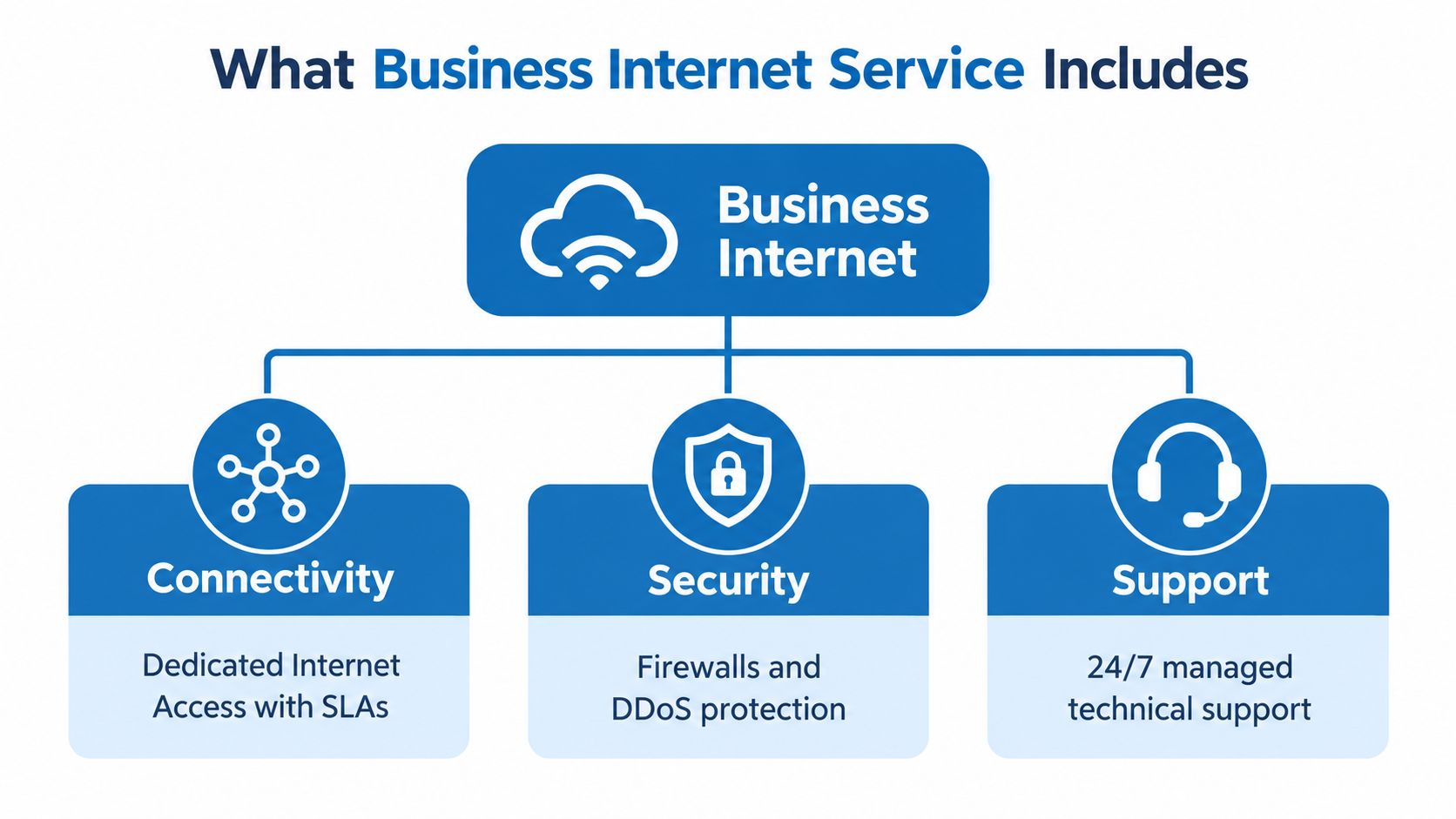
A practical proposal should identify:
- Connectivity: access type, committed bandwidth, upload rate, latency expectations, and address availability.
- Security: firewall ownership, monitoring, DDoS handling, guest separation, and escalation.
- Support: contact method, support hours, response targets, repair commitments, and who owns the incident.
- Integration: voice, cameras, managed Wi-Fi, multi-site networking, and cloud access.
If the provider presents these as separate add-ons, calculate the combined total. A modest circuit with unmanaged equipment may become more expensive after a business adds voice support, security appliances, Wi-Fi management, and a backup connection. Conversely, a managed package can be worthwhile when the alternative is coordinating several vendors without a clear owner.
Fiber, Cable, and Fixed Wireless Compared
A design firm with cloud applications, video meetings, large file transfers, and hosted voice can choose the wrong connection even after passing a speed test. Fiber, cable, and fixed wireless may all support business operations, but their practical differences appear under congestion, during sustained uploads, and when the site needs predictable repair and performance.
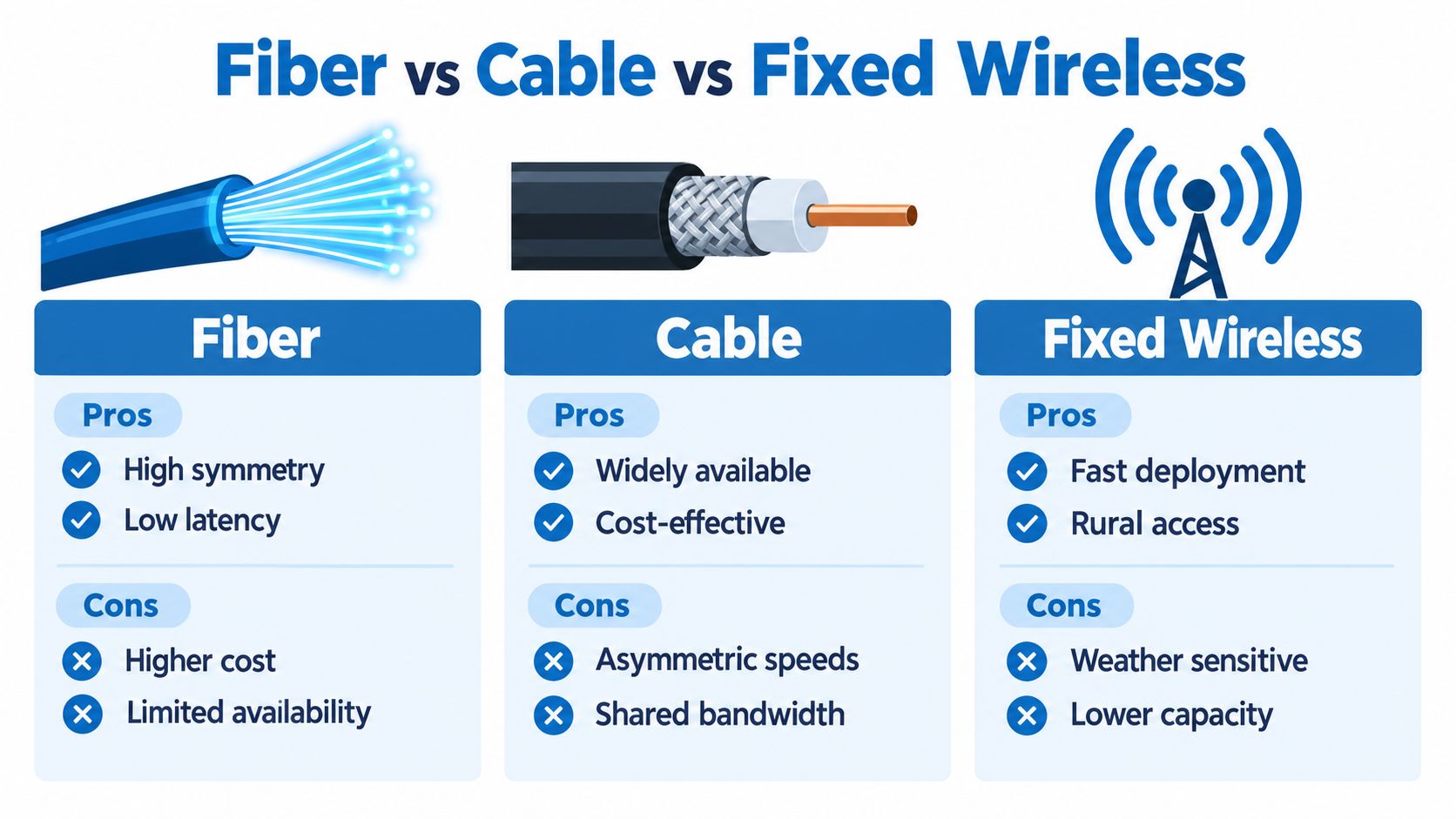
Fiber is usually the strongest default for a cloud-first office. It can provide symmetrical capacity, low and stable latency, and a clearer path to scaling. Business fiber offerings commonly range from 300 Mbps to 5 Gbps in both directions, while selected dedicated fiber services advertise capacity reaching 400 Gbps in some areas (dedicated internet access capabilities). These figures describe available service classes, not a recommendation for every company. Confirm the actual plan, delivery method, and service commitment at the business address.
Fiber still has practical drawbacks. It may not be available at the site, construction can delay activation, and a dedicated circuit can cost more than shared access. A small office with light cloud use may gain little from the highest fiber tier if a lower-cost symmetrical option meets its traffic and support requirements.
Where cable still fits
Cable is often the sensible choice when fiber is unavailable or the business needs dependable everyday access without paying for dedicated service. It commonly offers strong download performance and broad availability. The trade-off is usually asymmetric capacity, with less upload headroom than download headroom, plus performance that can vary as local users share network resources.
Cable can handle browsing, point-of-sale systems, email, SaaS applications, and occasional video meetings. It becomes a weaker fit when staff regularly upload large files, maintain continuous camera feeds, or run cloud backups during working hours. Ask for the actual upload rate at the service address. The download headline does not describe the whole connection.
Fixed wireless for speed to site
Fixed wireless solves a different deployment problem. A provider can often install it where trenching fiber is difficult, making it useful for rural offices, temporary locations, construction sites, or a secondary failover path. Performance depends on signal conditions, spectrum use, the radio path, and local congestion.
That variability matters to offices that treat voice, remote desktops, and continuous collaboration as mission-critical. Weather and physical obstructions can affect the link. Before signing, ask how the provider handles signal degradation, what equipment sits at the site, and whether the service includes meaningful performance commitments.
| Connection | Practical strength | Main trade-off |
|---|---|---|
| Fiber | Symmetry, stable latency, and strong scalability | Availability, installation, and cost |
| Cable | Broad availability and practical pricing | Lower upload capacity and shared bandwidth |
| Fixed wireless | Fast deployment and access where wired options are limited | Signal variability, weather exposure, and capacity limits |
Use a simple decision rule. Choose fiber when cloud traffic, predictable performance, growth, or service guarantees justify the cost. Choose cable when availability and monthly expense matter more than upload capacity and strict performance commitments. Choose fixed wireless when rapid deployment or geographic reach outweighs variability, or use it as a backup when a primary wired circuit is available.
The technology is only the first filter. Compare the exact upload capacity, SLA language, installation responsibility, support ownership, equipment charges, and total managed-service cost. A cheaper circuit can become expensive if the business later adds separate vendors for routing, security, Wi-Fi, monitoring, and failover.
The following video offers another visual explanation of how business connectivity choices differ:
Symmetric Speeds and Why Upload Matters More Than You Think
A symmetric connection provides the same advertised capacity for uploads and downloads. An asymmetric connection prioritizes downloading, which matches many residential habits but can create a bottleneck in offices where employees constantly send data to cloud platforms.
Upload traffic includes much more than sending an occasional attachment. Cloud backups, hosted voice, video conferencing, large design files, remote desktops, and camera systems all use the upstream path. When several of these run at once, the upload channel can fill before the download channel shows any stress.
The traffic that fails first
Video calls reveal the problem through frozen images, delayed speech, and dropped frames. VoIP calls reveal it through clipping and distortion. Backups may continue in the background, but they can make every interactive application feel unreliable if the connection lacks capacity or traffic management.
Independent business-network guidance places useful collaboration targets at under about 150 ms round-trip latency and under 30 ms jitter, while fiber-based metro links are often described in the low single-digit millisecond range (business fiber reliability guidance). These are performance reference points, not guarantees for every fiber plan. The provider still needs to explain how it measures latency, jitter, packet loss, and traffic within its service boundary.

Choose symmetric capacity when the office regularly performs any of the following:
- Cloud-heavy work: Staff synchronize large files or use cloud storage as the primary repository.
- Real-time communication: Teams rely on hosted phones and frequent video meetings.
- Continuous monitoring: Cameras or other sensors send data away from the premises.
- Remote access: Employees connect to desktops, servers, or applications hosted at the office.
Asymmetric service remains viable when upstream use is light, the workforce is small, and the business has a separate plan for backups or camera traffic. The mistake is assuming that every office has residential traffic patterns.
A network that needs more structured customer communication may also benefit from tools such as AI customer support solutions, but those tools still depend on a connection that preserves upstream capacity during normal peaks.
Pricing, Contracts, SLAs, and Managed Options
A low monthly rate can become an expensive choice when the proposal excludes equipment, installation, support, or the post-promotion price. Compare offers using the same cost categories: installation, hardware, static address options, managed Wi-Fi, security, backup connectivity, voice, applicable taxes, and renewal pricing. A quote is only useful when it reflects the service the business will actually operate.
Dedicated connectivity usually costs more than shared internet because the provider offers more predictable throughput and a stronger support process. Dedicated business-fiber providers commonly advertise 99.99% network availability, but that figure has limited value unless the contract explains how availability is measured, which exclusions apply, what remedies are available, and how incidents must be reported (dedicated internet service details).
Read the SLA as an operating document
Before signing, require clear answers to these questions:
- What uptime commitment applies to this exact circuit?
- Does the SLA set thresholds for latency, jitter, and packet loss?
- What response and restoration targets apply?
- Can the customer reach a business escalation team?
- Are service credits the only remedy?
- Does coverage include the access circuit, the provider network, or both?
Service credits may offset part of a missed commitment. They do not restore a failed payment, recover a lost call, or reopen a disrupted customer appointment. The practical value of an SLA is accountability during an outage, with defined ownership and recovery steps. The DFW business SLAs guide offers useful context on the terms and responsibilities that belong in a service agreement.
Calculate operational simplicity
Vendor consolidation can reduce administrative work, but a bundle is not automatically cheaper. Ask whether one provider will own the complete incident. If the internet vendor blames the firewall company while the firewall company blames the voice vendor, the arrangement has added invoices without solving accountability.
Managed services fit businesses that lack network expertise, operate across locations, or cannot spare employees to troubleshoot gateways and access points. A capable IT team may prefer direct control and separate suppliers. Compare the total cost of management, including staff time, outage risk, equipment, and escalation effort. Choose the arrangement that assigns responsibility clearly, rather than the one that merely produces a single invoice.
When Business Internet Becomes a Managed Network
A standalone circuit is enough for some businesses. If the office has a small number of users, simple applications, and staff who can manage the router and Wi-Fi, adding a complete managed network may create unnecessary cost.
The calculation changes when connectivity supports several systems at once. A growing office may need secure staff Wi-Fi, guest access, hosted voice, cameras, cloud applications, remote workers, and a backup path. Each system introduces configuration, monitoring, and incident ownership. The network becomes an operating environment rather than a cable with a monthly charge.
The value is responsibility
Managed Network Edge services can place routing, security policy, monitoring, and equipment management under one operational process. That can reduce the time spent deciding which vendor should investigate a failure. It also helps a business apply consistent policies when employees move between offices or connect from different parts of the building.
Industry coverage describes a wider move toward bundled connectivity, managed security, and operational services, including AI-assisted network optimization, SASE-style security integration, and fixed-wireless business options (business internet solutions market overview). The important point for a buyer isn't the trend label. It's whether the bundle solves a real management problem.
A managed network overview can help clarify what providers mean by monitoring, support, security, and device management. Compare the actual scope rather than accepting “fully managed” as a complete specification.
A managed service earns its cost when it gives someone clear ownership of performance, security, and recovery.
Security deserves early budget attention. SMB research reports that 59% recognize cybersecurity and compliance as priorities, while 49% prioritize them in new technology spending (SMB priorities and technology spending data). That gap creates predictable problems. Businesses know the risk exists, then postpone the network controls that would reduce it.
How to Evaluate Providers and Choose the Right Option
A provider proposal should make the decision clearer, not bury it under speed labels. Give each vendor the same requirements and request technical, support, and commercial terms in writing. That makes differences visible before installation, when changing direction is still manageable.
Start with the service address. Confirm whether the quoted connection is fiber, cable, fixed wireless, or another access type at that premises. Ask whether upload and download speeds are symmetrical, whether capacity is dedicated or shared, and how the provider handles growth. A high download rate does little for a business that regularly sends backups, synchronizes large files, or uploads camera footage.
Use a provider interview checklist
Performance: Request committed upload and download rates, expected latency, jitter handling, packet-loss commitments, and traffic policies. A speed test from a nearby address says nothing conclusive about the service delivered to your building.
Resilience: Ask about route diversity, backup connections, failover equipment, and restoration procedures. If one construction incident could disconnect the site, price a secondary connection that uses a different delivery method. Confirm whether failover is automatic and which applications continue working during an outage.
Support: Identify the business support channel, escalation path, response target, and person responsible for coordinating incidents across connectivity, gateway, Wi-Fi, voice, and security. “24/7 support” has limited value if the first contact can only create a ticket.
Commercial terms: Request the standard rate after promotions, installation charges, equipment fees, contract length, early termination terms, renewal conditions, and any usage limits. Compare the total recurring cost of equivalent packages, including managed services that may appear as separate line items.
Vendor consolidation can reduce handoffs, but it can also make the contract harder to assess. A bundled business connectivity and communications offering illustrates the type of integrated service approach worth evaluating. Confirm which services are included, who owns each failure, and whether combining them changes the SLA, support process, or total cost.
Test the proposal against real operations
Build a peak-use scenario from actual work. List simultaneous video meetings, cloud backups, phone calls, camera uploads, guest Wi-Fi sessions, and remote access. Ask the provider to size the service around that concurrency rather than employee count alone.
Then test the failure plan. Can voice receive priority? Does backup connectivity activate automatically? Can the provider monitor the gateway and Wi-Fi, or will internal staff have to diagnose every fault?
Compare at least two proposals against identical requirements. The lowest headline rate can become the expensive option after equipment, support, security, managed-service fees, and downtime risk are included.
Building a Reliable Business Connection Strategy
A reliable strategy begins with operational evidence. Review the applications employees use, the data they upload, the hours when traffic peaks, and the systems that stop revenue when connectivity fails. Then translate those observations into requirements for symmetry, latency, resilience, security, and support.
Use this decision sequence:
- Define the traffic: Include cloud storage, backups, hosted voice, video, remote access, cameras, and guest use.
- Choose the delivery method: Prefer fiber where predictable upstream performance matters and availability supports it. Use cable when the workload is moderate and the local alternative is practical. Use fixed wireless when deployment speed, geography, or backup access changes the calculation.
- Set the service standard: Decide whether the business needs dedicated access, an SLA, managed equipment, monitoring, or failover.
- Audit the complete price: Include installation, equipment, security, Wi-Fi, voice, backup, and contract obligations.
- Assign ownership: Make sure someone can coordinate the circuit, gateway, Wi-Fi, voice, and security when an incident crosses service boundaries.
The broader market has moved from legacy copper and DSL toward fiber infrastructure. Historical industry milestones include Charter's launch of Charter Pipeline and Cox's delivery of high-speed internet, telephone service, and digital video over one network in 1997, followed by nearly $8 billion in U.S. cable-provider fiber upgrades in 1998 and annual investment of $26 billion by 2025 (ITU broadband history and investment background). The lesson is not that every company needs the largest circuit. It is that connectivity now supports converged services, so buyers should evaluate the network as part of the operating model.
For most modern offices, symmetric fiber is the prudent starting point. Adjust downward when the workload is light, and add managed services when internal ownership is unclear. The right plan is the one that keeps critical traffic usable, gives the provider measurable responsibilities, and leaves the business with a clear recovery path.
Premier Broadband offers 100% fiber business internet, symmetrical capacity, hosted VoIP, AI camera systems, and Managed Network Edge services for organizations that want connectivity and network operations handled through one provider. Visit Premier Broadband to review the available business options and request a proposal based on your site's upload needs, reliability requirements, and managed-service priorities.