
Replacing an aging phone system sounds straightforward until the requirements collide. Your office needs reliable call routing, remote and mobile access, voicemail-to-email, CRM or Microsoft Teams integration, and a budget that won't expand every time you add a user or feature. Meanwhile, your IT team wants control, your staff wants simple apps, and leadership wants a migration that doesn't interrupt customers.
The strongest cloud VoIP providers aren't interchangeable. They solve different operating problems, from enterprise administration and Zoom consolidation to international calling, AI-assisted conversations, bundled IT services, and mobile-first work. Compare each provider's core calling, voicemail-to-email, desktop and mobile apps, integrations, published availability targets or SLA details, pricing transparency, support model, scalability, and contact-center path.
Premier Broadband is another model to consider for businesses that want connectivity and hosted voice from one partner. Its business voice offering includes hosted PBX, voicemail-to-email, caller ID, mobile app integration, PremierUC for Business, and enterprise-grade voice services. The following comparison focuses on the provider that best matches the way your organization operates.
1. RingCentral
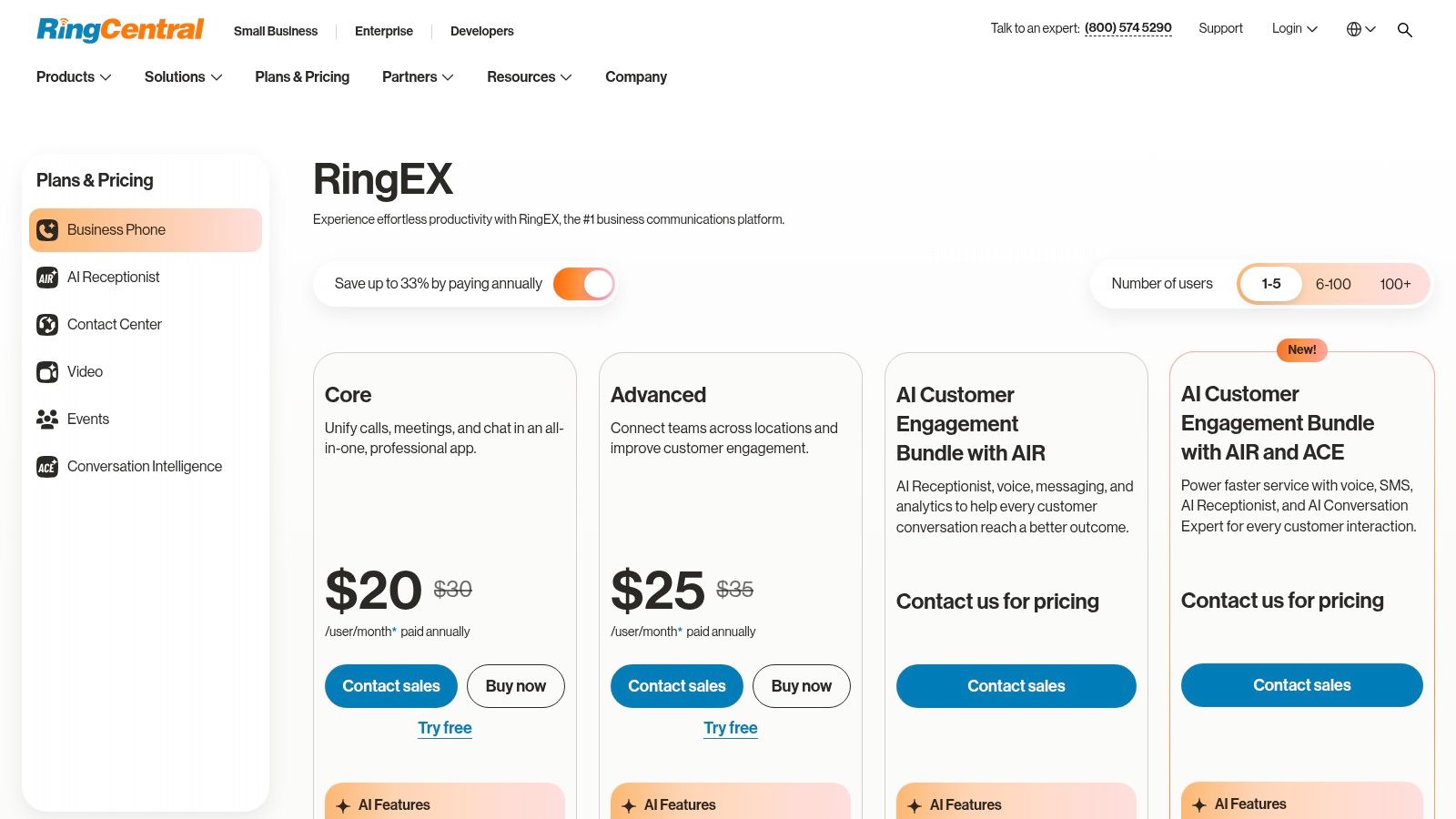
RingCentral is the strongest fit when the phone system is also an administration and communications platform. Its RingEX service combines cloud PBX, messaging, video, analytics, and an extensive integration ecosystem, so larger teams can centralize policies, users, call queues, reporting, and application access instead of assembling separate tools.
The platform supports unlimited US and Canada calling options, toll-free services, Microsoft Teams integrations, and a broad marketplace. Its add-on catalog includes AI Receptionist, Call Queue Booster, and Conversation Intelligence. Those options give administrators room to expand, but they also make a basic license comparison misleading.
Best for controlled complexity
RingCentral publishes a 99.999% high-availability target on its RingEX plans and pricing page. Treat that as a service commitment to investigate, not as proof that every customer's network, handset, Wi-Fi connection, or emergency calling path will perform identically. Ask which components the target covers, what exclusions apply, and how service credits work.
The platform's advantage is administrative depth. It can suit organizations that need role-based controls, analytics, queue management, integrations, and a larger catalog of extensions. The trade-off is procurement discipline. Higher tiers and add-ons can change the total cost, while support and commercial experience may differ by account size.
Practical rule: Build the quote around actual workflows, not the largest available feature list. Separate required calling, analytics, AI, contact-center, recording, and integration capabilities before comparing vendors.
Businesses also need to test network ownership. A provider can host the phone platform, but your broadband, firewall, switching, Wi-Fi, endpoint setup, and failover plan still influence call quality. Organizations comparing hosted voice with connectivity can also review Premier Broadband's business services as part of a one-partner evaluation.
2. Zoom Phone
Zoom Phone makes the most sense when employees already spend their working day in Zoom Meetings. Instead of introducing another calling interface and administration environment, the service extends the familiar Zoom client into business telephony through cloud PBX, desktop and mobile applications, messaging, and meeting workflows.
The service offers metered and unlimited US and Canada calling choices, with optional desk-phone hardware delivered through a subscription model. Zoom also presents Phone through broader Zoom Workplace tiers, which can make consolidation attractive for organizations already paying for the wider collaboration suite.
Best for collaboration consolidation
The central question isn't whether Zoom Phone has a long feature list. It's whether your organization wants calling to live inside the same client and administrative environment as meetings. Existing Zoom administrators may reduce user confusion and avoid a second collaboration platform, but buyers should still validate number coverage, calling territories, emergency workflows, and desk-phone requirements.
Zoom's Phone pricing information distinguishes between calling approaches and broader bundles. Confirm exactly what applies to each location before signing, especially if users call internationally or your organization has offices outside the primary service territory. A plan that looks simple for domestic users may require additional services for multinational operations.
Advanced queue and contact-center requirements also deserve a separate conversation. A standard business phone deployment may handle departments, transfers, voicemail, and basic routing, while a customer service operation may need deeper queue reporting, recording, supervisor controls, and quality management.
For distributed teams, test the complete user journey. Place calls from the desktop client, mobile app, and any supported desk phones. Confirm voicemail-to-email behavior, business-hour routing, number presentation, directory synchronization, and what happens when a user's normal broadband connection fails.
The buying advantage is ecosystem fit. If your staff already understands Zoom, adoption may be simpler than introducing an unfamiliar interface. The risk is assuming that familiar meetings automatically equal a complete telephony or contact-center design.
A business evaluating a broader content and technology workflow can also examine Premier Broadband's AI writing resource, though the phone decision should remain anchored in calling requirements, network readiness, and support ownership.
3. 8×8
8×8 is designed for organizations whose calling problem crosses borders. Its X Series combines unified communications and contact-center product families, with international calling zones, global numbers, local PSTN replacement options, desktop and mobile applications, and analytics.
That makes it more relevant to a multinational business than a provider optimized mainly for one domestic market. A company with offices, customers, or distributed service teams in multiple countries should assess not just per-user licensing, but also number availability, local regulations, emergency calling, carrier coverage, and the operational consistency of support.
Best for international operating models
The 8×8 plans and pricing page describes UC tiers from X2 through X4 and contact-center tiers from X6 through X8. Depending on the tier, unlimited calling zones cover 14, 32, or 48 countries, while the provider describes global numbers in more than 100 countries and local PSTN replacement in more than 55 countries. Those figures are product-positioning indicators, not a substitute for checking the exact countries and number types your organization needs.
The platform's most important trade-off is usage design. Contact-center minutes can be subject to fair-use pooling, so a business should model actual call patterns rather than assuming an unlimited label covers every workflow. Ask for treatment of inbound, outbound, toll-free, transferred, forwarded, and international traffic.
8×8 can also reduce fragmentation when a business wants UC and contact-center capabilities from related product families. That doesn't mean every employee needs the same tier. A sensible design might assign simpler UC access to office staff and reserve advanced contact-center capabilities for service or sales teams.
A global phone deployment fails less often because of missing buttons than because someone overlooked a country, number type, routing rule, or usage assumption.
Before choosing 8×8, request a location-by-location matrix. Include users, numbers, calling destinations, local PSTN needs, emergency requirements, queues, analytics, recording, and support escalation. The provider's global breadth is valuable only when it matches the organization's actual footprint.
4. Nextiva
Nextiva targets businesses that want a packaged communications service without building a complicated product stack. Its platform combines voice, SMS, video, team chat, administration, and reporting, with options for live chat, chatbots, AI Receptionist through XBert, and contact-center expansion.
The service is particularly relevant to small and midsize organizations that want guided onboarding and a clear path from basic business calling to broader customer communications. Unlimited US calling, messaging, and meetings are presented across its tiers, but the feature bundle should still be mapped against the users who need each capability.
Best for SMB support and packaged growth
Nextiva publishes a 99.999% uptime target on its pricing page. Buyers should ask what that target measures, which services it covers, and how it differs from the availability of the customer's internet connection. Cloud service uptime can't eliminate outages caused by local power, broadband, Wi-Fi, endpoint, or configuration failures.
The platform's practical strength is packaging. A small business can start with calling, messaging, meetings, dashboards, and administration, then consider AI or contact-center additions when the operating model requires them. Its stated US-based support and hands-on onboarding options may appeal to teams that don't want a purely self-service migration.
Some digital channels and AI capabilities are paid add-ons, so the first quote may not represent the final operating model. Ask the provider to show the monthly total for every user type, including reception, sales, managers, remote workers, and occasional users.
Implementation test: Require the vendor to demonstrate a complete call flow, including business hours, overflow, voicemail-to-email, mobile access, number porting, and an administrator's ability to change routing.
A company looking at Premier Broadband alongside broader business technology can also review its business product information. The link itself isn't a substitute for a voice proposal, so verify which services, support arrangements, and network responsibilities apply to your location.
Nextiva is less compelling when a business wants only the leanest possible phone deployment and doesn't need the broader suite. It becomes more relevant when support, onboarding, and a bundled communications roadmap matter as much as individual telephony features.
5. Dialpad
Dialpad approaches cloud calling as an AI-assisted work surface rather than a conventional phone system with optional intelligence layered on later. Its business phone plans combine calling with real-time transcription, summaries, coaching, messaging, IVR, routing, desktop applications, and mobile applications.
That model suits distributed teams that want conversations to become searchable operational information. Sales teams may value coaching and summaries, while managers may care more about routing, recordings, permissions, and integration with existing customer systems. The important distinction is that AI usefulness depends on workflow design, user adoption, privacy controls, and review processes, not just on whether an AI label appears in the plan.
Best for AI-enabled calling
Dialpad offers unlimited US and Canada calling on its business phone plans, with contact-center and sales-dialer capabilities available as additions. The Dialpad business phone system page also presents desktop and mobile apps with SMS and MMS, making it possible to support users who move between office computers and mobile devices.
The service emphasizes quick, self-service setup and offers a 14-day free trial, but buyers should use that period as a structured pilot. Test real greetings, transfers, queue behavior, mobile calling, voicemail-to-email, CRM actions, transcription quality, summary permissions, and administrator changes. A short trial can expose more than a polished demonstration if users perform their actual jobs.
International calling and number options generally add cost beyond base plans, so the quote should separate domestic licenses from international use, numbers, hardware, implementation, and contact-center services. Advanced capabilities may also require higher plans or add-ons.
AI isn't the selection criterion by itself. Ask who can access transcripts, how administrators manage retention, whether summaries enter the CRM, and how users correct or challenge inaccurate records.
Dialpad is a strong candidate for teams that want modern applications and conversation intelligence in the core experience. It may be a weaker fit for businesses that need extensive carrier control, highly specialized contact-center operations, or a provider-led network service relationship. Those buyers should test integration depth and escalation procedures before treating fast provisioning as the main advantage.
6. GoTo Connect
GoTo Connect solves a different problem. It appeals to small and midsize businesses that want phone, messaging, and meetings in one administrative environment, with the possibility of bundling communications with GoTo Resolve IT services.
The value is simplicity at the stack level. A business may prefer one vendor relationship for unified communications and optional IT helpdesk tools rather than managing separate contracts, consoles, and support paths. That benefit depends on whether the bundled products match the organization's needs and whether the commercial terms remain understandable after promotions expire.
Best for bundled simplicity
GoTo Connect combines cloud PBX, messaging, and video in one console. It also presents AI Receptionist and contact-center options, with per-user pricing and bundled offerings that can include GoTo Resolve. Review the current GoTo Connect offering directly because promotions and quote structures can change.
Price transparency is the main area to test. Public price points may be less complete than a buyer expects, and some deployments become quote-based. Request a written breakdown that identifies licenses, numbers, hardware, implementation, integrations, international calling, AI, contact-center services, support, and renewal terms.
The user experience deserves a pilot rather than an assumption. Ask receptionists, managers, remote users, and support staff to complete their normal tasks. Check transfers, shared lines, business-hour rules, mobile use, voicemail delivery, directory searches, and administrator changes.
GoTo Connect can be a sensible choice when reducing vendor sprawl is the primary objective. It is less suitable when the organization needs unusually deep analytics, highly specialized routing, or a tightly controlled carrier and network design that the bundled model can't accommodate.
A buyer can also compare the broader business relationship with Premier Broadband's service information. That comparison should focus on who owns the broadband, voice, installation, monitoring, and support responsibilities, not merely on the number of applications in each bundle.
7. Vonage Business Communications
Vonage Business Communications, or VBC, is built around tiered plans that make mobile access central to the entry experience. Its desktop and mobile applications support hybrid workers, while higher tiers add capabilities such as desk-phone support, on-demand recording, integrations, and single sign-on.
That structure can work well for a business where employees rarely need physical phones but still need a business identity on personal or managed mobile devices. It also gives organizations a straightforward way to reserve advanced controls for users who actually need them.
Best for mobile-first work
The Vonage unified communications pricing page presents Mobile, Premium, and Advanced plan structures. The service includes domestic calling, SMS and MMS, desktop and mobile applications, and higher-tier options for desk phones, recording, App Center integrations, and SSO.
Tiering is useful only if the feature boundaries match job roles. A mobile employee may need the entry experience, while a supervisor may need recording, integrations, or identity controls. Build a role matrix before accepting a per-user quote, and ask whether users can move between tiers without administrative friction.
Contract terms deserve close attention. Annual agreements may include early termination fees, and promotional pricing can obscure the renewal position. Ask for the initial term, renewal pricing, cancellation conditions, number ownership, porting responsibilities, and charges for international use.
VBC's mobile orientation is a genuine differentiator for hybrid teams, but it creates security and governance questions. Test how employees authenticate, whether business caller identity remains consistent from personal devices, how lost devices are handled, and whether administrators can remove access promptly.
A mobile-first phone system should protect the business identity, not just place calls through an app.
The platform is a practical candidate for SMBs that want clear tiers and mobile deployment. Organizations with complex queues, advanced contact-center reporting, or extensive CRM requirements should verify the relevant integrations and higher-tier features before selecting it.
Top 7 Cloud VoIP Providers Comparison
| Provider | 🔄 Implementation Complexity | ⚡ Resource Requirements | 📊 Expected Outcomes | 💡 Ideal Use Cases | ⭐ Key Advantages |
|---|---|---|---|---|---|
| RingCentral | High, advanced admin, broad integrations; needs careful scoping | Moderate–High, tiered pricing and add‑ons increase cost; needs IT/admin support | Enterprise-grade reliability (99.999%) and deep analytics · ⭐⭐⭐⭐ | Mid‑market/enterprise requiring high availability and extensible integrations | Extensive marketplace, rich analytics, HA focus |
| Zoom Phone | Low–Moderate, simple if already on Zoom admin console | Low, competitive entry pricing; optional hardware subscription | Consolidated Zoom UC experience; fast adoption for Zoom users · ⭐⭐⭐ | Organizations standardized on Zoom Meetings and clients | Native Zoom client, simple plans, smooth adoption |
| 8×8 | Moderate, multi‑country PSTN and international configuration | Moderate, global numbers and international bundles may add cost; quoting common | Strong global coverage and flexible international calling · ⭐⭐⭐⭐ | Multi‑country deployments and heavy international calling needs | Global numbers, extensive international calling bundles |
| Nextiva | Low–Moderate, SMB-friendly admin and onboarding options | Low–Moderate, clear SMB pricing; some AI/features are paid add‑ons | Reliable service with US‑based support and strong uptime · ⭐⭐⭐⭐ | SMBs seeking reliability, US support, and clear pricing | Clear pricing, strong support reputation, uptime SLAs |
| Dialpad | Low, quick provisioning and self‑service setup | Low, aggressive entry pricing; AI included but advanced features may cost more | Modern AI‑enhanced calling (transcripts, summaries, coaching) · ⭐⭐⭐⭐ | Distributed teams and SMBs wanting built‑in AI features | AI-native features, fast setup, competitive pricing |
| GoTo Connect | Low, consolidated admin for UC, meetings and messaging | Low–Moderate, bundled per‑user pricing; frequent promotions | Simplified stack and consolidated billing; straightforward UX · ⭐⭐⭐ | SMBs wanting an all‑in‑one stack with optional IT tools | All‑in‑one UC + IT bundle, easy bundling, promotions |
| Vonage Business Communications (VBC) | Low, tiered plans are straightforward to deploy | Low, mobile‑centric entry plans; review contracts/ETFs | Mobile-first UC with tiered feature access · ⭐⭐⭐ | SMBs needing mobile‑centric deployment and simple tiers | Clear tiers, mobile app focus, regular promotional pricing |
Turn the Shortlist Into a Low-Risk Decision
A provider comparison becomes useful only after you document the operating model. Start with users, locations, calling territories, existing numbers, queues, business hours, and after-hours coverage. Include reception, departments, direct numbers, shared lines, remote employees, conference rooms, fax or analog dependencies, and any numbers that must remain active during porting.
Then describe how people work. Record whether users need desk phones, desktop softphones, mobile apps, voicemail-to-email, call forwarding, simultaneous ringing, shared directories, or browser access. Identify required integrations with CRM, help-desk software, Microsoft Teams, Microsoft 365, Google Workspace, scheduling tools, or other systems that employees already use.
Reliability also needs a broader definition than a provider's published availability target. The FCC warns that VoIP calling can fail during a power outage, internet failure, or network overload, and its VoIP and 911 guidance explains that emergency-calling obligations and location requirements vary between fixed and non-fixed interconnected VoIP. Ask every provider to explain battery backup, secondary connectivity, automatic forwarding, location updates, remote administration, and emergency calling during a site outage.
Compare the operational details
Request an apples-to-apples quote with separate lines for:
- Licenses: Show each user type and the features included in every tier.
- Add-ons: Separate AI, recording, analytics, contact center, integrations, SSO, and advanced administration.
- Usage: Identify international calling, toll-free services, messaging, forwarding, and number charges.
- Hardware: List desk phones, headsets, adapters, replacement terms, and any hardware subscription.
- Implementation: Include discovery, configuration, training, number porting, testing, and cutover support.
- Support and contracts: State response targets, escalation routes, renewal terms, cancellation provisions, and service credits.
Run the same pilot across shortlisted providers. Test inbound and outbound calls, transfers, queues, voicemail-to-email, mobile and desktop workflows, caller ID, integrations, call recording, analytics, and failover. If your business depends on contact-center expansion, ask to see supervisor dashboards, queue reporting, agent states, quality tools, and the commercial path from business calling to customer-service operations.
The U.S. market illustrates why this diligence matters. In June 2025, interconnected VoIP subscriptions reached approximately 63.4 million, compared with 15 million switched-access lines, making VoIP about 80.8% of the combined total for those fixed voice subscriptions, according to this VoIP market overview. The comparison signals a structural shift toward broadband-based, centrally managed voice, but it doesn't tell you which provider will own your routing, network, support, or emergency-readiness experience.
Premier Broadband fits buyers who value a hosted VoIP relationship alongside connectivity. Its business offering includes enterprise-grade voice services, hosted phone capabilities, mobile access, voicemail-to-email, caller ID, and connectivity options. Before choosing it or any alternative, verify current availability, pricing, service terms, number-porting responsibilities, support coverage, and SLA details for your location.
Use this guide by Transactional LLC if call tracking is part of your measurement plan, then connect those reporting needs to the phone system's native analytics and integrations. The best shortlist is the one that survives a real workflow test, a complete quote review, and an outage discussion without relying on assumptions.
Premier Broadband offers hosted VoIP and business connectivity with features such as voicemail-to-email, caller ID, mobile app integration, PremierUC for Business, and enterprise-grade voice services. Visit Premier Broadband to discuss a cloud phone setup that matches your users, locations, routing, and network requirements.