

You get a letter or email saying your landline service is changing, your number will move, and you may need new equipment plugged into your router. The handset on the wall looks the same, so it's easy to assume nothing important has changed. With copper phone lines going away, the wire, the power supply, and the devices that dial out on that line are what you need to check first.
Where Copper Phone Lines Are Going Away and When
An operator's notice can name a cutover date without explaining what changes at home. In several countries, copper switch-offs are already under way. A copper line is the analog service called POTS in North America and PSTN or ISDN in the UK. Your phone number can usually be ported to a replacement service; what ends is the wire-based connection that carried calls.
The change is about more than the handset or number. A traditional copper line could draw power from the telephone exchange. Its replacement may depend on electricity and equipment in your home, so check what service is replacing copper and when the change takes effect.
Who Should Read the Notice Closely
| Region | What Is Changing | Notice or Deadline | Protections That Still Apply |
|---|---|---|---|
| United States (FCC's March 2025 action) | Rules for retiring copper are changing | Check your provider's notice for the planned retirement date | Ask your provider or regulator which consumer protections apply |
| United Kingdom | Traditional PSTN and ISDN lines are moving to IP-based calling | Your provider's letter gives the cutover date; test the replacement beforehand | 2025 government guidance urges free battery backup and testing of replacement connections for vulnerable customers |
| Other countries | Copper access is being replaced by fiber, cable or wireless voice | Your operator's letter sets the cutover date for your address | Ask your regulator about local notice, pricing and emergency-calling rules |
Households still using legacy lines may be affected, especially rural customers with few alternatives, older adults who rely on a landline for caregivers or health contacts, and businesses with alarms, fax machines or elevator phones. A handset that rarely rings may still share its line with equipment that needs to call out.
Keep the notice where you can refer to it. Write down three details: the cutover date, when the old service stops; the replacement technology, such as fiber, cable, fixed wireless or mobile; and power at home, including whether the new service needs household electricity to make calls. These details help distinguish the date service changes from a general upgrade announcement, and show whether the replacement connection needs backup power.
If the letter leaves any of these unclear, ask the provider to put the answer in writing. A “digital upgrade” alone does not tell you whether an alarm, medical alert or emergency call will work after copper service ends.
Why Operators Are Retiring Copper
Think of a copper line as a private single lane road built for one car at a time. When you lifted the handset, the network opened a dedicated circuit to the other phone and held it for the whole call. An IP network works more like a shared highway. Your voice is chopped into packets and travels alongside video, web pages and email over the same broadband connection, then it's reassembled at the other end.
That sharing is why operators want one network instead of two. Maintaining aging exchanges, copper pairs and spare parts for a shrinking group of users costs more each year, while broadband already reaches the building for internet service. Running voice as another application on that connection is simpler for the operator, even when it's less simple inside your home.
The image below captures that contrast between a dedicated old road and a shared modern highway.

The Numbers Show Substitution Is Already Happening
Ofcom's figures show traditional services shrinking while managed VoIP expands. According to Ofcom's telecommunications market data update, UK fixed voice connections dropped by 3.1 million, or 11%, to 24 million in 2024, while other connections, mainly managed VoIP, increased by 700,000, or 6%, to 11.5 million.
| Measure | Change | Level Reached |
|---|---|---|
| Fixed voice connections, 2024 | -3.1 million (-11%) | 24 million |
| Other connections, mainly managed VoIP, 2024 | +700,000 (+6%) | 11.5 million |
| Fixed lines incl. PSTN, ISDN and managed VoIP, one quarter | -715,000 (-2.9%) | 23.6 million |
In one quarterly measurement period, UK fixed lines including PSTN lines, ISDN channels and managed VoIP connections fell by 715,000, or 2.9%, to 23.6 million. Ofcom partly linked the decline to standalone broadband services and fewer residential landlines. People didn't just drop a handset. They dropped the access technology underneath it.
The milestone isn't fewer landlines. It's that continuing voice service now requires an IP capable connection, customer equipment and power at your premises.
How to Tell Which Line You Have
Trace the cord. An analog line usually runs from a wall socket fed by a copper pair, and a simple corded phone gets a dial tone without a router being on. A VoIP line arrives through a broadband router, a phone port on that router, or a small adapter box with an ethernet cable and a power brick. If turning off the router kills the dial tone, you're already on IP voice.
Why Power Becomes the Biggest Change
A copper phone can work in a blackout because the exchange powers the line. That's the surprise for many people. The replacement needs power at your home, continuously, for every device between the street and the handset.
Copper is like a hand crank radio. It doesn't care whether your wall outlets are live. Fiber or VoIP voice is like a laptop that needs its charger. It can do far more, but when the battery is flat and the charger has no power, it does nothing.
The hierarchy below shows where that power used to come from and where it must come from now.
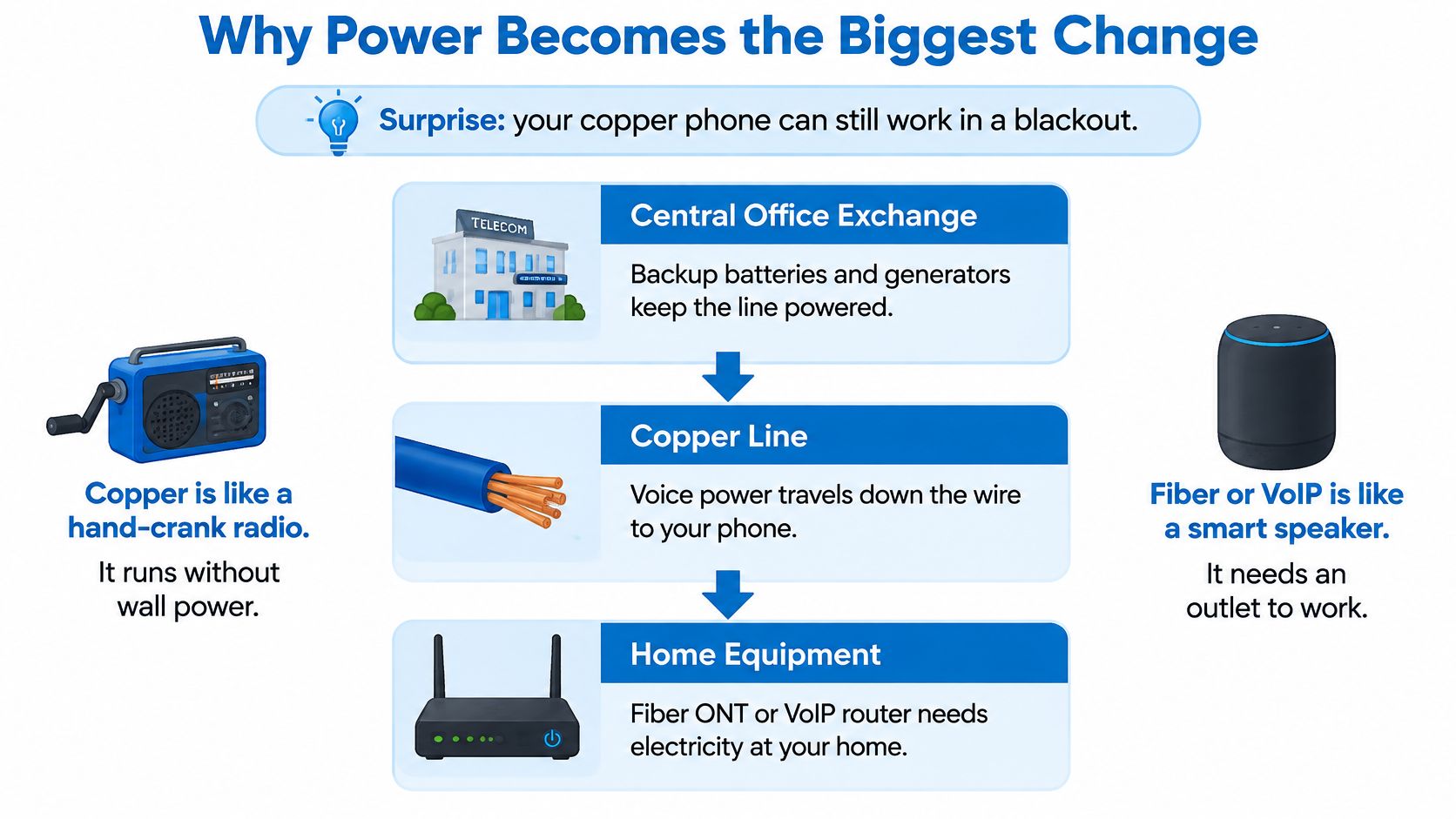
Walk the Powered Chain Device by Device
Start at the wall where fiber enters. The optical network terminal, often a small white box, converts light to electrical signals and needs mains power. Next comes the router, then any separate Wi-Fi system, then a VoIP adapter if your phone doesn't plug into the router. At the end sits the cordless phone base, which also needs an outlet even though the handset has its own battery.
Break any link and the call fails. A battery that protects only the router won't preserve calling if the optical terminal or adapter goes dark. Treat the whole chain as one system when you plan backup, not as separate gadgets.
Under the rules described on the FCC tech transitions page, providers whose replacement service is not line powered must disclose backup power requirements, offer a battery capable of at least 24 hours of standby operation to new subscribers, and explain service limitations with and without backup power.
Note the word standby. Standby runtime isn't talk time, and a rating measured with one device connected isn't your runtime with three devices connected. Ask for expected runtime under your actual load, with the terminal, router and adapter all running.
This short video walkthrough helps you visualize the equipment chain before you test your own setup.
Test It Before a Storm Does
- Load test: Switch off mains power to the equipment safely, confirm you get a dial tone, and make a real call.
- Repeat test: Do it again every few months, because batteries age even when they sit unused.
- Mobile fallback: Keep a charged mobile phone and a power bank as your alternate path during extended outages.
Write down every powered device in your calling path. Then decide, device by device, which ones go on battery. That list is the core of your migration plan.
Alarms, Medical Alerts and Fax Lines at Risk
Devices that dial out over a copper line can stop working without any warning. Nobody notices until a burglar alarm fails to reach the monitoring centre, a medical alert button gets no response, or a fax that worked yesterday won't connect today. A ringing handset proves almost nothing about these devices.
The UK government's 2025 guidance put numbers on the exposure. In its 2025 announcement on telecare users and the switch to digital landlines, the government notes the need to protect access for roughly 2 million people using telecare alarms, and it urged providers to supply vulnerable customers with free battery backup and to test replacement connections.
Devices People Forget Are Phone Devices
| Device | Depends on Copper Line? | Main Risk After Switching | Check Before Cutover |
|---|---|---|---|
| Medical alert base unit | Usually, through an analog phone connection | Base loses power or call path during an outage | Get written vendor compatibility; ask about battery backup and cellular fallback |
| Security alarm panel | Usually, dials a monitoring centre | Dialer signal lost if line or power fails | Ask the monitoring company for a live test call; ask about a cellular communicator |
| Fax machine | Usually, analog fax tones | Fax fails on some VoIP adapters and codecs | Test a send and a receive at the speeds used in practice |
| Elevator or fire panel phone line | Often | Emergency voice path stops if service is lost | Get the building manager and vendor to confirm in writing |
| Cordless home phone base | Yes, the base draws power from the line | Base needs mains power in an outage | Plug the base into a battery backed supply, not a plain surge strip |
| Card terminal on a phone line | Sometimes | Dial based payment processing stops | Ask the processor for an IP or cellular option before cutover |
Emergency calling sits underneath all of this. When broadband equipment loses power, a voice service that depends on it can't reach emergency services, show caller ID correctly, or carry an alarm signal. Copper is old and increasingly hard to maintain, yet its passive power still works during storms in a way an unprotected digital setup doesn't.
If you need battery protection for several small devices, it helps to compare UPS types for home use before buying, because runtime, outlet layout and battery replacement differ a lot between models. Size the unit for your full calling chain, not just the router.
Run These Tests in This Order
Test every device before the cutover date, while you can still compare behavior on the old line. Get written compatibility from the alarm or medical alert vendor, not a verbal assurance from a sales call. Confirm caller ID displays correctly, test a fax send and receive at your normal settings, and trigger a supervised alarm test so the monitoring centre confirms receipt.
Keep a written list of monitoring numbers and account details. Tell each company the line type is changing and ask what they need from you. Some will offer a cellular communicator that removes the phone line from the alarm path entirely. For many households, that's the cleanest fix.
Silent failure rule: If a device only speaks when something goes wrong, assume it will fail quietly unless you've watched it succeed on the new service.
Fiber, Cable, Fixed Wireless and VoIP Compared
Choose by what your address can really get, not by the brochure. A service that's excellent two streets away may not reach your building, and wireless quality can change from the front room to the back room.
The comparison below summarises the four realistic paths most households and small offices face.
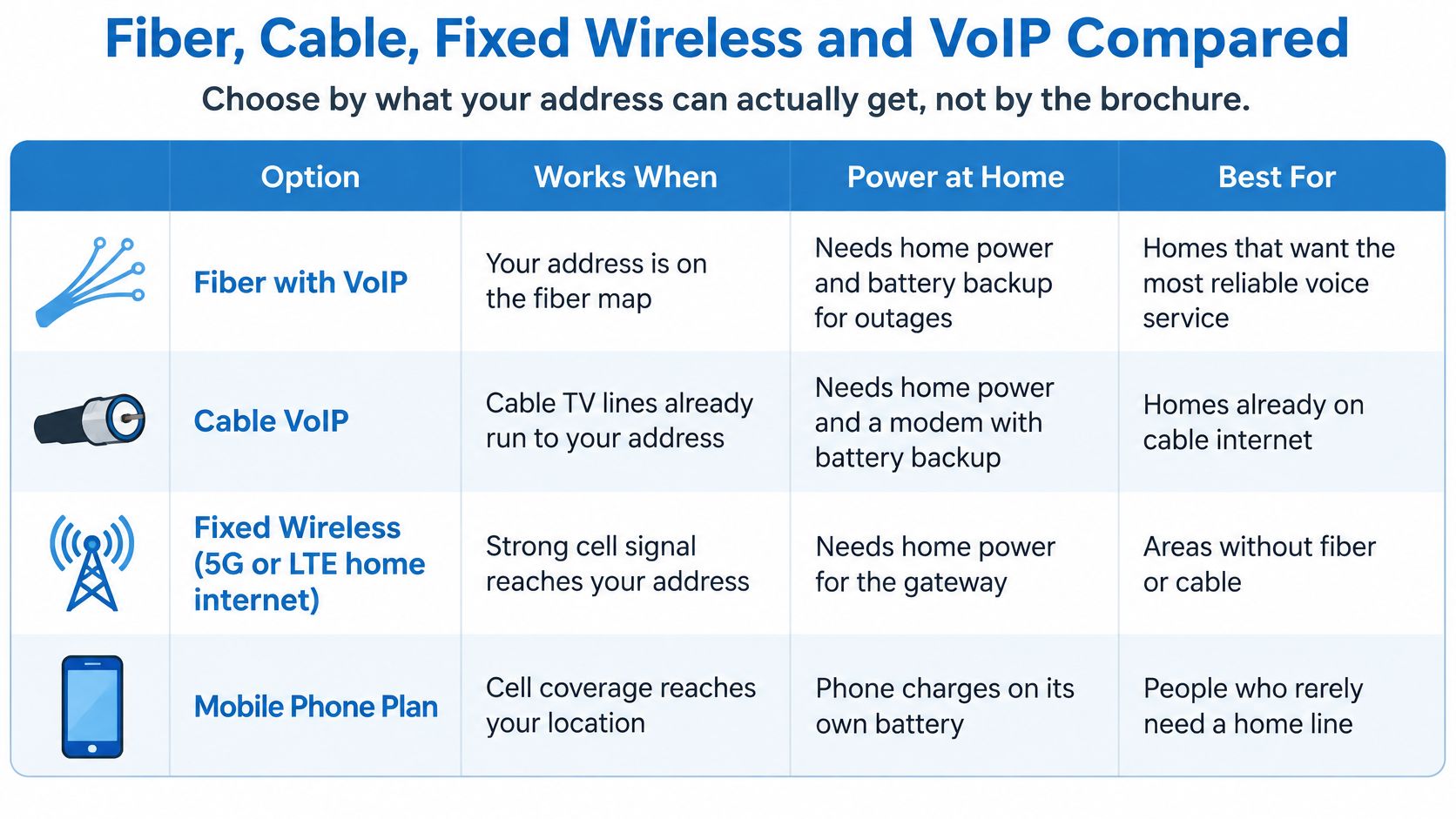
| Option | Power Needed at Home | Behaviour in an Outage | Main Strength | Main Limit |
|---|---|---|---|---|
| Fiber with VoIP | Yes, terminal and router | Calls stop without battery; FCC requires a battery offer of at least 24 hours standby for new subscribers | Symmetrical speeds and high capacity | Only where fiber reaches the address |
| Cable VoIP | Yes, modem and phone adapter | Depends on the modem battery and its measured runtime | Widely available in built up areas | Upload speeds and battery runtime vary |
| Fixed wireless (5G or LTE home internet) | Yes, home unit and router | Calls stop without battery; cellular may still connect | Works where fiber and cable are missing | Indoor signal strength and congestion vary |
| Mobile phone as stand-in | Phone battery | Works while the phone is charged and the mobile network is up | Portable and independent of the home line | Not a full landline replacement for fax or alarms; coverage varies |
A Verdict for Each Situation
Fiber with VoIP is the strongest choice where it's available. Symmetrical upload and download speeds help video calls and file transfers, and the voice service rides the same connection. You still need to add battery backup for the terminal and router. Speed doesn't solve the power problem.
Cable VoIP is the practical choice where fiber is missing and cable already runs to the building. Ask whether the modem includes a battery, what its measured runtime is, and who replaces it when it ages. Don't assume a battery slot means a battery is installed.
Fixed wireless suits rural addresses with no fiber or cable, provided indoor cellular signal is strong where the gateway will sit. Test with a phone on the same network in that exact spot, at busy times of day. A mobile phone alone works as a stand in if you rarely need a home line, but it won't run a fax machine or an alarm panel.
Say a small office has a fax machine and a monitored alarm. It moves to fiber VoIP, puts the terminal, router and fax adapter on one battery unit, tests faxing both ways, and fits a cellular communicator to the alarm so the panel no longer depends on the voice line at all. Each risky device gets its own answer.
If you're weighing bundles, this practical broadband advice for household budgets is useful for comparing total monthly cost rather than headline prices. Premier Broadband, for example, sells fiber internet with VoIP phone service and equipment for homes and businesses, so with any such bundle, ask whether standalone voice is available and what's included.
Costs, Coverage and Your Rights to Push Back
A provider notice doesn't prove the replacement works for you. It proves the provider has a plan. Whether that plan supports your alarm, your budget and your emergency calls is a separate question you have to test.
Compare the Full Bill, Not the Voice Price
Add up the voice charge, any broadband bundle the voice line is tied to, equipment rental, installation fees and future battery replacement. Then ask what the total becomes if you decline parts of the bundle. A cheap voice add on can hide an expensive required package, and a battery that's free at install may not be free to replace.
Check coverage at your exact address, not your postcode or ZIP code area. Confirm fiber or cable physically reaches the building. Before choosing any wireless option, test indoor cellular signal in the room where equipment will live. Ask how quickly service is restored after an outage and whether voice customers get any priority.
In its March 2025 action on copper retirement, the FCC encouraged faster copper retirement but retained requirements related to interoperability, comparable pricing, and consumer protections. The same document framework requires advance notice for planned copper retirement, including at least 90 days for incumbent local exchange carriers.
Put Four Requests in Writing
- Standalone voice: Confirm whether voice is available without a bundle you don't want.
- Emergency and alarm support: Get written confirmation the replacement supports 911 or local emergency calling and your specific alarm or telecare device.
- Measured runtime: Ask for backup runtime under your actual equipment load, not standby alone.
- Cutover and fallback: Get the date, the install window and what happens if tests fail on the day.
Rural and older customers should press these questions first. They often have the fewest competing providers, the weakest wireless coverage, and the greatest dependence on a line that works for caregivers, health monitoring and emergency services. Sparse areas can't shop their way out of a bad replacement as easily as a city apartment can.
If the provider can't answer, document what you asked and when. Escalate to the regulator, the FCC in the US or Ofcom in the UK, with your notes attached. A paper trail turns a frustrating phone call into a case someone must resolve.
How to Prepare and Migrate in Priority Order
The cutover date is only one part of the change. The bigger practical difference is that the old line could work during a blackout because the exchange supplied its power, while the replacement equipment at home may need electricity. Start early, especially with alarms and medical alerts, because vendors may need to approve equipment or arrange a new unit.
The overview below shows the sequence at a glance before the detailed steps.
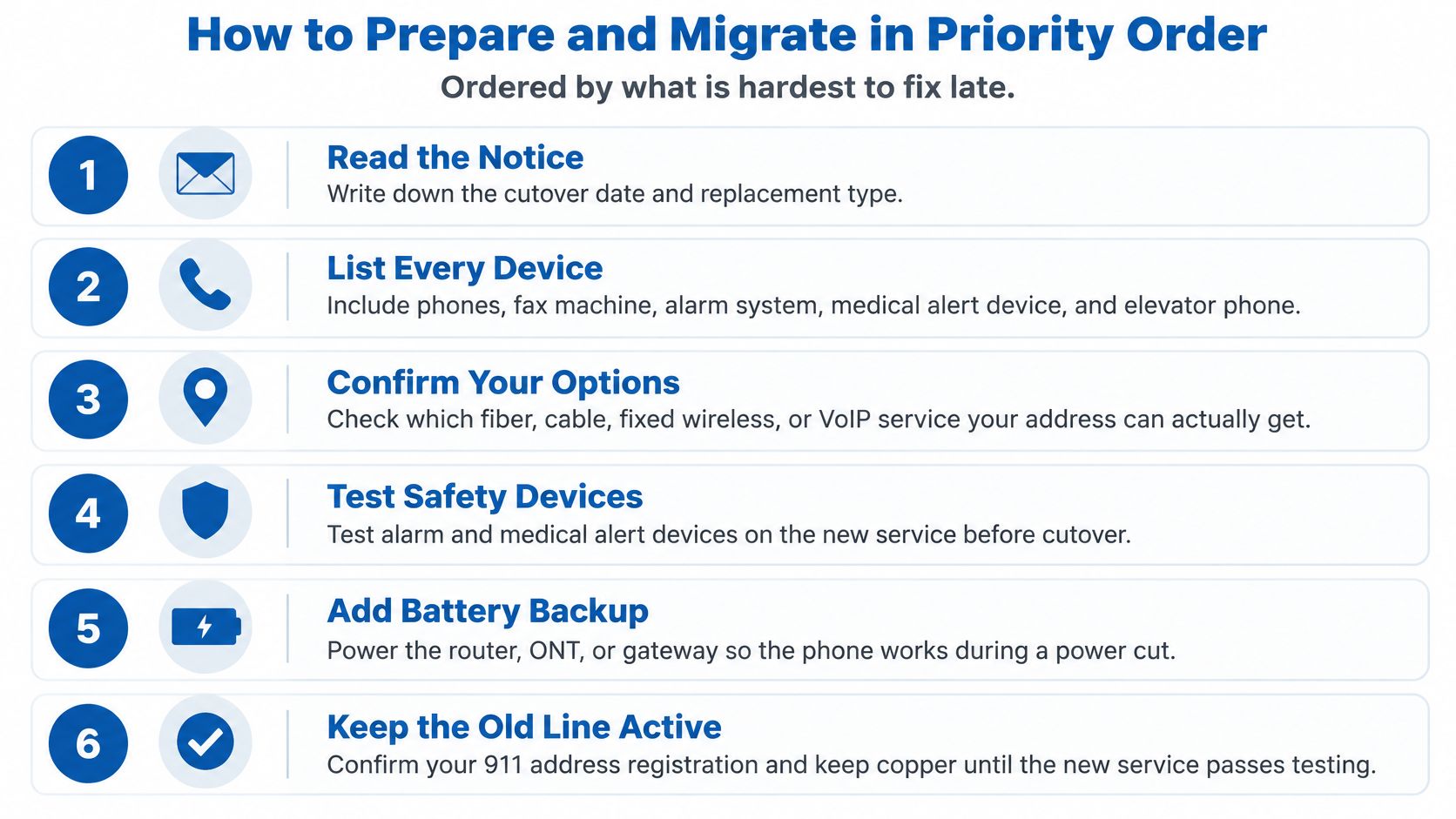
The Eight Steps That Prevent Cutover Day Surprises
Read the notice and record the basics. Note the cutover date, replacement type and any response deadline. Use the date to plan backward, leaving time for device checks and appointments.
List every device on the line. Check each room, equipment closet and utility area. Include phones, fax machines, alarm panels, medical alert bases, elevator or fire panel lines, and card terminals.
Test each device on the current line. Make a call, send a fax and arrange a supervised alarm test while the old service is still active. These results give you a baseline to compare with the replacement.
Confirm the service details in writing. Ask whether standalone voice is available, whether emergency calling supports your correct address, and whether caller ID is included. With VoIP, check that the registered emergency address stays accurate if you move the adapter.
Choose and install backup power. Ask how long the battery runs with your actual equipment connected, not just in standby. The replacement may depend on a terminal, router, adapter and cordless phone base, so identify which devices need backup and label their plugs.
Book a test installation window. After the switch, repeat each device test that day. Have the alarm monitoring centre confirm a live test call, and send and receive a fax. A dial tone alone does not prove that connected equipment works.
Notify monitoring companies in writing. Tell the alarm firm and medical alert provider that your line is changing, and keep their responses. Keep a charged mobile phone and power bank available as backup if the home loses power.
Port your number last. Wait until the replacement passes its tests, and keep the copper service active until the new connection has worked reliably. Moving the number too early can interrupt the old service before you know the replacement is ready.
Order matters. Early checks reveal problems that may require a vendor, parts or an appointment, rather than a quick fix on cutover day.
For a small business, keep a one-page log near the equipment. Record the cutover date, provider contacts, monitoring account numbers, battery installation date and test results. If a battery later beeps or a fax fails, the log helps you trace what changed and who to call.
Common Questions About the Copper Switch-Off
Will I Keep My Phone Number
Often, yes, if your new provider can port it. Confirm the process, any fee, and the timing before your cutover date. Don't cancel the old service first, since that may release the number.
Do I Need a New Phone
Often not. An analog phone may work through a VoIP adapter or a phone port on the router. A corded handset can keep working, but cordless bases need power from your home. Put the base on a battery-backed supply if you want it available during an outage.
Can I Refuse the Switch
You generally can't stop a retirement that regulators have allowed. You can ask for a standalone voice option, document problems in writing, and escalate to the FCC or Ofcom if the replacement does not provide equivalent emergency calling, alarm support, or pricing. Make specific written requests rather than ignoring the notice.
What If the Power Goes Out Before I Am Ready
Use a charged mobile phone as a backup and know your local emergency number. Contact your provider to report the outage and ask about restoration times. The key change is power: a traditional landline could draw power from the exchange, while replacement equipment at home needs electricity. Complete the battery and device tests before an outage leaves you without a working phone.
If your notice has arrived, start your device list today. Talk to Premier Broadband about its fiber internet with VoIP phone service for your home or business, and ask specifically about porting your existing number, battery backup for the terminal and router, standalone voice options, and a test window before your cutover date. Test your phone, alarms, and fax before the copper line is gone.