
The phone in the hall still rings, the bill still says landline, and a letter has just arrived about a "digital voice" change. The spare-room pendant, the shop alarm, and the lift phone never got a mention.
That letter is the copper phone lines switch off arriving at a building that did not ask for it. The handset is the easy part. The hard part is every device that still expects an old dial tone from the wall.
What the Copper Phone Line Switch-Off Means
The copper phone lines switch off means operators retire the traditional copper public switched telephone network (PSTN). Calls then travel as data over fibre or broadband instead of as electrical signals along copper wires to the exchange.
An old landline works like a dedicated pipe. The exchange sends a small electrical current through it, which is why a simple corded phone may keep working during a power cut. A digital service is more like a parcel delivered through several doors: your voice becomes data, and the broadband connection, router and any backup power must all be working for it to get through.
The handset is only one part of the change. A medical pendant, alarm or other device connected to the phone line may use signalling that the new service does not support. For example, a kitchen cordless phone might work after the switch while a medical pendant can no longer reach its monitoring centre. The device needs checking and a live test on the replacement service.

Which? reported that 46% of UK consumers still had a copper landline at home. Among landline users, 97% had another way to call, such as a mobile, while 3% relied on the landline as their household's only calling option. Without a second phone, a service problem can leave a household with no way to make calls.
Start by checking whether your provider's notice applies to your line. Then identify every device that uses the phone socket, and arrange a test for each one on the replacement service.
Switch-Off Dates by Country and Carrier
A calendar date does not always mean every copper line in a country goes quiet at once. Providers often move services by area, so check the date that applies to your address.
| Country or carrier | What switches off | Status or key date |
|---|---|---|
| United Kingdom | Copper PSTN replaced by digital voice | National completion target: 31 January 2027, revised from December 2025 |
| United States (AT&T) | Traditional POTS copper lines | Shutdown scheduled to start on 30 June 2026; timing varies by wire centre |
| Australia | Copper telephone network replaced under nbn | Rollout is underway; the changeover date depends on the service and address |
| Germany | Copper PSTN lines | No single national completion date is stated here; the timetable depends on the provider and area |
| Switzerland | Copper PSTN lines | No single national completion date is stated here; the timetable depends on the provider and area |
| France | Copper phone lines being phased out | Phased retirement is underway; fibre coverage does not set the shutdown date for an individual line |
| Other countries or carriers | That operator's copper voice lines | Check the operator's notice for the local timetable |
How to read the table
The UK and AT&T dates describe planned milestones, not a guaranteed switch-off day for every customer. Copper is usually retired area by area, much like closing one road at a time rather than shutting every road in a country on the same morning.
In the United States, DataRemote, using FCC data, reported that traditional switched POTS copper lines accounted for approximately 15 million of 78 million U.S. wireline retail voice connections in June 2025. AT&T's scheduled start date of 30 June 2026 marks the beginning of a shutdown wave. Ask whether your address is included.
Practical rule: If a notice names an exchange, wire centre, or postcode, use that local date rather than a national headline.
Three checks before you trust a date
- Read the provider's notice: Find the date that applies to your service, not just a general message about an upgrade.
- Confirm the area: Ask which exchange, cabinet, or wire centre the date covers.
- Check business lines separately: An office with several lines, or a line connected to an alarm, may need extra testing before the change.
A provider's notice is the useful starting point. If it gives no date, ask for the timetable in writing and whether it covers every line at your address.
Why Operators Are Retiring Copper Networks
Copper is leaving because fewer people use it, and what remains is expensive to keep alive.
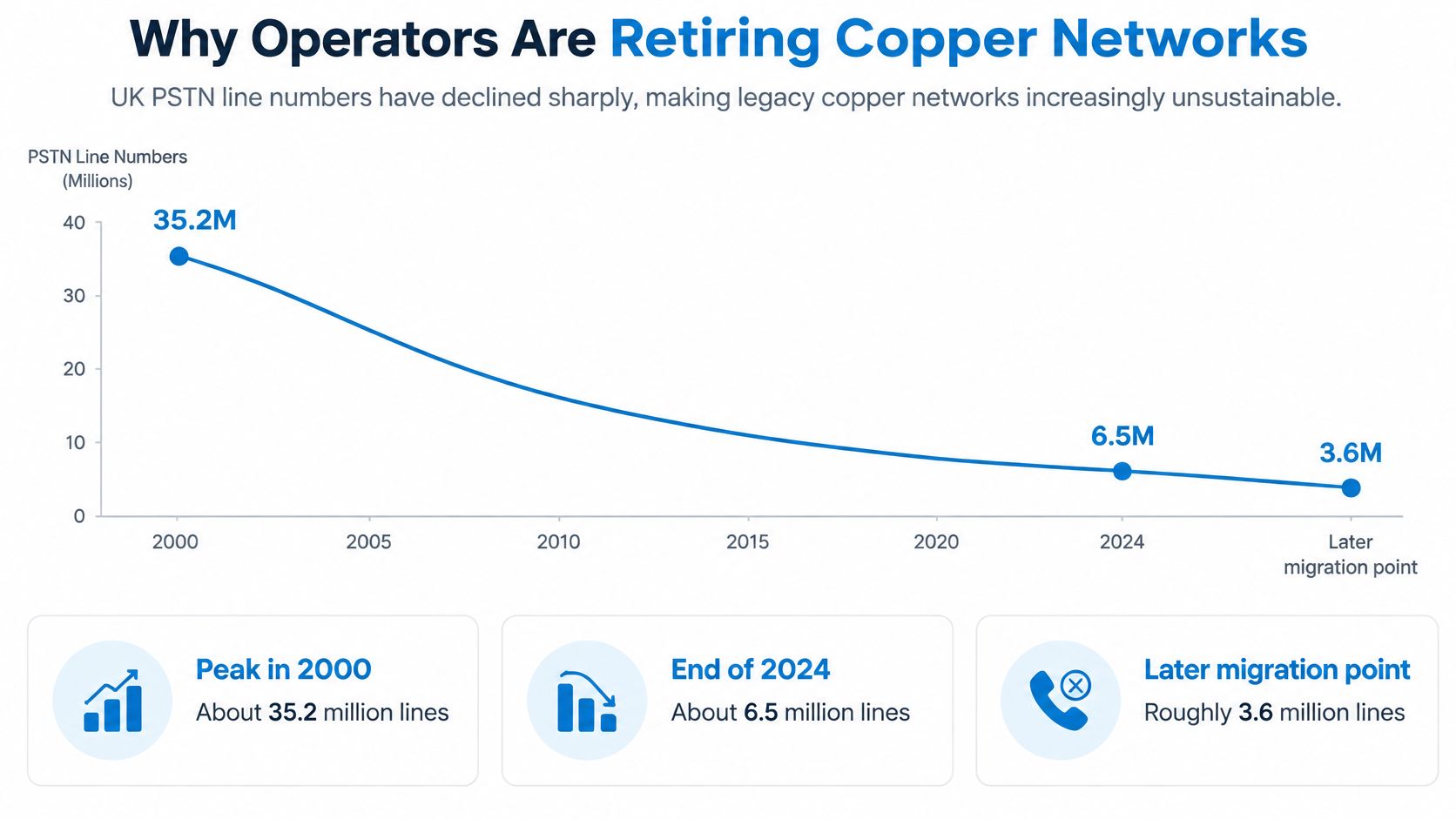
Broadbandswitch reports that UK PSTN line numbers peaked at approximately 35.2 million in 2000, fell to about 6.5 million by the end of 2024, and reached roughly 3.6 million by the end of 2025. That is an approximate 90% reduction from the 2000 peak to the reported 2025 level.
What the copper actually did
The technology changed in a clear order.
- Copper pairs first carried analogue voice, the dial tone and the ring current.
- The same pairs later carried DSL broadband alongside that voice.
- Fibre and other IP connections now carry broadband and the telephone call together.
Keeping an underused road open still needs crews, joints, and fault vans. Each remaining customer costs more to serve as the traffic thins out. The revised UK deadline is the last phase of that long decline, not the morning the landline suddenly became unfashionable.
The same pattern shows up where fibre has spread fastest. Connexion France, citing regulator Arcep, reported that France's fibre network was available to 89% of households in rural communes in 2025, up from 68% in 2024. Coverage like that is what lets an operator argue that a copper pair is no longer the only way to deliver a call.
What "landline" means now
A landline is usually a VoIP phone or base station plugged into a router. The phone works only while that internet connection works, and only while the router and handset have mains power or a charged battery.
One misconception is worth killing. The fall in copper lines does not mean your phone number is being cancelled. Providers can usually port the number onto the new service. Confirm the port in writing before anyone ceases the old line, because a ceased number is much harder to recover.
Services That Can Fail When Copper Goes Dark
A working kitchen phone does not prove the lift phone, the fax, or the fire panel will survive the move.
| Service | Why it can fail | What to confirm |
|---|---|---|
| Medical alarms and telecare pendants | Base units often need a specific line signal, not just a voice call | Monitoring centre and device supplier both sign off |
| Monitored intruder and fire alarm panels | Dialler panels send alarm tones down the line | Signalling method, plus a live test to the monitoring centre |
| Lift emergency phones | Often a dedicated line with scheduled checks | Facilities manager confirms it with the lift firm |
| Emergency call points | Fixed phones tied into a building system | A live test call and a backup path that is not the internet |
| Fax machines | Analogue fax needs a clean dial tone and a modem handshake | A real send and receive, or a tested adapter |
| EFTPOS and card terminals | Some still use dial-up or an analogue port | Terminal provider and the payment acquirer both confirm |
| Digital phones and cordless bases | They need mains power and a live router | Battery backup, then a test during a pretend power cut |
nbn warns that critical services may be disconnected unless the equipment is assessed and connected to the replacement network. Migration is not the same thing as compatibility. A new digital line can look "up" on a laptop and still be invisible to a panel that only speaks analogue.
Who has to check
The person who owns the risk is usually the householder, the landlord, the facilities manager, or the small business, not the engineer who swapped the socket. Insurance and monitoring contracts often assume a tested path. If the path changes and nobody tells the monitoring centre, a "successful" install can still be an unmonitored building.
Alarm and telecare users should get a yes from both the communications provider and the device supplier before any appointment is booked. A landlord with a lift should not accept "the phone line is digital now" as a maintenance sign-off. The lift firm has to hear the emergency phone on the new path.
The phone switch-off is often a hidden safety-system migration. Treat it like one, not like a handset upgrade.
The actions that turn this table into a pass or fail sit in the checklist further down. Until those tests are written down, assume the risky kit is still at risk.
Fiber, VoIP and LTE Backup Compared
There is no single winner. Match the path to the device.
| Option | Best for | Strengths | Weaknesses |
|---|---|---|---|
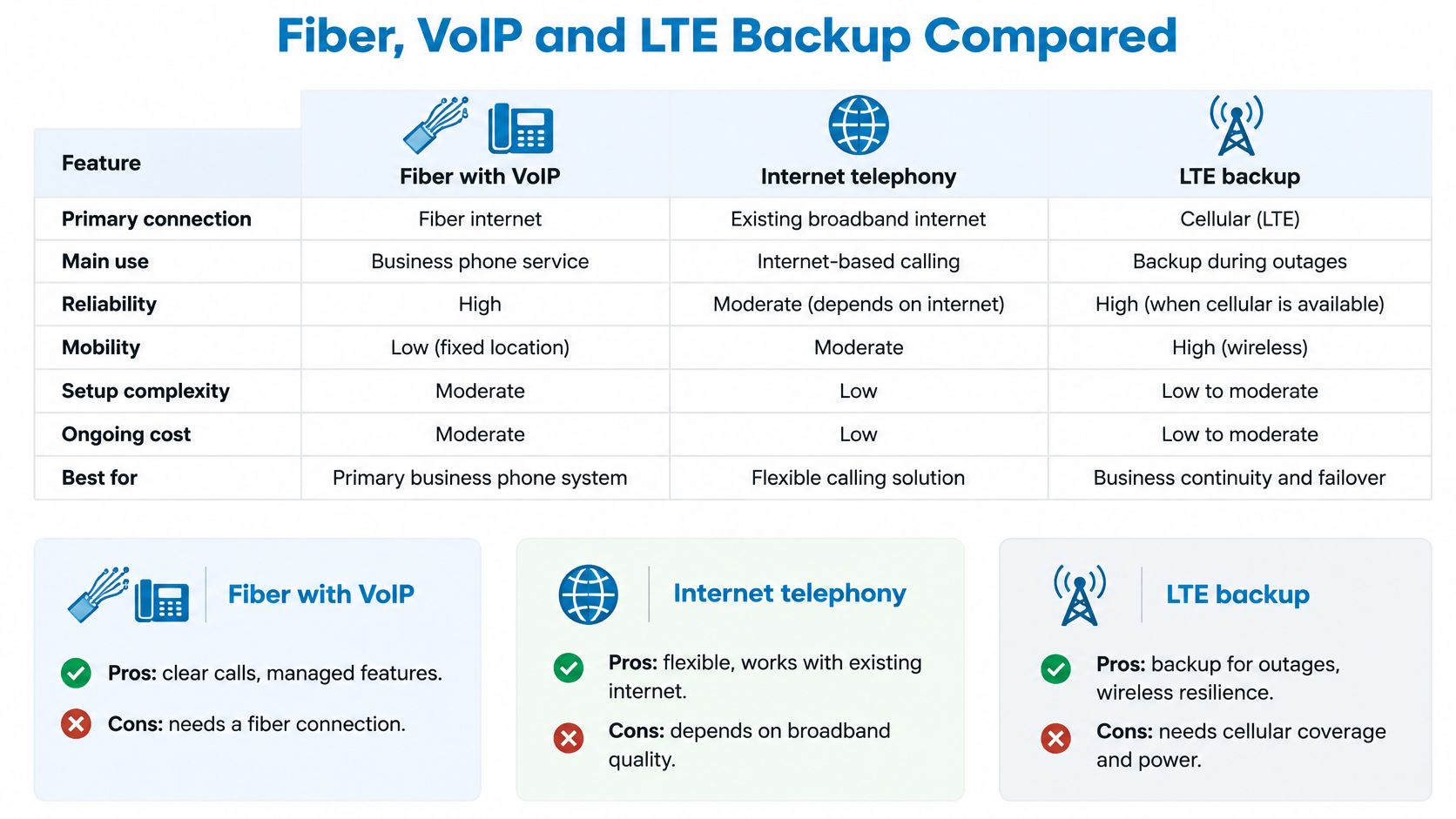
| Fiber with VoIP | Homes and offices where fibre is available | Clear calls, managed features, no copper needed | Needs a router and mains power, so battery backup is required |
| Broadband VoIP over cable or DSL | Users with a stable upload | Familiar setup, usually easy to add | Call quality follows upload speed and line stability |
| LTE or 5G backup | Alarms, telecare, and emergency lines that need a second path | Can keep working when broadband or mains power fails, where coverage exists | A monthly data cost, and indoor coverage can be patchy |
| Analogue adapter for legacy devices | Fax, EFTPOS, and older alarm panels | Keeps existing kit in service | Not every device is supported, and each one must be tested |
What each option is good at
Fibre with VoIP suits a home or office that can already get fibre. Calls are clear, and features such as voicemail-to-email sit in the provider's platform. The weakness is power. Router, optical terminal, and handset all need electricity, so add a battery sized for the outage you fear.
Broadband VoIP on cable or DSL is the familiar add-on when fibre is not at the door. If you are weighing those two broadband types, the Nerds 2 You Edmonton internet guide is a clear walk-through of how fibre and cable behave differently before you hang a phone on either. Call quality still follows the upload and the stability of that line. A busy evening can make a voice call worse even when web pages feel fine.
LTE or 5G backup is the second path for a pendant, an alarm, or an emergency phone. It can stay up when the broadband dies, and some units carry their own battery. You pay for data every month, and a basement plant room can have worse signal than the street outside. Test it in the cupboard where the panel sits.
An analogue adapter (an ATA) lets a fax, a card terminal, or an older panel keep its plug. Support is device by device. A successful test call does not prove a fire panel's contact ID tones will pass. Book the monitoring centre to watch a real alarm signal.
A short briefing on why the old power-from-the-exchange behaviour does not carry over is worth ten minutes before you pick a box:
A verdict by situation
Households that can get fibre should pair fibre with VoIP, then add battery backup for the router and the handset. Any home with an alarm or a telecare pendant should add LTE backup and keep a mobile that is not on the same router. A small business on a hosted phone system should look at a managed voice plan with branded caller ID, and test an analogue adapter on legacy terminals before the old line is ceased. One path for the people, another path for the machines.
Cost, Reliability and Common Questions Answered
Stop comparing "line rental" with "phone plan" in isolation. The copper rental is replaced by a bundle that usually includes the internet the phone now rides on. Ask for the full monthly total, broadband plus voice, and get installation and equipment charges in writing. Those charges differ by provider, and a verbal quote is easy to lose.
Reliability changes shape, not just price. Copper often stayed up in a mains cut because the exchange supplied the power. A VoIP phone needs the router, the ONT or modem, and the handset all powered. Ask the equipment maker for the battery runtime in hours, then time a real cut yourself. A battery that lasts twenty minutes is a different product from one that lasts eight hours.
Light Reading, summarising Ofcom's Connected Nations 2024 data, reported a 55% reduction in PSTN service hours lost during 2024, while PSTN incidents increased by 45%. Total time in failure shrank, and the number of incidents rose. Shorter, more frequent faults are exactly why a second path matters for an alarm.
Will I keep my number? Usually yes. Confirm the port with the provider, and do not cancel the old line until the new one rings with that number.
Is VoIP cheaper? It often looks cheaper inside a broadband bundle. Only the total bill, including kit and any backup SIM, shows the truth.
Will my phone work in a power cut? Only if the router and the phone have battery backup that still has charge. Without that, the line is down when the lights are down.
Do I have to switch? Ask the provider which options remain before the date on your notice. The timetable narrows the choice. It does not pick the replacement for you.
What happens to emergency calls? A VoIP line can place them only while the router and handset have power and the service is registered to a valid address. Make a planned test on the new setup, and read the registered address back to the provider. A wrong address sends help to the wrong door.
Waiting until the switch-off morning is the riskiest choice. A line can move with a short notice, and a rushed port leaves no time to test the pendant.
Step-by-Step Migration Checklist for Homes and Businesses
Work through the building once, on paper, before anyone books an install.
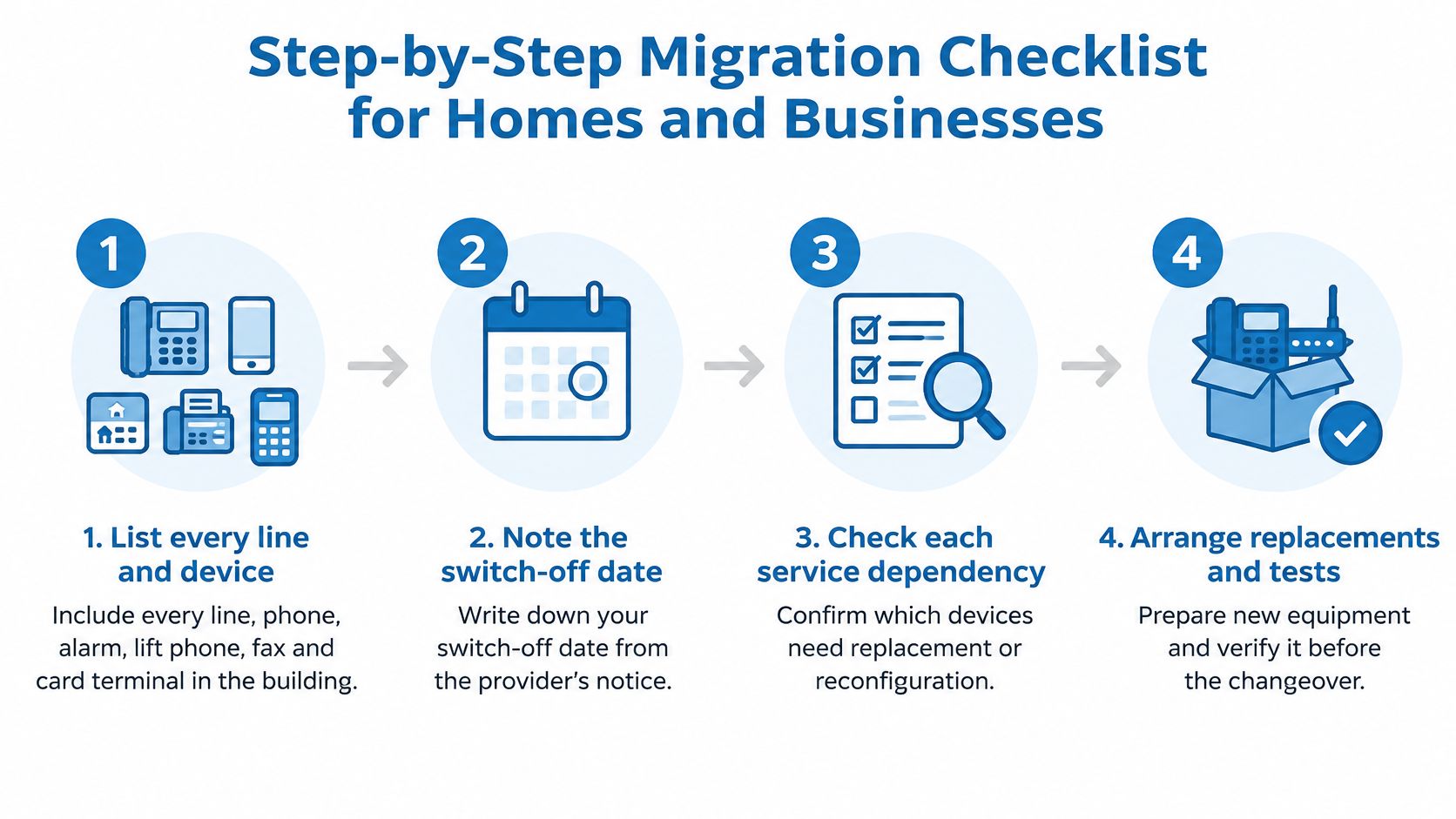
- List every line and device. Write down each phone, alarm, lift phone, fax, and card terminal, plus the socket it uses. Hidden lines are how shops discover a dead EFTPOS unit on a Saturday.
- Copy the switch-off date. Take it from the provider's notice, and note the exchange or postcode it names. A date with no location is not yet your date.
- Record how each device signals. Note analogue dialler, adapter, or IP, and write down its battery backup. If you cannot name the method, the supplier has to.
- Get compatibility in writing. Ask each device supplier, monitoring centre, and terminal provider. A verbal "it should be fine" will not help an insurer.
- Pick a path per device group. Fibre with VoIP for people, broadband VoIP where fibre is absent, LTE backup for alarms and pendants, an analogue adapter only after a pass on that exact unit.
- Book the install and the port. Ask for the number to move on a fixed date, and keep the old line live until that port completes.
- Run a live end-to-end test. That means a test signal the monitoring centre receives, plus a simulated power cut with the batteries in place.
- File the results. Keep battery runtime, the test outcome, and a non-internet way to call for help, stored with the device manual.
Homes and businesses do not share the same list
Households should spend their time on alarms, telecare pendants, and the people who would answer an emergency. A charged mobile in a known drawer beats a perfect router setting.
Businesses add EFTPOS, fax, lift phones, hosted PBX extensions, and any call-routing rule that still points at the old line. A branded caller ID and a hunt group are useless if the lift phone was never on the new platform.
Repeat the live test after any router swap or provider change. A firmware update can break an adapter that passed last month.
Confirm Your Migration Path Before the Deadline
Get three things in writing before you let the old line go. First, a compatibility sign-off from the monitoring centre or the device supplier. Second, the exact date the number moves, and confirmation that it is a port rather than a new number. Third, the battery runtime for the router and the handset, in hours, from the maker.
If several devices or sites hang off the same copper, a managed network plan is one way to keep the paths documented. Households that want voice on fibre can look at a home fibre plan with VoIP. Offices can look at a business voice plan with hosted PBX and branded caller ID. Premier Broadband is one provider that offers those fibre and VoIP options. You can check fibre at your address on its site and compare that quote with your current provider.
A test only counts when the device runs in its real cupboard, on its real power supply, with the monitoring centre watching. Book that check before the switch date, not after the first missed alarm.
Premier Broadband supplies fibre broadband and VoIP calling for homes and businesses, so a copper retirement can move onto an internet voice line with a plan for backup power and hosted business features. If you are replacing a landline, a pendant path, or an office phone system, start by checking what is available at your address. Visit Premier Broadband and compare a home or business voice option before your notice date arrives.