
You've received a notice about your landline, or you're looking at a phone bill for a line nobody seems to use. The obvious question is what replaces it. The less obvious question is what else depends on it.
That wall jack might serve a kitchen telephone, but a separate line could support an alarm panel, elevator phone, or medical alert device. Before you cancel anything, you need to know what the line connects, what powers the replacement, and how you'll prove everything still works.
What Copper Phone Lines Are and How They Compare
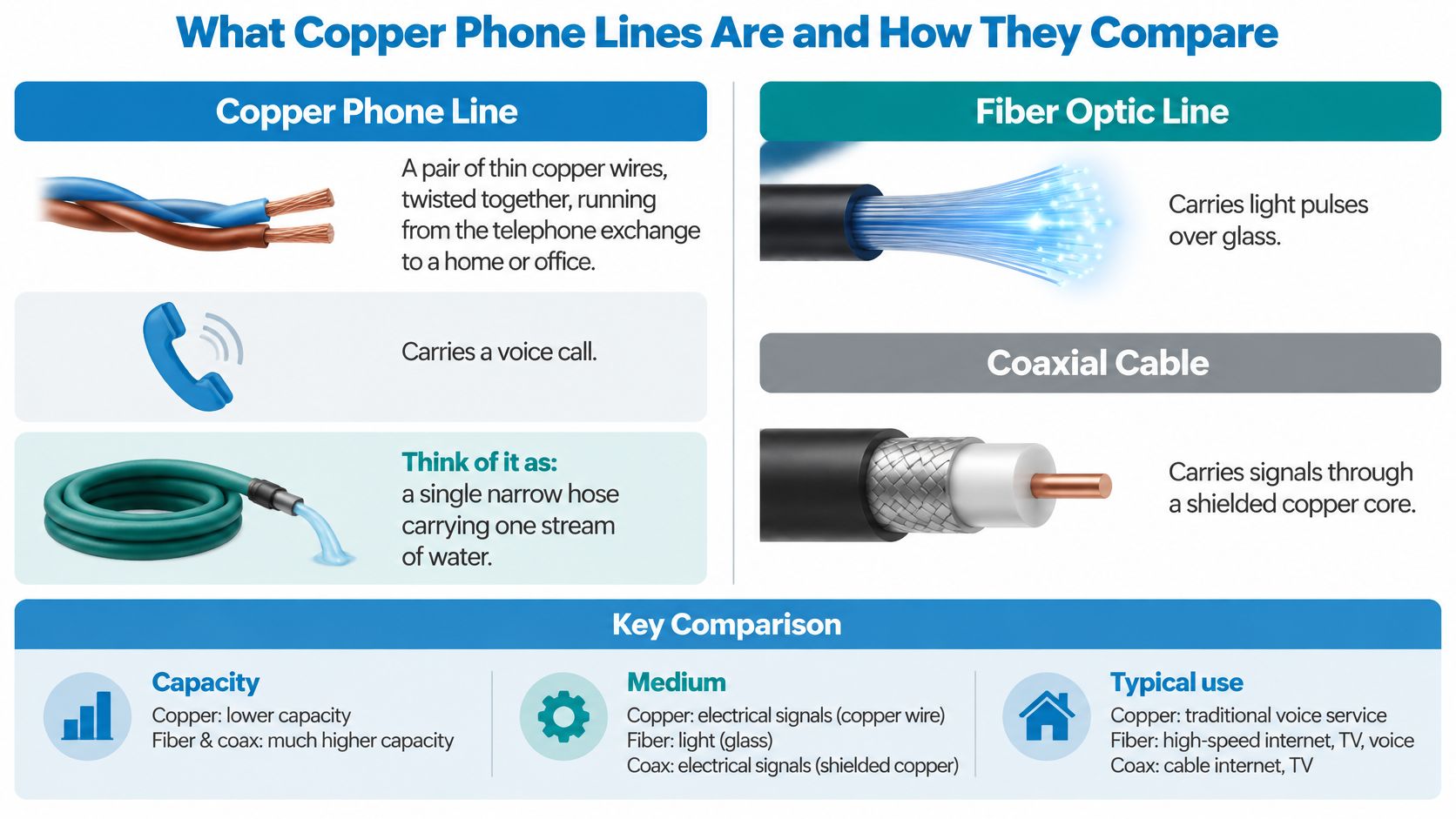
A copper phone line is a pair of thin copper wires, twisted together, running from a telephone exchange to a home or office to carry a voice call. Think of it as a private hallway: each customer has a path to the exchange, where switching equipment connects that path to someone else's.
Plain Old Telephone Service, usually shortened to POTS, is the traditional analog voice service delivered over that pair. Analog means the electrical signal varies with the sound of your voice, rather than carrying the conversation as digital data.
From private wires to a public network
The history helps explain why buildings still have these connections. A historical account of telephone development traces the progression through these milestones:
- The invention: Alexander Graham Bell's telephone invention in 1876 preceded the commercial exchange.
- The shared exchange: The first commercial telephone exchange opened on January 28, 1878, in New Haven, Connecticut, connecting subscribers through an operator instead of requiring dedicated wires between every pair of callers.
- Nationwide expansion: Approximately 600,000 telephones were in service by 1900, growing to about 30 million by 1948.
Copper subsequently supported dial-up internet and DSL, a method of sending data over telephone wiring. That extended its usefulness, but it didn't make traditional voice service equivalent to a modern broadband connection.
The visual below compares the physical cables. Remember that a cable type and a phone service aren't the same thing.
Copper, fiber, VoIP and cellular voice at a glance
VoIP, or Voice over Internet Protocol, carries speech as digital packets. Fiber describes an access connection, so fiber and VoIP aren't competing categories: a fiber connection can deliver VoIP.
| Voice path | How the call travels | Data ceiling | Equipment at the premises | Where it still applies |
|---|---|---|---|---|
| Copper POTS line | Analog signal over a twisted copper pair, with line-supplied power | Broadband requires separate DSL equipment; line quality limits performance | Basic corded phone; modem and filters if using DSL | Legacy homes and buildings still served by copper |
| Fiber with voice | Digital voice over glass fiber; equipment needs local power | Depends on the service plan | Optical network terminal, router and any required phone adapter | Addresses where fiber has been built |
| VoIP over internet | Voice packets over broadband; equipment needs local power | Depends on the internet connection | Router and compatible phone, adapter or calling software | Homes, offices and hosted business phone systems |
| Cellular voice | Radio connection to a mobile network | Depends on the mobile service | Charged mobile phone or powered cellular unit | Mobile use and suitable fallback locations |
Copper POTS is the oldest, most constrained voice path in this comparison. Choosing its replacement means looking beyond call quality to power, coverage and connected equipment.
How a Copper Pair Carries Voice and Power
Think of the copper pair as a road carrying different kinds of traffic together: a changing electrical signal representing speech and a steady electrical supply that operates a basic telephone. The same wires perform both jobs.
When you lift the handset, the phone goes off-hook. That completes an electrical loop, current flows, and the exchange recognizes that the telephone is requesting service.
What the electrical specifications mean
The following POTS electrical specifications and operating characteristics describe a traditional line. They're typical reference values, not instructions for probing telephone wiring yourself.
| Parameter | Typical value | What it means for the reader |
|---|---|---|
| Pair type | Unshielded twisted pair | Copper conductors twisted together form the telephone circuit |
| Idle-feed voltage | About 48 V DC | The central office supplies electrical power over the pair |
| Loop current | About 30 mA off-hook | Current flows when the handset is lifted |
| Voice band | About 300 to 3,400 Hz | The speech signal occupies a narrow frequency range |
| Power source | Central office battery supply | A basic corded handset doesn't need a household electrical socket |
| Data use | DSL over the same pair | Broadband needs suitable electronics, with performance dependent on the line |
Voltage is electrical pressure. Current is the flow of electricity. Frequency, measured in hertz, describes how rapidly a signal changes.
You don't need to memorize those terms to manage a migration. The important distinction is that traditional telephone service brings operating power with the voice connection, while a replacement may deliver voice through equipment you must power yourself.
Why voice and broadband need different treatment
Speech fits into a relatively narrow range of frequencies. Broadband requires the pair to carry additional signals using equipment designed for that purpose, rather than merely putting more information through an ordinary voice call.
Where DSL and analog voice share wiring, the modem handles the data connection and appropriate filters separate the services. A telephone working normally therefore doesn't prove that the same pair can provide satisfactory broadband.
Practical rule: Treat “the phone works” and “the line supports the data service” as separate findings.
Also distinguish the incoming network from the wiring inside the building. A familiar telephone jack tells you where a device connects, but it doesn't establish whether the service behind it is still traditional, exchange-powered POTS. Ask the provider to identify the actual service before making assumptions about its behavior.
Why Copper Runs Out of Road at Distance and Speed
A long, narrow garden hose delivers less useful pressure than a shorter, wider one. Copper has a comparable limitation: electrical resistance and signal loss make a long or degraded telephone loop harder to use for data.
A local loop is the access circuit between the customer and the telephone network. Its electrical condition matters more than how close the exchange looks on a map.
The limits a technician checks
Several characteristics determine what the loop can support:
- Conductor gauge: Thicker copper has lower resistance and can support longer runs than thinner copper under comparable conditions.
- DC resistance: Resistance opposes current flow. Excessive resistance can make the circuit unsuitable for the intended service.
- Attenuation: This means signal weakening as it travels along the cable.
- Loading: Some long loops contain load coils. Their presence matters when qualifying the pair for DSL.
- Bridge taps: These are branches off the main pair. They can complicate the electrical path and impair data performance.
The telephone-circuit engineering reference reports average local loops of approximately 2.5 miles, identifies around 18,000 feet as a common point where attenuation becomes significant and load coils may appear, and gives an example engineering limit of about 7.5 dB attenuation and 1,300 ohms resistance, including approximately 120 ohms for the telephone set.
Those figures are reference points, not a universal pass-or-fail rule for every service. A technician must interpret measurements against the actual line and equipment.
Ask for qualification, not a distance estimate
Loop qualification means checking whether the circuit can support the proposed service. For a long or degraded pair, that may involve investigating insulation faults, checking branches, or determining whether conditioning work is needed.
Suppose an office manager says the building is close to the exchange, so DSL should be fine. That conclusion skips the cable route, conductor size, joints and electrical condition. A short-looking route can still have a troublesome pair.
Ask the carrier what it measured and what the results mean for your service. A useful answer explains whether the pair is suitable, whether repair is possible, and whether limitations remain after repair.
Distance on a map is a planning clue, not an electrical test.
Don't buy replacement equipment on the assumption that it will overcome a line defect. First establish whether the problem is the copper circuit, the premises wiring, or the equipment attached to it.
Why Providers Are Retiring Copper Lines
U.S. POTS lines fell from approximately 122 million in 2010 to 41 million in 2019, a reduction of roughly 66 percent, while a separate switched-access series declined from 171 million in 2005 to 11.7 million in 2024, approximately 93 percent, according to industry coverage citing FCC-reported figures.
These are different reporting series. They indicate the same broad direction, but you shouldn't combine them into a continuous trend without checking their definitions.
Reading the decline correctly
| Reporting series | Earlier observation | Later observation | Interpretation |
|---|---|---|---|
| POTS lines | The earlier POTS figure cited above | The later POTS figure cited above | Substantial contraction within that series |
| Switched-access lines | The earlier switched-access figure cited above | The later switched-access figure cited above | Substantial contraction within a separate category |
| Cross-series comparison | Not established | Not established | Don't treat unlike categories as interchangeable |
The practical story is a change in how people connect. Mobile networks took over many everyday calls, while fiber, cable, fixed wireless and VoIP replaced functions previously delivered through traditional telephone access.
Carriers have also increasingly retired aging outside plant, meaning the cables and associated network facilities outside customers' buildings. Copper retirement is therefore more than removing an old telephone product from a price list.
Why a service change can become a building project
For a homeowner, replacing the line may require installing new access equipment and deciding where it will receive power. For an office manager, it may involve coordinating the carrier, IT staff, facilities personnel and equipment vendors.
The important questions are operational:
- What is changing? Ask whether the notice concerns physical copper, the voice service, or both.
- What will replace it? Request the proposed connection type and the equipment required.
- Who owns the work? Identify who installs, configures and tests each dependent device.
- What is the deadline? Obtain the date and scope of the change in writing.
A working internet connection isn't evidence that a separate telephone circuit has been replaced. Keep the access service, voice service and connected devices distinct in your records.
What Stops Working When Copper Goes Quiet
The lights go out, but the corded telephone on the wall may still work. Its power comes through the telephone line, not the nearby household socket.
That's a real advantage, but it isn't a promise that every device connected to copper survives an outage. Coverage of digital-landline switchover and outage preparation emphasizes the distinction between line-powered telephones and replacement services that need electricity at the premises.
Outage behaviour by voice service
| Service | Keeps working in a power cut | Power needed at premises | Notes |
|---|---|---|---|
| Corded copper POTS phone | Can, if the line and supplying network remain operational | None for a basic handset | Doesn't protect against every network failure |
| Cordless handset | Not without backup for its base | Base-unit power | A charged handset alone isn't enough |
| Fiber voice | Only with suitable backup | Optical network terminal, router and any adapter | Every required device must remain powered |
| VoIP over internet | Only while the connection and equipment remain operational | Modem or access terminal, router and calling equipment | Backup must cover the complete path |
| Mobile phone | While the handset and serving network remain operational | Handset charge | Check actual coverage where it will be used |
| Answering machine or alarm panel | Depends on its power arrangements | Mains electricity or an appropriate battery | Verify separately from the telephone |
An optical network terminal, or ONT, is the equipment that terminates the incoming fiber connection. Backing up the router but overlooking the ONT leaves a gap in the power plan.
Test the backup under realistic conditions
Ask the provider to identify every powered component needed for a call. Then choose a backup arrangement for the actual equipment load and ask how its usable runtime will be assessed.
At an agreed time, simulate a mains outage by removing the backup unit's incoming mains supply, not by disconnecting the equipment from its battery. Confirm ordinary incoming and outgoing calls, and arrange any emergency-calling verification through the provider's approved process. Don't make an unannounced emergency call just to test the installation.
Older adults, medical alert users and households with weak mobile coverage should explain their needs to the provider and ask about battery support or priority assistance. A mobile phone isn't an adequate fallback merely because someone owns one.
Outage planning: Copper's advantage is narrow. A simple corded handset may remain usable while other powered equipment does not.
Hidden Copper Dependencies and How to Audit Them
Consider a building whose internet service works normally after a telephone migration. Staff can browse and make office calls, but the elevator emergency phone no longer reaches its answering point.
That's the hidden-dependency problem. Successful office calling doesn't establish that every building system has a working replacement.
Build an inventory without pulling plugs
Use a physical walkthrough alongside carrier records. Don't disconnect an unidentified line to find out whether anyone complains.
- Record the termination: Label the wall jack or demarcation point, where the carrier's connection meets the building's wiring.
- Identify the attached device: Check elevator phones, fire alarm dialers, security panels, fax machines, emergency call boxes, ATMs and industrial monitoring equipment.
- Name the responsible party: Record the department, maintenance contractor and equipment vendor.
- Capture requirements: Ask the vendor what approvals, certifications and communication arrangements the device needs.
- Request carrier records: Reconcile the billed circuit with the location and equipment you've identified.
- Keep unknown lines open: Mark them for investigation rather than cancellation.
Trace and label wiring only where you're authorized to do so. Ask the carrier and device vendor to confirm your findings before approving a change.
For ordinary business calls, SkipCalls' guide to call forwarding codes can help you prepare questions about temporary call routing. Don't treat forwarding as a substitute for validating an alarm or emergency communications path.
Notice is not an implementation plan
Analog-line replacement guidance reports that the FCC reduced the required notice for certain copper retirements from 180 days to 90 days in March 2025, and that AT&T stopped accepting new copper orders, moves or changes across much of its footprint on October 15, 2025.
Those developments aren't a single national switch-off date. Ask your carrier which rules, restrictions and deadlines apply to your specific circuits.
A notice period also isn't guaranteed installation time. Your organization still needs to select equipment, coordinate vendors, obtain applicable approvals and schedule testing.
A voice replacement is not automatically a compliant life-safety communications path. Depending on the device, the vendor may require a cellular communicator, approved VoIP arrangement, dedicated managed connection, independent communication paths or battery backup.
Require an end-to-end test with the equipment vendor and receiving emergency or monitoring center. The acceptance question isn't whether a phone adapter produces dial tone, but whether the intended message or conversation reaches the correct destination.
How to Test a Copper Line Before You Switch
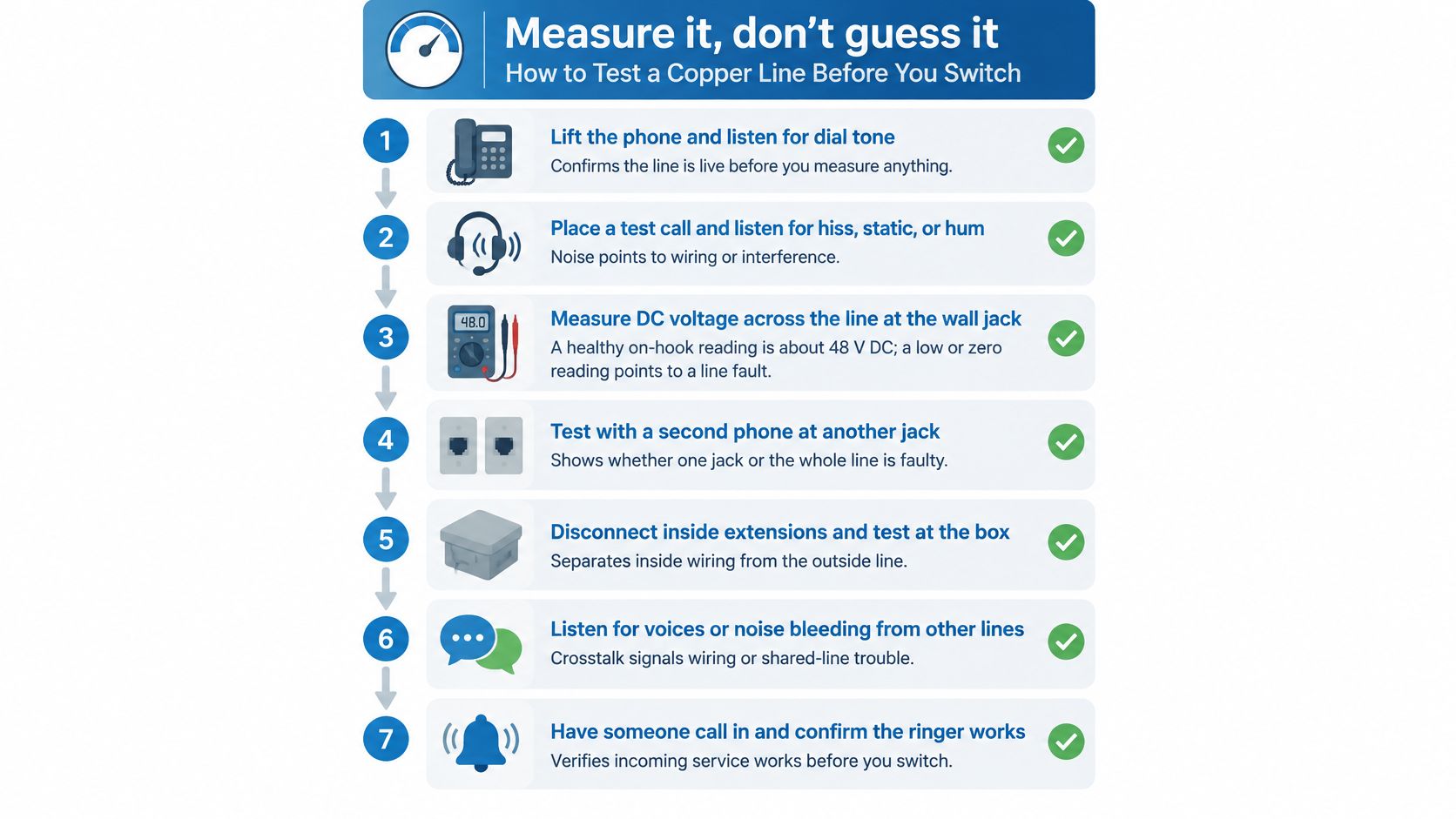
Measure a copper problem rather than guessing at it. Your role is to document symptoms and arrange appropriate testing, not to open protected equipment or experiment with active safety circuits.
The checklist image provides a visual reference. Leave voltage measurements and network-box isolation to the carrier or an appropriately qualified technician.
Gather useful evidence
Listen on a known-working corded phone. Check for dial tone and obvious crackle on an ordinary voice line. Missing tone identifies a problem to investigate, but it doesn't by itself distinguish a carrier fault from premises wiring or equipment trouble.
Isolate ordinary user equipment where safe. Disconnect noncritical phones or accessories you're authorized to remove, then retest. Don't unplug alarm, elevator, medical or unidentified equipment.
Make repeated ordinary test calls. Note hum, crackle, interrupted audio and whether the problem affects incoming or outgoing calls. Record when it happens so the carrier has something more useful than an intermittent-fault description.
Record DSL connection information if applicable. Capture the modem's displayed connection rate and disconnection history. Compare the symptoms with the service you're receiving rather than an assumed speed.
Request a carrier line test. Ask for findings on resistance, attenuation, insulation faults and pair condition. Request an explanation of whether the results meet the requirements of the existing service.
Ask about load coils and bridge taps. Use the electrical constraints described earlier to frame the conversation. Have the carrier explain whether either feature affects the proposed data service.
Create a handover record. Save dates, results, circuit identifiers, device names and fault references. Share relevant findings with the replacement provider and equipment vendors.
Interpret the results without overreaching
A clean call and stable DSL connection provide evidence about present operation. They don't guarantee continued availability or justify postponing a dependency audit until a retirement notice arrives.
Repeated faults or an unsuccessful loop assessment are reasons to accelerate repair and migration planning. Keep the technical diagnosis separate from the decision about what your household or building needs next.
For an additional visual reference, use the video alongside the written testing plan, not as authorization to work on unfamiliar circuits.
Before any hands-on work, confirm the boundaries with the carrier. For safety-related equipment, let its vendor control the test procedure and restoration checks.
Choose Your Migration Path Before Copper Is Switched Off
| Situation | Recommended path | Requirements to confirm |
|---|---|---|
| Household voice only, no alarm or medical device | Fiber internet with VoIP, where available | Complete backup-power arrangement and emergency-calling address |
| Home office or remote worker | Broadband with suitable VoIP service | Upload performance, backup power and mobile calling options |
| Small business with phones and internet | Business broadband with hosted VoIP | Number transfer, existing phone-system compatibility and caller identification |
| Building with elevator, fire or security analog lines | Vendor-approved cellular, VoIP or dedicated managed connection | Applicable approvals, end-to-end testing and receiving-center confirmation |
| Rural address without fiber | Qualified fixed wireless or cellular option | Actual coverage, backup power and outage behavior |
| Copper working, no notice received | Retain service while preparing the replacement | Notice tracking, completed inventory and documented tests |
Hosted VoIP means the provider operates the phone-system functions rather than relying entirely on a system at your premises. A PBX, or private branch exchange, is a business phone system that manages extensions and calls.
Match the replacement to the work it must do
Start with the inventory, not the advertised broadband speed. Separate ordinary conversations from devices that need a particular communications method or approval.
Next, use the line-test record to explain the current situation to prospective providers. Check service availability at the exact address, and request a written description of the proposed installation.
Ask about the features you actually use. A household may need voicemail and caller identification; a remote worker may need calling through a mobile application; a business may need extension routing, branded caller identification or compatibility with an existing PBX.
Keep equipment protection and service continuity separate in your questions. Repair coverage may help after equipment damage, but it isn't the same as backup electricity or an alternative communication path.
For a business considering managed networking, establish who will monitor faults, coordinate repairs and maintain configuration records. A single point of contact is useful only when responsibilities are explicit.
Set acceptance conditions before scheduling cutover
Give the incoming provider the telephone numbers you want to retain and ask it to coordinate number porting, the transfer of those numbers. Don't independently cancel the existing service before the transfer arrangements are confirmed.
Use a written acceptance checklist:
- Voice service: Verify incoming calls, outgoing calls and required features.
- Emergency calling: Confirm the registered address and provider-approved verification procedure.
- Power continuity: Complete the agreed backup test with the installed equipment.
- Dependent devices: Obtain vendor-led acceptance for each alarm, elevator or other critical system.
- Handover: Record support contacts, equipment ownership and unresolved issues.
Keep the copper service active until the replacement and every dependent system have been confirmed working, wherever the carrier's schedule allows. If the retirement deadline threatens that overlap, escalate early with the carrier and affected vendors rather than accepting an untested gap.
Your first action is straightforward: identify every remaining analog circuit and give each one a named owner. That turns an uncertain phone upgrade into a manageable migration.
Premier Broadband offers fiber internet and VoIP phone service for homes and businesses, providing a replacement path for everyday calling as copper service is retired. Visit Premier Broadband to check availability and discuss your voice features, backup-power arrangements and number transfer before scheduling the switch.