

A prospect calls at 4:47 p.m., the line rings out, and nobody checks the desk phone until Monday. By then, the caller may have moved on, while the voicemail sits in a phone-only inbox that no one remembers to open.
Voicemail-to-email removes that delay by placing the recording in the inbox your team already monitors. A support agent can listen from a laptop, a manager can route the message to the right colleague, and an after-hours caller can reach someone who isn't sitting beside the office phone. If you're also reviewing broader workflow improvements, resources such as AI for reducing clinic admin work can help place phone messages within a larger administrative process.
The useful outcome isn't just convenience. Done properly, forwarding voicemail creates a faster response path and a written email trail for each missed call. The setup is straightforward, but the security, transcription, and delivery details deserve as much attention as the forwarding toggle.
Why Voicemail-to-Email Has Become the Default
Voicemail-to-email sits between two communication habits. The caller speaks through the telephone, while the recipient works from email, ticketing software, or a mobile app. Forwarding the message bridges those systems without asking the recipient to dial into a separate mailbox.
That shift became practical because email could finally carry standardized audio attachments. Before the early 1990s, Internet email was largely limited to plain text. The MIME specification, proposed in 1991 and standardized through RFC 1341 and RFC 1342 in June 1992, added content types for audio, images, video, applications, and multipart messages, as documented in this history of email attachments and MIME. A phone platform can now create an audio file, encode it in a MIME message, and deliver it through ordinary email infrastructure.
Practical observation: Most teams don't want another inbox. They want the phone inbox to appear inside the one they already check.
The demand for that bridge grew as recorded voice became a routine part of household and business communication. By the early 1990s, approximately 2 in 5 U.S. households, about 40%, had answering machines, and AT&T estimated that households received an average of 2.5 voicemail messages per day during that period, according to reporting that cites the period's data in this history of voicemail adoption. By 2004, 78% of Americans had some form of voicemail, while 51% had caller ID, according to figures attributed to Pew Research Center in the same source.
The workplace use case is especially clear for mobile teams. A salesperson can skim a transcript before a meeting, a clinic administrator can route a patient's call to the correct queue, and an owner can review an urgent message without accessing the desk phone. That doesn't make email automatically safer or more reliable than the phone system. It makes the message easier to find, share, and act on.
The best deployments preserve both speed and accountability. A recipient gets the audio quickly, while the email subject, sender, timestamp, and routing history create a searchable record of what arrived and when.
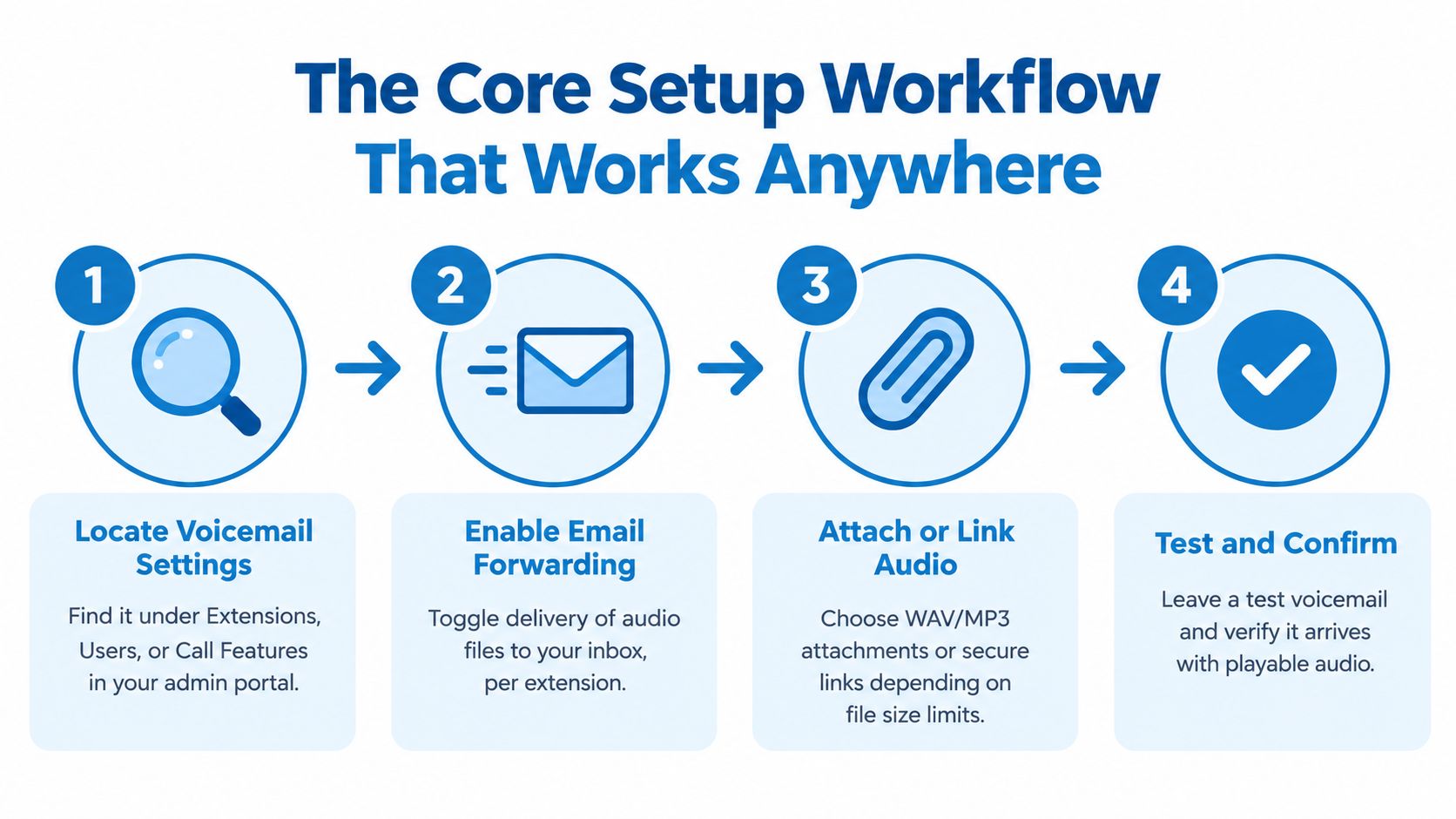
The Core Setup Workflow That Works Anywhere
Provider menus differ, but the underlying configuration usually follows the same sequence. Use this workflow whether your system is a hosted PBX, a cloud calling platform, or a business softphone service.
Locate the extension's voicemail settings. Sign in to the phone-system administration portal and look under Extensions, Users, Voicemail, Notifications, or Call Features. Confirm that voicemail-to-email is included in the account or plan. Some systems separate an email notification from delivery of the actual audio file, so look for both controls.
Choose the audio format. Select the format before rolling the feature out. WAV preserves higher-quality uncompressed audio and can be easier to archive, but it creates larger attachments. MP3 generally reduces attachment size and works broadly across desktop and mobile players, with some loss of audio quality. Your provider may also support a secure download link instead of, or alongside, an attachment.
Enable audio delivery. Turn on the option labelled something like Email a copy, Attach voicemail, or Voicemail forwarding. Check whether the message remains in the phone system after delivery. Don't assume that emailing a copy removes the original safely.
Add recipients deliberately. Enter the primary work inbox, then consider a backup address or a controlled team mailbox. Avoid adding personal accounts just because they're convenient. If your provider supports text or SMS notifications, use them for an alert rather than as the only destination for sensitive content.
Enable transcription only if it fits the workflow. A transcript can help a busy employee decide which message to open first. It shouldn't replace the audio attachment for names, numbers, addresses, payment instructions, or other details that affect a customer response.
Run a controlled test. Ask a colleague to leave a short message. Confirm that it arrives, inspect the sender and subject, open the attachment on desktop and mobile, and check spam or quarantine folders. Verify that the audio plays from start to finish and that any transcript appears in the expected location.
Document the final configuration. Record the selected format, recipient addresses, attachment or link behavior, maximum file-size setting, retry behavior, and retention rule. Keep that record with the extension's support notes so another administrator can diagnose a failure without guessing.
What to verify before enabling every extension
Don't activate automatic deletion after emailing until successful delivery has been demonstrated consistently. A temporary SMTP failure, mailbox rejection, or filtering rule can otherwise remove the only accessible copy. The provider-specific voicemail-to-email configuration guidance also recommends checking recipient addresses, spam folders, mailbox capacity, filtering rules, and SMTP authentication or relay settings.
Keep the test controlled rather than using a real customer message. Send an example that contains no confidential information, then inspect the original message headers and confirm that the receiving mailbox handles the attachment as expected.
For adjacent communications planning, a guide to Google Voice fax workarounds to avoid can also help teams distinguish between a voicemail workflow and a fax workflow. The two services may share an inbox, but they don't necessarily share the same delivery, retention, or compliance requirements.
Configuring the Feature Across Portals, Phones, and Apps
The same voicemail-to-email setting can appear in several interfaces, but those interfaces don't always have equal authority. Configure the server-side account or extension first. Treat the desk phone and mobile app as user-facing overlays unless the vendor explicitly says they can change the central policy.
Hosted PBX administration portals
In a web portal, start with the user or extension record. The relevant control may sit under Notifications, Voicemail Forwarding, or Message Storage. Look for separate choices for:
- Email notification, which may send an alert without the recording.
- Audio attachment, which delivers the actual voicemail file.
- Transcription, which adds text to the email or application.
- Recipient addresses, which determine who receives the copy.
- Retention, which controls what remains in the original phone mailbox.
Some systems let administrators configure multiple addresses per extension. That can support a primary user and a controlled backup recipient, but every additional recipient expands access to the recording.
Desk phones
A desk phone may expose a Message Settings or Voicemail Settings screen. In many deployments, the phone only reflects settings held by the calling platform. Changing a local notification option may alter the message-waiting indicator without changing email delivery.
If a setting appears on the handset but not in the web portal, test it with a harmless message and then verify the resulting email. Don't assume that a phone menu can override an administrator policy, especially on a centrally managed business system.
Mobile softphones
Mobile applications commonly place voicemail controls under the account, calling, or voicemail menu. They may add push notifications, in-app playback, or access to transcripts. A push alert can be useful when email is delayed, but it creates another place where message content or metadata may appear.
The supplied provider example follows the familiar pattern: an administrator enables delivery for an extension, chooses an audio format such as MP3 or WAV, and adds delivery addresses, while an end user manages related preferences in a mobile softphone. The important distinction is ownership. The portal defines the service behavior, while the phone and app provide access and notification layers.
Teams designing a wider communications environment may also benefit from this Ciphar enterprise solution guide, particularly when voicemail needs to coexist with collaboration tools, shared queues, or other business channels. Configure one extension end to end before copying the settings to a larger group.

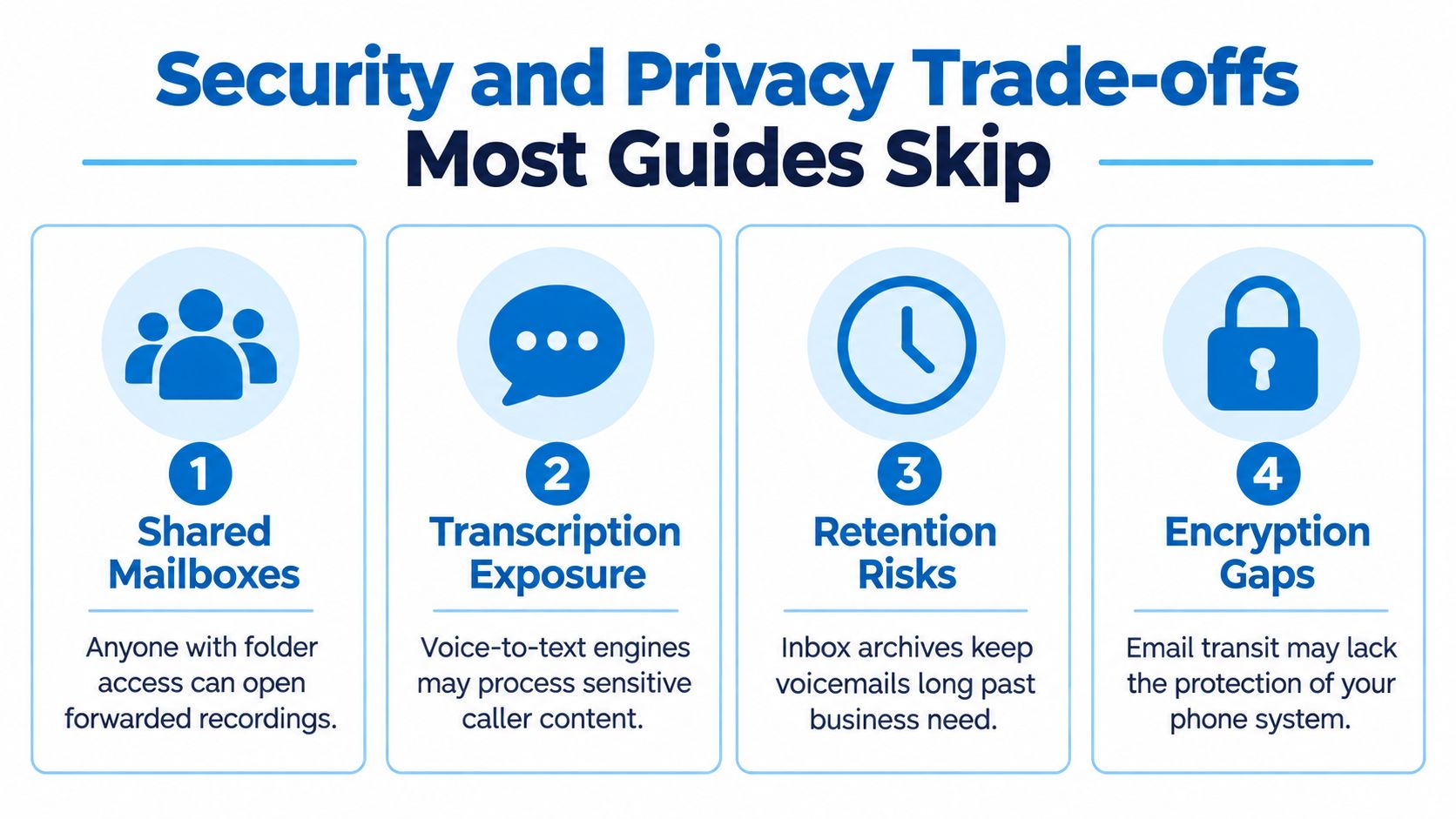
Security and Privacy Trade-offs Most Guides Skip
Forwarding a voicemail into email changes its security boundary. The recording may leave the phone platform's mailbox controls and enter an Exchange, Gmail, or other inbox with different access, retention, export, and forwarding rules.
A shared mailbox is the first place deployments go wrong. Anyone with folder access may be able to open, download, or forward the recording. That may be appropriate for a support queue, but it isn't appropriate by default for messages containing health details, payment information, account-recovery data, or confidential business content.
Treat the inbox as a new data store
Transcription creates a second exposure. The audio remains sensitive, but the transcript turns the same conversation into searchable text that staff can copy, forward, index, or retain in places the phone system never touched. If a third-party transcription service processes the recording, confirm its contractual terms, encryption controls, access logging, and retention policy before enabling it for regulated work.
Use a short, approved retention period rather than allowing voicemail emails to remain indefinitely. Apply least-privilege mailbox permissions, require multifactor authentication, and use encryption in transit and at rest where available. Disable uncontrolled forwarding from the receiving mailbox, and review access when an employee changes role or leaves.
Security rule: Convenience doesn't authorize a new recipient. Every address, shared folder, archive, and transcription processor should have an owner and a reason.
For healthcare workflows, verify whether the transcription provider offers the required contractual protections, including a Business Associate Agreement, before sending real patient information. A controlled acceptance test should use deliberately sensitive sample data, confirm that only authorized recipients can access it, and verify that disabling the feature stops new messages from being emailed.
Unexpected voicemail emails deserve the same caution as unexpected email attachments. A 2025 malware-analysis report described messages impersonating voicemail notifications while using attachments to steal email credentials, as detailed in this analysis of voice-message email scams. Staff should verify the sender through a known channel and avoid opening unusual links or browser prompts from a message they weren't expecting.
A practical guardrail is to route voicemail through a dedicated folder with controlled membership rather than a general company inbox. Review the folder's automatic forwarding, mobile download, archive, and deletion behavior. For an additional example of how organizations manage unwanted address-based traffic, see the AddressFence PO Box Guard, but don't treat an unrelated filtering product as a substitute for mailbox access controls.
Transcription Is a Convenience, Not a Record
A transcript can tell you which voicemail to open first. It can't guarantee that every name, number, or instruction has been captured correctly.
Names are easy to mishear. A callback number can contain transposed digits. Technical vocabulary may become an unrelated phrase, especially when the caller speaks quickly, uses a strong accent, or calls from a noisy environment. Available evidence doesn't support a universal transcription error rate, but it does identify substantial degradation for some non-US English accents and jargon-heavy speech, with reported word-error rates reaching 33.7% in some accent groups in the referenced discussion of Google Voice transcription limitations.
Use two formats for two different jobs
The audio file should remain the authoritative source when accuracy matters. The transcript should function as a search and triage layer. That arrangement lets an agent find messages quickly while preserving the recording for verification.
Use a consistent subject-line convention, such as a clear voicemail marker followed by the extension or queue name. Add an internal note that transcriptions may contain errors. For any action involving a refund, contract clause, payment instruction, address, date, or callback number, require the recipient to listen to the original audio before responding.
| Use case | Better primary reference |
|---|---|
| Finding urgent messages quickly | Transcript |
| Confirming a person's name | Audio |
| Checking a phone number | Audio |
| Searching a mailbox for topics | Transcript |
| Resolving a customer dispute | Audio and message headers |
| Reading content with a screen reader | Transcript, verified against audio |
This dual-format approach also supports accessibility without pretending that text is always complete. Someone may need a transcript to scan messages discreetly, while another person may need the audio to hear tone, emphasis, or a word the engine missed. Keep the formats connected, and make it clear which one staff must use for decisions.
Operational rule: If a wrong word could change the outcome, don't act on the transcript alone.
When transcription fails completely, the fallback is simple. Listen through the email client or mobile app, ask the caller to repeat the message, or configure audio-only delivery for extensions where text quality is consistently poor. Review how AI features are used in adjacent content workflows with this PageCraft AI resource, but keep automated summaries in the same review category as transcripts. They can accelerate triage without becoming the original record.

Troubleshooting Failed Delivery and Weird Behavior
Start with the simple checks before investigating mail infrastructure. Confirm that voicemail-to-email is enabled on the correct extension, the recipient address is spelled correctly, and the receiving mailbox isn't over quota. Send a new test message after each change so you know which adjustment solved the problem.
A practical diagnostic order
- Check the destination: Search spam, quarantine, rules, and focused or filtered views. Generic sender addresses and audio attachments often trigger filtering.
- Check the sending account: Confirm that SMTP authentication is valid, the relay permits the phone platform to send, and outbound mail isn't being blocked by the provider's policy.
- Check the attachment: Download the file and test it in another player. A codec mismatch can produce a silent or unplayable recording, particularly when the server and device use different voice encoding settings.
- Check the headers: Open the original message source and trace the relay path. Look for authentication results, timestamps, and evidence that the message used TLS in transit.
- Check the platform logs: Review delivery status, retry behavior, maximum attachment size, and whether the provider sent a file or a secure link.
If the email arrives without audio, compare the extension's selected format with the formats supported by the phone platform and receiving devices. MP3 is usually easier to distribute because it produces smaller files, while WAV can preserve more detail but may meet attachment limits sooner.
Don't delete the voicemail from the phone system while troubleshooting. Preserve the original, save the failed email headers, and give the provider both pieces of evidence. A traffic-management reference such as Scala AI Traffic Optimizer may be relevant to broader operational planning, but it won't replace checking the actual voicemail relay path and mailbox logs.
A Simple Rollout Checklist and What Comes Next
Use this checklist for one extension before applying the configuration to a queue or department:
- Confirm delivery: Choose the recipient mailbox and complete a controlled test.
- Choose formats: Decide whether the workflow needs MP3, WAV, an attachment, a secure link, or a transcript.
- Protect access: Enable MFA, limit shared-mailbox membership, and remove unnecessary forwarding.
- Set retention: Define how long the email and original voicemail should remain available.
- Monitor behavior: Review delivery, spam placement, attachment playback, and access logs during the first 24 hours.
- Brief users: Tell staff to verify important transcript details against the audio and treat unexpected voicemail emails as possible phishing.
Use the same checklist when briefing end users. Administrators need configuration records, while staff need clear rules for opening, forwarding, verifying, and deleting messages.
Voicemail-to-email is one part of unified communications, where voice, chat, fax, video, and customer records increasingly appear in connected workflows. AI summaries and CRM attachment are reasonable capabilities to pilot, but they should remain reviewable and should never remove the original audio without an approved retention decision. Teams exploring broader experimentation can also review this ABCommerce A/B testing resource as part of a wider process-improvement program.
Premier Broadband offers business VoIP with voicemail-to-email capabilities that can deliver voicemail audio and related message features into an inbox, helping teams manage missed calls alongside their existing communications. Visit Premier Broadband to review its phone and connectivity options, then ask how the service handles audio formats, transcription, recipients, retention, and mobile access.