
A five-person office can replace traditional copper lines with desk phones that use the same internet connection as email, cloud applications, and video meetings. The change looks simple from the user's side: plug in a phone, sign in, and dial. Behind that familiar experience, however, a SIP phone system separates call control from the conversation itself. That distinction affects reliability, security, emergency calling, and the choice between a hosted or office-managed deployment.
What a SIP Phone System Actually Does
SIP stands for Session Initiation Protocol. In plain language, it's the set of instructions that tells a phone system how to find an endpoint, start a call, negotiate the session, change its status, and end it. SIP doesn't represent “the internet phone line” by itself, and it isn't limited to voice. The protocol supports telephone calls, multimedia distribution, and conferences, as described in the RFC 3261 SIP specification.
That makes SIP one part of the broader Voice over Internet Protocol, or VoIP, category. VoIP describes the delivery of voice over an IP network. SIP is a signaling method often used to control those communications. A SIP desk phone, a desktop softphone, a mobile application, a gateway, and a business PBX can all participate in the same call architecture when they implement compatible standards.
Working analogy: SIP is the conversation coordinator. It arranges who should connect, what each side supports, and when the call is over. It usually isn't the path carrying the spoken audio.
The separation matters because a phone call has two different jobs. The first is call control, including registration, setup, routing, modification, and termination. The second is the media stream, which carries the voice or other real-time content. A business can therefore change its endpoints or add a conference application without rebuilding the entire telephone network.
Why the distinction helps a small business
A hosted provider can route calls to a physical phone in the office, a softphone on a laptop, or a mobile client. The same signaling model can support voicemail, conferencing, business call routing, and more than one participant. SIP's standards-based design also helps equipment from different vendors interoperate over IP networks.
The protocol has a longer history than many buyers realize. SIP originated in 1996 for multicast multimedia sessions on the Mbone, became standardized as RFC 2543 in 1999, and was substantially revised in RFC 3261, formally published on July 3, 2002, which remains the principal historical reference for SIP implementations (IETF RFC 3261).
The useful mental model is straightforward: VoIP describes the general method, SIP controls sessions, and the phone system or service applies business rules. Once those roles are clear, the next question is easier to answer: what happens between lifting the handset and saying hello?
How a SIP Call Actually Travels
A SIP call resembles a formal invitation followed by a separate courier. The invitation arranges the meeting. The courier carries the actual conversation.
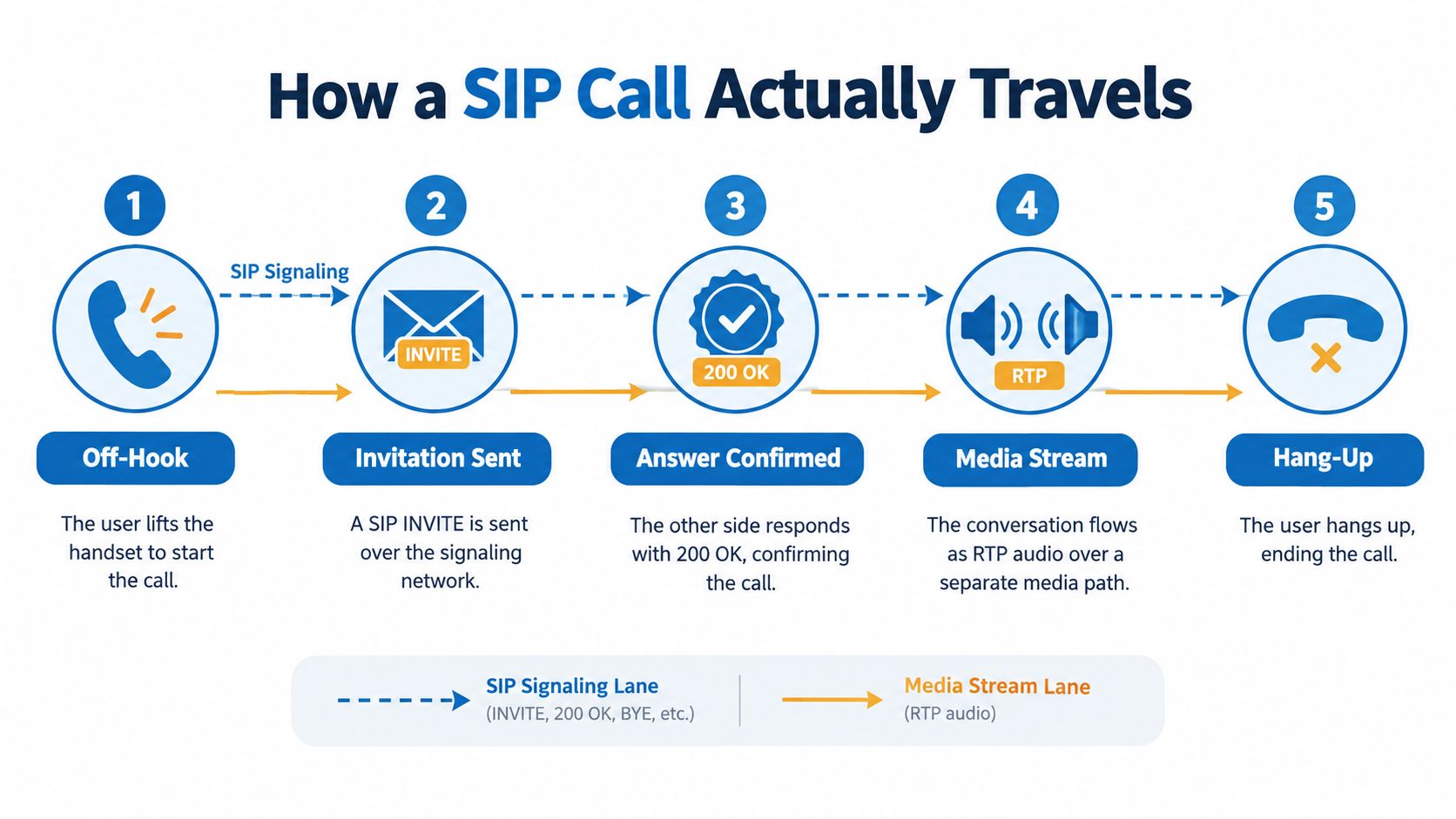
The call flow in practical terms
Register: When a phone or softphone comes online, it identifies itself to the service or PBX. Registration tells the system where that extension can receive calls. A remote worker's laptop and an office desk phone may register as different endpoints for the same business environment.
Invite: When the user dials, SIP sends an invitation toward the destination. The system uses its routing rules to decide whether the call goes to an internal extension, an auto-attendant, another SIP user, or a public telephone number through a gateway or trunk.
Negotiate: The endpoints agree on the session details, such as the media capabilities and where the live traffic should travel. A softphone performs this work in software. A hardware IP phone performs it in the handset. A gateway can connect the IP call to another type of telephone network.
Ring and talk: The destination rings, and the signaling confirms the answer. The voice then travels through a separate media path, typically using a real-time transport protocol. SIP remains available to manage changes such as hold, transfer, or adding a participant.
Bye: When someone hangs up, SIP sends a termination message. The system releases the session and updates the endpoint status.
SIP can operate over UDP, TCP, or SCTP, while the media stream is usually carried separately (IETF SIP transport reference). This is why successful registration doesn't guarantee a successful conversation. A firewall may permit signaling but block media ports. NAT traversal may be incomplete. A session border controller may reject or mishandle a session.
Where the supporting systems fit
A session border controller, or SBC, sits at the edge between networks and inspects signaling and real-time traffic. It can help enforce policy, protect the service from malformed packets, and ensure that media belongs to an established session. In a larger deployment, it also helps manage interoperability between the provider, the business network, and external telephone destinations.
The practical lesson is simple: SIP establishes the call, while the network must carry the media cleanly and securely. A strong connection indicator can coexist with silence, one-way audio, or clipped speech if the media path is misconfigured.
Hosted vs On-Prem SIP Deployments
The main deployment decision is where the phone system's control software lives. With hosted SIP, the provider runs the PBX functions in its infrastructure. Extensions, call routing, voicemail, auto-attendants, and much of the maintenance are managed through the provider's platform.
With on-prem SIP, the business operates an IP PBX or related communications server in its own office or data center. The business controls more of the system, but it also owns more of the responsibility for updates, backups, access control, troubleshooting, and resilience.
Neither option is automatically correct. A small company with limited IT capacity may prefer hosted administration, while a regulated or highly customized operation may need deeper control. A business with several locations may value centralized management, whereas an organization with strict local integration requirements may accept the operational burden of an on-premises system.
Compare the operating model
| Decision Factor | Hosted SIP | On-Prem SIP |
|---|---|---|
| Infrastructure | Provider operates the phone-system platform | Business operates the PBX and related systems |
| IT workload | Lower internal maintenance burden | Greater responsibility for updates, backups, and monitoring |
| Growth | Usually easier to add users and locations through the service | Scaling may require additional capacity and administration |
| Customization | Depends on provider features and supported integrations | More direct control over applications and call logic |
| Outage planning | Requires provider and local-internet failover planning | Requires local power, server, network, and carrier resilience |
| Cost profile | Recurring service model with less hardware ownership | More equipment and administration under business control |
A hosted model doesn't eliminate network design. Phones still depend on local switching, Wi-Fi where applicable, power, routing, and the internet connection. An on-premises model doesn't eliminate provider dependencies either, because external calling normally still requires carrier connectivity.
Practical rule: Choose hosted SIP when reducing operational responsibility matters most. Choose on-prem SIP when control, customization, or an existing communications environment justifies the additional work.
A hybrid approach can fit businesses that aren't ready for a complete replacement. For example, a hosted PBX may coexist with SIP trunks connected to an existing office system, allowing a phased migration. Before selecting a service, document the current PBX, phone models, number ownership, call flows, locations, and failover expectations. Businesses evaluating a hosted option can review Premier Broadband's hosted VoIP offering as one example of how provider-managed calling can be packaged.
Features That Matter in a Modern Business SIP System
A feature list is useful only when it maps to a daily business problem. The right question isn't “How many features does this package include?” It's “What should happen when a customer calls and nobody answers, when an employee leaves the office, or when the company makes an outbound call?”
SIP gives the system a flexible control layer, and the PBX or service applies those rules. A business can then build workflows around a few practical jobs.
Route calls to the right person
An auto-attendant can answer with a greeting and direct callers to sales, support, billing, or a named extension. Call queues can hold callers for a team instead of sending every call to one desk. Business-hours rules can send evening calls to voicemail or an approved answering destination.
Find-me-follow-me extends the same workflow across endpoints. An employee might answer at a desk phone first, then receive the call in a softphone or mobile application if they're away. The system manages the sequence through signaling, while the employee experiences one business identity.
Capture messages and make them actionable
Voicemail-to-email can send a notification and an audio attachment to an inbox. Some platforms also provide transcription, but the business should verify how accuracy, retention, access, and sensitive information are handled. The main benefit is operational: a message can enter the same workflow as other customer requests instead of remaining trapped on a handset.
Present a consistent identity
Branded caller ID helps outbound calls display the organization's recognized number or business identity where supported. That can make it easier for customers to identify a legitimate return call, but it shouldn't be treated as proof that every incoming caller is genuine. Caller-ID presentation and caller authentication are different security questions.
The capabilities commonly associated with SIP extend beyond desk phones. In a survey of nearly 300 IT professionals, 89% ranked VoIP as the most important media type controlled through SIP, followed by unified communications at 69% and videoconferencing at 65% (SIP trunking survey). That range reflects SIP's role in coordinating multiple communication experiences, not just replacing a physical line.
A provider's mobile and desktop tools, extension setup, call-flow design, and desk-phone support determine whether those features work as a coherent system. For an example of a packaged business calling application, see Premier Broadband's OneApp features.
Security Threats and Layered Defenses
A SIP phone system is also a system that can place calls on the company's behalf. If an attacker gains control of an extension or trunk, the result may be unauthorized calling, service disruption, or fraudulent charges. Strong passwords help, but they don't address every path an attacker can use.
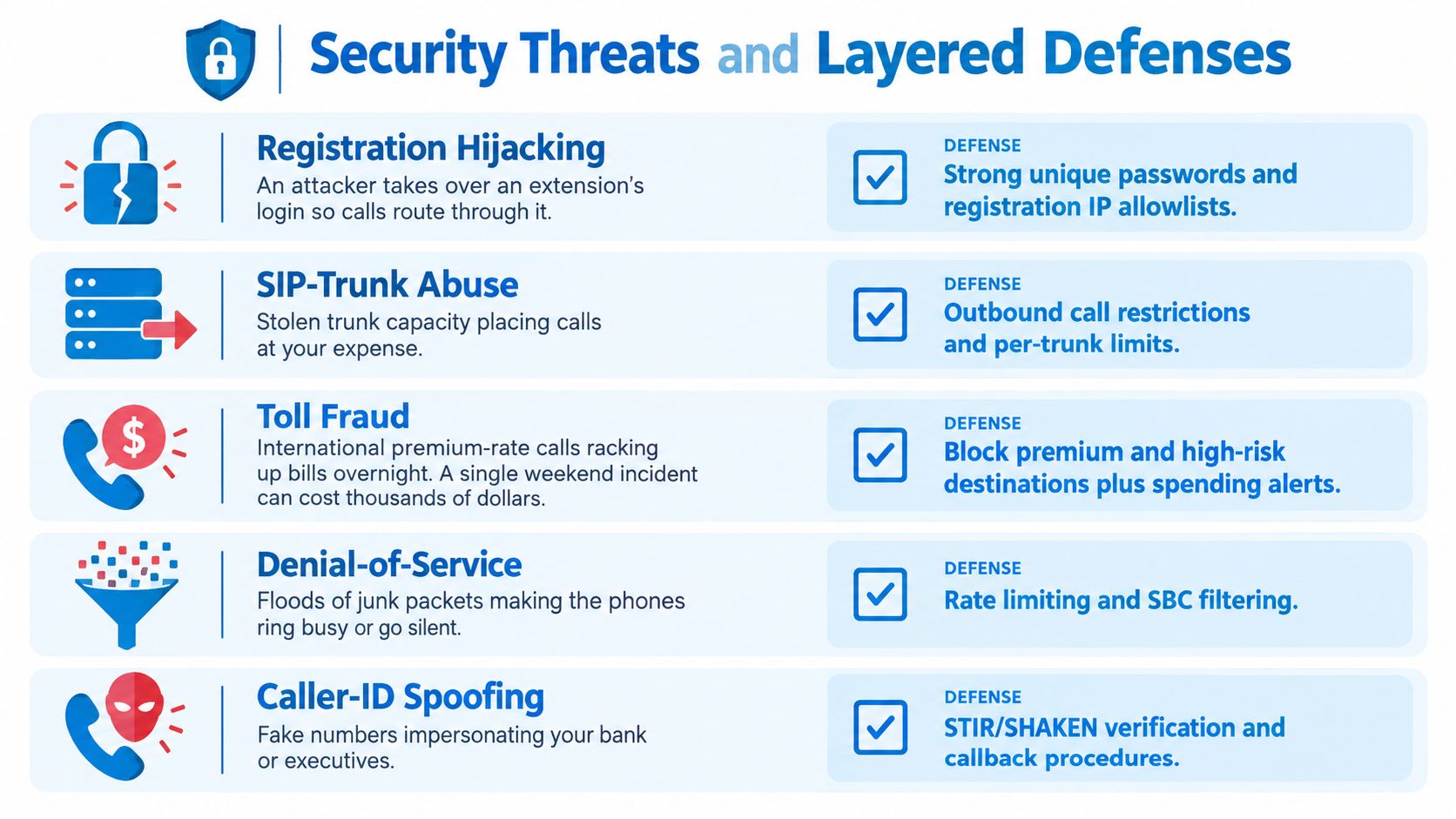
A 2025 peer-reviewed review identifies registration hijacking, SIP-trunk hacking, toll fraud, denial-of-service attacks, and caller-ID spoofing as recurring threats. It also notes that SIP-trunk abuse can generate heavy traffic and premium-rate charges, while caller authentication standards aren't implemented consistently across networks (2025 SIP security review).
Match each threat to a control
Registration hijacking occurs when someone captures or abuses an extension's credentials. The attacker may register another device, receive calls, or place calls as that user. Use strong, unique per-device credentials, restrict registrations where practical, and watch for unexpected locations or simultaneous registrations.
SIP-trunk abuse affects the connection between the business system and the carrier. Limit destinations, impose per-trunk policies, and monitor call volume. Toll fraud deserves a default-deny mindset for international and premium-rate destinations, followed by approved exceptions and spending alerts.
Denial-of-service attacks can flood the edge of the system with unwanted traffic. An SBC can inspect signaling and real-time packets, reject malformed traffic, apply rate controls, and block packets that don't belong to established sessions.
Caller-ID spoofing can make a call appear to come from a bank, supplier, executive, or internal number. Staff need verification procedures, such as calling back through a known number before approving payments or sharing credentials. For businesses that also need to evaluate the wider financial impact of a cyber incident, a resource such as cyber cover for trades can help frame the insurance questions separately from the technical controls.
Give the administrator a short checklist
- Protect identities: Use strong credentials, controlled registrations, and multifactor authentication where supported.
- Encrypt sessions: Use TLS for signaling and appropriate media protection where the service and endpoints support it. NIST-associated SIP security mechanisms include TLS, HTTP Digest, IPsec, and S/MIME, with modern cryptography preferred over obsolete protection (SIP security mechanisms).
- Separate traffic: Place voice devices on a dedicated VLAN or logically separate network, with restricted access to business systems.
- Inspect the edge: Use an SBC or equivalent provider controls to filter signaling and media.
- Monitor behavior: Alert on registration floods, unusual locations, call bursts, unauthorized redirection, and unexpected destinations.
- Prepare response: Maintain a process for disabling extensions, blocking destinations, contacting the provider, and preserving logs.
Security works best as a set of controls that compensate for one another. No single password policy, encryption setting, or caller-ID mechanism can contain every SIP threat.
Emergency Calling and Outage Reality
A phone can work for ordinary calls and still fail to reach emergency services. That risk is easy to miss when a SIP system runs through a softphone, a home router, or a small office network that depends on local power.
The failure modes are concrete. A fiber cut can interrupt service. A router or optical-network terminal can lose power. An employee can use a mobile application away from the registered service address. An address can be entered incorrectly, or a provider-side outage can affect emergency routing even while some other calling functions remain available.
The FCC's 2025 NG911 Transition Order requires providers to deliver SIP-based 911 traffic to emergency authorities through next-generation emergency-service networks. The FCC analysis estimates that a 0.14% outage rate applied to 28.5 million EMS dispatches could correspond to roughly 39,900 potentially life-saving 911 calls affected by failures or outages (FCC NG911 order).
Build an outage plan around the actual failure
- Local power loss: Use battery backup for the optical-network terminal, router, switches, and powered phones where appropriate.
- Internet failure: Consider cellular or secondary-internet failover for locations that need continuity.
- Incorrect location data: Verify the service address for every office and supported remote location, especially when users can move between networks.
- Softphone mobility: Tell users when emergency calling may not reflect their current physical location and provide an alternate method.
- Provider outage: Define automatic forwarding or a manual fallback to mobile numbers when the service supports it.
- Testing: Establish periodic internal checks that verify addresses and failover procedures without placing unnecessary emergency calls.
Power resilience often involves electrical equipment beyond the phone system. Businesses comparing backup-power approaches can use this generator interlock versus transfer switch comparison as background when coordinating with a qualified electrician.
Emergency readiness is therefore a network-design and operating procedure, not a checkbox in a feature table. Document who updates addresses, who approves forwarding rules, and who acts when monitoring shows an outage.
Network Design for Reliable SIP Call Quality
Users hear network behavior as delay, robotic audio, clipped words, or overlapping speech. A speed-test result alone won't explain those symptoms because conversational quality depends on the complete path between speakers.
End-to-end delay is the time between speaking and hearing the reply. ITU-T G.114 classifies one-way transmission time below 150 milliseconds as acceptable for most applications, 150 to 400 milliseconds as conditionally acceptable, and delays above 400 milliseconds as unsuitable for general network planning (ITU-T G.114 guidance). Highly interactive conversations can feel impaired well before the upper boundary.
Ask for measurable network behavior
Jitter means packets arrive with uneven timing, so the system must buffer them. Packet loss removes pieces of audio. Packet-order problems deliver pieces out of sequence. Queuing caused by large uploads can increase delay even when the connection has plenty of headline bandwidth.
A practical office design should include:
- Voice segmentation: Place phones on a dedicated VLAN or logically separate network.
- Traffic priority: Use quality-of-service treatment so real-time media doesn't wait behind bulk transfers.
- Upload capacity: Favor symmetrical connectivity when calls, cloud applications, backups, and file uploads compete for the uplink.
- Managed Wi-Fi: Reduce wireless contention and retransmissions near phones that use Wi-Fi.
- Continuous monitoring: Track one-way delay, jitter, packet loss, and packet-order problems instead of checking speed alone.
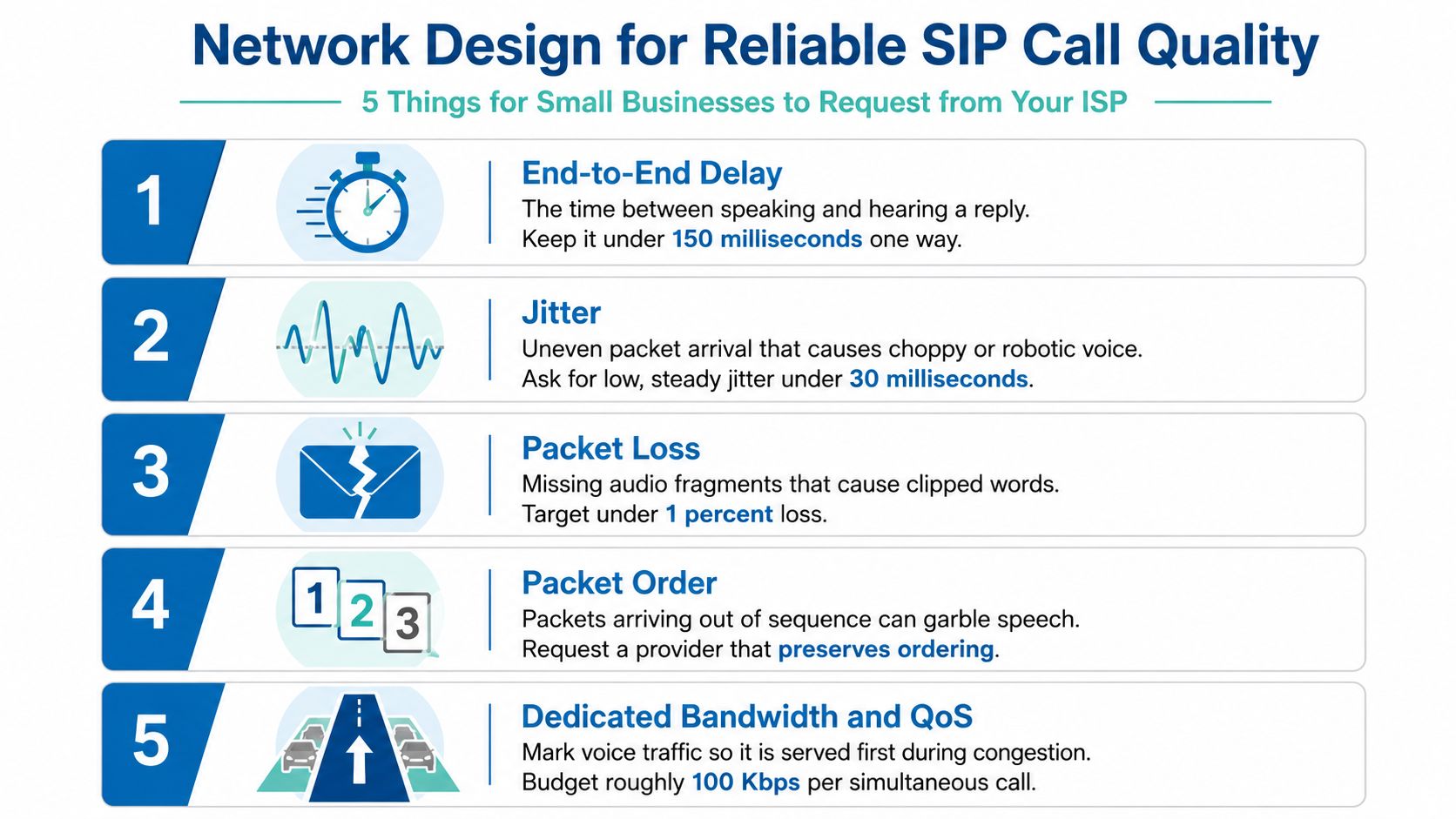
A provider conversation should focus on these operational details: how voice traffic is prioritized, how outages are detected, what failover exists, and which measurements the customer can review. A business can also use Premier Broadband's Typito video maker when creating internal training material about call procedures, but the underlying network still needs to meet the voice requirements.
The goal isn't to buy the fastest plan without context. It's to build a predictable path that keeps real-time traffic moving when the office is busy.
Putting It All Together With a Deployment Checklist
Use this sequence before moving numbers or ordering phones:
- Measure the connection: Confirm that the internet path has suitable upload capacity and stable latency, not just a high download result.
- Prepare the LAN: Create voice segmentation, apply traffic priority, and review switching and Wi-Fi behavior.
- Choose the operating model: Compare hosted, on-prem, or hybrid SIP against your IT capacity and customization needs.
- Secure the system: Use unique credentials, controlled registrations, encrypted signaling where supported, destination restrictions, and monitoring.
- Map the call flows: Document business hours, queues, voicemail, mobile users, transfers, and outbound caller-ID behavior.
- Register emergency locations: Verify every service address and document what happens during power, internet, or provider failure.
- Test and monitor: Exercise forwarding and failover procedures, then watch for unusual registrations, call bursts, and media-quality problems.
For teams transforming operational records or coordinating user and extension data, Premier Broadband's CSV solution may be relevant to the broader implementation workflow. SIP isn't a one-time purchase that can be ignored after installation. It's a living service that needs clear ownership, periodic testing, and ongoing fraud monitoring.
Premier Broadband provides business internet and hosted VoIP services, including call flows, desk-phone and softphone support, voicemail-to-email, caller ID, and mobile app integration. Review the available options and discuss a deployment plan through Premier Broadband so your phone system is designed around call quality, security, and outage readiness.