

Forwarding a voicemail is usually pretty simple. On most modern phones, it’s as easy as finding the “share” button in your voicemail app. With just a few taps, you can send the audio file over text, email, or another messaging app, turning a static message into something you can easily pass along.
Why Voicemail Forwarding Is a Modern Necessity
In a world of instant messaging and constant connection, old-school voicemail can feel a bit behind the times. But knowing how to forward a voicemail is more than just a neat trick—it’s a crucial skill for keeping things running smoothly, both at work and at home.
It’s all about closing communication gaps and getting the right information to the right person, fast. Imagine a client leaves a detailed message with technical questions. Instead of trying to scribble down notes and summarize it, you can just forward the original audio straight to an expert on your team. Every detail is preserved, and nothing gets lost in translation.
The same goes for personal life. You might want to share a sweet message from a grandparent with the rest of the family or send a contractor's specific instructions over to your partner. In these cases, forwarding turns a simple message into a collaborative tool. The days of dialing into a clunky carrier service are fading, replaced by intuitive smartphone apps and powerful VoIP systems that make sharing effortless.
To give you a quick overview of your options, here’s a breakdown of the common ways to forward voicemails depending on your device.
Quick Guide to Voicemail Forwarding Methods
| Platform | Primary Method | Best For |
|---|---|---|
| iPhone (Visual Voicemail) | Share Sheet (iMessage, Mail, AirDrop) | Quick, seamless sharing within the Apple ecosystem. |
| Android (Visual Voicemail) | Share function within the Phone/Voicemail app | Versatile sharing to any app (email, text, cloud storage). |
| Carrier Voicemail (Basic) | Dial-in system with forwarding commands | When you don't have a smartphone or visual voicemail. |
| Hosted VoIP (like PremierUC) | Voicemail-to-email, online portal sharing | Businesses needing automated, reliable message delivery. |
Each method offers a different experience, but they all solve the same core problem: getting an important message from point A to point B without losing a single detail.
Connecting Across Platforms
How you forward a message really depends on what you're using, whether it’s an iPhone, an Android, a traditional landline, or a cloud-based VoIP system like ours.
This infographic breaks down the core features you'll run into when managing and forwarding voicemails.
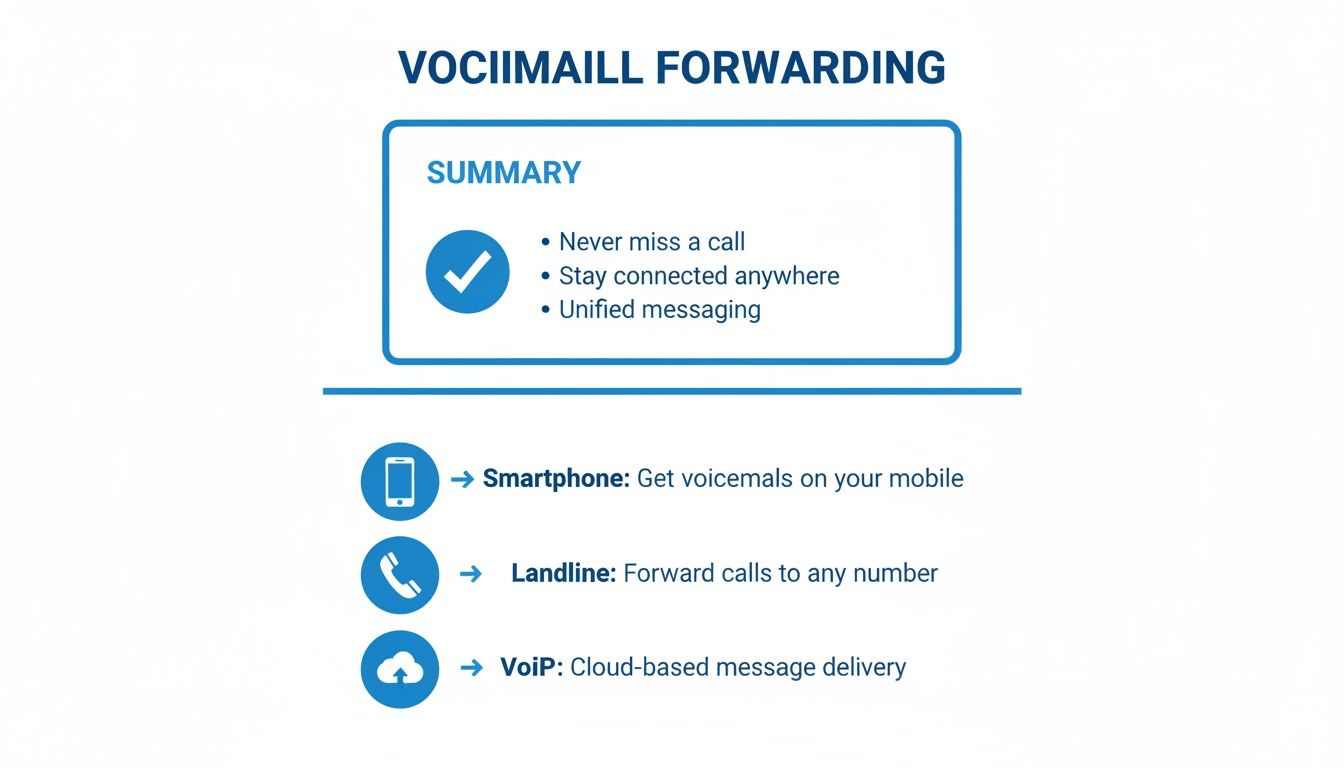
As you can see, each system has its own level of flexibility. Modern VoIP platforms tend to provide the most advanced and automated features, which is why so many businesses rely on them.
The need to capture every message is more important than you might think. Research shows that a shocking 80% of callers hang up if they hit an automated system and don't get to leave a message with a person. That means businesses sticking to old-school voicemail could be missing out on major opportunities. Features that make voicemails more accessible—like forwarding to email—are becoming essential. You can discover more insights about voicemail engagement and how it impacts modern businesses.
Key Takeaway: Voicemail forwarding isn't just about sharing an audio clip. It’s a smart way to ensure accuracy, speed up response times, and make sure valuable information never gets lost. Getting the hang of it keeps you connected and productive, no matter what phone or system you use.
Forwarding Voicemails Directly from Your Smartphone
Need to share a voicemail? Sometimes, sending that audio file directly from your smartphone is the quickest and easiest way to get it done. Whether it’s a critical update from a client or a heartfelt message from family, modern phones make forwarding a voicemail a task you can knock out in just a few taps.
This is all thanks to visual voicemail. It’s the feature that lays out your messages in a neat list, almost like an email inbox. You can see who called and when, then jump right to the message you need without listening to them all in order. This visual layout is what makes selecting and sharing a specific voicemail so simple.
Forwarding Voicemails on an iPhone
If you have an iPhone, Apple has this process baked right into the Phone app. It’s incredibly user-friendly. You can send the voicemail audio file through Messages, Mail, AirDrop, or even save it to a cloud app like Dropbox.
Just open your Phone app and tap the "Voicemail" tab in the bottom right corner.
- Pick the Voicemail: Tap on the message you want to forward.
- Hit the Share Button: Look for the small square icon with an arrow pointing up—that’s the universal Share button on iOS.
- Choose How to Send It: Tapping that button pulls up your Share Sheet. From there, you can pick a contact to send it to via iMessage, email it with the Mail app, or AirDrop it to another Apple device nearby.
Here’s exactly what the iPhone's Share Sheet looks like when you’re about to send off a voicemail.
This screen puts all your communication apps right at your fingertips, making the whole thing incredibly efficient.
Navigating Voicemail Forwarding on Android Devices
With Android, the exact steps can vary a bit. It really depends on who made your phone—like Samsung or Google—and which mobile carrier you use. The good news is, the basic idea is the same across the board.
Most Android phones have a built-in Phone or Voicemail app with visual voicemail. You’ll open the app, head to the voicemail tab, and tap on the message you want to share. From there, look for a "Share" icon (it often looks like three dots connected by lines) or a menu option labeled "Forward" or "Send to…"
Pro Tip: If your phone's default app doesn't have an easy sharing option, check the Google Play Store for a third-party visual voicemail app. They often come with extra features like voicemail-to-text transcription and better ways to organize your messages.
No matter what device you're using, the end goal is always to turn that voicemail into an audio file you can easily share. If you get stuck navigating your carrier’s specific menus, our guide to understanding your voicemail menu can help clear up any confusion about common commands and settings. That way, you can manage your messages like a pro.
Handling Voicemails from Landlines and Carrier Services

While smartphones give us the luxury of visual voicemail, a lot of us still use traditional landlines or basic carrier plans without that slick interface. Knowing how to forward voicemail in these situations can feel like a throwback, but it's totally manageable once you get the hang of it.
Forget a simple "share" button. These systems rely on a series of audio prompts and keypad commands. It’s less about tapping a screen and more about listening carefully to an automated menu. You'll have to dial into your voicemail, punch in your PIN, and follow the voice instructions to find and send your message.
Navigating the Automated Menu
First things first, you have to access your voicemail box. This usually means dialing a specific number—sometimes it's your own phone number, other times it's a carrier code like *86. Once you're in, the system will play your messages one by one.
Pay attention after a message finishes playing, because that's when the system lists your options. This is the key moment you're listening for the command to forward the message.
- Common Forwarding Command: On many carriers, pressing the number 7 will start the forwarding process.
- Other Options: You’ll likely also hear choices to reply (often 8) or delete (usually 9).
These codes aren't universal, so checking your phone provider's help guide is always the safest bet. After you hit the forward key, you’ll be asked to enter the recipient's full 10-digit phone number, and then press the pound key (#) to send it off.
Here’s a real-world example: Say a contractor leaves a crucial voicemail on your home landline with project details. To get it to your partner, you'd dial into voicemail, listen to the message, press the key for "forward" (probably 7), and then carefully type in your partner's cell number to pass it along.
A Smarter Alternative: Conditional Call Forwarding
Going through the manual forward process works, but let's be honest—it’s a bit of a pain. A much better solution is to set up conditional call forwarding before you even need it. This feature automatically sends calls to another number when your line is busy, you don't answer, or your phone is off.
By having unanswered calls routed to a mobile number with visual voicemail or a modern VoIP service, you completely sidestep the old dial-in system. The voicemail gets recorded on a modern platform right from the start, making it incredibly easy to save, share, or even transcribe. Most providers let you manage these settings online or by dialing special star codes. For a deeper dive, check out guides on setting up call forwarding to see how it works. This one simple setup can save you a ton of time and hassle down the road.
Unlocking Advanced Voicemail Forwarding with VoIP
Fumbling through an automated menu on a landline feels like a relic from a bygone era, because it is. Modern businesses have moved past these clunky systems, embracing the flexibility and raw power of Voice over Internet Protocol (VoIP). Unlike traditional phone lines, VoIP turns your voicemail from a passive message bank into an active, dynamic business tool.
This isn't just about convenience; it's a strategic move. The numbers tell the story. In 2024, more than 3 billion people use VoIP globally, yet outdated voicemail systems still cause 80% of callers to hang up in frustration. This is where features like Premier Broadband's voicemail-to-email really shine. They directly address the 60% of users who now demand cloud-based communication tools. You can explore more VoIP statistics that confirm just how widespread this shift is.
The real advantage here is automation. Instead of manually dialing in and punching keys, a VoIP system instantly routes messages for you, making sure nothing ever slips through the cracks.
The Power of Voicemail to Email
If there's one standout feature in any modern VoIP setup, it's definitely voicemail-to-email. This function is a complete game-changer for anyone who manages customer calls, works with a team, or spends time out of the office.
Here’s how it works: when a caller leaves a message, the system instantly converts it into an audio file (usually an MP3) and zips it over to a designated email address. It’s simple, immediate, and incredibly efficient.
- Create a Digital Paper Trail: Every voicemail is now a logged, timestamped email. This creates an organized archive you can always refer back to.
- Delegate with a Click: Got a technical question from a client that your support team should handle? Just forward the email. No need to play phone tag or risk misquoting important details.
- Access Messages Anywhere: If you can check your email, you can check your voicemail—whether you're on a laptop, tablet, or your phone.
This simple bit of automation completely eliminates the need to check a separate voicemail box. It integrates a critical communication channel right into your daily workflow.
Beyond Audio Files with Transcription
Many advanced VoIP services take things a step further by including voicemail transcription. The system uses speech-to-text technology to convert the audio message into plain text, which is included right in the body of the email.
Voicemail transcription is a massive time-saver. It lets you quickly scan a message's content without having to listen to the audio. This is perfect for noisy environments or when you just need to grab a phone number or address without replaying the file.
Imagine you're in a meeting and a voicemail email pops up. You can glance at the text, instantly grasp the message's urgency, and decide if it needs an immediate response—all without disrupting the conversation. This level of efficiency is what modern communication is all about. To see how these features come together, check out our guide on VoIP solutions for small business.
Ultimately, VoIP systems centralize all your communications, making it simple to manage everything. Suddenly, knowing how to forward voicemail messages becomes a seamless part of your daily operations instead of a tedious chore.
Best Practices For Voicemail Security and Management

Knowing how to forward a voicemail is handy, but it also comes with a responsibility to keep that information safe. Every message you share is a piece of data, and you have to treat it carefully to protect yourself and the person who left it. Before you hit "send," always take a moment to think about what you're sharing.
A simple but critical step is just double-checking the recipient. We’ve all sent an email to the wrong person before; imagine doing that with a confidential client update. Treat forwarded voicemails with the same caution you would any sensitive information.
Smart Voicemail Management Habits
Good management is more than just forwarding messages. If you build a few solid habits, your voicemail box can be an organized, useful tool instead of a cluttered mess causing you stress. It really starts with creating a system for what you keep and what you get rid of.
Here are a few practical tips to get you started:
- Archive Selectively: Not every voicemail is a keepsake. Save the ones that contain important business agreements, key contact information, or anything with legal relevance. Tucking them away in a secure cloud folder creates a reliable backup.
- Delete Promptly: Make it a habit to delete messages that are no longer needed, like a quick "call me back" request. This keeps your inbox clean and makes it much easier to find the important stuff later.
- Secure Your Devices: Your voicemail data is only as secure as the device it's on. This also means knowing how to protect personal data before selling your old phone so you don't accidentally leave sensitive messages behind.
When you start treating voicemails as part of your overall data footprint, you make smarter decisions. This mindset is key to protecting personal and professional information across every channel. Strong digital hygiene is essential, and you can learn more by exploring our guide to the best practices for network security.
Troubleshooting Common Forwarding Issues
Even with the best intentions, you're bound to run into a snag when forwarding a voicemail every now and then. Don't get frustrated—most problems have pretty simple solutions.
If a forward fails, the first thing to check is your internet connection. A weak Wi-Fi or cellular signal is the most common culprit. For those using a voicemail-to-email service, take a peek in your spam or junk folder, as automated messages can sometimes get filtered out by mistake.
And if you're dealing with poor audio quality, like a garbled recording, try re-downloading the file or attempting the forward again once you have a stronger signal. By methodically checking these common pain points, you can solve most issues quickly and get your message on its way.
Frequently Asked Questions About Voicemail Forwarding
Even with the best instructions, you're bound to run into a few questions when forwarding voicemails. We've been there. Here are some answers to the most common things people ask, so you can share messages without a second thought.
Is It Legal to Forward Someone Else's Voicemail?
This question pops up a lot, and the answer is… it's complicated. The legality really depends on the situation and whether the person leaving the message had a reasonable expectation of privacy.
In a business context, it’s usually fine. Forwarding a client's technical question to your support team, for example, is just part of the workflow.
When it comes to personal messages, though, you need to be more careful. It's always a good idea to get the caller's permission before you share a private message with someone else.
Key Takeaway: When in doubt, always err on the side of caution. If a message contains personal or sensitive details, just ask the original caller before forwarding it. It’s the safest and most respectful approach.
Are There Alternatives to Forwarding an Audio File?
Absolutely. Sometimes sending the whole audio file is overkill. Modern tools give you much smarter ways to share the important information while saving time and protecting privacy.
- Use Voicemail Transcription: Many VoIP services can automatically turn voicemails into text. You can just copy and paste the key info into an email or chat—it's quick and discreet.
- Summarize the Key Points: If you get a long, rambling message, just pull out the important stuff yourself. Note the caller’s name, number, and what they need, then send that summary along.
- Take a Screenshot: With visual voicemail on your smartphone, a quick screenshot can often do the trick. It shows the caller's info and call time without sharing the actual audio.
What Should I Do If a Voicemail Fails to Forward?
It’s incredibly frustrating when a forward fails, but don't panic. The solution is usually pretty simple. Before calling for help, run through this quick checklist.
First, check your internet connection. A spotty Wi-Fi or cellular signal is the number one reason sends fail. If your connection seems strong, a good old-fashioned device restart can often clear up any temporary software glitches.
Using a voicemail-to-email service? Don't forget to check your spam or junk folder. Automated emails with audio attachments can sometimes get flagged by mistake. And finally, double-check the recipient's phone number or email address—one wrong digit can stop the whole process.
Ready to upgrade your communication? With Premier Broadband, you get crystal-clear VoIP phone service featuring advanced tools like voicemail-to-email and a mobile app to manage messages on the go. Learn more at https://premierbroadband.com.