

Your phones still ring, but the system behind them may already be working against you.
A customer calls the main line. It rings at the front desk, then bounces to voicemail because the receptionist is helping someone in person. A salesperson returns the call from a mobile phone, but the office has weak cellular coverage, so the audio breaks up. Meanwhile, your IT person spends part of the afternoon dealing with desk phones, old cabling, and one more mystery bill with charges no one expected.
That’s the moment many owners start looking for a better business phone provider service.
The hard part isn’t finding vendors. It’s sorting through feature lists while actual risks stay buried underneath. Most guides talk about voicemail, auto attendants, and mobile apps. Fewer talk about the foundation that makes those tools reliable: your internet path, voice prioritization, failover design, in-building cellular coverage, and the hidden fees that show up after the contract is signed.
A phone upgrade works a lot like a building renovation. The paint matters. The layout matters. But if the plumbing and electrical work are weak, every surface improvement disappoints you later. Business phone systems work the same way.
Starting Your Business Phone Provider Service Journey
A lot of businesses start shopping for a new phone system because something finally breaks. Maybe your old PBX is expensive to maintain. Maybe remote staff need to answer calls from laptops and mobile apps. Maybe your current setup technically works, but it creates daily friction that slows down sales and service.
That friction usually shows up in simple moments.
A customer has to call twice. An employee can’t transfer a call cleanly. A manager can’t see call activity without asking someone to pull a report. A mobile user loses calls inside the office because the cellular signal is weak near interior rooms.
The first questions worth asking
Before you compare providers, get clear on these points:
- How do calls reach your team now: Are calls tied to desk phones, personal cell phones, or a mix of both?
- Where does work happen: In one office, across several locations, or partly remote?
- What causes the most pain: Dropped calls, missed calls, weak reporting, hardware problems, or billing surprises?
- What has to stay the same: Existing numbers, receptionist workflows, call queues, or CRM integrations?
Those questions keep you from buying a feature-rich system that still doesn’t solve your real problem.
Why the network matters early
Many owners assume a phone provider alone controls call quality. That’s only partly true. Modern calling depends on the connection underneath it. If your network is congested or your office has dead zones for mobile failover, even a polished cloud platform can feel unreliable.
Practical rule: Treat phone planning as both a communications decision and a network decision.
If you need a simple primer before going deeper, this overview of a cloud phone system is a useful starting point: https://premierbroadband.com/what-is-cloud-phone-system/
A good buying process starts with a mindset shift. Don’t ask only, “Which phone features do we want?” Ask, “What infrastructure do those features depend on, and what will they really cost us over time?”
Understanding Business Phone Provider Service
A business phone provider service is the system your company uses to place, receive, route, manage, and monitor business calls. Today, that often includes messaging, video meetings, voicemail transcription, mobile apps, and integrations with tools like Microsoft 365 or a CRM.
The easiest analogy is plumbing.
Your phones are the faucets your staff touches. The provider service is the network of pipes, valves, pressure controls, and backup paths behind the walls. If the hidden system is designed well, everything feels smooth. If it isn’t, users only notice the problems.

From landlines to internet-based calling
Older phone systems relied on dedicated lines and on-site PBX hardware. Newer systems use VoIP, or voice over internet protocol. Instead of reserving a fixed circuit for every call, VoIP turns voice into data packets and sends them over an IP network.
That shift is no longer niche. The global VoIP market reached an estimated USD 161.79 billion in 2025, up from USD 132.5 billion in 2023, and is projected to expand to USD 415.20 billion by 2034 at an 11.0% to 11.1% CAGR, according to Speedflow’s review of the VoIP industry in 2025.
That growth tells you something practical. Business communications have moved from hardware-first systems to network-first platforms.
The core pieces working together
You don’t need to become a telecom engineer, but a few terms help:
- VoIP: Voice sent over the internet rather than traditional phone circuits.
- SIP: The signaling method that helps start, manage, and end calls.
- Cloud PBX: The switching and call-routing logic lives in the provider’s environment instead of a box in your server room.
- UCaaS: A broader platform that combines calling with messaging, meetings, and collaboration.
If you want a quick non-technical refresher on what telephony is, that background makes the modern versions easier to understand.
Why phone quality isn’t just about the app
At this point, many buyers get tripped up. They test a sleek mobile app and assume the hard part is solved. It isn’t.
Call quality depends on whether the network can move voice traffic smoothly and consistently. Voice doesn’t tolerate delay and congestion very well. Email can wait a moment. A phone conversation can’t. That’s why a modern system needs smart routing, enough bandwidth, and policies that prioritize voice when the network gets busy.
A broader platform approach often helps. This introduction to UCaaS explains why businesses increasingly bundle calling with other communications tools instead of treating phones as a stand-alone product: https://premierbroadband.com/what-is-ucaas/
A phone system is no longer just a phone system. It’s a real-time application riding on your network, your office layout, and your mobile workflows.
That’s the key idea to carry forward. The provider matters. The infrastructure underneath matters just as much.
Exploring Types and Features of Business Phone Services
Not every business phone provider service is built the same way. Two providers may both advertise “cloud calling,” but one may suit a single office with existing equipment while another is better for a distributed team using laptops and smartphones all day.
The service model shapes installation work, ongoing support, and how fast you can scale.
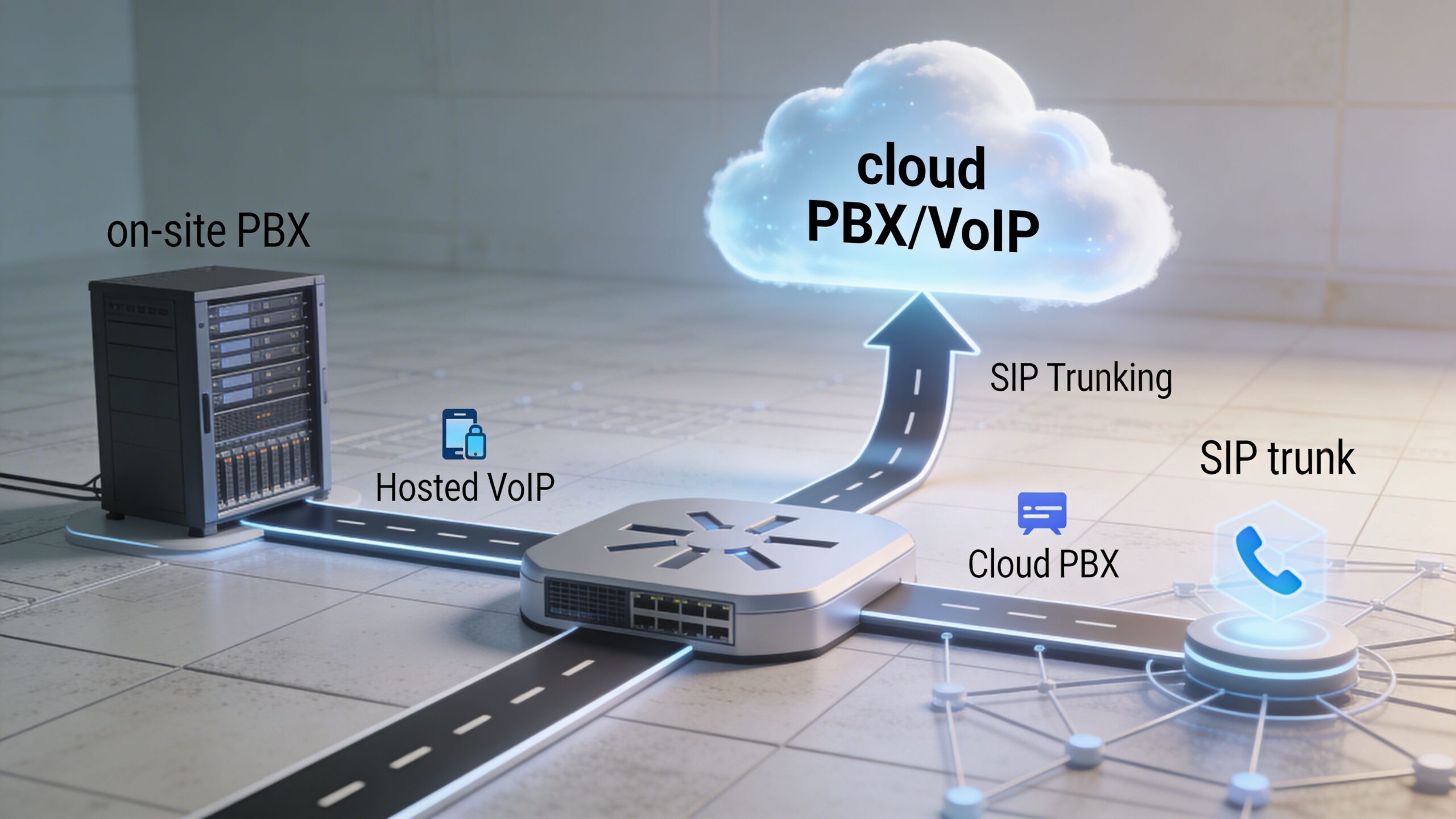
Hosted VoIP
Hosted VoIP is the most common option for small and midsize businesses. The provider hosts the phone system in the cloud, and your team connects through desk phones, softphones, or mobile apps.
This model usually makes sense when you want less on-site hardware and easier administration.
A typical setup looks like this:
- Calls enter through the provider platform: The provider handles routing, voicemail, menus, and extensions.
- Users connect from multiple devices: Desk phone in the office, app on a laptop, app on a mobile phone.
- Changes happen in software: Adding users, changing call flows, and updating greetings typically happen in an admin portal.
Hosted VoIP is often the easiest path for companies that want modern features without running telecom equipment in-house.
SIP trunking
SIP trunking fits businesses that already have a PBX they want to keep for now. Think of it as replacing the traditional phone lines connected to your PBX with internet-based trunks.
This approach can work well when your existing call control is still useful, but your line costs or flexibility are not.
It’s often chosen when:
- The PBX investment is still recent: You don’t want to replace it immediately.
- Internal workflows depend on that hardware: Some organizations have custom routing built around the current PBX.
- You want gradual modernization: SIP can serve as a bridge instead of a full rip-and-replace.
The trade-off is complexity. You still own more moving parts, and troubleshooting can involve both the PBX side and the carrier side.
On-site PBX versus cloud PBX
The simplest comparison is ownership versus outsourcing.
| Model | Where call control lives | What your team manages | Best fit |
|---|---|---|---|
| On-site PBX | In your office | Hardware, maintenance, updates | Firms with deep in-house telecom needs |
| Cloud PBX | In the provider environment | User setup, policy, devices | Most small and midsize businesses |
| Hybrid setup | Split between both | More coordination across systems | Businesses in transition |
An on-site PBX gives control, but it also keeps responsibility local. If the hardware fails, your office feels it immediately. A cloud PBX moves that burden to the provider, but then your internet connection and network design become central to performance.
Cloud-native phone systems
A cloud-native system goes further than hosting old phone logic elsewhere. It’s designed around software, APIs, mobile use, and integrated collaboration from the beginning.
That usually means features like:
- Auto attendants and call queues
- Voicemail-to-email
- Mobile and desktop apps
- CRM integrations
- Video meetings and team messaging
- Analytics and reporting
For many smaller organizations, this is the cleanest long-term model. The business gains flexibility without carrying telecom hardware debt.
For a practical example of how these services are packaged for smaller teams, this overview of VoIP solutions for small business is worth reviewing: https://premierbroadband.com/voip-solutions-for-small-business/
A short visual can help if you’re deciding between these architectures:
Where buyers often choose the wrong model
The mistake isn’t usually technical. It’s contextual.
A single-location office with stable staff might overbuy a complex hybrid approach when hosted VoIP would do the job. A business with a customized PBX might rush into full cloud migration without mapping dependencies first. A hybrid team may pick a solid cloud service, then discover the office has weak indoor cell coverage, which makes the mobile app and failover plan frustrating in practice.
If your team uses mobile apps as part of the phone experience, your office’s cellular environment matters almost as much as your broadband connection.
The right service type is the one that fits how your people answer calls, transfer work, and move between office and mobile contexts.
Analyzing Benefits and ROI for Business Phone Services
The case for upgrading a business phone provider service usually starts with convenience, but the stronger argument is operational. Better call handling protects revenue, reduces wasted staff time, and lowers the cost of maintaining old infrastructure.
That’s one reason the market around voice-enabled customer operations keeps growing. The global call center market powered by VoIP was valued at USD 352.4 billion in 2024 and is projected to reach USD 500.1 billion by 2030, according to AMBs Call Center business phone statistics.
That doesn’t mean every business needs a call center. It means voice systems built on modern IP platforms scale better and support more demanding workflows.
Where return on investment actually comes from
Owners often look first at monthly seat pricing. That matters, but it’s only one piece of ROI.
Most savings and gains come from five areas:
Reduced hardware burden
Cloud systems can remove or shrink the need for on-site phone equipment.Simpler changes
Adding a user or changing a call route becomes an admin task, not a hardware project.Better call coverage
Staff can answer from office phones, desktops, or mobile apps.Fewer workarounds
Teams stop juggling personal phones, handwritten call notes, or disconnected messaging tools.Cleaner vendor management
Bundling voice with connectivity and managed support can reduce administrative overhead.
A practical cost comparison
Exact costs vary by provider, device choice, support model, and contract terms. The comparison below is qualitative by design. It’s meant to show where costs tend to appear.
Cost Comparison of Business Phone Systems
| System Type | Upfront Cost per User | Monthly Cost per User | Typical ROI Timeframe |
|---|---|---|---|
| Legacy landline and aging PBX | Higher, because hardware and maintenance are often involved | Variable and often harder to predict | Longer, especially when repair costs continue |
| On-site PBX with SIP trunks | Moderate to higher, depending on existing equipment | Moderate | Medium, if you already own usable hardware |
| Hosted VoIP | Lower, since much of the system is cloud-based | Subscription-based and usually easier to budget | Often faster when replacing aging equipment |
| Cloud-native unified platform | Lower to moderate, depending on device needs and integrations | Subscription-based | Faster when collaboration, mobility, and reporting all improve |
How to calculate your own ROI
Use your current environment, not a generic internet calculator. Start with these categories:
- Current direct costs: Old line charges, repair contracts, hardware replacements, admin time.
- Upgrade costs: Devices, setup, training, number porting, onboarding.
- Operational gains: Faster call handling, fewer missed calls, easier remote work, lower maintenance burden.
- Risk reduction: Less downtime from aging hardware, cleaner failover, more visibility into call activity.
A simple exercise works well. Gather your last few invoices, list all one-time implementation expenses, then add the hidden costs of your current system that never appear under one label. That might include staff time chasing voicemail, IT labor spent maintaining old gear, or customer frustration caused by poor routing.
The hidden TCO issue many comparisons skip
Internet and phone buying should connect here.
A phone platform may look inexpensive on paper, but if it forces you into separate support teams, unclear quality responsibility, or add-on network fixes later, your total cost of ownership rises. Some businesses avoid that by choosing a provider that can align connectivity, voice, and managed edge services under one design. One example is Premier Broadband, which offers business internet, hosted VoIP, and Managed Network Edge on a single platform model. More context is available in its guide to business VoIP services: https://premierbroadband.com/best-business-voip-services/
The cheapest line item isn’t always the least expensive phone system. The real question is how much friction the system removes after go-live.
That’s the ROI lens that matters. Good phone systems don’t just lower telecom costs. They make the business easier to run.
Assessing Security and Reliability for Business Phone Services
A polished phone app doesn’t guarantee dependable service. Reliability starts underneath the interface, in the network policies, the provider architecture, and the backup paths available when something goes wrong.
At this stage, many buying decisions either pay off or create years of frustration.
The quality metrics that affect real conversations
Voice traffic is sensitive. If packets arrive late, out of order, or not at all, users hear it as choppy audio, lag, or dropped calls.
Three terms matter most:
- Latency: Delay between speaking and hearing.
- Jitter: Variation in packet arrival timing.
- Packet loss: Missing audio packets during the call.
Providers and network teams often manage this with Quality of Service, or QoS. That means voice traffic gets priority when the network is busy. According to Fusion Connect’s white paper, QoS configurations that prioritize voice can reduce jitter by 70 to 90 percent and achieve MOS voice quality scores above 4.0, even on shared fiber networks in the right conditions: Fusion Connect on choosing a VoIP provider.
That sounds technical, but the business takeaway is simple. When voice gets priority, calls sound clearer.
Uptime and failover
Ask providers how they keep service available when part of the system fails.
A resilient design usually includes:
- Redundant infrastructure: More than one path or environment supporting call service.
- Automatic failover: Calls reroute when a component or connection drops.
- Monitoring: Problems are detected before users start opening support tickets.
- Mobile continuity: Staff can still answer from another device if the office path is interrupted.
A provider may advertise uptime, but you should ask how that uptime is achieved. Is there geographic redundancy? Is failover automatic? What happens to inbound calls during an outage? Does the mobile app become part of the recovery plan?
Security is not just encryption
Most buyers know to ask whether calls are encrypted. That’s necessary, but incomplete.
A stronger review includes:
- Signaling and media protection: Ask whether the provider uses standards such as TLS and SRTP.
- Account safeguards: MFA, role-based access, and admin logging matter.
- Data handling: Voicemail, transcriptions, and analytics may carry sensitive information.
- Vendor controls: Ask how the vendor documents and tests its internal security practices.
If you’re evaluating providers with compliance-sensitive workflows, it helps to understand what goes into verifying vendor SOC 2 compliance before you rely on security claims in marketing copy.
Strong phone security means protecting the call, the account, the data around the call, and the systems that support all three.
Reliability inside the building
There’s another layer many businesses miss. A service can be secure and well-architected at the provider level, but still feel unstable inside your office if the local network is poorly configured or indoor cellular coverage is weak.
That problem shows up in hybrid work environments more than owners expect. Staff move between desk phone, desktop app, and mobile app. If the Wi-Fi design is uneven or cellular signal drops in key rooms, call continuity suffers.
Use a short reliability checklist before signing:
| Question | Why it matters |
|---|---|
| How is voice prioritized on the network | Prevents congestion from hurting call quality |
| What is the failover path for inbound calls | Keeps customer calls reachable during disruption |
| How is the platform monitored | Speeds up detection and troubleshooting |
| What encryption and access controls are included | Protects voice traffic and account data |
| How will indoor mobile use be supported | Prevents app and failover problems in weak coverage areas |
Security and reliability don’t come from one feature. They come from design discipline across the provider, the network, and the building.
Implementing and Migrating to Your New Phone Service
Migration feels risky because phone systems are public-facing. If payroll software has a hiccup, only internal staff notice. If phones fail, customers notice first.
That’s why the best migrations are methodical rather than flashy.
Start with the network
Before porting numbers or unpacking handsets, verify the environment that will carry voice traffic.
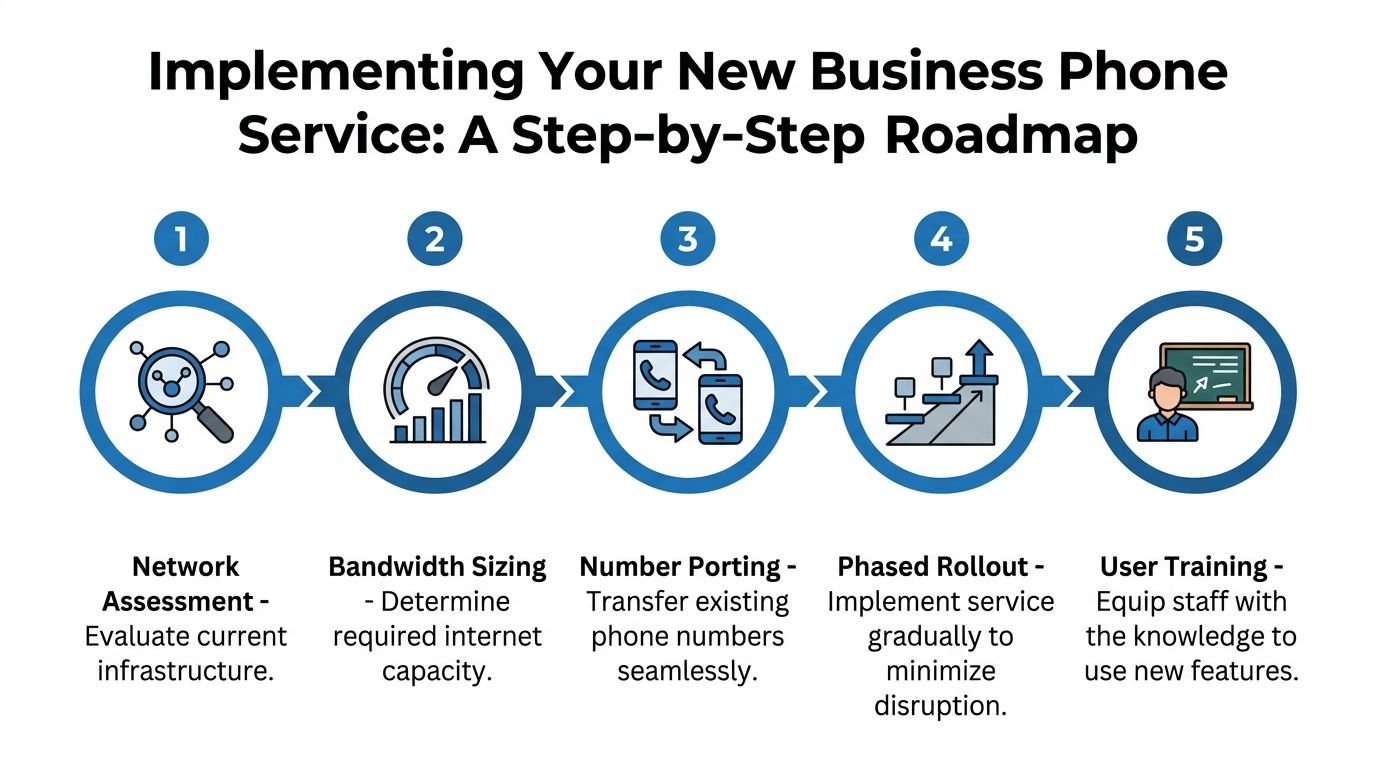
A solid starting checklist includes:
- Review internet capacity: Confirm your connection can support voice alongside daily traffic.
- Inspect internal networking: Switches, Wi-Fi design, and traffic policy all affect performance.
- Map calling locations: Front desk, conference rooms, warehouse floor, private offices, and remote users may have different needs.
- Check indoor mobile experience: Don’t assume the office has reliable cell coverage in every area.
That last point often gets ignored. Yet in-building cellular coverage issues affect 40 to 50 percent of small offices, and integrating cellular boosters and managed failover into fiber-backed VoIP can cut dropped calls by over 80 percent, based on the data summarized by Spectrum Business on comparing business mobile providers.
If your mobile app is part of your phone workflow, indoor coverage isn’t a side issue. It’s part of deployment quality.
Use a phased rollout instead of a hard cut
Many businesses don’t need a dramatic overnight switch.
A lower-risk approach often looks like this:
Pilot group first
Start with a small team, often reception, operations, or a sales pod.Test call flows
Verify menus, business hours, voicemail delivery, hunt groups, and transfers.Train by role
Receptionists need different guidance than field staff or managers.Port numbers in a controlled sequence
Keep records of old and new assignments during the transition.Monitor call quality and user behavior
Early patterns often reveal whether the issue is training, routing, or network configuration.
Focus training on moments, not manuals
Users don’t need a telecom textbook. They need confidence in the tasks they perform every day.
Train around real actions:
- Answer and transfer a live call
- Move between desk phone and app
- Check voicemail and transcription
- Set presence or forwarding rules
- Handle calls during internet or device issues
Field note: The smoothest migrations happen when staff practice their top three call tasks before launch day, not after.
Don’t overlook integrations and edge conditions
A migration isn’t complete when dial tone works. It’s complete when the phone service fits your workflow.
That means checking:
- CRM screen pops or logging
- Microsoft 365 or Google workspace behavior
- Video meeting handoff
- Shared line or queue behavior
- Mobile app performance in weak-signal areas
The “edge conditions” are where hidden pain lives. Basement office? Warehouse with thick walls? Rural site with mixed connectivity? Those are the places where managed failover, booster design, or network edge tools become practical, not optional.
A rollout mindset that protects the business
Treat migration like opening a second entrance before closing the first one. Keep fallback paths available. Document who owns each task. Confirm number porting details in writing. Test inbound and outbound calls repeatedly.
When businesses run into avoidable migration trouble, it’s usually because they focused on features before they confirmed readiness. The right order is infrastructure, routing, user workflow, then expansion.
Evaluating Business Phone Providers and Key Questions
Most provider comparisons start with price and features. That’s too narrow.
A business phone provider service should be evaluated the way you’d evaluate a utility, a software platform, and a support partner at the same time. If you skip any one of those views, costs show up later.
A useful reminder comes from budgeting data. Thirty-five percent of small businesses exceed initial VoIP budgets by 20 to 30 percent due to unforecasted porting fees and hidden charges, which is why transparent total cost review matters, according to Fraser AIS on business phone systems.
Questions that reveal the real cost
Ask every provider these before you sign:
- What fees are not included in the quoted monthly price: Ask specifically about porting, onboarding, regulatory fees, support tiers, and add-on licenses.
- Who owns call quality troubleshooting: If calls sound bad, do they help diagnose the connection and network path, or only the app layer?
- What failover options are available: Can calls reroute to other devices or locations automatically?
- How are mobile workflows supported inside the office: If users rely on smartphone apps, what’s the plan for weak indoor cellular coverage?
- What reporting is included by default: Call logs, queue visibility, recordings, and admin analytics shouldn’t be vague.
- What contract terms matter most: Renewal clauses, price changes, device terms, and cancellation conditions need plain-language answers.
A practical scorecard
Use a side-by-side worksheet rather than sales impressions.
| Evaluation area | What to look for |
|---|---|
| Pricing clarity | Clear monthly service terms and plain explanation of extra charges |
| Network alignment | Willingness to discuss bandwidth, QoS, and internal readiness |
| Reliability design | Specific failover and monitoring practices |
| Mobile usability | Honest answer on indoor signal issues and app expectations |
| Support model | Named process for setup, training, and troubleshooting |
| Integration fit | Compatibility with the tools your staff already use |
What strong provider answers sound like
Strong answers are specific without becoming evasive or overloaded with jargon.
For example, a useful provider won’t just say, “We support mobile apps.” They’ll explain how calls hand off, what happens when office Wi-Fi is weak, and whether they can help assess the office environment. They also won’t hide behind a base rate if activation and change costs are likely to matter later.
This is also where a fiber-first approach can make sense. If one provider can address connectivity, hosted voice, and managed edge services together, you may get fewer handoff problems when troubleshooting. The value isn’t that all businesses need one vendor for everything. The value is that fewer parties can mean clearer accountability.
The hidden-cellular question almost nobody asks
Ask this directly: “How will this phone system perform for staff using mobile apps in parts of the office with weak cellular reception?”
That question catches providers off guard because many comparisons assume office calling happens at desks with stable connectivity. Real businesses don’t operate that neatly. Employees walk rooms, step into storage areas, move between Wi-Fi and cellular, and answer customer calls from wherever they are.
If a provider has no answer for that scenario, the proposal is incomplete.
Good provider selection is less about flashy features and more about whether the vendor can explain what happens on an ordinary bad day.
That’s the standard worth using.
Next Steps for Choosing Your Business Phone Solution
Start with your pain points, not a vendor shortlist. List where calls break down, where staff lose time, and where billing feels unclear.
Then review your infrastructure. Confirm internet readiness, internal network quality, and indoor cellular coverage before you treat any phone platform as a finished solution. Compare service models based on how your team works, especially if employees move between desk phones, desktops, and mobile apps.
When you talk to providers, ask for plain answers on hidden fees, number porting, failover, security controls, and support ownership. If you can align voice with a fiber-first connection and managed edge support, you’ll usually get a cleaner operating model and fewer surprises after launch.
The goal isn’t just to replace old phones. It’s to build a business phone provider service that your team can trust every day.
If you want a customized assessment of your internet, voice, and office network readiness, Premier Broadband can help you review hosted VoIP options, fiber connecti…com) can help you review hosted VoIP options, fiber connectivity, and Managed Network Edge considerations so you can make a clearer phone-system decision with fewer hidden costs.