
You’re probably already using an internet phone without calling it that.
Maybe you take work calls on your laptop, answer a customer from a mobile app, or talk with family through a video call instead of a landline. Maybe your old phone line sounds dated, but your internet calls sometimes break up just enough to be annoying. That’s usually the moment people realize the phone itself isn’t the whole story. The connection underneath it matters just as much.
An internet phone is a phone service that uses your internet connection instead of the old copper phone network. The technical name is VoIP, short for Voice over Internet Protocol. It sounds complicated, but the idea is straightforward. Your voice becomes data, that data travels across the web, and the other person hears you almost instantly.
The part many people miss is this: internet phone quality depends heavily on the network carrying the call. If the connection is unstable, your call sounds unstable. If the connection is fast, symmetrical, and consistent, the phone experience feels smooth and natural. That’s why fiber internet changes the conversation.
Why Your Next Phone Will Be an Internet Phone
Dropped calls used to mean bad cell coverage. Today, they often mean something else. A crowded home network, an overloaded upload connection, or a weak internet setup trying to juggle video meetings, cloud backups, streaming, and phone calls at the same time.
That’s one reason internet phone service has become the default direction for communication. It fits how people already live. You use one connection for work, school, entertainment, messaging, and now calling too. Instead of maintaining a separate phone system, your voice rides over the same network that powers everything else.

The internet grew into a phone network
Internet phone service didn’t appear out of nowhere. It became possible because the internet itself matured into a fast, global communications system. The number of internet hosts jumped from 2,000 to 30,000 between 1986 and 1987, and by 2007 the internet handled over 97% of all two-way communication information flows, which helped VoIP move past traditional telephony, according to the Science and Media Museum’s history of the internet.
That shift matters because it changed what the internet was for. It stopped being just a place to retrieve information and became a place to interact in real time. Email came first, then messaging, then media, then voice and video. An internet phone is the logical next step, not a gimmick.
Internet phone service works well because the modern internet was built for fast exchanges, not just slow downloads.
Why people switch
For most homes and businesses, the appeal isn’t technical. It’s practical.
- More flexibility: You can answer calls on a desk phone, a laptop, or an app.
- More useful features: Things like caller ID, voicemail-to-email, and mobile access fit modern work.
- Less dependence on legacy hardware: You don’t need the old phone infrastructure just to stay reachable.
If you’ve ever wondered why so many providers are moving voice service onto broadband, that’s the answer. It matches how communication happens now. And if you want to see why the connection underneath that service matters so much, this overview of the benefits of fiber internet makes the bigger picture clear.
How an Internet Phone Call Travels Across the Web
A lot of people hear “VoIP” and assume it’s too technical to understand. It isn’t. The easiest way to think about it is like sending a puzzle in tiny pieces.
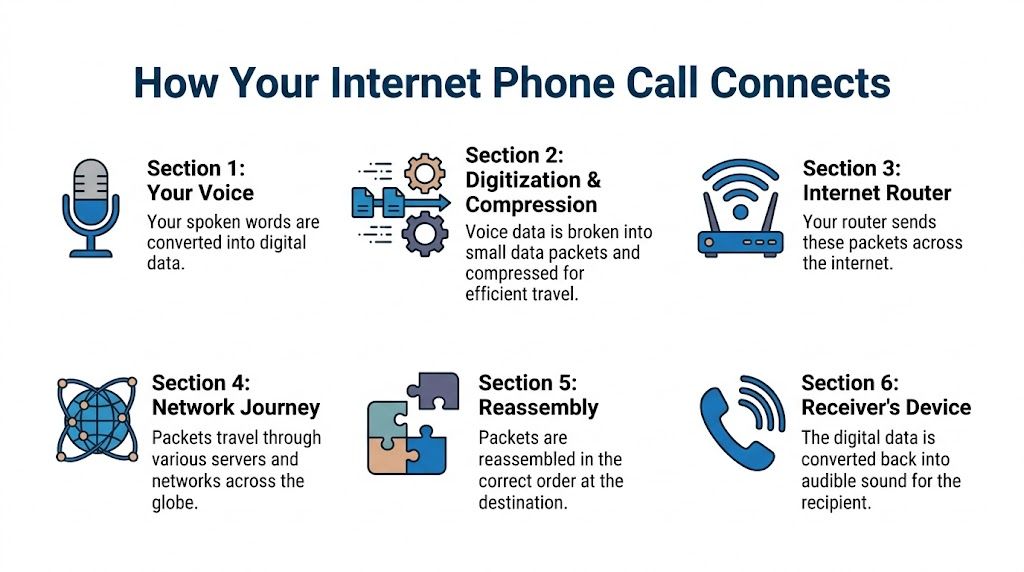
When you speak into an internet phone, your voice doesn’t travel as one continuous signal the way it did on older phone lines. Instead, the system breaks your voice into small digital packets, sends them across the internet, and rebuilds them on the other end in the right order.
Your voice becomes data
Start with the microphone. It hears your voice as an analog sound wave. VoIP software converts that sound into digital information so a network can carry it.
That conversion happens very quickly. Hosted VoIP systems sample voice at 8 kHz, use codecs to compress and encode it, and aim for latency under 150 ms and jitter below 30 ms. On quality fiber connections, QoS prioritization can also reduce call drops by 40% to 60% compared with traditional phone lines, according to Nextiva’s hosted VoIP overview.
If those terms sound abstract, here’s the plain-English version:
- Codec: The rulebook that tells the system how to convert voice into digital form and back again.
- Latency: The delay between when you speak and when the other person hears you.
- Jitter: Variation in packet arrival times. Too much of it makes audio sound choppy or robotic.
What SIP and packet delivery actually do
You don’t need to configure SIP to benefit from it, but it helps to know what role it plays. SIP is the signaling method that helps set up, manage, and end the call. Think of it as the traffic coordinator. It tells devices where to connect and when the session starts.
The actual voice then moves as packets. Each packet carries a tiny slice of audio plus addressing information. Your router sends those packets out, networks move them along, and the receiving device reassembles them into sound.
Practical rule: Clear VoIP audio depends less on magic phone hardware and more on whether those packets arrive quickly, in order, and without too much delay.
That’s why internet quality shows up directly in call quality. When packets arrive late, the call can sound delayed. When too many arrive unevenly, voices can cut in and out. When the connection is stable, the process feels invisible.
Why fiber changes the experience
Internet phones don’t need a complicated explanation to reveal their weak point. They depend on the network. If your internet connection struggles with uploads, your calls will show it.
A fiber connection helps because it moves data smoothly in both directions. That matters for voice because calls are two-way, live, and sensitive to interruptions. You’re not just downloading information. You’re sending your voice at the same time.
If you want a more focused breakdown of the moving parts, Premier’s guide on how VoIP phone work gives a practical look at the process without turning it into an engineering lesson.
Comparing Internet Phones and Traditional Landlines
Some choices are close calls. This one usually isn’t.
A traditional landline was built for one job: voice over a dedicated phone network. An internet phone uses broadband instead, which means it can do much more and adapt much more easily. The easiest way to compare them is side by side.
Internet Phone VoIP vs Traditional Landline
| Feature | Internet Phone (VoIP) | Traditional Landline |
|---|---|---|
| Underlying technology | Uses internet data packets over an IP network | Uses legacy circuit-switched phone lines |
| Device flexibility | Can work on desk phones, computers, mobile apps, and adapters for existing phones | Usually tied to a specific phone jack and device |
| Features | Commonly includes voicemail-to-email, caller ID, call routing, mobile access, and cloud management | Typically offers basic calling features with fewer modern integrations |
| Portability | You can often use the same service in different locations with internet access | Usually linked to one physical address |
| Scalability | Easier to add users, numbers, and call features | Expanding service often requires more line-specific setup |
| Cost structure | Often combines voice with existing internet infrastructure | Often maintains a separate service and separate wiring |
| Best fit | Homes, remote workers, and businesses that want flexibility | Users who only want a basic fixed phone line |
What the table doesn’t show
The biggest difference isn’t just feature count. It’s that VoIP treats phone service like software. That means your calling experience can travel with your account, your app, or your office setup, instead of staying locked to one wall jack.
Landlines still feel familiar, and familiarity has value. But they don’t match how communication happens today. Work follows you between locations. Customers expect quick routing. Families want a call on one device and voicemail on another. Internet phone service fits that reality much better.
Where readers often get tripped up
Many people assume “internet phone” means “only for businesses” or “only for people with special equipment.” Neither is true. Some people use a dedicated IP desk phone. Others keep a familiar handset by connecting it through an adapter. Others use an app and never touch a physical phone at all.
A landline connects a place. An internet phone connects a person or a team.
That’s the shift. Once you see that, the rest of the decision gets easier.
The Benefits and Limitations You Need to Know
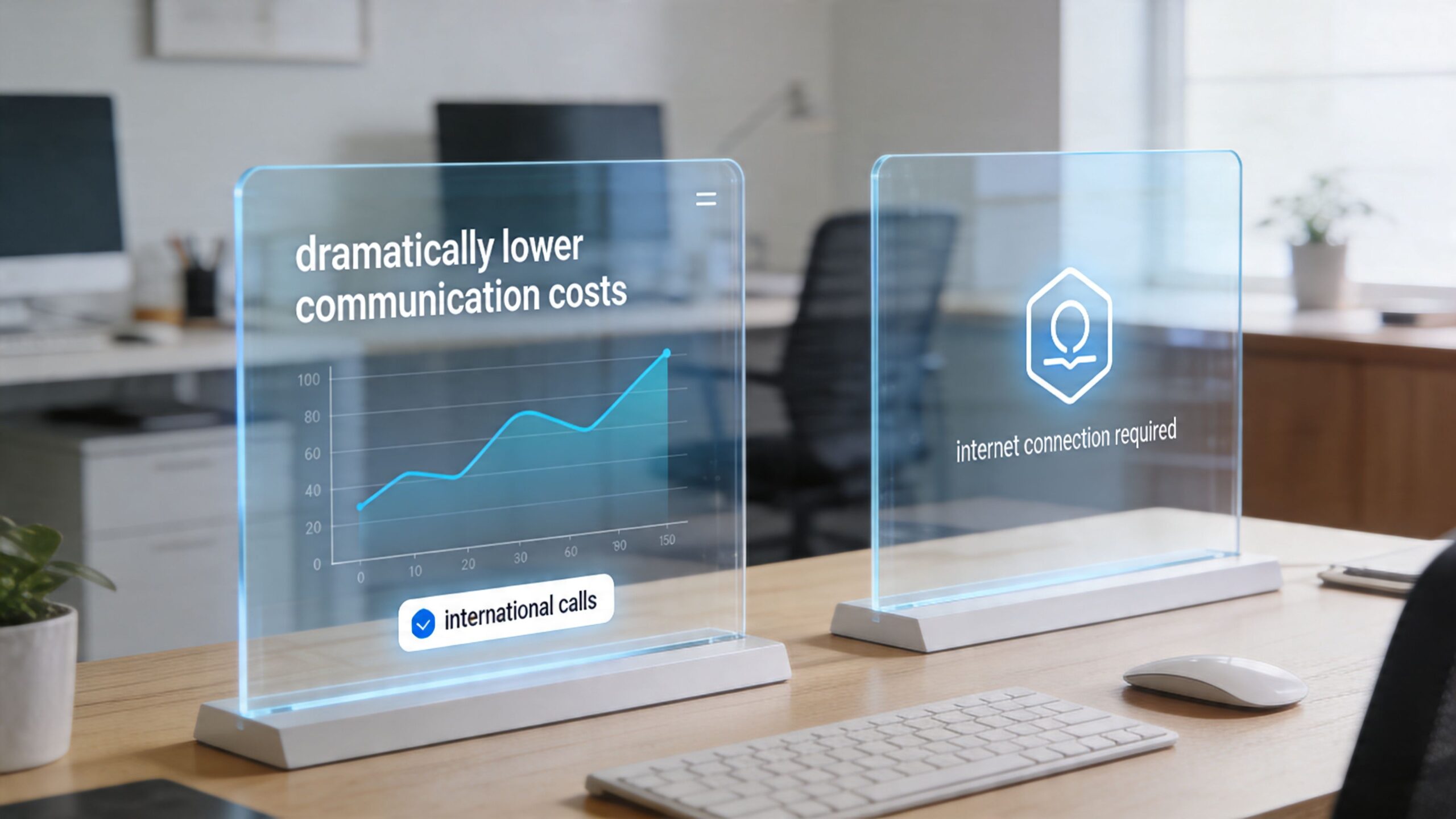
Internet phone service solves a lot of old frustrations. It can lower costs, simplify management, and give you features that used to require a bigger phone system. But it also asks something in return. You need a dependable internet connection and power.
That tradeoff is worth understanding before you switch.
Where VoIP creates real value
The strongest case for internet phone service is usually operational, not flashy. You’re consolidating communication onto a single IP network instead of maintaining a separate legacy voice system.
Hosted VoIP can deliver 50% to 70% cost savings versus on-premises PBX, and a 100 Mbps symmetrical fiber link can support over 200 simultaneous high-quality VoIP calls, according to the United Business Technologies hosted VoIP guide.
For a small business, that can mean fewer boxes to maintain and fewer service silos. For a home office, it can mean getting professional-grade calling features without a traditional office phone closet.
Benefits that show up day to day
Some advantages are financial. Others are just easier to live with.
- Lower infrastructure burden: The phone system lives in the cloud instead of inside your office.
- Better fit for hybrid work: Calls can follow users across locations and devices.
- Feature depth: Auto-attendants, voicemail delivery, call routing, and softphone apps are common expectations now.
- Shared network efficiency: Voice, data, and video can run across one connection.
Audio accessories matter too. If you spend hours in meetings, your headset or earbuds can make a bigger difference than people expect. A practical guide to the best earbuds for calls and music can help if you’re trying to improve clarity on your end without changing your whole setup.
The limitation people shouldn't ignore
VoIP depends on internet quality. That’s the honest catch.
If your connection is weak, congested, or inconsistent, your phone service will reflect that. Choppy audio, lag, and call instability usually aren’t “phone problems” in the old sense. They’re network problems showing up during a call.
That’s why bandwidth planning matters. Voice doesn’t just need speed. It needs stable, low-latency delivery. If you’re evaluating whether your connection can carry phone traffic reliably, Premier’s resource on bandwidth for VoIP is a useful place to start.
Good VoIP isn’t just about having internet. It’s about having internet that stays calm under pressure.
Homes and businesses experience limits differently
A household might notice issues when someone starts a large upload during a call. A business might notice them when multiple employees are on voice and video at once. The pattern is the same. Real-time communication is less forgiving than casual browsing.
That’s why people who love VoIP often sound almost boring when they give advice: get the connection right first. They’re not oversimplifying. They’re pointing to the part that determines whether the phone feels modern or frustrating.
Choosing the Right Internet Phone Service
You can buy a sleek desk phone, download a calling app in minutes, and still end up with calls that feel unreliable. The reason is simple. Internet phone service rides on your network the way a train rides on its tracks. If the tracks are uneven, the ride never feels right.
That is why choosing a service starts with the connection that will carry every call. The phone matters. The features matter. But the network under them decides whether conversations sound clear and steady or strained and delayed.
Start with the way you actually communicate
A home user replacing a landline usually wants three things. Keep the current number, hear people clearly, and avoid fiddling with settings every week.
A remote worker needs a little more. Calls, video meetings, file uploads, and cloud apps all share the same connection. A plan that feels fine for streaming shows can still create frustrating work calls if the network gets crowded or upload performance swings.
A small business adds another layer. One person may need a direct number, another may need calls routed to a mobile app, and a manager may need voicemail delivered by email. The phone system has to fit the workflow, but the internet connection has to support everyone using it at the same time.
Mobile convenience has limits
A smartphone app can be useful for occasional calls. It is not always the best foundation for work that depends on consistent call quality.
That gap shows up clearly for people without dependable home broadband. Modivcare’s look at internet access and underserved populations explains how limited internet access affects everyday communication. For internet phone service, the lesson is practical. If your calls matter to your income, clients, patients, or team, a stable home or office connection gives you a stronger base than mobile-only calling.
Fiber helps here because it gives voice traffic a cleaner path in both directions. That matters for conversations, where sending and receiving need to happen at the same time without interruption.
What to compare before you choose
Feature lists can look similar across providers, so it helps to compare the parts that shape the day-to-day experience.
- Connection type: Fiber is often the strongest fit for internet phone service because symmetrical speeds support clear two-way voice traffic.
- Device support: Check whether you want a desk phone, an adapter for an existing handset, or an app for laptops and mobile devices.
- Calling features: Businesses may need ring groups, voicemail delivery, caller ID controls, and number management.
- Support model: Problems are easier to solve when the provider understands the internet connection and the voice service together.
- Setup path: If you want a practical checklist, Premier Broadband’s guide on how to set up a VoIP phone shows what to confirm before your first call.
Premier Broadband offers fiber internet and VoIP phone service, which is useful because the network and phone experience are closely tied. For a buyer, that means fewer finger-pointing problems between separate providers and a clearer path to getting calls working the way they should.
If recording is part of the job
Some users need more than live conversations. Trainers, consultants, interviewers, and distributed teams may want recordings for notes, reviews, or compliance. If that applies to you, this guide to recording Skype calls is a helpful example of how call recording fits into internet-based communication workflows.
The core choice
A better buying question is not only, "Which phone service has the features I want?" It is also, "Will my network let those features work well every day?"
That question changes the whole decision.
On a strong fiber connection, internet phone service feels natural. Calls connect quickly, voices sound fuller, and business features like mobile apps or voicemail-to-email become useful instead of frustrating. On a weak or inconsistent connection, even a well-designed phone system can feel unreliable.
Choose the service that matches your calling needs. Choose the network that lets it perform the way it was designed to.
Simple Steps for Setup and Troubleshooting
Getting started with an internet phone is usually much easier than people expect. You don’t need to be a network engineer. You just need the right hardware, a stable connection, and a few basic checks.
Pick the setup that matches how you work
There are three common ways to use an internet phone:
- IP desk phone: Best for people who want a familiar office-style phone on a desk.
- Adapter for an existing phone: Helpful if you want to keep using a traditional handset.
- Softphone app: Good for laptops and mobile devices when flexibility matters most.
As of mid-2024, over 96% of the digital population accesses the web via mobile devices, accounting for 4.24 billion users, but mobile convenience doesn’t replace the reliability that home offices and small businesses often need from a dedicated fiber connection, according to Statista’s mobile internet overview.
That’s why setup should start with the connection, not the app.
Basic setup checklist
A clean setup usually follows the same pattern:
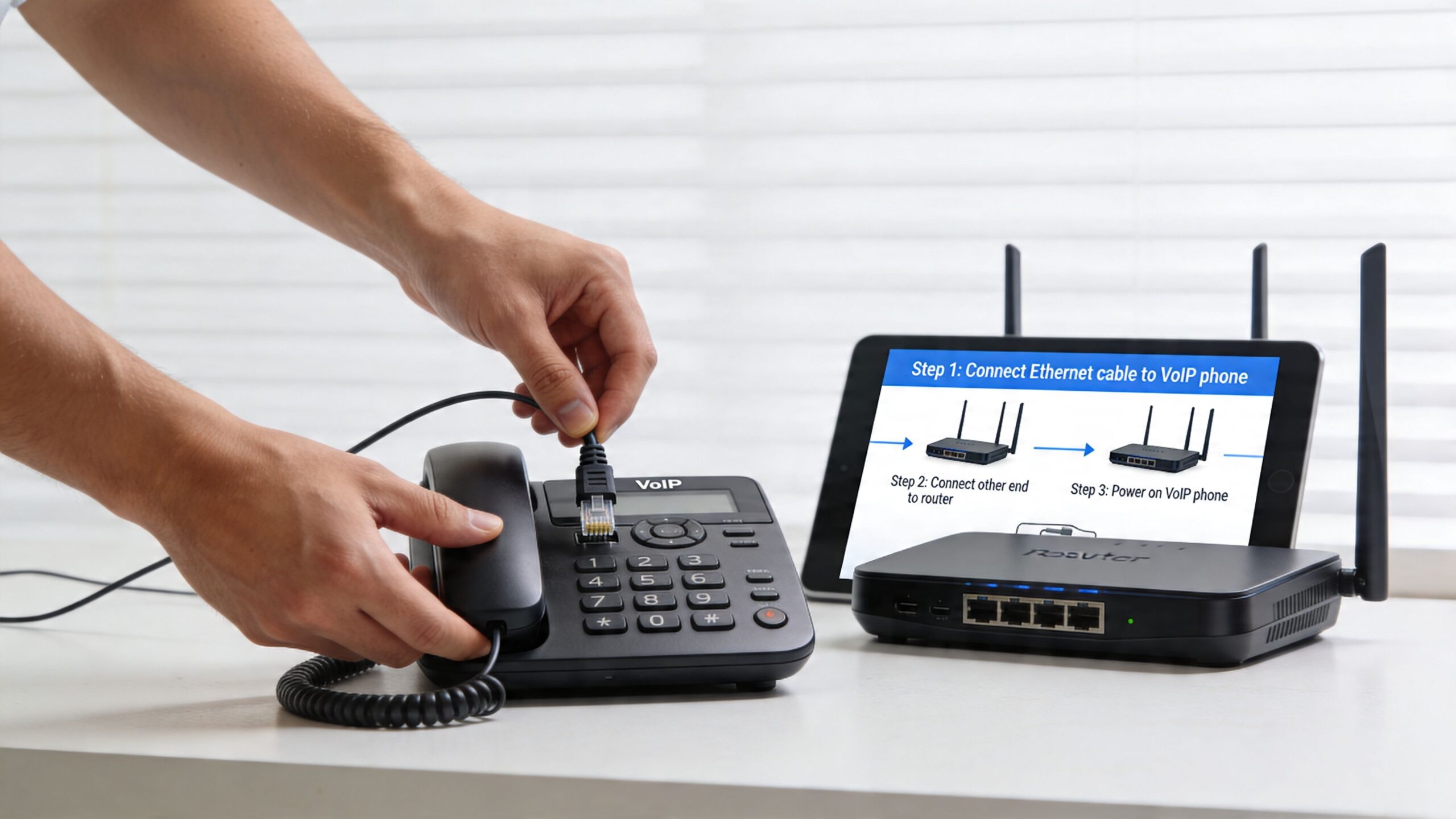
- Connect your device by Ethernet when possible: Wired links are usually more stable than Wi-Fi for desk phones.
- Confirm your account details: Your phone or adapter needs the correct service credentials from your provider.
- Test both directions of audio: Make a short test call and listen for delay, clipping, or one-way audio.
- Check your router placement: If you’re using Wi-Fi calling, distance and interference can affect quality.
If you want a more detailed walkthrough, this guide on how to set up VoIP phone covers the basics in a practical format.
Common problems and easy fixes
Most VoIP issues fall into a few familiar categories.
- Echo on calls: Lower speaker volume, switch to a headset, or move the microphone away from speakers.
- Choppy audio: Pause heavy uploads or move the phone to a stronger connection.
- Dropped registration: Restart the phone, adapter, and router in order.
- One-way audio: Recheck device setup and try another test call after rebooting equipment.
Here’s a simple visual walk-through if you prefer seeing the hardware side in action.
If a call sounds bad, test the network before blaming the phone. VoIP usually reveals connection issues faster than web browsing does.
A small habit that prevents bigger headaches
Run a quick call test when nobody else is hammering the network, then another during your busiest hour. If the second test sounds worse, you’ve learned something important. Your phone service is competing with other traffic, and your network may need adjustment.
That simple comparison often solves the mystery faster than swapping devices.
Frequently Asked Questions About Internet Phones
Can I keep my current phone number
Yes, in many cases you can. Most internet phone providers support number porting, which means your current number moves over to the new service instead of being replaced.
The safest approach is to keep your old service active until the transfer finishes. That avoids a gap where calls could miss you.
Do I need a special phone
You have a few choices. A dedicated IP phone works well for a desk. An adapter lets you keep using a traditional handset. A softphone app turns a laptop, tablet, or mobile phone into your phone line.
It helps to match the device to the job. A front desk may want a physical phone with buttons. A remote employee may prefer an app that works anywhere with a strong connection.
How does 911 work on an internet phone
Internet phone service can support 911, but it depends on having the right address on file with your provider. A traditional landline is tied to one physical location. VoIP is more like a phone service that can travel with you, so the provider needs your current service address to route emergency help correctly.
If you move your equipment, update that address right away.
What happens if the power goes out
Your internet phone depends on the equipment that carries the call, including the modem, router, and phone device. If those lose power, calling may stop until power returns.
That is why backup power matters for some homes and many businesses. A small battery backup can keep key equipment running long enough to make calls during a short outage.
What happens if my internet goes down
VoIP needs internet access to place and receive calls, so an outage can interrupt service. Some providers offer call forwarding or mobile app options so calls can ring somewhere else during a disruption.
The quality of the underlying connection is paramount. A stable fiber connection lowers the chance of the service interruptions that make internet phone systems frustrating.
Is an internet phone good enough for business use
Yes, if the service and network are set up for business traffic. Voice calls are sensitive to delay and packet loss in a way email is not. That means the phone system can only sound as good as the connection carrying it.
For a business, fiber internet works like a wider, cleaner road for voice traffic. Calls stay clearer, teams can handle more simultaneous conversations, and daily features like transfers, voicemail, and ring groups work more reliably.
Will call quality sound different from a landline
It can sound just as clear, and sometimes clearer, when the network is strong. If a call sounds robotic, clipped, or delayed, the problem usually comes from congestion, weak Wi-Fi, or an unstable internet connection.
That is why internet phone quality is really a network question first. The phone is the handset. The connection does the heavy lifting.
If you are comparing options, start by asking whether your internet service is built to carry real-time voice well. Premier Broadband offers fiber internet and VoIP options for homes, remote workers, and businesses that want calling to stay clear, stable, and easy to manage.