

Monday starts with three missed calls on the desk phone, two customer emails marked urgent, a team chat thread that split into five side conversations, and a video meeting link buried somewhere in a calendar invite. By 10 a.m., someone on your staff has already said, “I thought you were handling that.”
That's the problem most small businesses are trying to solve when they start looking at unified communications for business. It usually doesn't begin with a grand technology plan. It begins with friction. Calls don't follow employees when they leave the office. Messages live in one app, files in another, and meeting notes in someone's inbox. Customers feel the disconnect long before leadership does.
I see the same pattern in growing companies. They don't have a communication problem because people aren't trying. They have a system problem because the tools were added one at a time, usually to fix an immediate need. Over time, that patchwork becomes expensive to manage and harder to trust.
The End of Communication Chaos
A small business owner usually notices communication sprawl in ordinary moments, not in a formal audit. A sales rep takes a customer call on a mobile phone, then has to forward details by email because the rest of the team can't see the conversation history. A project manager runs a video meeting in one app, then posts action items in another, while accounting still relies on voicemail and email. Nothing is fully broken, but nothing connects cleanly either.
That kind of setup creates drag all day long. Employees waste time checking multiple inboxes, repeating information, and figuring out which tool they're supposed to use for what. Managers think they have communication covered because they've bought several apps. In practice, they've created more switching, more inconsistency, and more room for things to fall through.
Unified communications for business is the fix for that fragmentation. It brings your core communication methods into one operating environment so your staff can move from chat to call, from meeting to file share, and from desktop to mobile without losing context.
The real gain isn't just convenience. It's that your business starts behaving like one system instead of five separate tools stitched together.
For a small business, that matters because speed, responsiveness, and clarity are competitive advantages. If your staff can reach each other quickly, answer customers without hunting for information, and keep work moving across office and remote locations, communication stops being background noise and starts becoming operational infrastructure.
What Is Unified Communications Really
A lot of business owners hear the term and assume it means “internet phones plus a few extras.” That's too narrow.
Unified communications is better understood as a digital headquarters for communication. Instead of treating calls, messages, meetings, and shared files as separate activities handled in separate systems, a UC platform pulls them into one interface and one operating layer. Microsoft describes UC as combining tools such as video conferencing, email, chat, voice and video calls, file sharing, screen sharing, and VoIP into a single interface, and the market itself was valued at USD 136.11 billion in 2023 with a projection of USD 417.86 billion by 2030 according to Grand View Research's unified communications market overview.
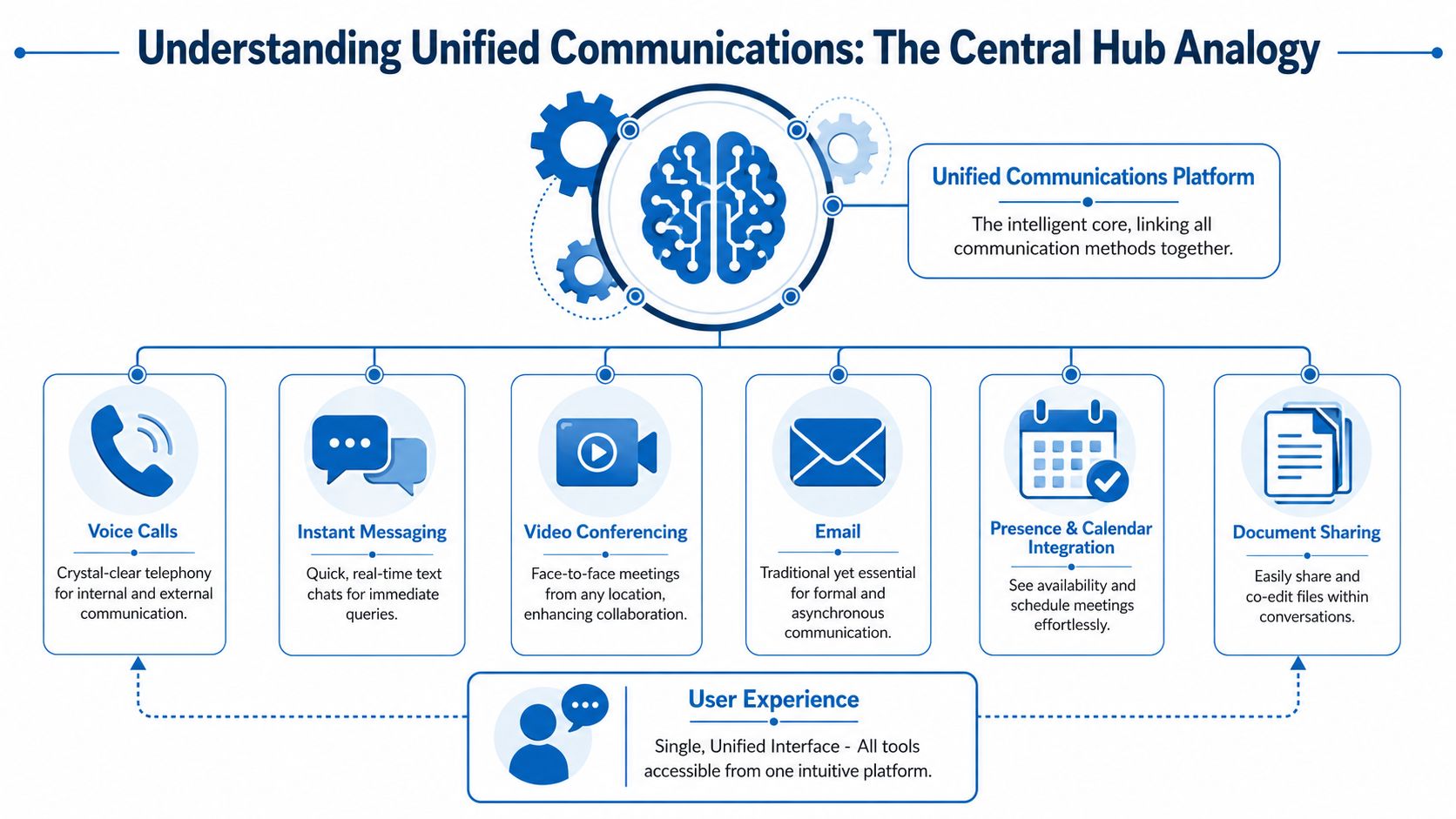
For a small business owner, the useful question isn't “What does UC stand for?” It's “What lives inside it, and how would my staff use it on a normal Tuesday?”
The core pieces in plain English
Here's what a complete platform usually brings together:
- Voice calling: Your business phone system runs over the internet and gives staff one business identity across desk phones, laptops, and mobile apps.
- Video meetings: Internal meetings, client calls, and remote check-ins happen inside the same environment instead of a separate meeting tool.
- Team messaging: Quick one-to-one chats and group threads replace scattered text messages and ad hoc app hopping.
- Presence and availability: Staff can see whether someone is available, in a meeting, away, or on a call before they try to reach them.
- File and screen sharing: Documents and visual walkthroughs can happen inside the conversation instead of being moved to a separate platform.
- Email and calendar alignment: Formal communication and scheduling stay connected to the rest of your workflow rather than operating in a silo.
If you're still sorting out where cloud voice fits into the bigger picture, this plain-language overview of what UCaaS means for business communication is a useful companion to the broader UC discussion.
How the pieces work together
The strength of unified communications for business isn't any single feature. It's the handoff between features.
A customer might call your main number, reach the right person through call routing, then receive a follow-up message in the same business system. Your employee can escalate that message to a video meeting, pull in another teammate, share a screen, and send the customer a file without switching identities or losing history. That's a very different experience from juggling a phone vendor, a chat app, a meeting app, and personal mobiles.
A simple way to test whether a system is unified is to ask these questions:
| Business moment | Fragmented setup | Unified setup |
|---|---|---|
| Employee misses a call | Checks voicemail in one system, messages team in another | Sees call, voicemail, and teammate presence in one place |
| Customer needs a quick answer | Staff forwards email and waits | Staff starts chat or call with the right coworker immediately |
| Team meeting needs documents | Separate file tool and screen-share app | Files and screen sharing happen inside the meeting flow |
If you're comparing traditional handsets with modern cloud calling, a practical reference point is this 2026 guide to business phones, which helps frame the phone system as one part of the wider communication environment rather than the whole solution.
Practical rule: If your staff has to remember which app handles which type of conversation, your communication stack still isn't unified.
The Tangible Business Benefits of UC
Business owners don't buy unified communications because the feature list looks nice. They buy it because disconnected communication wastes time, slows decisions, and creates avoidable cost.
A business-focused source reports that organizations using integrated UC platforms can see up to a 52% improvement in productivity and a 25% boost in profit, while integrated communications can reduce communication delays by up to 30%. The same source notes that poor communication in large organizations has been estimated to cost about $62.4 million per year per company in lost productivity, as outlined in this review of business benefits from unified communication services. Small businesses won't map to that large-enterprise loss figure directly, but the underlying lesson is the same. Communication problems turn into operational cost very quickly.
Here's the impact in a more practical format.
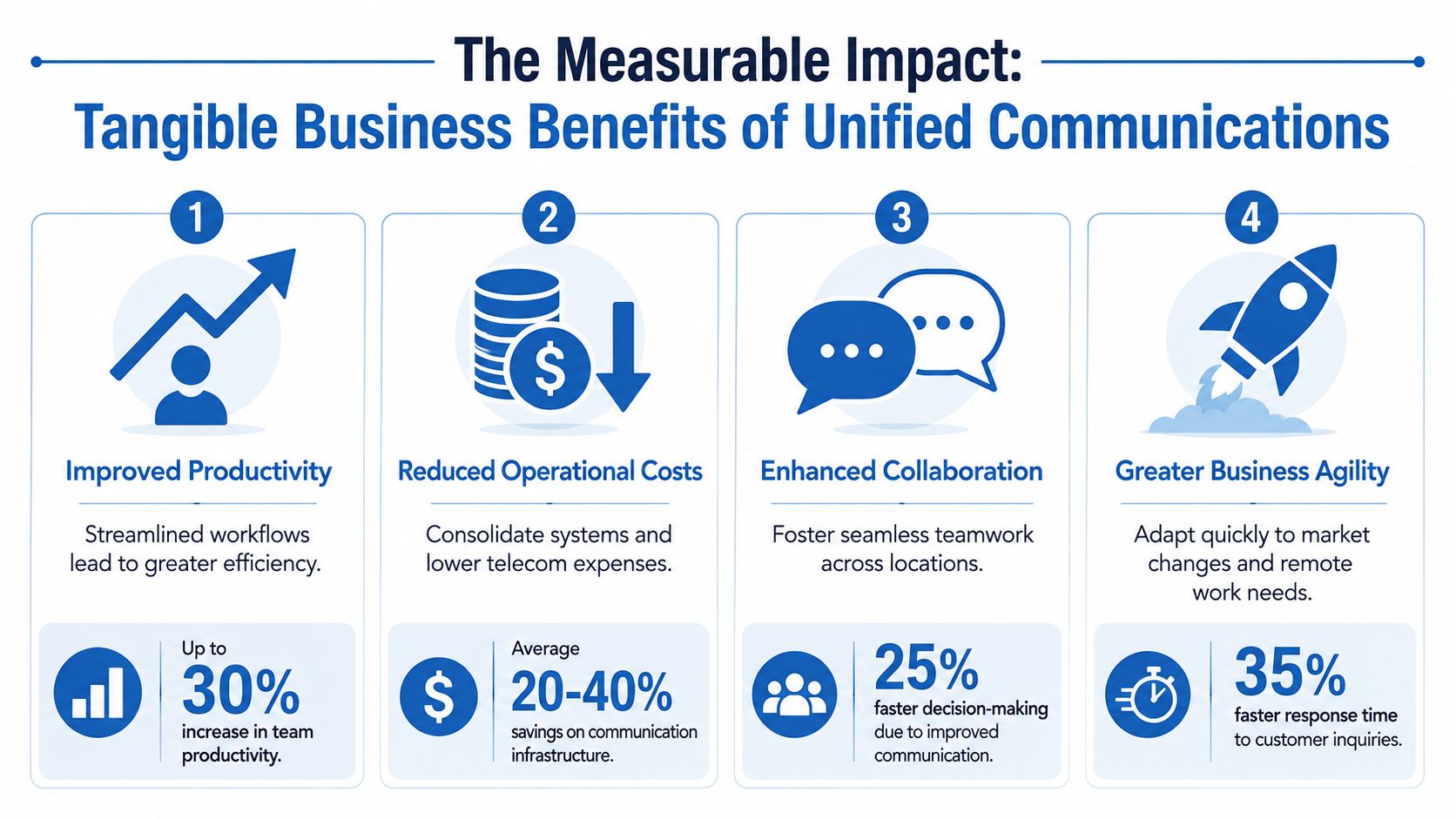
Productivity improves when switching drops
Teams often don't lose time because work is hard. They lose time because work is interrupted.
An employee takes a call, opens email to find a file, switches to chat to ask a question, opens a calendar to see if a manager is free, then launches a separate meeting app. That's not collaboration. That's administrative overhead disguised as work.
With UC, the path is shorter. Presence shows who's available. Calls, messages, and meetings sit in one interface. Staff spends less time locating people and more time solving problems.
For teams trying to tighten handoffs across departments, tools that surface cross-functional collaboration insights can also help identify where communication is breaking down between sales, service, and operations.
Costs become easier to control
The savings story isn't just “replace the phone bill.” It's broader than that.
When a business consolidates voice, messaging, meetings, and collaboration into a smaller number of systems, it reduces duplicate vendors, duplicate admin work, and duplicate user confusion. IT or whoever acts as IT also spends less time resetting, patching, and troubleshooting disconnected tools.
If your current setup includes a legacy phone line, a separate meeting subscription, individual mobile reimbursements, and a basic chat tool, UC often makes those expenses easier to rationalize. Even when the monthly subscription looks similar on paper, the management burden is lower.
A cloud-first calling setup often plays a big role here. If you're looking at the voice side specifically, this overview of VoIP solutions for small business is a useful starting point.
Mobility stops being a workaround
A lot of small businesses say they support remote or hybrid work when what they really mean is that employees improvise from home.
That usually leads to personal cell phone use, inconsistent caller ID, missed internal context, and customer interactions that depend too heavily on individual employees. UC replaces that improvisation with a business system that travels with the user. Staff can answer business calls, join meetings, and collaborate from wherever they are while staying inside the same company environment.
Later in the buying process, owners usually realize this wasn't just about flexibility. It was about control.
A short explainer on the topic makes the business case easier to picture:
Resilience improves when communication isn't tied to one desk
Traditional setups often fail in simple, local ways. The office loses access, the desk phone stays on the desk, and work stalls.
Cloud-based UC changes that operating model. When users can move between devices and locations, the business has more options during office disruptions, staffing changes, and location-specific issues. For a small company, that kind of resilience matters because there usually isn't much slack in the system. One missed day of communication can ripple into billing delays, customer frustration, and lost sales.
Comparing UC Deployment Models
Most businesses reach the same fork in the road after deciding they want unified communications. They still have to choose how to deploy it.
Unified communications systems are commonly deployed as on-premise, cloud, or hybrid architectures depending on security, control, and scalability needs, as explained in Nutmeg Technologies' overview of unified communications deployment approaches. That choice affects cost, flexibility, support burden, and the pace of future change more than most first-time buyers expect.
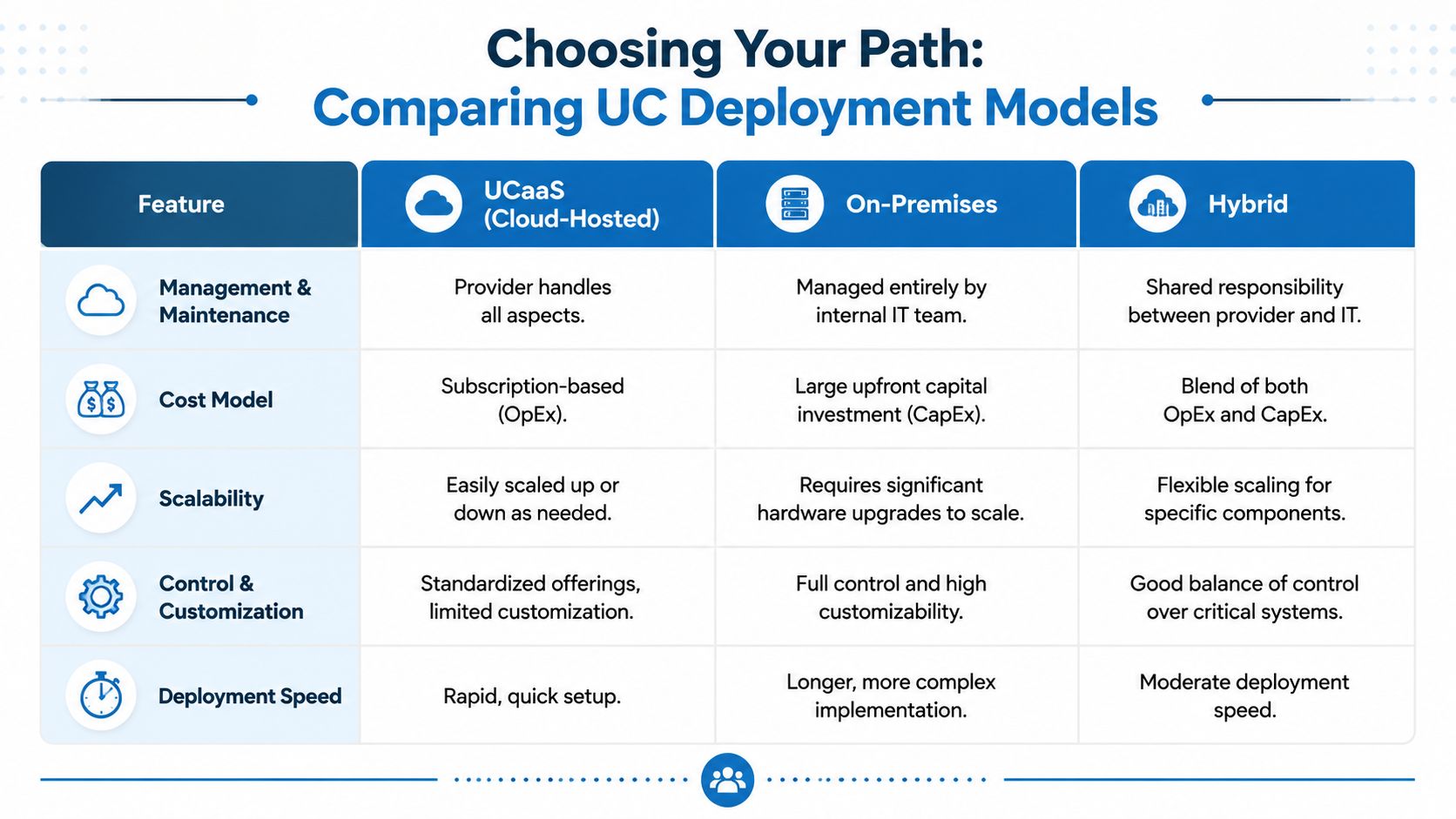
UCaaS works well when simplicity matters most
UCaaS means the provider hosts and maintains the platform in the cloud. For many small and mid-sized businesses, this is the most practical entry point because it removes a lot of infrastructure ownership.
What tends to work well with UCaaS:
- Faster rollout: You can usually deploy by user group, location, or department without waiting on major hardware changes.
- Simpler administration: The provider handles much of the backend maintenance, updates, and platform availability.
- Easier scaling: Adding staff, remote users, or a new office is usually more administrative than physical.
- Predictable budgeting: Costs often align better with operating expense planning.
What doesn't work as well:
- Less deep customization: If you need very specific call flows, legacy integrations, or unusual policy requirements, some cloud platforms can feel rigid.
- Provider dependence: Support quality matters because your team won't control every moving part.
For many SMBs, those trade-offs are acceptable. They want communication that works, not a platform they have to engineer from scratch.
On-premises still fits some environments
An on-premises deployment puts the core system under your control. That can make sense when a business has strong internal IT capability, existing infrastructure investment, or strict operational requirements that favor local control.
This model usually appeals to organizations that want:
- Full control over configuration
- Closer alignment with internal security policies
- Custom integrations tied to existing systems
- Direct ownership of maintenance windows and change timing
The downside is operational weight. Hardware lifecycle, patching, redundancy planning, and troubleshooting all stay on your side of the fence. That's manageable for a mature IT team. It's a burden for a business where “the IT department” is one person with six other responsibilities.
If your business struggles to maintain basic network documentation, an on-premises UC project is usually harder than it looks.
Hybrid exists for a reason
A hybrid model blends local control with cloud flexibility. This often makes sense when a company isn't ready for a full cutover, has site-specific requirements, or needs to preserve part of a legacy investment while modernizing the rest.
A common example is keeping some voice functions or location-specific systems in place while moving messaging, meetings, and remote-user access into a cloud platform. Hybrid can be a smart transition path, but it also creates a split-responsibility environment. When issues happen, teams need to know whether the problem lives in the local infrastructure, the cloud service, or the connection between them.
A practical side-by-side view
| Decision area | UCaaS cloud-hosted | On-premises | Hybrid |
|---|---|---|---|
| Upfront cost profile | Lower initial infrastructure burden | Higher initial investment | Mixed |
| Internal IT workload | Lower day-to-day platform maintenance | Higher maintenance responsibility | Shared |
| Scalability | Usually easiest to expand | Slower if hardware changes are needed | Flexible but more complex |
| Control | Provider-led structure | Highest internal control | Targeted control |
| Best fit | SMBs prioritizing speed and simplicity | Organizations needing deep customization | Businesses in transition |
If you want a clearer picture of the cloud side specifically, this explanation of how a cloud phone system works for business helps translate the concept into practical buying criteria.
How to decide without overcomplicating it
Ask four blunt questions:
- Who will manage this system after go-live?
- How much customization do we need, versus how much do we think we need?
- How fast do we need to support growth, remote users, or additional locations?
- What happens operationally if the current setup fails next month?
Small businesses often make better UC decisions when they stop evaluating the platform as a pure technology purchase and start evaluating it as an operating model. The right model is the one your team can support consistently, not the one with the most impressive architecture diagram.
A Practical Roadmap for UC Implementation
The hardest part of unified communications for business usually isn't choosing the software. It's switching without breaking daily operations.
That's where many high-level guides fall short. They explain voice, chat, video, and integrations, then skip over the messy part: number porting, phased cutovers, user retraining, and downtime planning. Visual Edge IT puts the core concern plainly in its discussion of building a unified communication system: businesses aren't just asking what UC is. They're asking how to switch without disrupting operations.
Start with a communication audit, not a vendor demo
Before you compare providers, document what you already have.
That means more than counting phones. You need to identify your phone numbers, extensions, auto attendants, hunt groups, voicemail usage, call routing rules, conferencing habits, mobile work patterns, and business-critical lines. For some companies, the front desk number or after-hours support flow is the part that can't fail. For others, it's a sales queue or owner line that everyone still calls directly.
A simple pre-migration checklist helps:
- Map business-critical numbers: Identify which published numbers, direct dials, and support lines cannot tolerate downtime.
- List workflow dependencies: Note where calls trigger downstream work such as CRM updates, service dispatch, or team escalation.
- Find unofficial workarounds: Ask staff where they're using personal mobiles, side apps, or manual forwarding to keep things moving.
- Review internet readiness: Make sure your connectivity and internal network can support voice and video consistently.
Treat number porting like a project of its own
Number porting sounds administrative. In practice, it can affect customer trust, inbound call flow, and staff confidence.
Port dates can shift. Service ownership records may be inconsistent. Some lines may be tied to old contracts or forgotten hardware. If you assume your numbers will “move over” automatically, you're exposing the business to one of the most avoidable migration failures.
This is the safer approach:
- Verify every number and account detail early.
- Keep a fallback call route during transition.
- Port in phases where possible, not all at once.
- Test inbound and outbound behavior immediately after each change.
For multi-site or more complex Teams-based environments, this guide on how to optimize Teams Phone System for complex orgs is helpful because it focuses on setup realities rather than glossy feature descriptions.
A smooth migration usually looks slow on purpose. Fast cutovers make nice sales presentations, but controlled cutovers protect the business.
Roll out by user group, not by hope
The most reliable UC migrations are phased.
Start with a pilot group that reflects real use. Include at least one person who handles external calls, one manager, and one employee who isn't naturally technical. If the system only works for your most adaptable staff, it isn't ready.
Then move in waves:
- Pilot users: Confirm call quality, voicemail flow, app access, and support process.
- Customer-facing teams: Validate routing, business hours, transfer behavior, and mobile use.
- Back-office users: Shift lower-risk departments after the rough edges are identified.
- Final cleanup: Retire duplicate tools only after people are using the new system.
Training matters more than the feature list
Low adoption usually isn't a technology failure. It's a behavior failure.
If employees don't know how to transfer a call, update presence, check voicemail from the mobile app, or start a quick internal chat, they'll revert to old habits. That's when businesses end up paying for a UC platform while still relying on personal phones and disconnected apps.
Good training for SMBs is practical and role-based:
| User type | What they need most |
|---|---|
| Front desk or dispatcher | Call handling, transfers, queues, failover steps |
| Sales staff | Mobile app use, business caller identity, voicemail follow-up |
| Managers | Meetings, presence, team messaging, escalation workflows |
| General staff | Basic calling, chat, voicemail, status updates |
A one-time training session won't cover it. Short follow-ups during the first weeks matter more because that's when real usage questions show up.
Build a continuity plan before go-live
Every business needs a fallback plan for migration day.
Decide in advance how staff will communicate if a port is delayed, if a call queue misroutes, or if a user can't log in. Publish backup numbers internally. Assign one person to own vendor communication. Tell customer-facing staff exactly what to say if there's a temporary issue.
That planning feels tedious until the first surprise happens. Then it becomes the difference between a controlled disruption and a business-wide scramble.
How to Choose the Right UC Partner
A UC platform can look great in a demo and still be the wrong fit for your business. The difference usually comes down to the partner behind it.
Small businesses don't need the longest feature matrix. They need a provider that can deliver stable service, support a clean rollout, and fit communication into the way the business already works. When evaluating UCaaS options, businesses should look for a specific feature stack that includes cloud PBX and call routing, SMS and group chat, integrated video conferencing, and integrations with business apps such as CRM or ERP so communication events can flow into existing workflows, according to IR's guide to evaluating UCaaS solution features.

The shortlist should start with operational fit
Most owners begin by asking about price. That matters, but it shouldn't be first.
Start here instead:
- Support model: Who answers when call routing breaks on a Monday morning? A generic help desk script isn't enough for a business-critical phone issue.
- Implementation ownership: Will the provider help map numbers, users, devices, and cutover timing, or are you expected to manage the move?
- Network awareness: Voice and video performance depend on the connection underneath them. A provider that ignores that layer is only solving half the problem.
- Admin usability: If you need to make simple changes, can your team do it without opening a ticket every time?
- Workflow integration: Can the platform connect to the systems your staff already uses, or will communication still live off to the side?
Ask harder questions in the sales process
A good partner shouldn't struggle with practical questions. In fact, the quality of the answer often tells you more than the answer itself.
Ask things like:
| Question | What a strong answer sounds like |
|---|---|
| How do you handle number porting risk? | Clear process, verification steps, fallback planning |
| What does training look like? | Role-based onboarding with post-launch support |
| How do you support remote users? | Mobile and desktop experience explained in plain terms |
| What happens during outages or service issues? | Documented escalation path and continuity options |
| How do integrations work? | Specific explanation of supported business workflows |
If the conversation keeps drifting back to generic promises, keep looking. Good UC partners talk about cutovers, adoption, support ownership, and operational realities because that's where success or failure usually lives.
Don't separate UC from connectivity and security
A common SMB mistake is buying communication, internet, and edge security as completely separate decisions with no single owner. That often leads to finger-pointing when quality degrades.
Voice quality problems don't care whether they started in the phone platform, the access circuit, local Wi-Fi, or the network edge. Your partner selection should reflect that. The more your provider understands the full path from user device to internet connection to communications platform, the less time you'll spend chasing causes during outages and quality issues.
That's one reason some businesses prefer a provider that can pair hosted voice with connectivity and managed network services under the same operating umbrella. As one example among several options in the market, Premier Broadband offers business phone provider service alongside business internet and managed network offerings, which can simplify accountability for SMBs that don't want separate vendors for every layer.
Choose the partner that can explain how your business will operate on day two, not just how the dashboard looks on day one.
What usually works for SMBs
In practice, the strongest UC partner for a small business usually has four traits.
First, they keep the design grounded. They don't push enterprise complexity into a company that mostly needs dependable calling, messaging, meetings, and mobile access.
Second, they respect migration risk. They know number porting, auto attendant design, call flow cleanup, and user adoption aren't side issues. They are the project.
Third, they connect communications to real business workflows. If your sales team lives in a CRM, your service team needs queue visibility, or your office manager needs easy call handling, the platform should support those habits instead of forcing staff into awkward workarounds.
Fourth, they support growth without making every change painful. A good system for a ten-person office should still make sense when you add another location, more remote staff, or new customer service needs.
Red flags worth taking seriously
You don't need a technical background to spot risk. Watch for these signs:
- Everything sounds easy: Real deployments have trade-offs. If the provider acts like there are none, they're either oversimplifying or hiding work.
- No discovery process: If they haven't asked about your numbers, locations, internet setup, or current workflows, they're not designing responsibly.
- Weak training plan: User adoption won't happen by accident.
- Integration hand-waving: “It integrates with everything” usually means “we haven't looked at your environment yet.”
- Unclear support boundaries: If you can't tell who owns what after go-live, problems will take longer to resolve.
A UC partner should reduce uncertainty, not add polished confusion.
Unifying Your Business for the Future
Most businesses don't outgrow their communication problems by waiting. They outgrow them by simplifying the system behind the work.
That's the case for unified communications for business. It isn't just about replacing desk phones or giving employees one more app to install. It's about creating one communication environment that supports how your company operates, whether your team is in one office, spread across sites, or moving between home and the field.
The companies that get the best results usually make a few sound decisions. They choose a deployment model that matches their internal capacity. They treat migration like an operational change, not a software purchase. They plan number porting and cutovers carefully. They train users by role. And they select a partner that understands support, connectivity, and business continuity, not just licensing.
If your current setup depends on workarounds, scattered apps, personal mobile phones, or tribal knowledge, that's your sign. Communication has become a business system that needs proper design.
Start by listing every way your team communicates today. Then identify what breaks, what gets duplicated, and what depends too heavily on one person. That exercise alone usually makes the next step obvious.
If your business is dealing with disconnected calling, messaging, meetings, and remote work tools, Premier Broadband can help you assess your current setup and plan a practical path to a more unified communications environment without losing sight of continuity, connectivity, and day-to-day operations.