
Your internet connection looks fine on paper. Speeds are solid. The router is on. Devices are connected. But the network still feels unreliable when it matters most.
A client call freezes right as you're presenting. Your office phones sound choppy in the middle of the day. Card payments lag at the front counter while someone in the back uploads a large file to the cloud. In a home office, your video meeting stutters because somebody else is streaming, gaming, or backing up photos.
That usually feels like an internet problem. Often, it isn't.
A lot of small business owners spend time shopping for faster service when the actual bottleneck is the traffic flow inside the local network. If every device and every app gets treated the same way, your network behaves like a crowded intersection with no signals, no lane markings, and no way to move urgent traffic first. That's where a managed network switch starts to make sense.
Is Your Network Working Against You
You sit down for a video call with a top client. Audio is clear for the first few minutes. Then your screen freezes. Your voice turns robotic. You apologize, reconnect, and hope the moment passes.
At the same time, someone else in the office is syncing files to a cloud drive. A camera system is recording. The point-of-sale terminal is taking longer than usual. Nothing is technically "down," but everything feels unstable.
That kind of problem frustrates people because it doesn't match what they bought. You paid for business internet. You upgraded Wi-Fi. You added more devices. Yet the network still acts like it has a mind of its own.
The issue isn't always raw bandwidth. Sometimes the problem is that the network has no rules about what should go first.
A simple network can get away with that for a while. A busier one can't. Once phones, cameras, cloud apps, guest Wi-Fi, smart TVs, printers, access points, and remote work tools all share the same local traffic path, you need more than "plug it in and hope."
That's why businesses start looking into tools that give them control, not just connectivity. If you're trying to understand where that fits into a broader support model, managed network services help connect the dots between the internet connection, the equipment on site, and the day-to-day experience your team has.
The hidden traffic jam
A network switch is often viewed as a simple splitter for Ethernet cables. In a small setup, that's close enough. But once traffic becomes mixed and important, that simple device can become a blind spot.
A managed switch solves a different job. It gives someone the ability to direct traffic, separate devices, and spot trouble before users start calling to complain. That changes the network from a passive utility into something you can actively run.
Managed vs Unmanaged Switches The Core Difference
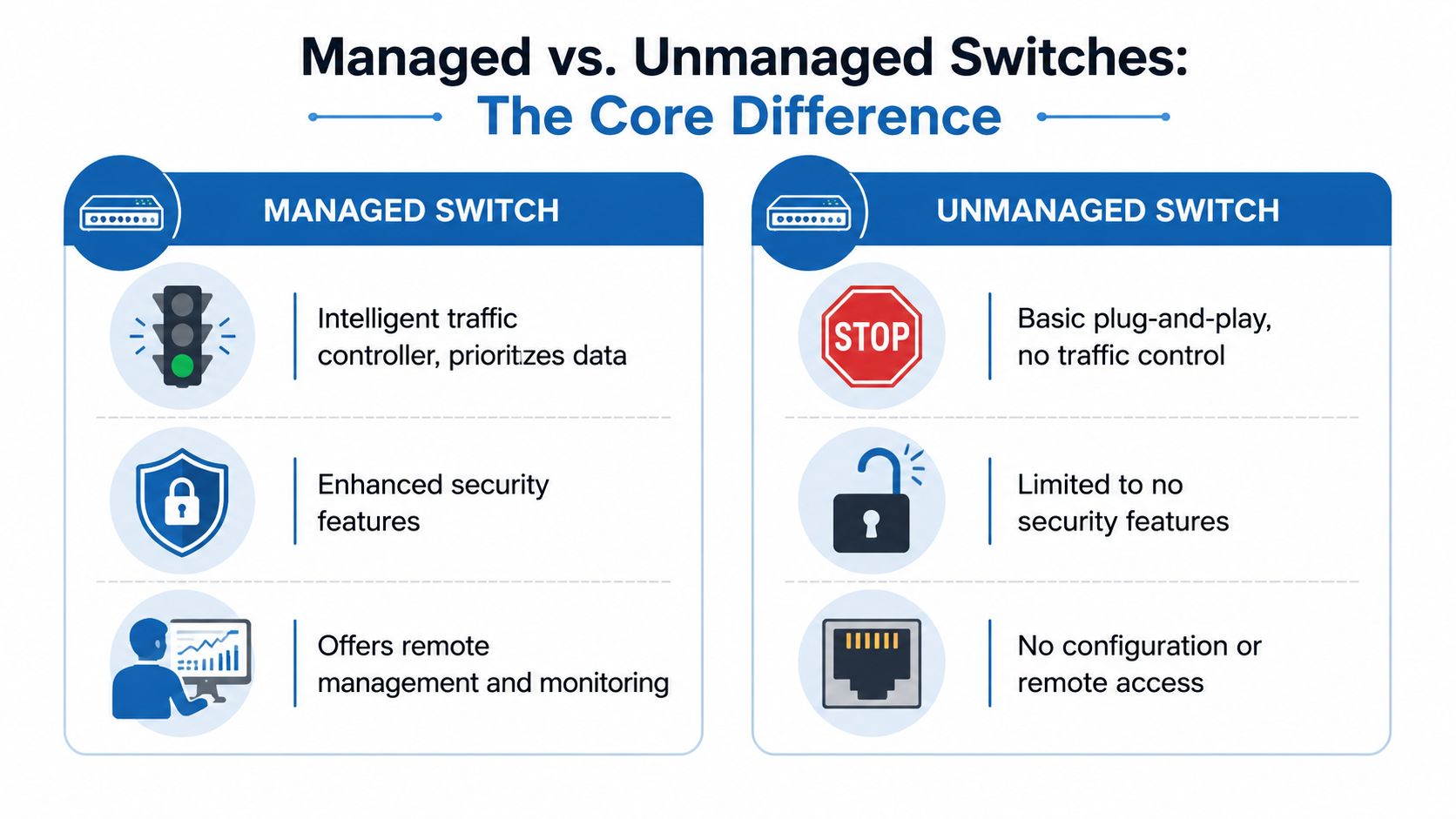
An unmanaged switch is the simple version. You plug devices into it, and it forwards traffic. No setup. No traffic policies. No visibility into what's happening.
A managed switch is the version you can control. According to Wikipedia's network switch overview, a managed network switch can be configured through tools such as a CLI, web interface, or SNMP, while an unmanaged switch is largely plug-and-play. In practical terms, that means you can create VLANs, set Quality of Service rules, mirror ports for troubleshooting, and apply security policies so important traffic gets treated differently from everything else.
Think road signs versus a traffic controller
The easiest way to understand what is a managed network switch is to compare it to road traffic.
An unmanaged switch is like a basic intersection with no active control. Cars arrive, take turns, and usually get through. If traffic is light, that works fine.
A managed switch is like adding a smart traffic controller to that intersection. Now you can do things such as:
- Create dedicated lanes: Keep guest Wi-Fi traffic away from office computers.
- Prioritize emergency vehicles: Let phone calls and video meetings move first.
- Watch congestion in real time: See where traffic is piling up.
- Block risky entries: Limit what unknown devices can access.
The key difference isn't that one switch moves data and the other doesn't. Both do that. The difference is whether you can tell the switch how to behave.
Why the distinction matters
For a small office with a handful of stable devices, an unmanaged switch may do the job with less cost and less complexity. But if your network supports voice calls, shared files, cameras, multiple employees, or customer access, you eventually run into situations where "automatic" isn't good enough.
Practical rule: If you need to separate, prioritize, monitor, or secure traffic, you're already describing the job of a managed switch.
That's why managed switches show up in offices where reliability matters more than basic connectivity. They don't just add features for the sake of features. They solve the problem of a network that has grown up without gaining any structure.
Unlocking Control Key Features of a Managed Switch
The useful way to look at switch features isn't "what does this acronym mean?" It's "what problem does this solve on a busy workday?"
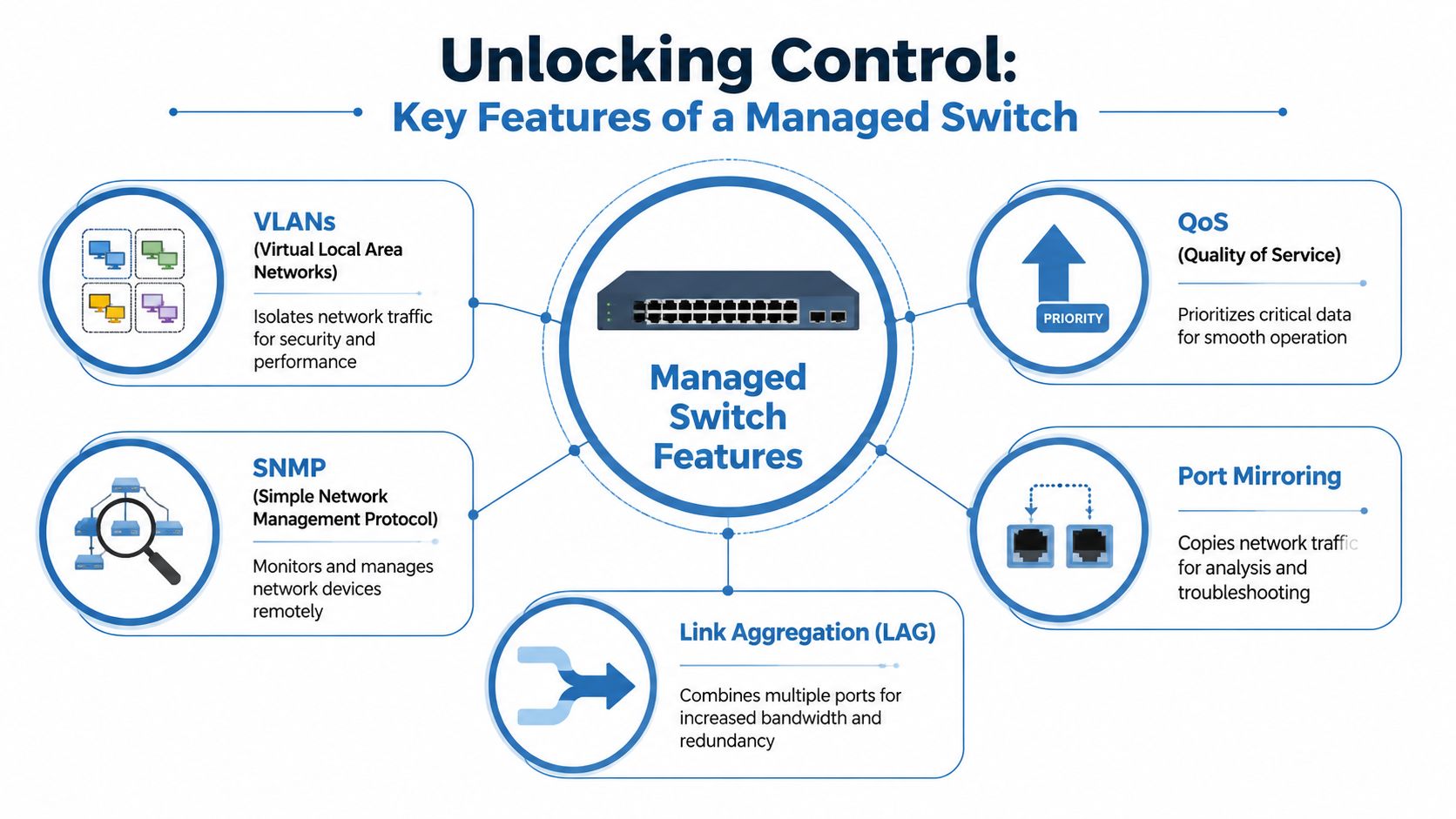
Maple Systems explains that a managed switch adds a management plane with its own IP address, so admins can configure ports, VLANs, QoS, and security policies through a CLI or web interface. The same overview notes that features such as SNMP monitoring, port mirroring, link aggregation, and 802.1X access control help operators isolate traffic, detect faults faster, and prioritize latency-sensitive applications like VoIP and video conferencing. You can read that in Maple Systems' explanation of managed network switches.
VLANs solve the "keep these groups apart" problem
A VLAN lets you split one physical network into separate logical networks.
The job to be done is simple. You don't want customer devices, employee laptops, payment systems, and security cameras all living in the same open room. A VLAN creates separate rooms.
Examples help:
- Guest Wi-Fi separation: Customers get internet access, but they don't sit on the same network as accounting files or printers.
- Camera isolation: Security cameras stay on their own segment instead of mixing with everyday office traffic.
- Department boundaries: Finance devices can stay separate from general office browsing.
Without VLANs, everything tends to mingle. That can create both security concerns and messy troubleshooting.
QoS solves the "important traffic keeps getting delayed" problem
Quality of Service, or QoS, tells the switch which traffic deserves priority.
If your phones, video calls, and payment terminals compete equally with file uploads and software updates, the urgent applications can feel unreliable even though the network is still technically up.
QoS works like an express lane. It doesn't create more internet speed by itself. It makes sure time-sensitive traffic doesn't get stuck behind less urgent traffic.
A choppy call often means the network treated a voice packet like it was no more important than a background download.
That matters in offices using cloud phones, video meetings, or remote desktop tools. Those apps care about timing, not just bandwidth.
A quick visual refresher can help here:
Monitoring solves the "we only know there's a problem after people complain" problem
Managed switches support monitoring tools such as SNMP. In plain English, that means the switch can report health and status information instead of sitting there without communicating.
That helps with questions like these:
- Which port keeps dropping? You can identify the trouble spot instead of swapping cables at random.
- Which device is flooding traffic? You can narrow down the source.
- Is a link overloaded? You can spot recurring congestion patterns.
Monitoring doesn't just help during outages. It helps you prevent them.
Port mirroring, link aggregation, and access control
Some managed switch features sound technical until you attach them to a real job.
| Feature | What it solves | Plain-language example |
|---|---|---|
| Port mirroring | You need to inspect traffic for troubleshooting | Copy traffic from one port to an analysis tool to see what's going wrong |
| Link aggregation | One connection path isn't enough | Combine multiple links for more bandwidth or resilience |
| 802.1X access control | You don't want any random device joining the network | Require approved devices or credentials before access is granted |
These features matter because business networks rarely fail in neat, obvious ways. Usually the issue is partial, intermittent, or tied to a specific device or type of traffic. A managed switch gives you handles to work with.
Managed Switches in Action Real World Use Cases
A managed switch earns its keep when the network has mixed priorities. Here are three common situations where the features stop being abstract and start solving real operational problems.
The accounting office
A small accounting firm has office staff, cloud file access, VoIP phones, network printers, and security cameras. During tax season, everyone is moving documents at once. The owner doesn't want dropped calls, and they definitely don't want guest traffic anywhere near client records.
A managed switch lets the firm split those needs apart. Phones can be prioritized so conversations stay clear. Staff devices can sit on one segment, while guest access and cameras sit elsewhere. If call quality drops, the IT team can investigate specific ports and traffic patterns instead of guessing.
For businesses handling a mix of branch connectivity, security, and local traffic control, managed network edge services are often where switching, routing, and policy start working together instead of as separate point products.
The home office power user
A remote video editor works from home. Large file transfers are normal. Video meetings happen throughout the week. The rest of the household streams shows, games online, and connects a growing pile of smart devices.
An unmanaged switch may still connect everything, but it won't make judgment calls. A managed switch can reserve better treatment for work traffic and keep a home office setup from being dragged down by entertainment traffic during the same hours.
This isn't about turning a house into a data center. It's about making sure the person earning income from that connection doesn't lose performance every time the rest of the home gets busy.
The coffee shop with guest Wi-Fi
A coffee shop wants to offer guest internet access because customers expect it. At the same time, the owner needs the point-of-sale system, back-office devices, and cameras to remain isolated.
That is a classic managed switch job.
- Guest traffic stays separate: Customers can browse without touching business systems.
- Point-of-sale stays protected: Payment traffic doesn't mix with public access.
- Cameras remain stable: Surveillance traffic doesn't have to compete blindly with customer usage.
Public access and private business systems should share a building, not the same trust level.
The value isn't in having a more advanced piece of hardware on the shelf. The value is that the network reflects how the business operates.
The Business Advantage for SMBs and Remote Work
Small businesses don't need enterprise jargon. They need fewer disruptions, clearer calls, safer segmentation, and faster troubleshooting.
That's why managed switching has become more relevant as networks have grown more crowded and more dependent on cloud services, voice, video, and connected devices. One industry projection cited by FiberMall says the global network switch market is projected to increase by 6.9% between 2023 and 2030, reflecting broader adoption tied to flexibility, control, and support for demanding environments such as data centers and VoIP-heavy offices. That projection appears in FiberMall's discussion of managed Ethernet switches.
Better productivity from fewer avoidable slowdowns
When employees lose time to frozen meetings, choppy calls, or random network lag, the cost shows up in frustration first. Then it shows up in missed details, repeated conversations, and slower work.
A managed switch helps by making the network less chaotic. Critical traffic can move predictably. Troubleshooting takes less guesswork. The result is not magic speed. It's steadier performance.
Stronger separation for everyday security
A lot of security problems start with networks that are too flat. If every device lives in the same space, one weak point can expose more than it should.
Managed switching gives businesses a practical way to separate roles:
- Business systems stay isolated from public or guest access.
- IoT devices stay contained instead of roaming freely across the same segment as workstations.
- Access policies become possible instead of relying on whatever the default setup allows.
A better fit for hybrid work
Remote work changed what "the office network" means. It now has to support video meetings, cloud apps, remote collaboration, and sometimes a mix of corporate and personal devices in the same location.
That makes control more valuable than ever. If the network is part of how your team sells, serves, communicates, and gets paid, then managing that traffic isn't a luxury item. It's basic operational discipline.
What to Know Before You Buy or Deploy
A managed switch can solve the right problems. It can also be the wrong purchase if your network is simple and likely to stay that way.
Independent guidance summarized by FieldEngineer makes that point clearly. For home or small-office networks, unmanaged switches are often preferred when advanced traffic policy isn't needed because they are simpler, cheaper, and usually sufficient. That's discussed in FieldEngineer's comparison of managed and unmanaged switches.
Start with the network you actually have
Before you buy anything, ask a few plain questions.
- How many wired devices do you need today? Count computers, printers, phones, cameras, access points, and anything else that needs Ethernet.
- Will you need separation? If guest Wi-Fi, payment systems, cameras, and office computers should not mix, that points toward managed features.
- Do calls or video meetings matter a lot? If yes, traffic prioritization may be worth having.
- Who will manage it? A feature is only useful if someone can set it up and maintain it.
The overkill test
Some setups don't need management features at all.
If you have a few devices, no guest network, no special traffic needs, and no plan to monitor or segment anything, an unmanaged switch is often the smarter choice. It does less, but that may be exactly what you need.
Buy the amount of control your environment can actually use. Not the amount that looks impressive on a spec sheet.
If your needs sit somewhere in the middle, it may be worth pairing switch decisions with managed network security solutions so security policy, segmentation, and oversight develop together instead of as separate projects.
Watch for these decision points
| Question | Why it matters |
|---|---|
| Port count | You need room for current devices and some growth |
| PoE needs | Phones, cameras, and access points may need power over Ethernet |
| Management style | Web-managed is simpler, deeper administration often needs more expertise |
| Support model | Someone has to monitor, update, and troubleshoot the switch over time |
The best buying decision usually isn't "managed or unmanaged forever." It's choosing the level of control that matches your real environment.
Simplify Your Network with Premier Broadband Managed Edge
Understanding the function of a managed network switch often reveals its inherent challenge. Control is useful, but control creates work. Someone has to configure VLANs, set policies, monitor devices, review alerts, and troubleshoot problems when performance slips.
That's where managed services start to make more sense than buying hardware alone.

A practical option is Premier Broadband Managed Edge, which is positioned around managed networking functions such as security, routing, Wi-Fi, SD-WAN, remote access, and device management for equipment including switches and access points. For a business owner, that means the network can be structured and monitored without turning the office manager, owner, or in-house generalist into a full-time network engineer.
Where a managed service helps most
The value isn't just in having the right switch model. It's in keeping the whole environment coordinated.
That usually matters when you need to:
- Support mixed traffic: Phones, cameras, cloud apps, guest access, and employee devices all behave differently.
- Reduce troubleshooting time: Problems can be investigated with visibility instead of guesswork.
- Keep policy consistent: Segmentation and security don't drift every time the network changes.
- Protect staff focus: Your team can work on the business instead of babysitting network gear.
For readers who want the broader framework behind that approach, Managed Network Edge 101 explains how managed infrastructure can improve day-to-day business internet performance.
The plain-language takeaway
A managed switch is useful because it gives you control over how traffic moves inside your network. That control helps solve real problems such as unstable calls, mixed-trust devices, poor visibility, and fragile performance under load.
But not every business wants to own the setup burden that comes with those tools. In many cases, the smarter move is to get the benefits of segmentation, prioritization, and monitoring through a managed platform rather than building and maintaining every piece yourself.
If you're trying to make your network more reliable without getting buried in switch settings and troubleshooting, Premier Broadband offers fiber internet, VoIP, and managed network services that can help align connectivity, security, and day-to-day performance with how your home office or business works.