
Your movie looks sharp until someone starts a cloud backup in the next room. Your online match feels smooth, then your character rubber-bands at the worst moment. Your video call is fine for ten minutes, then faces turn blocky and voices start clipping.
It's common to blame “the internet” when that happens. Sometimes the problem is the internet plan. Just as often, the issue is the last stretch between your router and your device. That's where the ethernet vs WiFi speed debate stops being abstract and starts affecting real work, real entertainment, and real frustration.
The twist most articles miss is that your connection type matters more when your underlying service is better. If you have symmetrical fiber, your connection can deliver strong download and upload performance at the same time. That gives both Ethernet and Wi-Fi more to work with. It also makes the gap between them easier to spot in everyday use.
The Never-Ending Battle Between Wired and Wireless
A lot of people run into this debate without realizing it. They upgrade to a faster plan, install a newer router, and expect every problem to disappear. Then the TV buffers anyway, the laptop stalls during a meeting, or a game starts lagging even though the speed test looked “good.”
That's usually the moment when wired and wireless stop sounding like technical jargon and start sounding like a decision that matters.
Ethernet is simple. It runs a cable from your router straight to a device. Wi-Fi skips the cable and gives you mobility. That convenience is hard to beat, especially for phones, tablets, and laptops that move around all day. But convenience has trade-offs, and those trade-offs show up fastest when your home network is busy.
I've seen the pattern over and over. A household might have one person on a Zoom call, another streaming a show, and someone else downloading a game update. Nothing is broken. The network is just asking Wi-Fi to juggle too many variables at once.
Wi-Fi gives you freedom. Ethernet gives you control.
That doesn't mean Wi-Fi is bad. It means Wi-Fi has to fight through walls, interference, distance, and competing devices. Ethernet doesn't. If you've been comparing newer wireless standards and wondering whether the latest generation changes everything, this breakdown of Wi-Fi 5 vs Wi-Fi 6 technology helps explain why newer Wi-Fi can improve things without replacing the basic strengths of a cable.
Here's the practical version early on:
| Connection type | Best for | Main strength | Main weakness |
|---|---|---|---|
| Ethernet | Desktops, gaming consoles, smart TVs, office workstations | Stable speed and responsiveness | Requires cabling |
| Wi-Fi | Phones, tablets, laptops, flexible workspaces | Mobility and convenience | Performance changes with distance, walls, and interference |
| Hybrid setup | Most homes and small businesses | Uses each connection where it fits best | Takes some planning |
Your Connection Is a Team Effort
People often treat Ethernet and Wi-Fi as if they are the entire internet connection. They're not. They're the final delivery method to your device.
Your network works like a chain. The service enters the building from your ISP. The modem or gateway translates that service. The router manages local traffic and sends data to each device. Then the last hop happens through an Ethernet cable or through Wi-Fi.
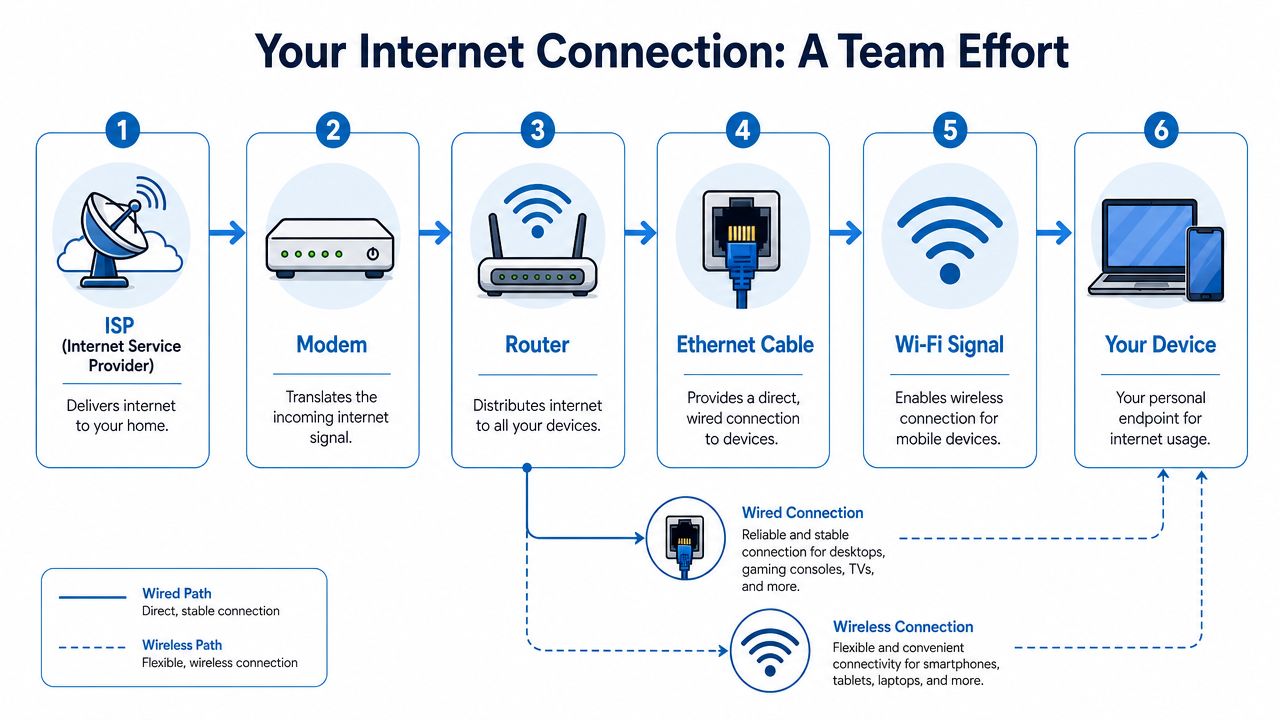
Where the bottleneck usually appears
If the incoming internet service is weak, neither Ethernet nor Wi-Fi can rescue it. A cable won't turn an overloaded or limited connection into a great one. It only removes the wireless variables inside your home or office.
That's why the quality of the underlying service changes the whole ethernet vs WiFi speed conversation. With symmetrical fiber, you aren't just buying faster downloads. You're also giving uploads equal importance, which matters for video meetings, cloud backups, file syncing, security cameras, and sending large work files.
A lot of users still think internet performance is mostly about download speed. That was a reasonable shortcut years ago. It's not a good shortcut for households with remote workers, creators, students, and connected devices all active at once.
Fiber makes the comparison more meaningful
When the incoming service is symmetrical fiber, both connection types can perform closer to their best. That reveals a more honest comparison:
- Ethernet shows what the service can really deliver because it removes interference inside the building.
- Wi-Fi shows how well your local environment supports wireless including placement, device quality, and congestion.
- Uploads become easier to notice because symmetrical service exposes whether the wireless side is limiting things during calls and file transfers.
Practical rule: Test the whole chain in order. Check the service first, then the modem or router, then the device connection method.
If you're troubleshooting gear placement or replacing hardware, a good guide to modem and router setup can save a lot of wasted guesswork.
What this means at home and at work
In a home office, a weak upload path can make you look frozen or pixelated even when webpages open quickly. In a small business, a poor internal setup can make staff blame the provider when the actual problem is an overloaded wireless environment.
The important takeaway is simple. Ethernet and Wi-Fi don't compete in isolation. They sit on top of the service feeding them. If that foundation is strong, especially with symmetrical fiber, your choice between wired and wireless has a much bigger effect on what you experience.
The Real Difference in Internet Speed
On spec sheets, modern Wi-Fi can look close enough to Ethernet that the choice seems trivial. In real rooms with walls, doors, neighbors, and active devices, the difference gets obvious fast.
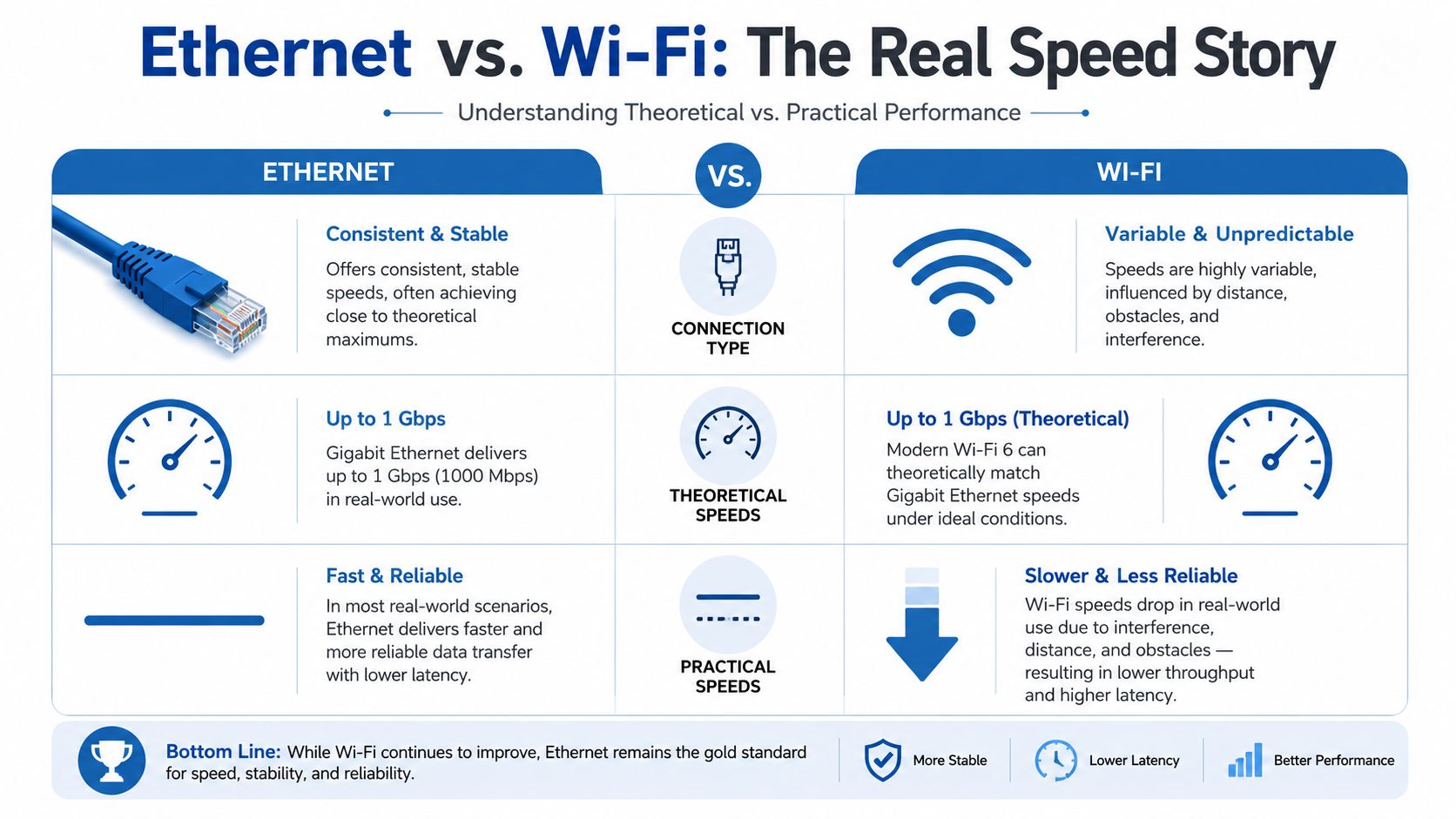
The practical reason is straightforward. Ethernet gives one device a direct path to the router. Wi-Fi shares airspace. Every wall, every bit of interference, and every competing device can chip away at the result.
According to network performance data summarized with Wi-Fi vs Ethernet speed findings, wired Ethernet connections consistently deliver 95–100% of plan speeds, whereas Wi-Fi connections typically deliver only 50–80% depending on distance, interference, and router quality. The same source notes that on a 1 Gbps fiber plan, users may see actual Wi-Fi speeds of 400–800 Mbps rather than the full provisioned speed.
What that looks like in the real world
If you're paying for fast fiber, Ethernet is usually the easiest way to feel the benefit immediately. Large downloads finish more predictably. Upload-heavy work like sending project files or backing up media tends to stay steadier. Performance doesn't swing as much from one room to another.
Wi-Fi can still be fast. In the same source, real-world gigabit setups commonly show Ethernet delivering 800–940+ Mbps with steady performance, while Wi-Fi 6 speeds vary widely and often drop to 400–900 Mbps under good conditions but can fall significantly lower with distance or walls.
While Ethernet reliably delivers close to the speed you pay for, Wi-Fi performance depends on the room, the router, and what else is happening on the network.
That's the core distinction in ethernet vs WiFi speed. It's not that Wi-Fi never performs well. It's that Wi-Fi performance is conditional.
To see the hardware side of the wired path, this guide to choosing a Category 5 Ethernet cord is a useful place to start.
Download speed is only half the story
People often notice download numbers first because those are easy to recognize. Streaming starts faster. Updates install sooner. Big apps finish downloading with less waiting.
But better internet service, especially symmetrical fiber, changes what matters. Uploads become just as visible because modern households send as much as they receive during a normal day. Video meetings, cloud drives, offsite backups, and content creation all depend on upload quality.
The same source found that Ethernet increased usable upload bandwidth by 22–38% compared to Wi-Fi under load, which matters directly for video conferencing and other interactive tasks.
Here's a quick speed comparison view:
| Scenario | Ethernet | Wi-Fi |
|---|---|---|
| Same room as router | Usually closest to plan speed | Can be very good, but still variable |
| Across the house | Largely unchanged if cabled properly | Often drops due to walls and distance |
| Busy household or office | More consistent under load | More likely to fluctuate |
| Large file transfers | Predictable and steady | Can slow down unexpectedly |
A short explainer can help if you want to see this difference discussed visually:
Why fiber changes the stakes
On a slower connection, the service itself may hide the difference between Ethernet and Wi-Fi. Once fiber gives you strong headroom in both directions, the local connection method becomes a bigger factor.
That's why people moving to symmetrical fiber often notice a surprise. The internet plan feels excellent over Ethernet right away, while Wi-Fi still needs tuning. The service is no longer the ceiling. Your local network is.
Beyond Speed Why Latency and Reliability Matter More
A fast connection can still feel bad. That catches people off guard.
When someone says “my internet is slow,” they often mean one of two different things. They may mean low bandwidth, which affects how much data moves at once. Or they may mean poor responsiveness, which shows up as lag, choppy audio, delayed controls, and unstable calls.

Jitter is what ruins real-time use
For gaming, VoIP, and video meetings, jitter matters as much as raw speed. Jitter is the variation in packet timing. High jitter makes connections feel uneven. You hear it as robotic audio, see it as frozen video, and feel it as inconsistent game response.
According to testing published in this analysis of Ethernet vs Wi-Fi jitter, under typical home network conditions with background traffic, Wi-Fi 5GHz jitter averages 18.4ms compared to Ethernet at 0.6ms, a 30× difference in stability. Under heavy load, Wi-Fi jitter spikes above 80ms while Ethernet remains under 2ms. In identical load scenarios, Ethernet delivered consistent jitter of 0.3–1.7ms while Wi-Fi ranged from 4.2–47.8ms.
That's why a wireless connection can show decent bandwidth in a speed test and still perform poorly on a live call.
Reliability beats peak performance
If your work depends on staying connected without glitches, Ethernet's biggest advantage isn't just top speed. It's consistency.
Consider these use cases:
- Video conferencing needs a steady stream more than flashy peak throughput.
- Competitive gaming rewards predictable response, not occasional bursts of speed.
- VoIP phone systems sound better when packet timing stays stable.
- Remote desktop sessions feel natural when input delay doesn't jump around.
A connection that behaves the same way every minute is usually more valuable than one that's fast only when conditions are perfect.
If lag keeps showing up during meetings or gaming, this practical guide on how to fix high latency helps identify whether the problem is local wireless behavior, network load, or something else in the chain.
Where Wi-Fi still works well
Wi-Fi is still the right tool for plenty of tasks. Web browsing, messaging, smart home devices, and casual streaming usually tolerate small shifts in latency. Many users don't need a cable for every device.
But once an activity becomes real-time and important, reliability matters more. That's where Ethernet earns its place. It doesn't have to be everywhere in the building. It just needs to be available where poor timing causes real problems.
How to Test Your Connection the Right Way
The cleanest way to settle the ethernet vs WiFi speed question is to test your own network. Don't test once and assume the answer applies everywhere in the house or office.
Start with one device that has both Ethernet and Wi-Fi. Use the same laptop or desktop for each test so you aren't comparing different hardware.
Step one: set a wired baseline
Plug the device directly into your router or gateway with an Ethernet cable. Run a speed test and note three things: download, upload, and ping. That result is your best picture of what the connection can do without wireless variables getting in the way.
If you have symmetrical fiber, the service should look the most balanced under these conditions. Upload should matter just as much as download if your day includes meetings, cloud storage, or sending large files.
Step two: test Wi-Fi from the same location
Unplug the cable. Connect to Wi-Fi and run the test again while standing or sitting in the same spot. That isolates the effect of connection type.
If there's a meaningful gap, the issue is probably not your internet plan. It's the wireless hop between the router and the device.
Test wired and wireless from the same chair first. Then change rooms. If you move both the device and the connection type at once, the results are muddy.
Step three: move and repeat
Now take the same device to a room where performance usually feels worse. Run the test again on Wi-Fi. There, you start seeing the effect of walls, floors, furniture, and distance.
Use the results to answer practical questions:
- Is the wired result strong? If yes, your service and core hardware are likely in decent shape.
- Does Wi-Fi drop sharply in one area? That points to coverage or placement issues.
- Do uploads look weaker on Wi-Fi than expected? That often shows up first during calls and cloud work.
A few testing habits help:
- Close heavy apps: Pause downloads, backups, and game updates before testing.
- Use one device at a time: You want a clear reading, not a snapshot of household chaos.
- Test at problem times: If evenings feel worse, test in the evening.
The point isn't to chase perfect numbers. It's to find where the connection changes and whether Ethernet, better placement, or broader wireless coverage will solve the problem.
Optimizing Your Home and Business Network
The best setup usually isn't “all Ethernet” or “all Wi-Fi.” It's a deliberate mix.
Use Ethernet where consistency matters most. Use Wi-Fi where mobility matters most. That approach gets better results than trying to force one connection type to handle everything.
What should be wired first
If you can only wire a few devices, start with the ones that create the most traffic or suffer the most when the connection wobbles.
- Desktop computers: They stay in one place, so they're ideal Ethernet candidates.
- Gaming consoles: A wired link helps keep play sessions and downloads more predictable.
- Smart TVs and streaming boxes: Wiring them can take heavy video traffic off your wireless network.
- Workstations and office phones: Business tools benefit from consistency more than convenience.
- Network-attached storage or servers: These devices work best when they have a stable path.
This does two jobs at once. It improves those devices directly, and it frees wireless capacity for the devices that need to roam.
What makes Wi-Fi perform better
If Wi-Fi is your main connection for laptops, phones, and tablets, setup matters.
Router placement is the first thing I'd check. Put it in a central, open location rather than hiding it in a cabinet, closet, or far corner of the building. A great internet service can still feel mediocre if the Wi-Fi signal starts from a bad spot.
Then look at device behavior. A house full of smart devices, TVs, tablets, and laptops creates a more demanding environment than people expect. Wireless works best when you give it room to breathe.
A few practical moves help a lot:
- Move the router into the open: Avoid enclosed furniture and tucked-away utility spaces.
- Separate critical devices from crowded Wi-Fi use: If one person depends on calls all day, wire that workstation.
- Use mesh in larger spaces: A mesh system can improve coverage where one router can't reach cleanly.
- Keep firmware and hardware current: Outdated gear can drag down an otherwise solid network.
Home and business need different priorities
Homes usually optimize for convenience first. Businesses usually optimize for reliability first. That difference matters.
In a house, you can tolerate a little fluctuation on a tablet or smart speaker. In a business, a dropped call, unstable payment system, or choppy conference room connection causes immediate disruption. Even in small offices, the right move is often to wire fixed equipment and reserve Wi-Fi for mobile staff and guest access.
Wireless is best treated as a shared resource. The more fixed, high-demand devices you move off Wi-Fi, the better Wi-Fi feels for everything else.
If you don't want to keep adjusting channels, placement, and coverage yourself, managed Wi-Fi can be a practical solution. It takes the tuning work off the customer side and puts network design, placement, and support into a more structured process.
Final Verdict Who Needs Ethernet vs WiFi
There isn't one winner for everyone. There is a best fit for each job.
A strong fiber connection gives you the headroom to make either option work well. Ethernet is the better choice when you need the most stable experience. Wi-Fi is the better choice when convenience and mobility matter more than perfect consistency.
Gamers and streamers
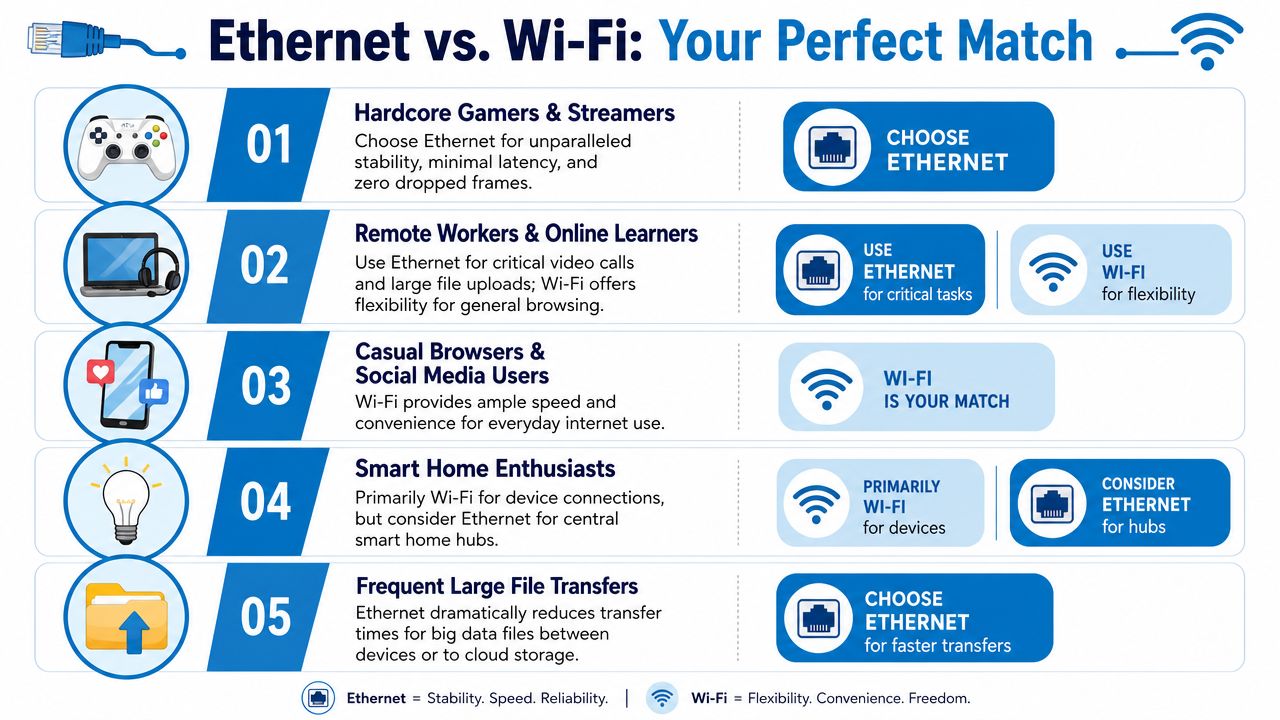
If you play competitive games, stream live, or do both at once, choose Ethernet when possible. This is the group that notices fluctuations first and forgives them least. Stable timing matters more than theoretical wireless speed.
Remote workers and online learners
If your day includes Zoom, Teams, VoIP, cloud drives, and shared documents, a wired connection is worth using at your primary desk. Wi-Fi is still fine for general browsing, messaging, and moving around the house, but the main workstation should favor consistency.
Families and casual users
If most activity is browsing, social media, smart devices, and on-demand streaming, Wi-Fi is usually enough when it's set up properly. The bigger priority is coverage, router placement, and reducing congestion from heavy fixed devices.
Small businesses
If staff rely on cloud apps, voice systems, point-of-sale tools, or shared files, use Ethernet for fixed equipment and business-critical stations. Keep Wi-Fi available for laptops, mobile devices, and guest access. That balance usually gives the cleanest day-to-day experience.
Creative professionals and large file workflows
If you upload media, sync large project folders, or move files to cloud storage every day, Ethernet makes the most of a fast symmetrical connection. It removes one of the biggest variables between your work and the service you're paying for.
Website owners can think about it the same way. Strong hosting and fiber access help, but the user experience still depends on the last-mile and local delivery details. For teams working on site performance, these Core Web Vitals optimization insights are a useful parallel. Fast infrastructure only pays off when the rest of the delivery path is handled well.
The short version is simple:
- Choose Ethernet for desks, consoles, TVs, and business-critical devices.
- Choose Wi-Fi for mobility, convenience, and everyday general use.
- Choose both if you want the best overall network.
That's the fundamental answer to Ethernet vs WiFi speed. The better your underlying service is, especially symmetrical fiber, the more valuable it becomes to match each device with the right connection method.
If you want a connection that supports both strong wired performance and dependable whole-home or business Wi-Fi, Premier Broadband offers 100% fiber internet with symmetrical speeds built for streaming, gaming, remote work, and voice. If your current setup feels inconsistent, it may be time to upgrade the foundation first and then tune the network around how you use it.