
You've probably felt this already. A customer calls the main office line, your receptionist is out, one salesperson is working from home, another is on the road, and the call ends up in the wrong place or nowhere at all. Meanwhile, the phone closet in the back office still looks like a bowl of tangled wires, and every small change seems to require a support ticket, a service visit, or both.
That setup used to be normal. For a growing business, it's now a drag on speed, staffing, and customer experience. A modern cloud phone system changes that by moving the brains of your business phone service off the wall and into a managed online platform your team can use from desk phones, laptops, and mobile apps.
Is Your Old Phone System Holding Your Business Back
A lot of small businesses reach the same point at the same time. The team grows past one office. Someone wants calls forwarded to a mobile phone. A manager asks for better reporting. Customer service needs a simple auto-attendant. Then the old phone system starts showing its age.
One office manager I've worked with described it this way: “The phones worked fine until they didn't fit the business anymore.” That's usually the issue. Legacy systems were built for a world where everyone sat near the same desk, in the same building, using the same hardware every day.
The signs show up in daily work
Older systems often create problems that feel small in isolation but expensive in combination:
- Missed opportunities: Calls ring at empty desks while remote staff are available but unreachable through the main system.
- Slow changes: Adding a user, changing a greeting, or rerouting calls becomes a project instead of a quick admin task.
- Higher maintenance burden: Aging hardware needs support, replacement parts, and on-site troubleshooting.
- Poor fit for hybrid work: The system assumes work happens in one location, on one device.
If you're still comparing your current setup to a basic office phone standard from years ago, it helps to revisit the difference between a legacy switchboard model and newer options like PABX systems and hosted alternatives.
Old phone systems don't usually fail all at once. They fall behind one workflow at a time.
That's why many business owners start looking into hosted voice after a frustrating stretch of missed calls, awkward call transfers, or staff using personal mobiles as a workaround.
Businesses are moving away from hardware-first systems
This isn't a niche shift. The global cloud-based phone system market reached $31.15 billion in 2025 and is projected to reach $77.94 billion by 2032, growing at a 14.0% CAGR, according to P Market Research's cloud-based phone system market research. That tells you something important: businesses aren't treating this as a gadget upgrade. They're treating it as core communications infrastructure.
If you're sorting through options and want a broader view of how companies are choosing modern office phone systems, it helps to compare not just features but also how each model supports the way your team works today.
A cloud phone system solves a very practical problem. It lets your business answer, route, transfer, record, and manage calls without tying those functions to a box in one office.
What Exactly Is a Cloud Phone System
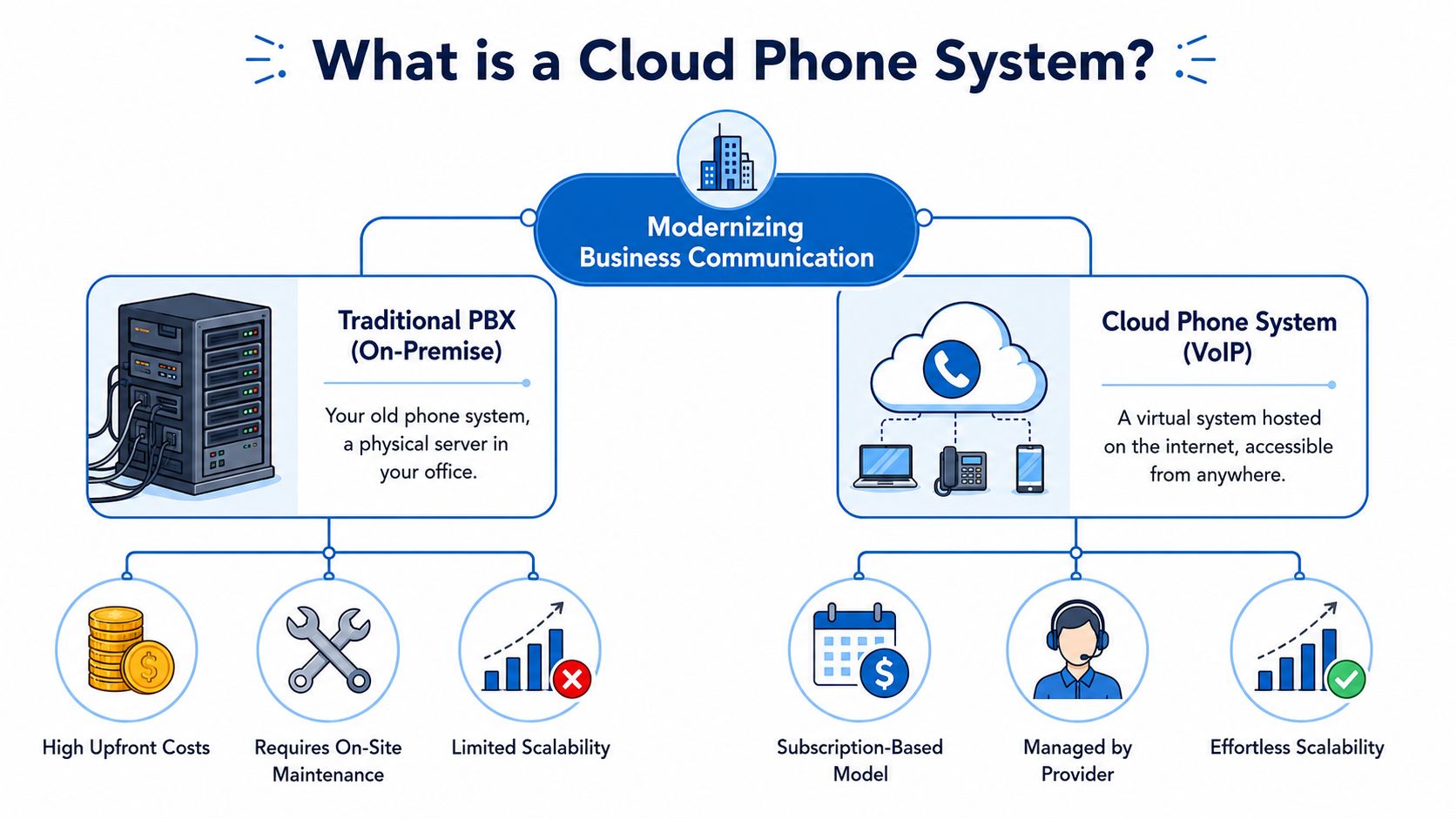
A cloud phone system gives you the same core job as a traditional business phone setup. It answers calls, routes them, sends people to voicemail, and rings the right employee or department. The difference is where that work happens.
With an older PBX, the call control usually depends on equipment sitting in your office. With a cloud system, that control lives in the provider's data centers and is delivered to your team over the internet using VoIP, or Voice over Internet Protocol. Your voice is converted into digital data, sent online, and then turned back into audio on the other end.
A simple way to picture it is the difference between keeping one important machine in the back office and using a managed online service your staff can reach from anywhere. If the office hardware has a problem, your phone setup can become harder to manage fast. If a cloud provider maintains the platform for you, updates, capacity, and day-to-day administration are handled much differently.
What actually changes for your team
Your customers still dial your business number. What changes is the system behind that number.
With a cloud setup:
- The provider hosts the call-routing platform: You do not need to maintain the central phone system hardware on-site.
- Staff can use different approved devices: Calls can be answered from desk phones, laptops, mobile apps, or a browser, depending on the service.
- Admins handle changes in a web portal: Business hours, voicemail routing, call queues, auto attendants, and user accounts are usually managed online.
For a small business owner, that shift matters because the phone system stops being tied to one building and one wiring closet. If you hire a new employee, open a second location, or let someone work from home three days a week, you are usually updating settings instead of ordering more boxes and scheduling an on-site visit.
You will also hear the term UCaaS. It is related, but broader. A cloud phone system focuses on business calling. UCaaS adds messaging, video meetings, and team collaboration in one platform. If that line has felt fuzzy, this guide explaining what UCaaS means for business communications gives helpful context.
Why business owners usually grasp the value quickly
Here is the practical test. If moving one employee to another room, another site, or home creates forwarding issues, voicemail confusion, or missed transfers, your current phone setup is probably too dependent on office hardware.
Cloud systems are usually sold as monthly subscriptions, with pricing based on users and feature tiers rather than expansion cards and maintenance visits. The exact total still depends on add-ons, call volume, hardware choices, and support terms, which is why provider comparison matters so much later in the buying process.
For another small-business perspective, the Networking2000 UK business phone system guide offers a useful overview.
Key Benefits for Modern SMBs and Remote Teams
The best way to evaluate a cloud phone system is to ignore the feature checklist for a moment and ask a different question: what gets easier for your business the week after you switch?
For most SMBs, the answer comes down to flexibility, cost control, and fewer communication bottlenecks.
Work from anywhere without sounding disorganized
A traditional office phone setup assumes the employee is where the desk phone is. That assumption breaks fast when your team works from home, splits time between locations, or spends half the day in the field.
A cloud platform changes the identity of the phone system from “the phone on the desk” to “the business number and call flow your staff can access from approved devices.” That means a sales rep can answer a business call from a mobile app, a receptionist can route calls from home during a weather disruption, and a manager can check voicemail without dialing into an office line.
If remote calling is becoming part of your day-to-day operations, this overview of a remote work phone system setup shows how businesses keep staff connected without forcing everyone back to a fixed desk.
Costs get more predictable
One reason SMBs move to cloud telephony is budget clarity. Instead of planning around hardware repairs, expansion modules, and specialized maintenance, you're usually budgeting by user and feature tier.
According to KrispCall's cloud phone system statistics roundup, organizations adopting cloud phone systems can reduce telecom costs by 30% to 50%, and the cost of cloud telephony is expected to decline 3% to 5% annually. For a small business, that matters because every avoided hardware surprise protects cash flow.
Growth stops feeling like a wiring project
Scaling an old phone system can be awkward. New users may require physical changes, extra hardware, or outside help. In a hosted model, growth is usually administrative rather than mechanical.
Here's what that changes in practice:
- New hires onboard faster: You can usually create users, assign extensions, and set routing rules without waiting for a hardware change.
- Seasonal teams are easier to support: If your staffing rises and falls, a subscription model is often easier to align with actual headcount.
- New locations feel less isolated: A second office can operate inside the same communications environment instead of becoming a separate phone island.
Small teams get access to larger-business capabilities
This is one of the most overlooked advantages. Features that used to feel “enterprise only” are now common in cloud platforms, including auto-attendants, voicemail-to-email, call routing rules, mobile apps, analytics, and integrations with tools your team already uses.
That doesn't just sound more professional. It helps people work faster. A front desk team can see missed-call patterns. A service manager can route calls by schedule. A business owner can review whether calls are being answered promptly without standing next to the receptionist all day.
Better phone systems don't replace good service. They remove the friction that keeps your staff from delivering it consistently.
Cloud Phone System vs On-Premise PBX
If you're deciding between keeping your current PBX and moving to a hosted service, the comparison becomes clearer when you look at daily business impact rather than technical jargon.
Side-by-side comparison
| Factor | Cloud Phone System | On-Premise PBX |
|---|---|---|
| Initial setup | Usually faster to roll out because the core system is hosted by the provider | Often requires on-site equipment, installation, and configuration |
| Cost structure | Subscription-based, typically billed per user | Hardware-heavy, with upfront equipment and installation costs |
| Maintenance | Provider handles the main platform updates and infrastructure | Your business manages or contracts for hardware support and upkeep |
| Adding users | Typically handled through an admin portal | May require additional hardware, licenses, or technician support |
| Remote work | Built for staff using mobile apps, laptops, and multiple locations | Often needs workarounds to support remote users well |
| Feature access | Modern features are easier to activate as part of service tiers | Feature expansion can depend on hardware compatibility and added modules |
| Office moves and expansion | Easier to adapt when teams relocate or open another site | Physical relocation can be disruptive and time-consuming |
| Dependency | Strongly dependent on internet performance and planning | Less dependent on internet for core calling if using traditional lines |
Where SMBs usually feel the difference first
Most owners don't notice the biggest difference in a spec sheet. They notice it when something changes.
A staff member relocates. A second location opens. A storm disrupts office access. The receptionist needs backup coverage from home. A business line must ring on multiple devices. These are the moments when a hardware-centered phone system starts to show its limits.
When on-premise still appeals
There are businesses that prefer owning and controlling their phone hardware. Some want that direct control. Others already have a system that's closely tied into internal processes and aren't ready to replace it.
That said, for many SMBs, the operational question isn't “Can the old PBX still make calls?” It's “Does this system support the way we work now without creating friction?”
If every staffing change or routing update needs outside help, the phone system is no longer supporting the business. The business is supporting the phone system.
Ensuring Security and High Call Quality
Business owners usually ask two fair questions before moving phones to the cloud. Will calls sound clear, and what happens if something goes wrong?
The answer starts with understanding that a cloud phone system depends on your network, not just your provider.
Call quality depends on your connection design
Voice traffic doesn't need massive bandwidth, but it does need consistency. A cloud phone system requires about 100 kbps per concurrent call, according to Business.com's cloud phone system guidance. The keyword there is concurrent. If several people may be on calls at the same time, your network has to be able to carry that voice traffic cleanly while the rest of the office is also using the internet.
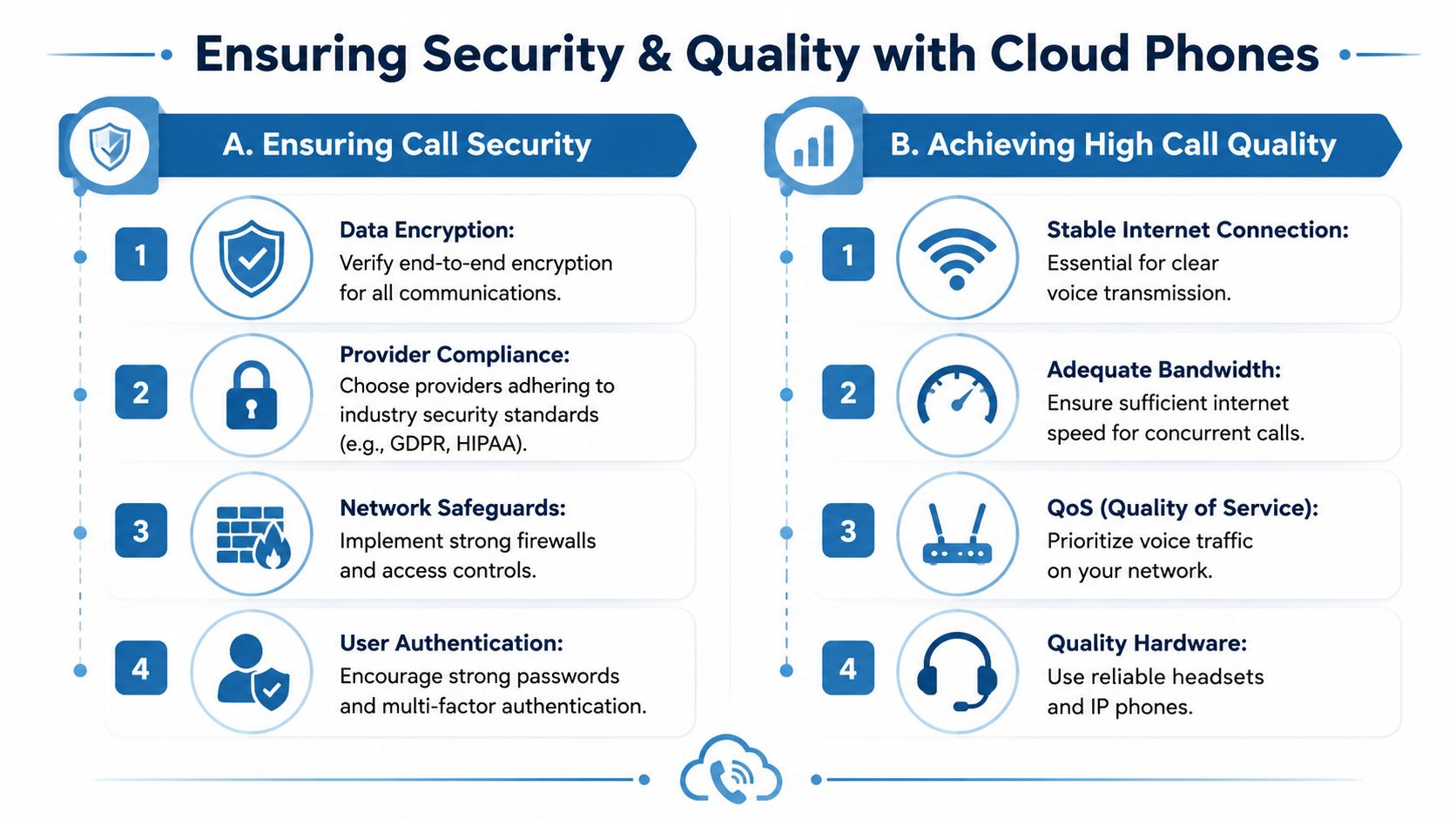
That's where QoS, or Quality of Service, matters. QoS tells your network to prioritize voice traffic over less time-sensitive traffic. Without it, calls can sound choppy during busy periods because the network treats voice packets like any other data.
Uptime promises aren't the whole story
A lot of providers advertise platform uptime, but that doesn't protect you from a local internet outage. If your office has one internet path and that line fails, your phones can still go silent even if the provider's platform is operating perfectly.
Business.com also notes that experts recommend redundant internet connections because a single link failure can cause total voice service loss without automatic failover. For businesses that depend on inbound calls, redundancy is not a luxury item. It's part of business continuity.
Here's a practical reliability checklist:
- Prioritize voice traffic: Ask whether your router or network stack supports QoS.
- Plan for failover: A backup connection can keep calls alive when the main line drops.
- Check endpoint quality: Good headsets and properly configured devices reduce user-side issues.
- Map critical call paths: Decide which users or departments must stay reachable during outages.
A provider's uptime promise covers their platform. Your customers care whether your business can still answer the phone.
Security is broader than passwords
Security doesn't stop at login credentials. You also need to ask how the provider handles encryption, account access, call records, and regulatory features that affect trust and compliance.
Businesses in regulated industries should look closely at emergency calling requirements and caller authentication expectations. For leadership teams sorting through emergency response obligations in internet-based calling, this guide to E911 compliance for leaders is a useful reference.
You should also verify practical controls such as role-based admin access, support for strong authentication, and clear policies around call data handling. Security in a cloud phone system is part provider choice, part internal discipline, and part network design.
Evaluating Providers and Understanding Costs
Once you decide a cloud phone system makes sense, the next challenge is choosing well. Many buyers get tripped up at this stage. They compare monthly seat prices but don't dig into what's included, what's excluded, and what extra work their own team will still carry.
Start with the pricing model, then go past it
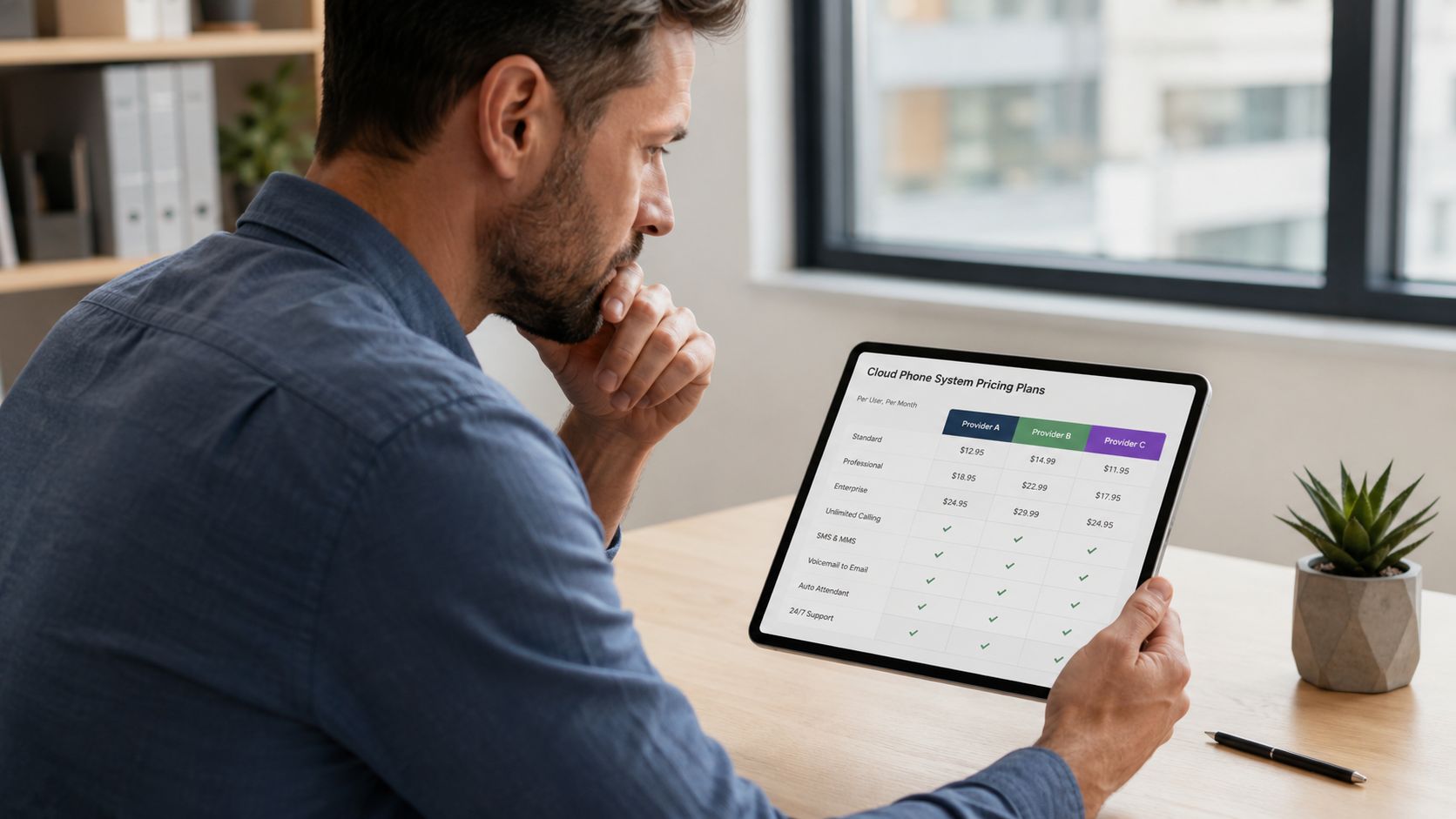
Most services are sold per user, per month. That sounds straightforward, but plans differ a lot in what they treat as standard versus premium. Basic tiers may cover calling, voicemail, and simple routing. Higher tiers may add analytics, integrations, video, or AI-assisted notes.
The sticker price is only the first layer. According to Sipstack's guide to choosing a cloud phone system, lifetime costs can be inflated by 30% to 50% beyond monthly fees because of hardware, training, implementation, and integration work. The same source notes that buyers should also ask about data handling after cancellation and local support availability.
Questions that separate a good fit from a future headache
When you compare providers, ask questions that reveal how the service will feel after go-live.
Support and onboarding
- Who handles setup: Will the provider help configure call flows, auto-attendants, and user provisioning?
- How support works: Is support local, outsourced, ticket-based, or phone-based?
- What training looks like: Will your staff receive onboarding help, or are you expected to self-serve?
Ownership and flexibility
- Number porting: Can you keep existing business numbers, and are there fees or limitations?
- Exit clarity: What happens to recordings, messages, and data if you leave?
- Admin control: Can your team make ordinary changes without opening support requests?
For businesses comparing hosted voice options, it's helpful to review providers that also understand the internet side of the equation. A strong phone platform still depends on reliable connectivity. This is why many buyers also compare firms that combine voice with network expertise, such as those listed in this overview of cloud communications companies.
A short explainer can help as you build your shortlist:
A practical migration checklist
Before signing, make sure you can answer these points clearly:
- Current inventory: List your numbers, users, devices, call flows, greetings, and any fax or specialty lines.
- Internet readiness: Confirm your connection, internal network, and failover plan can support voice well.
- Device plan: Decide who needs a desk phone, who can use a softphone, and who needs both.
- Training plan: Give staff a simple rollout guide for transferring calls, checking voicemail, and using mobile apps.
- Cutover timing: Schedule the move during a low-risk period and confirm number porting details in advance.
The migration itself usually isn't the hardest part. The hardest part is buying a system without asking enough operational questions.
Frequently Asked Questions for Business Owners
A lot of owners ask the same thing after they start comparing options. Will we lose our number. Will the bill creep up. Will the switch turn into a week of chaos. Those are the right questions, because the goal is not just to replace old hardware. It is to choose a system that fits how your team works.
Can I keep my current business phone number
Usually, yes. Your new provider can typically port your existing number over, which means customers keep calling the same line while the service behind it changes.
The part to watch closely is timing. Ask how the provider handles port dates, temporary routing, and what happens if the old carrier delays the release. Keep your current service active until the port is confirmed, or you risk dropped calls during the changeover.
How much will a cloud phone system cost
Most providers charge a monthly subscription per user, but the advertised price is only the starting point. Your total cost depends on how many people need licenses, whether you want desk phones, and which extras are billed separately.
For a small business, the hidden costs are often more important than the base plan. Ask about setup fees, number porting charges, taxes, support tiers, call recording, CRM integrations, international calling, and what happens if you need to add or remove users mid-contract. A low sticker price can get expensive fast if key features are sold as add-ons.
Do I need special desk phones
Many businesses do well with a mix of devices. Staff who travel or work from home often prefer laptop softphones and mobile apps. Receptionists, shared front desks, and call-heavy teams may still work better with physical phones.
A good way to decide is to look at the job, not the title. If someone answers calls all day, transfers frequently, or covers a common area, a desk phone may make sense. If they mostly need to make and receive calls from anywhere, software is often enough.
How much internet capacity do I need
Capacity matters, but call quality depends just as much on how the network is set up. Voice traffic needs to arrive in order and on time, much like a delivery route that works best when the road is not blocked by larger trucks.
That is why businesses should ask two questions, not one. Do we have enough bandwidth for busy hours. Is our network configured to prioritize voice over less time-sensitive traffic like file syncing and large downloads.
How long does it take to switch
It depends on how complicated your current setup is. A small office with a few users and simple call routing can often move quickly. A business with multiple numbers, departments, auto attendants, and several locations will need more coordination.
Number porting usually sets the pace. The businesses that switch with fewer surprises are the ones that document their current greetings, extensions, routing rules, and special lines before the first onboarding call.
What should I watch out for before signing
Start with reliability. Ask what uptime commitment the provider makes, how they handle outages, and what backup options are available if your office internet goes down. A cloud phone system is only as dependable as the service behind it and the connection your team uses to reach it.
Then look at the contract with a flashlight, not a highlighter. Check for implementation fees, unclear support hours, weak onboarding, long terms with price increases, and vague language around exporting your numbers or call data if you leave later. If a provider cannot explain the full cost and the failure plan in plain English, keep looking.
If you're ready to replace an aging phone setup with something that fits hybrid work, remote staff, and modern customer expectations, Premier Broadband is worth a look. Premier combines business internet and hosted voice on a 100% fiber network, giving SMBs a stronger foundation for clear calls, reliable uptime, and easier day-to-day communication.