
You're probably in the same spot as a lot of small business owners. You've got internet service, cloud apps, a few laptops, maybe a firewall, maybe a VoIP phone system, maybe cameras or smart devices in the office. Everything works, until one day you start wondering whether the digital equivalent of a back door is standing open and nobody has checked it.
That's where a security vulnerability assessment stops being a technical luxury and becomes basic business hygiene. If your team depends on uptime, customer trust, and access to data, you need a way to find weak points before someone else does. The hard part is that most businesses assume a scanner report equals safety. It doesn't. The bigger risks often sit in the gaps between tools, in devices nobody inventoried, and in settings that drifted after a routine change.
What Is a Security Vulnerability Assessment
A security vulnerability assessment is a structured process for finding weaknesses across your systems, applications, devices, and configurations before attackers exploit them. In practice, it's less like running antivirus and more like hiring a thorough building inspector who checks the roof, doors, wiring, and places nobody remembers touching in years.
For a small business, that usually starts with a simple question. What could hurt us if it failed or got exposed? Customer records, accounting systems, email, voice systems, remote access, security cameras, file shares, Wi-Fi, and cloud admin accounts all belong on that list.
Think of it as a property inspection for your business systems
A good assessment doesn't just ask whether a server is missing a patch. It asks whether an old phone gateway is still reachable, whether the guest Wi-Fi can touch internal resources, whether a web login page leaks too much information, and whether a change someone made six months ago unintentionally weakened access controls.
That's why vulnerability assessment matters more now than it did even a few years ago. In 2025, 48,185 new CVEs were published, a 20.6% increase from 2024, and the pace exceeded 5.33 vulnerabilities uncovered every minute according to ZeroThreat's vulnerability statistics. No small business can keep up with that by memory, intuition, or occasional spot checks.
Practical rule: If your business relies on connected systems to make money, serve customers, or keep records, you already have an attack surface that needs regular inspection.
A lot of owners understand physical exposure better than digital exposure. If you want a plain-language way to frame that risk, this digital attack surface guide does a good job of explaining how all the visible and hidden entry points add up.
What the assessment is really for
The purpose isn't to produce a pretty PDF. It's to answer four business questions:
- What do we have
- What's exposed
- What matters most
- What needs fixing first
That last point matters. A vulnerability list without prioritization just creates noise. A real assessment helps you reduce the odds of downtime, fraud, data loss, and those ugly “we'll need to investigate” conversations with customers after a breach.
The Six Stages of the Assessment Lifecycle
Most businesses think of assessment as “run a scan.” That's only one stage. A reliable process works as a loop. You inspect, verify, prioritize, fix, and then check again because the environment keeps changing.
A formal framework helps. Federal regulation defines a five-step structure consisting of Asset Characterization, Threat Assessment, Security Vulnerability Analysis, Risk Assessment, and Countermeasures Analysis in 6 CFR 27.215. On the ground, that translates into a practical six-stage lifecycle that small businesses can use in practice.
A visual can help clarify where different assessments fit.
Discovery
This is asset finding. Not the spreadsheet from last year. Actual discovery.
You identify laptops, servers, firewalls, switches, VoIP devices, wireless access points, cloud workloads, web apps, cameras, remote access tools, and any outside services with access into the business. If you skip this stage, every later stage is weaker because unseen assets don't get assessed.
Scanning and enumeration
Now you inspect what's there. That includes open ports, running services, exposed interfaces, software versions, weak configurations, and application behavior. Think of it as checking every door, window, and lock rather than just walking through the front entrance.
Analysis
Raw findings need interpretation. A scanner may flag an issue that matters a lot on an internet-facing system and much less on an isolated device. Analysis separates signal from clutter.
This is also where an experienced reviewer starts spotting blind spots. A device that never appeared in the scan. A management page reachable from the wrong network. A system that looks patched but still exposes risky settings.
To see how continuous operational oversight supports this part of the process, it helps to look at what managed network monitoring and management is supposed to accomplish in day-to-day operations.
Risk prioritization
Many programs falter at this juncture. Teams sort by generic severity and chase the loudest alerts. That isn't the same as reducing risk.
A better approach asks:
- Business impact: If this system goes down, what stops?
- Exposure: Is it internet-facing, shared, or reachable internally?
- Exploit path: Can an attacker realistically use it?
- Compensating controls: Does anything already limit abuse?
The best remediation queue is not the longest list of critical scores. It's the shortest list of issues that could actually hurt the business first.
Reporting
A useful report should be readable by both technical staff and owners. It needs to show what was found, why it matters, and what to do next. If the report only makes sense to the person who wrote it, it won't drive action.
Later in the lifecycle, the team needs to validate whether fixes worked. This overview video is a useful companion to that process.
Remediation and verification
At this juncture, an assessment's value becomes apparent. Fixes get applied, access gets restricted, configurations get corrected, and then the environment gets checked again. No re-test means no confidence.
A strong program keeps cycling because new systems appear, old systems get forgotten, and routine changes keep reshaping the environment.
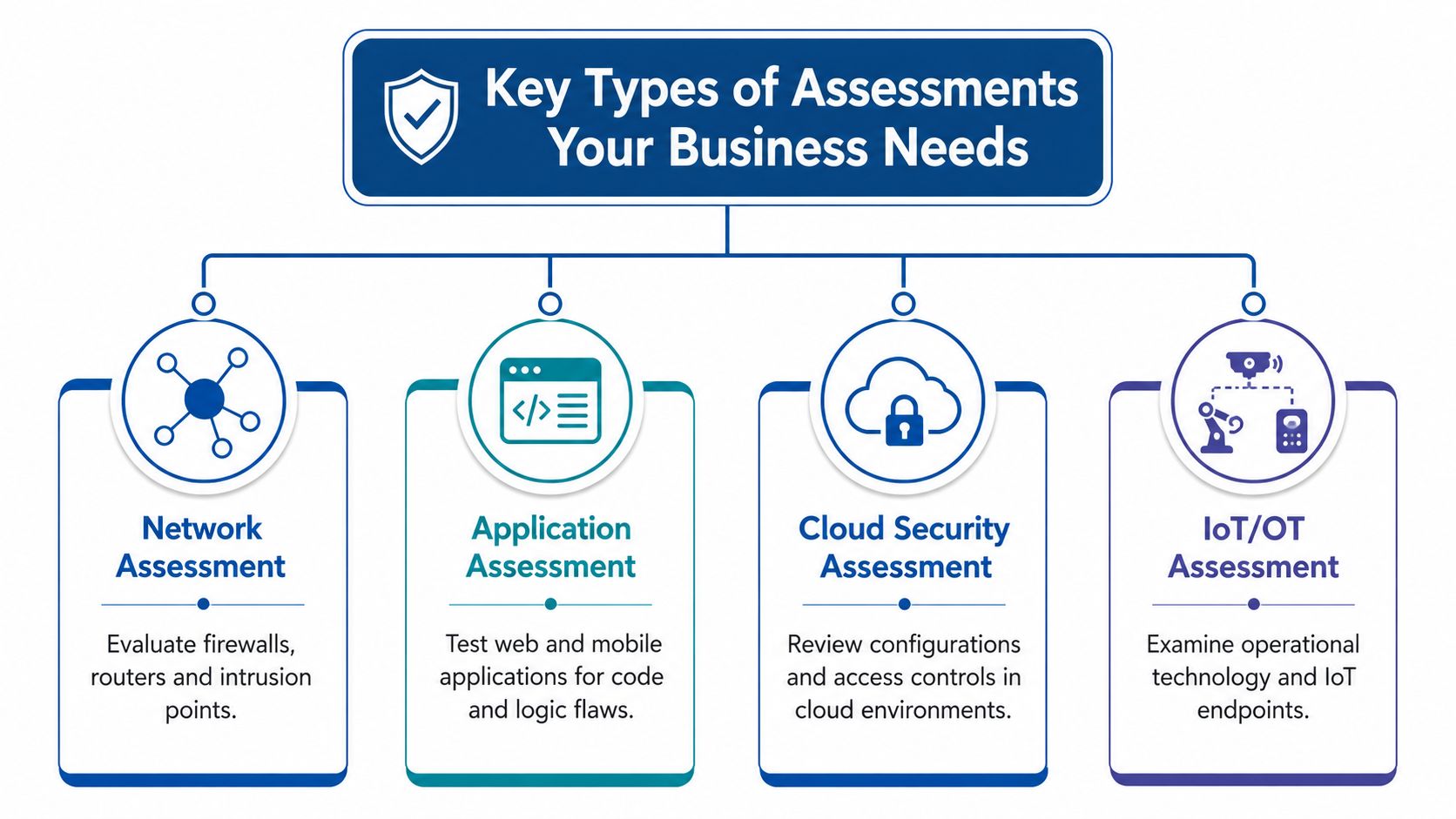
Key Types of Assessments Your Business Needs
Not every business needs the same depth everywhere, but most small companies need more than one assessment type. If your office runs on modern broadband, cloud software, remote access, smart devices, and hosted communications, your risk doesn't live in one place.
Network assessments
A network assessment looks at the plumbing. Firewalls, routers, switches, segmentation, remote access, exposed services, and weak internal trust boundaries all live here.
Per NIST SP 800-115, technical execution requires identifying all active hosts and validating vulnerabilities through attempted exploitation. That means checking all ports and services for problems such as OWASP Top 10 issues, DoS exposure, and misconfigured firewalls. For a small business, this often uncovers old management interfaces, flat networks, and voice or camera equipment sitting in the wrong segment.
If that sounds close to your environment, reviewing your current firewall protection setup is a practical place to start.
Web application assessments
If customers or staff log in through a browser, the application layer deserves its own attention. This includes customer portals, scheduling systems, admin consoles, content management systems, and payment-related workflows.
These tests look for login flaws, weak session handling, injection paths, access control mistakes, and dangerous defaults. A web app can be fully patched and still expose sensitive functions because of poor design or bad permissions.
Cloud security assessments
Cloud systems fail in quieter ways. The software may be current, but access rights, storage permissions, logging, and integrations create risk. Businesses often assume the cloud provider “handles security,” when the provider usually handles infrastructure and the customer still owns identity, access, and configuration choices.
IoT and emerging system assessments
This category covers cameras, badge systems, smart TVs, printers, sensors, conference room gear, and industry-specific operational devices. These are common weak points because they're added for convenience and then ignored.
A lot of companies also now use automation tools and AI-powered assistants inside business workflows. That creates a different kind of exposure around permissions, data handling, and third-party integrations. If your team is introducing those systems, an AI agent security assessment is a relevant example of the kind of specialized review that goes beyond a standard network scan.
Devices that “aren't really computers” still become attack paths once they connect to your network.
The right mix depends on what your business uses. A law office with a client portal has different priorities than a warehouse with cameras and VoIP phones. A good assessment program reflects that.
Essential Metrics and Checklists for Success
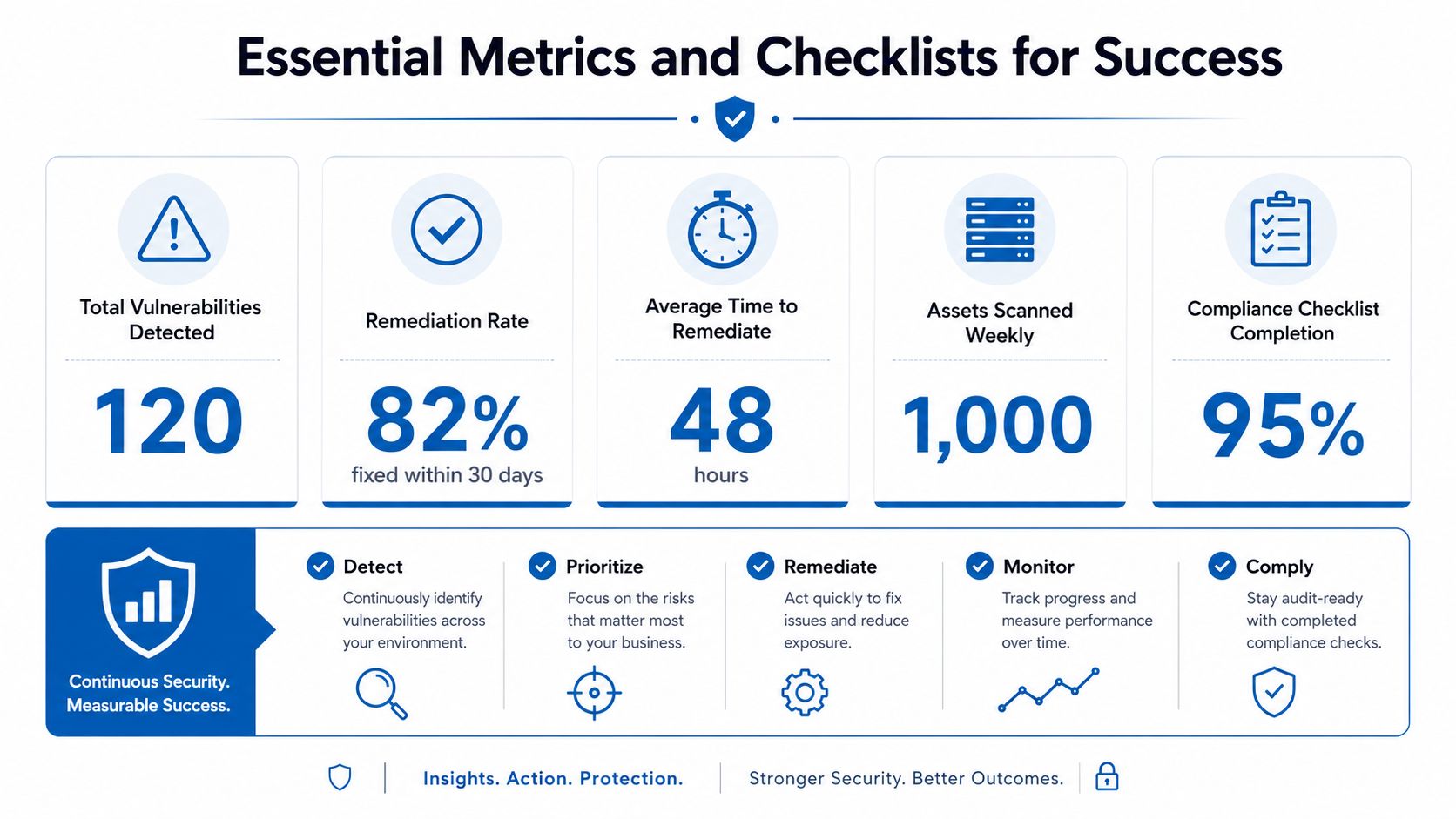
If you can't measure whether assessment work leads to safer operations, you're paying for paperwork. Good programs track a handful of metrics that tell you whether the business is getting less exposed over time.
The metrics that actually matter
The first metric is remediation speed. According to Astra's vulnerability statistics, 60% of all data breaches are caused by failure to apply available patches, the average time to fix vulnerabilities is 57.5 days, and 20.4% of full-stack vulnerabilities are assessed as high or critical risk. That combination tells a simple story. Finding problems isn't enough if they sit open for weeks.
The second metric is coverage. Not scanner coverage as reported by the tool. Real coverage. Do you know which systems were assessed, which were skipped, and whether cloud assets, mobile devices, smart devices, and remote endpoints were included?
The third is verification. After the team marks an issue “resolved,” was it retested? Plenty of organizations close tickets while the risky condition still exists.
A practical scorecard
Use a short scorecard when reviewing your own process or a provider's work:
| Checkpoint | What good looks like |
|---|---|
| Asset inventory | The list includes known devices, apps, cloud services, and remote systems |
| Findings quality | Issues are explained in business terms, not just scanner labels |
| Prioritization | Internet-facing and business-critical systems are handled first |
| Remediation follow-up | Fixes are tracked to completion and retested |
| Operational review | Changes in configuration and access are reviewed routinely |
A strong assessment program should connect to broader security habits, not sit alone. That's where documented best practices for network security become useful, because they turn isolated fixes into repeatable operating discipline.
A checklist for your next assessment conversation
- Ask about asset discovery: How do you find systems that aren't already in inventory?
- Ask about prioritization: How do you decide what gets fixed first?
- Ask about validation: Do you verify findings through testing and verify fixes after remediation?
- Ask about business context: Will the report explain risk in terms of downtime, data loss, and operational impact?
- Ask about repeatability: What changes trigger reassessment?
A mature security vulnerability assessment program doesn't stop at “we scanned it.” It proves what was found, what was fixed, and what changed afterward.
Common Assessment Pitfalls to Avoid
The most dangerous assessment programs are the ones that look mature from a distance. They produce charts, pass audits, and still miss the things that attackers use.
Mistaking scanner output for full visibility
A scanner only sees what it can reach and recognize. That sounds obvious, but businesses forget it all the time. An old device on a neglected switch, a cloud service no one documented, or a temporary system added during a project can sit outside the assessment entirely.
That matters because coverage gaps are common. Reporting on the vulnerability management gap notes that 30 to 40% of assets can remain undetected when teams rely too heavily on native scanner coverage metrics, especially when they miss misconfigurations, missed IP ranges, and agentless devices, as discussed by The Register's analysis of incomplete asset visibility.
Prioritizing by score alone
The vulnerability volume is too high for score-first thinking. In 2025, 48,185 new CVEs were published, a 20.6% increase from the prior year, and the pace topped 5.33 vulnerabilities per minute, with failure to prioritize identified as a major contributor to unresolved issues in ZeroThreat's 2025 vulnerability landscape review. If your team treats every severe finding as equally urgent, the queue grows faster than the fixes.
A file server used by accounting, exposed through weak remote access, deserves attention before an isolated lab machine with the same severity rating. Business context has to break the tie.
Ignoring configuration drift
A lot of compromise doesn't start with “we forgot to patch.” It starts with “we changed something and didn't realize what else that change affected.” New integrations, policy exceptions, rushed firewall edits, remote work accommodations, and inherited admin settings all create drift.
That's why a one-time clean scan can create a false sense of security. The environment doesn't stay still.
Treating bad data as a technical problem only
Security decisions depend on clean inventories, accurate ownership, and current configuration details. When that underlying data is messy, the assessment degrades fast. The issue is similar to broader operational reporting problems. This piece on solving data quality problems is useful because it explains why weak source data leads to weak decisions, even when the tooling looks sound.
- Watch for missing owners: If nobody owns a system, fixes stall.
- Watch for stale inventories: Old asset lists create invisible exposure.
- Watch for report-only programs: If findings don't become tracked work, risk stays put.
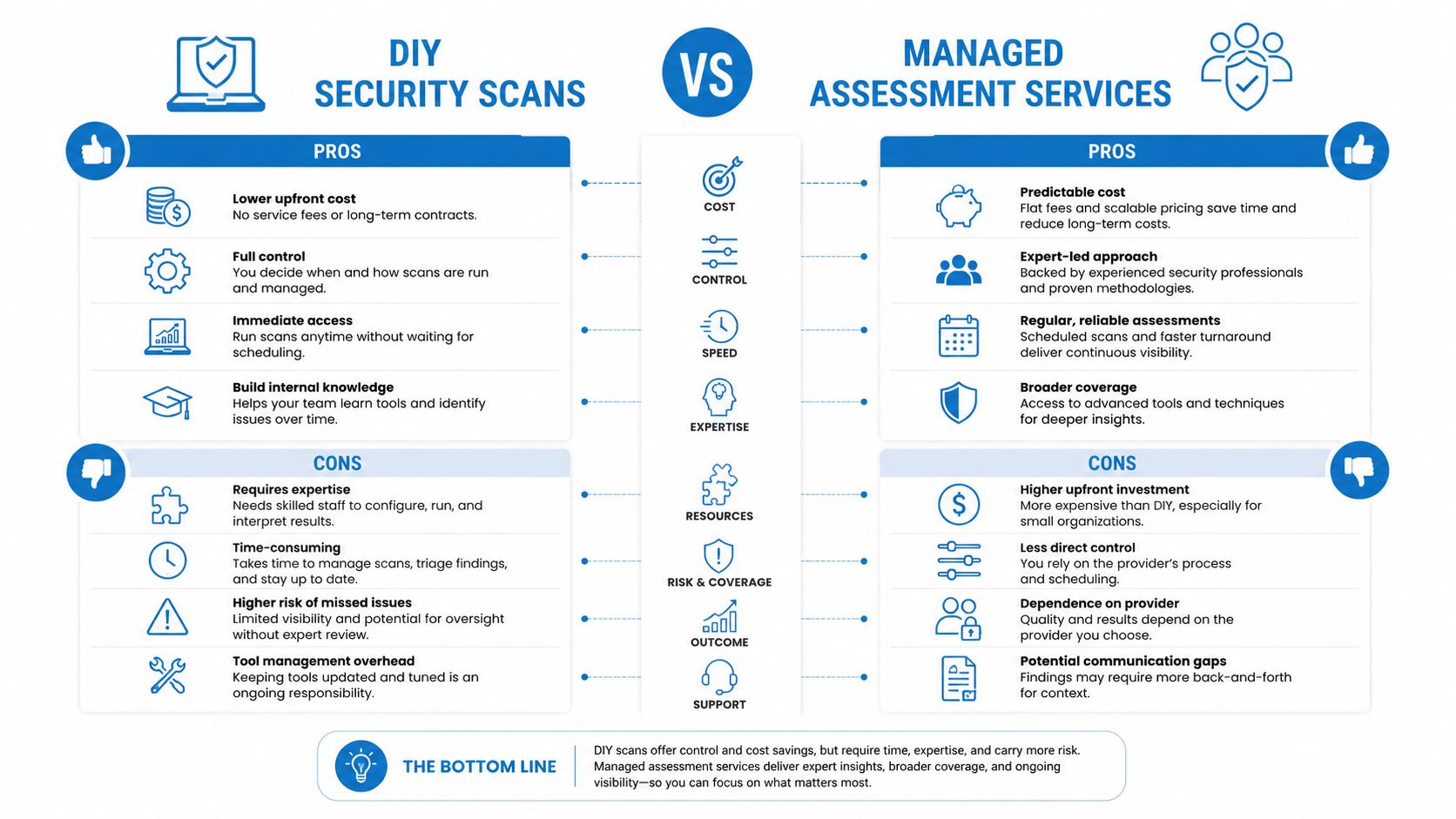
DIY Security Scans vs Managed Assessment Services
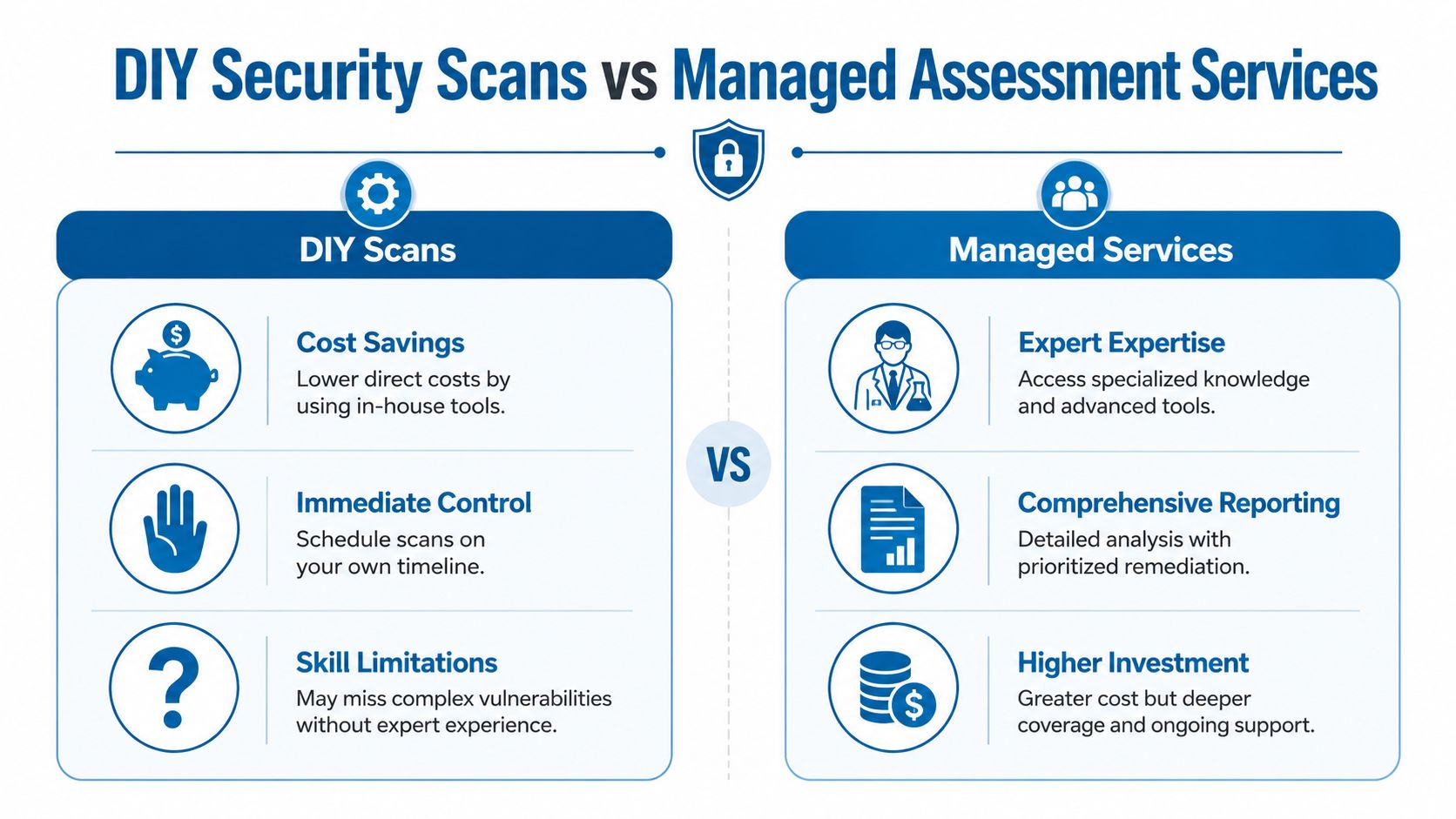
There's nothing wrong with running your own scans. For some businesses, it's a sensible first step. The problem is assuming a tool subscription replaces a security program.
Where DIY works
DIY scans are useful when you have a small environment, clear inventory, someone competent to tune the tool, and the discipline to review findings regularly. They're especially helpful for routine checks on known infrastructure.
The upside is control. You choose the timing, the scope, and how findings feed into your internal process.
Where DIY starts breaking down
DIY usually weakens at interpretation and continuity. Someone still has to determine whether a finding is real, whether it matters, whether the scanner missed something, and whether a later operational change reopened the issue.
That last point is bigger than most owners realize. A critical blind spot is configuration drift, where 65% of exploited vulnerabilities stem from operational changes rather than unpatched software, according to the source material referenced in this discussion on configuration drift and assessment blind spots. That's a strong argument against patch-only thinking and against scan programs that nobody actively manages.
Side-by-side comparison
| Approach | Strengths | Limitations |
|---|---|---|
| DIY scans | Lower direct cost, internal control, quick spot checks | Gaps in asset discovery, weaker validation, staff time burden |
| Managed services | Ongoing oversight, broader expertise, clearer remediation guidance | Higher spend, provider selection matters |
Managed services make the most sense when the business depends heavily on connected operations but doesn't have dedicated security staff. That includes companies with hybrid work, internet-facing systems, multiple locations, voice systems, cameras, and cloud platforms.
If you're comparing options, this is the point where managed network security solutions become relevant. Not because outsourcing is automatically better, but because many small businesses need continuity more than they need another dashboard.
If no one owns the scanner, the queue, the retesting, and the drift review, you don't have vulnerability management. You have occasional visibility.
How to Choose the Right Security Partner
A good security partner won't sell you fear, and won't hand you a spreadsheet full of findings without context. They should help you see the environment clearly, understand what matters, and make the fix path manageable.
What to look for
Start with asset visibility. Ask how they discover unknown systems, cloud resources, remote endpoints, and unmanaged devices. If the answer sounds like “our scanner will find them,” keep asking questions.
Then look at scope. A capable provider should be comfortable assessing networks, applications, cloud services, and operational devices, and they should know when each area needs different methods.
What separates useful providers from report factories
The difference usually shows up in remediation guidance.
A weak provider delivers a technical list. A good one tells you which findings can disrupt operations, which can expose customer data, which can be mitigated quickly, and which require planned change control. They also help verify fixes, not just recommend them.
Use these questions when evaluating providers:
- How do you handle incomplete asset discovery
- How do you detect configuration drift and operational changes
- How do you prioritize risk beyond severity scores
- Do you validate findings through testing
- Will you help track remediation to closure
- How often do you reassess after business changes
The practical standard
For a small business, the right partner should reduce complexity, not add to it. You want a team that can translate technical exposure into business decisions. Which systems need urgent work. Which ones need segmentation. Which changes need tighter controls. Which recurring patterns point to process problems instead of one-off mistakes.
That's especially important when connectivity, voice, cameras, cloud access, and edge security all intersect in the same environment. The more your business runs through one network, the more valuable it is to work with a provider that can treat security vulnerability assessment as an ongoing operational function rather than a compliance event.
If you want a provider that can support connectivity and security together, Premier Broadband offers business internet, VoIP, AI-driven camera systems, and Managed Network Edge services designed to simplify deployment, monitoring, and protection across modern business networks.