
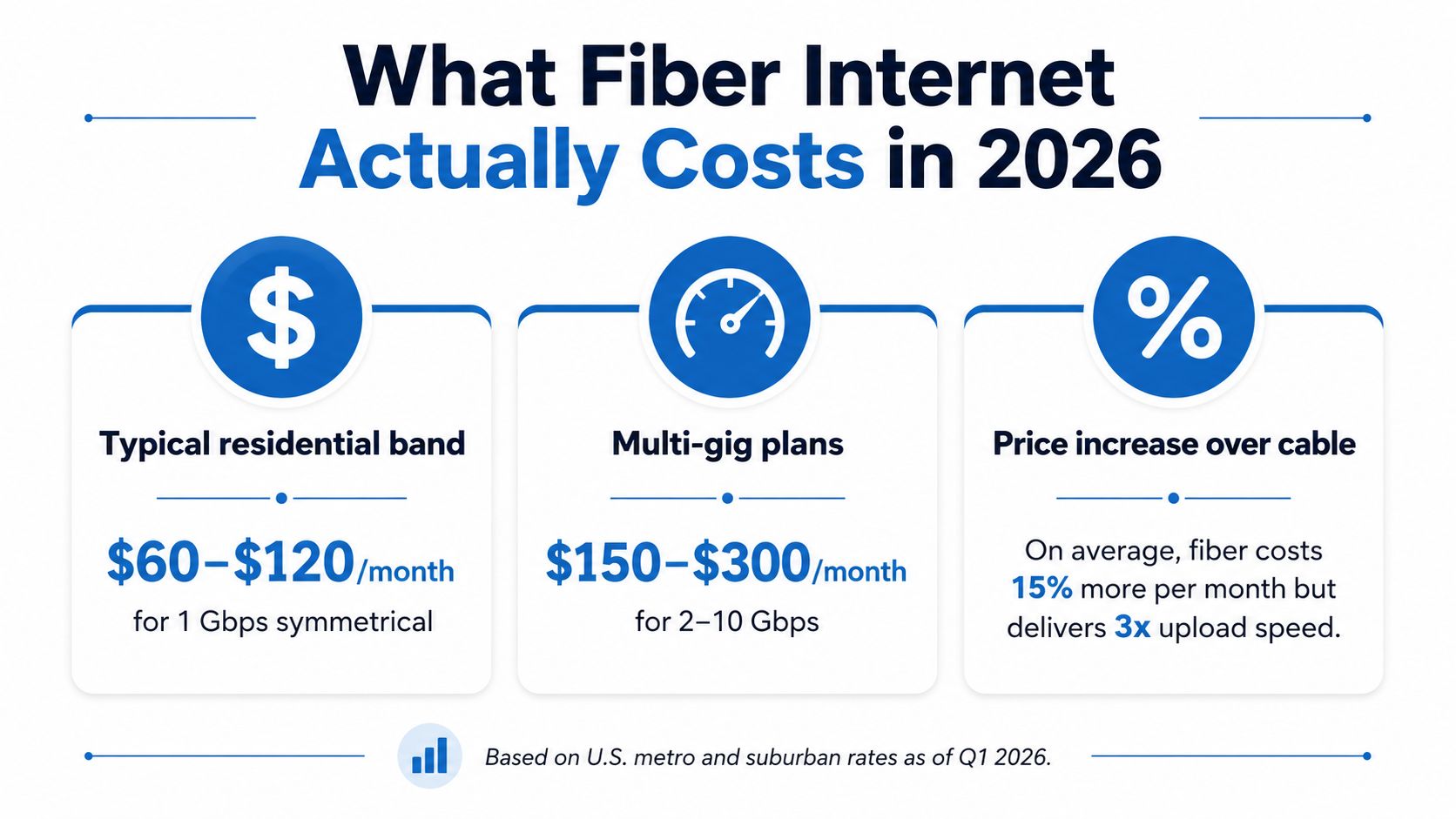
Typical U.S. residential fiber plans run roughly $50 to $90 per month, gigabit tiers cluster near $100, and 2 to 8 Gbps plans often land around $100 to $150+. Premier Broadband's published plans, Essentials 200 at $44.99, Streamer 400 at $59.99, and Family 1 GIG at $89.99, sit right in that band, which is exactly why the key question isn't “Is fiber expensive?” but “What are you paying for?”
If your bill keeps creeping up, you're probably dealing with the same mess most households face, the headline rate looks fine, then installation, equipment, managed Wi‑Fi, and other add-ons push the actual monthly cost higher. That's the part people miss, and it's where the savings are.
What Fiber Internet Costs in 2026
A clean way to read a fiber quote is to start with the advertised monthly rate, then ask what speed tier it buys and what extra charges sit on top. Premier Broadband's residential line makes that easy to see, with Essentials 200 at $44.99, Streamer 400 at $59.99, and Family 1 GIG at $89.99 as a simple three-step ladder, while its business side goes from Business Fiber 300 at $89.99 to Business Fiber 1000 at $174.99. You can compare those plan names directly on Premier Broadband's fiber internet plans.
The broader U.S. market lines up with that pattern. In 2024, the average advertised monthly price for fiber was $85, compared with $77 for internet overall, and consumer internet bills averaged $83.35 per month for unbundled wired service through February 2025, according to HighSpeedInternet.com's internet facts and statistics. That same dataset says fiber prices rose 12.8% in real terms year over year and 40.1% since 2020, while plans at 2 Gbps or more averaged $179 per month, which is why multi-gig service sits at the top end of the market.
Practical rule: If you only need solid video calls, cloud backups, and a few streams, don't pay for a speed tier your home can't use. Start in the middle, then move up only if your devices feel constrained.
The second number that matters is the one after installation, equipment, managed Wi‑Fi, and any service add-ons. A quote can look tidy on the page and still turn into a much higher monthly bill once those line items land, which is the pattern most households face: a clean headline rate that balloons once installation and equipment fees are added. For a quick reliability check before you shop, check internet quality at Madeira Remote. The right plan is the one that matches your usage, not the one with the biggest number on the brochure.
Residential Fiber Pricing by Speed Tier
Fiber pricing is really a speed-tier pricing problem. The market generally puts residential fiber around $50 to $90 per month, with gigabit tiers clustering near $100, and multi-gig plans commonly reaching $100 to $150+, according to BroadbandSearch's price of fiber optic internet guide. That's the shape of the market, and it tells you where the value usually lives.
Where the sweet spot usually is
For most households, 300 to 500 Mbps is the point where the bill still feels sane and the connection handles ordinary family traffic without drama. If the home has multiple remote workers, gamers, or 4K streamers, 1 Gbps is the safer buy because it leaves more headroom for busy evenings and uploads.
My take: The worst value is paying for multi-gig just because it sounds future-proof. If your router, switches, and Ethernet ports can't take advantage of it, you're buying speed you can't use.
Why multi-gig costs more than the jump suggests
The jump from 1 Gbps to multi-gig isn't priced linearly because providers aren't only charging for raw throughput. They're pricing the higher-capacity optics, customer-premises gear, and the network resources needed to support those tiers, which is why the premium can look large even when the incremental infrastructure cost is smaller than people expect. Google Fiber's public rate card shows 1 Gig at $70/month, 3 Gig at $100/month, and 8 Gig at $150/month, while Frontier lists 500 Mbps at $49.99/month, 1 Gig at $74.99/month, 2 Gig at $99.99/month, and 7 Gig at $109.99/month with promotional pricing, all on Google Fiber's internet page.
| Speed tier | Typical monthly price | Best-fit household |
|---|---|---|
| 200 to 500 Mbps | About $50 to $60 | Small households, light streaming, basic work from home |
| 1 Gbps | About $70 to $100 | Busy families, frequent video calls, heavier uploads |
| 2 Gbps and above | About $100 to $150+ | Power users, shared homes, local network bottlenecks |
The key point is simple. Price per megabit usually improves as you move up, but only until your devices or internal network become the bottleneck. If your home still runs on older Wi‑Fi gear, upgrading the plan before the hardware is often backwards.
How a Business Fiber Bill Differs From a Home Bill
Business fiber looks similar on the surface, then grows a lot of extra structure underneath. A home bill is usually just access plus optional Wi‑Fi gear. A business bill often packages internet, managed networking, voice, and service guarantees into one quote, and that changes the math.
Premier Broadband's business rate card gives a clean example. Business Fiber 300 at $89.99 sits close to a strong residential gigabit offer in price, while Business Fiber 1000 at $174.99 moves into the territory where uptime, shared-use performance, and support matter more than sticker shock. If you want to see how providers frame that difference for smaller operations, Premier Broadband's fiber internet for small business is a useful reference point.
What businesses pay for that homes usually don't
The business quote often includes operational features, not just speed. That can mean managed Wi‑Fi, advanced support, voice service integration, or service-level commitments that a residential plan doesn't need. Those features raise the cost, but they also keep a small office from losing half a day to a flaky router restart.
A home office can usually keep things lean. A small business, especially one with staff, phones, and customer traffic, should treat those extras as part of the network budget instead of optional fluff.
Managed Wi‑Fi changes the bill in a real way
Premier Broadband lists Managed WiFi starting at $9.99 per month, and that kind of add-on is worth paying for only if it replaces equipment you'd otherwise have to buy and manage yourself. For a business, that can be a reasonable trade. For a single household with one decent router, it may just be a recurring cost that never feels necessary.
Rule of thumb: If downtime costs you real money, pay for the features that keep the network stable. If not, keep the quote simple and strip the extras.
The biggest mistake businesses make is comparing a home fiber bill to a business fiber bill as if they're the same product. They're not. The business plan is selling control, support, and predictability, and that has to be priced differently.
The Hidden Line Items That Change Your Effective Price
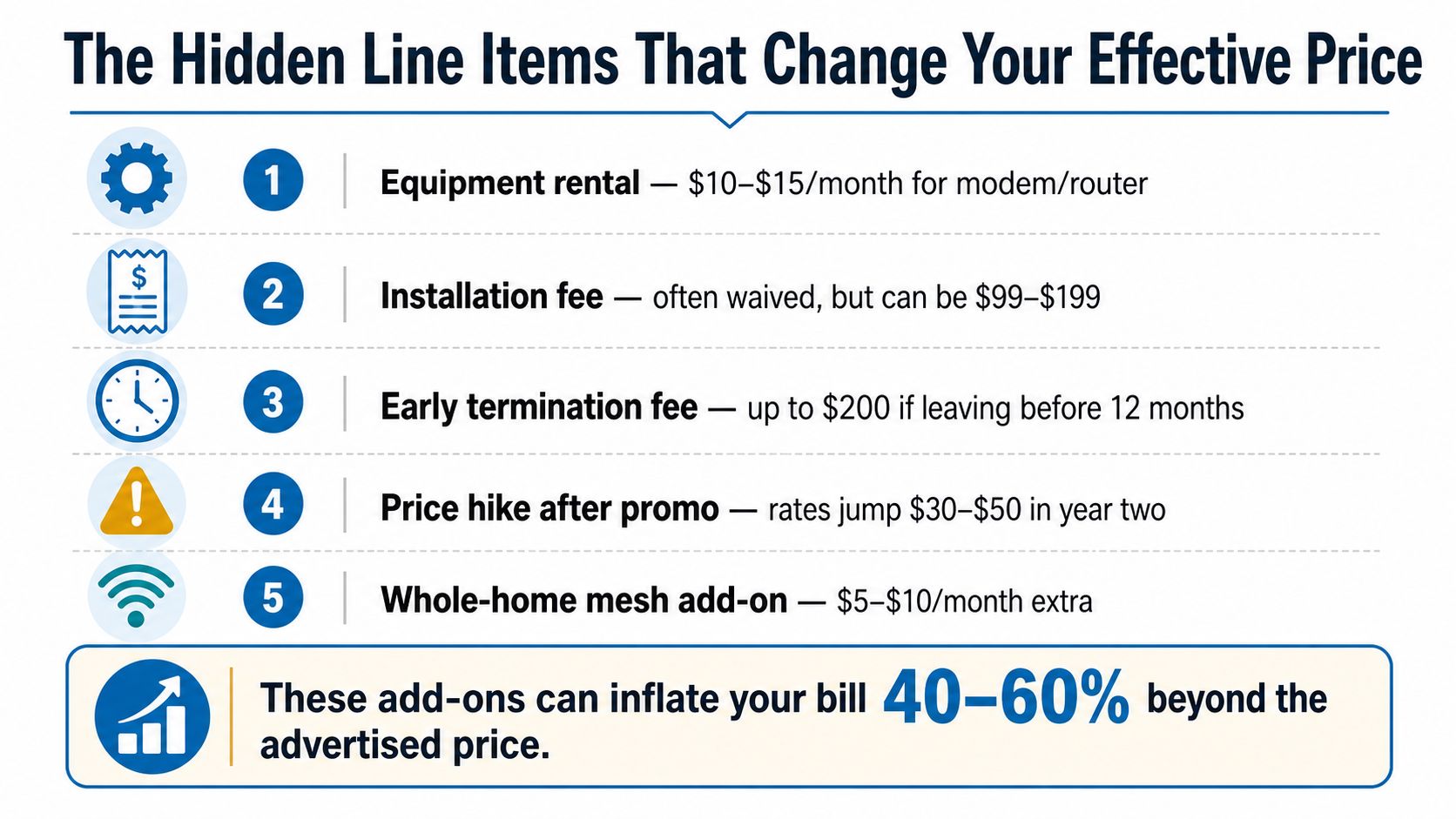
The advertised rate is only the first number. The actual fiber internet cost usually rises after you add installation, equipment, and whatever support package the provider puts in front of you. If you compare two quotes without normalizing those line items, you're not comparing the same offer.
Start with the install and activation question
Some providers waive installation, some don't, and some bury the cost in a promotional term. That one line can matter more than a small difference in monthly price, especially if you're comparing two otherwise similar fiber plans. If the install is free but the monthly rate is higher, do the math across the term you plan to stay.
Then identify every recurring add-on
You want a plain list of what's being charged every month, not just the internet line itself. Look for:
- Equipment rental. Modem or router rental can add recurring cost, especially if you didn't notice it during signup.
- Managed Wi‑Fi. Useful if you need whole-home coverage, unnecessary if you already own strong gear.
- Content controls or protection plans. These are worth keeping only if you use them.
- Voice or security bundles. Good for some homes and offices, dead weight for others.
- Support upgrades. Pay for them when response time matters, skip them when it doesn't.
Premier Broadband's usage-based pricing page is a reminder to watch how plan structure affects the bill, not just the headline rate. If a quote looks cheap, ask for the total monthly number after equipment and add-ons, then compare that final figure against the other offers.
A simple rule saves money fast. Never choose from the advertised price alone. The bill you keep for a year is the price, not the first number on the page.
Fiber Versus Cable and DSL on Real Cost
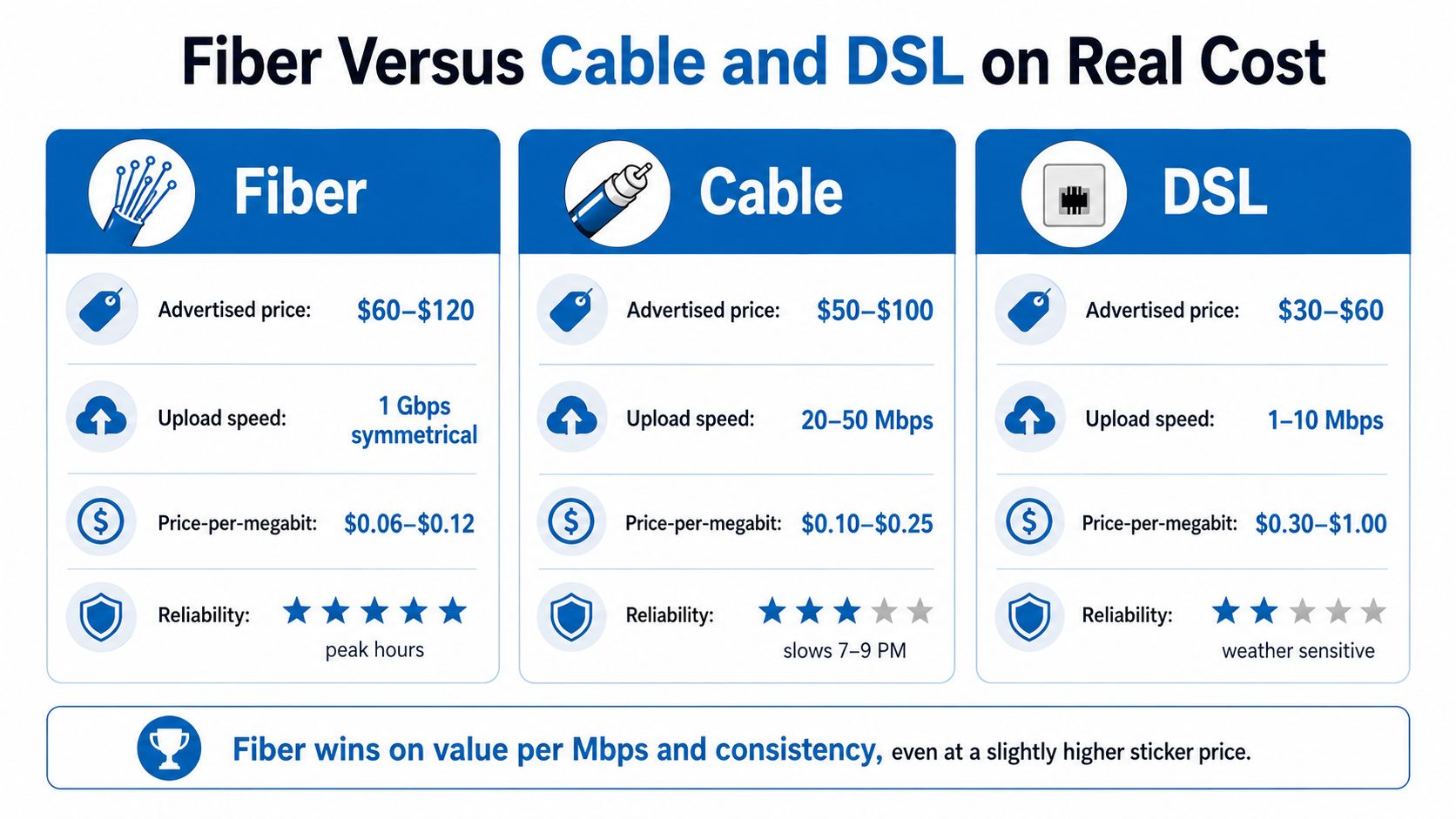
Fiber usually wins on value, but not because it's always the cheapest monthly line item. It wins when you price the connection by speed, upload capacity, and consistency, not just by sticker price. That's why a slightly higher bill can still be the smarter buy.
Premier Broadband's fiber internet vs cable is a solid local example of how providers frame that trade-off, especially for homes that are trying to decide whether to leave cable behind. The difference shows up most clearly in upload-heavy tasks, not just streaming.
The comparison that matters
Fiber has a stronger value story because it keeps uploads and downloads closer together, while cable still tends to favor downloads and DSL falls behind on both speed and consistency. That matters if the household runs video calls, cloud backups, shared game downloads, or multiple heavy users at once.
Here's the blunt version:
- Fiber: Buy it when you care about uploads, latency, and stable peak-hour performance.
- Cable: Consider it when the area price is lower and your household usage is mostly downstream.
- DSL: Use it only when budget or availability forces the choice.
Why the cheapest plan can still be the expensive mistake
A slower plan that looks affordable can cost more in frustration if it forces retries, lag, or failed uploads. That's especially true for remote workers and small businesses, where a connection that falls apart during busy hours becomes a productivity tax.
The video market has made this easier to understand, but the actual buying decision hasn't changed. Fiber is worth paying for when you need the performance you can feel, not just the number you can brag about.
Ways to Lower Your Fiber Bill Without Downgrading
The fastest savings usually come from timing and cleanup, not from dropping to a worse plan. If you already have fiber available, the game is to pay less for the same usable performance, not to start over with a slower connection.
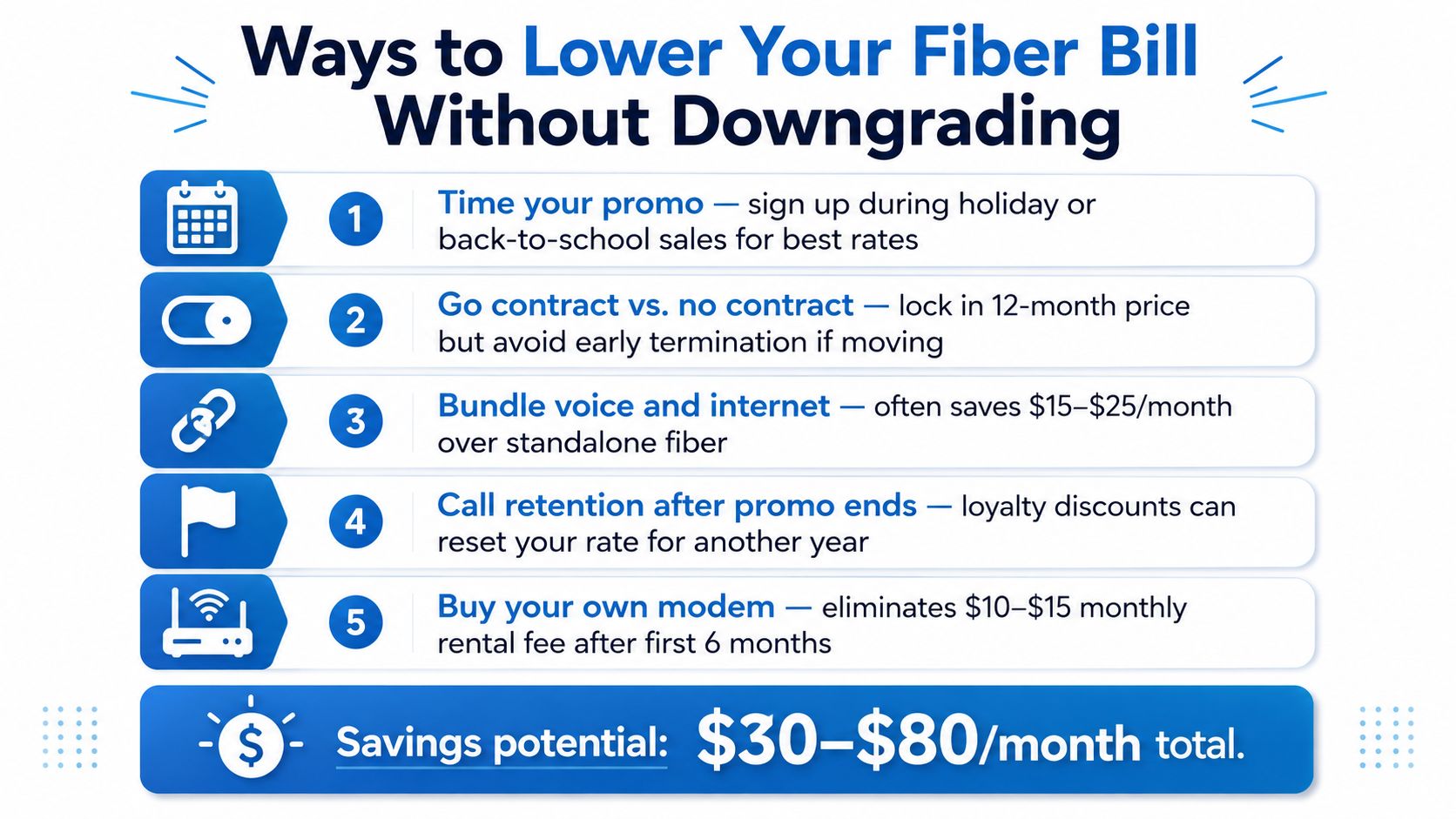
Cut the bill without cutting the speed
- Time the promo. New-customer offers tend to show up during shopping-heavy periods, so don't sign the minute you get tired of your current bill.
- Ask about contract terms. A contract can lock a lower rate, but it can also trap you if you move sooner than expected.
- Call after the promo ends. Retention offers exist because providers would rather discount you than lose you.
- Buy your own equipment. If rental is on the quote, run the math on a router purchase instead of paying forever.
- Check your actual need before jumping tiers. If your household isn't saturating the line, multi-gig is probably wasted money.
A useful detail gets missed a lot. Some low-income or community programs can bring the price down meaningfully, so ask directly whether you qualify before you accept the first quote. If the provider can't answer clearly, keep shopping.
Make sure the house can use what you're paying for
Paying for multi-gig fiber without the right home network is a bad deal. You need gear that can pass that traffic, which means looking at your router, the Ethernet ports on your devices, and whether your internal wiring is the limiting factor.
Practical check: If your home still runs on basic hardware, don't buy capacity you can't move around the house.
The cleanest savings move is usually boring. Stay on the speed tier you can fully use, remove the extras you don't need, and treat equipment as part of the cost equation instead of an afterthought.
Putting It Together and Planning Your Fiber Budget
The right fiber budget starts with usage, not with marketing. If your household needs are light, a mid-tier fiber plan can be enough. If several people are online at once, gigabit service can be the cleaner choice, but only if the rest of the network can support it.
A simple way to think about the monthly bill is to separate fixed costs from variable choices. For a useful primer on how recurring bills stack up in a household, recurring cost examples for households is a good reminder that the question is how fiber fits into the rest of your monthly commitments.
Use this three-part filter
First, match the speed tier to actual peak use. Second, list every add-on on the quote, including managed Wi‑Fi, equipment, and protection features. Third, compare at least two offers on the same basis, monthly price plus whatever the contract forces you to keep paying.
That last step matters more than many realize. A quote with a lower headline rate can still be the more expensive option once the rental gear and add-ons are counted.
My recommendation
Don't buy the fastest plan on the board unless you know why you need it. For most homes, the smart move is a solid residential fiber tier, no wasted add-ons, and a router setup that doesn't choke the connection inside the house. For small businesses, pay for the support and network features that prevent downtime, then strip everything else.
Premier Broadband sells fiber, VoIP, managed Wi‑Fi, and business connectivity through a single provider, so it's a reasonable place to compare residential and small-business options side by side. If you're ready to tighten up your bill and choose a plan that matches your actual usage, visit Premier Broadband and compare the fiber options against the total monthly cost you'd really pay.