

More features don't make a business phone system better. The right features, configured around the way your team works, do. A small office can waste money on advanced routing and AI dashboards while still missing calls because nobody owns the shared voicemail inbox. A growing sales team can make the opposite mistake, choosing a cheap plan that lacks CRM integration, call visibility, or reliable mobile access.
The market has already moved toward hosted communications. Hosted or cloud PBX accounted for about 52.3% of global VoIP services revenue in 2024, while hosted systems represented about 56.0% of the U.S. unified communications market in 2023, a market valued at USD 28.37 billion that year, according to Grand View Research's U.S. unified communications market report. That shift matters because cloud delivery makes features such as voicemail-to-email, mobile applications, branded caller ID, and centralized administration practical without on-site PBX hardware.
The buyer's job, then, isn't to collect every item on a vendor's feature page. It's to identify the operational bottlenecks, select the capabilities that remove them, and reject expensive extras that nobody will configure or use.
Why Most Feature Checklists Fail Business Buyers
Most guides treat business phone system features like a shopping list. They mention call routing, IVR, recording, analytics, integrations, artificial intelligence, and mobile apps, then imply that the provider with the longest list deserves your business.
That advice is backwards. A feature has value only when it changes a workflow, protects revenue, improves service, or reduces administrative work. Otherwise, it's another setting in an already crowded dashboard.
Cloud delivery changes the buying question
Hosted PBX is now the dominant deployment model in major communications markets. The figures from Grand View Research show why buyers should focus less on whether a provider offers cloud calling and more on how well the provider implements and manages it.
Cloud architecture makes it easier to add users, support remote staff, manage numbers centrally, and deliver phone functions through desktop and mobile applications. It also shifts responsibility. You're no longer evaluating only hardware, cabling, and on-site maintenance. You're evaluating network quality, identity controls, provider support, data handling, redundancy, and the practical administration of a service that your staff may use from many locations.
A modern system can include dozens of capabilities, but your company may need only a small foundation:
- Reliable call handling: Incoming calls should reach the right person or team without improvised forwarding chains.
- Message continuity: Staff should be able to retrieve, prioritize, and share voicemails without depending on one desk phone.
- Professional identity: Outbound calls should display the appropriate business number instead of an employee's personal mobile number.
- Mobility: Remote and traveling employees should use business identities from approved devices.
- Manageable administration: Someone on your team should be able to change schedules, greetings, extensions, and routing without opening a support ticket for every adjustment.
Practical rule: Buy for the workflow you need to control, not the feature count a salesperson wants to demonstrate.
Separate operational value from decoration
Feature prioritization starts with three questions. Who handles the call? What happens when that person is unavailable? Where does the information go afterward? The answers reveal whether you need a basic auto-attendant, department queues, CRM context, supervisory tools, or automation.
A solo consultant may need a professional greeting, mobile calling, voicemail-to-email, and a business caller ID. A support operation with multiple departments may need queue management, escalation rules, recording, reporting, and role-based access. Both are buying a cloud phone system, but they aren't buying the same operating model.
The strongest evaluation process maps each proposed feature to a specific failure it prevents or task it accelerates. If nobody can explain the workflow, owner, and expected use, classify the capability as optional until proven otherwise.
Core Call Handling Features Every Business Needs
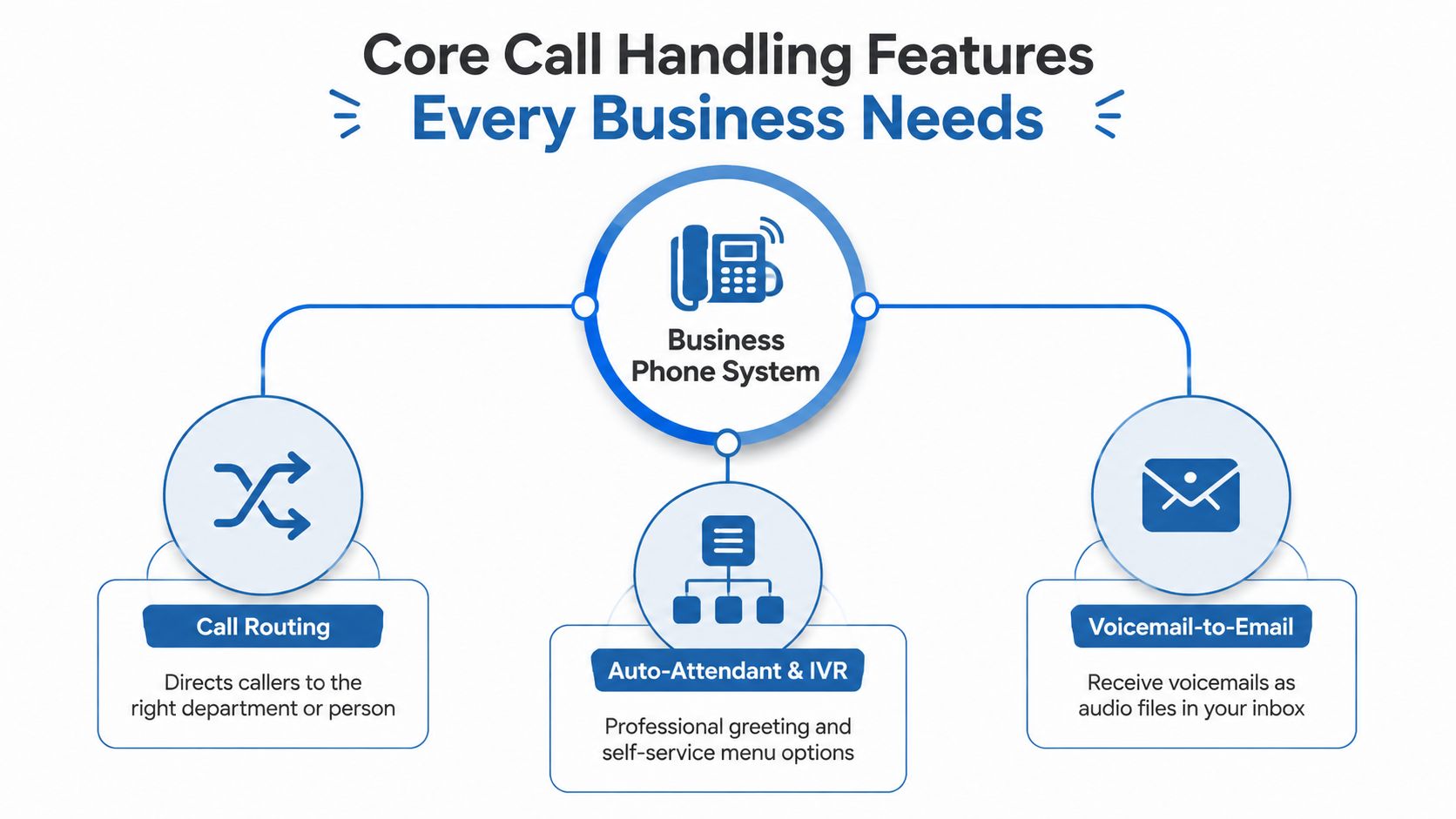
Every business needs a dependable call-handling foundation before it considers advanced analytics or artificial intelligence. The core should make it easy for callers to reach the right destination, for employees to answer from approved devices, and for managers to maintain the system without technical friction.
Call routing and auto-attendant
Start with call routing. It directs calls according to rules such as department, business hours, user availability, or location. A small professional-services firm might route the main number to a receptionist during office hours and to an on-call employee afterward. A multi-location company might send calls to the correct branch while preserving one central number.
An auto-attendant gives callers a professional greeting and menu. It can direct customers to sales, billing, support, or a directory without requiring a full-time operator to answer every call. Keep the menu short and use plain language. A complicated IVR frustrates callers faster than a modest system with clear routing.
Call queues become useful when several employees handle the same type of request. Instead of sending a caller to a busy extension or forcing them to call repeatedly, the system can hold the interaction for the next available team member. That's valuable for service desks, clinics, property managers, and sales teams, but it's unnecessary for a business where one person handles nearly every call.
Voicemail-to-email
Voicemail-to-email is a baseline feature, not a luxury. It converts a voice message into an email-delivered audio attachment, often including caller ID, the time, and timestamp metadata. RingCentral's phone feature overview describes how this creates a searchable, asynchronous handoff channel for distributed teams.
Consider a remote support team. An employee can review a voicemail in the shared inbox, identify the caller, forward the message to the right colleague, and create a callback task without opening the phone application. The message becomes part of the team's normal information flow rather than remaining trapped inside a desk phone.
Set ownership rules before deployment. Decide whether messages go to an individual, a shared mailbox, a ticketing system, or a department queue. Without clear ownership, voicemail-to-email just moves the missed-call problem from the phone system into an overloaded inbox.
Caller ID and mobile integration
Caller ID management should support different outbound identities by user, department, or location. That lets a company present a branded main number when appropriate while preserving direct-dial transparency for customers who need to reach a specific employee. An API-driven system can also connect caller ID controls with monitoring, messaging, fax, analytics, masking, and workflow-based routing, as outlined in the Yay VoIP API documentation.
Mobile integration completes the foundation. Employees should be able to make and receive business calls through a desktop or mobile application, use the company directory, transfer calls, and maintain a clear separation between business and personal identities. Test the experience on the devices your staff uses. A feature that exists but performs poorly on mobile won't protect customer access.
Advanced Capabilities That Deliver Real ROI
Advanced features deserve a place in the system only when they solve a defined workflow problem. They can improve service and reduce manual work, but each one adds configuration, training, governance, or administration. Buy the capability your operation can use, not the longest feature list.

Match sophistication to workflow complexity
Skills-based routing earns its cost when callers need specialized help and employees have distinct competencies. A growing support team can send technical questions to trained specialists and billing issues to finance staff. A small office staffed by generalists usually gets more value from a basic queue and a clear escalation path. Complex routing adds upkeep, so use it only when specialization improves the caller's outcome.
Call recording and monitoring support coaching, quality review, dispute resolution, and regulated workflows. Recording also creates policy obligations. Set access restrictions, retention rules, and notification practices before activation. Define who may listen, the business purpose of each recording, and when the files should be removed. Do not enable recording because the provider includes it in the plan.
Analytics dashboards help managers track workload, unanswered calls, queue pressure, and employee availability. They create value only when a manager reviews the findings and changes staffing, coverage, or processes. A support leader can use reporting to investigate service bottlenecks. An owner who never acts on the data is paying for decorative charts.
CRM integration pays off when sales or service employees repeatedly re-enter call details. It can attach activity to the correct customer record, show relevant context during an interaction, and reduce manual logging. Teams that manage tasks alongside conversations may also benefit from Kanban CRM inside Gmail, particularly when staff already work primarily from email.
Treat AI as governed automation
Transcription, summaries, sentiment analysis, and virtual assistants can reduce administrative work, but their output requires review. Transcription can misread names, technical terms, accents, or confidential information. Sentiment scoring can flag conversations for examination, yet it should not determine an employee's performance assessment or a customer outcome by itself.
Assign an owner for AI governance. Confirm where recordings and transcripts are stored, who can access them, whether administrators control retention, and how the provider handles data used for automated processing. Buyers comparing voice, video, chat, and collaboration in one platform can first review what UCaaS means and then decide whether consolidation will reduce application sprawl or add another administrative layer.
Use AI for a defined process, such as drafting a call summary for human approval or flagging a conversation for quality review. Skip it when no one reviews the output, the information is too sensitive, or the result will not change a decision.
Feature Priorities by Business Size and Workflow
The right feature package depends more on workflow than on headcount alone. A small business that handles urgent customer calls may need stronger routing than a larger company whose staff rarely uses the phone. Use the matrix below as a starting point, then remove anything you can't connect to a real operating requirement.
| Business Profile | Essential Features | Valuable Upgrades | Optional Add-Ons |
|---|---|---|---|
| Solo professional or micro-business | Business number, voicemail-to-email, mobile app, caller ID, simple schedules | Auto-attendant, call forwarding rules, shared contacts | Advanced queues, sentiment analysis, complex APIs |
| Small office with a shared support or sales function | Auto-attendant, department routing, queue handling, mobile and desktop apps, shared voicemail ownership | Call recording, basic reporting, CRM integration | Skills-based routing, deep workflow automation |
| Growing sales or service team | Queues, skills-based routing, CRM integration, recording, reporting, role-based administration | Transcription, supervisor monitoring, workflow automation | Highly customized API development |
| Distributed or multi-location operation | Central administration, location-aware routing, mobile access, branded caller ID, resilience controls | Analytics, presence, CRM and ticketing integrations | Advanced AI scoring without governance controls |
A solo professional usually needs clarity and reachability, not a contact center. A growing team needs visibility and consistency, because missed handoffs and incomplete records become harder to manage as more people participate in the same workflow. A multi-location company should prioritize identity management and centralized control before buying advanced analytics.
VoIP adoption has become broad enough that baseline expectations are no longer limited to traditional PBX users. One industry summary reports that roughly 31% of businesses use VoIP systems, another cites 36% using hosted VoIP services, and a unified communications summary says VoIP is used by 90% of organizations as a foundational UC feature, as reported by In-Telecom's VoIP statistics overview. Those figures support a practical conclusion: call forwarding, voicemail-to-email, caller ID, and mobile access should be treated as standard requirements in many buying conversations.
Buying discipline: Ask vendors to price the features your team will configure, administer, and review. Bundling isn't savings if the unused capabilities complicate the system.
For small companies comparing deployment models, VoIP solutions for small business can help frame the requirements around users, locations, and daily call patterns rather than a generic feature inventory.
Security and Resilience in a Remote and AI-Heavy World
Security belongs in the phone system's architecture, not at the end of a feature comparison. Employees place business calls from offices, homes, personal devices, and mobile networks, so the provider must protect accounts and communications beyond the company's physical premises. Prioritize controls that match your workforce and workflow, rather than paying for a broad security package no one administers.
Evaluate access, devices, and continuity together
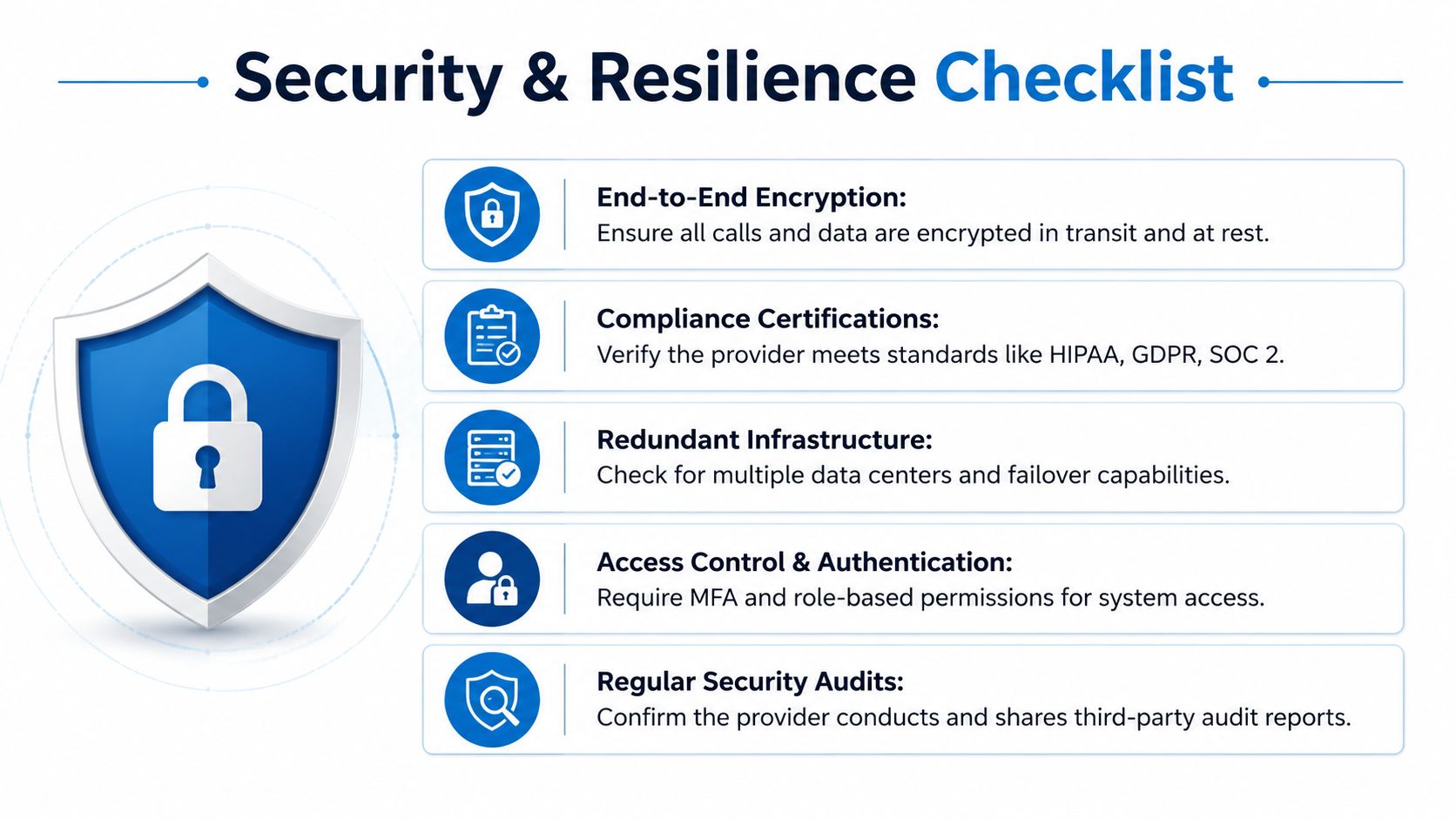
Require multi-factor authentication, role-based permissions, secure administrative access, and clear controls for lost or unmanaged devices. BYOD can work, but only if the provider supports account separation, remote session control, and policies that stop former employees from retaining access.
Encryption should cover calls and related data in transit and at rest where the service supports it. A general security statement proves little. Ask which components are encrypted, how administrators access the system, and which security documentation your team can review.
Resilience requires the same level of scrutiny. Confirm redundant infrastructure, failover behavior, emergency calling procedures, number portability, backup methods, and the process for restoring service after an outage. A platform that performs well during normal operations still exposes the business if nobody can explain how service continues during a failure.
Review the network alongside the phone system. Business network security guidance can help teams identify network controls that should support account and communications protections.
AI creates a new governance layer
AI transcription and analysis can spread sensitive information through recordings, summaries, searchable text, and third-party processing. Regulated teams should set rules for consent, access, retention, audit trails, correcting inaccurate transcripts, and handling deletion requests before enabling these tools.
Ask direct questions:
- Data location: Where are recordings, transcripts, and summaries stored?
- Access ownership: Which roles can search, download, share, or delete them?
- Retention control: Can administrators set and enforce retention policies?
- Auditability: Does the platform record access and administrative changes?
- Vendor processing: Does an external service process the content, and under what controls?
Verify security claims through documentation, contract language, audit reports, and a provider conversation with someone who can answer technical questions. Marketing labels do not replace controls your team can configure, test, and review. Smaller businesses should secure identity and continuity first. Larger or regulated teams should add governance for recordings, transcripts, and administrative activity before adopting AI features.
Procurement and Implementation Considerations
A strong feature list can still produce a poor deployment if the network, contract, or migration plan is weak. Treat procurement as an operational project, not a subscription checkout.
Validate the environment first
Test the locations, connections, Wi-Fi coverage, firewalls, headsets, and user devices that will carry calls. Voice quality depends on the complete path between employee and provider, not just the phone application. Review bandwidth capacity, congestion, traffic prioritization, and failover options before committing to a large rollout.
Ask providers to explain their approach to network readiness and quality of service in plain language. If they can't identify what they'll test, what they'll monitor, and who owns remediation, the deployment may leave your internal team carrying the risk.
Read the commercial terms carefully
Monthly per-user pricing rarely represents total ownership. Check implementation fees, number charges, recording storage, transcription usage, premium support, international calling, hardware, training, porting, taxes, and cancellation terms. A lower subscription can become expensive when core workflows require paid add-ons.
Request a written service-level agreement covering uptime, incident communication, support response, escalation, maintenance windows, and remedies. Ask how emergency calls are handled at each location and how administrators update addresses when employees work remotely.
Migrate in controlled stages
Inventory every number, extension, greeting, queue, schedule, device, and integration. Build the call flows before porting numbers, then test them with internal users and external callers. Keep a rollback plan, publish the new process, and train staff on transfers, voicemail, mobile use, and outage procedures.
Pilot with representative users rather than only technically confident employees. Include a receptionist, manager, remote worker, and someone who handles the highest-value calls. Their feedback will expose problems that a vendor demonstration won't.
Your Decision Checklist for Hosted VoIP Providers
Use this checklist during vendor demonstrations and contract review. Require a live answer or documented evidence for each item.
- Reliability: Review the uptime SLA, redundancy design, failover process, maintenance policy, and incident communications.
- Scalability: Confirm user, location, number, queue, recording, and integration limits before growth makes them restrictive.
- Compatibility: Test desktop apps, mobile apps, CRM connections, headsets, directories, and existing business numbers.
- Security: Verify MFA, role permissions, encryption, device controls, audit logs, retention settings, and compliance documentation.
- Total cost: Price implementation, training, storage, transcription, hardware, support, taxes, and cancellation alongside the recurring plan.
- Onboarding: Identify the migration owner, training resources, support escalation path, pilot process, and post-launch review.
Before deployment, review practical guidance on network readiness for VoIP, then ask the provider to validate your actual sites rather than relying on a generic checklist. For teams comparing architectures, what a cloud phone system is can help clarify which responsibilities belong to the provider and which remain with your organization.
Select the smallest feature set that solves today's operational problems and supports the next stage of growth. Run a pilot, measure missed-call handling, callback ownership, call quality, adoption, and administrative effort, then expand only when the evidence supports it.
Premier Broadband offers hosted PBX and enterprise-grade VoIP services with call routing, auto-attendants, voicemail-to-email, branded caller ID, call recording, and mobile applications for business teams. Visit Premier Broadband to evaluate hosted voice, business connectivity, and managed network options around your actual workflows.