

The movie freezes just as the final scene starts. In the next room, a gamer sees a character jump across the screen, then gets disconnected from the match. At the kitchen table, a remote worker hears only fragments of a client's sentence before the video call drops. Everyone may be paying for fast internet, but speed alone doesn't guarantee connection stability.
A stable connection delivers data consistently. It keeps delay predictable, limits packet loss, and recovers quickly when something goes wrong. This guide explains what stability means, how to measure it, where failures originate, and which fixes make sense for households, gamers, remote workers, and small businesses. If you're comparing network technologies, this guide to why fiber internet is superior to cable internet provides useful context on the underlying access connection.
Introduction to Connection Stability
A speed test can report impressive download performance while a video call still sounds robotic or a game still lags. The reason is that applications don't experience your connection as one large speed figure. They receive a stream of individual data packets, and the timing, order, and completeness of those packets determine how smooth the experience feels.
For a family, instability may appear as repeated buffering on a smart TV while other devices are active. For a gamer, it may look like sudden lag even though the game loads quickly. For a remote worker, a brief interruption can cut off speech or force a meeting app to reconnect.
Practical rule: Diagnose the behavior you experience, not just the speed shown by a single test.
Connection stability also depends on where the problem occurs. A fault may sit between your device and router, in the home Wi-Fi network, on the last-mile access line, or farther away in an ISP, DNS service, cloud platform, or power system. That's why replacing a router won't solve every unstable connection.
The sections ahead build a practical path from definition to action. You'll learn the four metrics that matter, how to separate home-network faults from provider or upstream failures, and how to choose targeted improvements instead of buying more bandwidth without addressing the underlying cause.
Understanding Connection Stability
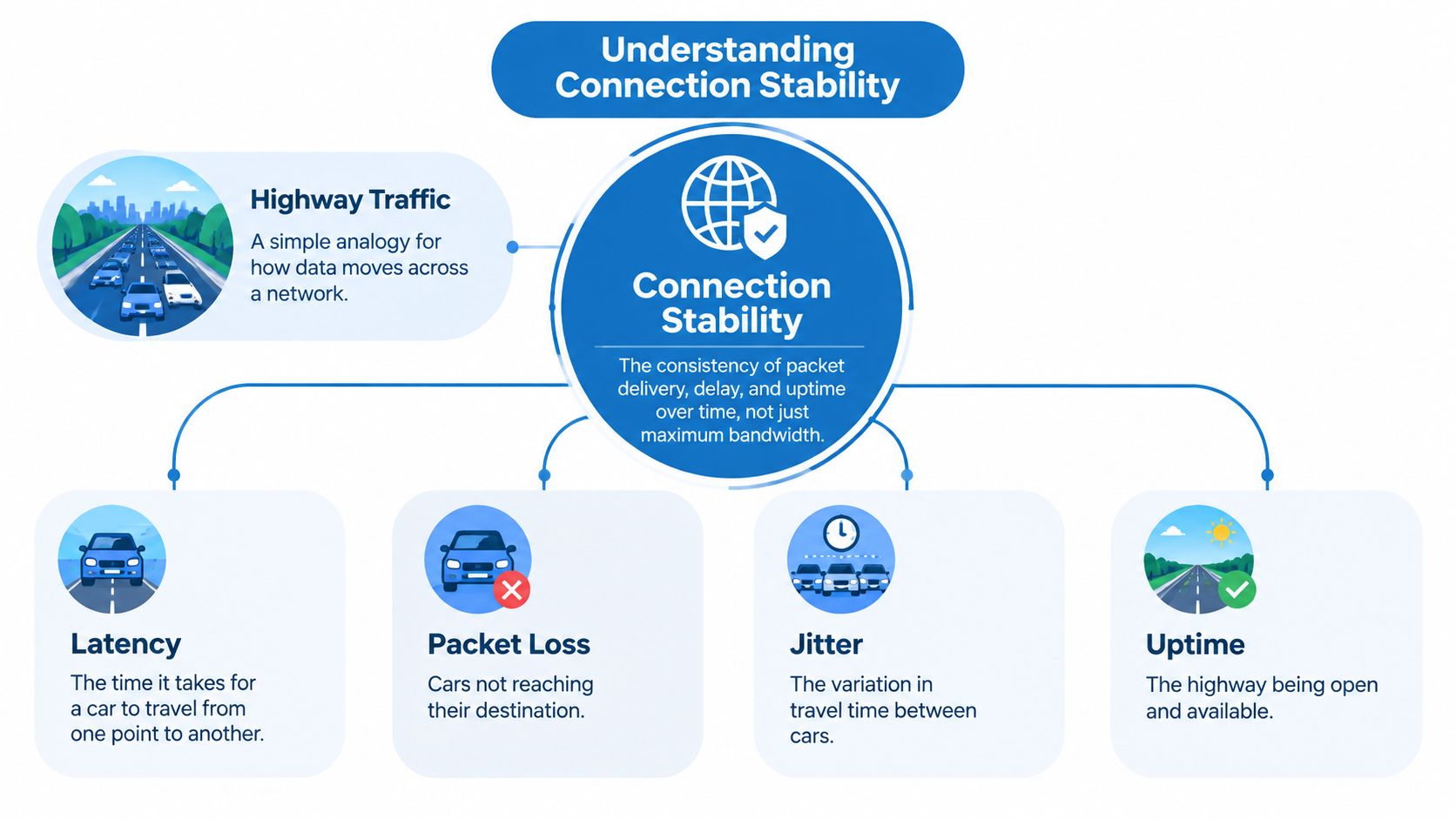
Connection stability is the consistency of packet delivery, delay, and availability over time. Maximum bandwidth matters, but it only describes how much data a connection can move under favorable conditions. Stability describes whether that data arrives predictably while you use the network.
A highway makes the distinction clear:
- Latency is the travel time between two points.
- Jitter is the variation in travel time from one vehicle to the next.
- Packet loss means some vehicles never reach their destination.
- Uptime describes how often the highway remains open.
A wide highway can still produce a poor journey if traffic repeatedly stops, vehicles disappear, or travel times change sharply. Network packets behave similarly. A connection may have ample capacity yet feel unreliable when queues build or packets arrive unevenly.
Historical outage data shows why modern reliability includes recovery, not only continuous availability. In a study of 1.8 million monitored outages, 61.4% of sites experienced at least one outage, the average site logged 47 outages, and annual uptime averaged 98.71%. The same analysis reported a median outage duration of 1.9 minutes, demonstrating that a network can experience interruptions while still maintaining high overall availability. These figures come from the large outage analysis.
That broader view helps explain why stability has multiple layers. Your home Wi-Fi may be unreliable even when the fiber line is healthy, while a cloud platform may be unreachable even though every device in your home remains connected. For a related comparison of connected access systems and gate security, the Wi-Fi versus LTE gate security comparison offers another example of how connectivity requirements vary by use case.
Key Metrics for Connection Stability
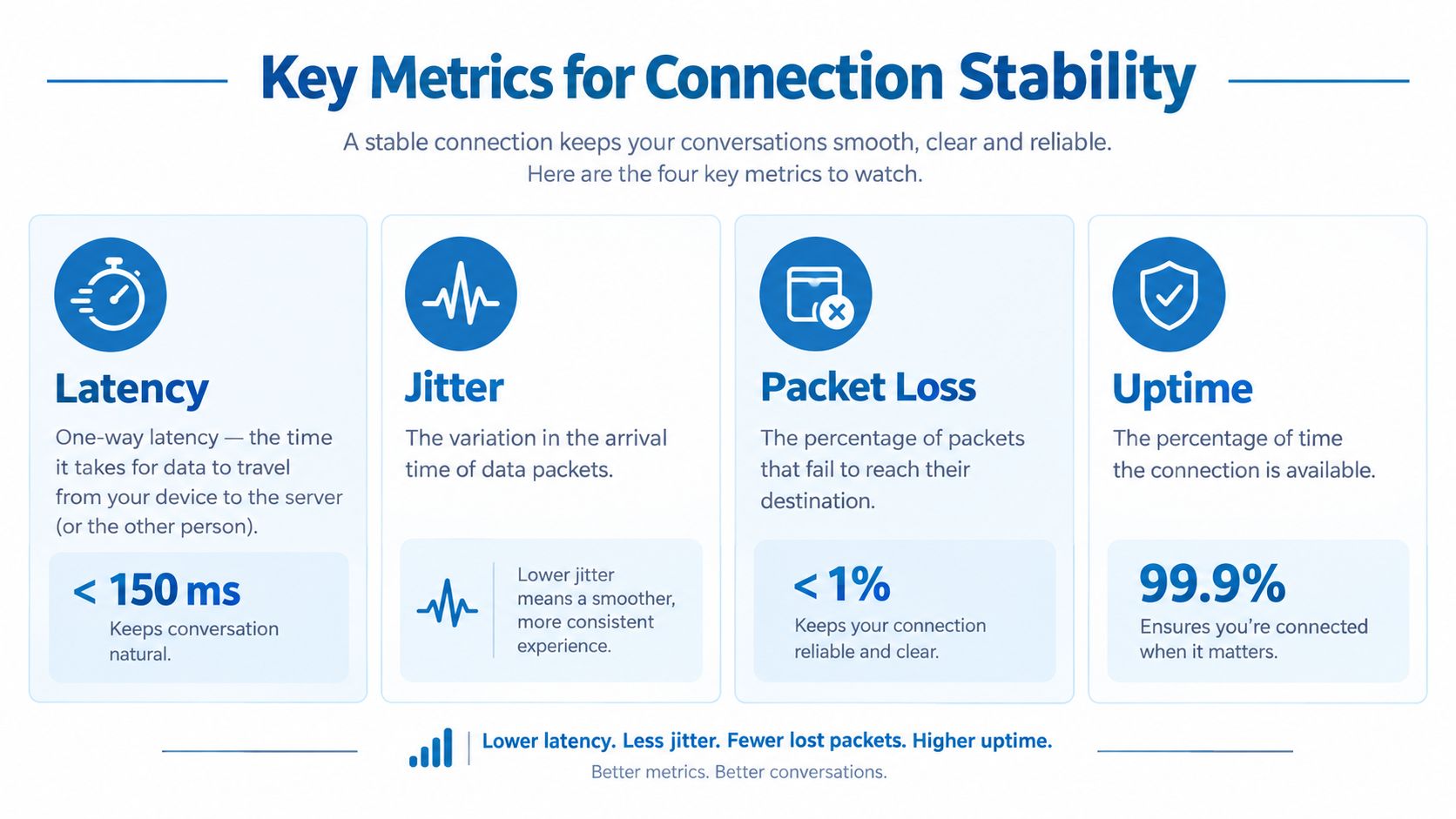
Four measurements reveal different failure modes. A speed test shows capacity at one moment, while stability requires observing how packets travel, arrive, and recover over time.
Latency
Latency is the time data needs to travel between endpoints. For voice and video, one-way latency below 150 ms is generally considered acceptable for natural conversation, according to this VoIP quality guidance. Greater delay makes conversation feel like speaking across a long hallway, because each person waits longer for the reply.
Download speed measures how much data can move. It does not measure how quickly the first data reaches a service. A fast connection can still encounter distance or queueing delays. This explanation of network latency clarifies the difference.
Jitter
Jitter measures changes in packet arrival times. One packet may arrive promptly, while the next is delayed. A call application then buffers the stream, adds delay, or discards packets that arrive too late. Under 30 ms is a strong target for real-time communication. Jitter above 50 ms can contribute to talk-over and choppy audio, as described in the call-quality reference.
Packet loss
Packet loss means data fails to reach its destination. Small gaps may be concealed, but noticeable degradation commonly begins around 1% loss. Above approximately 3%, real-time calls are likely to produce clipped speech and broken audio. These latency, jitter, and packet-loss benchmarks help connect the measurement to the user experience.
Uptime
Uptime is the share of time a service remains available. It shows whether a connection is reachable, but not whether brief interruptions repeatedly disrupt calls or games. Review uptime alongside latency, jitter, and packet loss to distinguish a persistent outage from instability on the route, whether the source is home Wi-Fi, the ISP, or an upstream service.
Causes of Connection Instability
Instability rarely has one universal cause. The same symptom, such as a frozen call, can originate in the room, on the access network, or in an upstream service.
Home Wi-Fi
Wireless networks share radio space. Neighboring networks can overlap, household electronics can add interference, and a crowded router can struggle to serve many active devices at once. Walls, furniture, and poor router placement can weaken the signal, forcing retransmissions and creating uneven delivery.
Wi-Fi problems often appear as bursts. The connection works normally, then deteriorates when several devices upload photos, synchronize files, stream video, or move between coverage areas. A wired test near the router helps separate radio problems from the internet service itself.
Fiber and last-mile access
Fiber usually provides a consistent physical path, but it isn't immune to faults. Cable cuts, switching failures, damaged equipment, or maintenance can cause brief interruptions. A healthy home network can't compensate for a failure on the line serving the property.
LTE behaves differently. Signal fading, building penetration, and heavy use of a nearby cell can make performance fluctuate. A phone may show a strong connection indicator while actual latency and packet delivery vary.
Upstream dependencies
The local access line is only one part of the route. Recent disruption research identifies power failures, cable cuts, DNS failures, software faults, and cloud infrastructure outages as causes of major connectivity incidents, rather than only local access problems. Cloudflare's Q4 2025 internet disruption summary supports a layered approach to diagnosis.
A working modem doesn't prove that every online service is reachable.
That distinction matters when one application fails while others continue working. If several unrelated services fail, investigate the local network and ISP. If only one platform fails, the issue may sit with that platform, its DNS path, or an upstream provider.
Diagnosing Connection Issues
Start close to the device and move outward. This prevents you from blaming the ISP before ruling out Wi-Fi, equipment, or local traffic.
Step one, establish a baseline
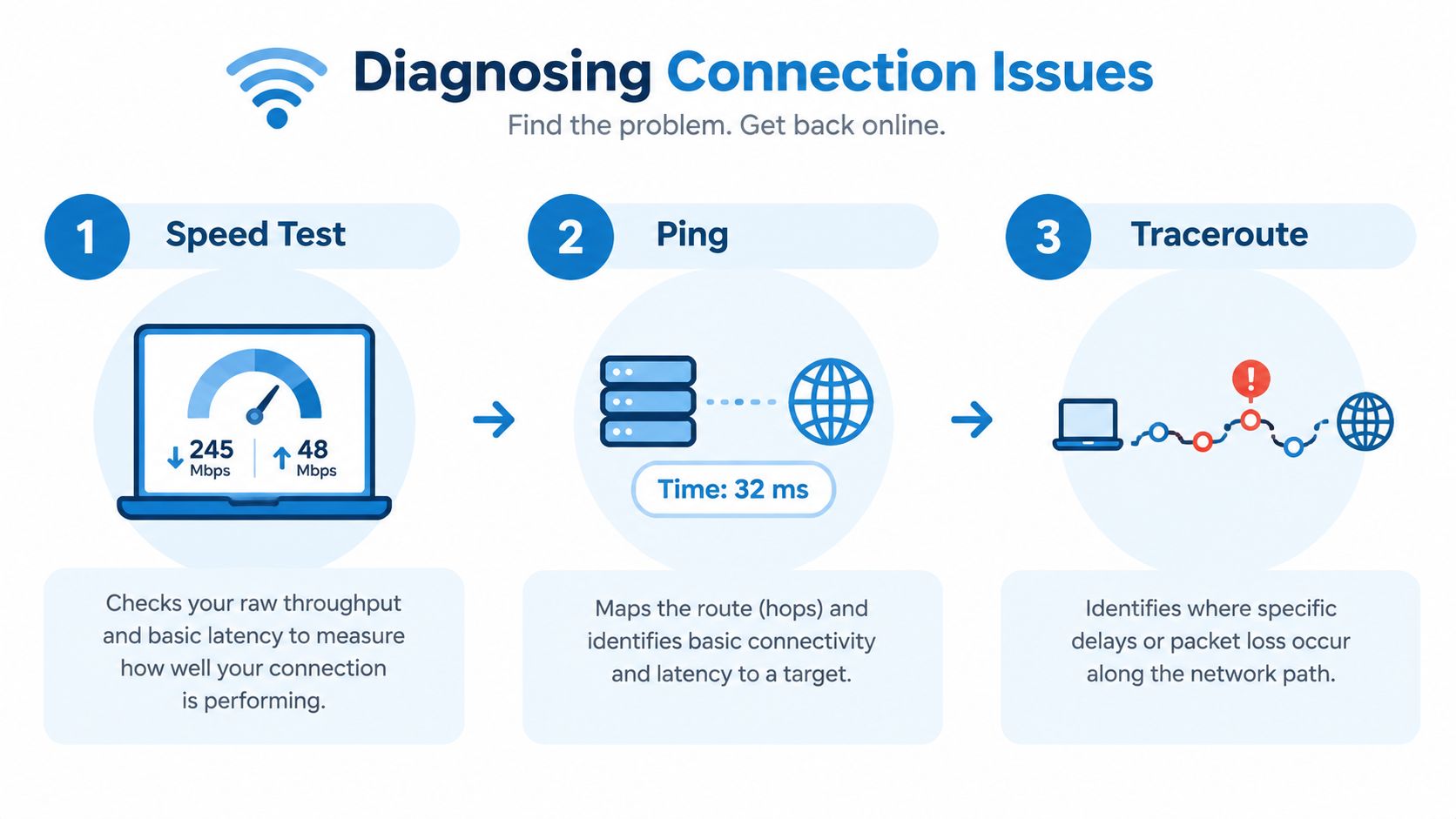
Run a speed test over Ethernet near the router, then repeat it over Wi-Fi in the room where the problem occurs. Test again during normal household activity. Record throughput, latency, and the time of each test rather than relying on one result.
If Ethernet is stable but Wi-Fi is not, focus on wireless coverage, interference, or router load. If both connections fail at the same time, continue toward the modem, access line, or provider. Tools described in these network diagnostic utilities can help organize the process.
Step two, test consistency
Use ping to send repeated requests to a reliable target. Look for timeouts, sudden response-time changes, or a repeating pattern. A stable average with occasional large spikes points toward jitter or queueing, while continuous loss suggests a more persistent path problem.
Run traceroute when you need to see how traffic travels through intermediate network hops. A delay that begins inside the home network points to local equipment. A change that starts after traffic leaves the home can provide useful evidence for the ISP, although individual hops may intentionally deprioritize diagnostic traffic and shouldn't be treated as proof on their own.
Step three, inspect conditions and logs
Check router event logs for repeated disconnects, reconnects, or wireless-channel changes. VoIP applications and business phones may expose jitter, packet loss, and latency readings. A Wi-Fi analyzer can show competing networks and signal changes around the rooms where failures occur.
A good record separates line uptime, last-mile faults, Wi-Fi interference, and resolution time. That distinction matters because users often treat an uninterrupted call as proof of uptime, or treat a provider complaint count as proof that their own service is stable. The same separation is emphasized in this broadband and mobile complaints analysis. For broader troubleshooting across connected devices, ScanStay's host technology troubleshooting guide can provide additional context.
Mitigation Strategies by User Type
The right fix depends on what needs protection. A household may need better coverage, while a gamer needs predictable queues and a small business may need failover.
Households
Place the router in an open, central, high location rather than inside furniture or behind dense obstacles. Update its firmware, review connected devices, and use the router's band and channel controls to reduce interference. Keep high-priority stationary devices on Ethernet when practical, and use parental controls to schedule heavy activity away from important calls.
Gamers
Connect the console or gaming PC by Ethernet, or use a wired backhaul between mesh nodes. Enable the router's gaming or adaptive QoS mode only after identifying the device and traffic that need priority. The objective is not merely more bandwidth. Queueing and bursty impairment can create poor responsiveness even when throughput looks high, because excess jitter may force applications to delay or discard packets. The QoS technical overview explains this relationship.
Remote workers
Use Ethernet for the primary work computer, keep a mobile hotspot ready, and connect networking equipment to a UPS so short power interruptions don't immediately end a call. Pause large cloud synchronizations before important meetings, and test VPN performance from the location where you work. If the VPN adds substantial delay, ask your employer's IT team whether a closer endpoint or split-tunnel policy is appropriate.
Small businesses
Segment staff, guest, voice, and device traffic with VLANs where the network equipment supports it. Managed Wi-Fi can coordinate access points and reduce manual channel decisions. For voice, configure QoS and an appropriate jitter buffer, then monitor call metrics instead of judging quality by internet speed alone. A second ISP connection or cellular failover can keep essential services available during an access-line fault.
| User Type | Main Strategy | Example Tip |
|---|---|---|
| Household | Improve wireless conditions | Move the router into open space and connect fixed devices by Ethernet |
| Gamer | Control queueing | Prioritize the console or gaming PC with QoS |
| Remote worker | Add continuity | Keep Ethernet as the primary path and a tested hotspot as backup |
| Small business | Segment and monitor | Separate voice and guest traffic, then review jitter and packet loss |
Test one change at a time. If you move the router, change channels, and replace the modem simultaneously, you won't know which action solved the problem.
Provider Grade Solutions for Stability
Home adjustments can't repair a damaged access line, replace an upstream route, or monitor a business network after hours. Provider-managed services address those layers by combining the connection, equipment, monitoring, and support process.
A 100% fiber service with symmetrical upload and download capacity can suit households that stream, work remotely, upload large files, or use cloud applications in both directions. Premier Broadband describes 99.9% reliability SLA coverage, managed Wi-Fi through Premier Protects, and business services that include Managed Network Edge and hosted VoIP. Those features matter because centralized monitoring can identify equipment or access problems before a user has to describe a vague intermittent fault.
Hosted VoIP adds another layer of control. Provider-managed voice platforms can use priority routing and jitter buffering to protect conversations from ordinary traffic bursts. That won't eliminate every failure, but it gives the voice service tools that a basic unmanaged connection may lack.
Choosing resilience instead of speed alone
Ask a provider how it measures uptime, what its SLA covers, how it handles recurring faults, and whether it offers failover. A network redundancy solution can combine primary and backup paths so one access failure doesn't automatically interrupt critical operations.
Multi-network connectivity also illustrates the value of path diversity. Businesses tracking vehicles or remote equipment can review how multi-network SIMs improve fleet tracking, particularly when one mobile network has weak coverage in a specific area.
The practical benefit of a managed arrangement is simpler ownership. Instead of troubleshooting the router, Wi-Fi, voice settings, and provider fault separately, a customer can give the service team one documented problem with measurements and timestamps.
Conclusion and Next Steps
Connection stability isn't a synonym for fast download speed. It combines latency, jitter, packet loss, and uptime, then adds the behavior of your Wi-Fi, access line, ISP, DNS path, cloud services, and power supply. A connection feels dependable when those layers deliver data consistently and recover quickly when a fault occurs.
Use a short checklist to turn frustration into evidence:
- Update equipment: Install router and device firmware updates.
- Compare paths: Test the same activity over Ethernet and Wi-Fi.
- Measure behavior: Run repeated speed tests, ping tests, and traceroutes.
- Review conditions: Check Wi-Fi interference, router load, and VoIP logs.
- Record incidents: Note the time, affected device, application, and symptoms.
- Contact the ISP: Share the evidence and ask about access-line faults, outages, and escalation.
- Plan continuity: Keep a tested hotspot, UPS, or secondary connection for important work.
Don't make several major changes at once. Measure before and after each adjustment, then keep the fixes that improve the experience you prioritize, whether that's clearer calls, steadier gaming, or uninterrupted streaming. Ongoing monitoring matters because a network that works today may still hide recurring short interruptions.
Premier Broadband provides 100% fiber internet, managed Wi-Fi through Premier Protects, business connectivity, and hosted VoIP designed for dependable voice, work, and everyday online use. Visit Premier Broadband to explore connection options and discuss a stability-focused solution for your home or business.