
Dial *67 before the number if you want to hide your caller ID for one call in the U.S. and Canada. If you want your number hidden by default, turn off Show My Caller ID on iPhone or choose Hide Number in Android call settings.
Those looking up how to call from a block number need one of two things right now. They either need to make a single private call in the next minute, or they want a lasting privacy setting so every outgoing call stays hidden until they change it back.
Both work, but they solve different problems. A one-off code is better when you're calling a marketplace seller, returning a missed business call, or protecting your personal number for a single conversation. A permanent setting makes more sense if you regularly call from a personal line and don't want it displayed every time.
Why You Might Want to Block Your Number
Sometimes you need privacy for a perfectly normal reason. Maybe you're calling back someone from an online listing, contacting a service provider you don't expect to speak with again, or reaching out from a personal phone when you'd rather not invite callbacks later.
That doesn't mean you need a burner phone or a complicated app. In most cases, you can either use a per-call code for one conversation or change a built-in setting on your phone for a longer-term fix.
Common situations where this makes sense
Here are a few practical reasons people hide caller ID:
- One-time business calls: You're asking for a quote, checking availability, or following up on a service and don't want your personal number stored.
- Marketplace and classified calls: You're buying or selling something locally and want a little distance until you know the other person is legitimate.
- Shared personal number: You use one phone for work, family, and everything else, so you want more control over who can call you back.
- Privacy after a spoofing scare: If your number has already been misused or copied, extra caution is reasonable. If that's happening, this guide on someone else using your phone number can help you think through the next step.
Plain rule: use a temporary block when the situation is temporary. Use a device setting when your privacy need is ongoing.
Pick the method that matches the moment
If you're in a hurry, start with the fastest option. Dial the blocking code before the phone number. If you make private calls often, use your phone's caller ID setting instead.
The trick is choosing the right level of privacy. Hiding your caller ID for one call is simple. Hiding it all the time is also simple, but it comes with more downsides because many people ignore unknown or private callers. That's where the trade-offs matter.
The Quickest Method Per-Call Blocking Codes
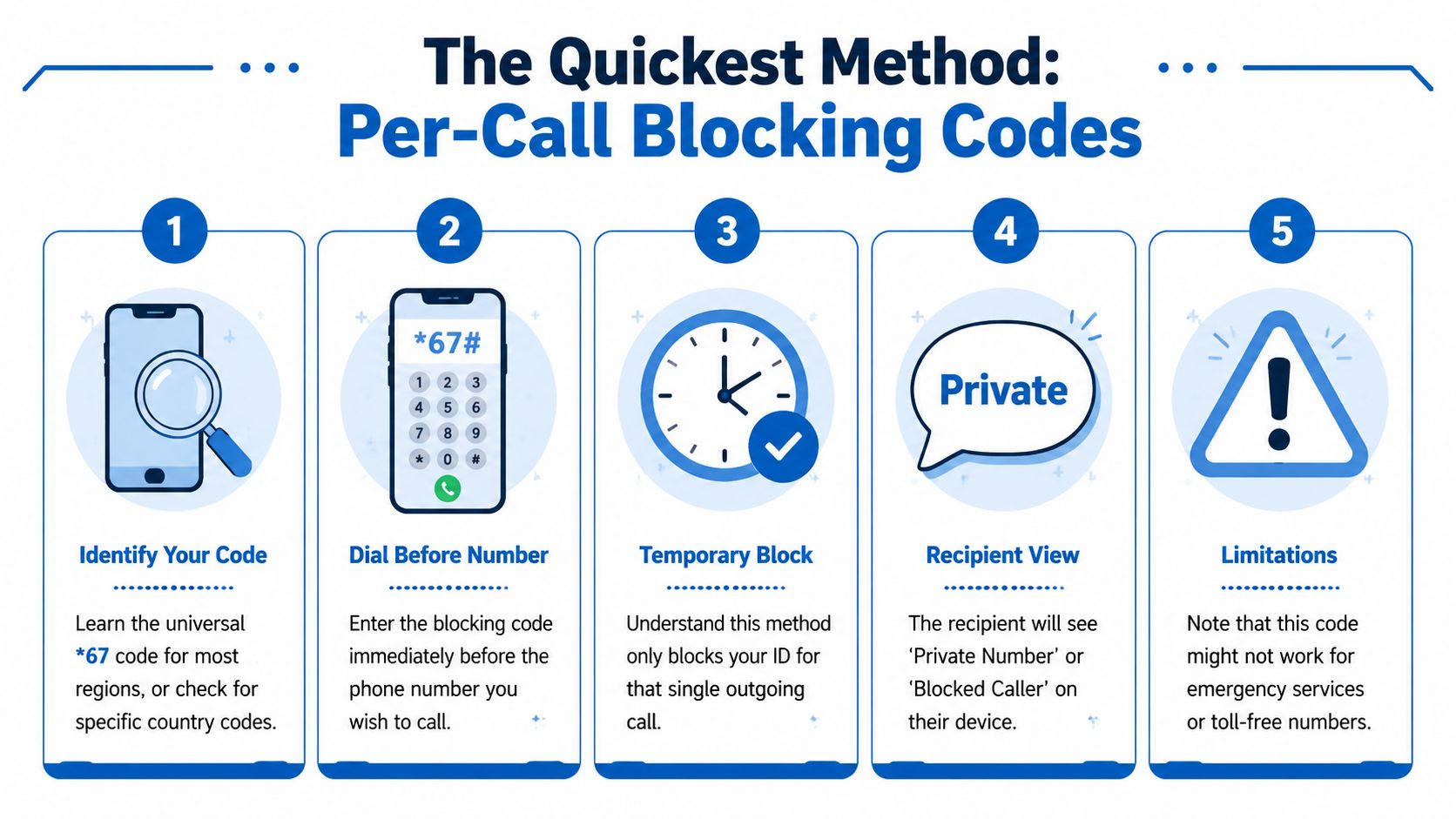
If you want the fastest working answer to how to call from a block number, start with a prefix code. This is the classic carrier-level method. You type the code first, then the number, and your caller ID is suppressed for that single outgoing call.
According to Voiso's explanation of caller-ID suppression codes, the established codes are *67 in the U.S. and Canada, 141 in the U.K., and 1831 in Australia.
How to use it correctly
For U.S. and Canada users, the process is simple:
- Open your phone's dialer.
- Enter *67.
- Type the full number you want to call.
- Place the call normally.
If the network accepts the request, the person you're calling will usually see something like Private or Unknown instead of your number.
This method is useful because it's temporary. You don't have to dig through settings, and you don't risk forgetting that you turned caller ID off for every future call.
When a per-call code is the best choice
Per-call blocking is the right move when you're making an isolated call and don't want to change your phone permanently.
Use it for situations like these:
- A single callback: You missed a call from a business and want to return it without exposing your personal line.
- Short-term privacy: You're contacting someone from an online listing or local community group.
- Shared device habits: You don't want to change default settings and confuse other calls later.
Practical rule: If you only need privacy once, don't change your whole phone. Use the code and move on.
What people often get wrong
The biggest mistake is assuming any hidden-number code will work everywhere. It won't. The verified region-specific codes above are the reliable ones to use where they apply.
Another common mistake is thinking a blocked caller ID equals guaranteed connection. It doesn't. The code only suppresses the caller ID presented to the other person. It doesn't force their phone, app, or carrier to accept the call. If they block anonymous callers, your call may never ring through.
Permanent Privacy Your Phone's Built-in Settings
If you make private calls often, it's easier to change your phone's caller ID setting once and leave it there. This hides your number by default, so you don't have to remember a prefix every time.
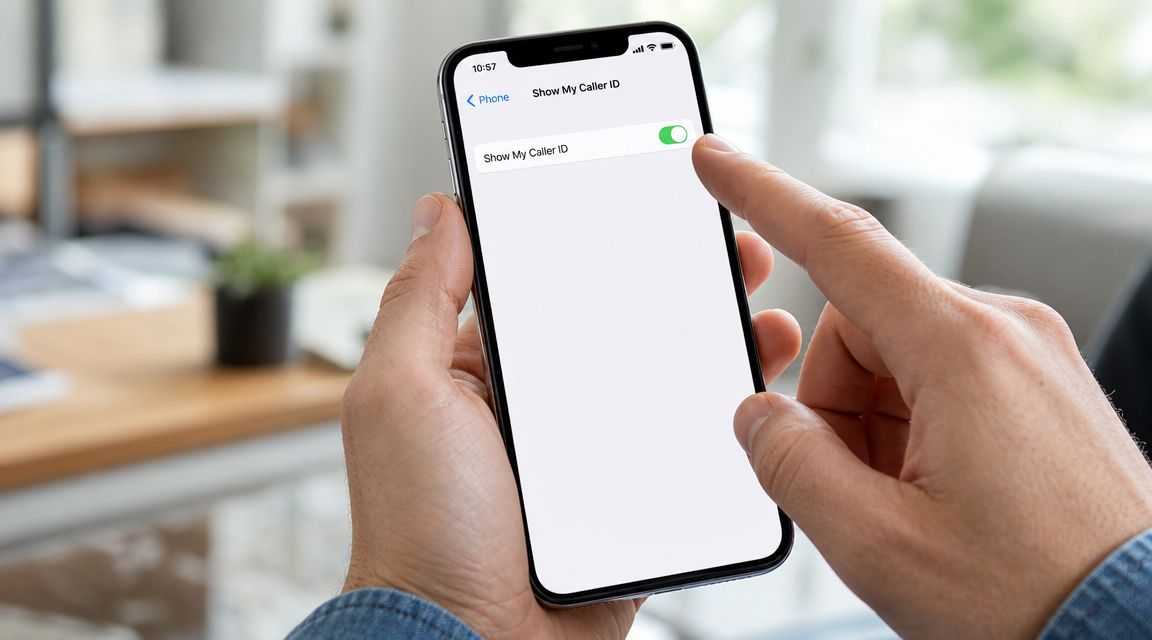
The device-level paths are straightforward. As explained in PowerDialer's guide to hiding caller ID on iPhone and Android, you can turn it off on iPhone through Settings → Phone → Show My Caller ID → Off or on Android through Call Settings → Caller ID → Hide Number.
iPhone steps
On iPhone, do this:
- Open Settings.
- Tap Phone.
- Tap Show My Caller ID.
- Turn it Off.
If you don't see that option, your carrier may control the setting instead of the handset. In that case, the per-call code is often the simpler workaround.
If you also want the other side of the equation, this guide on how caller ID settings work is a useful companion.
Android steps
Android menus vary by device, but the general path is:
- Open the Phone app.
- Open Settings or Call Settings.
- Find Caller ID.
- Choose Hide Number.
Some Android phones bury this under additional calling options. If you don't see it right away, look in the phone app rather than the main system settings first.
When this setting is on, you're not blocking the recipient's phone from seeing a number they already have saved. You're only masking the caller ID that gets presented during the call setup.
A quick visual walk-through can help if the menu names on your phone look a little different:
The trade-off most people notice immediately
This is the downside of making every call private:
Some people won't answer at all if they see Private, Unknown, or Blocked. Businesses may also route anonymous calls differently or reject them.
That's the part many guides skip. Permanent blocking is convenient for you, but it can lower the chance that someone picks up. If you're calling a doctor, school, customer support line, or a client who doesn't know to expect your call, hidden caller ID may work against you.
A good middle ground is simple:
- Keep permanent blocking off if most of your calls are ordinary and you need people to answer.
- Turn it on temporarily when you're making several private calls in a row.
- Use the per-call code instead if privacy is the exception, not the rule.
Advanced Control with VoIP and Third-Party Apps
If you use internet-based calling, you have more moving parts. That can be good or frustrating, depending on how your service is set up.
With VoIP, caller ID isn't always controlled only by your handset. Your provider may also manage what number gets presented, whether your display name is attached, and how outbound calls behave across desk phones, apps, and web portals.
VoIP users should check provider settings first
Many people search how to call from a block number, change a phone setting, and then wonder why their VoIP line still behaves differently. That's usually because the service provider is involved in caller ID presentation.
If you're using a hosted voice platform, start with the account portal or provider documentation before assuming your mobile setting will control everything. That's especially important if you use a business line, a softphone app, or a home voice service tied to broadband instead of a traditional mobile plan.
Premier Broadband voice customers who use hosted calling should look at service-level options as well, since VoIP numbers and presentation rules can differ from standard mobile behavior. Their overview of what VoIP phone numbers are gives useful context for how those numbers are assigned and managed.
When an app is better than blocking your caller ID
Sometimes hiding your number isn't the best privacy move. Sometimes you need a different number, not just a hidden one.
That's where third-party calling apps such as Burner or Hushed can make more sense. Instead of masking your existing number, they give you a separate number to use for specific situations.
That approach is often better for:
- Online selling: You can talk and text without giving out your personal line.
- Short-term projects: Contractors, event planning, and temporary outreach all fit this well.
- Dating or first contact situations: You can keep communication open without exposing your main number.
- Boundary management: If the relationship ends, you can stop using that number instead of changing your personal one.
A hidden caller ID says "don't show my number." A secondary number says "use this number instead." Those are different privacy strategies.
What works best in practice
Generally, the options break down like this:
| Situation | Better tool |
|---|---|
| One private call | Per-call blocking code |
| Frequent private calling from a mobile phone | Built-in caller ID setting |
| Business or home VoIP service | Provider account or portal settings |
| Ongoing privacy with texting and callbacks | A separate app-based number |
Modern calling has become more flexible. You're no longer limited to one trick from the landline era. You can choose between temporary suppression, device defaults, service-level controls, or a second number entirely.
Troubleshooting When Blocking Fails
You dial with caller ID blocked, but the person still sees your number, or the call never gets answered. In practice, that usually points to a service limitation, a calling app, or the receiving side filtering private calls.
Blocked caller ID only controls what number is presented. It does not force every carrier, app, router, or spam filter in the call path to handle that call the same way.
Common reasons it doesn't work
The failures usually fall into a few patterns:
- The person you're calling rejects private numbers: Many phones, carriers, and call-screening tools send anonymous calls straight to voicemail or refuse them outright.
- You placed the call through a VoIP app or alternate dialer: Some apps ignore your phone's caller ID settings and send calls using their own outbound identity rules.
- Your provider limits caller ID controls: On some mobile plans, business lines, and home phone services, the handset setting does not fully control outgoing caller ID.
- The call worked, but private status reduced answer rates: A hidden number often looks like spam to the recipient, so they let it ring.
One quick test saves time. Place the same call from your phone's native dialer instead of a third-party app. If blocking works there, the issue is the app or service, not the phone itself.
VoIP and home phone setups need an extra check
VoIP adds another layer. If you use a home phone adapter, business VoIP line, or broadband voice service, caller ID settings may exist in more than one place: the device, the app, and the provider portal. I see this a lot with home internet phone setups, including Premier Broadband customers using VoIP features through their account.
If calls behave inconsistently, check your network setup too. A router feature like SIP ALG can interfere with call signaling on some systems. This guide on how SIP ALG affects VoIP calling is a useful place to start if your blocked calls work on one device but fail on another.
What to do next
Work through the problem in this order:
- Test one call with your native dialer
- Turn off any third-party calling app and try again
- Check your phone's caller ID setting
- Review your carrier or VoIP account settings
- Try calling a different number to rule out anonymous-call rejection on the recipient's side
That sequence usually tells you where the failure lives. Phone, app, provider, or recipient filter.
If blocked calls fail on only one service, stop changing everything at once. Test one variable at a time and you will usually find the break point fast.
Ethical Considerations and Legal Boundaries
You block your number to protect your privacy. The person receiving the call still gets to decide whether they want contact.
That distinction matters. Calling a doctor back from your personal line, checking on a marketplace sale, or contacting a business without exposing your direct number is ordinary use. Repeated anonymous calls to push, intimidate, or get around someone's clear boundary is different, and it can create legal problems fast.
Use blocking for privacy, not pressure
Hidden caller ID should solve a narrow problem: keeping your number private on a one-off call or as part of a standing privacy setup. It should not be used to make someone answer who would ignore the call if they recognized the number.
Recipients have tools on their side too. They can reject anonymous calls, filter unknown numbers, or report unwanted calling behavior. As noted earlier, agencies that handle consumer complaints ask for practical details such as the time of the call, the number shown if any, and what happened during the call.
This matters for VoIP users as well. If you use a provider portal or app based calling service, including some home voice setups used by Premier Broadband customers, your account may let you hide caller ID by default. That setting is useful, but the same rule applies. Use it to limit exposure of your number, not to avoid accountability.
A simple test before you call
Ask these two questions:
- Would this call still be appropriate if my number showed up normally?
- Am I protecting my privacy, or trying to get past someone's boundary?
If the second answer is anything close to "trying to get past it," stop there.
Caller ID blocking is a privacy feature. It is not consent to keep calling after someone has made it clear they do not want contact.
Used carefully, blocking your number is routine and harmless. Used the wrong way, it looks like the same anonymous calling behavior people and phone providers are already trying to filter out.
If you want help with home or business voice service features, including caller ID options and VoIP calling tools, take a look at Premier Broadband.