

Want a quick way to check your network latency? Just open up a command-line tool and use ping, or head over to a web-based service like Ookla's Speedtest. These tools fire off a tiny data packet to a server and time how long it takes to come back. The result, measured in milliseconds (ms), gives you a real-time snapshot of your connection’s responsiveness.
Why Your Network Latency Actually Matters
Before we get into the nuts and bolts of testing, let's talk about why this matters. Network latency, which most people know as ping, is the hidden force that shapes your entire online experience. It's that invisible delay between when you do something—like click a link or move your character in a game—and when the server acknowledges it.
This delay is the difference between a crystal-clear video call and a frustrating, choppy conversation where you're constantly talking over each other.
The Real-World Impact of Milliseconds
Everyone talks about bandwidth, but for anything interactive, latency is the true measure of your connection's quality. High latency is what causes those awkward pauses on Zoom calls, the infuriating lag in competitive online games, and sluggish websites, even when your internet plan is supposedly "fast."
On the other hand, a connection with low latency feels instantaneous. Your actions get an immediate response, and your voice comes through on VoIP calls without any weird delays. For anyone who games, streams, or works from home, low latency isn't just a nice-to-have; it's essential. This is especially true if you have a high-speed fiber connection. You can learn more about how fiber internet will change the way you game online and stream everything else to see what a difference it makes.
A low-latency connection doesn't just feel faster—it fundamentally changes what's possible online. It's the key to a more productive workday and a more immersive entertainment experience.
Setting the Standard: What’s a “Good” Latency?
So, what kind of latency should you be aiming for? Understanding the numbers is key. For households and remote workers who depend on Premier Broadband's fiber network, a few milliseconds can make or break an important meeting.
Here's a quick reference to see how your connection stacks up for different activities.
Latency Impact on Common Online Activities
| Activity | Excellent Latency (<30ms) | Good Latency (30-60ms) | Acceptable Latency (60-100ms) | Poor Latency (>100ms) |
|---|---|---|---|---|
| Online Gaming (FPS) | Instant, competitive edge | Smooth gameplay, no noticeable lag | Minor delays, still playable | Frustrating lag, unplayable |
| Video Conferencing | Flawless, real-time conversation | Clear audio/video, minimal delay | Occasional choppiness or talking over | Constant interruptions, unusable |
| General Web Browsing | Pages load instantly | Fast and responsive | Noticeable but tolerable loading | Sluggish and frustrating |
| Streaming Video (HD/4K) | Buffering is non-existent | Starts quickly, no interruptions | May buffer at the start | Frequent buffering and low quality |
As you can see, the lower your latency, the better your experience will be across the board. The goal is to get those numbers as close to zero as possible.
Your Toolkit for Measuring Network Latency
To get a real handle on network latency, you need the right tools for the job. The good news is that many of the most powerful utilities are already built into your computer, while others are just a quick online search away. Knowing which tool to pull out—and when—is the key to quickly diagnosing and fixing any slowdowns you're experiencing.
The easiest place for anyone to start is a web-based speed test. No installation needed. They give you a quick, easy-to-read snapshot of your connection’s health, including latency, download, and upload speeds.
This gives you a fantastic baseline for your network's current performance.
Starting with Web-Based Speed Tests
For most situations, a tool like Ookla's Speedtest is the perfect first step. It gives you a solid look at your connection’s core metrics in just a few seconds. In fact, the data from millions of these tests shows just how much performance can vary between providers.
Take Ookla's Speedtest Connectivity Report for the first half of 2025. It highlighted some huge differences across the US, showing T-Mobile leading mobile 5G with a median latency of 45ms. On the other hand, AT&T Fiber came in as the fixed broadband leader at just 18ms.
These numbers, collected from real users, are exactly why fiber providers like Premier Broadband consistently deliver a better experience for anything that can't tolerate lag. You can see all the details in Ookla's comprehensive report.
Using Built-In Command-Line Tools
When you need to dig a little deeper, your computer's own command-line interface has some seriously powerful tools. They might look a bit old-school, but they provide a level of detail that web-based tests just can't offer.
- Ping: This is your fundamental latency tester. It sends a tiny data packet to a server and times how long it takes to come back—the round-trip time (RTT), measured in milliseconds. It’s perfect for checking your live connection stability to a specific destination, like a gaming server or your office VPN.
- Traceroute (or tracert on Windows): Think of this as a roadmap for your data. It maps out the entire journey from your computer to the server, showing you every single "hop" it makes along the way. If a specific router out on the internet is causing a bottleneck, traceroute will point you right to it.
These commands are essential for serious troubleshooting. If you're looking to get more comfortable with them, check out our guide on common network diagnostic utilities.
Advanced Tools for Deeper Insights
For those times when you need an even more detailed analysis, a few specialized tools can combine the power of ping and traceroute with continuous monitoring.
Pro Tip: When you're troubleshooting, always use more than one tool. A speed test gives you the big picture, while ping and traceroute help you zoom in on specific problem spots. This layered approach is the fastest way to find the real source of high latency.
One of the best is MTR (My Traceroute). MTR is like running a traceroute on a continuous loop, constantly sending packets and giving you live updates on latency and packet loss for every hop. This makes it an incredible tool for catching those frustrating, intermittent network issues that a single traceroute might miss.
Another great specialized tool is iPerf. It’s designed to test your internal network performance. Instead of measuring latency to an internet server, iPerf measures the maximum speed between two devices on your own local network. This is how you figure out if that lag is coming from your Wi-Fi router or wiring, not your internet connection itself.
How to Actually Interpret Your Test Results
So, you’ve run a test and now you're staring at a list of numbers. What’s next? Getting the data is just the first step—the real skill is knowing what those numbers actually mean for your day-to-day online life.
Learning how to read your latency, jitter, and packet loss results turns you from someone just hoping for a better connection into an informed troubleshooter. These three metrics are the core trio that tells the complete story of your connection's quality.
Latency is the raw speed of your connection's response time. Jitter and packet loss, on the other hand, reveal its stability and reliability.
Decoding Your Latency (Ping) Score
Your main latency result, often called ping, is measured in milliseconds (ms). It's the round-trip time it takes for a tiny piece of data to travel from your computer to a server and back again. Lower is always better, but what’s considered “good” really depends on what you’re doing online.
- For competitive online gaming: Anything under 30ms is fantastic and will give you a real competitive edge. You'll find that 30-60ms is still very playable, but once you start creeping over 100ms, you're going to feel that frustrating lag in fast-paced games.
- For video conferencing (Zoom, Teams): To have a clear, real-time conversation without talking over each other, a stable connection under 60ms is ideal. You can get by with up to 100ms, but that’s when you might start noticing those awkward delays.
- For general web browsing and streaming: Latency isn't as critical here. As long as your ping is below 150ms, you probably won't notice much of a difference in how quickly pages load or your Netflix show starts playing.
Think of it this way: a lower ping means your clicks and commands are registered almost instantly. That's absolutely vital when every fraction of a second counts.
Understanding Jitter: The Consistency Killer
Jitter is all about the variation in your ping over time. If your ping test shows results jumping from 20ms to 90ms, then back down to 35ms, you’ve got high jitter. This inconsistency is often way more disruptive than a connection that's consistently a little slow because it makes everything feel unpredictable.
High jitter is almost always the culprit behind choppy audio on VoIP calls or those sudden, infuriating lag spikes in the middle of a game. For a smooth experience with anything real-time, you want your jitter to be as low as possible—ideally under 15ms. If you're dealing with an unpredictable connection, you can learn more about what causes it and how to fix high network jitter in our detailed guide.
A stable connection with 50ms latency is far better than one that bounces between 20ms and 100ms. Consistency is just as important as speed for real-time communication.
Spotting Packet Loss: The Data Thief
Packet loss happens when the data packets sent from your computer never make it to their destination, or vice versa. It’s measured as a percentage, and your goal should always, always be 0%. Even a tiny amount, like 1-2%, can cause some serious headaches.
Imagine trying to stream a movie where a few frames go missing every second—the picture would quickly become a pixelated, stuttering mess. The exact same thing happens with your data. In gaming, packet loss causes you to teleport unexpectedly or makes your actions fail to register. On a video call, it’s the reason for frozen screens and garbled, robotic-sounding audio.
Any packet loss at all points to a significant problem that needs to be fixed right away.
Targeted Strategies for Real-World Scenarios
Generic latency tests give you a decent baseline, but the real story is in testing your connection against the services you actually use day-to-day. Different online activities have completely different demands. A one-size-fits-all test just won't cut it when you're trying to hunt down a specific problem.
Your testing strategy needs to mirror your real-world usage. A general speed test might show fantastic low latency to a server just down the road, but that tells you next to nothing about your connection to a gaming server halfway across the country.
Testing for Competitive Gaming
For gamers, every millisecond is the difference between winning and losing. A high ping can ruin a match. Instead of just running a broad speed test, you need to check your latency directly to the game's servers. That’s the only way to get a truly accurate reading.
Many online games actually show your ping in real-time right on the scoreboard or in the network settings. If yours doesn't, you can often track down the server IP addresses on community sites or forums. With that IP, you can use the ping command in your computer's terminal to get a precise, live measurement of your connection quality to that specific server.
Optimizing for Remote Work
A stable connection isn't just a nice-to-have for remote workers; it's essential. The main thing you care about is the performance between your home office and your company’s key systems, like its Virtual Private Network (VPN) or cloud services (think Microsoft 365 or Google Workspace).
A great place to start is running latency tests both with and without your VPN turned on. This immediately helps you figure out if slowdowns are coming from your own internet or something on the corporate network. If you can, ping your company's VPN gateway address to see the direct latency your work traffic is dealing with. A consistently low ping here is what keeps video calls smooth and file transfers snappy.
This simple decision tree helps visualize the process. You start with a test and then, depending on the results, you either enjoy a great connection or start digging into the problem.
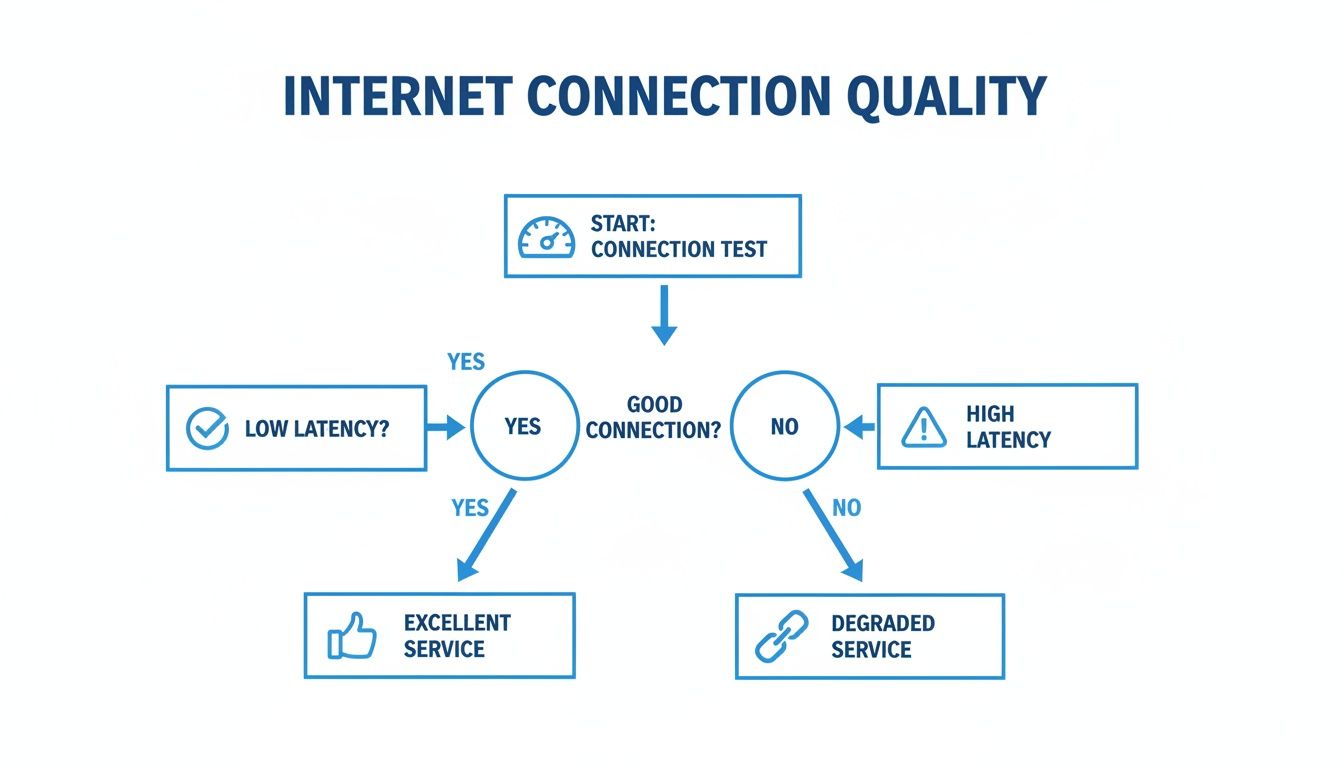
As the chart shows, it comes down to a clear choice: a good, low-latency result means you're all set, while a high-latency result is your signal that it's time to troubleshoot.
Ensuring Crystal-Clear VoIP Calls
Voice over IP (VoIP) is incredibly sensitive to both latency and jitter. High ping is what causes those awkward delays where you end up talking over each other. High jitter is what makes audio sound choppy and robotic.
For conversations to sound clear and natural, you're aiming for a round-trip latency of less than 150ms and jitter below 20ms.
Many VoIP providers offer their own network quality testing tools. It's always a good idea to use these to check if your connection is up to the task for voice traffic. These tests often simulate an actual call, measuring latency, jitter, and packet loss to give you a detailed quality score.
Key Takeaway: The whole point of scenario-specific testing is to replicate what you actually do online. By testing the direct path your data takes for gaming, work, or calls, you get real insights that a generic speed test will always miss.
Poor network performance is more than just an annoyance; it has real financial impacts. A 2025 IDC report revealed that 28% of global companies lost up to $5 million because of outages and performance issues. This is why major investments are being made, like China's first 10G broadband network that hit an incredible 3ms latency. You can learn more about how every millisecond counts in different industries.
A Practical Guide to Fixing High Latency
Okay, so you've run the tests and confirmed what you already suspected: your latency is too high. Now what? The good news is you don't need to be a network engineer to solve this. Most of the time, laggy connections are caused by simple issues right inside your own home.
Let's start with the easiest fixes, because they're often surprisingly effective. Before you start unplugging everything, try power-cycling your modem and router. Just unplug them from the wall, wait a full 60 seconds, and plug them back in. This simple reboot can clear temporary glitches that slow your network down.
Also, take a quick inventory of what’s running on your computer or other devices. Background apps chewing up bandwidth with big downloads or automatic updates are notorious for causing latency spikes. Shut down anything you don't absolutely need open.
Isolate the Source of the Problem
To really fix high latency, you have to find out where it's coming from. Is the problem your local setup, or is it an issue further up the line with your internet provider? The fastest way to figure this out is to ditch the Wi-Fi for a moment.
Grab an Ethernet cable and plug your computer directly into your router. Now, run your latency tests again. If your ping suddenly drops, you've found the culprit: Wi-Fi interference or a weak signal. This is probably the single most common cause of spotty network performance. If that's your situation, you can learn how to extend WiFi with Ethernet for a stable, low-latency connection.
Still seeing high latency even when you're wired in? Then the problem is likely outside your home network. This is where a tool like traceroute becomes essential, as it can show you exactly where the slowdowns are happening along the internet's highways.
How to Prepare for Contacting Your ISP
If you've tried the basics and are still stuck with lag, it's time to get your Internet Service Provider involved. But here's a crucial tip: just calling support and saying "my internet is slow" will probably land you in a long, frustrating loop of generic advice. You need to come prepared with data.
Pro Tip: When you call your ISP with specific numbers and test results, the conversation completely changes. You're no longer just making a complaint; you're presenting a clear case that helps their technicians diagnose the real issue much, much faster.
Before you dial, get this information ready to go:
- Your Average Ping: Be ready to say something like, "I'm consistently getting a 150ms ping to Google's servers."
- Traceroute Results: Have the output from a few recent traceroute tests handy. This literally shows the support team which network hop is causing the delay.
- Specific Examples: Describe the problem in real-world terms. "My Zoom calls are constantly freezing," or "Online games are unplayable because of lag spikes."
Having this evidence helps the support team get past their standard script and start digging into the actual problem. For a deeper dive into troubleshooting, check out our complete guide on how to fix high latency.
Common Questions About Network Latency
Even after you've run a few tests, some of the concepts around network latency can feel a bit fuzzy. Let's walk through some of the most common questions that pop up when people start digging into their connection's performance. Getting these fundamentals right is the key to figuring out what’s actually going on.
It’s incredibly common for people to mix up "bandwidth" and "latency," but they measure two totally different aspects of your connection. Understanding the difference is the first real step to diagnosing any problem.
What Is the Difference Between Latency and Bandwidth
Here’s a simple way to think about it: your internet connection is like a water pipe.
Bandwidth is the width of that pipe. A wider pipe can carry more water at once. This is measured in Mbps (megabits per second) and represents the total volume of data your connection can handle.
Latency, on the other hand, is the speed the water flows through the pipe. It’s the time it takes for a single drop of data to travel from your computer to a server and back again, measured in ms (milliseconds).
You can have a massive pipe (high bandwidth), but if the water pressure is low (high latency), everything just trickles through. For anything that happens in real-time, like a video call or an online game, low latency is usually way more important than massive bandwidth.
Can I Test Network Latency on My Mobile Phone
Absolutely. The quickest way is to just grab an app like Ookla's Speedtest from your phone's app store. These tools are fantastic for getting a quick snapshot of your latency, download, and upload speeds over whatever connection you're on, whether it's Wi-Fi or cellular.
Here's a pro tip: use your phone to hunt down Wi-Fi dead zones in your house. Walk from room to room while running tests. If you see latency suddenly spike in the back bedroom, you've probably found a spot with poor signal coverage.
Why Is My Latency High with a Fast Fiber Connection
This is a great question and a common source of frustration. You've got the best connection technology available, so why is there still lag? While a fiber line itself offers the lowest possible latency, other things along the data's journey can create a bottleneck.
It's almost never the fiber optic cable itself. The problem is usually one of these culprits:
- Using Wi-Fi: No matter how fast your plan is, a wired Ethernet connection will almost always give you lower and more stable latency than Wi-Fi. It’s just a more direct, less interference-prone path.
- Physical Distance: The speed of light is fast, but it's not instant. Connecting to a game server on the other side of the country will naturally have higher latency than connecting to one in a neighboring city.
- Outdated Equipment: Your old router might not be up to the task of handling modern fiber speeds. It can become the weak link in your home network, slowing everything down before it even leaves the house.
- Background Apps: Something on your computer could be hogging your connection without you realizing it. Think cloud backups, software updates, or other hidden downloads.
If you want to dig a little deeper into these kinds of issues, this resource on general network concepts is a good place to start.
Ready to experience the ultra-low latency of a 100% fiber network? Premier Broadband offers the speed and stability you need for flawless gaming, streaming, and remote work. Check our availability and make the switch today!