
A lot of people looking for internet for remote areas are dealing with the same daily pattern. The work call freezes right when you need to answer. A large file upload crawls for so long that you leave the laptop open overnight. Someone starts streaming in the living room and the whole house feels the hit. If you have kids at home, homework platforms and video lessons can turn into a nightly argument with a loading wheel.
That frustration is real, but it isn't the same as having no options. In most remote places, the primary challenge is sorting through imperfect choices, understanding what each one does well, and matching the connection to the way you live and work. A plan that looks fine on an ad can still feel awful in a real house if the upload is weak, the latency is unstable, or the Wi-Fi inside the home is poorly set up.
The Digital Divide Is Real But Not Unsolvable
For many rural households, the problem isn't just "slow internet." It's inconsistent internet. A connection may work for email and casual browsing, then fall apart when two people join video meetings and another person tries to submit schoolwork. That's usually when people start asking the practical question that matters most: Will this connection hold up during an ordinary weekday?

In Canada, the gap is easy to see in public data. Despite a federal goal to bring 50/10 Mbps service to 95% of Canadian households by 2026, June 2023 data showed that while 91.4% of all households had access, only 62% of rural households did, according to the Library of Parliament's broadband research publication.
That number matters because it confirms what residents already know from experience. Rural and remote service isn't lagging because people don't need it. It's lagging because sparse populations and long build distances make networks harder and more expensive to extend.
What people feel before they know the cause
The symptoms tend to show up before the technology does:
- Video calls break first: Audio clips, faces freeze, and meetings become stressful.
- Uploads expose weak service: Cloud backup, sending photos, and sharing work files often perform worse than speed tests suggest.
- Peak-hour slowdowns change the whole evening: Entertainment, school, and work all compete for the same connection.
- Home Wi-Fi gets blamed for outside-network problems: Sometimes that's true. Often it isn't.
Most people don't need a perfect connection. They need one that behaves predictably during the hours that matter.
A workable path usually exists
The good news is that remote internet planning doesn't start with wishful thinking. It starts with a clear look at what's available at your address, what your household needs most, and which compromises you're willing to accept. In some places, that means fixed wireless. In others, LTE home internet is the practical middle ground. For the hardest-to-reach homes, satellite may be the only option reaching the location at all.
The key is choosing based on lived performance, not marketing language. Fast downloads alone won't save a bad workday.
Understanding Your Realistic Connectivity Options
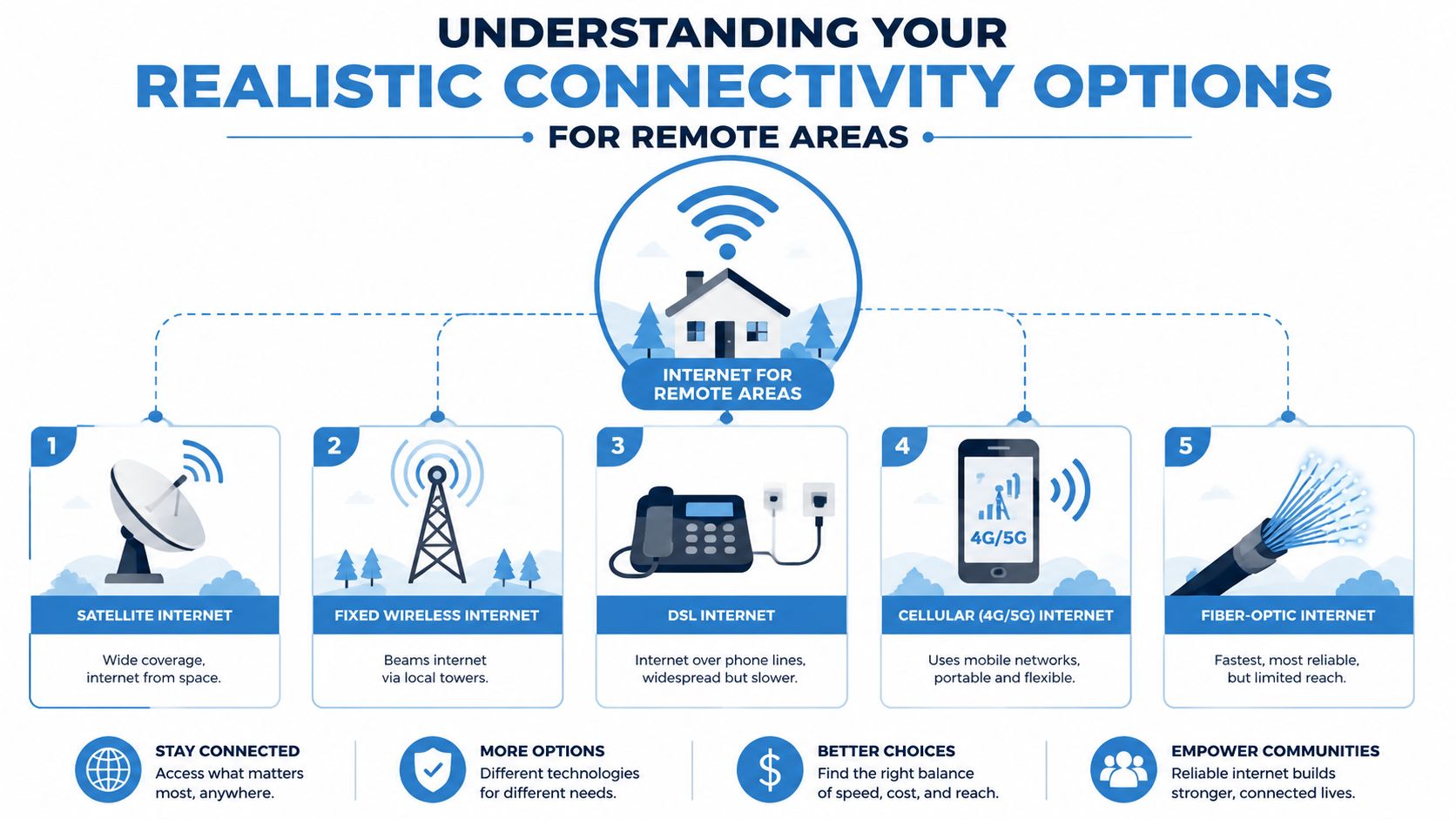
Remote locations rarely get one ideal choice. They get a menu of technologies, each with a different delivery method and different trade-offs. That's normal. In practice, there is no single universal access method for remote areas; a mix of satellite, fixed wireless, and 4G/5G LTE is often required because geographic barriers and low population density make a pure fiber buildout economically challenging in many regions, as explained in this overview of rural internet options.
Satellite internet
Think of satellite as internet delivered from overhead instead of from a wire on your road. It's the broadest coverage option because it doesn't need a nearby tower or trench to your house.
There are two common ways people talk about satellite. Traditional geostationary systems are like a very distant lighthouse fixed high above the earth. Newer low-orbit systems are more like a moving swarm passing overhead. For a household in a hard-to-reach valley, on a ranch, or beyond any practical tower footprint, satellite may be the only serviceable path.
What it feels like in daily use depends heavily on latency, congestion, weather, and how upload-heavy your tasks are. It can be fine for web use and streaming, but real-time interaction is where limitations become obvious.
Fixed wireless
Fixed wireless works more like a directed beam from a local tower to an antenna on your home. If the provider has a strong tower position and your property has workable line-of-sight, this can be one of the most practical forms of internet for remote areas.
It often feels more responsive than satellite because the signal stays on terrestrial infrastructure. In plain terms, clicks register faster, calls feel steadier, and cloud apps usually behave better. A useful primer on how wireless compares with fiber and home wireless options is this family-focused look at fiber internet vs 5G home internet.
Cellular home internet over 4G or 5G
This uses the same broad mobile network family as your phone, but through a dedicated home gateway. It works best where tower signal is solid and the network isn't overly congested.
For some homes, it's the easiest option to try because setup is often simpler than tower-mounted or roof-mounted installations. The downside is consistency. A location can show "coverage" on a map and still perform unevenly inside the house or at busy times.
DSL over telephone lines
DSL rides on older copper telephone infrastructure. In some remote areas it's still available, and in some cases it's better than people expect for basic tasks.
But copper has limits. Distance from network equipment matters a lot, and weak upstream performance often becomes the deal-breaker for remote work. DSL is usually a fallback, not a first-choice upgrade.
Fiber and community builds
Fiber is still the benchmark if it's available. It gives the cleanest path for high-demand households and small businesses because it handles modern upload needs much better than older or more asymmetric systems.
In very remote areas, fiber sometimes arrives through local buildouts, utility partnerships, cooperatives, or community-backed projects rather than a major national rollout. That's why availability research has to go beyond the obvious brand names.
Comparing Rural Internet Performance and Costs
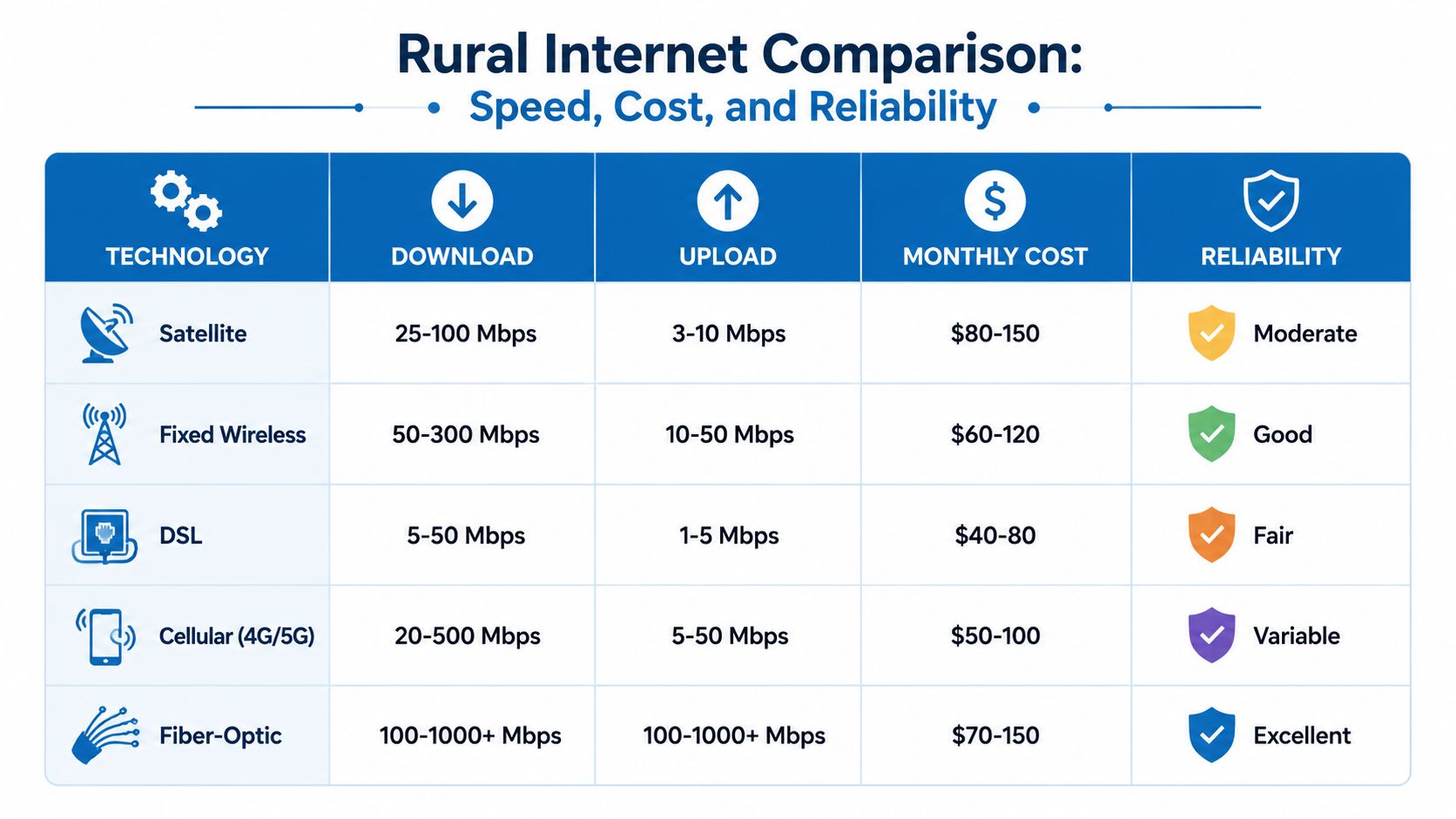
The biggest mistake I see people make is comparing rural internet options only by advertised download speed. That misses the part you feel every day. For work, voice, gaming, and cloud apps, the quality of the connection often comes down to upload performance, latency, and stability.
A key benchmark still shapes how providers talk about broadband. The FCC's 25/3 Mbps standard defines broadband, but modern remote work and telehealth increasingly require better upstream performance and lower latency for video calls and file transfers, making technologies like fiber and well-engineered fixed wireless more suitable than high-latency or asymmetric options, as noted in this rural broadband performance discussion.
What the numbers don't always tell you
A connection can post a decent download result and still struggle with normal life. That's because:
- Uploads matter more than most ads admit: Video meetings, shared drives, photo syncing, and security cameras all rely on upstream capacity.
- Latency changes the feel of the network: Low latency makes a connection feel immediate. Higher latency creates delay, hesitation, and talk-over on calls.
- Reliability beats raw peak speed: A stable moderate-speed connection is often more usable than a faster one that varies wildly.
- Installation conditions affect outcomes: Trees, roof placement, tower visibility, and indoor gateway location can change the experience.
Practical rule: If your day includes live meetings, shared files, or cloud software, don't buy on download speed alone.
Remote Internet Options at a Glance
| Technology | Typical Speeds (Down/Up) | Typical Latency | Reliability | Average Monthly Cost |
|---|---|---|---|---|
| Satellite | Varies by provider and conditions, often stronger on download than upload | Usually higher than terrestrial options | Can be affected by weather and congestion | Usually higher equipment and service costs than many terrestrial options |
| Fixed Wireless | Often strong enough for work and streaming when engineered well | Usually lower than satellite | Good when line-of-sight and tower capacity are solid | Mid-range, with possible install costs |
| DSL | Often limited, especially on upload | Can feel acceptable for basic tasks | Depends heavily on line quality and distance | Often lower monthly cost |
| Cellular 4G or 5G Home Internet | Can be very good in some locations and very uneven in others | Often better than satellite when signal is strong | Variable with tower load and indoor signal conditions | Usually moderate, sometimes with equipment or gateway fees |
| Fiber | Strong download and upload performance, often symmetrical | Low and stable | Excellent where available | Competitive monthly pricing, but availability is limited in remote places |
A broader shopping view can help if you're checking provider categories in your region. This guide to rural internet providers is useful for comparing what's commonly offered.
How each option feels in real life
Satellite often wins on reach and loses on responsiveness. It can keep a remote home connected where nothing else can, but interactive tasks feel the trade-off first.
Fixed wireless is often the sweet spot when available. It doesn't require a full fiber build, but it can still deliver a connection that feels responsive enough for serious work.
Cellular home internet is easy to test and easy to misunderstand. If the local tower is healthy and your home gets clean signal, it can work well. If the tower is crowded or your building blocks signal, performance can swing more than people expect.
DSL is usually about adequacy, not comfort. It may keep essential services online, but it rarely feels modern once several people rely on it at once.
Fiber remains the least frustrating option for mixed-use households and business operations because it tends to pair strong upload with low latency.
How to Find and Fund Better Internet In Your Area
The hard part isn't learning the names of the technologies. It's finding out what reaches your property, what kind of installation is possible, and whether a better option is already planned but not yet active.
Rural deployment often stalls for structural reasons. Providers must build more network miles to serve fewer people, and that challenge gets worse in difficult terrain or places lacking utility infrastructure, which is why government funding and community initiatives often play a necessary role.
Start with address-level checking
Don't stop at a provider's homepage. Use the exact service address. Then call.
Ask direct questions:
- What service type reaches my address today: Fiber, fixed wireless, LTE, DSL, or satellite reseller.
- What equipment gets installed: Dish, roof antenna, indoor gateway, trench, or line extension.
- What can block installation: Trees, terrain, roof access, power availability, or line-of-sight problems.
- How does the plan behave under load: Especially for video calls, uploads, and multiple active users.
Coverage maps are marketing tools first. The accurate answer usually comes from an installer or network engineer who knows the road, not just the ZIP code.
Look beyond large national brands
Smaller wireless internet providers, electric cooperatives, municipal projects, and regional fiber builders often serve remote territory more aggressively than national carriers. Community social groups, county development offices, and utility boards can be surprisingly useful sources of current information.
If your area is organizing for better connectivity, grant strategy matters. A practical starting point is this resource on funding community development projects, which can help local groups think through how projects get financed and documented.
Check affordability and public program options
Some households also need help bridging the cost of equipment or monthly service. Program availability changes, and some initiatives evolve over time, so verify the current status before relying on them. This page about Affordable Connectivity Program partnership information is a useful example of the kind of provider-specific assistance information worth checking.
If no provider is building to your road alone, a cluster of neighbors asking together often gets more attention than one household asking by itself.
Choosing the Right Internet for Your Specific Needs
The best internet for remote areas depends less on the label and more on the job you need it to do. A household that mainly streams movies can tolerate things that would make a remote worker miserable. A gamer notices problems that a casual browser won't. A small business has very different stakes than a weekend cabin.

The remote worker
If your paycheck depends on video meetings, cloud apps, and sending files, prioritize stable upload and low latency over flashy peak download claims. In many remote areas, that makes fiber the first choice, fixed wireless the second, and cellular home internet a situational third if tower conditions are good.
Satellite can work, especially where it's the only viable path, but I wouldn't choose it first for a call-heavy workday if a solid terrestrial option exists. For people comparing access methods, it helps to understand what fiber to the home changes inside a home office. The major difference is usually consistency, not just speed.
The competitive gamer
Gamers feel latency immediately. The issue isn't only download rate. It's delay, jitter, and whether the connection stays responsive when someone else in the house starts using bandwidth.
Best fit usually looks like this:
- Fiber if available: Lowest frustration for real-time play.
- Well-built fixed wireless: Often a strong second choice.
- Cellular home internet: Can be playable, but consistency varies by tower load.
- Satellite: Usually the hardest fit for competitive play because responsiveness matters more than headline speed.
The streaming family
A family focused on TV streaming, general browsing, homework, and casual device use can succeed on more connection types than a gamer or remote worker. The key is avoiding a plan that collapses during evening demand.
What matters most here is less about perfection and more about household tolerance for shared use. If several screens run at once, fixed wireless, fiber, or a strong cellular setup usually feel better than older copper options. Satellite may still be workable if expectations are realistic and interactive demands are limited.
A quick explainer on how these trade-offs play out can help before you decide:
The small business owner
A home-based accounting office, repair shop, clinic outpost, or retail location needs more than internet access. It needs continuity. Card processing, cloud software, voice calls, camera uploads, and guest usage all create pressure points.
For that kind of environment, I'd rank the options by operational risk, not just speed. Fiber is usually the cleanest fit. Fixed wireless can be excellent when engineered properly. Cellular is useful as primary service in some places and as backup in many others. Satellite is often the service of necessity rather than the service of choice for business-critical workflows.
Choose the connection that protects your most important daily task. Everything else comes second.
Making Your Connection Work for Business and Voice
A practical test often happens at 10:07 a.m. A customer is on the phone, a card terminal is processing a payment, someone in the back office is uploading photos or invoices, and the Wi-Fi at the far end of the building starts dropping packets. On paper, the internet plan may look fast enough. In practice, the connection feels unreliable, and that is what staff and customers remember.
Business and voice traffic expose weaknesses that casual browsing can hide. A video call can freeze even when movie streaming looks fine the night before. A cloud phone system can sound choppy on a link with plenty of download speed if latency jumps or upload capacity gets crowded.
Why VoIP exposes weak networks
Voice over IP works best on a connection with stable latency, low jitter, and enough clean upload headroom. It does not need huge bandwidth, but it does punish inconsistency. If one person starts a large upload or the link slows down every afternoon, callers hear the result immediately through clipped words, delay, or one-way audio.
For a home office, clinic outpost, workshop, or small retail site, that day-to-day experience matters more than headline speed. Symmetrical fiber usually feels better for calls, cloud apps, and file sync because uploads do not fight for scraps. Fixed wireless can also work well if the provider has engineered the sector properly and local signal quality is solid. Cellular can support voice and light business use, but performance may swing by time of day. Satellite is usually the hardest fit for phone-heavy work because latency changes the rhythm of conversation, even when the call technically stays connected.
Premier Broadband may be relevant if fiber is available in your area, since the company focuses on fiber connectivity and business voice rather than residential speed marketing alone.
Indoor Wi-Fi often decides whether the service feels usable
I see this problem often in remote homes that also run a business. The internet service to the property is acceptable, but the office is at one end of the building, the router is at the other, and every complaint gets blamed on the provider. In reality, the bottleneck is the local network.
Coverage design matters. So does access point placement, wall construction, and whether guest devices are sharing the same weak router as phones and work laptops. If you need better internal coverage, this guide on how to set up mesh WiFi in Melbourne is a useful reference for thinking through node placement and signal behavior.
Before signing a business plan or adding hosted voice, ask direct questions:
- Can the service hold steady under upload load? Voice, backups, camera footage, and cloud sync often compete for the same upstream capacity.
- Who is responsible for Wi-Fi design inside the building? A good internet link will still feel poor if the office, register, or workshop sits in a coverage hole.
- What support response can you expect when service affects revenue? Fast repair handling matters more to a business than a slightly higher advertised speed.
A connection that supports remote work or business use should feel predictable. Staff should be able to take calls, run cloud software, and move around the building without wondering what will fail next.
Frequently Asked Questions About Remote Internet
Can a signal booster improve my current satellite or cell service
Sometimes. For cellular-based service, better antenna placement, a stronger router location, or approved signal-improvement equipment can help if the issue is weak reception inside the building. For satellite, the bigger gains usually come from correct dish placement and a clean view of the sky, not from generic boosters.
What is connection bonding and can it combine two slow connections into one fast one
Connection bonding combines multiple links to improve continuity and sometimes overall usable performance. It can help remote workers or businesses that need resilience, but it isn't magic. Two weak, unstable links don't always become one great one. Bonding is best treated as a specialist solution when reliability matters more than simplicity.
What are the hidden costs or installation challenges with satellite and fixed wireless
The main issues are site conditions. Satellite needs mounting, cable routing, and a clear sky view. Fixed wireless may require line-of-sight to a tower, roof access, and careful antenna positioning. Before ordering, ask what happens if trees, hills, or building layout make the first install plan impossible.
If you're weighing internet for remote areas and want a practical second opinion on fiber, wireless, whole-home Wi-Fi, or business voice needs, Premier Broadband is worth contacting to check address availability and discuss what type of connection fits your actual usage.