
A phishing email lands in a small company's inbox. One employee clicks, the attacker captures a password, and the supposedly protected internal network offers a clear path to file shares, business applications, cameras, and payment systems. The problem isn't only the email or the missing password control. It's the architecture that treats one successful login as permission to reach everything.
A secure network architecture assumes that prevention can fail. It combines identity checks, segmentation, encryption, device controls, and monitoring so a compromised account or endpoint has limited reach. The practical challenge is turning those ideas into policies and operating routines without breaking legitimate access, creating an unmanageable collection of tools, or losing sight of traffic across cloud and remote environments.
Why Secure Network Architecture Matters More Than Ever
Traditional network security placed most of its confidence at the edge. A firewall guarded the internet connection, and users who entered the internal network often received broad access. That design made sense when applications and employees stayed inside clearly defined facilities. It becomes fragile when staff work remotely, applications run in cloud services, contractors use personal devices, and connected equipment sits outside the traditional office.
The scale of the threat environment makes that weakness difficult to ignore. Verizon's 2024 Data Breach Investigations Report executive summary analyzed 30,458 real-world security incidents and identified 10,626 confirmed data breaches. Those figures don't prove that every perimeter-based design will fail, but they show why assuming that an internal network is safe creates unacceptable exposure.
A more useful question is not, “How do we keep every attacker out?” It's, “What can an attacker reach if one control fails?” Secure network architecture limits the blast radius by separating systems, requiring explicit authorization, and recording behavior that deserves investigation.
Who needs this approach
- Households need to separate work equipment from children's devices, smart appliances, and visitors.
- Remote workers need secure access that protects company resources without making normal work so difficult that they bypass controls.
- Small businesses need distinct zones for staff, guests, payment systems, voice, and cameras, often without a dedicated security team.
- Enterprises need one policy model across offices, branches, cloud workloads, and mobile users.
That makes architecture a business decision, not a firewall purchase. The right design protects operations, supports access, and gives people a practical way to respond when something goes wrong.
The Core Principles Behind Secure Network Architecture
A medieval castle used walls, gates, guarded rooms, and watchtowers because no single barrier could protect every asset. A modern network needs the same layered logic, although its gates are identity policies, its rooms are network segments, and its watchtowers are monitoring systems.
Segmentation divides resources into zones with controlled connections between them. A guest network shouldn't freely communicate with payment terminals, just as a visitor shouldn't walk from a castle courtyard into the treasury. Segmentation can use VLANs, firewalls, intelligent switches, routers, next-generation firewalls, or gateway devices. NIST's Zero Trust Architecture guidance describes isolating individual resources or small groups of resources into protected segments, making segmentation a policy control rather than merely a routing preference.
Least privilege answers a different question: what should this person, device, or application be allowed to do? An accounts-payable employee may need an accounting platform but not a camera controller or server administration console. Permissions should match the work, expire when circumstances change, and receive regular review.
Verification replaces assumed trust
Zero trust brings those ideas together. NIST formalized the model in Special Publication 800-207, published in final form on August 11, 2020. NIST describes a move away from static, network-based perimeters toward explicit authentication and authorization for each access request, with no implicit trust based only on network location.
Encryption protects information while it travels and while systems store it. Monitoring then provides the watchtower. Logs can show an unusual login, unexpected communication between zones, or a device contacting a service it has never used before.
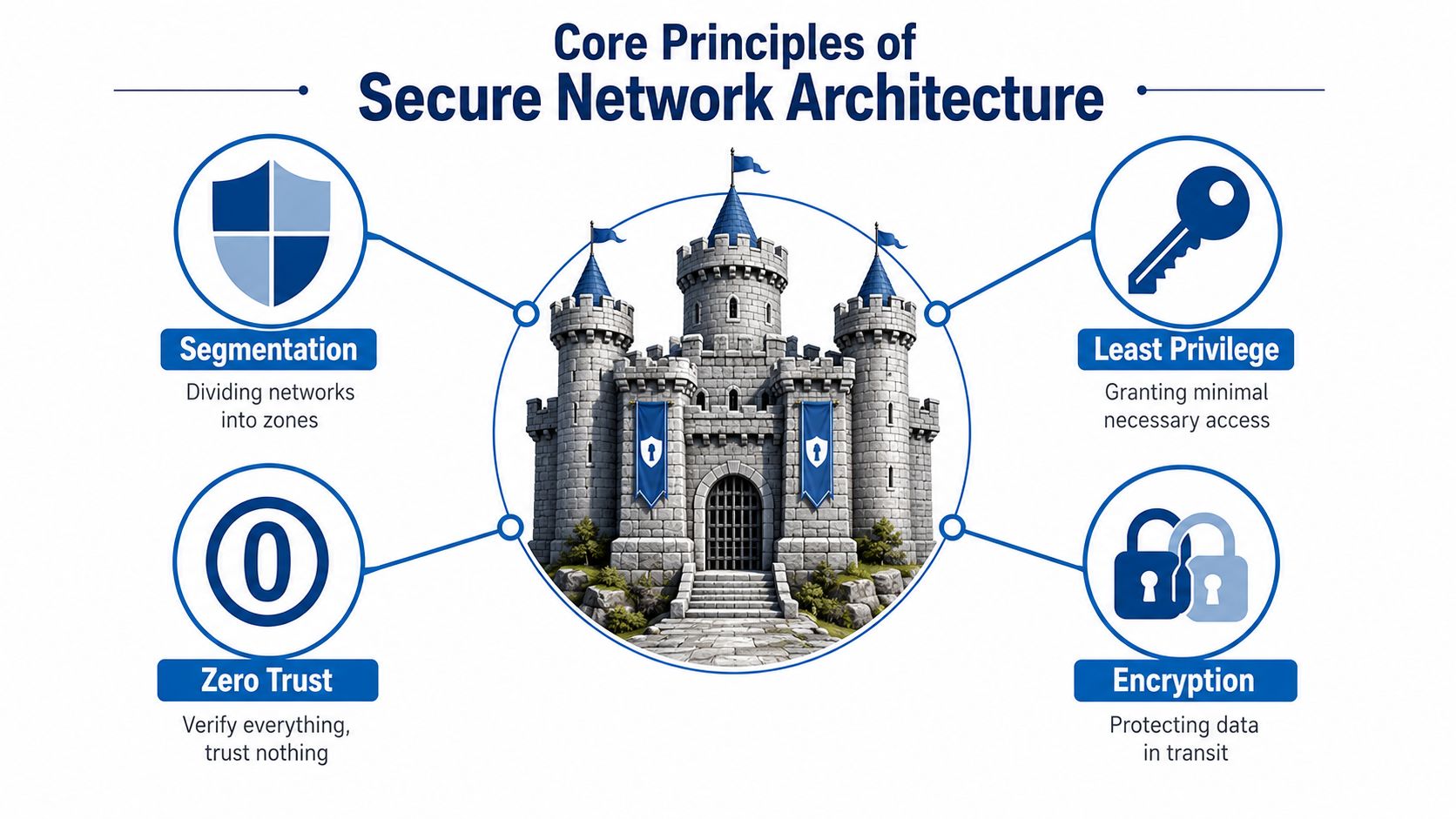
Practical rule: Each control should answer a different failure question. Segmentation limits movement, least privilege limits authority, zero trust checks every request, encryption protects content, and monitoring helps people detect what slipped through.
These controls reinforce one another. Encryption won't stop an authorized user from opening the wrong application. Segmentation won't help if every account can cross every boundary. Monitoring without defined policy produces alerts without context. Secure architecture works when the layers are designed as a system.
Physical equipment and retired storage also belong in that system. Teams handling old routers, drives, or endpoints should document disposal and review compliance for secure device disposal so sensitive information doesn't survive the network's useful life on discarded hardware.
Reference Design for Homes and Remote Workers
Treat a home office like a small branch, not like an extension cord from a consumer router. Start with a reliable fiber connection that supports stable video calls, file transfers, and ordinary household activity at the same time. Symmetrical upload and download capacity is useful for people who regularly send large files, join video meetings, or back up work data.
The router is the policy point. Choose managed Wi-Fi equipment that receives automatic security updates, supports separate guest access, and provides family content controls where needed. The exact interface matters less than the operating model. Someone should be responsible for firmware, configuration, and troubleshooting rather than leaving those tasks to a busy household member.
Separate devices by purpose
Create distinct access zones for:
- Work devices, which connect to employer resources and contain business data.
- Family devices, which support ordinary browsing, streaming, and schoolwork.
- IoT equipment, such as cameras, speakers, televisions, and smart appliances.
- Visitors, who need internet access but shouldn't see local systems.
A VLAN is useful when the router supports it and the owner can maintain it. A properly configured guest network is a reasonable starting point for less technical households. The important outcome is that a compromised smart appliance or visitor device doesn't sit beside a work laptop with unrestricted local access.
Hosted VoIP can keep business or household calling separate from consumer chat applications, while voicemail-to-email, caller ID, and mobile access support normal communication away from the desk. Premier Broadband's Home Office Hero plan and Premier Protects managed Wi-Fi illustrate how an ISP can bundle fiber connectivity, managed wireless controls, and voice services for a residential setup. For configuration guidance, use this guide to securing a home network.
Keep administrative passwords unique, enable multi-factor authentication wherever an account supports it, and remove old devices from the network. A household doesn't need an enterprise security operations center, but it does need clear zones, maintained equipment, and a response plan for lost devices or suspicious account activity.
Reference Design for Small and Mid-Sized Businesses
A small business usually has more traffic types than its office diagram suggests. Employees need business applications, visitors need Wi-Fi, payment terminals need dependable access, phones need clear voice paths, and cameras may need to reach a recording or management service. Putting all of them on one network turns every endpoint into a potential doorway.
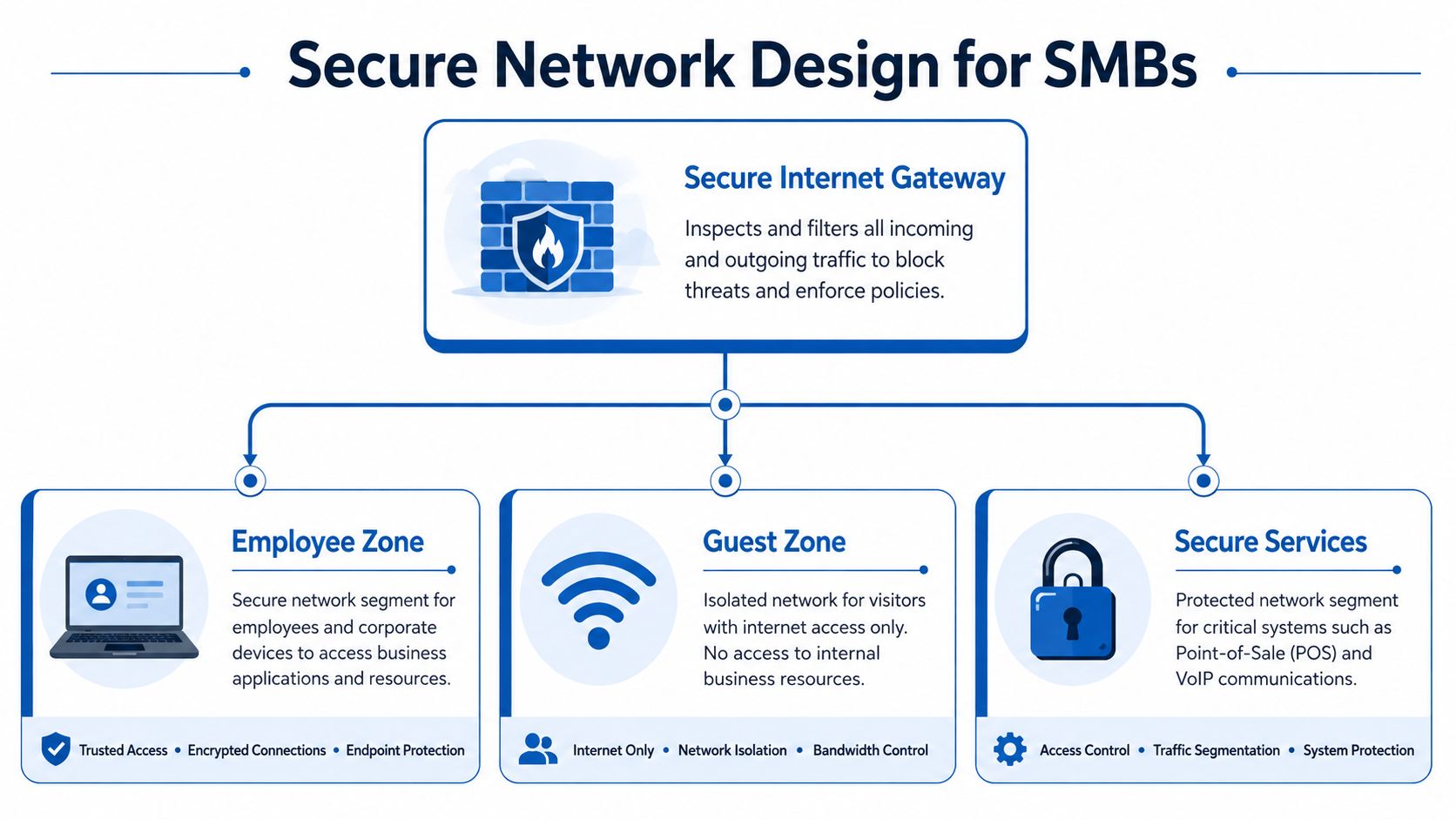
Place a next-generation firewall at the internet edge, then create zones with explicit rules between them. Guest Wi-Fi should reach the internet, not employee laptops. Point-of-sale equipment should communicate only with the services it requires. Voice traffic should have appropriate quality-of-service treatment without gaining unnecessary access to business systems.
A practical zone model
- Employee zone: managed laptops, desktops, printers, and approved internal applications.
- Guest zone: visitor devices with internet-only access.
- Payment zone: point-of-sale terminals and related systems with tightly limited destinations.
- Voice zone: hosted VoIP handsets and call-management services.
- Camera zone: cameras and recording systems separated from office workstations.
Identity policies should assign access by role. A store manager may need reports and scheduling tools, while a temporary worker may need only a point-of-sale function. Remove access when a person changes roles or leaves. Don't let a shared password become a permanent substitute for account governance.
Logging should cover firewall decisions, administrator activity, authentication events, and unusual traffic between zones. A basic SIEM or managed monitoring service can turn those records into alerts, but someone still needs ownership of triage and escalation. An alert nobody reviews is storage, not protection.
Managed Wi-Fi, hosted VoIP, and AI-driven camera systems can reduce the amount of equipment a small IT team must operate. A platform such as Premier Broadband's Managed Network Edge represents an operating model in which connectivity, firewall controls, segmentation, and monitoring are coordinated rather than maintained as unrelated products. Businesses comparing designs can use this small-business network security resource to examine the controls that should sit around the core gateway.
The trade-off is provider dependence. Before signing, ask who changes firewall rules, who receives alerts, how incidents are escalated, which logs the customer can access, and how equipment is replaced. A managed service simplifies operations only when accountability is explicit.
Reference Design for Enterprises and Distributed Networks
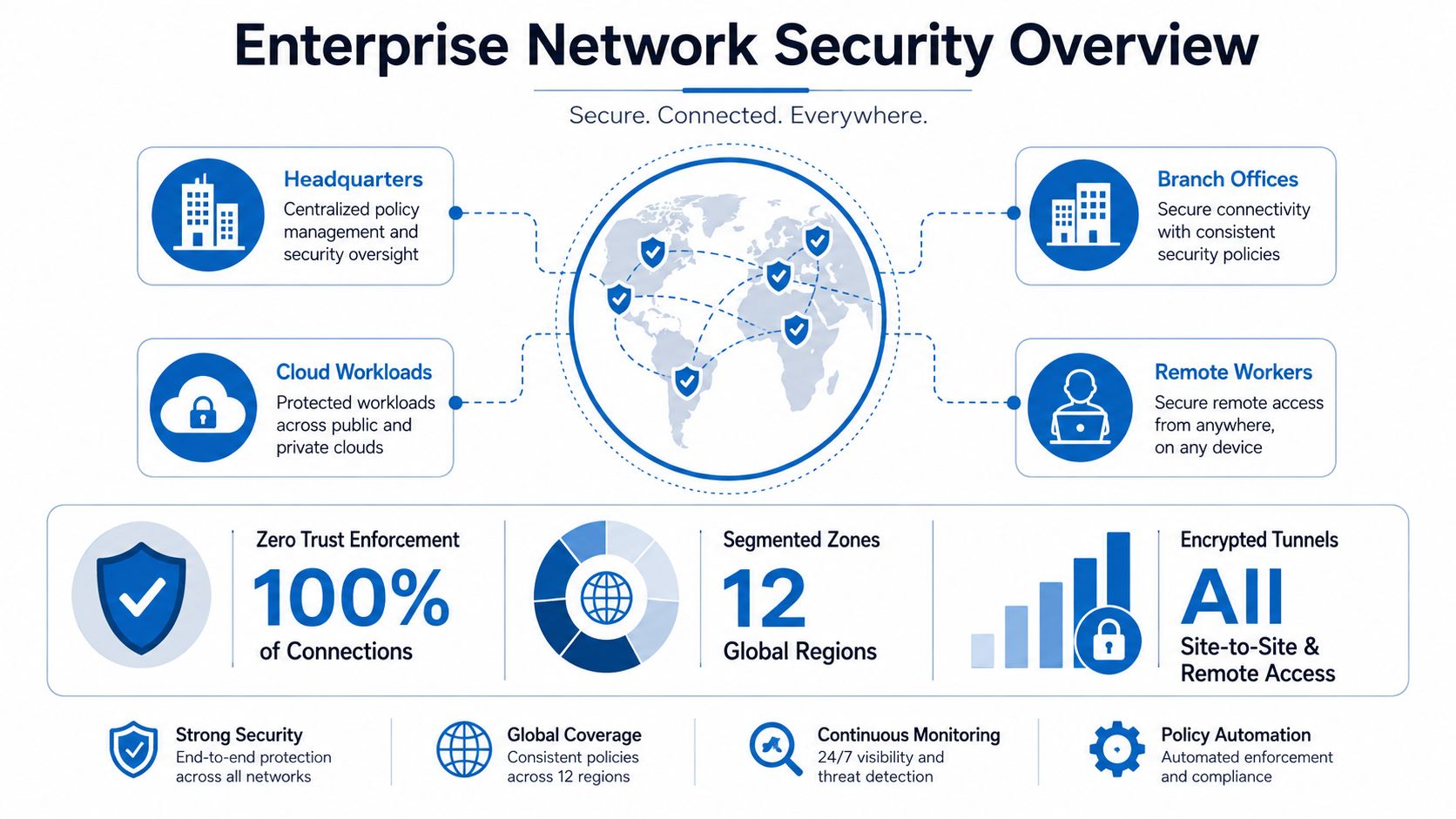
Enterprise architecture starts with policy, not a box at headquarters. The design must connect offices, branches, cloud workloads, SaaS applications, contractors, and remote employees while applying consistent rules to each request. A user's location can provide context, but it shouldn't grant trust by itself.
Build access around identity and context
Zero Trust Network Access can replace broad network-level VPN access with application-specific access. The user authenticates to an identity provider, multi-factor authentication strengthens that proof, and conditional access evaluates details such as device posture, user role, resource sensitivity, and session risk. The result is narrower access. A contractor can reach one approved application without receiving a route to an entire corporate network.
Single sign-on improves usability and centralizes account lifecycle management. It doesn't eliminate risk, so administrators still need strong authentication, role reviews, session controls, and rapid termination procedures. Device posture checks can block or restrict unmanaged endpoints that lack required updates, encryption, or security agents.
Micro-segmentation controls east-west movement inside data centers and cloud environments. Rather than placing a broad collection of workloads in one trusted zone, teams define which services may communicate and why. A 2025 systematic review of zero-trust micro-segmentation research reports that applying these controls in cloud and edge environments can cut successful breaches and lateral spread by about 80%, reduce exposure and attack paths by over 99% in real-world networks, and lower misconfigurations by 65%. Those findings support a design principle: isolate workloads according to business function and enforce communication at the workload level.
Connect branches without recreating the old perimeter
SD-WAN can provide policy-aware connectivity between branches, data centers, and cloud services. The security design still needs inspection, identity integration, and route control. A fast link that carries every application to every location without policy boundaries creates a faster flat network.
Cloud security gateways and related cloud access controls help apply policy to SaaS and IaaS traffic. They can also improve visibility into applications that bypass traditional data-center paths. Security teams can't protect traffic they can't identify, classify, or associate with an owner.
Solve the operating problem
The architecture often stalls after the diagram is approved. A 2025 survey found that over two-thirds of organizations were evaluating or implementing SASE, while only 8% had fully implemented it, according to the 2025 State of Secure Network Access Report. The gap points to migration sequencing, legacy integration, policy ownership, and user experience, not a lack of awareness.
The same source identifies tool and vendor sprawl, legacy constraints, and performance or user-experience concerns as major blockers. Teams should therefore rationalize overlapping controls before adding another console. They should map application dependencies before enforcing a restrictive rule, then move groups of users and services through measured pilot stages.
Visibility requires its own workstream. A 2025 State of Network Security report states that 71% of security teams struggle with visibility, delaying detection and response. Centralize relevant logs, maintain an inventory of cloud applications and data flows, and assign owners to important policies. Architecture without observability creates blind spots that look like normal traffic until an incident exposes them.
Implementation Checklist for a Secure Network Architecture
A rollout should begin with evidence, not a product purchase. Inventory users, devices, applications, cloud services, IoT, and traffic paths. Record which systems support daily operations, who owns them, and where an outage would stop work. This map becomes the reference for access decisions and later troubleshooting.
Work through the phases in order
| Phase | Key Actions | Complexity |
|---|---|---|
| Discovery | Inventory users, devices, applications, cloud services, IoT, and traffic paths | Medium |
| Boundaries | Separate guest, employee, payment, voice, camera, server, and management zones | Medium |
| Identity | Enforce MFA, role-based access, lifecycle reviews, and conditional access | High |
| Protection | Encrypt data in transit and at rest, harden endpoints, and control removable media | Medium |
| Observation | Collect authentication, firewall, endpoint, and cloud logs with assigned reviewers | High |
| Resilience | Test backups, recovery procedures, incident contacts, and alternate communications | High |
| Validation | Run vulnerability scans, access reviews, tabletop exercises, and policy tests | Medium |
The complexity labels guide planning. They describe the coordination each phase may require across staff, technology, and business processes, not a measured risk score.
A small team can start with the next two or three changes that reduce the most exposure. For example, separate payment devices, remove dormant accounts, and enable MFA before attempting an application-by-application migration. After each change, test the user journey and document exceptions. A control that blocks payroll or support work will often be bypassed, leaving a gap that the diagram does not show.
Avoid the patterns that undo good design
- Unclear boundaries: Earlier sections explain why zones matter. During implementation, name each zone, record its allowed connections, and assign an owner who approves exceptions.
- Permanent VPN access: Replace broad, indefinite access with application-specific permissions, expiry dates, and reviews tied to contractor and employee lifecycle events.
- Unmanaged devices: Check device posture before granting sensitive access. Devices that fail the check should reach only lower-risk services or a remediation path.
- Shadow IT: If approved tools are slow or unreliable, users will find alternatives. Review cloud-service alerts, fix the approved workflow, and provide a clear route for requesting new applications.
- Tool sprawl: Consolidate overlapping functions, define which system is authoritative for each policy, and set an alert-handling workflow before adding another console.
- IT-only ownership: Include finance, operations, human resources, and legal teams when rules affect payments, records, staffing, or regulatory duties.
Leaders who need a business-focused companion can review this resource on actionable breach prevention for leaders. For a broader network control checklist, use these best practices for network security.
Before deployment, ask: Can we see the traffic? Can we explain each permission? Can we recover if access is denied or systems are unavailable? If any answer is no, assign an owner and test the missing capability before production.
How Managed Services Make Secure Architecture Real
Build, buy, or partner is an operating decision. A household or small business may understand segmentation and MFA but lack time to patch gateways, investigate alerts, update policies, and replace failed equipment. A managed service can take responsibility for those recurring tasks while leaving business owners in control of risk decisions.

A provider may handle firmware updates, patch management, firewall administration, segmentation changes, and monitoring. The customer still owns identity governance, employee training, acceptable-use decisions, data classification, and approval of access that affects business processes. Those responsibilities shouldn't disappear because another party operates the equipment.
Evaluate the operating model
Ask prospective providers:
- Policy ownership: Who writes and approves access rules?
- Monitoring: Who reviews alerts, at what times, and through which escalation path?
- Visibility: Can the customer view logs, devices, zones, and configuration changes?
- Change control: How are urgent and routine rule changes documented?
- Exit planning: Can the customer export configurations and records if the relationship ends?
Premier Broadband's managed network security solutions describe controls such as firewall protection, multi-factor authentication, VPN access, and network segmentation. The useful evaluation question isn't whether a provider lists those features. It's whether the service applies them consistently, explains their limits, and gives the customer a clear accountable contact. Review the managed network security solutions available for the environment you're securing.
A managed model works best when it reduces operational friction without hiding important decisions. It should make secure behavior easier for users and more sustainable for the people responsible for the network.
A short overview can help non-specialists understand the relationship between connectivity and managed controls.
Frequently Asked Questions About Secure Network Architecture
How often should we review the architecture?
Review it whenever the business adds a major application, opens a site, changes identity systems, acquires another company, or introduces connected equipment. Schedule recurring access, segmentation, and logging reviews as well. A secure design becomes inaccurate when the inventory and business processes change around it.
What can we do with legacy equipment?
Identify what the device can't support, then contain it. Place it in a restricted segment, allow only required destinations, monitor its traffic, and create a replacement plan. Don't pretend a legacy device has modern trust capabilities because it sits behind a firewall.
Is a managed provider delivering security or only bandwidth?
Ask for the actual control set and operating evidence. The provider should explain segmentation, patching, authentication, alert handling, configuration changes, customer visibility, and incident escalation. If the answer focuses only on connection speed, you're evaluating connectivity rather than secure architecture.
How can we protect user experience?
Start with application dependency mapping and pilot groups. Enforce narrow access to sensitive resources, but avoid forcing every user through a slow or confusing workflow. When people can complete legitimate work easily, they're less likely to create shadow IT.
What's the most common design mistake?
A flat network remains the common failure pattern because it makes initial compromise far more consequential. Separate high-value resources, remove unnecessary permissions, and monitor the paths between zones.
Premier Broadband offers fiber internet, managed Wi-Fi, hosted VoIP, AI-driven camera systems, and Managed Network Edge services that combine connectivity with network controls and ongoing management. Visit Premier Broadband to discuss a secure network architecture for your home, remote-work setup, or business.