

You're probably dealing with one of two problems right now.
Either your current phone system feels stuck in another decade, with desk phones tied to a front counter and calls disappearing whenever someone steps away. Or your team already works across cell phones, laptops, and home offices, but your “business phone system” hasn't caught up, so customers get bounced around, voicemail becomes a black hole, and nobody has a clean view of what's being missed.
That's why small business VoIP solutions matter now. This isn't just a cheaper way to make calls. It's the shift from a fixed utility to a software-based communication system that can follow your team wherever they work.
Is Your Phone System Holding Your Business Back
A small office gets busy fast. The front desk is helping a customer. A salesperson is on the road. The owner is answering after-hours calls from a personal cell phone because the office line stops being useful the second someone leaves the building. A new employee starts next week, and adding them to the phone system turns into a mini-project.
That setup limps along until it doesn't.
Missed calls don't just mean inconvenience. They mean lost appointments, delayed quotes, frustrated customers, and staff wasting time working around a system that should be helping them. If your phone system forces people to remember forwarding codes, check multiple voicemails, or carry two phones just to look professional, it's already costing you more than the monthly bill suggests.
VoIP fixes that because it treats calling like modern business software instead of old utility wiring. Calls can ring a desk phone, laptop app, and mobile app. Voicemails can land in email. Admin changes happen in software instead of through hardware swaps and service calls.
The broader market tells the same story. The global VoIP services market was valued at $169.38 billion in 2025 and is projected to reach $264.27 billion by 2029, while North America accounted for 48% of global VoIP revenue in 2024, and small and medium-sized enterprises are expected to see the fastest growth according to Zoom's VoIP market overview. That's not a fringe category. It's where business communications already are.
If you run a specialized practice, the stakes are even higher. Industries with high call volume and scheduling pressure need workflows built around responsiveness, not voicemail tag. That's why resources like medical office phone systems are useful. They show how much operational friction comes from using the wrong calling setup for the job.
Old phone systems fail quietly. They rarely crash in dramatic fashion. They just make every customer interaction slightly harder.
What VoIP Really Means for Your Small Business
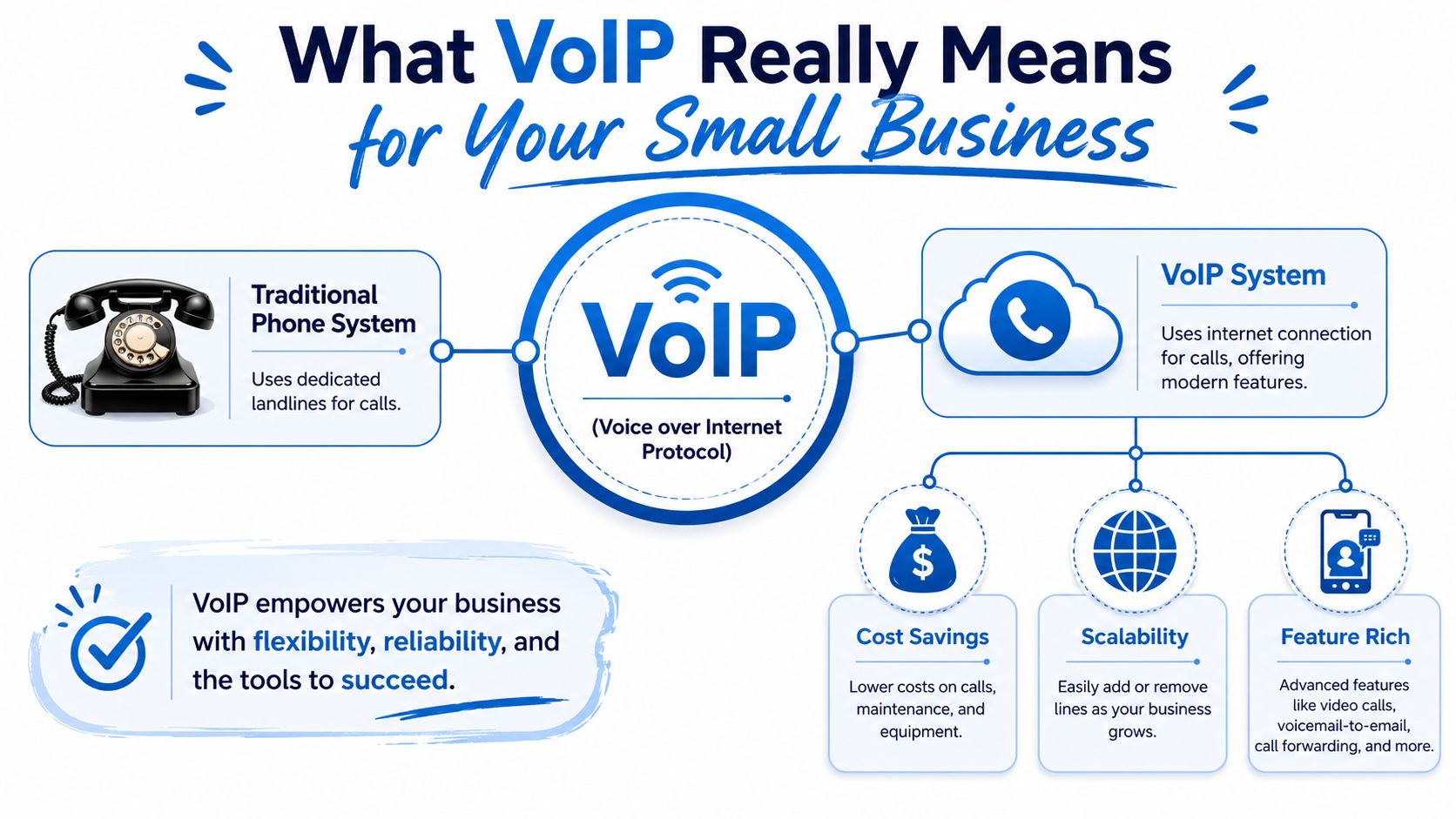
Traditional business phones are like a private railway. The tracks are expensive, fixed, and annoying to change. If you want to add a stop, reroute traffic, or serve a new location, you're dealing with infrastructure.
VoIP is a highway. Your internet connection carries different kinds of traffic, and voice is just one lane. Once calls are software, they can move to a desk phone, laptop, mobile app, or browser session without you rebuilding the system.
What changes in practical terms
You stop thinking in terms of “lines” and start thinking in terms of users, call flows, and devices.
That means:
- Your number becomes portable: The business number isn't trapped at one desk.
- Features become software settings: Auto-attendants, ring groups, voicemail routing, and business hours are easier to adjust.
- Remote work becomes normal: Staff can answer from home or on the road without exposing personal numbers.
- Growth gets simpler: Adding a new user is usually an admin task, not a hardware project.
A lot of owners hear “internet phone” and assume it's only about cutting costs. That's too narrow. The bigger change is operational flexibility. Your team can work from where they are, not where the copper line happens to terminate.
Why this matters beyond the phone itself
Once voice lives in software, it starts fitting into the rest of your business systems. Calls can connect with CRM records, help desk tools, shared inboxes, and team messaging. That's where VoIP stops being a phone replacement and starts becoming a workflow tool.
If you're evaluating browser-based customer conversations too, this guide to secure web calls for customer support is a useful companion read because it highlights the same shift away from location-bound calling.
Bottom line: VoIP isn't “a phone over the internet.” It's a business communication platform that uses the internet as its transport.
The Business Benefits and Must-Have VoIP Features
Most buyers get distracted by feature lists. That's the wrong approach. Don't buy a phone system because it has fifty toggles in the admin panel. Buy it because it solves business problems cleanly.
Never miss a customer
This is the first test. If your business depends on inbound calls, your system needs to catch calls even when your staff is moving.
Look for:
- Call forwarding and simultaneous ring: Calls should reach the right person without forcing customers to guess extensions.
- Mobile and desktop apps: Staff should be able to answer the business line from wherever they're working.
- Voicemail-to-email: Messages should show up where people already live, not on a desk phone nobody checks.
If your current setup sends callers to a generic mailbox at lunch, you have a process problem, not a staffing problem.
Support flexible work without losing control
A good VoIP setup lets employees work from the office, home, or the field while keeping one professional identity. That matters for service companies, sales teams, clinics, law offices, and any business where calls don't happen neatly at a receptionist's desk.
The benefit isn't “remote work” as a buzzword. It's continuity. A customer should feel like they're calling one organized company, not hunting across a patchwork of personal numbers.
Reduce admin drag
The economic advantages become clear. According to Tech.co's VoIP statistics roundup, businesses save 30% to 50% on average by switching from traditional phone systems, and some analyses indicate up to 75% of a communications budget can be reduced. The reason isn't just cheaper calling. It's also lower hardware needs and software-based administration.
That matters because every old-school phone task carries overhead:
- Moves and changes: New hires, extension updates, and routing changes shouldn't require a service appointment.
- Multi-site operations: One phone system should cover multiple locations without weird workarounds.
- Basic reporting: Managers need visibility into missed calls, call routing, and response patterns.
Present a more professional image
Even a five-person company can sound organized if the call flow is built well.
Features that matter most
| Business need | VoIP feature to prioritize |
|---|---|
| Direct calls to the right team | Auto-attendant and ring groups |
| Protect personal numbers | Business mobile app |
| Keep response times tight | Voicemail-to-email and call routing |
| Handle growth cleanly | Easy user provisioning |
| Improve coordination | Integrations with business software |
Don't overbuy. Most small businesses need a clean call flow, good apps, easy admin, and reliable delivery. Fancy extras come later.
The best small business VoIP solutions feel boring in the right way. Calls land where they should. Staff can work anywhere. Admin work drops. Customers get faster responses. That's the return.
Hosted Cloud VoIP vs On-Premise PBX
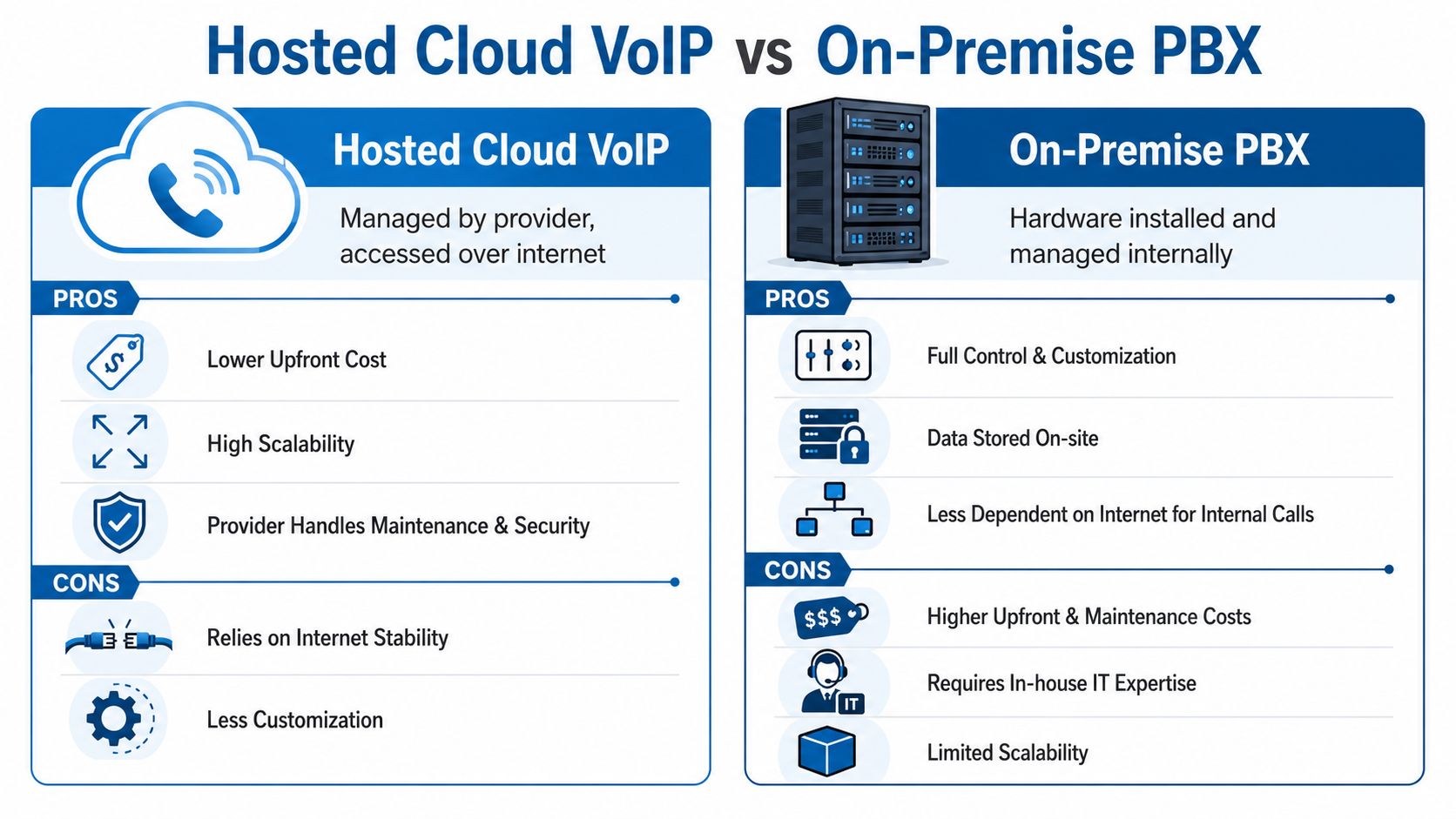
This is the big fork in the road. Do you want the phone system hosted by a provider in the cloud, or do you want to own and manage the PBX hardware yourself?
For most small businesses, the answer is simple. Choose hosted cloud VoIP unless you have a strong reason not to.
Hosted cloud VoIP vs on-premise PBX at a glance
| Factor | Hosted Cloud VoIP | On-Premise PBX |
|---|---|---|
| Upfront cost | Lower, usually subscription-based | Higher, requires hardware and setup |
| Maintenance | Provider-managed | Your team or IT vendor handles it |
| Scalability | Easier to add users and locations | Often requires more equipment and planning |
| Updates | Typically included | You manage upgrade cycles |
| Internet dependency | High | Lower for some internal calling scenarios |
| Control | Less direct infrastructure control | More direct customization and control |
When hosted cloud VoIP makes more sense
Hosted cloud VoIP fits most small businesses because it removes the burden of managing voice infrastructure yourself.
That means:
- Less capital expense: You don't need to buy and maintain a PBX stack.
- Faster deployment: New users and locations can be added with less friction.
- Lower IT burden: Your staff isn't troubleshooting phone servers and firmware.
- Cleaner support model: One provider manages the service layer.
If you want a plain-language explanation of how this model works, Premier Broadband has a useful overview of a cloud phone system for business.
When on-premise still fits
On-premise PBX still has a place, but it's a narrower one.
It makes sense if you have unusual customization needs, strict internal control requirements, or existing IT staff who are comfortable managing telephony infrastructure. Some organizations also prefer on-site systems because they want direct ownership of the environment.
That said, small businesses often underestimate what comes with that control:
- You own outages tied to your hardware
- You own upgrade planning
- You own maintenance complexity
- You own more of the security and support burden
If you're a small business without dedicated telecom expertise, an on-premise PBX is often buying yourself a part-time job.
The smarter question isn't “Which model is more powerful?” It's “Which model lets my team communicate well without creating another system to babysit?” For most companies, hosted wins that argument.
Understanding the True Cost of VoIP Solutions
A lot of small businesses compare VoIP options by monthly seat price alone. That's a mistake.
The cost of a VoIP system includes the phone service, hardware choices, setup work, internet readiness, and what downtime costs your business when the system can't perform. The cheap plan isn't cheap if customers can't reach you on a busy Monday morning.
What you're actually paying for
The visible costs are straightforward:
- User subscriptions: Usually based on how many people need service.
- Phones or headsets: Depending on whether you use desk phones, softphones, or both.
- Setup and onboarding: Number porting, call flow design, and configuration work.
- Add-ons: Recording, advanced analytics, or integrations may sit in higher tiers.
The less visible costs are where owners get surprised.
The costs most buyers ignore
According to Vonage's small business VoIP guidance, VoIP can become more expensive than expected once you factor in backup connectivity, power protection, and the operational cost of outages. That's the contrarian point most glossy buyer guides skip, and it's correct.
If your internet drops, your cloud phone system feels it. If your office loses power and you haven't planned for continuity, your call handling changes whether you like it or not. If your team works hybrid and your network isn't designed for that reality, the “savings” disappear into missed calls and lost time.
Budget for these on day one
| Cost area | Why it matters |
|---|---|
| Backup internet | Keeps calling available during a primary connection failure |
| Power protection | Prevents avoidable outages for phones and network gear |
| Quality endpoint devices | Cuts down on audio problems and user frustration |
| Implementation planning | Prevents messy call flows and poor adoption |
If you're pricing connectivity alongside voice, it helps to review current business internet cost factors with the phone system in mind, not as a separate purchase. Voice rides on the network. Treating them as unrelated line items causes bad decisions.
Cheap monthly VoIP with unreliable internet is like buying a new delivery van and filling it with bad fuel. The vehicle isn't the problem. The foundation is.
How to Implement Your VoIP System and Choose a Provider
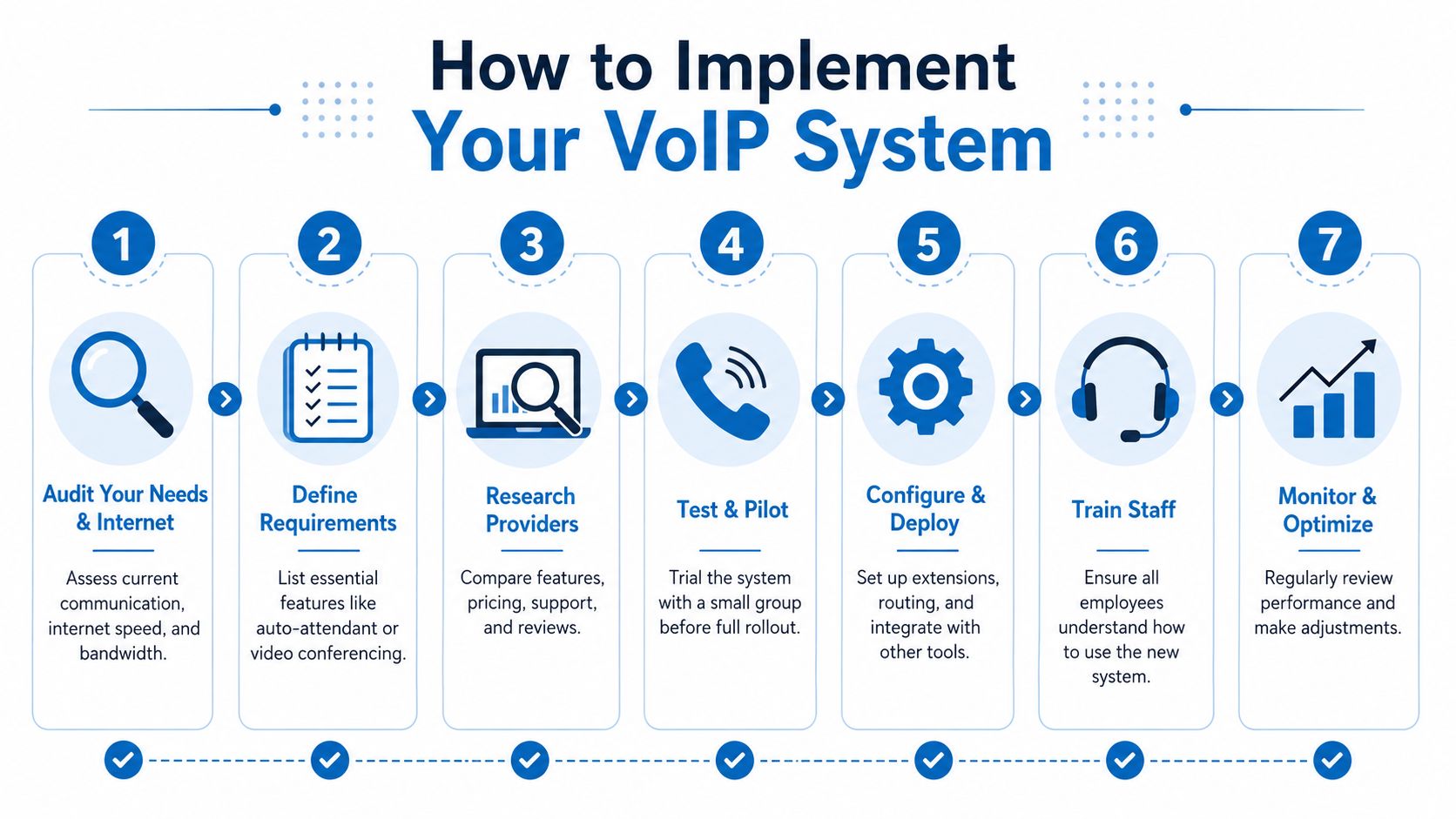
Rollouts fail for predictable reasons. People skip the network audit, guess at requirements, rush number porting, and assume users will “figure it out.” Don't do that.
Start with the foundation.
Step one is the internet, not the phones
A practical benchmark from CloudTalk's SMB VoIP buying guide is that one HD voice call uses little bandwidth, but your connection still needs enough symmetrical capacity and QoS consistency to avoid contention. When congestion rises, jitter rises, and call quality gets worse, especially with multiple extensions or remote staff.
That's why I push owners to ask blunt questions:
- What else uses this connection all day? Video meetings, backups, cloud apps, guest Wi-Fi?
- Is upload capacity as solid as download capacity? Voice suffers fast on weak upstream performance.
- What happens during failover or local power issues? If you don't know, that's a problem.
A voice project that ignores the access circuit is just a future support ticket.
A practical rollout checklist
Audit current call handling
Map how calls arrive, where they should go, who answers after hours, and where missed calls happen now.Define must-have features
Separate required functions from nice extras. Auto-attendant, ring groups, mobile apps, voicemail-to-email, and integrations usually matter more than novelty features.Decide on endpoints
Some teams need desk phones. Others are better with softphones and quality headsets. Don't force one model on everyone.
Before full rollout, it helps to see a simple implementation walkthrough:
Pilot with a small group
Test reception, call quality, routing, voicemail, mobile usage, and handoff between devices.Plan number porting carefully
Keep copies of current bills, confirm account details, and set realistic expectations for cutover timing.
How to choose the provider
Don't choose on seat price first. Choose on fit.
Look for:
- Reliable connectivity options: This matters more than marketing screenshots.
- Clear support ownership: You should know who handles service issues and who handles network issues.
- Scalable administration: Adding users and changing call flows shouldn't be a headache.
- Security and policy controls: Especially if calls are recorded or transcribed.
If you want one provider that can cover both the connection and the voice layer, Premier Broadband offers VoIP phone system installation along with fiber connectivity for businesses that want those services aligned under one roof. That model is often simpler to support than mixing disconnected vendors.
VoIP Security Compliance and Common Pitfalls
Security gets ignored until there's fraud, spoofing, or a compliance question nobody can answer.
That's a bad time to learn how your provider handles recordings, transcripts, retention, or account protection.

What to check before you sign
According to Unitel Voice's small business VoIP coverage, buyer guides often miss how vendors handle voicemail fraud, spoofing, and AI-enabled transcription risks. That's exactly the right concern. The trend isn't just phones in the cloud. It's phones plus AI and compliance.
Ask direct questions:
- Who can access recordings and transcripts?
- How long are they retained?
- What admin roles control access?
- What protections exist against unauthorized account changes or social engineering?
- How are suspicious usage patterns monitored?
If a provider dances around those questions, keep shopping.
Common mistakes that cause avoidable pain
Buying on price alone
Low monthly pricing looks good until support is weak, setup is sloppy, and call quality suffers. The service you save on can become the downtime you pay for.
Ignoring user permissions
Not every employee should have the same access to recordings, routing rules, or admin settings. Loose permissions create both security risk and operational chaos.
Treating AI features as harmless extras
Transcription and summarization can be useful, but they also create new governance questions. If customer conversations become searchable text, that changes your data handling responsibilities.
Skipping staff training
Even good systems fail when users don't know how to transfer calls, set presence properly, or use the mobile app. Training isn't optional. It's part of deployment.
Ask your provider security questions the same way you'd ask a bank. If they can't explain controls in plain English, they probably aren't managing them well.
For businesses that want a broader look at protecting the surrounding environment, this guide to network security for small business is worth reviewing alongside any VoIP decision.
The strongest small business VoIP solutions don't just make calls possible. They make communication reliable, governable, and workable in practice.
If your business is ready to replace an aging phone setup, the smart move is to evaluate voice and connectivity together. Premier Broadband provides fiber internet and business VoIP services, which is useful for companies that want one partner responsible for both call delivery and the network underneath it.