
Your home phone might still work, but that doesn't mean it's working well for the way people live now. Maybe the bill feels high for a service that only does one thing. Maybe you want to keep a home number for family, school calls, or emergencies, but you also want features that fit modern life. That's where voip phone service residential options start to make sense.
The big detail many guides skip is simple. Your phone service doesn't sit on an island anymore. It rides on your internet connection. If that connection is weak, busy, or uneven, your calls can sound weak, busy, and uneven too. If it's strong, stable, and low-latency, home VoIP can feel smooth and clear.
Is It Time to Replace Your Old Landline?
A lot of people keep a landline for one reason. It feels familiar. You know the number. You know where the phone sits. You know it should ring when someone calls.
But familiar isn't always practical.
Traditional landlines can feel expensive for what they offer. You usually get basic calling and not much else. No easy mobile app. No voicemail sent to your inbox. No simple way to route calls when you're in the backyard, working from home, or out picking up the kids. Meanwhile, most households already pay for internet, and that's changed what a home phone can be.

Why so many homes are switching
The shift away from old copper phone service isn't a niche trend. The global residential VoIP services market was valued at approximately $23.6 billion in 2024 and is projected to reach $38.9 billion by 2030, and internet-based voice subscriptions surpassed PSTN lines for the first time in 2024, according to Strategic Market Research on residential VoIP.
That matters because it shows where home calling is headed. Households aren't just swapping one dial tone for another. They're moving to a phone service that works more like the rest of their digital life.
If you're comparing old and new home phone options, this guide to VoIP vs landline differences gives a useful side-by-side look at what changes.
What makes VoIP feel newer
With residential VoIP, your home number can do more than sit on one wall jack.
- Calls can follow you to an app or another device.
- Messages can show up as email instead of waiting on an answering machine.
- Features fit real routines, like call forwarding, spam filtering, and simultaneous ringing.
Practical rule: If you already depend on internet for work, school, streaming, and security cameras, it makes sense to evaluate whether your home phone should run on that same modern foundation.
For many households, the essential question isn't whether VoIP is modern enough. It's whether your internet connection is good enough to support it well.
How VoIP Technology Modernizes Home Calling
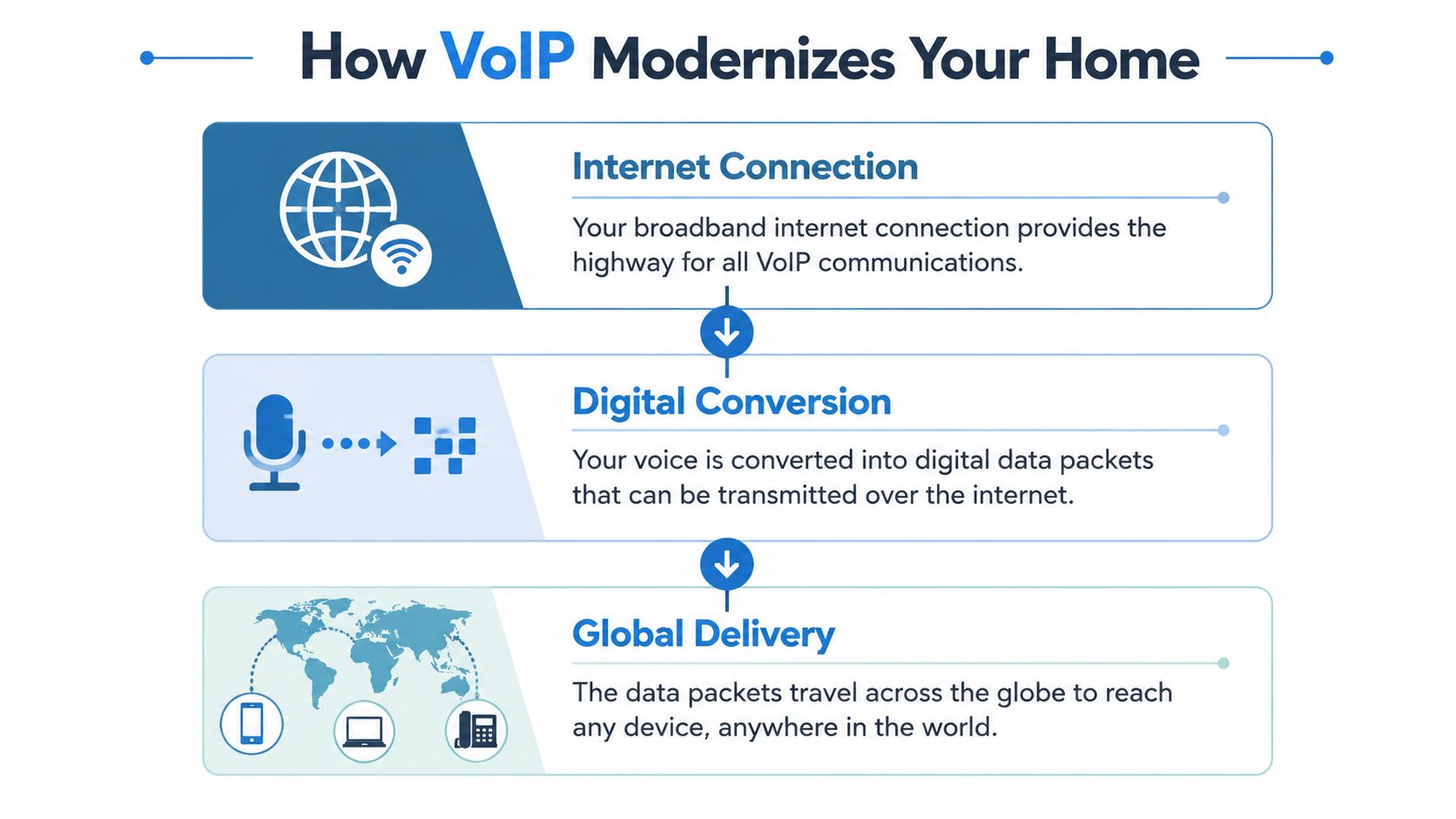
A landline sends your voice through a dedicated path, like mailing a paper letter through one fixed route. VoIP does something different. It turns your voice into digital pieces and sends them over the internet, more like sharing photos from your phone.
That idea sounds technical, but the basic process is easy to picture. You speak into the phone. The service converts your voice into data. That data travels across your internet connection. At the other end, it gets turned back into sound almost instantly.
What happens during a call
Here's the simple version of the trip your voice takes:
Your voice starts as analog sound
That's the natural sound coming from your mouth into a handset, cordless base, or microphone.The device converts it into digital data
VoIP uses codecs such as G.711 or G.729 to package your voice efficiently for internet travel.The data moves across your network
Signaling protocols such as SIP help set up the call, and media protocols such as RTP carry the actual audio.The other person hears your voice
Their device rebuilds those tiny data packets back into audio.
Why internet quality matters so much
This is the part that confuses people. Since VoIP is "phone service," they assume call quality mostly depends on the phone provider. It does partly, but your internet connection has a huge job.
If your network has delay, congestion, or poor upload capacity, voice packets can arrive late or out of order. That's when people hear choppy audio, awkward pauses, robotic voices, or clipped words.
A VoIP call isn't a separate utility line in your house. It's one more real-time service riding on the same connection as video meetings, streaming, gaming, and cloud backups.
That's why broadband quality changes the experience so much. A strong connection helps voice data move quickly and consistently. A weak one forces the call to compete with everything else happening online.
Why this matters in daily life
A basic home example makes it clearer. If someone in your house is on a video meeting, another person is uploading photos, and a third is gaming online, your phone call isn't just competing with silence. It's joining traffic.
VoIP works best when your connection can handle real-time traffic without strain. That's why the internet provider matters just as much as the phone features. The voice service may be digital, but the experience still feels personal. You notice every delay, every dropped syllable, and every awkward echo.
The Top Benefits of a Residential VoIP Phone
A home phone matters most in ordinary moments. A school calls about an early pickup. A doctor returns a message. A grandparent checks in. A delivery driver needs help finding the house.
Residential VoIP works well for these situations because it updates what a home phone can do, while still keeping the familiar idea of one household number. The big difference is that the service rides on your internet connection. If that connection is fast and stable, especially on fiber, the phone experience usually feels much more modern than an old copper landline.
Three benefits stand out right away
Lower monthly cost is often one reason people switch. Internet-based phone service often bundles features that used to cost extra on traditional home lines, so households can get more function from the same bill.
Modern calling features are the second big advantage. Instead of checking voicemail from the handset in the hallway, you may get messages sent to email, calls forwarded to another device, or your home number available through an app.
More flexibility is the third. Your number is no longer tied to one phone jack in one room. It can follow how your household lives now.
That flexibility only feels helpful when the connection underneath it is dependable. A good VoIP plan on a weak broadband connection is a bit like sending high-resolution photos over a slow, crowded network. The service can do it, but the experience is less consistent. On a strong fiber connection, voice traffic has a much better path.
Traditional landline vs residential VoIP at a glance
| Feature | Traditional Landline (PSTN) | Residential VoIP (e.g., Premier Voice) |
|---|---|---|
| Calling method | Analog voice over copper lines | Digital voice over your internet connection |
| Typical feature set | Basic calling features | Advanced features like voicemail-to-email and call forwarding |
| Mobility | Tied to home wiring | Can extend to apps and connected devices |
| Setup style | Dedicated phone line | Works through broadband and VoIP equipment |
| Fit for remote work | Limited | Better suited for app-based, flexible communication |
| Relationship to internet | Separate from internet | Directly dependent on internet quality |
How those benefits help in real homes
A parent may want the house number to ring on a mobile phone while cooking dinner in the backyard. A caregiver may need voicemail delivered somewhere easier to check than a base station. A remote worker may want one home number for family contacts and service calls, with better control over where those calls go during the day.
Many providers include tools like these:
- Voicemail-to-email so messages are easier to read or replay
- Call forwarding for days when no one is near the main handset
- Simultaneous ring so important calls have a better chance of being answered
- Mobile app support for using your home number away from home
- Spam call filtering to cut down on nuisance calls
These are practical improvements, not flashy extras. They remove small annoyances that add up over a month.
The benefit many guides skip
VoIP is often described as if the phone service alone determines the experience. In real homes, the broadband connection carries much of that responsibility. The provider handling your internet connection matters because your calls share the same path your household uses for everything else online.
Fiber stands out here for a simple reason. It gives voice traffic a faster, more consistent route, with low delay and plenty of capacity for the rest of the home at the same time. If someone is streaming TV, backing up photos, or on a video call, a stronger network gives your phone service more room to stay clear and responsive.
That is why choosing residential VoIP is partly a phone decision and partly a network decision. If you want a plain-language look at what that setup involves, this guide to setting up a VoIP phone at home explains the pieces clearly.
A traditional landline was built for one job. Modern home life asks for more. VoIP gives you that flexibility, and the internet connection underneath it decides how well those benefits show up day to day.
Your Guide to Setting Up a VoIP Phone at Home
You get a new VoIP phone, plug it in, and expect it to work like the old landline. Then someone starts uploading vacation photos, a tablet begins a video class, and your call starts to break up. That usually is not a phone problem first. It is a home network problem.
Home VoIP setup is easier than it sounds, but the phone service only works as well as the internet connection carrying it. A strong fiber connection gives voice traffic a steadier path, the same way a wide, open road handles traffic better than a crowded side street.
The basic equipment you need
Most homes use one of three setup paths.
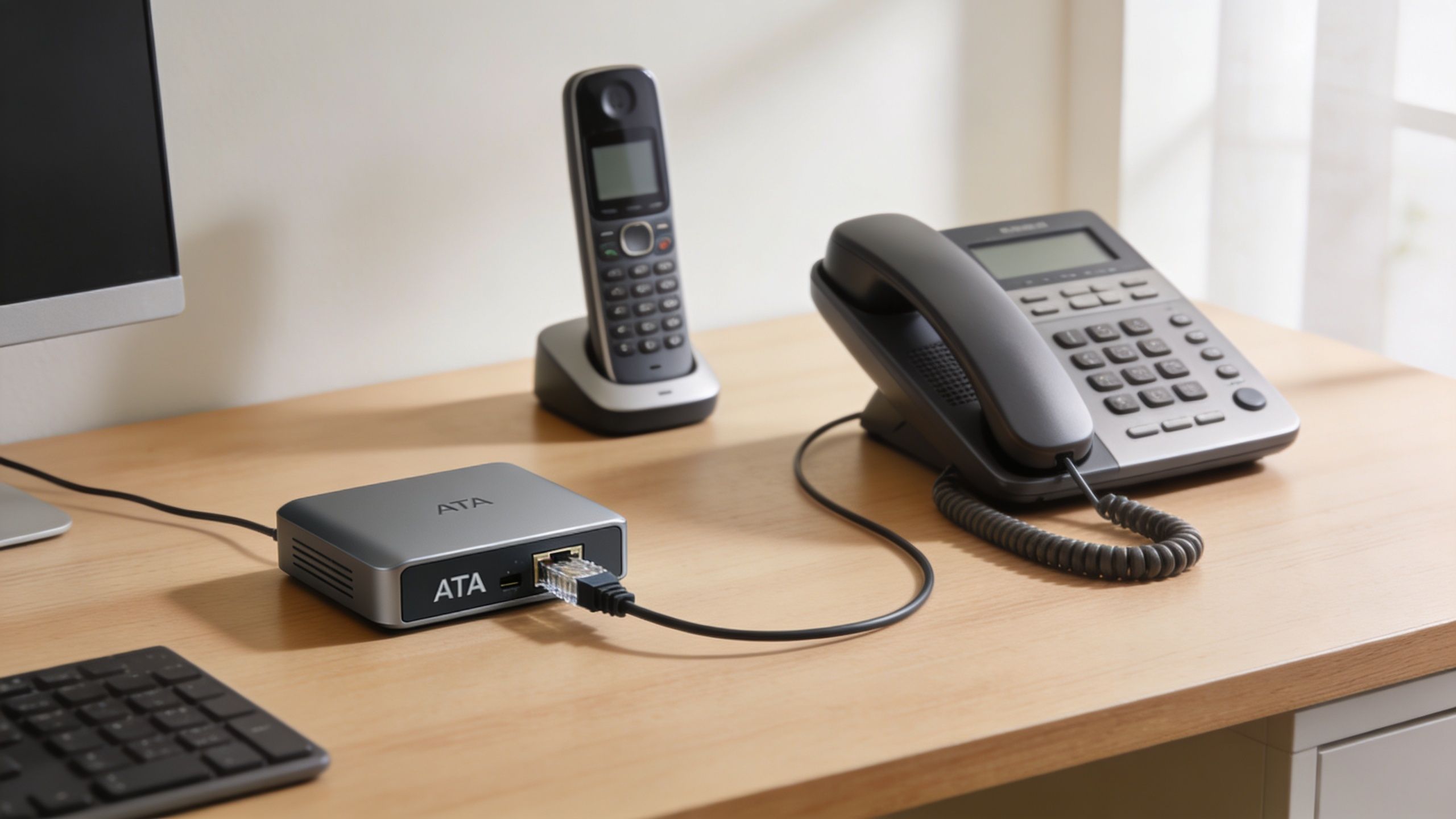
An ATA adapter
An Analog Telephone Adapter lets you keep your current corded or cordless home phone. It sits between the phone and your modem or router, turning voice into digital data and back again.An IP phone
An IP phone is built for internet calling from the start. It connects directly to your home network.A mobile or desktop app
Some households use an app to answer calls on the home number, either as a backup or as part of the main setup.
If you want a plain-English walkthrough of the parts and steps, this home VoIP setup guide is a practical place to start.
The internet requirements that actually shape call quality
A VoIP call does not use a huge amount of data by itself. The challenge is what else your network is doing at the same time.
Voice works like sending a steady stream of small messages in order. If those messages arrive late, out of order, or squeezed behind other traffic, you hear it as delay, choppiness, or dropped words. That is why upload capacity and latency matter as much as download speed in a real home.
Fiber helps because it usually gives you more consistent performance in both directions. Your voice has to travel out of the house just as cleanly as the other person's voice travels in. On busy home networks, that difference can be easy to hear.
Why your connection type matters more than many setup guides admit
Cable and other shared broadband options can work well for VoIP, but they tend to feel the strain faster when the house is busy. A doorbell camera uploading clips, a cloud backup running in the background, or a laptop on a video meeting can crowd the upstream side of the connection.
Fiber gives VoIP more breathing room. It is like mailing a letter on a road built for one truck at a time versus sending a photo over a fast, open data line with room for lots of traffic at once. The phone service still matters, but the network underneath it often decides whether calls sound clear at dinner time, during school hours, or when two people are working from home.
A quick clue helps here. If calls sound worse when someone starts a video call or uploads files, your upstream connection is the first thing to check.
If you run into local connection problems while testing, the Simply Tech Today connectivity guide covers one basic troubleshooting step for network adapters.
A short explainer can help if you want to see the setup process visually.
A simple home setup flow
Choose your device path
Decide whether you want to keep your current phone with an ATA, use a dedicated IP phone, or answer through an app.Connect it to stable network equipment
Plug the device into your router or modem setup where the connection is steady. Wired connections usually give the most consistent results.Activate your service
Set up your phone number, voicemail, call forwarding, and any mobile app access your provider includes.Test during normal household use
Make a few calls while the home network is active, not just when everything else is idle. That is the best way to catch congestion problems early.
Premier Broadband offers a residential VoIP option that runs over internet service, including fiber plans designed for households that also rely on video calls and uploads. That matters if you want one provider handling both the broadband connection and the voice service, since those two pieces work together every time you place a call.
How to Ensure Your VoIP Service is Reliable and Secure
The two worries people bring up most are easy to name. What happens if the power goes out, and how safe is the service on a home network?
Both are valid concerns. Both have practical fixes.
Reliability starts with power and failover
Old-school landlines had one major advantage. They didn't rely on power inside your home the same way modern VoIP gear does. VoIP adapters and phones need local power, so an outage can interrupt service unless you plan for it.
The verified guidance here is straightforward. Modern VoIP services can achieve 99.999% availability by using battery backups, mobile failover, and a stable fiber network, according to Premier Broadband's VoIP reliability overview.
That gives you a clear checklist:
- Add a UPS battery backup so your modem, router, and VoIP gear stay on during short outages
- Enable call continuity or mobile failover if your provider supports routing calls to your cell phone
- Use a stable broadband connection so congestion doesn't create voice problems during busy hours
Security depends on the whole home network
VoIP security isn't just about the phone account. It's about the network carrying the call. If your Wi-Fi is messy, outdated, or unstable, call quality and security can both suffer.
A managed approach to securing your home network can help households that don't want to guess through router settings and device policies on their own.
If you're troubleshooting odd connection issues before blaming the phone service, the Simply Tech Today connectivity guide is a useful plain-English resource for basic network adapter resets and related checks.
If your calls cut out at the same time smart TVs buffer, games lag, or cameras disconnect, treat it as a network health issue first.
Don't overlook emergency calling and scam risk
Emergency calling deserves special attention, especially for seniors or anyone who wants a dependable home number for 911 use. Your provider should explain how E911 is configured and how your service address is kept current.
Security features matter too. That includes spam call blocking, caller screening, and safer home network management. A phone service can only be as trustworthy as the connection and controls around it.
How to Choose the Best VoIP Service for Your Home
A lot of shoppers start with monthly price. That's understandable, but it's not the smartest first filter.
If the service sounds bad when the house is busy, or if support sends you back and forth between your internet company and your phone company, the cheap plan can become the frustrating plan. For home VoIP, the better buying question is this: who controls the network quality that your calls depend on?
What to compare before you buy
Look at providers through four lenses.
Network quality
Start with the type of internet connection behind the service. Fiber has a strong advantage for home VoIP because upload performance and latency matter, not just headline download speed.
Ask practical questions. Is the connection symmetrical? Does the provider discuss latency, network stability, and performance during peak usage? Do they support households with multiple connected devices?
Calling features
A modern home phone should do more than ring.
Check for features like:
- Voicemail-to-email
- Mobile app access
- Call forwarding
- Spam call tools
- Caller ID controls
- Easy number porting
Support simplicity
One provider for both internet and voice can make life easier. If something goes wrong, you want one support path, not a blame loop between separate companies.
This matters more than people expect. With bundled service, the same team can look at both the network and the voice side when troubleshooting.
Pricing clarity
Read the plan details carefully. Look for contract terms, equipment requirements, feature limits, and any extra setup needs. The cheapest advertised price doesn't always reflect the full experience.
A residential VoIP plan should be evaluated like a system, not a standalone utility. The phone feature list matters, but the internet layer often decides whether those features feel seamless or annoying.
If you're comparing providers with that broader lens, this guide to internet telephone service options for home use can help frame what to ask before choosing.
Residential VoIP Phone Service FAQs
Can I keep my current home phone number?
Usually, yes. Many residential VoIP providers support number porting, which lets you move your existing number instead of starting over. Ask the provider to confirm eligibility before canceling your old service, because the transfer typically needs to be coordinated in the right order.
Will my home alarm system work with VoIP?
Sometimes yes, sometimes no. It depends on the alarm equipment and how it communicates. Older systems may expect a traditional analog line. Before switching, contact your alarm company and ask whether your current panel supports VoIP or needs an update.
How much data does a VoIP call use?
The exact amount depends on the codec and call quality settings. What matters most for most homes is not total data use, but whether the network can deliver steady real-time performance while other devices are active.
Is VoIP safe for seniors who may need 911?
This is an important question. Verified guidance notes that post-2025 regulations mandate enhanced 911 for VoIP requiring high location accuracy, and it also notes that 28% of VoIP users have experienced phishing via spoofed caller ID, which is why secure bundled services and whole-home protection matter, according to Ooma's home phone service overview.
What if my power goes out?
VoIP equipment needs local power, so a battery backup is smart. Some providers also offer failover options that can route calls to a mobile phone during an outage.
If you're looking at home phone service and want the internet connection to be part of the decision, not an afterthought, Premier Broadband is one option to review for fiber internet, residential VoIP, and whole-home connectivity tools under one account.