
Is your old, clunky office phone system holding you back? If you're tired of expensive hardware and unpredictable bills, it's time to move your business communications to the cloud. VoIP (Voice over Internet Protocol) is a modern phone service that runs on your internet connection, giving you unmatched flexibility and powerful features that traditional phone lines just can't offer.
Why Smart Businesses Are Switching to VoIP
If you're still using traditional analog phone lines, you're paying for technology that's actively limiting your growth. Think of a landline like a dedicated copper wire running into your building—it's expensive to install, a headache to move, and can only do one thing: make and receive calls. That old-school setup is costly to maintain and lacks the features you need to stay competitive.
VoIP solutions for small businesses completely change the game. Instead of relying on physical wires, your calls are turned into digital data and sent securely over the internet connection you already have. This simple shift opens up a world of benefits that were once only available to massive corporations with equally massive budgets.
Unlocking Key Advantages
Making the move to VoIP isn't just a minor tech upgrade; it's a strategic business decision that delivers real, immediate results. For small businesses, the main reasons for making the switch are crystal clear:
- Serious Cost Savings: By getting rid of the need for separate phone lines and expensive on-site PBX hardware, businesses can slash their monthly communication costs.
- Work-from-Anywhere Flexibility: Your team is no longer chained to a desk phone. With VoIP, they can make and receive calls from a mobile app, a computer, or their desk phone, making remote and hybrid work seamless.
- Big-Business Features: Professional tools like auto-attendants, call recording, and voicemail-to-email transcription are often standard, helping you create a polished image and work smarter.
The numbers don't lie. VoIP adoption is growing fast because it just makes sense. By 2025, it's expected that around 61% of small businesses globally will be using VoIP, all thanks to the huge cost savings and advanced features.
In fact, some small businesses have saved up to 68% on their communication expenses over two years just by switching to usage-based VoIP plans. That’s a serious return on investment.
Traditional Phone Lines vs Modern VoIP at a Glance
To really see the difference, let’s put the old way and the new way side-by-side.
| Aspect | Traditional Landline | VoIP System |
|---|---|---|
| Technology | Analog signals over copper wires | Digital data over the internet |
| Cost Structure | High monthly line rental, per-minute charges | Lower monthly fees, often with unlimited calling |
| Hardware | Bulky on-site PBX systems | Minimal hardware; can use existing devices |
| Flexibility | Tied to a physical location | Work from anywhere with an internet connection |
| Features | Basic calling, caller ID, voicemail | Advanced features included (auto-attendant, etc.) |
| Scalability | Difficult and expensive to add/remove lines | Easy to add or remove users instantly |
It's clear that VoIP provides a modern, agile solution perfectly suited for today's business needs.
A New Era of Business Communication
At the end of the day, modern VoIP solutions for small business are part of a bigger shift toward what's called unified communications. These systems don't just handle voice calls; they bring chat, video conferencing, and file sharing together in one place.
If you're interested in learning more about this all-in-one approach, you should check out our guide on what UCaaS is. By bringing all your tools together, you empower your team to work more efficiently and deliver a better customer experience from anywhere.
Understanding Your VoIP Deployment Options
When you're looking at VoIP solutions for small business, one of the first big decisions is deciding where your phone system will "live." This is your deployment model, and it basically comes down to two paths. Figuring this out is key to choosing a solution that fits your budget, your tech resources, and where you see your business going.
The two main choices are Hosted VoIP and On-Premise VoIP. A good way to think about it is deciding between renting a fully furnished, managed apartment versus buying and maintaining your own house. Each has its own perks depending on what’s most important to you.
Hosted VoIP: The Cloud-Based Approach
Hosted VoIP, which you’ll often hear called a cloud PBX, is like that managed apartment. Your VoIP provider owns, runs, and takes care of all the complicated hardware and software in their own secure data centers. All you have to do is connect to their system over the internet.
This is, by far, the most popular route for small businesses, and for good reason. The provider handles all the technical headaches—updates, security, and maintenance—which frees you up to focus on what you do best: running your business. It’s a straightforward, subscription-based model that takes a huge technical weight off your shoulders.
Hosted VoIP solutions eliminate the need for large upfront capital expenditures on hardware. This makes enterprise-grade communication features accessible and affordable for businesses of any size, fundamentally changing how small companies compete.
With a hosted solution, your startup costs are very low. You'll usually pay a predictable monthly fee for each user, which covers the service, all the features, and any support you need. This makes budgeting a breeze and helps you avoid surprise maintenance bills down the road.
On-Premise VoIP: The In-House Solution
An on-premise VoIP system is the "owning your own house" option. You buy and install all the necessary server hardware—the PBX—right there in your office. Your team is then in charge of managing, maintaining, and upgrading the entire system from top to bottom.
This approach gives you total control over every single aspect of your phone system. For companies with very specific security requirements or a dedicated IT department, having this level of control can be a huge plus. You can customize the system to your exact workflows without being limited by a provider's feature list.
But, all that control comes with a lot of responsibility and cost.
- High Initial Investment: You have to purchase the server hardware, software licenses, and maybe even all new IP phones. That can add up to a major upfront expense.
- Ongoing Maintenance: Your IT team is on the hook for every update, security patch, and troubleshooting issue. If something breaks, it's entirely on you to fix it.
- Scalability Challenges: Adding new people means making sure your hardware can handle the extra load, which could mean buying even more equipment.
On-Premise vs. Hosted: Which Is Right for You?
The best choice really boils down to your company's resources and priorities. An on-premise system needs a dedicated IT staff and a significant chunk of capital to get started, which often puts it out of reach for a typical small business.
On the other hand, a hosted model offers a low-risk, scalable, and budget-friendly way to get modern communications. You get access to powerful features without the headache of managing the tech behind them. For most small businesses, the simplicity and predictable costs of hosted VoIP make it the clear winner, letting them grow without being held back by their phone system.
Some on-premise setups also use digital pathways to connect to the wider phone network. If you're curious about the technology that makes this possible, you can learn more about how SIP trunks work and their role in modern telephony. This background knowledge helps you appreciate the seamless connectivity that powers today's voice communications, whether hosted or on-site.
Unlocking Growth with Essential VoIP Features
A modern VoIP system is so much more than just a dial tone—it's an engine for growth, turning your phone into a strategic asset. When you look past the basic calling functions, you’ll find that the best VoIP solutions for small business are loaded with smart features built to make you more productive, polish your professional image, and create a better experience for your customers. These aren't just flashy add-ons; they are practical tools that solve real-world business problems.
Just imagine your phone system actively working for you, handling routine tasks and giving your team the freedom to work from anywhere. From tools that help you manage calls more efficiently to features that make sure you never miss an important message, VoIP transforms your phone from a simple utility into a central command center for your business.
Tools for Peak Productivity
Efficiency is everything in a small business. The right VoIP features can give your team back hours of valuable time by automating tedious tasks and simplifying workflows, freeing everyone up to focus on what really matters—growing the business.
Many VoIP systems bring enterprise-level tools like call forwarding, voicemail-to-email, and CRM integrations to small businesses at a fraction of the old-school cost. In fact, small and mid-sized businesses often report up to a 30% increase in productivity after switching to VoIP, all thanks to better call management and mobile access.
Consider these game-changing productivity features:
- Voicemail-to-Email Transcription: Stop dialing in to check messages. Voicemails are automatically turned into text and sent right to your email. You can scan messages in seconds, prioritize callbacks, and save important info without ever picking up the phone.
- Find Me/Follow Me: This one is a lifesaver. It makes sure you never miss that critical call by ringing multiple devices—your desk phone, mobile app, and home office line—all at once or in sequence until it finds you.
- Business SMS: Texting is often the quickest way to connect with customers. Integrating SMS into your business phone system keeps all your communications professional and organized in one place. You can learn more about the benefits of VoIP text messaging and how it works.
Enhancing the Customer Experience
How your business sounds to a customer is just as important as how it looks. VoIP features help even the smallest shops present a polished, professional, and organized front, building trust from the very first ring.
An auto-attendant alone can make a small operation sound like a large, established company. It guarantees every call is answered right away and sent to the right person, so you stop missing opportunities and frustrating customers.
These client-facing tools make a huge difference:
- Auto-Attendant (Virtual Receptionist): This feature greets callers with a custom message and a simple menu ("Press 1 for Sales, Press 2 for Support"). It gets callers where they need to go without needing a human receptionist.
- Call Queues: If you get a lot of calls, this is a must. It automatically places callers in a line, playing music or custom messages until someone is free. It’s a simple way to manage call flow and avoid the dreaded busy signal.
- CRM Integration: This is a game-changer. Connecting your VoIP system to your Customer Relationship Management software means a customer's record can pop up on your screen when they call. Your team gets instant context on their history, leading to a much more personal conversation.
Unprecedented Mobility and Flexibility
The modern workplace isn't tied to a single office anymore. VoIP gives you the tools to support remote teams, traveling employees, and hybrid work models, ensuring your business stays connected no matter where your people are.
A simple mobile app turns any employee's smartphone into their business phone. They can make and take calls using your business number, check voicemail, and transfer calls to colleagues—all from their personal device, while keeping their personal number private. This is essential for any business that needs to stay responsive and flexible.
To get more ideas on specific communication tactics, checking out a guide to ringless voicemail for business can offer some valuable insights. By putting these kinds of tools to work, your small business can build a communication system that not only saves money but also actively helps you grow.
Calculating the True Cost of Your VoIP System
Let's be honest: one of the biggest reasons small businesses look into VoIP is to save money. And while that's absolutely true, it’s important to see the whole picture to make a smart investment. When you look past the sticker price and calculate the true cost, you'll see just how powerful the return on these systems really is—with no surprises.
VoIP pricing is a world away from your old-school phone bill. You can stop worrying about physical line rentals, surprise long-distance charges, and expensive maintenance calls for on-site hardware. Instead, you get a predictable, all-in-one price, which is a huge win for any business watching its budget.
Common VoIP Pricing Models
Most VoIP solutions for small business work on a simple subscription model, making your monthly planning a breeze. You’ll usually see one of two approaches:
- Per-User, Per-Month Plans: This is the most popular way to go. You pay a flat monthly fee for each person on the system (say, $25 per user). This price typically bundles in a whole suite of features and unlimited domestic calls, so your costs are easy to track and scale up or down.
- Pay-As-You-Go or Metered Plans: Some providers offer a lower base rate and then charge you for the minutes you use. This can be a good fit if your call volume is very low, but it can get unpredictable if you have a busy month.
Looking Beyond the Monthly Subscription Fee
The per-user fee is your main cost, but there are a few other things to keep on your radar for an accurate budget. Knowing about these upfront means no unexpected bills later on.
The real financial power of VoIP isn't just in the lower monthly bill, but in the elimination of unpredictable expenses. You stop paying for hardware maintenance, expensive international calls, and the hidden costs of an inflexible system that can't grow with you.
Keep these potential one-time and recurring costs in mind:
- Hardware Costs: You can always use softphones on computers or mobile apps for $0 upfront hardware cost. But if your team prefers a traditional desk phone, you're covered. Basic IP phones start around $50-$100 each, with fancier models available too.
- Setup or Activation Fees: Some providers might have a one-time fee to get your account set up, move your existing phone numbers over, and handle the initial configuration.
- Taxes and Regulatory Fees: Just like any utility, you'll see government taxes and fees (like the E911 service fee) on your monthly bill.
To help visualize this, let's break down what a typical budget might look like for a small business making the switch.
Sample VoIP Cost Breakdown for a 10-Employee Business
| Cost Item | Example One-Time Cost | Example Monthly Cost | Notes |
|---|---|---|---|
| Monthly Subscription | $0 | $250 ($25/user x 10) | This is your core, predictable expense for service. |
| IP Desk Phones | $750 (10 phones @ $75) | $0 | A one-time investment for physical hardware. This could be $0 if using softphones. |
| Setup/Porting Fee | $100 | $0 | A one-time fee to get started and keep your existing business numbers. |
| Taxes & Fees | $0 | $40 | An estimate, as this varies by location and provider. |
| Total First Month Cost | $850 | $290 | |
| Ongoing Monthly Cost | $290 |
This table shows how quickly the investment pays off. After the initial setup, you're left with a clear, manageable monthly cost that's often a fraction of what a traditional phone system would run.
The Real ROI: Long-Term Savings
Now for the best part—the savings. Cost efficiency is what drives so many businesses to VoIP. On average, businesses that switch from old-school landlines cut their communication costs by 30% to 50%. If you're a new business starting from scratch, you could slash initial phone system costs by up to 90% just by skipping the on-site hardware. Check out more VoIP statistics and trends on Tech.co to see the full impact.
Where does all that savings come from?
- No More Landline Rentals: Ditch the expensive monthly fees from traditional phone companies for every single physical line.
- Drastically Reduced Call Costs: Most plans include unlimited local and long-distance calling, and international rates are way cheaper.
- Zero Maintenance Contracts: With a hosted solution like ours, there’s no on-site PBX box to maintain, repair, or replace.
When you add up the one-time costs and your predictable monthly fee, then subtract the massive long-term savings, the benefits are impossible to ignore.
Securing Your Conversations and Ensuring Compliance
When you move your business phone system online, it's smart to ask about security. You wouldn't send sensitive financial details over an unsecured website, right? The same logic applies to your business conversations—you need to know they're private. The good news is that modern VoIP solutions for small business come with serious security built right in to protect your data and keep every call confidential.
Think about the little padlock icon you see in your web browser when you're on your bank's website. That lock means your connection is encrypted and safe. VoIP operates on a similar principle, scrambling your voice calls into a secure code that’s completely useless to anyone trying to listen in.
The Core Layers of VoIP Security
At its heart, VoIP security relies on a couple of key technologies working in tandem to create a secure tunnel for your calls. You don't need to be a tech wizard to get it, but knowing they're working for you offers real peace of mind.
- Transport Layer Security (TLS): This is like the secret handshake. Before your call even connects, TLS makes sure your phone and the VoIP server are who they say they are, encrypting the connection from the start so no one can sneak in.
- Secure Real-Time Transport Protocol (SRTP): Once that secure handshake is complete and the call begins, SRTP takes over. It encrypts the actual voice data—the stream of your conversation—as it travels over the internet. This makes the call itself totally unreadable to eavesdroppers.
Together, these two protocols give you end-to-end protection, locking down both the call setup and the conversation itself.
Best Practices for Your Business
While your provider does the heavy lifting on the backend, there are some simple yet powerful steps you can take to make your setup even more secure. Being proactive is always your best defense.
Protecting your communications is a shared responsibility. A quality VoIP provider builds a secure foundation, but implementing smart internal practices turns that foundation into an impenetrable fortress for your business.
Get started by making these security habits second nature:
- Enforce Strong Passwords: This is your first line of defense, period. Insist on complex, unique passwords for all user accounts and admin portals, and make sure they get updated regularly.
- Configure Your Firewall Correctly: Think of your office firewall as the bouncer for your network. Make sure it's set up to let legitimate VoIP traffic through while showing suspicious activity the door.
- Keep Software and Firmware Updated: Always install the latest updates for your IP phones, softphone apps, and other network gear. These patches often fix security holes before they can become a problem.
For businesses that want a more hands-off, comprehensive approach, partnering with a network protection specialist is a smart move. You can learn more about how managed network security solutions can deliver an all-in-one platform to secure your entire operation.
Meeting Industry Compliance Standards
If your business is in a regulated field like healthcare (HIPAA) or finance, compliance isn't just a good idea—it's the law. When you're shopping for a VoIP provider, you have to be sure they can meet these strict standards.
A truly compliant provider will offer features like secure call recording and detailed audit logs. For healthcare, they must be willing to sign a Business Associate Agreement (BAA). By picking the right partner, you ensure your phone system not only protects your conversations but also helps you meet your critical regulatory duties, keeping both your data and your reputation safe.
Your Step-by-Step VoIP Migration Checklist
Making the move to a modern phone platform is an exciting step, but a smooth rollout needs a solid plan. Switching to one of the market's best voip solutions for small business doesn't have to be a headache. This simple, step-by-step checklist will guide you through the whole process, turning what could be a complex project into a manageable, stress-free launch.
Think of this as your project blueprint. Following these steps helps you cover all your bases, from making sure your network is ready to getting your team onboard, so you can avoid common hiccups.
Phase 1: Pre-Launch Preparation
Before you do anything else, you need to lay the groundwork. This first phase is all about planning and making sure your new system has a solid foundation to run on. Getting this part right is absolutely critical for great call quality and a seamless switch for your customers.
- Test Your Internet Bandwidth: Your internet connection is the highway your calls travel on. Use a speed test to check your upload and download speeds. A stable, high-speed connection is non-negotiable for crystal-clear HD voice.
- Gather Your Number Porting Info: Want to keep your existing business phone numbers? You'll need to give your new provider a recent copy of your current phone bill. It has all the account details needed to transfer your numbers without a hitch.
- Audit Your Current Setup: Make a quick list of all your existing phone numbers and extensions. Don't forget any special features you use, like a main business line or a toll-free number. This makes sure nothing gets left behind in the move.
Phase 2: Configuration and Setup
With your prep work done, it’s time to build out your new system. This is where you get to customize all the features to fit how your business actually works and get your hardware ready for action.
A well-configured VoIP system should work for you, not against you. Take the time during this phase to customize greetings and call flows to create a professional and efficient experience for both your team and your customers.
This is also where security comes into play, with multiple layers working together to protect your conversations.
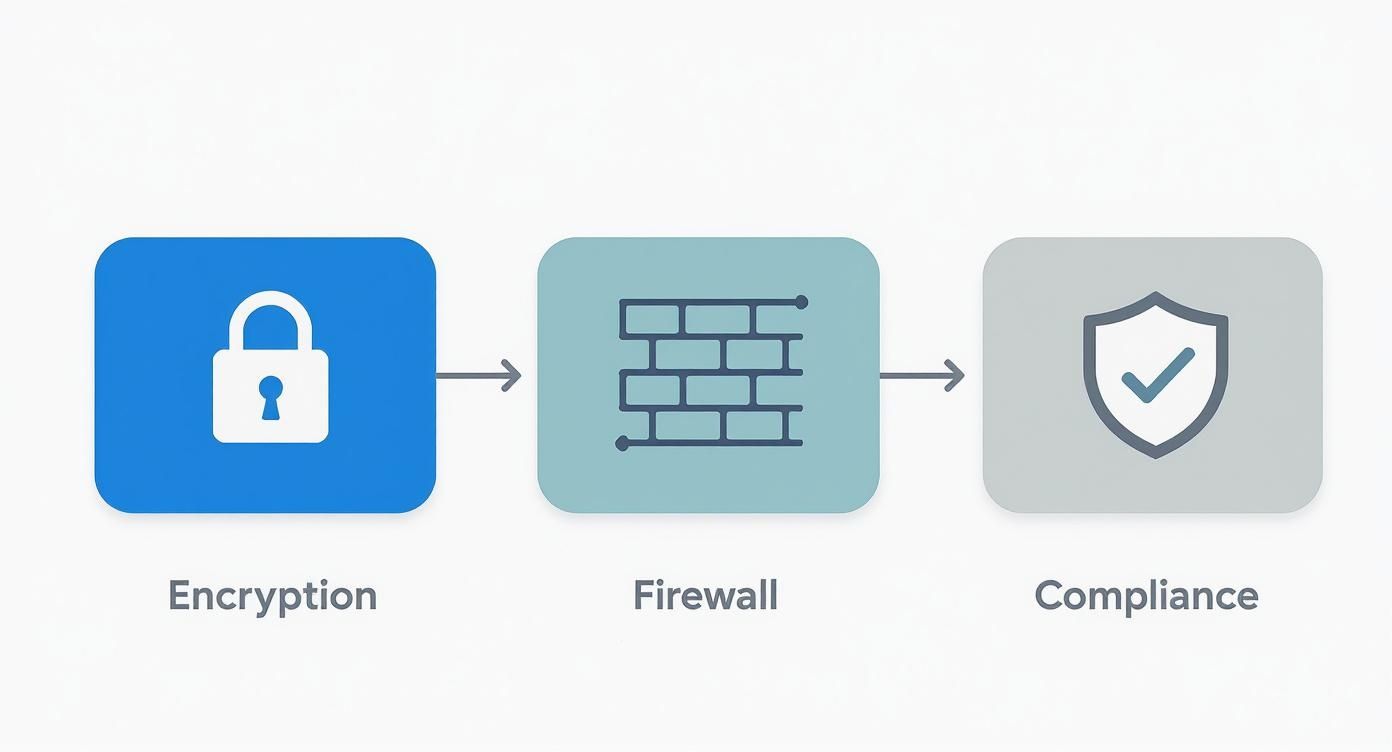
From encryption to firewalls and compliance, these layers create a secure environment for every call you make and receive.
- Select and Order Hardware: Decide if your team will use physical desk phones, headsets with softphones on their computers, or maybe a mix of both. Get your hardware ordered so it arrives well before your go-live date.
- Configure Key Settings: Now for the fun part. Record your main auto-attendant greeting and set up your call menus ("Press 1 for Sales…"). You'll also configure things like call queues, business hours, and voicemail-to-email settings for everyone.
- Install Softphone Applications: Ask your team to download and install the mobile and desktop apps. This lets them get a feel for the new system before it officially goes live.
Phase 3: Training and Go-Live
The final step is all about your people. A successful launch really depends on your team feeling confident and comfortable with their new tools from day one.
Schedule a training session before your official switch-over date. Walk everyone through the basics like making and transferring calls, checking voicemail, and using the mobile app. It's also a good idea to provide quick-reference guides and answer any questions they have.
On your go-live day, run a few final tests to make sure everything is working exactly as it should.
Common Questions About Small Business VoIP
It's completely normal to have a few last questions before you make the jump. Moving your business phone system is a big decision, and you want to feel confident about it. Let’s tackle some of the most common things business owners ask when looking at VoIP solutions for small business.
We want to clear up any hesitation you might have. By answering these practical questions head-on, you'll know exactly what to expect and can make sure your switch is a success from day one.
Will My Call Quality Be as Good as a Landline?
Yes, and often it’s even better! As long as you have a stable, high-speed internet connection, modern VoIP systems deliver crystal-clear HD voice quality that beats old, crackly analog lines hands down. The key is making sure your internet has enough bandwidth and low latency.
The best providers offer simple online tools to test if your network is ready. This quick check gives you peace of mind that your internet can handle the clear calls your business relies on.
What Happens to My Calls if the Internet Goes Down?
This is a huge concern for many, but there's a simple, elegant solution. Good VoIP providers build in powerful business continuity features like automatic call forwarding. If your office internet ever drops, the system instantly reroutes all incoming calls to a destination you've already set up.
This failover feature is a critical safety net. It means that even during an outage, your calls can be automatically sent to a mobile phone or another location. You never miss an important customer call, and business keeps moving.
Do I Need to Buy Expensive New Phones?
Not at all, which is great news if you're working with a tight budget. While dedicated IP phones are great and offer a lot of features, you have flexible, low-cost options to get started right away.
Most VoIP services today include a softphone, which is just a software app for your computer or a mobile app for your smartphone. With a simple headset, you can make and receive high-quality business calls directly from the devices you already own. This lets you get started with little to no upfront hardware cost, making it one of the most accessible VoIP solutions for small business.
Ready to upgrade your business communications with crystal-clear voice and unmatched reliability? Premier Broadband delivers enterprise-grade Hosted VoIP and high-speed fiber internet designed to help your small business thrive. Explore our powerful business solutions today.