
Your internet probably feels “fast enough” until the exact moment it doesn't. A work call freezes when you're presenting. A game stutters right as you react. Someone starts a backup upstairs and suddenly the movie downstairs starts buffering.
That's usually when people start asking a better question than “What speed am I paying for?” They ask what is fiber internet service, and why does it seem to solve problems that other connections keep stumbling over.
Fiber matters because it's not just a bigger number on a plan page. It's a different way of carrying internet into your home or business. Instead of sending data over older copper-based systems, fiber sends it as light. That change affects speed, upload performance, responsiveness, and consistency in ways you can experience in daily use.
The End of Buffering and Internet Bottlenecks
Most home internet frustrations don't come from one dramatic outage. They come from small bottlenecks that pile up. A video call turns choppy when your connection can't upload cleanly. A smart TV buffers because several devices are active at once. A cloud backup or game update hogs the line and everything else feels sluggish.
Fiber internet service is designed to remove a lot of that friction at the source.
Unlike older internet types that rely on electrical signals traveling over copper, fiber uses optical fiber to carry data as light. That gives it a cleaner, higher-capacity path for moving information. In practical terms, that often means a connection that feels steadier when your household is doing several things at once.
Why this matters in normal life
People often hear “fiber is faster” and stop there. Speed matters, but it's only part of the story. What most homes notice first is that fiber tends to handle modern habits better:
- Remote work: smoother video meetings and faster file uploads
- Streaming: fewer pauses when multiple screens are active
- Gaming: better responsiveness during real-time play
- Busy households: less slowdown when many devices share the network
Fiber isn't just about downloading a movie quickly. It's about keeping the whole connection usable while everyone in the house is online at the same time.
That's one reason fiber is treated as a premium access technology, even though adoption is still growing. In the United States, about 43% of households had access to fiber from Tier 1 providers as of 2022, while roughly 21% subscribed, according to the overview of internet access in the United States.
The real promise of fiber
If you're wondering what fiber internet service really changes, the simplest answer is this: it reduces the little delays and bottlenecks that make internet feel unreliable.
That's especially important now that internet use isn't just web browsing anymore. One connection may be supporting work, school, entertainment, security cameras, smart devices, and business tools all in the same day.
How Fiber Internet Actually Works
Fiber can sound complicated until you strip away the jargon. At home, it's similar to a very clean, very wide path for data.
Older internet lines are more like narrow roads with more limitations. Fiber is closer to a multi-lane highway built for modern traffic. More data can move through it efficiently, and it can do that over distance without running into the same kind of signal issues older copper systems face.
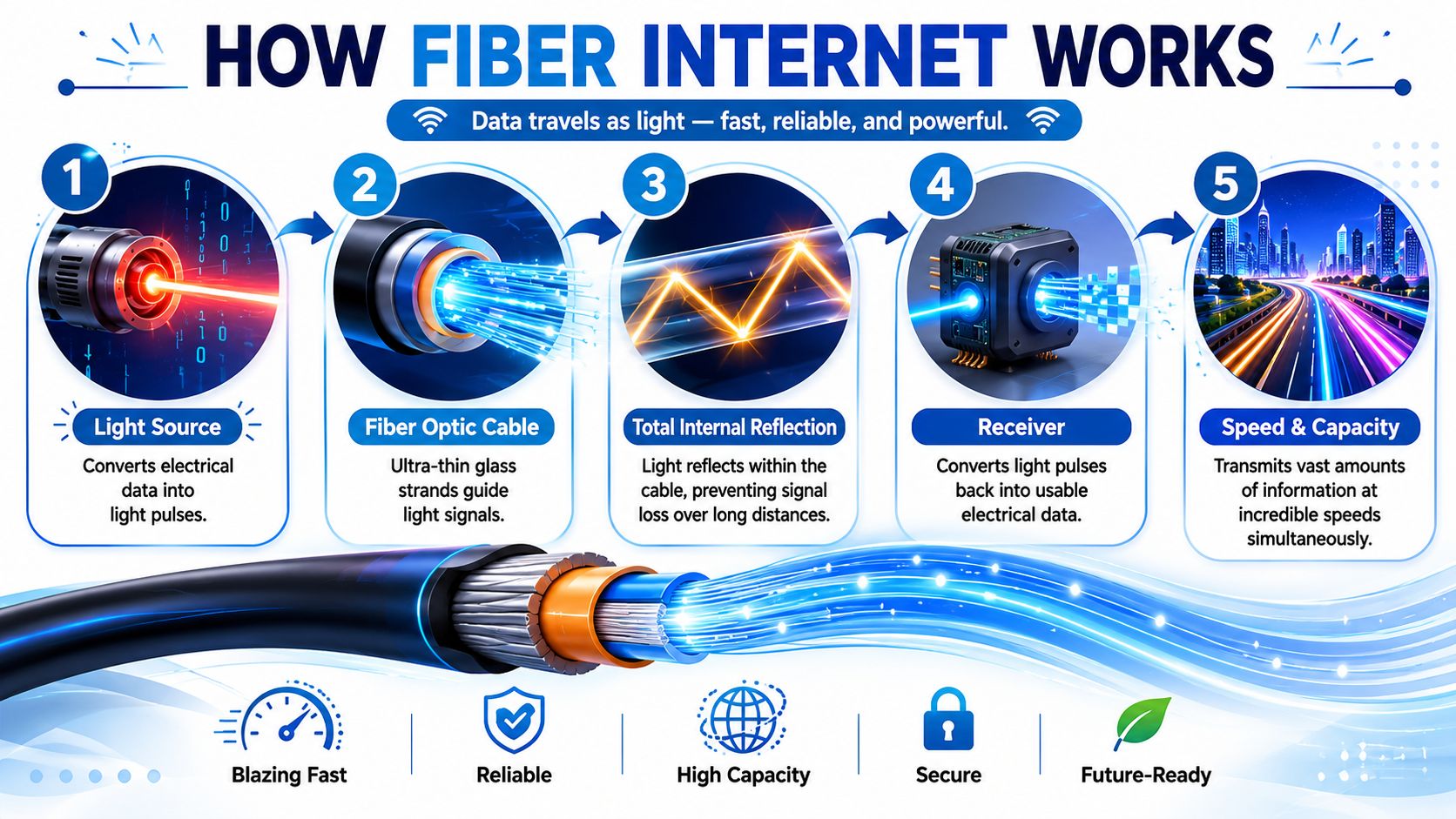
The basic path from the provider to your devices
With fiber-to-the-premises, the connection runs to your location and carries data as pulses of light. At your home or office, an optical network terminal, usually called an ONT, converts that optical signal into electrical signals your router can use. That's the core setup described in this explanation of fiber installation and ONT equipment.
If you've used cable or DSL before, that's where a lot of confusion happens. People expect a traditional modem. Fiber usually works differently.
A simple setup looks like this:
- Fiber line arrives at the building from the provider's network
- ONT receives the light signal and converts it
- Router distributes the connection to Wi-Fi and wired devices
- Your devices connect by Ethernet or wireless
What the ONT does
The ONT is the translator. Fiber itself carries data as light, but your laptop, TV, game console, and phone need standard network signals. The ONT bridges that gap.
That's why installers often place the ONT near where the fiber enters the building, then connect your router from there.
Practical rule: If you upgrade to fiber but keep an old router, your Wi-Fi may become the weak link even when the fiber line itself is excellent.
Why the router still matters
People sometimes assume fiber automatically fixes every internet problem in the house. It doesn't. Fiber can deliver strong service to the home, but poor Wi-Fi placement, outdated hardware, or overloaded wireless settings can still cause dead spots and slow rooms.
If you want a plain-English breakdown of local network performance after the internet reaches your building, this guide from Finchum Fixes IT on network optimization is useful, especially for small offices and mixed home-office setups.
For a closer look at the direct-to-home model, this overview of fiber to the home architecture helps clarify why a full fiber path usually delivers the strongest experience.
What installation usually feels like
From a customer perspective, fiber installation is less mysterious than it sounds. A technician brings the line to the premises, installs or activates the ONT, connects the router, and confirms the service is working.
The part you'll notice most later isn't the install itself. It's that the connection tends to feel less strained during heavy use.
The Real Benefits Symmetrical Speed and Low Latency
Most internet ads train people to focus on download speed. That's only half the performance story. Fiber's biggest everyday advantages are usually symmetrical speeds and low latency.
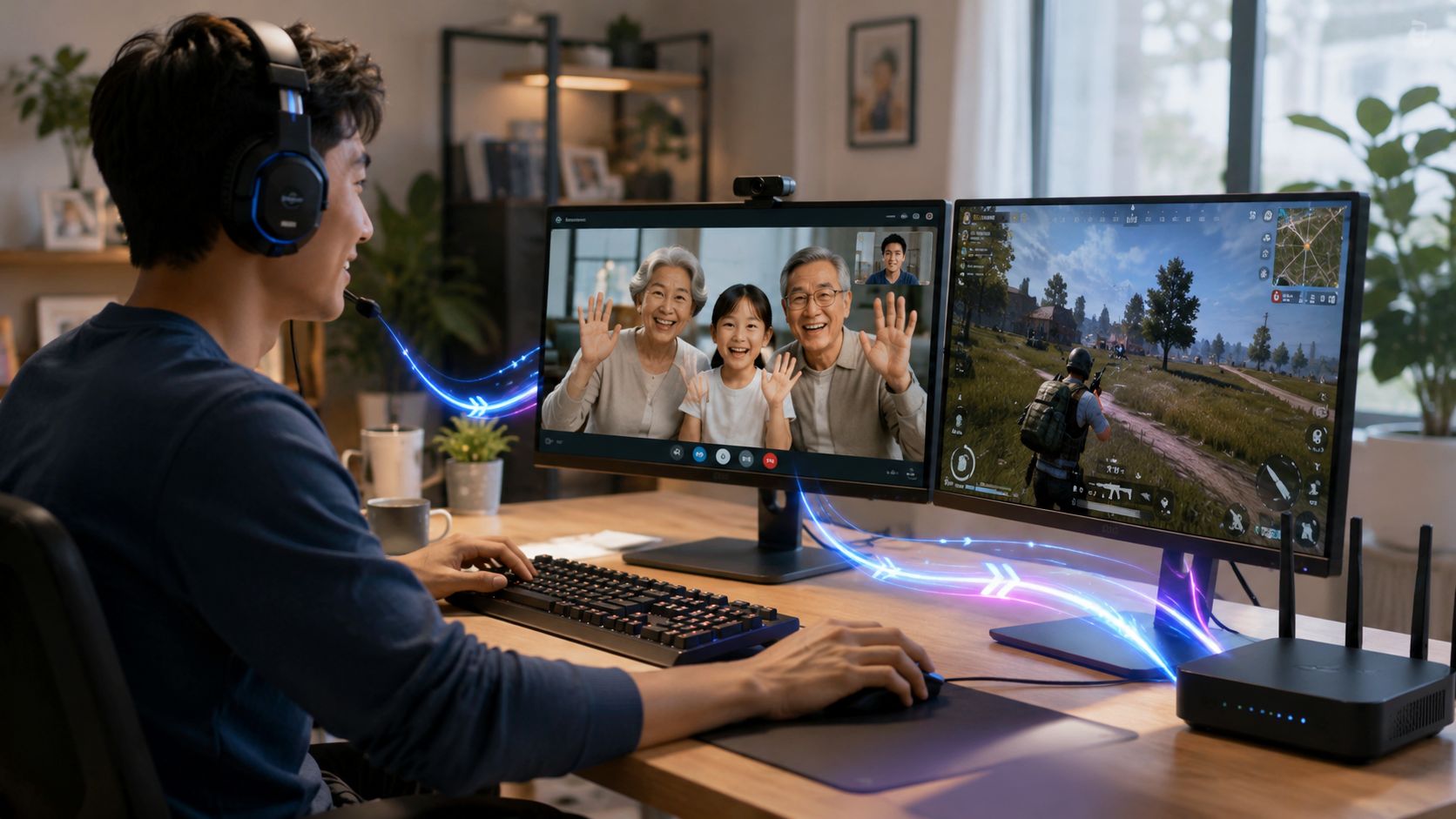
Symmetrical speed means uploads stop feeling neglected
A lot of non-fiber plans are built around strong download performance and much weaker upload performance. That works fine if all you do is browse and stream. It falls apart when you start sending large amounts of data back out.
Fiber can offer symmetrical bandwidth, meaning your upload and download speeds can be the same. Provider and industry materials give examples such as 500/500 Mbps and 2 Gbps down / 2 Gbps up in this overview of fiber equipment and service tiers.
That matters more than many people realize.
Tasks that depend heavily on upload speed
- Video meetings: your camera and microphone have to send data continuously
- Cloud backups: photos, project files, and device backups move upstream
- File sharing: sending a big design file or media folder can take far less time
- Live streaming: your stream quality depends on consistent upload capacity
A choppy call often isn't a download problem. It's an upload problem.
Low latency means less delay
Latency is the time it takes for data to travel back and forth. It's similar to conversation lag. If there's too much delay, people talk over each other on calls, games feel sluggish, and remote apps stop feeling immediate.
Low latency matters when the internet has to respond in real time:
- online gaming
- voice and video calls
- remote desktop work
- cloud-based creative tools
- smart home actions that need quick response
If download speed is how wide the road is, latency is how quickly a car can complete the trip.
That's why two connections with similar advertised download rates can feel very different in actual use.
Here's a short video that gives a helpful visual explanation of why connection quality matters beyond raw speed:
When fiber makes the biggest difference
Fiber isn't automatically necessary for every person. If someone mainly checks email, browses, and streams on one or two devices, they may not feel a dramatic change every minute of the day.
But fiber often makes a clear difference for:
| Activity | Why fiber helps |
|---|---|
| Remote work | Better upload performance for calls, screen sharing, and file sync |
| Gaming | Lower delay and more stable responsiveness |
| Streaming while others are online | More headroom for simultaneous use |
| Content creation | Faster uploads for video, audio, and project files |
For more examples of practical day-to-day advantages, this page on the benefits of fiber optic internet is a useful companion read.
Comparing Fiber with Cable DSL and 5G Home Internet
The easiest way to understand fiber is to compare it with the other services people usually choose from. Each option can be useful in the right setting. They just solve different problems, and they do it with different underlying technology.
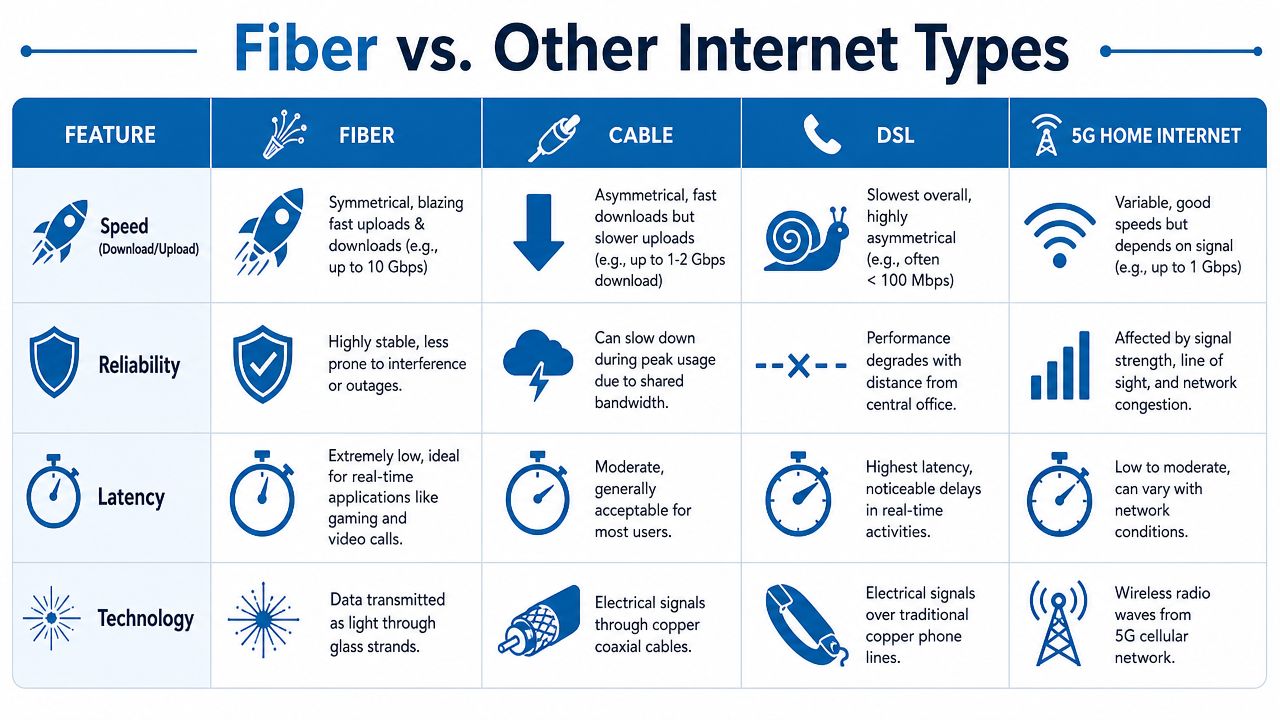
Internet Technology Comparison Fiber vs. Cable vs. DSL vs. 5G
| Feature | Fiber | Cable | DSL | 5G Home Internet |
|---|---|---|---|---|
| Technology | Data travels as light through fiber strands | Data travels over coaxial copper cable | Data travels over phone-line copper | Data travels wirelessly from cellular infrastructure |
| Speed pattern | Often supports symmetrical service | Usually stronger download than upload | Typically limited, especially on upload | Can be fast, but performance varies by signal and congestion |
| Latency | Commonly low | Often moderate | Often higher than fiber | Can range from low to variable |
| Consistency | Strong for multi-device and real-time use | Can fluctuate during busy periods | Can weaken with line limitations | Can change with network conditions and placement |
| Best fit | Remote work, gaming, heavy uploads, many devices | Download-heavy households with decent local cable service | Light internet use where other options are limited | Homes needing a quick wireless setup |
Why cable can still feel crowded
Cable internet often delivers solid download performance. For many households, it works well enough most of the time. The tradeoff is that cable systems can feel less consistent under neighborhood demand, especially during busy hours, and uploads are often much weaker than downloads.
That difference becomes obvious when somebody is on a video call while another person uploads files or streams live.
Why DSL often feels dated
DSL uses older phone-line infrastructure. It can still serve basic needs, but it usually struggles to keep up with modern multi-device households, especially if your work or entertainment depends on responsive connections and stronger uploads.
For people with simple browsing habits, DSL may still be usable. For homes doing cloud-heavy work, gaming, and streaming at the same time, it often feels limited.
Where 5G home internet fits
5G home internet is attractive because installation can be simpler and availability may be better in some places. It can be a practical option when wired fiber isn't available.
The tradeoff is variability. Wireless performance depends on signal quality, placement in the home, congestion, and local conditions. Some users get a very good experience. Others find that performance shifts too much for demanding work or gaming.
Cable, DSL, and 5G can all be the right answer in the right location. Fiber usually stands out when consistency matters as much as speed.
Broadband in the United States has changed dramatically over time. The American Society of Civil Engineers says 1% of U.S. adults had broadband at home in 2000, compared with about 80% today, and notes that the FCC's June 2024 broadband map shows 94% of U.S. households can access a connection meeting the FCC's high-speed definition, all within its review of broadband infrastructure and current investment efforts. Fiber sits inside that bigger shift toward higher-capacity access.
For a narrower head-to-head look, this comparison of fiber internet vs. cable is useful when those are the two options at your address.
Who Needs Fiber Internet the Most
Not every household feels internet problems in the same way. One person notices upload delays. Another notices lag. Another just knows the house gets cranky every evening when everyone logs on.
That's why fiber makes the most sense when you match it to how people use the connection.
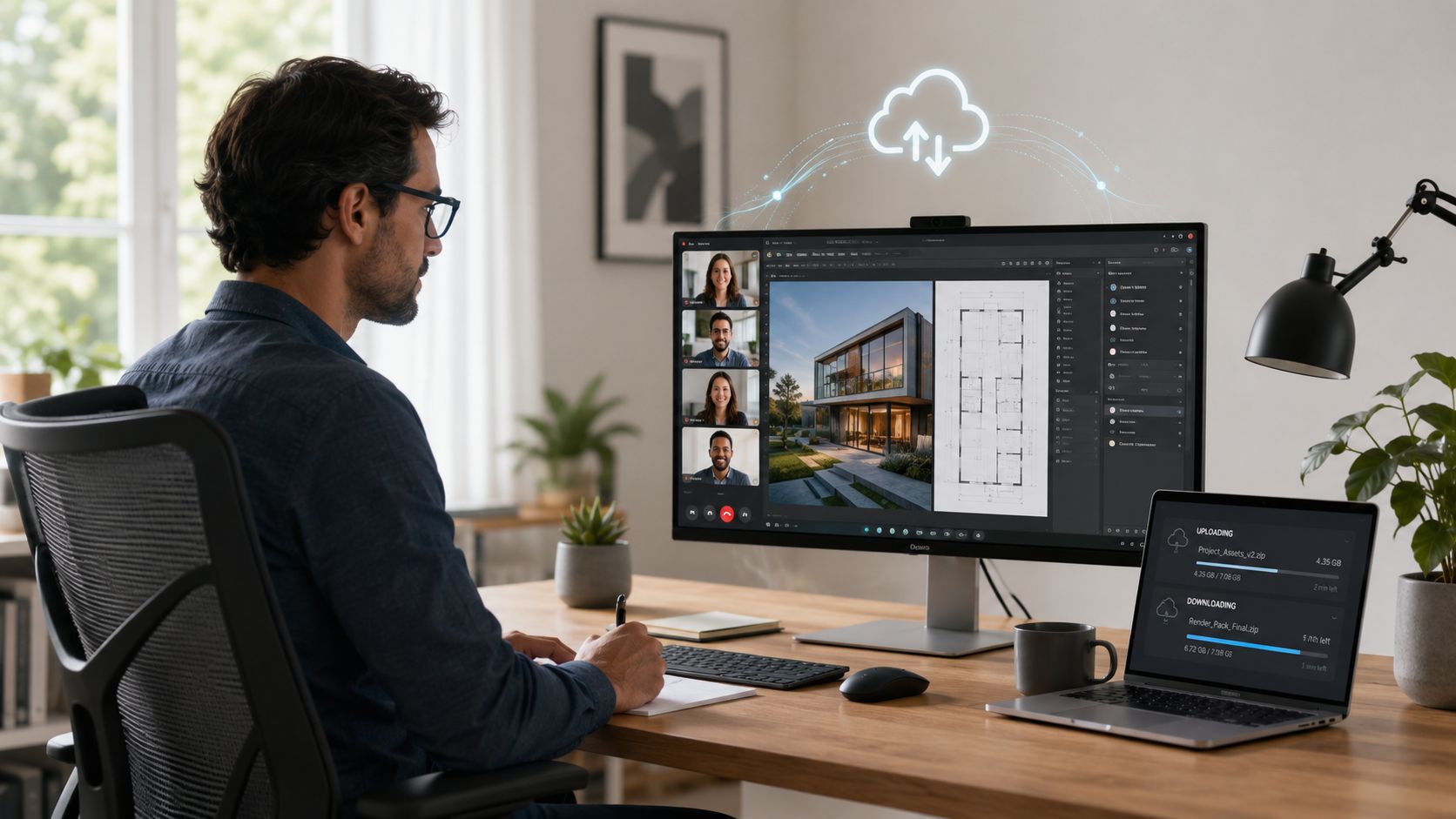
The remote worker
A remote worker usually notices weak internet in two places first. Video calls break up, and file syncing drags.
If your day includes Zoom, Teams, cloud documents, remote desktop sessions, or sending large files, fiber's symmetrical design is often a better fit than a download-heavy connection. You're not just consuming data. You're constantly sending it too.
The modern family
A busy family doesn't use the internet one device at a time. It's overlapping traffic all day long.
One person streams in the living room. Another joins a class call. A console downloads an update. Security cameras stay active. Smart speakers, thermostats, phones, tablets, and laptops keep checking in.
In that kind of house, fiber helps because it handles concurrency well. It's less about one dramatic speed test and more about avoiding that “who's using all the internet?” argument.
The competitive gamer
Gamers often care less about marketing language and more about how the connection feels. That's where low latency earns its reputation.
A connection with strong responsiveness can help movement, timing, voice chat, and match stability feel more natural. Downloads matter for installing games and updates, but gameplay itself depends heavily on consistency and delay.
A gamer may forgive a long download once. They won't forgive repeated lag in the middle of a match.
The small business
Small businesses need internet that supports revenue-producing work, not just casual browsing. Calls, payment systems, scheduling tools, cloud platforms, guest Wi-Fi, file sharing, and cameras can all ride on the same connection.
For that kind of environment, fiber often fits well because it supports real-time applications and busy upstream traffic without feeling constrained. Offices using VoIP phone systems, shared cloud storage, and remote collaboration usually appreciate those strengths quickly.
How to Choose the Right Fiber Provider
Once you know what fiber does well, the next question is practical. Which provider should you trust with the service?
Many people make the mistake of shopping by the biggest advertised number alone. A smarter approach is to compare how the service is delivered, what equipment is included, and how well the provider supports the whole in-home or in-office network.
Start with availability at your exact address
Fiber availability is still uneven. A neighborhood may be advertised as covered while your specific address isn't ready yet. Industry reporting notes that U.S. fiber had passed 88.1 million homes by 2024, with 6.7 million added in that year, but also emphasizes that meaningful gaps remain in many areas in this review of fiber provider availability and market growth.
That's why your first step should always be an address-level availability check.
What to compare besides speed
Use a simple checklist when reviewing providers:
- Network type: Is it full fiber to the premises, or does part of the route rely on older infrastructure?
- Upload performance: Are uploads clearly listed, or is the plan mostly built around download marketing?
- Equipment details: Will you get an ONT, router, managed Wi-Fi, or only basic hardware?
- Data policies: Ask whether the service includes data caps or usage restrictions.
- Support quality: Find out how installation, troubleshooting, and equipment replacement are handled.
- Whole-home coverage: A strong line to the house won't help much if Wi-Fi coverage inside is poor.
Look for fit, not just raw headline speed
A family with several active users may need a different setup than a solo apartment resident. A small office may care more about reliability, voice quality, and network management than about chasing the highest possible plan tier.
One option in this category is Premier Broadband's guide to fiber internet providers, which is useful if you're comparing plan structure, managed Wi-Fi, security add-ons, VoIP, and business connectivity under one provider relationship.
Questions worth asking before you order
- Where will the ONT be placed?
- Will the router location support the rooms where you work or stream most?
- Are there managed Wi-Fi or security options if you need them?
- If you run a business, are voice and network management services available too?
Good fiber service isn't only about the line outside. It's also about whether the provider helps the connection perform well where you use it.
Your Fiber Internet Questions Answered
Do I need a modem with fiber internet?
Usually, no in the traditional cable sense. Fiber service commonly uses an ONT to convert the light-based signal for your router. Your provider typically handles that equipment.
Will fiber automatically fix weak Wi-Fi in every room?
Not by itself. Fiber can give you a stronger connection to the home, but Wi-Fi coverage still depends on router quality, placement, and the layout of the building. Thick walls, poor placement, and old hardware can still create dead spots.
Is fiber worth it if I don't run a business?
It can be. You don't need a company office to benefit from better uploads and lower latency. Remote workers, gamers, streamers, and busy families often notice the biggest difference, but even lighter users may appreciate the steadier feel.
Is switching to fiber a hassle?
Usually it's straightforward. A technician installs or activates the connection, sets up the ONT, and connects your router. If you're also moving phone service, many providers can help with number portability for VoIP options, which makes the transition easier.
Should I always buy the fastest fiber plan?
Not necessarily. Buy for your real usage. If your home mostly browses, streams, and joins occasional video calls, a moderate plan may be enough. If you upload large files, run many devices, stream live, or support a small business, moving up can make sense.
If you're checking whether fiber is available at your address or comparing plans for your home or business, Premier Broadband offers 100% fiber internet, VoIP, managed Wi-Fi, and business network services that match the kinds of needs covered in this guide.