
You're in the middle of a familiar problem. The living room TV streams fine, the office call starts to freeze when someone opens a video in the kitchen, and the basement console keeps dropping bars even though the router looks powerful on paper. A whole home WiFi mesh system solves that by changing the shape of the network, not just cranking up one radio's output.
That shift matters because modern homes ask too much of a single router. Phones, laptops, smart TVs, cameras, and smart-home gear all compete for the same signal, and walls, floors, and appliance noise break that signal up in different ways. Mesh is built for those realities, with multiple nodes acting like one unified network, so devices can stay connected as you move from room to room. For a deeper look at how signal strength affects wireless coverage, see Premier Broadband's guide to signal strength in wireless networks.

If you've already tried to patch holes with endless support chats, cut support messages is a useful reminder of how much time homeowners lose when a network is left to guesswork instead of planning.
Why Your Single Router Cannot Cover Every Room
A single router is asked to do a job that sounds simple but isn't. It has to reach the front bedroom, the back office, the upstairs hallway, and the room behind the furnace, all while walls, floors, and other sources of radio noise chip away at the signal. In many homes, the pattern is predictable, a strong connection near the router, weaker service farther out, and dead zones where the network effectively stops cooperating.
A whole home WiFi mesh system changes the shape of that job. It uses several nodes that act like one network, so coverage is spread across the home instead of forced out from one point. Modern consumer systems often advertise about 5,000 ft² (460 m²) of coverage and support for 150+ devices as described in product and explainer material, which shows how this category is built for busy households rather than a single room.
The core issue is architecture
A stronger router still relies on one central broadcast point. If the signal has to pass through several walls or cross a floor made with dense materials, the home layout usually wins. Mesh handles that problem by sharing the work across nodes and guiding your phone or laptop toward the strongest access point as you move.
That is why mesh is better described as a smarter network than a better router. It spreads the load, and that distributed design is what makes roaming feel steadier instead of fragile. The connection can stay alive while your device moves from one room to another, which is why families often notice fewer pauses during calls, streams, and downloads.
Practical rule: if one room is weak and another room is strong, the issue is usually not your device, it is the path the signal has to travel.
The hidden snag shows up when a mesh kit meets an ISP gateway that still wants to act like the boss of the network. Some homes end up with double routing, awkward handoffs, or a mesh system that is technically connected but still not behaving the way it should. That is where managed WiFi from a fiber provider like Premier Broadband can help, because setup can be aligned with the gateway, the fiber handoff, and the home layout instead of leaving the hardware to sort it out on its own. For a closer look at why coverage rises and falls with placement and building layout, Premier Broadband's guidance on signal strength in wireless networks is a useful reference.
If you have already spent too long chasing weak spots, cut support messages is a useful reminder of how much time homeowners lose when a network is left to guesswork instead of planning.
Mesh Systems Versus WiFi Extenders
A lot of people start with an extender because it feels cheaper and simpler. The problem is that extenders are a patch, not a redesign. They repeat the signal, but they don't create the same smooth handoff experience, and that's why many homes end up with awkward network names, manual switching, and speed drops in rooms that still need help.
The distinction is easier to see side by side.
| Feature | WiFi Extender | Mesh System |
|---|---|---|
| Network name | Often creates a separate network or awkward split | Uses a single SSID for easier roaming |
| Roaming | Devices may cling to the wrong signal longer | Devices are steered toward the strongest node |
| Speed impact | Can reduce usable bandwidth because it relays traffic | Better at preserving performance across the home |
| Backhaul | Usually shares the same wireless path with clients | Can use dedicated backhaul or Ethernet backhaul |
| Device management | Feels like multiple mini networks | Feels like one managed system |
The downside of extenders is practical, not theoretical. They can force traffic to be received and retransmitted on the same channel, which leaves less room for the devices you use. Mesh avoids that by making node-to-node communication part of the design, not an afterthought. That's why households that stream in one room, game in another, and work from a third usually feel the difference quickly.
For a simple homeowner-friendly primer, the RV mesh network overview from SwiftNet Wifi is a helpful illustration of how mesh differs from the old repeater mindset, even though the use case is a different kind of space.
Useful shortcut: if you want one network name, smoother roaming, and less babysitting, mesh is the cleaner model. If you only need a tiny bump into one weak room, an extender can be enough.
The biggest confusion comes when buyers treat mesh as a fancy extender. It isn't. Mesh is a coordinated system with node placement, upstream signal quality, and backhaul design all working together.
How Mesh WiFi Actually Works Under the Hood
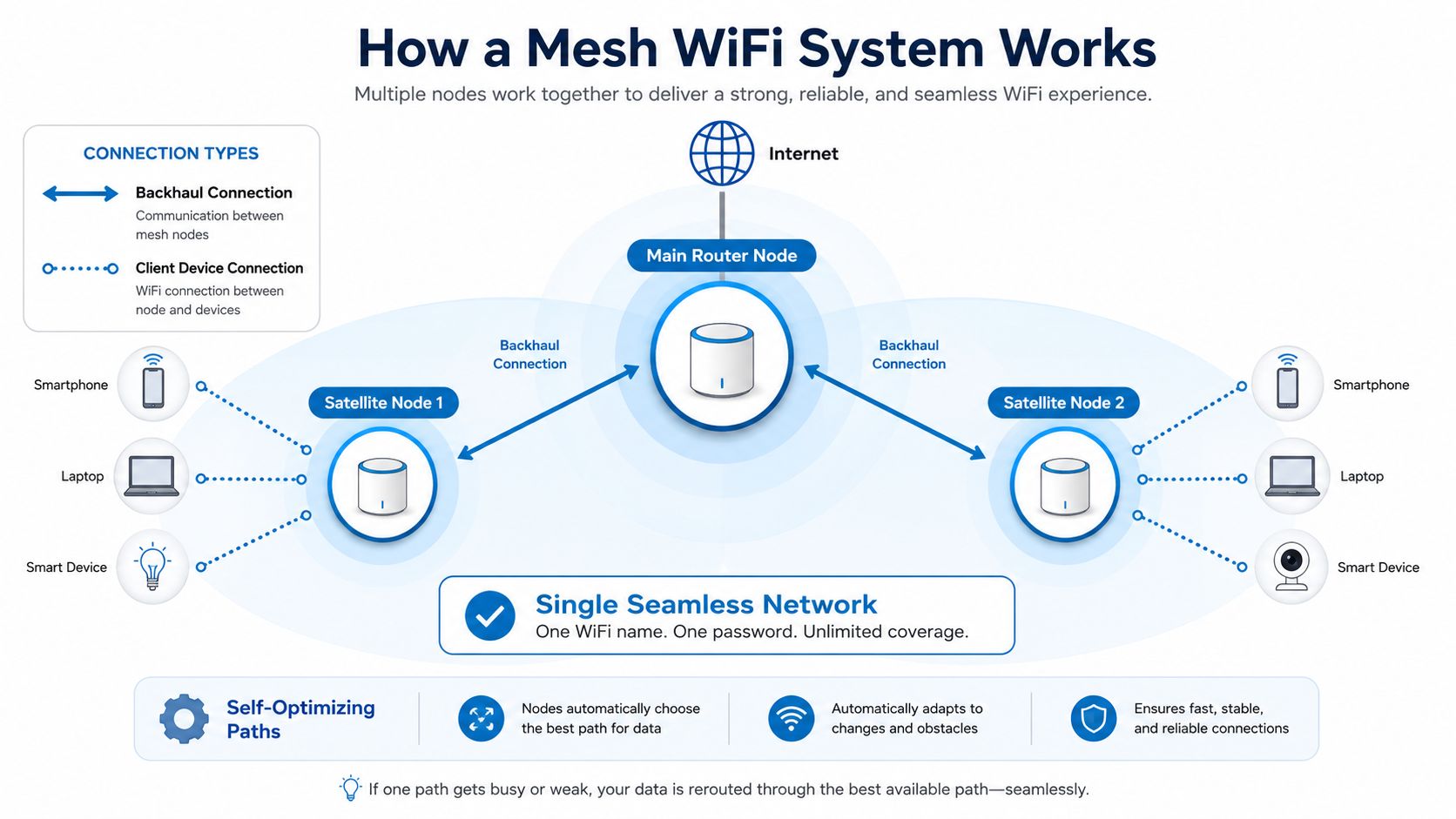
A mesh network starts with a main node and adds satellite nodes around the home. Together, they form a single network, so your devices see one WiFi experience instead of a collection of separate access points. The system also keeps track of which node should serve each device, then shifts that connection as the device moves or signal conditions change.
Backhaul is the part most people miss
The link between nodes is called backhaul. If that link is wireless, the nodes need radio airtime to talk to each other and to serve your devices at the same time. If Ethernet is available, Ethernet backhaul is generally preferred because it avoids using wireless airtime for node-to-node traffic, which leaves more capacity for phones, laptops, TVs, and cameras as explained by ASUS support.
That backhaul design is why tri-band mesh WiFi 6 systems can advertise up to 6 Gbps aggregate wireless throughput and use dedicated tri-band wireless backhaul to keep inter-node traffic off the client-facing radios according to NETGEAR's system documentation. In everyday use, that means less airtime fighting and a better chance of holding steady performance during streaming, gaming, and video calls.
Dual-band and tri-band are not the same experience
Dual-band systems are fine in smaller or simpler homes, but they share radios more aggressively. Tri-band systems add more breathing room by reserving a band for backhaul, which reduces contention. That doesn't make every tri-band system perfect, but it does explain why higher-end mesh kits tend to feel more stable in homes with busy traffic patterns.
A mesh system works best when its nodes can talk cleanly to each other before they talk to your devices.
The hidden detail is placement. Wireless backhaul only works well when nodes stay within strong upstream range of one another. Put a satellite too far out, and it stops being a smart relay and starts becoming a weak link.
Choosing the Right Mesh System for Your Home
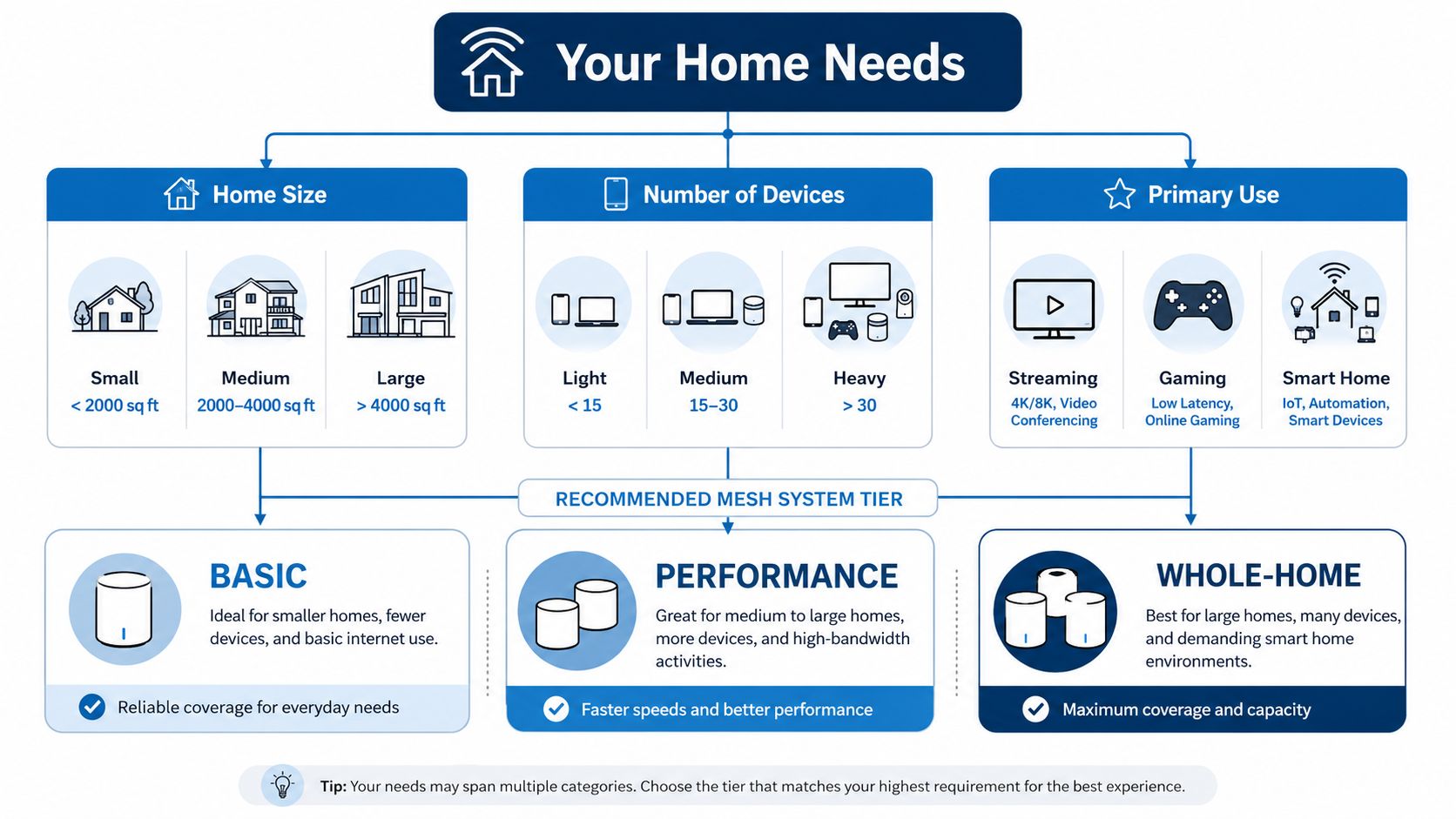
The right mesh kit depends on the home, not the box. A compact apartment with one or two people streaming and browsing has very different needs from a two-story house with game consoles, cameras, work laptops, and smart speakers on every floor. Matching the system to the space keeps you from paying for extra hardware you won't use.
For gamers, Premier Broadband's gaming WiFi guide is a useful companion because it focuses on the low-latency side of the decision, not just raw coverage.
Match the hardware to the household pattern
- Small homes and apartments: A single router can still be enough if the layout is simple and the dead zones are minor. If the signal only fades in one corner, a two-node mesh kit can be a cleaner upgrade than a stack of add-ons.
- Multi-floor family homes: Three nodes often make more sense when the home stretches vertically. One node can anchor the main floor, another can support the upstairs, and a third can cover the far end of the house where walls and stairs break the signal path.
- Gaming-heavy homes: Tri-band hardware matters more here because latency sensitivity shows up fast when someone else starts streaming or backing up files.
- Home offices: Stable uploads and dependable video calls matter more than flashy packaging. A mesh setup only helps if the upstream connection and node placement are both solid.
The market reflects that demand for bigger, more connected homes. The global mesh WiFi sector is estimated at about $5 billion in 2025 and projected to reach roughly $12 billion by 2033 at a 15% CAGR, while another estimate places the home mesh segment at $6.8 billion in 2025 and $14.2 billion by 2034 with 14.2% CAGR per market estimates. Those projections line up with what homeowners already feel, more devices, more rooms, and less tolerance for dead spots.
Selection shortcut: start with home size, then count the devices that actually need good WiFi at the same time, then decide whether the system needs tri-band or wired backhaul.
A sensible rule is simple. Buy for the layout you have, not the marketing label on the box.
Placement and Setup Best Practices for Maximum Coverage
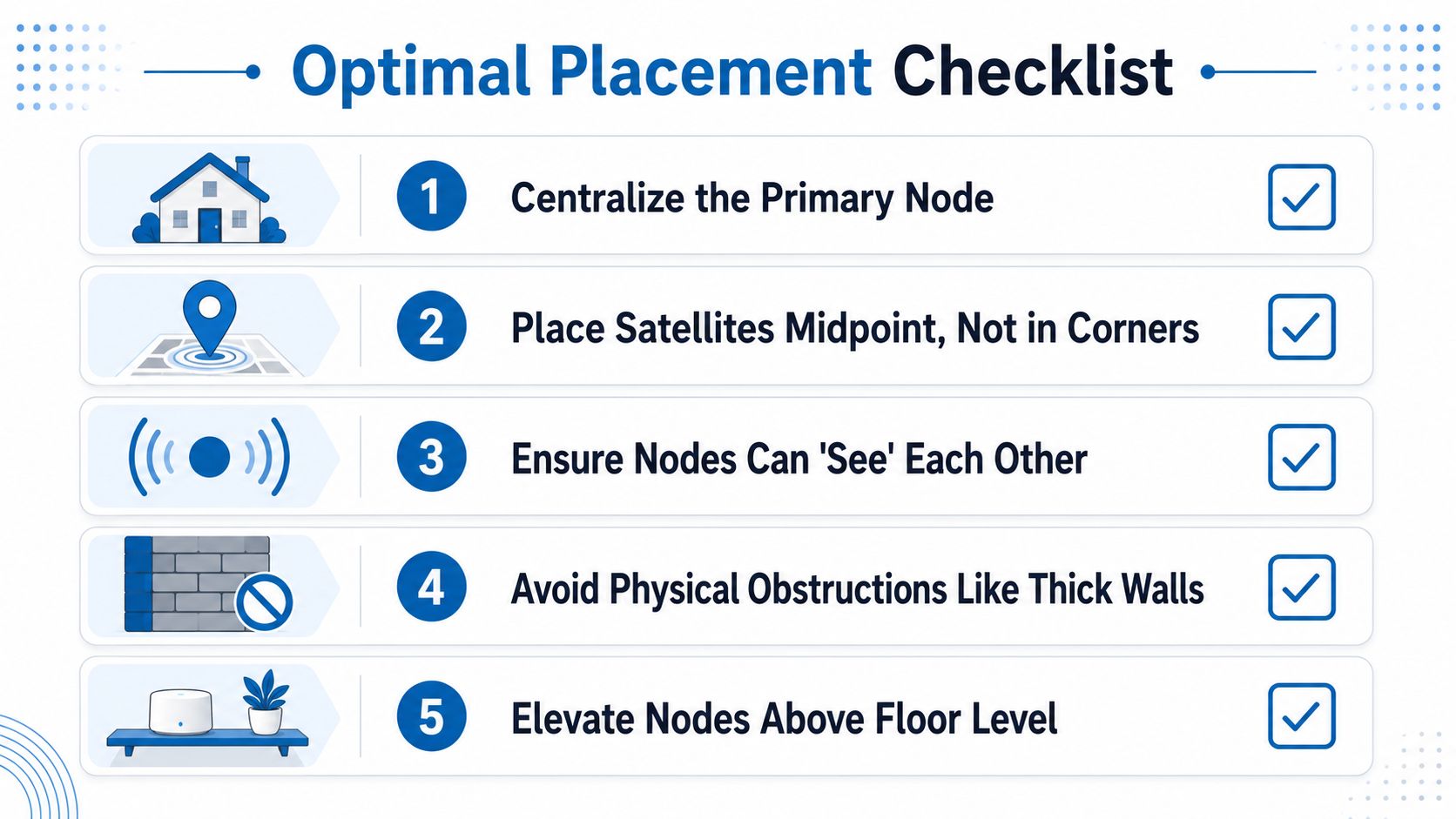
Even excellent mesh hardware underperforms when the nodes are placed badly. A satellite dumped into a dead zone can't help much if it can't hear the main node well enough to relay traffic cleanly. The goal is not to chase the weakest corner first, it's to build a chain of strong connections across the home.
Start with signal quality, not convenience
Put the primary node where it can reach the modem or gateway and still sit near the center of the home's traffic pattern. Then place the satellites where they still receive a strong upstream signal, usually partway between the main node and the problem area rather than at the far edge of coverage. Thick concrete, metal appliances, and dense utility spaces are common ways to ruin an otherwise good layout.
The integration question matters just as much as physical placement. A common setup is to turn off the router's wireless and let the mesh system become the primary WiFi layer, especially when an ISP gateway is already handling the internet handoff as noted in a university network resource. Leaving both wireless systems active can create overlap and make troubleshooting far harder than it needs to be.
Use Ethernet backhaul when the house allows it
If you can run Ethernet between nodes, do it. Wired backhaul removes one of the biggest bottlenecks in a wireless mesh, because the nodes don't have to spend airtime repeating traffic to each other. That can make a larger difference than adding another satellite in the wrong spot.
For homeowners who want a step-by-step setup walk-through, Premier Broadband's mesh setup guide is a practical companion because it deals with the basics of getting the main unit and satellites working as one network.
Next-gen WiFi guidance from DigiDevice is also useful if you're deciding whether newer WiFi standards are worth factoring into a placement or upgrade plan.
Keep nodes in the signal, not in the dead zone.
A good setup is often less about more hardware and more about cleaner spacing. That's the difference between a network that feels intentional and one that feels patched together.
The More Nodes Myth and Performance Tradeoffs
More nodes can look like a safer bet, but that's not always how mesh behaves. Every additional wireless hop adds complexity, and the more traffic has to pass from node to node, the more chances there are for slowdown or instability. Homes with thick walls, long floor plans, or awkward layouts often do better with fewer well-placed nodes than with a crowded chain of satellites.
That tradeoff is why placement advice keeps coming back to the same theme, keep nodes within good coverage of one another. Drop a node into a dead zone and it may help one corner while weakening the path back to the rest of the network. The result can be coverage that looks better on paper but feels worse in daily use.
Marketing coverage is not the same as real coverage
Mesh products are now being advertised for much larger homes, including WiFi 7 mesh systems for spaces up to 6,000 to 10,000 square feet according to product-positioning data. Those numbers are useful as a direction of travel, but they still assume favorable conditions. Real homes have insulation, plumbing chases, appliances, and people moving around, and all of that changes the result.
The smarter approach is to think in terms of network paths. If a home already has a strong wired path between floors, that can beat an extra wireless node every time. If the construction is difficult, the answer may be better positioning and fewer hops rather than a bigger kit.
Practical takeaway: coverage is not the only metric that matters. Stability, hop count, and backhaul quality matter just as much.
A lot of frustration comes from buying one more node, then discovering the system is now busy relaying traffic instead of improving it. That's why the best mesh setup is usually the one that reaches the whole home with the fewest compromises, not the one with the highest node count.
Managed WiFi and Protection Plans That Complete Your Network
Hardware solves only part of the problem. A whole home WiFi mesh system still depends on the internet service feeding it, the gateway it connects to, and the support behind the setup when something changes. That's where managed WiFi makes a real difference, because someone has to keep the network tuned, updated, and aligned with the way the home gets used.
Premier Broadband's managed WiFi approach fits into that picture by handling the network side as a service rather than leaving homeowners to interpret every setting themselves. Its managed network services overview shows how a provider can take on more of the monitoring and maintenance burden, which matters when the goal is reliable coverage across the whole home instead of a one-time hardware sale.
Premier's 100% fiber network matters too, because mesh can't compensate for a weak or inconsistent upstream connection. The Home Office Hero plan is relevant for remote work because stable upload performance matters as much as download speed when the day is full of video calls and file transfers. Add managed WiFi and content controls through Premier Protects, and the network becomes easier to live with, not just easier to install.
The Premier Protection Plan also addresses the messy realities homeowners know well, repairs, relocations, storms, pets, and remodeling. Those are the moments when equipment gets bumped, disconnected, or damaged, and a protection layer keeps a home network from becoming an expensive surprise.
The best whole home WiFi setup is not just a box on a shelf. It's the combination of good mesh hardware, clean placement, a stable fiber connection, and support that keeps the system usable over time.
If you're trying to fix dead zones, simplify setup, or get reliable coverage for work, gaming, and streaming, take a look at Premier Broadband. Their fiber service, managed WiFi options, and protection plans are built to support the kind of whole-home network this guide describes, so you can spend less time troubleshooting and more time using the connection you pay for.