

Tired of your Wi-Fi dropping out the second you walk into another room? A whole-home Wi-Fi solution is exactly what you need. These systems are designed to wipe out those frustrating internet dead zones for good, giving you a strong, steady wireless signal all through the house.
Instead of trying to make a single router cover every nook and cranny, these setups use a team of devices working together. This creates a seamless blanket of connectivity, making sure everything from your 4K streaming and online gaming to your work-from-home video calls runs smoothly.
Conquering Wi-Fi Dead Zones for Good
There’s nothing worse than having a video call freeze up in your home office or your favorite show start buffering right at the good part. These Wi-Fi dead zones are a common headache, but you don't have to live with them. Think of this guide as your game plan for getting powerful, reliable internet in every corner of your home.
With all the streaming, gaming, smart home gadgets, and remote work happening under one roof, the old single-router setup just doesn’t cut it for most families anymore. We’ll walk you through how to pick and set up the right system for your home.
Why a Single Router Falls Short
A standard router is like a single lightbulb trying to light up a whole house—it’s bright when you're close, but the rooms farthest away are left in the dark. Walls, floors, and even kitchen appliances can block and weaken its signal, creating those dead spots. This is where getting a handle on signal strength in wireless networks really starts to matter.
This need for better coverage isn't just a feeling; it's a huge trend. The home Wi-Fi router market is expected to grow by a massive USD 3.34 billion between 2025 and 2029, all thanks to the rise of e-learning and the explosion of smart devices in our homes.
Your internet connection is only as good as its weakest link. A powerful fiber internet plan is the essential foundation, but a whole home WiFi solution is what unlocks its full potential, distributing that speed to every device you own.
The end goal is simple: create one unified, smart network that covers your entire property. This lets you walk from the basement to the attic on a video call without a single hiccup. It's the seamless experience that today's connected life demands.
So, What Exactly is Whole-Home Wi-Fi?
Think of your home’s Wi-Fi like its lighting. A single, traditional router is like having one super-bright bulb in the living room. It works great when you’re nearby, but the bedrooms or the basement are left dim, or even completely dark. Those dark spots are your Wi-Fi dead zones.
Whole-home Wi-Fi is the fix. Instead of that one lightbulb, it’s like installing a complete lighting system with fixtures and lamps placed strategically throughout your house. This way, every corner—from the front door to the back porch—is bathed in a strong, reliable connection.
The goal is to create one single, smart network that covers your entire property. You get one network name (SSID) for the whole house, and your devices automatically hop to the strongest signal without you ever noticing.
The Magic of a Seamless Network
The real magic here is how seamless it all feels. With a whole-home Wi-Fi solution, you can start a video call in your basement office, walk up to the kitchen for a snack, and head out to the patio, all without the call ever dropping or even stuttering.
Your phone, laptop, or tablet intelligently connects to the nearest network point, making sure you always have the best performance possible. This gets rid of the frustrating old-school method of manually switching between different network names to find one that works.
A true whole-home system isn't just about making a signal reach farther; it's about creating an intelligent, self-managing network that delivers consistent speed and reliability everywhere. It’s the difference between shouting from one room to another and having a clear conversation face-to-face.
This unified setup is essential for modern families juggling dozens of connected devices—smart TVs, security cameras, laptops, and gaming consoles—all fighting for stable bandwidth at the same time.
Core Technologies That Power Your Connection
While the result is a simple, powerful network, a few different technologies can get you there. Each one strikes a different balance between performance, cost, and how easy it is to set up.
-
Mesh Wi-Fi Systems: These are the most popular choice today. They use a main router connected to your modem and several satellite "nodes" you place around your home. These nodes talk to each other to form a single, strong network, smartly routing your internet traffic for the best speeds.
-
Wi-Fi Range Extenders: A simpler, more budget-friendly option. An extender (or repeater) just grabs the existing signal from your main router and rebroadcasts it to a specific area, stretching its reach. The downside is that this can sometimes cut your overall network speed in half.
-
Wired Access Points: This is the gold standard for performance. It involves running Ethernet cables from your main router to additional access points in other rooms. This gives you the fastest, most stable connection you can get, but it requires a more involved installation.
Understanding these basic options is the first step to building a network that can handle everything your family throws at it.
Comparing the Top WiFi Coverage Solutions
To get that perfect blanket of WiFi coverage we've been talking about, you have a few options. Each one strikes a different balance between performance, price, and how easy it is to set up. Think of it like picking the right tool for the job—what works for a small apartment just won't cut it for a sprawling, multi-story home filled with smart gadgets.
Let’s break down the main players in the world of whole-home WiFi: mesh systems, range extenders, and wired backbones. We'll dig into how they work and where each one really shines.
Mesh WiFi Systems: The Smart Team Approach
Imagine your WiFi signal is a package that needs to get across your house. A mesh system is like a team of couriers, all working together. Instead of one person running back and forth from a central hub, they pass the package along the most efficient route to its destination.
This is, by far, the most popular and intelligent solution for most homes today. A mesh system has a main router connected to your modem and several satellite "nodes" you place around your house. These nodes are smart—they talk to each other to create one seamless, powerful network.
- Seamless Roaming: Walk from your living room to the backyard without a dropped video call. Your phone automatically connects to the strongest node without you ever noticing.
- Intelligent Routing: If one node gets bogged down with traffic, the system instantly reroutes your connection through a clearer path, keeping things fast and stable.
- Easy Expansion: Have a new dead spot in the garage? Just plug in another node, and it joins the team.
Mesh is exploding in popularity for a reason. The whole-home mesh WiFi market is projected to hit $7,500 million by 2025, growing at an incredible 18% CAGR. This just goes to show how many people are tired of what a single router can't deliver. In fact, some studies show users get up to 30% better performance in larger homes.
WiFi Range Extenders: The Simple Signal Boost
If a mesh system is a team of couriers, a WiFi range extender is more like a simple megaphone. It listens for the signal from your main router and just shouts it out again, pushing it a bit further into a specific dead zone.
Extenders are a cheap and easy fix for a single stubborn spot, like that one bedroom at the end of the hall. You just plug it into an outlet halfway between your router and the problem area, and you’re done.
But that simplicity comes with a cost. By grabbing the signal and re-broadcasting it, most extenders cut your potential WiFi speed in half for anything connected to them. This creates a bottleneck that’s no good for 4K streaming or online gaming. If you're weighing your options, check out a detailed comparison of Mesh WiFi vs. Range Extenders to see real-world scenarios for each.
Wired Backbones: The Ultimate in Stability
For pure, unfiltered speed and reliability, nothing beats a physical wire. A wired backbone, which means using wired access points, is the gold standard for performance. This setup involves running an Ethernet cable from your main router to access points in other parts of your home.
Think of it this way: a wireless connection is like sending a message by radio—it can get fuzzy with interference. A wired backbone is like having a direct, private telephone line. The connection is crystal clear, lightning-fast, and rock-solid.
This approach delivers the full speed of your internet plan right to the access point, with zero signal loss along the way. It's the perfect solution for a home office that can't afford a dropped video call or a media room where lag-free 4K streaming is non-negotiable.
The only real downside is the installation, which can get complicated if your home isn't already wired for Ethernet. The performance you get also depends heavily on the gear you use, so understanding the difference between Wi-Fi 5 vs. Wi-Fi 6 technology will help you get the most out of a powerful wired setup.
To make things even clearer, let's put these three options side-by-side.
Whole Home WiFi Technology Comparison
Here’s a quick breakdown to help you decide which solution is the best fit for your home and your needs.
| Feature | Mesh WiFi System | WiFi Range Extender | Wired Backbone (Access Points) |
|---|---|---|---|
| Best For | Most homes, especially large or multi-story layouts | Small homes with one or two specific dead zones | Performance-critical areas like home offices or theaters |
| Performance | Excellent, with smart routing and seamless roaming | Fair, but typically reduces speed by up to 50% | The absolute best speed and reliability possible |
| Coverage | Covers the entire home with one network name | Extends signal to a targeted area | Delivers full-speed coverage to specific locations |
| Ease of Setup | Simple, app-based setup | Very easy; just plug it in and connect | Can be complex; may require running Ethernet cables |
| Cost | Moderate to High | Low | High, especially if professional installation is needed |
Ultimately, the right choice comes down to your priorities. For most people, a mesh system offers the best blend of performance, ease, and coverage. But if you have simple needs or demand the absolute best performance, an extender or a wired backbone might be the better play.
How to Choose the Right Solution for Your Home
Picking the right whole-home WiFi setup isn't about chasing the latest tech buzzwords. It's about finding what actually works for your house and how you use the internet. The specs can look confusing, but the choice really boils down to a few simple things.
Think of it like buying a car. You wouldn't get a two-seater sports car to haul lumber, right? The same logic applies here. Your home’s size, layout, and the sheer number of gadgets you have connected will point you straight to the perfect WiFi solution.
This quick guide can help you see which path makes the most sense, whether you're in a small apartment that just needs a solid router or a larger house that’s screaming for a full mesh network.
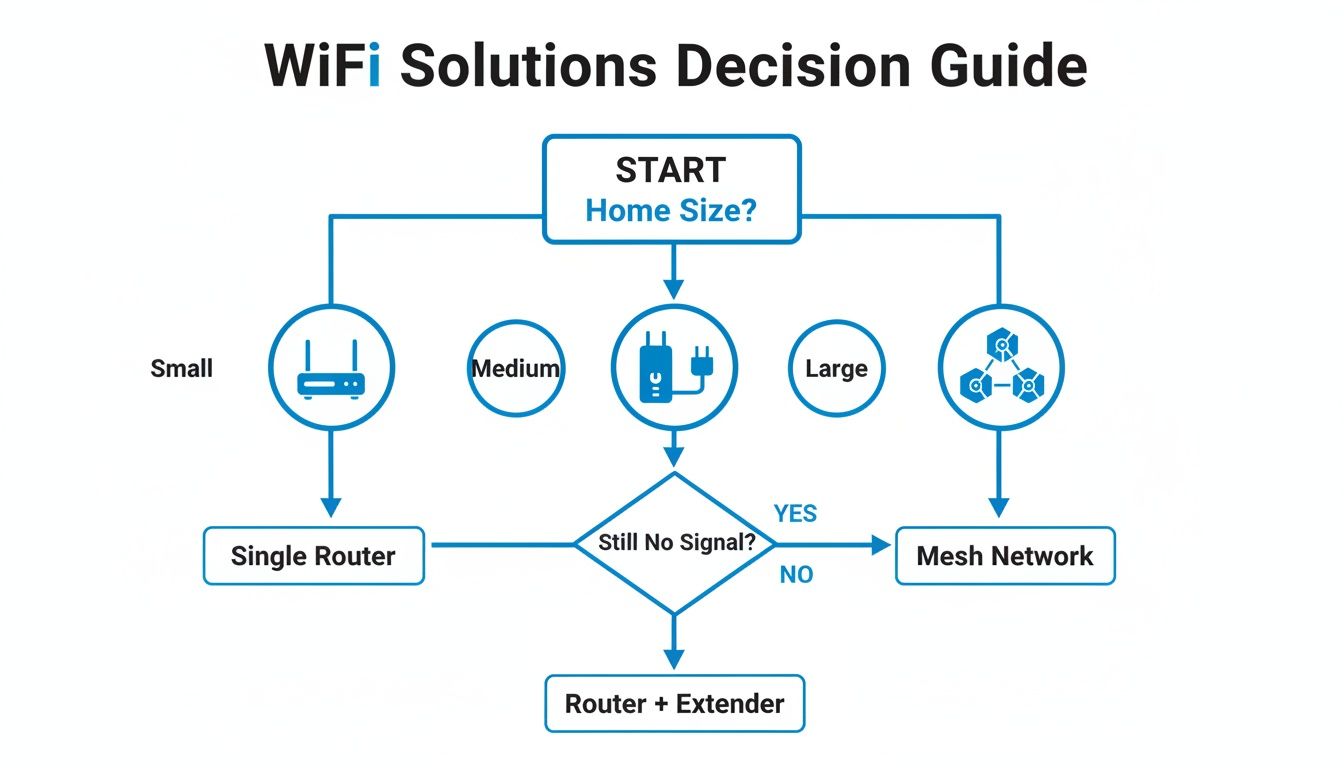
As you can see, the first and most important question is about your home's square footage. That's the best starting point to figure out if a single router, an extender, or a mesh system is what you need.
Evaluate Your Home’s Physical Layout
First things first, take a look at the physical space you're trying to cover. A bigger house obviously needs more help getting a signal from one end to the other, but other factors are just as critical.
- Square Footage: If your home is under 1,500 square feet, a powerful, modern router might be all you need. But once you get into the 2,000-3,000+ square foot range, a mesh system is pretty much a must-have to kill those dead zones.
- Number of Floors: WiFi signals get tired climbing stairs. For multi-story homes, a mesh system with a node placed on each level is the most reliable way to get a strong, consistent signal everywhere.
- Building Materials: Not all walls are the same. Signals fly through drywall, but things like brick, concrete, and old plaster can stop WiFi in its tracks. If your home is built like a fortress, you'll need more access points placed closer together.
Consider Your Device Density
Next up, do a quick count of how many devices are fighting for a slice of your WiFi. This is what we call device density. It’s not just laptops and phones anymore—think smart TVs, security cameras, thermostats, doorbells, and game consoles. They all add up.
A typical family can easily have 30 or more connected devices. When dozens of gadgets are all trying to talk to the router at once, things can get congested fast, slowing everyone down.
If your home has over 50 devices, especially with power users in the family, a mesh system is your best bet. It’s smart enough to manage all that traffic so one person’s 4K movie binge doesn't freeze someone else's important video call.
On the flip side, a small apartment with just a handful of devices can usually get by just fine with a single, solid router.
Assess Your Internet Habits
Finally, be honest about what you and your family actually do online. Your daily activities have a huge say in the kind of WiFi performance you really need.
- Casual Browsing and Streaming: If you're mostly on social media, checking email, and streaming HD video on a screen or two, a basic setup will probably work just fine.
- Competitive Gaming and 4K Streaming: These are the real network hogs. They need tons of bandwidth and are super sensitive to lag. Gamers and movie buffs will get the most out of a mesh system or even a wired backbone for rock-solid stability.
- Data-Heavy Remote Work: Working from home means constant video calls, uploading huge files, and using cloud apps. A reliable connection is everything. A robust mesh system—or even better, a managed WiFi service—ensures your workday isn’t ruined by a dropped connection.
At the end of the day, your whole home WiFi solution is only as good as the internet plan behind it. Pairing a top-tier system with a fast, symmetrical fiber connection is the only way to get the performance you're paying for and make sure every single device gets the speed it needs.
DIY Setup vs Managed WiFi Service
Once you’ve figured out which whole‑home Wi‑Fi solution is right for your space, you’ve got another big decision to make: do you tackle the setup yourself, or do you call in the pros? This is really a choice between total control and total convenience, and what's right for you comes down to how comfortable you are with technology and how much you value your peace of mind.
Going the Do-It-Yourself (DIY) route puts you firmly in the driver’s seat. You get to pick every single piece of hardware, from the exact mesh system down to the brand of access points. This is a dream for tech enthusiasts who love to tinker with settings and squeeze every last drop of performance out of their network.
But all that freedom comes with responsibility. A DIY project can quickly turn into a headache of confusing instructions, devices that refuse to talk to each other, and troubleshooting that feels like a full-time job. If you don't get the configuration just right, you could accidentally leave your network open to security risks or end up with performance that doesn't come close to what the hardware is capable of.
The Case for a DIY Approach
There’s no doubt that setting up your own network can be a rewarding project and gives you a real sense of ownership. If you want absolute, fine-grained control over every setting, this is the way to go.
- Total Hardware Control: You can mix and match different brands and models to build a system that perfectly suits your home and your budget.
- Deep Customization: For the advanced user, this means diving into firmware, setting up custom security rules, and tweaking network traffic for specific things like lag-free gaming or smooth 4K streaming.
- Potential for Cost Savings: If you're a savvy shopper, you can hunt for deals on equipment and skip the installation and monthly service fees.
Just remember, when you go DIY, you’re also signing up to be your own tech support. When something inevitably goes wrong, it’s all on you to figure out what’s broken and how to fix it. If you need a hand getting started, our guide on how to set up mesh WiFi can walk you through the key steps.
Why a Managed WiFi Service Offers Peace of Mind
The other option is a managed WiFi service—basically, the "set it and forget it" choice. Think of it like hiring a professional electrician to wire your house instead of doing it yourself. You might not pick out the brand of circuit breakers, but you have confidence the job is done right and, most importantly, safely.
With a managed service like Premier Protects, you get expert installation, continuous support, and proactive maintenance from day one. Our pros handle everything from finding the perfect spot for each device to locking down your network against threats, making sure your system just works.
A managed service turns your WiFi from another complicated gadget you have to manage into a simple utility that’s always there, just like your electricity or water. It’s all about getting flawless connectivity without the technical headaches.
This kind of professional oversight is more important than ever. Home networks are getting incredibly complex, and the market for the powerful WLAN technology behind these whole‑home Wi‑Fi solutions is booming—it grew by 10.6% to hit $2.3 billion in the first quarter of 2025 alone. With an estimated 39 billion IoT devices expected to be online by 2030, having a professionally managed network means you’re ready for whatever comes next.
Getting the Most Out of Your WiFi
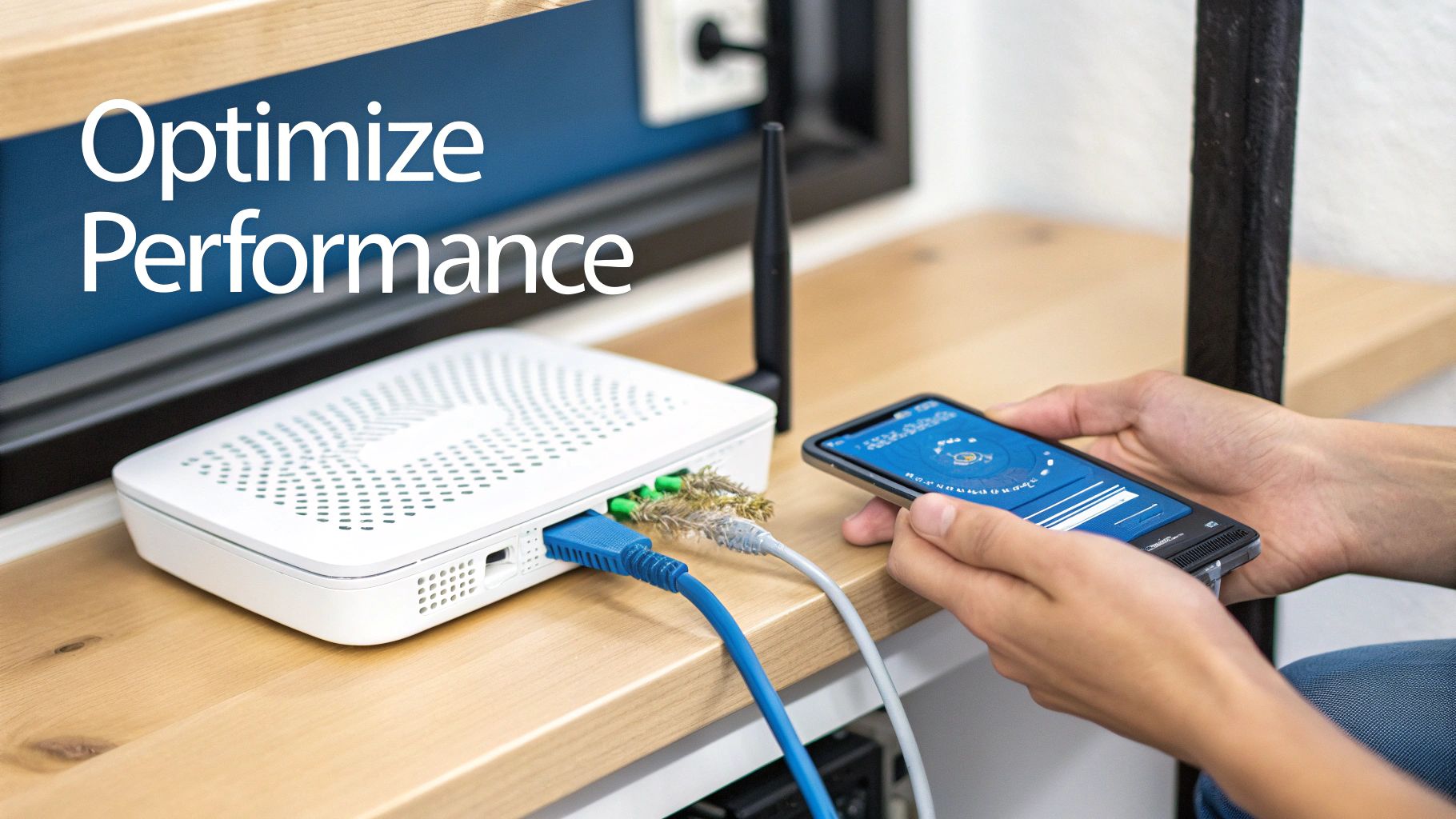
Getting your whole home wifi solution installed is a great start, but it’s not the finish line. If you want to unlock the full speed and rock-solid reliability you're paying for, a little fine-tuning is in order. Think of it like getting a new guitar—it works right out of the box, but a proper tune-up makes all the difference in how it sounds.
Optimizing your network is about more than just plugging things in and hoping for the best. It means being smart about where you put your gear and how you set up your network. A few simple tweaks can take a good network and make it great, making sure every device in your house gets the fast, stable connection it deserves.
Strategic Placement for a Stronger Signal
Where you physically place your router and any extra mesh nodes is the single most important factor for your network’s performance. A router stuffed in a closet or behind a TV will always struggle, creating frustrating dead zones and slow speeds. You have to think like a radio wave—what’s standing in the way?
Keep your equipment out in the open, ideally in a central spot on each floor of your home. Avoid tucking them away in cabinets or leaving them on the floor. Elevation is your friend here, so putting a node on a bookshelf or side table is always better than hiding it behind the couch.
Also, watch out for things that block Wi-Fi signals. The usual suspects include:
- Thick Walls: Brick, concrete, and even old plaster can kill a wireless signal.
- Large Metal Appliances: Your refrigerator and oven are basically signal black holes.
- Water: It might sound strange, but a big fish tank can interfere with your connection.
The goal is simple: create the clearest possible line of sight between your Wi-Fi nodes and your devices. Moving a node just a few feet can dramatically boost your speed and coverage.
For a deeper dive, check out our guide on how to improve home WiFi—it’s packed with practical tips you can use right now.
https://premierbroadband.com/how-to-improve-home-wifi/
Unlock Peak Performance with a Wired Backhaul
While mesh Wi-Fi is built to work wirelessly, there’s a secret weapon for getting the absolute best performance: a wired backhaul. All this means is connecting your mesh nodes to each other with a physical Ethernet cable instead of letting them talk over Wi-Fi.
Think of it this way: a wireless connection between nodes is like two people trying to shout across a loud, crowded room. A wired backhaul is like giving them a direct, private phone line. The conversation is faster, clearer, and way more reliable.
When you connect your nodes with an Ethernet cable, it frees up all the wireless bandwidth for your devices—your laptop, phone, and smart TV. This can slash network congestion and give your speeds a serious boost, especially if you have a lot of gadgets competing for attention. For those with more complex setups, learning about managed Ethernet switches can help take your network management to the next level.
Essential Security and Troubleshooting Habits
A fast network is great, but a secure network is non-negotiable. Good digital security starts with smart Wi-Fi habits, and one of the easiest and most effective steps is setting up a guest network.
A guest network creates a totally separate, walled-off connection just for visitors. They get internet access, but they can't see or interact with any of your personal devices, like your computers or smart home gadgets. It’s a simple way to keep your private network safe.
Of course, you should also be ready for the occasional hiccup. Most common Wi-Fi problems can be fixed with a few simple steps, no tech support call needed.
Quick Troubleshooting Checklist:
- Reboot Everything: It’s a cliché for a reason. The "turn it off and on again" trick really works. Unplug your modem first, then your router, and finally restart any devices having trouble.
- Check Your App: Most modern whole home wifi solutions come with a handy smartphone app. Use it to run a quick diagnostic, test your speeds, and see if all your nodes are connected properly.
- Reposition a Node: If one corner of the house is still slow, try moving the nearest node. Sometimes shifting it just a little can make a huge difference in signal strength.
Alright, you're now armed with everything you need to kick those Wi-Fi dead zones to the curb for good. We've gone over what whole-home WiFi solutions actually do, compared the big players like mesh and extenders, and walked through how to pick the right one for your home.
But making the jump from spotty coverage to a seamless connection is about more than just convenience. These days, fast and reliable internet isn't a perk—it's as essential as electricity. It's the foundation for everything we do, from working at home and online classes to streaming our favorite shows and keeping up with family. A strong signal in every single room is the new baseline.
Pairing the Right Gear with a Powerful Connection
So, how do you get there? It’s a two-part play. First, you need the right hardware inside your home. That could be a smart mesh system if you've got a big house with tons of devices, or maybe just a simple extender for that one stubborn dead spot in your apartment. This is the gear that actually delivers the signal where you need it.
Second, that hardware needs to be hooked up to a powerful, symmetrical fiber internet connection. Think of your fiber connection as the engine. Without a fast, stable internet source feeding your network, even the fanciest Wi-Fi setup is going to feel sluggish.
When you match the right in-home Wi-Fi system with a powerful fiber internet connection, you're building the ultimate foundation for modern life. It’s a combination that lets you work, stream, game, and connect from every room, on every device, without a single hiccup.
It’s this teamwork between your internet service and your in-home network that unlocks that truly flawless experience. You can finally stop worrying about your video calls freezing in the middle of a meeting or the movie buffering right at the good part.
Building Your Connected Future
With the blueprint we’ve laid out, you’ve got the know-how to make the right call. You know the key things to look at:
- Your Home's Size and Layout: The bigger the space and the more walls you have, the more robust your system needs to be.
- How Many Devices You Have: The number of phones, laptops, smart TVs, and gadgets all fighting for bandwidth matters.
- Your Internet Habits: What you do online, whether it’s competitive gaming or just streaming video, determines the speed and performance you need.
The end game is simple: create one unified, smart network that handles whatever your family throws at it without breaking a sweat. You have the blueprint; now you can build a home where fast, reliable internet is just a given.
Ready to build a powerful, seamless network without all the guesswork? Premier Broadband combines the speed of 100% fiber internet with our Premier Protects managed Wi-Fi service to deliver flawless connectivity to every corner of your home. Learn more and get started today at premierbroadband.com.