Figuring out what you're really paying for streaming isn't as simple as looking at the sticker price. The final number on your bill is a mix of the base plan, how many services you're juggling, and any local taxes. For most households, this easily adds up to $50-$100 per month. Knowing the complete picture is the only way to make a smart choice for your wallet.
Understanding the Real Cost of Streaming Today
The glory days of cheap, simple streaming are behind us. What started as an affordable, ad-free alternative to cable has ballooned into a complicated market. Costs can quickly get out of hand, sometimes even blowing past what you used to pay for a traditional cable package. We've all felt that 'subscription fatigue' when trying to manage multiple services, each with its own price hikes and confusing plans.
To do a true streaming services cost comparison, you have to look beyond the advertised monthly fee. The actual expense comes down to a few factors that most people don't think about.
Key Factors Influencing Your Total Bill
- Service Tiers: Nearly every platform now has multiple plans. You'll usually find a cheaper ad-supported option and at least one ad-free tier that throws in perks like 4K streaming or the ability to download shows for offline viewing.
- Live TV vs. On-Demand: This is a big one. Live TV streaming services like YouTube TV and Hulu + Live TV are built to replace cable entirely, and they come with a hefty price tag—often $70+ per month. On-demand services like Netflix or Disney+ are much cheaper in comparison.
- Bundles and Promotions: Companies love to bundle services, like the popular Disney Bundle (Disney+, Hulu, ESPN+), which can save you a few bucks compared to subscribing to each one separately.
- Hidden Costs: Don't forget about sales tax, which most states add on. You might also need to upgrade your streaming device or router to get the best experience, which is another potential cost.
And let's not forget the foundation of it all: your internet connection. You can't have a good streaming experience, especially with 4K content, without a fast, reliable internet plan. If you need some help with that, check out our guide on finding affordable home internet plans that actually work.
Your total entertainment cost is no longer just one bill. It's a collection of individual subscriptions, internet fees, and optional add-ons. The first step to getting your monthly spending under control is adding it all up.
Here’s a quick look at the main differences between the two kinds of streaming services you'll run into.
| Feature Comparison | On-Demand Streaming (e.g., Netflix, Max) | Live TV Streaming (e.g., YouTube TV, Fubo) |
|---|---|---|
| Primary Content | A library of movies and TV shows you can watch anytime. | Live channels just like cable (news, sports, local stations). |
| Typical Monthly Cost | $7 – $23 per service | $73 – $110+ per service |
| Best For | Binge-watching your favorite shows and movies. | Completely replacing your traditional cable subscription. |
| Flexibility | Very flexible. It's easy to cancel and restart month-to-month. | Less flexible. It's more of a long-term commitment. |
Comparing On-Demand Streaming Plans and Tiers
When you start a streaming services cost comparison, you’ll quickly find that the sticker price is just the tip of the iceberg. Services like Netflix, Disney+, and Max organize their plans into different tiers, and each one is built for a specific kind of viewer. You have to look beyond the monthly fee to really see what you’re getting for your money.
The biggest split is usually between ad-supported and ad-free plans. Going with commercials can save you $5 to $10 per month on each service, which really adds up if you’re on a budget. But that choice isn’t just about watching ads—it comes with other trade-offs.
This chart shows how quickly streaming costs, once the cheap alternative to cable, can balloon and start looking a lot like those old cable bills.
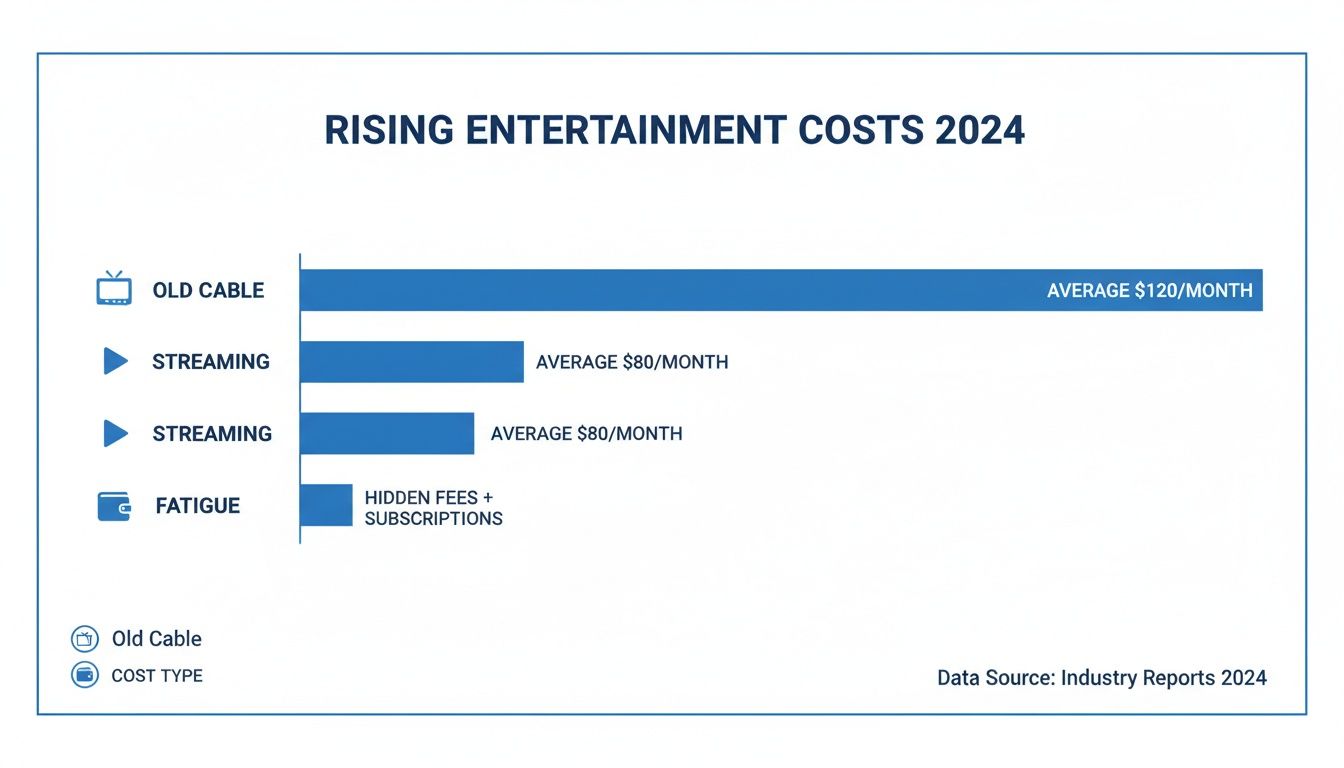
It's pretty clear that stacking multiple subscriptions, especially with hidden fees, is causing a lot of "subscription fatigue" for families everywhere.
Ad-Supported vs. Ad-Free: The Real Difference
Picking an ad-supported plan is an easy way to lower your bill, but you need to know what you’re giving up. These cheaper plans often cut features like offline downloads, which is a dealbreaker if you travel or commute a lot.
Think about a family getting ready for a road trip—an ad-free plan with downloads is a lifesaver. On the other hand, if you mostly watch at home by yourself, the ad-supported tier is probably a smart way to save some cash. It's all about matching the plan’s features to how you actually live.
And with prices going up across the board, these decisions matter more than ever. The average cost for the top 10 paid streaming services in the U.S. jumped by 12% recently, another year of big hikes. A family juggling Netflix (around $15.49), Hulu ( $7.99), and Paramount+ ( $5.99) could easily be spending $50 or more a month, making many people wonder if "cord-cutting" is still a bargain.
Deconstructing Premium Features: 4K and Simultaneous Streams
Premium tiers try to justify their higher price with perks like 4K Ultra HD resolution and more simultaneous streams. 4K looks incredible, but it's only worth it if you have the right gear. If you don't have a 4K TV and a fast, stable internet connection, you’re just paying for something you can’t even use.
Simultaneous streams are a much more practical feature, especially for families or roommates. A standard plan might give you two streams, while a premium plan could offer four.
- For a family of four: A premium plan with four streams is almost a must-have to keep everyone happy.
- For a couple or single person: Two streams is usually plenty, making the premium upgrade an unnecessary expense.
Choosing a streaming plan isn't just about the price—it's about paying only for the features you will actively use. A household with two viewers paying for four streams is leaving money on the table every single month.
To sort through all the options, a good guide to comparing streaming services that covers price, content, and features is a huge help. It can make it much clearer which platform is the right fit for you.
On-Demand Streaming Services Cost and Feature Breakdown
To make this streaming services cost comparison even clearer, let’s lay out what the major players are offering. The table below gives you a side-by-side look at what your money gets you, so you can find the best value for your viewing habits. Sometimes, it helps to dig into one platform; for a closer look, check out our guide on https://premierbroadband.com/what-you-need-to-know-about-netflix/.
| Streaming Service | Ad-Supported Plan Cost | Ad-Free Plan Cost | Max Video Quality | Simultaneous Streams | Best For |
|---|---|---|---|---|---|
| Netflix | ~$6.99/mo | ~$15.49/mo (Standard) | 4K Ultra HD (Premium) | 2 (Standard), 4 (Premium) | Binge-watchers and fans of original blockbusters. |
| Disney+ | ~$7.99/mo | ~$13.99/mo | 4K Ultra HD | 4 | Families and fans of Disney, Marvel, and Star Wars. |
| Max | ~$9.99/mo | ~$15.99/mo | 4K Ultra HD (Ultimate) | 2 (Standard), 4 (Ultimate) | Viewers seeking premium HBO content and a deep film library. |
| Hulu | ~$7.99/mo | ~$17.99/mo | 4K Ultra HD | 2 | Those who want next-day access to current network TV shows. |
| Paramount+ | ~$5.99/mo | ~$11.99/mo (with Showtime) | 4K Ultra HD | 3 | Fans of CBS, live sports like the NFL, and Star Trek. |
This breakdown shows the little details that make a big difference. For example, Disney+ gives you 4K quality and four streams with its standard ad-free plan, but Netflix makes you pay for its top-tier premium plan to get those same features. Understanding these differences is how you build a streaming lineup that gives you everything you want without draining your wallet.
Evaluating Live TV Streaming Service Costs
For anyone looking to completely ditch their cable box, Live TV streaming services like YouTube TV, Hulu + Live TV, and Fubo are fantastic alternatives. They were built from the ground up to give you that traditional cable experience—live news, local channels, sports—without the clunky hardware and rigid contracts.
But let's be honest, the original promise of a much cheaper, flexible option has gotten a little murky as prices keep creeping up.

This trend has a lot of cord-cutters asking themselves if they’re really saving any money. We've seen some pretty big price hikes, with most of the top-tier plans now starting anywhere from $73 to $110 per month. Thanks to the soaring costs of licensing local stations and sports rights, nearly every major service has bumped up its base price in the last year.
Beyond the Base Price: Channel Lineups and Add-Ons
When you’re doing a streaming services cost comparison for live TV, the monthly price is just the starting line. The real value is hidden in the channel lineup and the cost of any add-ons you might need. Each service tailors its channel packages for different tastes, which means there’s no single "best" option for everyone.
A huge sports fan, for instance, might lean toward Fubo for its deep roster of international sports channels. But another fan might see more value in YouTube TV, especially with its exclusive deal for the NFL Sunday Ticket package.
The most expensive plan isn't always the best. A service with 150 channels is a waste of money if you only watch 20 of them. The goal is to match the channel lineup to your household's actual viewing habits, not just to get the highest channel count.
This is where you need to watch out for add-on packages. A base plan can look like a great deal, but your final bill can balloon quickly once you start adding premium movie channels, extra sports coverage, or niche content.
A Look at Cloud DVR and Simultaneous Streams
Another huge factor to compare is the Cloud DVR. This feature lets you record live TV to watch whenever you want, and the specs can vary wildly from one service to the next.
Here’s what to look for:
- Storage Capacity: YouTube TV is famous for its unlimited DVR storage, keeping your recordings for up to nine months. Others might cap you at 50 or 200 hours, which means you’ll have to constantly manage your library.
- Ad-Skipping: Most services let you fast-forward through commercials on your recorded shows—a major perk! But you should always double-check this before you sign up.
Simultaneous streams are just as critical, especially for families or roommates. Most live TV plans include three simultaneous streams. If you’ve got more than three people who want to watch different shows at the same time, you’re going to run into a frustrating bottleneck.
Making the Final Decision
Picking the right live TV streaming service is all about balancing what you need against what it costs. It means taking a hard look at the channel packages, DVR features, and any extra fees that could inflate your monthly bill.
Start by making a simple list of your "must-have" channels. This one step can instantly help you narrow down the field and keep you from overpaying for a bunch of content you'll never touch. For a more tailored approach, you can learn more about how to cut the cord with Premier Broadband and MyBundle.TV, which helps simplify the whole process.
Ultimately, the best service is the one that gives you all your essential live content without a hitch, backed by a solid fiber internet connection that ensures you never miss a single moment.
Finding Your Ideal Streaming Mix for Every Need
A streaming services cost comparison is about more than just the monthly price tag—it’s about matching the right services to your life. The truth is, there's no single perfect setup. What works for a single person is going to be completely different from what a big family needs to keep everyone happy.
The real trick is to think about who's watching. Once you know your household's main viewing habits, you can build a custom bundle of services that gives you the most bang for your buck, without wasting money on features or shows you’ll never touch.
For the Family Household
For families, the streaming game is about functionality just as much as it is about content. You need enough simultaneous streams to go around, solid parental controls, and a library diverse enough to keep everyone from toddlers to teenagers entertained.
A great starting point for any family is often the Disney Bundle (which gets you Disney+, Hulu, and ESPN+). That combination alone covers kids' movies, the latest TV shows, and a healthy dose of live sports. Add Netflix’s Premium plan on top of that, and you’ve got four simultaneous streams and a massive catalog of originals, which should stop most fights over the remote.
- Key Features to Prioritize: At least four simultaneous streams, kid-specific profiles with content ratings, and offline downloads for those long car rides.
- Estimated Monthly Cost: A setup like this will usually run between $40 and $60, depending on which ad-free or ad-supported plans you choose.
This mix gives you a well-rounded library that has something for everyone, plus the tools parents need to manage what their kids are watching.
For the Dedicated Sports Fanatic
If your weekends revolve around the big game, your streaming needs are in a different league entirely. Forget binge-watching shows; you need a Live TV streaming service that carries the specific sports channels and leagues you follow. And for the best seat in the house, you’ll want it all in crisp 4K.
Fubo is a top contender here, especially known for its huge lineup of both international and U.S. sports channels. YouTube TV is another fantastic all-rounder, and it's a must-have for football fans since it’s the exclusive home of the NFL Sunday Ticket add-on. If you're looking for a more budget-friendly route, combining a leaner service like Sling TV with ESPN+ can cover a lot of ground without the premium cost.
When you're a sports fan, the details matter. Don't get distracted by a high channel count. Make sure the service has your local regional sports networks and the specific leagues you can't live without. Paying a little more is worth it if it means you never have to miss a game.
For the Ultimate Movie Buff
For the true cinephile, quality always trumps quantity. Your ideal streaming mix should focus on services with deep film libraries, the best picture quality like 4K HDR with Dolby Vision, and immersive sound from Dolby Atmos.
Max is the perfect place to start. It’s packed with the entire Warner Bros. film library, all the HBO originals, and a fantastic, curated collection from Turner Classic Movies. To go even deeper, The Criterion Channel is a treasure trove of classic, indie, and international cinema. And if you're hunting for something new to watch, checking out guides on the best crime dramas on Netflix can help you uncover some hidden gems.
Rounding out the collection with Netflix's Premium tier is a smart move. It’s one of the few services that consistently releases its original movies and shows in stunning 4K. For film lovers trying to find this year's top contenders, you can check out our guide on where to watch the Academy Award nominees. By picking services that fit these specific profiles, you can build a personalized entertainment package that works perfectly for you without breaking the bank.
Actionable Strategies to Reduce Your Streaming Bill
Okay, comparing plans is the first step. But how do you turn that knowledge into real savings? You can seriously lower your monthly entertainment bill without giving up the shows and movies you love. It’s all about being smarter with your subscriptions and using tools designed to find the best deals for you.
A lot of families overspend simply because they stick with the same services out of habit. Just a few simple tweaks can unlock immediate savings and free up your budget for other things.
Embrace Subscription Cycling
One of the best tactics out there is subscription cycling, sometimes called "churning." Instead of keeping every service active all year, you subscribe just long enough to binge-watch a series you can't miss, and then you cancel. This strategy takes full advantage of the monthly, no-contract model that most streaming platforms use.
For instance, you could sign up for Max for a couple of months to catch the new season of House of the Dragon. Once you're done, cancel it and switch over to Netflix when the next season of Stranger Things is released. It takes a little planning, but it guarantees you’re only paying for content you're actually watching right now.
By rotating just two or three services throughout the year instead of paying for them all at once, a household can easily save $150 to $300 annually. It’s the single best way to beat subscription fatigue and get your spending under control.
Use Smart Bundling Tools
Trying to manually track shows and cycle through subscriptions can feel like a part-time job. That's where tools like MyBundle.TV come in. Instead of you doing all the guesswork, these platforms do the hard work for you.
You just tell the tool what channels, shows, and sports leagues you want to watch. It then scans all the available streaming services and packages to build the most cost-effective bundle for your exact needs. This approach often finds savings you would’ve missed trying to figure it out on your own.
- Personalized Recommendations: It goes beyond generic advice to find the leanest, cheapest mix of services for your home.
- Discover New Options: You might find that a smaller service like Sling TV paired with another on-demand platform covers all your bases for less than one big, expensive live TV package.
- Simplified Management: These tools give you one place to see what you’re paying for, making it much easier to manage your entertainment budget.
Look for Annual Discounts and Promotions
Finally, don't forget about the easy savings offered through annual payment plans. Many services, including Disney+ and Paramount+, give you a discount for paying for a full year upfront. You’ll often get 12 months of service for the price of 10. If you know a platform is a must-have in your household, this is a no-brainer way to lock in savings.
By combining these strategies—cycling subscriptions for occasional shows, using a smart tool like MyBundle.TV to build your core lineup, and choosing annual plans for your favorite services—you can create a super-efficient and affordable entertainment setup. When you pair that with a fast fiber internet connection, you get a premium viewing experience without the premium price tag.
Streaming Costs: Your Questions Answered
When you start comparing streaming services, a few common questions always pop up. Getting straight answers on the technical side of things and how to actually save money is key to building a setup that works for your family without breaking the bank.
What Internet Speed Do I Need for 4K Streaming?
Most services will tell you that 25 Mbps is enough for a single 4K stream. But let's be realistic—that's just not how modern homes work anymore.
If you have kids gaming online, someone on a video call for work, and you're trying to watch a movie in 4K, that 25 Mbps is going to cause a lot of buffering. For a smooth, frustration-free experience for everyone, you really need a fiber internet plan with symmetrical speeds of 100 Mbps or higher.
Is Bundling Streaming Services Actually Cheaper?
Yes, it absolutely can be. A great example is the Disney Bundle, which packages Disney+, Hulu, and ESPN+ together for less than you'd pay for each one separately. It's a simple way to get more for your money.
But you can save even more. A discovery tool like MyBundle.TV goes a step further by building custom bundles around the specific channels and shows you love. It often finds smart combinations you wouldn't have thought of, saving you more in the long run.
How Can I Best Manage All My Streaming Subscriptions?
The easiest way to keep track of your spending and avoid those surprise charges is to manage everything in one place. You could use a subscription app or a separate email, but a service like MyBundle.TV is built for this.
It not only helps you find the right services to begin with but also gives you a single dashboard to see all your subscriptions clearly. This makes it much simpler to decide what to keep, what to cancel, and when to rotate services to get the most out of your budget.
Ready to build the perfect entertainment setup without the high costs? Premier Broadband provides the ultra-fast, reliable fiber internet you need for buffer-free streaming, paired with MyBundle.TV to find your ideal, budget-friendly service mix. Explore our internet plans and start saving today.