
You queue into a ranked match after work and everything looks fine until the first real fight. Your aim is on target, comms are clear, then the game hitches for half a second and the round is gone. The plan on your bill still says high-speed internet. That label does not tell you whether the connection can hold steady under real gaming load.
Gamers get pushed toward the wrong plans because ISPs sell headline speeds, not the numbers that decide whether a match feels clean or sloppy. Jitter, packet loss, routing quality, and peak-hour congestion matter more than another jump in advertised download speed once you have enough bandwidth to run the game. If those metrics are bad, a connection can test fast and still feel inconsistent every night.
The best internet for gaming in 2026 is the connection that stays predictable under pressure. Low ping matters, but stable latency matters just as much. A line that swings from one moment to the next creates delayed inputs, bad hit registration, and voice chat problems even if the speed tier looks generous on paper.
That is why a 100% fiber connection stands out for gaming. Fiber is built to keep latency low and performance more consistent during busy evening hours, while cable plans often rely on shared neighborhood capacity and "up to" speed claims that say very little about congestion. For competitive play, the goal is simple. Choose the connection with the cleanest, most stable path to the server, not the one with the biggest number in the ad.
Your Internet Connection is Costing You the Win
You usually notice a bad connection in the ugliest ways. Your inputs feel delayed. Hit registration gets weird. Teammates sound robotic in voice chat right as a push starts. Then the match ends and your speed test still says the plan is “fast.”

That disconnect frustrates people because the industry trains them to focus on one number. Download speed gets all the marketing attention. But gaming punishes instability more than it punishes modest bandwidth. A connection can be fast on paper and still feel terrible in actual matches if latency spikes at the wrong time.
I’ve seen this most often in homes where everything works fine until evening. Someone starts a stream in the living room, another device begins a cloud backup, and suddenly the match quality drops. Not because the household internet “stopped working,” but because the line couldn’t keep game traffic clean under stress.
What losing to your ISP actually looks like
A weak gaming connection usually shows up in a few patterns:
- Lag spikes in fights: The game feels normal, then suddenly slows or skips during the most demanding moment.
- Rubber-banding: Your character snaps backward or teleports because the server and your client stop agreeing.
- Peak-hour misery: Afternoon is fine. Evening gets messy when neighborhood traffic rises.
- Streaming problems while playing: Your game may stay barely playable while your upload chokes and the stream quality falls apart.
A stable connection wins more games than a flashy speed tier that collapses under load.
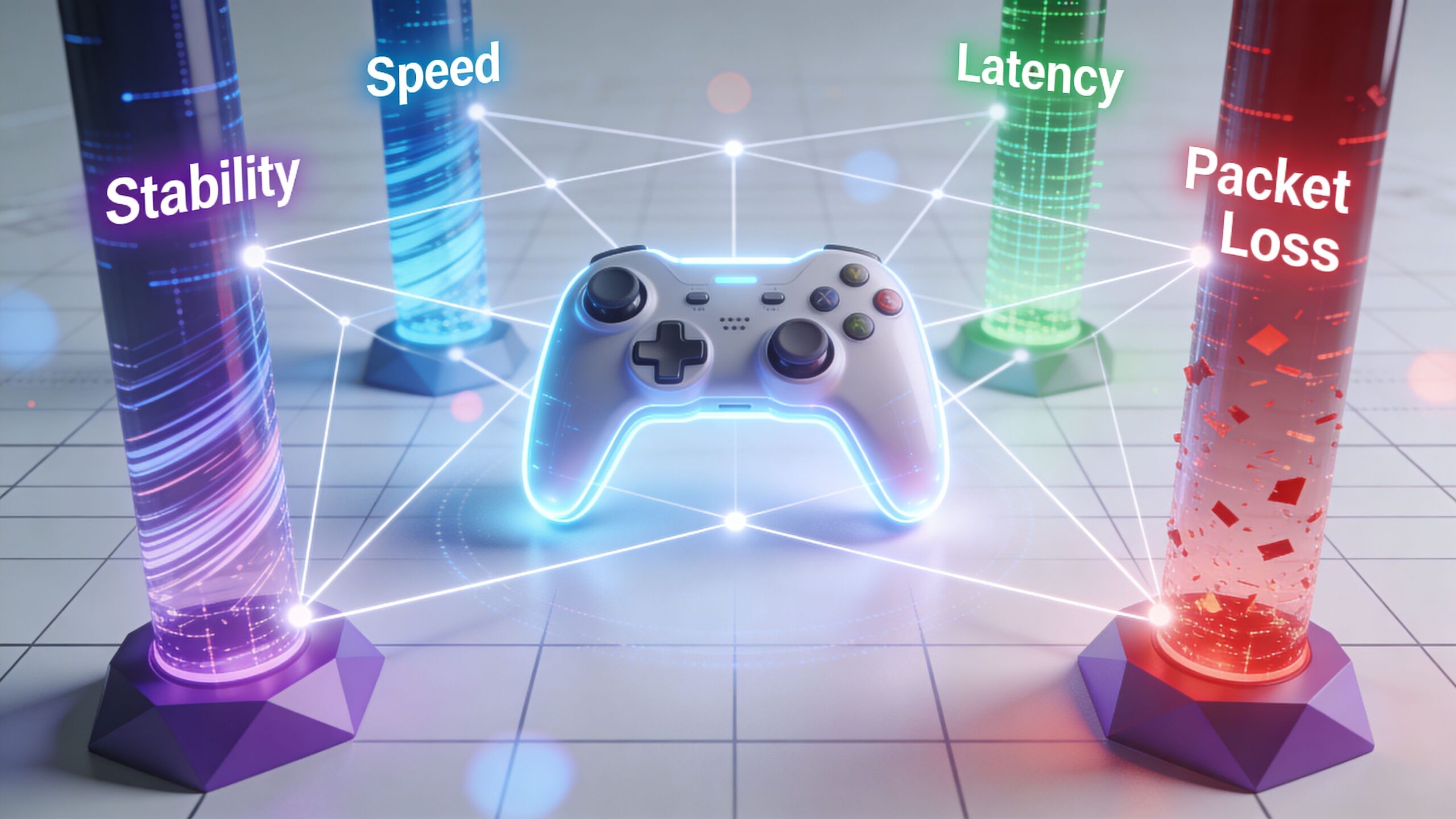
That’s why choosing the best internet for gaming starts with the metrics ISPs rarely advertise. Ping matters. Jitter matters. Packet loss matters. And the underlying network technology matters even more.
Why Gaming Demands More Than Just Speed
Most online games don't need massive bandwidth during active play. What they need is a connection that delivers small bursts of data quickly, consistently, and without errors. That’s why a gamer can have a “fast” plan and still get a miserable experience.
Latency is the first number to care about
Latency, usually shown as ping in milliseconds, is the time it takes for your action to travel to the server and for the response to come back. In a shooter, that’s the delay between clicking and the server recognizing the shot. In a fighting game, it’s the delay between your input and the server state catching up.
For competitive play, lower is better. A connection that stays low and consistent feels responsive. A connection that swings around makes everything feel slippery, even if the average speed is high.
Jitter is what makes a good ping turn bad
A lot of gamers know to check ping. Fewer check jitter. Jitter is the variation in latency over time. If latency is travel time, jitter is unpredictability in that travel time.
That unpredictability is what creates the “it felt fine a second ago” problem. The average latency might look acceptable, but if packets arrive at uneven intervals, movement and hit registration feel off. You’ll notice it in games that demand precise timing long before you notice it in a casual web browser.
Packet loss is the silent match killer
Packet loss happens when some of your traffic never arrives. Games can compensate up to a point, but they can’t hide repeated loss. Missing packets cause snapping, freezing, voice drops, and desync.
This is one reason serious gamers care about line quality more than headline speed. You can’t brute-force your way past packet loss with a bigger download tier. If the connection is noisy or congested, the game still suffers.
Practical rule: If your game feels inconsistent rather than simply slow, check for jitter and packet loss before you blame download speed.
Bandwidth still matters, just not in the way ads suggest
Bandwidth is the capacity of your connection. It matters most when your network has to do more than one thing at a time. A solo player on a quiet network can get by with less than a family home where people are gaming, streaming, updating consoles, and taking video calls all at once.
The baseline and effective recommendations are far apart now. While the FCC's baseline for broadband is just 3-6 Mbps for gaming, modern requirements have escalated. Optimal setups recommend 500 Mbps for a household with gamers and 1 Gig for multi-gamer families, while today’s game downloads and patches often run 50-150 GB. Cloud gaming services require 50-100 Mbps for HD quality, and streaming gameplay can demand an additional 10 Mbps or more of upload speed, according to LiveOak Fiber’s gaming speed guide.
Upload speed is no longer optional
Upload used to be treated like an afterthought. That made sense when most households mostly downloaded pages and videos. It doesn’t hold up for modern gaming.
If you stream to Twitch, upload clips, play co-op while someone else is on a video call, or use cloud saves heavily, weak upload can bottleneck the whole experience. That’s where symmetrical speeds matter. A plan with strong download but weak upload can still feel cramped for a modern gaming household.
The four metrics that matter most
| Metric | What it affects in real play | What a bad result feels like |
|---|---|---|
| Latency | Responsiveness | Delayed shots, late inputs |
| Jitter | Consistency | Random spikes, uneven movement |
| Packet loss | Accuracy of game data | Rubber-banding, voice cuts, desync |
| Bandwidth | Capacity during downloads, streams, and multi-device use | Slow updates, congestion, household slowdown |
If you remember one thing, remember this: the best internet for gaming is the connection that stays stable when the house is busy, not the one that posts the prettiest speed test at noon.
Comparing Internet Technologies for Gaming Performance
You queue for ranked at 8:30 p.m., your ping looks fine in the lobby, and then the match starts. Inputs feel delayed, voice chat breaks up, and one teleporting enemy decides the round. That usually is not a raw speed problem. It is the access technology underneath the plan, and whether it holds latency steady once the neighborhood gets busy.
Fiber, cable, DSL, satellite, and fixed wireless can all advertise impressive download numbers. Gaming exposes the part ads gloss over. Jitter, packet loss, upload headroom, and peak-hour congestion separate a line that feels sharp from one that only looks good on a speed test.
Here is the quick comparison.
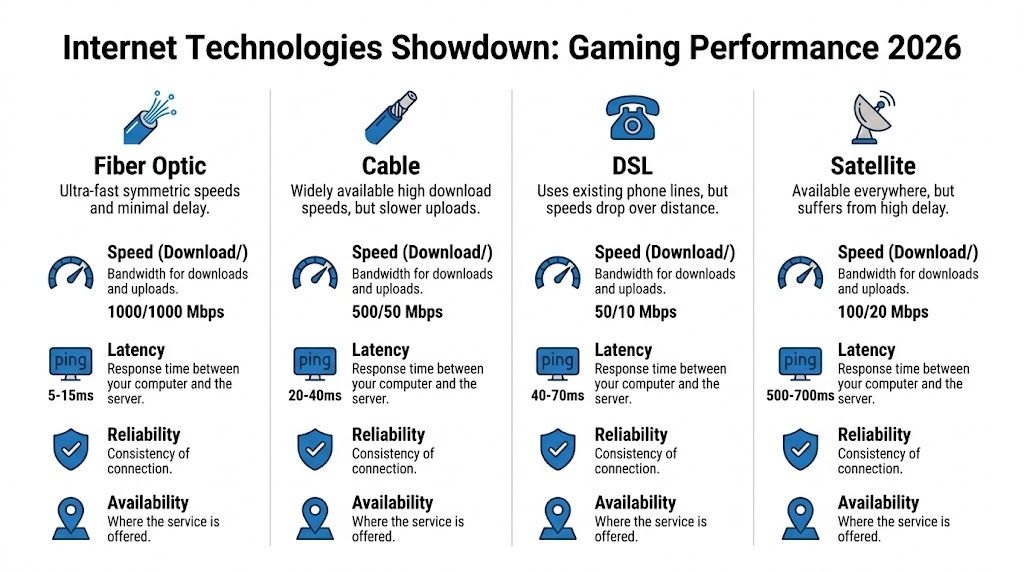
| Technology | Typical Latency | Symmetrical Speeds? | Peak Hour Reliability | Best For |
|---|---|---|---|---|
| Fiber | Low. Top fiber can reach below 10 ms, and providers like Frontier Fiber and CenturyLink commonly deliver 8-20 ms according to PCMag 2025 gaming benchmarks summarized by MyHomeConnected | Usually yes | Strong | Competitive gaming, streaming, multi-user homes |
| Cable | Higher than fiber. Better cable service often lands above top fiber ranges in the same benchmark summary | Usually no | More vulnerable to evening congestion | Casual to mid-core gaming where fiber isn’t available |
| DSL | Higher and less stable | Rarely | Weak to mixed | Light gaming only |
| Satellite or 5G home internet | Varies widely. Satellite is especially poor for twitch gaming | No | Mixed to weak | Backup use, rural access, non-competitive play |
Fiber solves the problems gamers actually notice
Fiber stands out because it stays cleaner under load. Lower latency matters, but lower jitter and lower packet loss matter just as much during real matches. A line that sits at 18 ms all night usually plays better than one that bounces between 14 and 35 ms whenever the block starts streaming.
That is why 100% fiber is the benchmark for serious play. It is less prone to the shared-node slowdowns that hit cable during peak hours, and symmetrical upload keeps voice chat, cloud saves, streams, and background sync from interfering with the match. For a closer look at how wired fiber compares with wireless alternatives in daily use, see Premier Broadband’s guide to fiber internet vs 5G home internet for families.
In practice, fiber gives gamers the most predictable connection. Predictability wins games.
Cable can work, but the weak point is consistency
Cable is often the second-best option. In the right area, it is good enough for most players. The problem is that cable performance depends heavily on how crowded the local node gets and how much upload capacity the plan gives you.
That trade-off shows up at the worst time. Afternoon matches may feel solid, then evening sessions pick up extra latency, more jitter, and occasional packet loss. The benchmark source above places strong cable service behind top fiber on latency, which matches what many competitive players see at home.
For ranked play, that variability is the issue. The advertised download tier does not tell you how stable the line will be from 7 p.m. to 11 p.m.
If your gameplay gets worse on a schedule, check for peak-hour congestion before you blame your router or console.
DSL is serviceable only for light use
DSL still fills coverage gaps, but it is hard to recommend for modern online gaming. Latency is usually higher, line quality varies by distance and copper condition, and upload tends to be limited.
For slower-paced games, it may be acceptable. For shooters, fighters, sports titles, and homes with multiple active devices, DSL usually runs out of room fast. The issue is not just speed. It is instability.
Satellite and 5G home internet require realistic expectations
Satellite remains the weakest fit for competitive gaming because the signal path itself adds too much delay. No gaming router fixes that.
5G home internet is more situational. In a strong coverage area with low tower load, it can handle casual gaming well enough. In a weaker spot, latency swings, jitter spikes, and congestion can make one match feel fine and the next feel broken. Wireless service also changes with signal conditions in a way wired fiber does not.
For gamers, that means fixed wireless is a fallback, not the standard to chase if fiber is available.
What each technology is actually good at
- Fiber: Best choice for competitive multiplayer, cloud gaming, streaming, and homes with several heavy users.
- Cable: Solid backup choice if local performance is stable at night and fiber is unavailable.
- DSL: Acceptable for lighter online play where options are limited.
- 5G home internet or fixed wireless: Reasonable for casual use in the right location, but less predictable than wired service.
- Satellite: Last resort for online gaming.
The real ranking
- Fiber for serious online gaming and busy households.
- Cable if local congestion is under control and fiber is unavailable.
- Fixed wireless or 5G home internet for lighter play.
- DSL where better wired options do not exist.
- Satellite only as a last option.
If you are comparing gaming internet, start with the technology, not the promo rate. A 100% fiber connection directly addresses the metrics cable providers often blur with "up to" speed claims. Lower jitter, lower packet loss, steadier latency, and stronger peak-hour behavior are what make a connection feel competitive.
Common ISP Pitfalls Every Gamer Must Avoid
A lot of bad gaming experiences come from perfectly legal ISP behavior that most customers never think to question. The plan sounds fast, the price looks decent, and then the fine print turns it into a bad fit for gaming.
The trap of “up to” speed claims
“Up to” is useful for sales teams because it highlights a best-case scenario. Gamers need the opposite. They need to know what the connection looks like at night, during updates, and while several devices are active.
A plan can advertise strong download speeds and still perform poorly where it counts. If the line suffers from congestion, unstable latency, or weak upload, the ad didn’t technically lie. It just didn’t tell you what matters.
Asymmetrical plans punish modern gaming
Many plans still give you far less upload than download. That may seem harmless until your household starts doing modern household things. Voice chat, cloud backups, livestreaming, game clips, video calls, and console syncing all compete for upload.
When upload gets squeezed, the entire connection starts to feel unstable. Games may remain “connected,” but responsiveness falls off. That’s one reason many gamers switch away from plans that looked fine on paper.
Data caps and long sessions don’t mix
Game files are huge now. Updates arrive often, and reinstalling a large title can eat through a surprising amount of data in a hurry. A capped plan can turn normal gaming habits into a monthly budgeting exercise.
Even worse, some providers respond to heavy use with throttling or soft slowdowns that show up exactly when a gamer notices them most. Long sessions, frequent downloads, and cloud-based game libraries expose those limits fast.
Don’t evaluate a gaming plan by the promo price alone. Evaluate what happens after the first month of real use.
ISP equipment can hold a good connection back
Sometimes the line to the house is fine and the rented gateway is the weak point. Cheap all-in-one hardware often struggles with range, device handling, or basic traffic management. That can create Wi-Fi instability that gets blamed on the ISP plan itself.
Ask whether you can use your own router, whether the included gear supports modern Wi-Fi standards, and whether the provider offers managed setup that optimizes the home network rather than just dropping off a box.
Questions every gamer should ask before signing
- How does the plan perform at peak hours? Ask specifically about evening congestion, not just advertised speeds.
- Is the upload speed strong enough for gaming and streaming? Don’t assume. Confirm it.
- Are there data caps or soft slowdowns? If there are, expect gaming pain later.
- What hardware is included? Weak gear can make a solid line feel unstable.
- Can the provider discuss latency, jitter, and packet loss? If they only talk about download speed, they’re skipping the important part.
The best internet for gaming usually comes from a provider that answers those questions directly instead of redirecting you to a giant “up to” number.
Optimizing Your Home Network for Low Latency
Even a strong ISP can’t save a sloppy home setup. I’ve seen players blame their provider when the issue was a far-away console on congested Wi-Fi, a cheap router stuck behind a TV, or a house full of devices all fighting for airtime.
Use Ethernet when the match matters
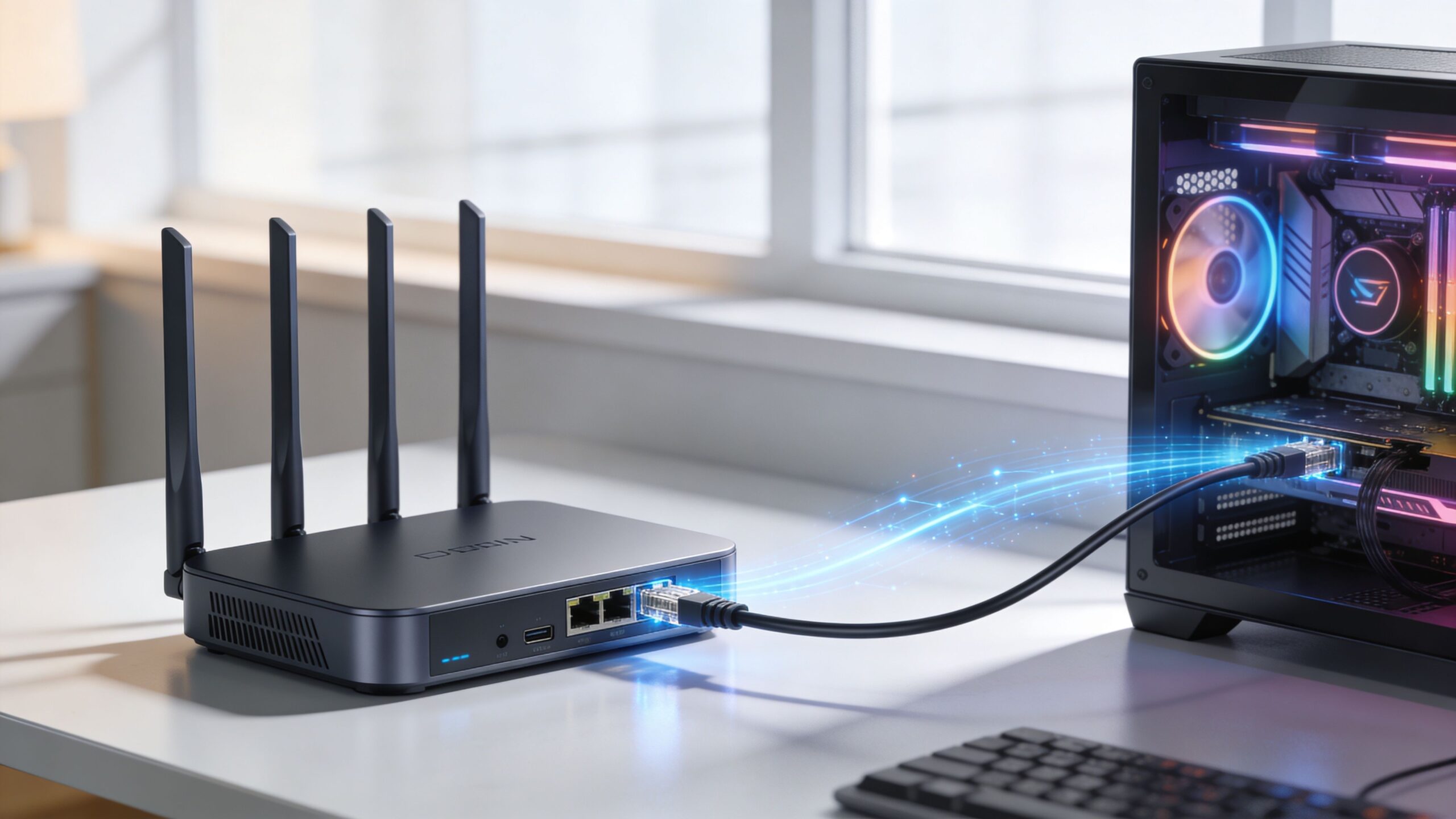
This is still the biggest easy win. A wired Ethernet connection removes a lot of the instability that Wi-Fi can introduce. It won’t magically fix a bad ISP, but it eliminates one major source of jitter, interference, and random packet retries inside your home.
If you play ranked shooters, fighting games, or anything where timing decides outcomes, wire your main setup. Don’t save Ethernet for “later.” Use it first, then troubleshoot the rest.
Fix your Wi-Fi before you buy more speed
If wiring isn’t possible, improve the wireless path before upgrading your plan.
- Move the router into open space: Don’t bury it in a cabinet or behind a TV.
- Separate your gaming device from crowded household traffic: Keep heavy streaming and downloads from swamping the same wireless band when possible.
- Update old hardware: An aging router can become the bottleneck even if your internet line is fine.
- Test from your actual setup location: The connection at your desk matters more than the connection next to the router.
A lot of practical troubleshooting overlaps with broader latency tuning. Budget Loadout has a useful guide on how to get better ping addressing player-side habits many people overlook.
Turn on traffic prioritization if your router supports it
Quality of Service, often shortened to QoS, lets a router prioritize some traffic over other traffic. In a busy home, that can keep a download, stream, or backup job from stomping all over your game session.
Set the priority for your main gaming device or for gaming traffic categories if your router supports that level of control. Then test during the time of day when the network is busiest, not just on a quiet weekday morning.
Your network should be optimized for the conditions you actually play in, not the conditions of an empty house.
Check latency where it hurts most
A common approach is to run one speed test and call it done. That misses the point. Test at peak hours. Test while someone is streaming. Test while a console is updating. The goal is to see whether latency stays stable under normal household stress.
If your numbers jump around or gameplay degrades when the house is active, fix the local network first. Then look upstream to the ISP if the issue remains. Premier Broadband’s guide on how to fix high latency is a useful checklist for separating in-home issues from provider-side problems.
For a quick visual walkthrough, this video covers practical network tuning ideas that align well with what works in gaming setups:
A clean setup beats a complicated one
The best-performing gaming network at home is often boring. Wired where possible. Router in a good location. Reasonable device management. No mystery extenders stacked on top of each other. No ancient gateway trying to serve every room in the house.
Quick home-network checklist
- Wire your primary gaming device
- Place the router centrally and in the open
- Update router firmware
- Enable QoS or traffic priority
- Test during peak use
- Reduce unnecessary background traffic on gaming devices
Do those things first. Then evaluate the connection itself. A lot of “bad internet” turns out to be bad in-home network habits.
The Premier Broadband Advantage for Gamers
A lot of gamers shop by the biggest download number on the page, then wonder why ranked matches still feel off at night. The missing details are usually the ones the provider barely highlights. Jitter, packet loss, and peak-hour congestion decide whether your inputs feel immediate or delayed.
That is why provider choice matters more than a flashy speed tier.
What a 100 percent fiber connection fixes
A 100% fiber connection addresses the three problems cable plans often hide behind “up to” claims. It keeps latency more consistent, holds up better when neighborhood demand spikes, and gives you the same class of upload performance as download performance.
For gaming, that matters in practical ways. Lower jitter means your connection behaves more predictably from one fight to the next. Lower packet loss means fewer hit registration issues, rubber-banding moments, and random disconnects. Better peak-hour consistency means your network at 8 p.m. feels closer to your network at 2 p.m., which is where many cable users start seeing the gap.
Symmetrical speeds also help more than many households realize. A game itself may not need huge throughput during a match, but a home with cloud backups, Twitch streams, console updates, Discord calls, and 4K video can choke a weak upload path fast.
Premier Broadband fits the profile gamers should look for. Its residential fiber service focuses on symmetrical performance and managed Wi-Fi, which is a practical combination for homes that need stable in-game latency, not just a good speed test result. For a closer look at why that architecture matters, see Premier Broadband’s article on why fiber internet changes online gaming and streaming.
Technology ranking for gaming
If gaming performance is the priority, the order is usually straightforward:
- 100% fiber for the best mix of low latency consistency, clean upload capacity, and stronger peak-hour stability
- Cable if fiber is unavailable, but only if the provider has a good track record for congestion and packet loss in your area
- Fixed wireless for lighter gaming needs, with results that depend heavily on signal quality and local tower load
- DSL and satellite only when there is no better option, because latency behavior is usually the limiting factor
I would take a stable fiber line over a faster-sounding cable plan almost every time for competitive play. Gaming punishes inconsistency more than it punishes moderate bandwidth limits.
Who benefits most from fiber-first service
Some players notice the difference immediately.
- Competitive shooter and fighting game players: They are most sensitive to jitter, latency spikes, and packet loss.
- Streamers: They need upload headroom that does not fall apart as soon as gameplay and broadcast traffic overlap.
- Homes with multiple active users: They need the connection to stay stable when several people are gaming, streaming, working, or downloading at the same time.
- Players on Wi-Fi in larger homes: They benefit from a provider that treats in-home coverage as part of the service, not as an afterthought.
Managed Wi-Fi is relevant here because a good fiber line can still feel bad if the wireless network is unstable. Providers that support the whole path, from the street to the room where the console or PC sits, remove more variables.
What to look for before you sign up
Ask direct questions. Does the provider offer true fiber or a hybrid service? Are upload speeds symmetrical? How does the connection perform during local peak hours? Is there any data cap, traffic management policy, or equipment setup that could affect gaming traffic?
If the sales pitch stays focused on maximum download speed, you are not getting the information that matters most.
A gaming-friendly ISP should be able to speak clearly about consistency, not just headline speeds. That is the advantage with fiber done properly. It targets the metrics that decide whether a match feels smooth, stable, and fair.
Frequently Asked Questions About Gaming Internet
Is 1 Gig overkill for gaming
Not for many homes. A single game session may not need that much throughput during active play, but a modern household often has more happening than one match. Big downloads, patches, streaming, cloud gaming, and multiple active users all stack up. If you want context for matching a speed tier to your setup, Premier Broadband’s guide on what is good internet speed for gaming is a useful starting point.
How do I test my internet for gaming, not just for speed
Run tests during the hours you play. Don’t only check download and upload. Look for latency consistency, jitter, and packet loss. Then compare that with what you feel in-game. If your test looks fine at noon but your matches fall apart at night, you likely have a congestion or local network issue rather than a pure bandwidth problem.
Is Wi-Fi ever good enough for gaming
Yes, for a lot of players. But “good enough” depends on the game and your setup. Casual play on a well-designed Wi-Fi network can be fine. Ranked shooters, fighters, and other latency-sensitive games still benefit from Ethernet because wired links remove a lot of local variability.
Does a VPN help with gaming ping
Usually not. In many setups, a VPN adds another hop and can make latency worse. There are edge cases where routing improves, but that’s the exception, not the rule. If your goal is lower ping, start with your ISP quality, server selection, and home network before experimenting with a VPN.
What matters more, download speed or upload speed
For many gamers, connection quality matters more than either number on its own. If you had to choose one headline metric, download gets more attention because of patches and installs. In actual mixed-use households, weak upload often becomes the hidden problem first, especially when streaming, cloud syncing, or video calls happen alongside gaming.
If my speed test is fast, why does my game still lag
Because speed tests don’t always reveal instability. A plan can produce strong download results while still suffering from jitter, packet loss, poor upload behavior, or peak-hour congestion. That’s why the best internet for gaming is defined by responsiveness and consistency, not by the biggest advertised speed.
If you want a connection built for low-latency gaming rather than “up to” marketing, take a close look at Premier Broadband. Its 100% fiber approach, symmetrical speeds, and managed Wi-Fi align with what improves online play in real homes.