
A lot of people start in the same place. The cable bill climbed again, the box on the TV stand is running hot, the second room needs another rental box, and nobody in the house even watches half the channels anymore. What they want is simple. Turn on the TV in any room, pick what they want, and have it work over Wi-Fi without the old cable setup dragging everything down.
That’s what is generally implied when searching for cable tv to wireless. They’re not really asking how to preserve every part of the old system. They’re asking how to get a cleaner setup with fewer wires, better flexibility, and less hassle. The answer usually isn’t “convert coax and keep patching around it.” It’s to rebuild the setup around strong internet, the right streaming services, and better in-home Wi-Fi.
Why Make the Switch from Cable TV to Wireless
One of the most common house calls goes like this. The family has one main living room TV, a bedroom TV that barely gets used because the cable box fee isn’t worth it, and a home office where someone wants news in the background during the day. The old setup technically works, but it’s expensive, clunky, and hard to expand.
That frustration isn’t random. It matches a much bigger shift in how people watch TV. Cable TV subscribers in the U.S. dropped from 105 million households in 2010 to 68.7 million in 2025, and streaming reached 44.8% of total TV viewership by May 2025, surpassing the combined share of broadcast and cable, according to Statista’s cord-cutting and streaming data.
What people are actually trying to fix
Most households aren’t loyal to cable boxes. They’re trying to solve a few practical problems:
- Too much equipment: A main DVR, extra room boxes, remotes, splitters, and coax runs create clutter fast.
- Poor flexibility: Moving a TV often means moving coax or scheduling another install.
- Paying for channels nobody watches: The package gets bigger while actual viewing gets narrower.
- Weak Wi-Fi planning: People cancel cable, add streaming, then realize the internet and router were never sized for that load.
Practical rule: If your plan is “cancel cable and hope the current Wi-Fi handles everything,” you’re skipping the part that matters most.
The better approach starts with the connection, not the app list. A strong internet foundation gives you the freedom to stream live TV, on-demand shows, sports, and even business content screens without being tied to coax in every room. If you’re building that setup from scratch, this guide on high-speed internet for streaming is a useful starting point.
Wireless TV is really an ecosystem
A modern wireless TV setup has three layers:
- Internet service that can handle your real usage.
- Streaming services and devices that fit how you watch.
- Wi-Fi coverage that reaches every TV reliably.
Miss any one of those, and the experience feels flaky. Get all three right, and the switch feels easy.
Assess Your Needs and Plan Your Bandwidth
Before you buy a streaming device or cancel anything, do a quick audit. Most wireless TV problems don’t start with the TV. They start when the home or office network was sized for yesterday’s habits.
Count usage by behavior, not just devices
People often say, “We only have a few devices.” Then you look closer. Two TVs stream in the evening, one person is on a video call, somebody else is gaming, security cameras are uploading in the background, and a tablet is pulling a live sports stream in the kitchen.
That’s the true load. Not device count alone, but what those devices are doing at the same time.
Use this simple checklist and be honest about the busiest hour of your day:
- Streaming TVs: Count every TV that might stream at the same time.
- Remote work: Include Zoom, Teams, file uploads, VPN use, and cloud backups.
- Gaming: Fast reactions depend on connection quality, not just headline speed.
- Phones and tablets: These often run video, social apps, and updates in the background.
- Smart home gear: Cameras, thermostats, speakers, and doorbells all use the network.
- Small business traffic: If you work from home or run a shop, add POS systems, guest Wi-Fi, and voice calls.
Build your own connectivity profile
A good way to plan cable tv to wireless is to group your setup into one of three patterns.
Light-use home
This home streams casually, browses, checks email, and maybe uses one TV at a time. A basic setup can work well here if Wi-Fi coverage is solid.
Busy family home
This is the common one. Multiple people stream at once, someone games, someone works from home, and no one wants buffering during prime time. This home needs more than “cheap internet.” It needs consistency.
Home office or small business
This setup depends on stable upload performance, clear calls, and reliable coverage in more than one room. A plan that looks fine for movie night can still fall apart during video meetings or large file transfers.
If one person’s video call gets choppy every time another TV starts streaming, that usually points to a planning problem, not a streaming-app problem.
Don’t ignore upload and Wi-Fi quality
Download speed gets all the attention, but upload matters if you work from home, use cloud apps, join video calls, or run cameras. That’s why a household can feel “fast” for entertainment but still feel unstable during the workday.
Placement matters too. A decent plan can still perform poorly if the router is tucked inside a cabinet or jammed next to electronics. If you want a plain-English refresher on how bandwidth and coverage affect wireless performance, this article helps explain how to optimize your Wi-Fi network.
Questions to answer before you shop
- Where are the TVs located: Same room as the router, or spread across the house?
- When is peak demand: Evenings, school hours, or all day?
- Do you need live TV: Sports, local news, and event coverage change your streaming choices.
- Do you need work reliability too: That raises the bar for latency, upload, and coverage.
- Will guests or customers connect: Important for home offices and small businesses.
Write the answers down. It makes the next decision much easier.
Choose Your Internet Foundation Fiber vs 5G
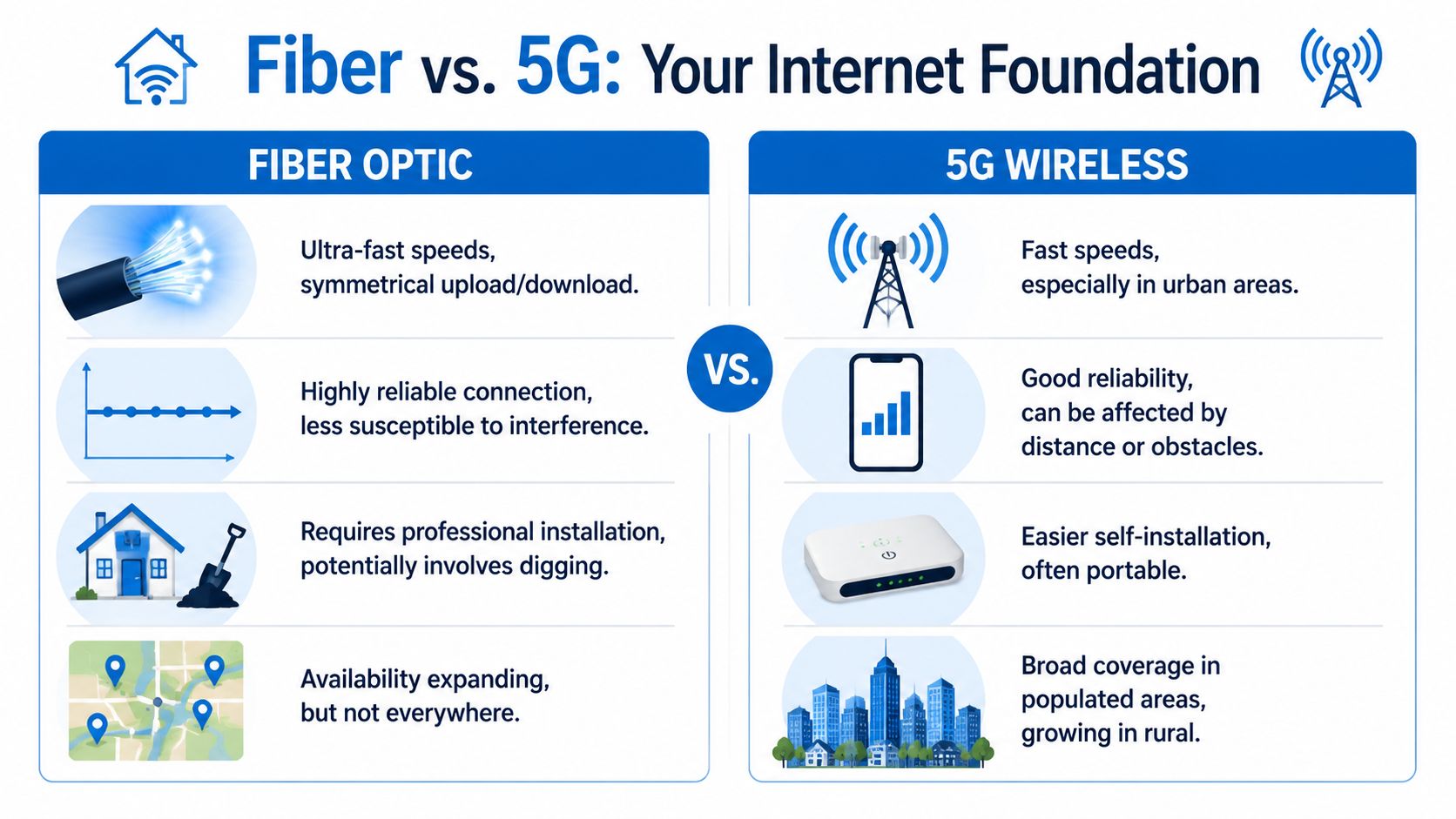
When people talk about switching cable tv to wireless, they usually compare three connection types. Fiber internet, 5G home internet, and legacy cable internet. All three can stream TV. They don’t all behave the same once the house is busy.
What matters more than the marketing headline
The three things that shape daily experience are:
- Consistency: Does the connection hold up the same way in the morning, afternoon, and evening?
- Latency: Do commands, clicks, and voice packets move quickly enough for gaming and calls to feel clean?
- Upload strength: Can the connection handle video meetings, cloud backups, and shared use without dragging?
A plan can advertise fast speeds and still feel rough if latency jumps around or uploads get squeezed.
Fiber for households that want fewer surprises
Fiber is the cleanest foundation for a wireless TV setup because it supports heavy streaming while still leaving room for work, gaming, and smart home traffic. For homes replacing cable boxes with streaming devices in several rooms, that consistency matters more than flashy peak numbers.
The trend lines support that shift. CableCompare’s streaming and cord-cutting roundup notes that 59% of young Americans have cut the cord, with 29% of the remaining group considering it, and it also ties the move to 100% fiber networks for low-latency gaming and stable Zoom calls via Home Office Hero plans.
If you want a practical breakdown of the trade-offs, this comparison of fiber internet vs 5G home internet lays out the differences in everyday terms.
Where 5G fits well
5G home internet is attractive when you want simpler installation or fiber isn’t available yet. It can be a good option for apartments, temporary setups, or lighter-use households that stream mostly in one area of the home.
Its weak point is variability. Performance can shift with location, building materials, network congestion, and placement of the gateway in the house. Some homes get a very good result. Others get an experience that’s fine one hour and frustrating the next.
Wireless internet can be good enough for TV and still be the wrong fit for a house full of remote work and gaming.
Legacy cable internet still works, but it has limits
Cable internet can absolutely support streaming. Many homes use it every day. The issue is less “can it stream” and more “how does it behave under mixed demand.” In homes with lots of uploads, work-from-home traffic, and multiple simultaneous users, it often feels less balanced than fiber.
For small businesses, that difference gets more noticeable. If the same connection has to support smart TVs, point-of-sale systems, voice calls, security tools, and staff devices, reliability matters more than raw download speed.
Quick decision guide
| Connection type | Best fit | Watch out for |
|---|---|---|
| Fiber | Homes and small businesses that stream a lot and need strong work performance too | Availability depends on area |
| 5G home internet | Lighter-use homes, renters, or quick-install situations | Performance can vary by location and conditions |
| Cable internet | Homes that already have solid service and moderate needs | Can feel less balanced during heavy shared use |
Select Your Streaming Services and Devices
Once the internet side is right, the rest gets easier. The transition is often complicated unnecessarily when consumers prioritize brand first instead of by viewing habits.
Start with one question
Do you want to replace cable channels, or do you mainly want on-demand shows and movies?
That separates the streaming world into two useful buckets.
Live TV replacement services
These are for households that still want channel-style viewing, sports, local news, and a familiar guide. Services in this category usually include cloud DVR and a channel lineup that feels closer to cable.
On-demand services
These are for people who mostly watch specific series, movies, kids content, and originals on their own schedule. Think Netflix, Disney+, Max, Hulu, and similar apps.
If you’re trying to keep the monthly total under control, don’t subscribe to everything at once. Pick your “must-have” services first, then add seasonally when there’s something you want to watch.
Compare live TV options on the features that matter
Because pricing and channel lineups change often, the smartest move is to compare current offers before you commit. This overview from Simply Tech Today's streaming guide is useful for checking the latest differences between platforms.
Here’s a practical comparison framework you can use:
| Live TV Streaming Service Comparison (2026) | Starting Price/Month | Key Channels Included | Cloud DVR |
|---|---|---|---|
| YouTube TV | Varies by market and promotion | Strong general entertainment, news, sports, locals in many areas | Yes |
| Hulu + Live TV | Varies by package | Live channels plus bundled on-demand library | Yes |
| Sling TV | Lower entry point than many live TV bundles | Good for flexible channel mixes, but locals vary | Yes |
| Fubo | Often chosen for sports-heavy viewing | Sports-focused lineup with news and entertainment | Yes |
| Philo | Lower-cost live TV style option | Entertainment-focused, limited sports and locals | Yes |
A smart way to build your stack
Use this order:
- Pick one live TV service only if you really need channels, sports, or locals.
- Add one or two on-demand apps your household uses weekly.
- Test for a month before adding more.
- Search for overlaps so you’re not paying twice for similar content.
For households that feel buried in options, what you need to know about Netflix is a good example of the kind of detail worth checking before you stack another subscription onto the bill.
Choose the right streaming device for your household
The device matters more than people think. A sluggish interface can make streaming feel worse than it is.
Roku
Simple menus, broad app support, and easy setup. Good for households that want something straightforward and familiar.
Apple TV
Strong fit for Apple users who already use iPhones, iPads, and AirPlay. The interface feels polished, and navigation is usually very smooth.
Amazon Fire TV Stick
A practical option for people already using Amazon services or looking for an easy setup at a lower device cost.
Google TV and Chromecast
Good fit for Android and Google-based homes. Casting support can be handy, especially if people like sending content from phones or laptops.
A quick demo helps if you’re still deciding what the day-to-day experience looks like on streaming hardware:
One more tip for homes and small businesses
For homes, stick with a dedicated streaming device even if the TV has built-in apps. The interface is often faster, updates are cleaner, and troubleshooting is simpler.
For small businesses, keep the setup even simpler. Use one platform across all screens if possible. That makes updates, training, and remote support much easier.
Build a Whole-Home Wireless Network for Perfect Streaming
Fast internet into the building isn’t enough. You also have to move that performance cleanly to every room where people watch. That’s where a lot of cable tv to wireless projects succeed or fail.

Why one router often falls short
A single router can work in a small, open layout. It struggles more in homes with thick walls, long hallways, multiple floors, or TVs placed at opposite ends of the house.
Think of Wi-Fi like water pressure in a home. Good service enters the house at one point, but if the plumbing to the far bathroom is poor, the shower still disappoints. Streaming works the same way. Great internet at the modem doesn’t guarantee a clean stream in the back bedroom.
Mesh Wi-Fi fixes coverage, not just speed
A mesh Wi-Fi system places multiple access points around the home so devices can connect to a stronger signal closer to where they are. That usually improves consistency more than buying a more expensive single router.
Mesh is especially useful when:
- TVs are far apart: Living room, bedroom, bonus room, patio, or basement.
- People work and stream at the same time: Coverage gaps become obvious fast.
- You’ve had dead zones for years: The old cable-company gateway rarely solves that by itself.
- You run a small business from home: Front office and back room both need stable service.
If you want a more detailed setup guide, this walkthrough on how to set up mesh WiFi covers the basics clearly.
Put Wi-Fi where people use it, not where it was easiest for the installer to leave the router.
Placement rules that solve a lot of problems
You don’t need advanced tools to improve most home setups. Start with these basics:
- Move the main router into the open: Don’t bury it in a cabinet or behind the TV.
- Avoid interference-heavy spots: Keep it away from microwaves, cordless phone bases, and dense electronics.
- Don’t put all nodes at one end of the house: Spread them along the path of use.
- Wire what should stay fixed: If a smart TV or office device is near Ethernet, use it.
- Restart with purpose: If you’re troubleshooting, reboot the modem, router, and streaming device in a clean sequence.
Homes and businesses need different layouts
In a home, the goal is usually smooth roaming and fewer dead spots. In a small business, the goal also includes predictable performance for voice, work apps, and customer-facing traffic. That may call for separated networks, better hardware placement, and managed support instead of a do-it-yourself setup.
This is the one place where managed Wi-Fi can save a lot of frustration. One option is Premier Broadband, which offers managed Wi-Fi through Premier Protects along with fiber internet. That kind of setup can help homes and small businesses that want one provider handling connectivity and in-home coverage rather than piecing it together themselves.
Managing Costs and Troubleshooting Common Problems
Once the new setup is in place, people usually ask two things. Am I saving money, and what do I do when something stops working?
The first answer is simple. Add up your internet plan, your live TV service if you use one, your on-demand subscriptions, and any device costs you spread out over time. Then compare that number to the old cable bill plus box rentals and extra equipment. The savings can be meaningful, but only if you avoid stacking too many subscriptions.
A simple monthly cost check
Use a quick worksheet like this:
- Internet: Your monthly internet service
- Live TV replacement: Only if you need it
- On-demand apps: List the ones you use every month
- Extra devices: Streaming sticks, boxes, or mesh hardware
- Business add-ons: Guest Wi-Fi, voice, or office equipment if relevant
If you keep adding apps because “it’s only one more,” streaming can start to look a lot like the bloated cable package you wanted to leave.
Troubleshooting the issues that show up most often
Buffering on one TV
That usually points to local Wi-Fi coverage in that room, not your streaming account.
Buffering on every TV
Check the internet connection first. Then look at how many heavy activities are happening at once.
Picture quality drops during work calls
That often means the network wasn’t planned for mixed traffic. Revisit the bandwidth and Wi-Fi sections above.
Can’t find a show
The content may be split across different apps. This is usually a service-selection issue, not a network issue.
Trying to reuse old coax for wireless TV
That question comes up all the time, but it usually leads people in the wrong direction. As noted in a discussion about converting coaxial cable TV signals for wireless transmission, that approach is complex, prone to interference, and usually worse than replacing the legacy setup with reliable internet and dedicated streaming devices.
The cleanest fix is often the simplest one. Stop trying to force the old cable path to behave like a modern wireless system.
A solid internet connection, the right streaming mix, and whole-home Wi-Fi usually beat patchwork coax conversions every time.
If you’re ready to replace cable with a cleaner wireless setup, Premier Broadband can help you sort out the foundation first, including fiber internet, managed Wi-Fi, VoIP, and streaming-friendly connectivity for homes and small businesses.