
Your phone system looks fine until the first important call of the day. The sales rep hears the customer, but the customer can't hear anything back. Another user can register their desk phone, but calls drop during setup. Someone else gets ringing with no audio at all. In most offices, that feels random.
It usually isn't.
Most VoIP failures come back to the same root cause: the wrong SIP IP ports are open, blocked, translated badly, or exposed too broadly. The hard part is that many guides reduce the answer to “open 5060 and a media range,” which is only enough to create partial success and long troubleshooting sessions.
A reliable setup has to match how VoIP works. SIP handles signaling. RTP carries the voice. Firewalls and NAT sit in the middle. Security controls decide whether the cure becomes a new problem. If you understand those moving parts, call quality stops feeling mysterious and starts looking like normal network engineering.
Why VoIP Calls Fail and How SIP Ports Are the Key
A failed VoIP call usually breaks in one of two places. Either the device can't signal properly, which means it never registers or never completes call setup, or it can signal just fine but the media path fails, which creates silence, one-way audio, or choppy conversation.
That split matters because VoIP is not one stream on one port. Session Initiation Protocol, or SIP, is the control plane. It handles registration, call setup, call teardown, and session negotiation. The audio you hear travels separately. If your firewall treats all VoIP traffic as if it belongs to a single port, you'll get exactly the kind of intermittent behavior that frustrates business owners and front desk staff.
What the firewall is really doing
A router firewall does what it was built to do. It blocks unsolicited traffic and tracks state. That's useful for security, but a voice system depends on traffic flowing in very specific ways, at very specific moments.
Common symptoms usually map back to port behavior:
- Registration fails: The phone can't reach the signaling service, or the return traffic is blocked.
- Call connects but no audio: Signaling worked, but the media ports didn't.
- One-way audio: One endpoint can send RTP, but the reverse path is blocked or translated incorrectly.
- Intermittent quality issues: The path exists, but prioritization, NAT handling, or session behavior is inconsistent.
Practical rule: If a call rings but nobody can hear each other, stop looking at the handset first. Check media handling and firewall policy.
Why business owners get bad advice
A lot of online advice is written from the perspective of “make it pass.” That's not the same as “make it reliable and secure.” Opening a broad set of ports to the public internet might get a phone online, but it can also create ongoing risk and leave you with a setup nobody wants to maintain later.
The right approach starts with understanding the core ports, then building rules around real call flow instead of guesswork.
The Foundation SIP Signaling Ports 5060 and 5061
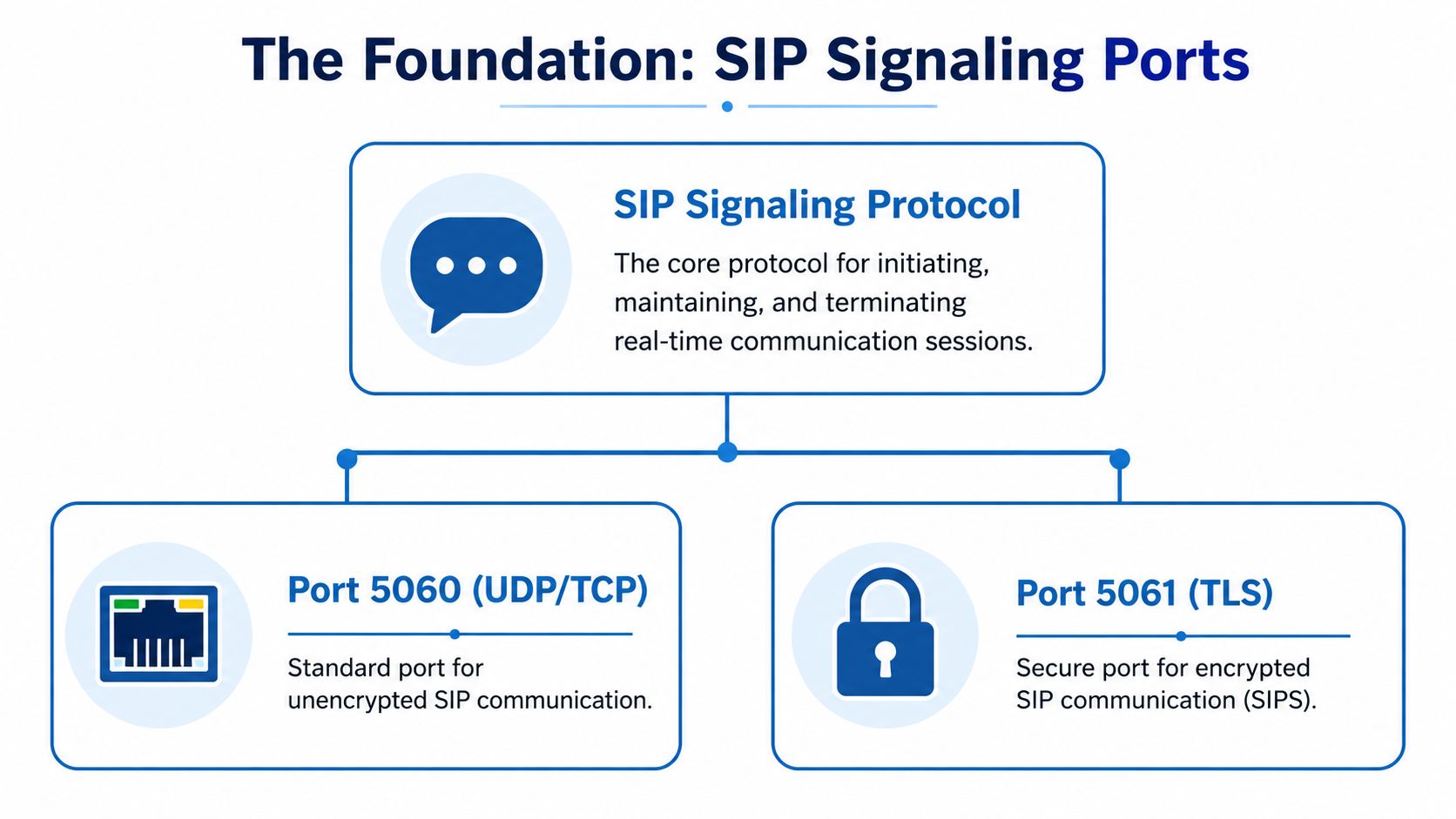
The two SIP signaling ports that matter most are 5060 and 5061. If you work with hosted VoIP, SIP trunks, desk phones, or softphones, these are the first ports you check because they carry the signaling traffic that starts and manages calls.
According to Wikipedia's SIP documentation, port 5060 is standardized for non-encrypted SIP signaling over UDP or TCP, while port 5061 is officially designated for SIP over TLS. That distinction is operationally important. One is the long-standing default for standard signaling. The other is the secure transport for environments that need encrypted signaling.
What port 5060 actually does
Port 5060 handles the messages that make SIP work in day-to-day operations. Registration, session negotiation, call setup, and call teardown commonly pass through this port when encryption isn't enabled.
In practical terms, that means:
- Phones register to the provider or PBX through this signaling path
- Calls start when SIP messages negotiate the session
- Calls end when SIP tears the session down cleanly
UDP is often used because it's lightweight and common in VoIP environments. TCP can also be used. The important part is not choosing a favorite transport by habit. It's matching what your provider, PBX, or SBC expects.
Why port 5061 matters more in secure environments
Port 5061 is the standard for SIP over TLS. TLS encrypts the signaling traffic, which protects call metadata during registration and session setup. It does not mean the audio is automatically handled the same way, but it does protect the control channel from straightforward interception and manipulation.
That's why security-conscious deployments increasingly prefer 5061 over 5060 for signaling. If a business has compliance requirements, remote workers, public internet handsets, or multiple sites, encrypted signaling is usually the safer design choice.
Unencrypted SIP can still function. That doesn't mean it's the right long-term default for a business network.
What trips people up
The most common mistake is treating 5060 and 5061 as interchangeable. They aren't. If your provider expects TLS and your firewall or device only allows standard SIP signaling, registration may fail. If the provider expects non-encrypted signaling and your device is forced to TLS without matching settings, you'll see the same result.
Another common mistake is opening these ports globally instead of tying rules to trusted systems. That may seem simpler at first, but it creates unnecessary exposure. Signaling ports should be reachable by the systems that need them, not by the whole internet.
Understanding RTP Media Ports for Voice and Video
Once SIP finishes negotiating the session, the call still isn't carrying any voice. That job belongs to RTP, the Real-time Transport Protocol. If SIP is the conversation about the call, RTP is the stream that carries the actual audio and, in some systems, video.
At this point, many SIP IP ports guides become less useful. They explain the signaling port and skip the part that usually causes one-way audio.
According to Clear-Com's overview of SIP and internet transport, RTP commonly uses a dynamic UDP port range of 10000 to 20000, and each call requires two UDP ports for bidirectional communication. The same reference also notes that DSCP EF = 46 is a recommended marking for prioritizing RTP traffic across LAN and WAN paths.
Why RTP uses a range instead of one port
RTP doesn't live on a single fixed port the way SIP signaling often does. Media sessions are assigned dynamically, which allows multiple concurrent calls to coexist without colliding on one port.
That design solves one problem and creates another. It means a firewall has to allow the agreed media range cleanly enough for the call to pass. If the signaling works but the dynamic media ports are blocked, the phone system can look half-broken.
What that means for real deployments
If you allow only SIP signaling and forget the RTP range, you'll see symptoms like these:
- Phones register successfully
- Users can place or receive calls
- Audio is missing or only works in one direction
- Video sessions fail while signaling appears normal
That isn't a SIP problem anymore. It's a media path problem.
Quality depends on more than open ports
Even when the RTP range is open, the call can still sound poor if the network treats voice like ordinary traffic. RTP is sensitive to delay, jitter, and packet loss. That's why QoS policy matters. Marking and prioritizing media traffic gives the network a way to protect active calls when links are busy.
Field note: A VoIP system can be “configured correctly” on paper and still sound bad if the WAN edge doesn't prioritize media during congestion.
If you're troubleshooting voice or video, always separate these questions: Did SIP establish the session, and did RTP get a clean path through the firewall?
How SIP and RTP Work Together During a Call
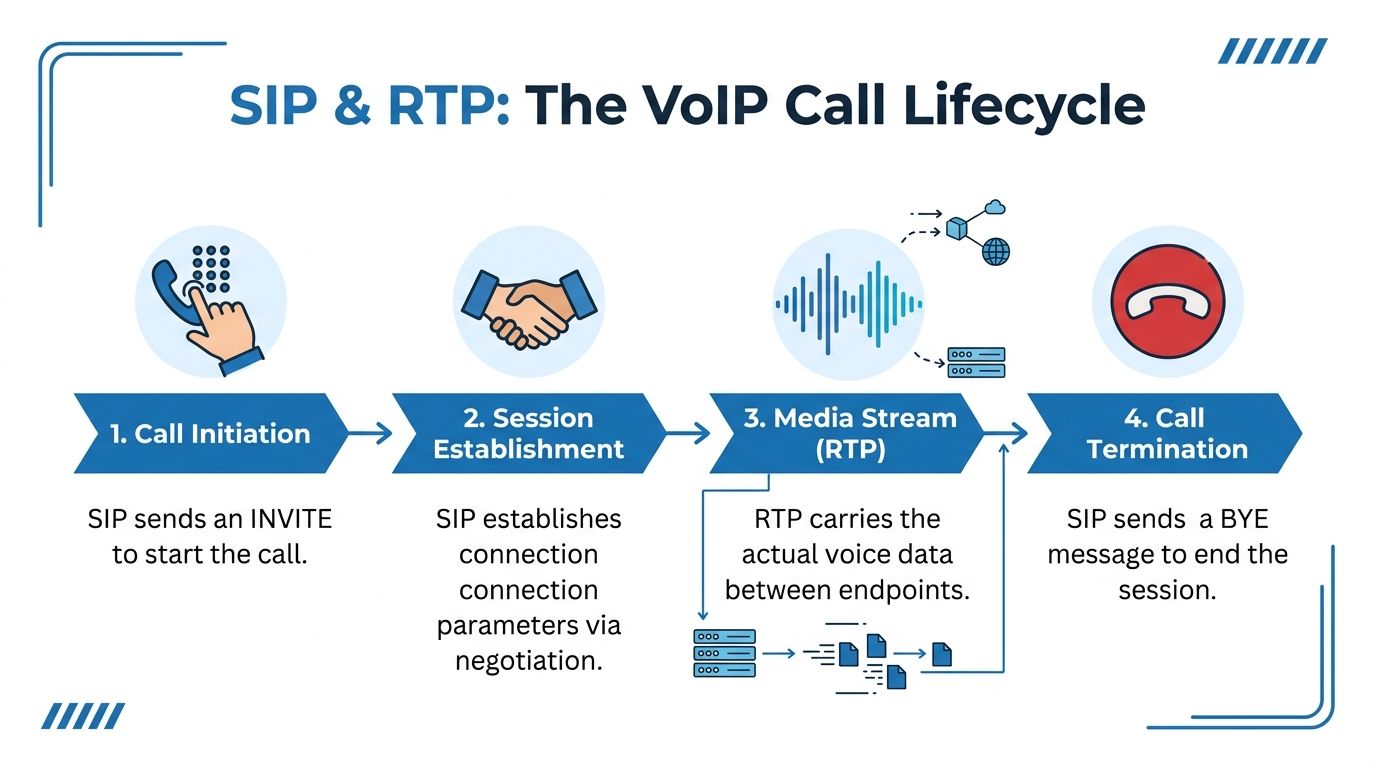
The easiest way to understand SIP IP ports is to follow one call from start to finish. A user dials. The phone sends a SIP request to begin the session. The provider or PBX responds. The devices agree on how the call should be built. Then the media starts on separate ports.
A simple call flow
Think of the process in four stages:
Call initiation
The phone sends a SIP INVITE through the signaling path.Session establishment
SIP messages negotiate the session details, including where media should go.Media stream
RTP starts carrying the actual voice data on the negotiated media ports.Call termination
SIP sends the message that ends the call and closes the session.
If you want a plain-language overview of the full phone process, Premier has a useful explainer on how VoIP phone service works.
Where one-way audio is born
One-way audio almost always makes more sense once you look at the handoff between signaling and media. SIP can succeed completely. The phone can ring. The user can answer. The screen can show connected status. Then RTP fails in one direction because the firewall, NAT device, or session policy blocks the negotiated media stream.
That's why “the call connected” is not proof that the VoIP path is healthy.
A stable deployment depends on two separate successes:
- Successful signaling
- Successful media flow
If either side of that handoff is broken, the user experiences a failed call even though part of the system is functioning exactly as designed.
The Firewall Challenge with NAT and Port Forwarding
Firewalls don't hate VoIP. They just don't make assumptions in VoIP's favor.
A business firewall sees unsolicited inbound traffic and tries to protect the network. A NAT device rewrites addresses and ports so multiple private devices can share one public connection. Both behaviors are normal. Both can also break SIP if the deployment isn't designed around them.
The classic failure mode happens when the phone or PBX tells the far end to send media to an address or port that doesn't make sense outside the local network. The signaling may still get through because the device started the conversation. The media path often doesn't survive the translation cleanly.
Why blanket port forwarding is a bad shortcut
Many online guides stop at “forward 5060 and open a wide UDP range.” That can produce a dial tone. It can also create a standing security problem.
As noted in Intuitive Technology's firewall guidance for SIP ports, opening a SIP port broadly can increase exposure to hacking and spam calls, which is why operators recommend restricting access to known provider IPs instead of using a blanket opening.
That advice lines up with what engineers see in the field. If you expose signaling too broadly, you aren't just making VoIP possible. You're advertising where it lives.
What NAT changes
NAT introduces friction in several ways:
- Address rewriting: The device may advertise a private address in signaling, which the outside party can't use.
- Port rewriting: The firewall may translate ports unexpectedly, which confuses session tracking.
- Session timeout behavior: Idle UDP state can disappear mid-call or during registration intervals.
- Asymmetric handling: One direction of media may pass while the reverse direction fails.
A broken SIP ALG can make this worse by trying to “help” and rewriting traffic incorrectly. If you suspect that's happening, Premier's guide on what SIP ALG is and how to disable it is worth checking.
The firewall rule that gets a phone online fastest is rarely the rule you want to keep in production.
Better than simple forwarding
Instead of forwarding ports to a phone or PBX and hoping for the best, use policy-based rules that match your provider's design. Allow the required signaling and media traffic. Restrict sources to trusted systems. Review NAT behavior. Confirm the device advertises reachable media details. That takes more care up front, but it avoids the endless loop of “it worked yesterday.”
Premier Broadband Firewall Rules for Flawless VoIP
A common failure looks like this. Phones register in the morning, outbound calls work, then inbound audio drops or one-way voice starts after lunch. In almost every case, the firewall is allowing some SIP traffic but not the exact mix of signaling, media, direction, and peer restrictions the service expects.
For Premier Broadband customers, the right approach is to build rules around the call flow. Permit the signaling method your service uses. Permit the RTP range your platform negotiates. Limit those rules to trusted provider systems and approved remote endpoints. That gives you a voice policy you can support at 2 p.m. on a Tuesday, not just one that happened to work during install.
Recommended rule structure
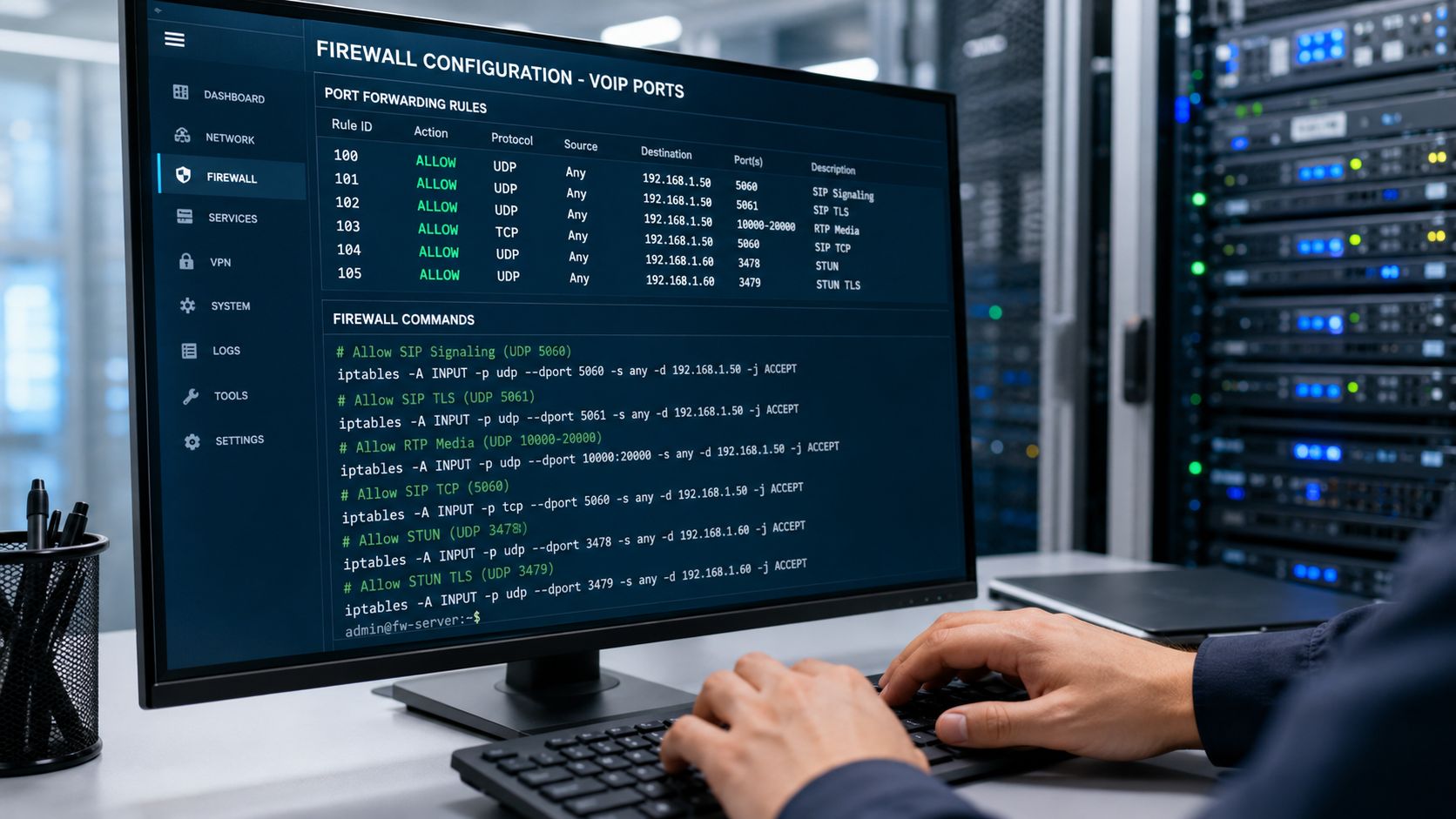
Use this as a starting point for a business firewall policy, then tune it to the provider design and the PBX or hosted platform in use.
| Service | Protocol | Port Range | Direction | Notes |
|---|---|---|---|---|
| SIP signaling | UDP/TCP | 5060 | Inbound/Outbound as required | Use only for deployments that still run standard unencrypted SIP |
| SIP over TLS | TCP | 5061 | Inbound/Outbound as required | Use this where the provider and endpoints support encrypted signaling |
| RTP media | UDP | Provider-defined media range | Inbound/Outbound as required | Match the exact range required by your provider or voice platform |
| Device management | Varies by platform | Vendor-specific | Restricted as needed | Keep management access separate from voice rules whenever possible |
The trade-off is straightforward. Broader rules are faster to deploy, but they create more attack surface and make troubleshooting harder later. Narrow rules take longer up front, but they keep the voice path readable.
What a clean policy looks like
Well-built VoIP firewall rules usually share a few traits:
- Source and destination limits are explicit: Allow traffic from provider voice systems and approved remote devices, not from arbitrary internet hosts.
- Signaling and media are split into separate rules: That makes packet captures, log review, and change control much easier.
- Transport is documented in the rule name or comment: If a site uses TLS on 5061, label it that way so the next engineer does not have to guess.
- Outbound policy is reviewed with the same care as inbound policy: Many call failures come from return traffic handling or expired state tables, not from an obviously blocked inbound request.
Premier Broadband provides fiber internet, hosted VoIP, SIP trunking, and managed edge services. That matters because the WAN circuit, voice platform, and firewall policy often need to be validated together. For a broader baseline on securing the perimeter around these services, review these network security best practices for business environments.
Example rule logic for a business site
On a typical small or midsize deployment, I would group rules by function.
Create one rule set for SIP signaling to the provider addresses on the required port and transport. Create a second rule set for RTP media over the negotiated UDP range. If phones or a PBX need vendor management access, place that in a separate policy with stricter admin source limits and logging enabled.
That separation saves time during incidents. If registration is healthy but audio is failing, the media policy is the first place to look. If calls never establish, start with signaling.
Capacity planning matters as much as ports
A correct firewall policy will not fix a voice deployment that runs out of usable bandwidth during busy periods. Flowroute explains in Flowroute's guide to SIP trunk call capacity that call volume, codec choice, and concurrency planning all affect how much capacity voice traffic needs.
The practical point is simple. A circuit can look fine on paper and still produce poor call quality if voice shares the link with backups, file sync, cameras, or guest Wi-Fi and no one accounted for peak call load. Good VoIP depends on ports, policy, and traffic planning together.
A short walkthrough can help when you're mapping policy to a real firewall:
Essential SIP Security Best Practices
A VoIP system that works but isn't hardened is unfinished. Voice services sit at the edge of the network, involve user credentials, and often cross the public internet. That means the security design has to be deliberate.
Start with encrypted signaling
If your platform supports it, prefer SIP over TLS instead of plain signaling. That protects registration and call setup metadata from easy interception and reduces the chance that someone can tamper with signaling in transit.
If TLS isn't currently in place, don't assume the answer is “switch it on” and walk away. Confirm that phones, PBX settings, certificates, and firewall rules all align. Security features fail most often when one side of the deployment is modern and the other side is still configured like a legacy install.
Tighten access and credentials
A secure voice deployment usually looks boring in the best possible way. The attack surface is small, passwords are strong, and only approved systems can reach the signaling service.
Use a checklist like this:
- Limit who can talk to the service: Build ACL-style firewall rules around trusted provider systems and approved remote endpoints.
- Use strong extension credentials: Weak passwords turn a phone system into a target quickly.
- Disable features you don't need: Unused external forwarding, exposed admin panels, and test accounts create risk without adding value.
- Review logs regularly: Registration failures, repeated auth attempts, and unusual call behavior are early warning signs.
Security mindset: The safest SIP port is the one that only trusted systems can reach.
Treat SIP ALG carefully
Some firewalls advertise SIP ALG as a convenience feature. In practice, it's either helpful, irrelevant, or actively harmful depending on the platform and the deployment. If the device rewrites SIP headers incorrectly, you get broken registrations, bad media negotiation, or random call failures that are hard to reproduce.
That's why voice security and voice stability overlap. If the edge device is trying to inspect and alter signaling, you need to know exactly how it behaves.
For a broader hardening checklist across the network edge, review these best practices for network security.
Troubleshooting Common SIP Port and Firewall Issues
Monday morning, the phones register at one office, fail at another, and the first report from staff is only that “calling is broken.” At that point, the useful question is not whether SIP is down. It is which part of the call path failed first: registration, call setup, media flow, or firewall state.
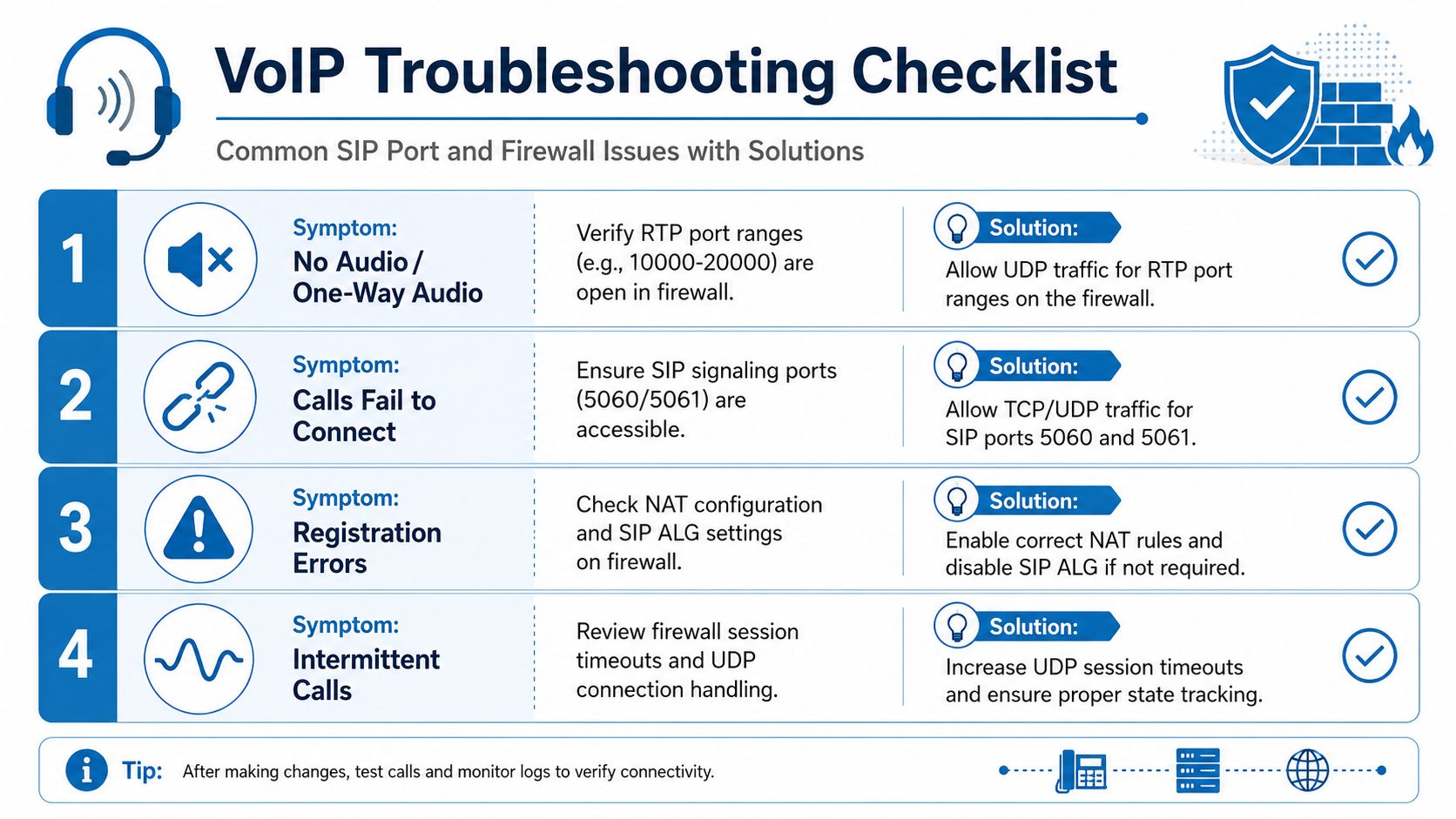
Symptom-based checks that save time
Start with the symptom, then tie it to signaling or media.
Registration fails from every phone
Check reachability to the expected SIP signaling port first. Confirm the phone can reach the PBX or provider on the correct transport, and confirm return traffic is allowed through the firewall. If the system expects TLS on 5061, a policy built only for standard SIP on 5060 will fail every time.Calls connect but there's no audio
The signaling path is probably fine. Focus on RTP. Verify the media port range required by the platform is open and that NAT is presenting an address the far end can send to.One-way audio only
This usually points to media flowing in one direction and failing in the other. Common causes include incorrect NAT handling, an incomplete inbound RTP rule, or a phone registering on one interface and sending media on another.Intermittent call failures
Check firewall session timers, SIP inspection features, and inconsistent policy between sites. These are the cases that waste time because one test call works and the next one does not.
Real deployments do not always use default ports
Default SIP ports are only the starting point. PortSIP's security feature documentation shows the familiar defaults of 5060 for UDP or TCP and 5061 for SIP over TLS, but it also documents deployments that use other signaling ports such as 5063, along with large RTP ranges on PBX and SBC platforms.
That matters in the field. A firewall rule set can match a generic SIP checklist and still miss the port map used by the phone system you are troubleshooting.
A practical sequence for isolating the problem
Use the same order every time. It keeps the team from changing three variables at once and losing the trail.
Confirm registration state
If the endpoint is not registered, stay on signaling. Media checks can wait.Verify transport and destination
Match the phone, PBX, or hosted service to the port and protocol in use. UDP, TCP, and TLS are not interchangeable.Test the RTP range in both directions
Successful outbound signaling does not prove inbound media can return.Inspect NAT behavior and SIP ALG
If one site fails and another works with the same provider, the edge device is a likely suspect.Compare the live config to the platform port map
Check the PBX, SBC, or hosted voice documentation instead of assuming it uses only default ranges.
For teams that need a cleaner baseline, Premier's guide to router and firewall configuration for VoIP networks is a useful reference for edge policy, NAT behavior, and rule design.
The fastest fix usually comes from proving which stage failed first.
SIP port problems stop looking mysterious once you separate signaling from media and compare both against the firewall policy in place. That is how business VoIP goes from “it works most of the time” to predictable call quality under normal office traffic.