
Most small business owners aren't lying awake thinking about VLANs, SIEM tools, or firewall policy hygiene. You're thinking about payroll, customer service, late invoices, remote staff who need access now, and whether your internet and phones will stay up during the next busy day.
That's exactly why business network security matters so much. Your network is no longer a back-office utility. It's the path your sales calls, payment systems, cloud apps, file sharing, cameras, and customer data all travel through. If that path is weak, the rest of the business is exposed.
Good security doesn't mean turning your office into a bunker. It means making sensible decisions in the right order so one mistake, one bad click, or one exposed device doesn't become a company-wide problem. If you want a grounded starting point, these network security best practices are useful because they frame security as an operational discipline, not just a shopping list of tools.
Why Business Network Security Matters Now More Than Ever
The risk environment has changed faster than most small businesses have had time to adapt. Cloud apps are everywhere. Staff work from home, from the road, and from personal devices. Phones run over the same networks as business software. Cameras, printers, access points, and smart devices all create more doors into the environment.
Attackers don't need your business to be famous. They just need it to be reachable, underprotected, and busy enough to miss the warning signs.
That pressure is growing. Google's Threat Intelligence Group identified 75 zero-day vulnerabilities in 2024, and more than 30,000 new security vulnerabilities were cataloged that year, about 17% higher year over year, according to Fortune Business Insights. For an SMB, that doesn't mean you need to chase every headline. It means your network has to be designed so routine patching gaps or a missed alert don't become a full business interruption.
Security is a business continuity issue
A lot of owners still treat security as an IT add-on. That's a mistake. If your team can't access files, if your phones are disrupted, if your payment workflows stop, or if customer records are exposed, the damage lands in operations first.
That's why I advise clients to stop asking, “How do we become perfectly secure?” and start asking, “What keeps us working if something goes wrong?”
Security spending makes more sense when you tie it to uptime, client trust, and recovery costs, not just fear of hackers.
What small businesses actually need
Most SMBs don't need a giant enterprise stack. They need a roadmap they can maintain:
- A clean network design that separates critical systems from general traffic
- Protected daily access for Wi-Fi, remote work, and voice services
- Central visibility so suspicious activity doesn't stay invisible
- A response plan so people know what to do under pressure
- Outside help when needed because few small teams can monitor everything alone
That's manageable. It's also a far better investment than buying random tools and hoping they fit together.
Understanding Your Digital Fortress and Its Attackers
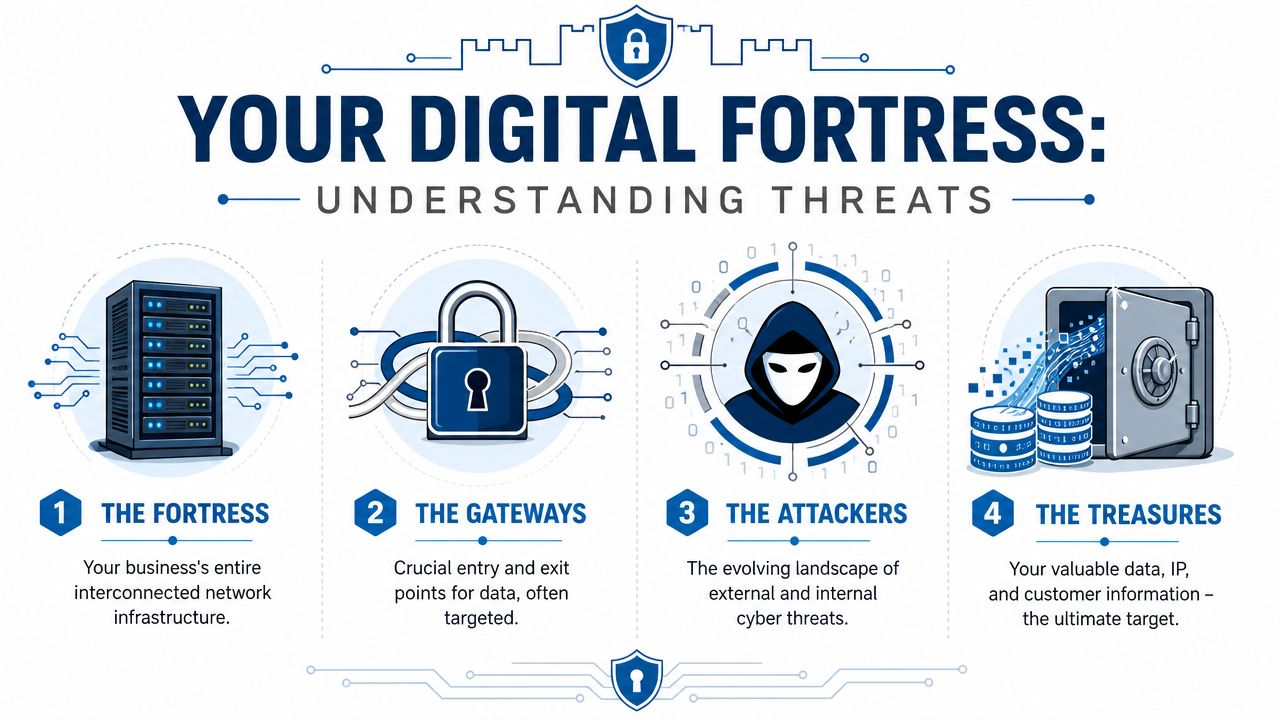
Think of your business network as a digital fortress. Not a medieval fantasy. A practical property with walls, gates, staff entrances, storage rooms, and a vault.
Your internet connection forms the outer edge. Firewalls and routers act like guarded gates. Wi-Fi, VPN access, email logins, cloud apps, and VoIP systems are all entry points. Your file shares, accounting systems, customer records, and proprietary documents are the valuables inside.
If you don't know where your gates are, you can't protect them.
What belongs inside the fortress
For an SMB, the fortress usually includes more than owners expect:
- Internet edge equipment such as routers, firewalls, and managed switches
- User devices like laptops, desktops, tablets, and phones
- Wireless networks for staff, guests, and sometimes operational devices
- Business systems such as point-of-sale, accounting, CRM, file storage, and cloud software
- Voice and camera systems that run over the same infrastructure
- Admin tools that control the whole environment
A quick network traffic analysis guide can help you see which systems are talking to each other and where unusual patterns may already exist. That visibility matters because many businesses discover too late that sensitive and non-sensitive systems are all mingled together.
The attackers don't all work the same way
The most common attackers usually fall into a few recognizable patterns.
The trickster at the gate
This is phishing and social engineering. The attacker doesn't batter down the wall. They convince someone to open the gate for them. A fake invoice, a password reset prompt, a voicemail link, or a login page that looks close enough to fool a rushed employee.
According to the 2024 Verizon Data Breach Investigations Report, the human element is involved in 68% of breaches, and IBM reported the global average cost of a data breach reached $4.88 million, as summarized by Fortinet's cybersecurity statistics page. This underscores a key takeaway for security awareness. People are part of the security perimeter whether you planned for it or not.
The vandal inside the walls
Not every threat comes from outside. Some start with an over-permissioned user, a forgotten contractor account, a shared password, or an employee device that shouldn't have had broad access in the first place.
That's why permissions and segmentation matter so much. You don't give every person in a physical office a master key. Your network should work the same way.
The smash-and-lock crew
Ransomware and related malware are less like pickpockets and more like a crew that gets into the building, locks doors, and demands payment while your business grinds to a halt. They often start with a small foothold. Then they move laterally until they find file shares, backups, and administrative tools.
If one compromised account can reach everything, your network isn't a fortress. It's an open floor plan.
Start with a map, not a product
Before buying tools, map the environment. List your critical systems, your entry points, and who has access to what. If you want a practical model for that review, the MD TECH TEAM security guide is a useful resource because it frames a security audit around assets, exposure, and control gaps rather than vague checklists.
That exercise often reveals the underlying problem. Most SMBs aren't missing one magical product. They're missing structure.
Building Your First Line of Defense with Smart Architecture
A lot of small businesses try to secure a messy network by piling on apps. That usually creates noise, cost, and blind spots. Strong business network security starts with architecture.
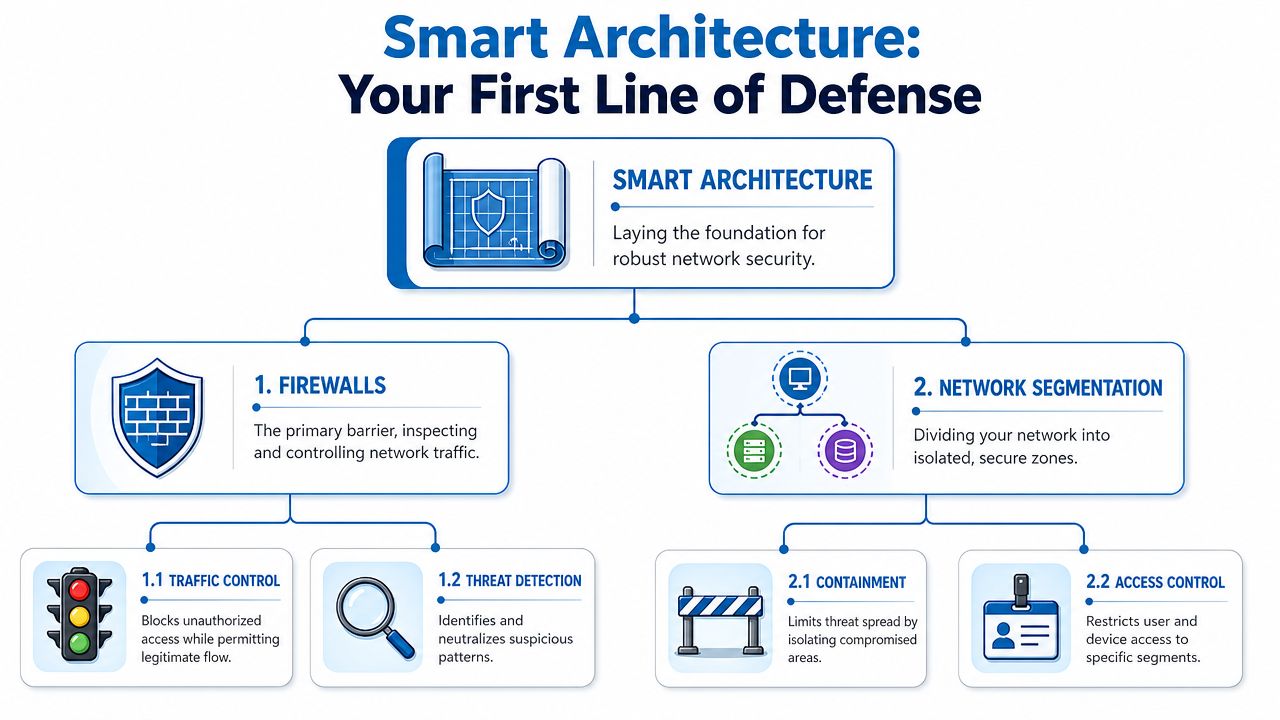
If your network is flat, one compromised laptop can become everyone's problem. If your network is segmented and governed by a well-configured firewall, the same incident is often contained to one corner of the environment.
Firewalls are your main gatekeepers
A firewall is your first checkpoint. It decides what traffic gets in, what goes out, and what should be blocked entirely. A decent firewall policy doesn't just allow “the internet” and hope for the best. It enforces intent.
That means being explicit about what services are exposed, which devices can talk to which systems, and what management access is allowed. In practice, many SMB problems start with over-broad rules that were added in a hurry and never revisited.
What works
- Default-deny thinking so unnecessary inbound traffic is blocked unless there's a clear business reason
- Application-aware policies that distinguish business traffic from suspicious traffic
- Separate administration paths for network gear, rather than managing everything from the same general user network
- Documented rule changes so old exceptions don't pile up forever
What doesn't
- Any-any style allowances created for convenience
- Consumer-grade gear in business environments where visibility and policy control are limited
- Rules nobody owns because “the vendor set it up years ago”
- Flat remote access that drops users directly into the broad internal network
Segmentation is how you keep one leak from sinking the ship
The easiest analogy for segmentation is a ship's watertight compartments. If water gets into one section, the whole vessel doesn't have to go down.
Networks should work the same way. Guest Wi-Fi shouldn't sit beside accounting systems. Point-of-sale devices shouldn't be able to browse the same internal resources as office laptops. Management interfaces for switches and firewalls should live in their own restricted area.
ClearNetwork's guidance on network segmentation explains the core principle well. Using VLANs and application-aware firewalls to create logical segments can reduce the blast radius of a breach by limiting lateral movement and containing a compromise to a smaller area.
A practical SMB segmentation model
You don't need a huge enterprise design to get real benefits. Start with a simple layout.
| Segment | What goes there | Why it matters |
|---|---|---|
| Guest network | Visitor and personal devices | Keeps unknown devices away from business systems |
| Staff network | Employee laptops and standard office traffic | Supports daily work without exposing critical systems |
| Critical systems | Servers, accounting, POS, core apps | Limits who and what can reach sensitive assets |
| Voice and IoT | VoIP phones, cameras, printers, operational devices | Isolates devices that are often overlooked |
| Management | Switches, firewalls, monitoring tools | Protects the controls that run the whole environment |
A managed switch is often what makes this practical. It lets you define VLANs, control traffic paths, and enforce separation in ways basic unmanaged hardware can't. If you want the non-jargon version, this overview of what a managed network switch is gives the right foundation.
Practical rule: If a guest device, lobby camera, and finance workstation can all sit on the same network with no meaningful barriers, redesign the network before buying more software.
Don't ignore old hardware on the way out
There's another architectural blind spot that gets missed all the time. Retired drives, old servers, and replaced workstations still contain data. Securing the live network while tossing old storage into a closet is a bad habit. This guide to responsible hard drive disposal is a useful reminder that the security boundary includes decommissioning, not just production systems.
Good architecture isn't glamorous. It is, however, one of the highest-return decisions an SMB can make because it lowers risk before an incident starts.
Securing Your Everyday Connections
Most breaches don't begin with a dramatic movie scene. They start with normal business activity. Someone joins Wi-Fi. A remote employee logs in from a hotel. A phone system is exposed more broadly than it should be. Everyday connections deserve more attention because they're used constantly and trusted automatically.

Wi-Fi should not be one big room
A surprising number of businesses still run wireless like a coffee shop. One network, too many users, and little separation between staff devices and everything else.
That's fine for convenience. It's weak for security.
Create separate wireless networks for distinct purposes. Staff, guests, and business devices should not all share the same path. Even if the internet connection is excellent, the security model fails if every connected device can mingle freely.
A simple Wi-Fi checklist
- Separate guest access so visitors get internet without touching internal systems
- Dedicated staff SSID tied to business authentication policies
- Isolated device network for printers, cameras, and other operational hardware
- Strong admin controls on access points, not just strong user passwords
- Regular review of who and what is still connecting
VPNs matter because remote work is normal now
A VPN is best understood as a protected tunnel through public roads. Your employee may be working from home, a hotel, or an airport, but the tunnel gives business traffic a safer path back into the company environment.
What a VPN doesn't do is magically fix poor access design. If remote users connect through a VPN and then gain broad access to the entire internal network, you've just extended the office without adding guardrails.
The better approach is limited remote access. Give users the systems they need, not the entire environment. Pair remote access with multi-factor authentication and review who still has VPN rights. Former staff, temporary contractors, and one-off vendor accounts tend to linger far too long.
VoIP needs the same discipline as any other business system
Business owners often think of phones as separate from security. Modern VoIP doesn't work that way. Your voice traffic runs across your network and internet infrastructure, so misconfiguration can affect call quality, call reliability, and exposure.
VoIP security usually comes down to a few practical controls:
- Keep voice on its own segment so phone traffic is separated from general office traffic
- Restrict administrative access to the phone system and handsets
- Allow only necessary signaling and media flows through the firewall
- Monitor unusual registration attempts and failed logins
- Review provider and device settings after office moves or service changes
Here's a useful visual explainer on protecting remote connectivity and communication paths:
Convenience is usually where risk sneaks in
The recurring trade-off in this section is convenience versus control. Open Wi-Fi is easier. Broad VPN access is faster to deploy. Default phone settings are simpler to leave alone.
But those shortcuts stack up. What works better is a modest amount of structure applied consistently.
A good standard for SMBs looks like this:
- Keep wireless networks separate by purpose.
- Treat remote access as privileged, not routine.
- Put voice systems behind clear firewall and segmentation rules.
- Review access after staffing changes, office changes, and vendor changes.
That's not overengineering. It's the operational baseline for staying reachable without being exposed.
Watching the Walls with Active Monitoring and Response
Many businesses invest in prevention and stop there. Firewall installed. Wi-Fi separated. VPN configured. Job done.
It doesn't work that way.
Security controls reduce exposure, but they don't eliminate mistakes, missed patches, risky user behavior, or suspicious activity that develops slowly over time. You need a way to notice trouble early, before it becomes a business outage.
Why logs matter only when someone can use them
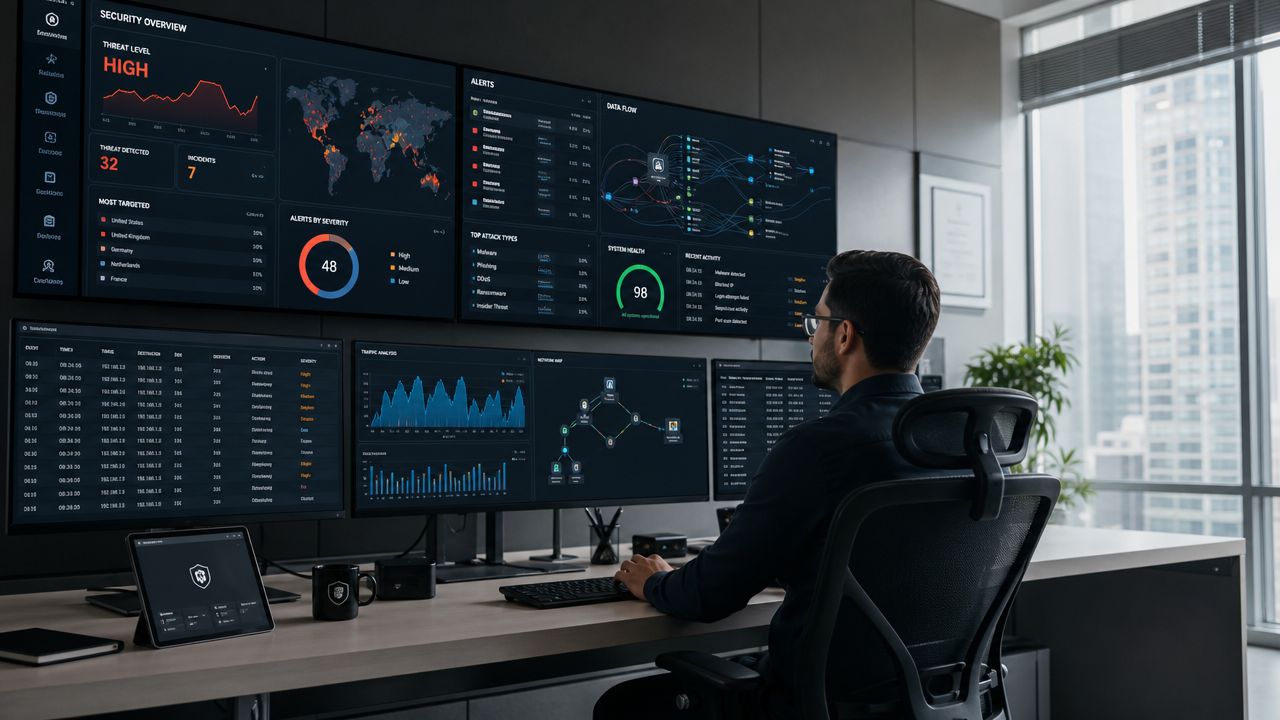
Every firewall, switch, endpoint tool, and identity system creates records. Left on their own, those logs are just scattered notes. A SIEM, or Security Information and Event Management platform, acts like a central command post. It gathers those records, aligns them, and helps you spot patterns that wouldn't stand out in one device alone.
The FTC's small business cybersecurity guidance notes that implementing a strong logging and monitoring infrastructure using a SIEM can reduce the mean time to detect a security incident by up to 50% compared with relying on native logs alone, as summarized on the FTC cybersecurity page.
That's a meaningful operational advantage. Faster detection often means less cleanup, less downtime, and fewer unpleasant surprises.
What active monitoring should include
A useful monitoring setup doesn't have to be fancy, but it does need coverage in the right places.
- Perimeter devices such as firewalls and edge equipment
- Identity events including login failures, account changes, and unusual sign-in patterns
- Endpoint alerts from business laptops and desktops
- Network changes such as new devices, unexpected traffic paths, or disabled protections
- Critical system activity involving servers, business apps, and administrative tools
What doesn't work is collecting everything and reviewing nothing. The value comes from correlation, prioritization, and response.
The goal isn't to watch every packet yourself. The goal is to know when behavior stops matching normal business activity.
You also need a fire drill
Incident response sounds formal, but for an SMB it can be simple. It's a written plan that answers basic questions before people panic.
Your response plan should define
| Question | What to decide in advance |
|---|---|
| Who leads | Internal point person and backup contact |
| Who to call | IT provider, security provider, internet/voice provider, legal or insurance contacts if applicable |
| What to isolate | Which systems can be disconnected first without causing wider damage |
| How to communicate | Alternate channels if email or phones are affected |
| What to preserve | Logs, screenshots, alerts, and device status for investigation |
Run through that plan periodically. Not as a paperwork exercise. As a practical rehearsal. If a suspicious login, locked file share, or abnormal phone system event happens on a Monday morning, people should know the first three actions without debating them.
Monitoring is what tells you the walls are being tested. Response planning is what keeps everyone from improvising at the worst possible moment.
When to Call for Backup with Managed Network Security
Most SMBs hit a point where do-it-yourself security stops being efficient. The issue usually isn't effort. It's coverage.
Someone on the team can reset passwords, approve software, and call the ISP when there's a problem. That same person usually can't also review logs consistently, tune firewall policy, monitor endpoint alerts, track access changes, and respond to suspicious activity after hours.
The in-house versus managed trade-off
This isn't really a debate about control. It's a debate about capacity and specialization.
| Approach | Strengths | Limits |
|---|---|---|
| In-house handling | Direct familiarity with staff, systems, and workflows | Time pressure, uneven coverage, and limited specialized expertise |
| Managed security support | Ongoing monitoring, broader technical depth, and better operational consistency | Requires vendor coordination and clear scope |
| Hybrid model | Internal ownership with outside operational support | Needs defined roles to avoid confusion |
The best fit depends on the business, but trigger points are usually obvious.
Signs you should bring in outside help
Growth has outpaced your setup
A network that worked for one office and a small staff often struggles once you add remote users, cloud services, cameras, extra sites, or voice complexity. Security debt accumulates when infrastructure expands faster than policy.
You handle sensitive information
If your business stores customer records, payment-related systems, internal financial data, or confidential files, mistakes become more expensive to clean up. You need more than casual oversight.
Security tasks keep getting deferred
This is one of the clearest warning signs. Firewall rules aren't reviewed. Old accounts remain active. Device inventories are outdated. Alerts sit unread. None of that means the team is careless. It usually means they're overloaded.
The ROI question matters
For many SMBs, security spending feels hard to justify because success looks like “nothing happened.” But that's an incomplete way to evaluate it.
The better lens is operational return. Does the investment reduce downtime risk, improve response speed, support insurability, and lower the chance that a small incident becomes a costly one?
LBMC notes that businesses adopting clear security frameworks and managed services see meaningful drops in incident rates and even cyber insurance premiums, according to its discussion of layered controls in this business security framework article.
That doesn't mean every managed service is worth buying. It means a well-scoped service can create business value beyond “extra protection.”
What to look for in a managed option
If you evaluate a provider, ask practical questions:
- What is monitored and during what hours
- Which controls are included such as firewalls, IDS or IPS, segmentation support, patching, or MFA enforcement
- Who responds when suspicious activity appears
- How changes are documented and approved
- What visibility you retain into your own environment
One example in this category is Premier Broadband managed network security solutions, which are positioned around managed edge controls, monitoring, and security operations. That kind of model can fit businesses that want a single provider relationship for connectivity and network security, especially when internal IT resources are limited.
Managed security should remove operational burden without turning your environment into a black box.
A good provider becomes part of your operating rhythm. A bad one becomes another mystery dependency. Ask enough questions to know which you're getting.
Your Path to a More Secure Business
Business network security gets easier when you stop treating it as one giant project. It's a sequence of sensible decisions.
Start with structure. Build a clean network with firewall discipline and segmentation. Protect the connections your team uses every day, especially Wi-Fi, remote access, and VoIP. Add monitoring so you can see suspicious behavior early. Then make sure someone is ready to respond when something goes wrong.
That roadmap is achievable for a small business. It doesn't require perfection, and it doesn't require enterprise complexity. It requires prioritization, consistency, and a willingness to fix the weak spots that create the most business risk.
A secure network won't just help you avoid trouble. It helps you operate with more confidence, support growth without chaos, and keep serving customers when conditions aren't ideal.
If your business needs a clearer path from internet connectivity to stronger security controls, Premier Broadband is one place to start exploring options for business internet, VoIP, and managed network services that support a more resilient day-to-day operation.