
A good ping for gaming is under 50ms, and a great competitive ping is under 20ms. If your shots feel late, your character rubber-bands, or you lose fights you swear you won, ping is probably part of the problem, but it may not be the whole problem.
You know the moment. You peek a corner, fire first, and still get dropped. On your screen, the timing looked perfect. Then the replay, kill cam, or match result tells a different story. That gap between what you did and what the server accepted is where network performance starts to matter.
A lot of gamers search for one simple number and stop there. That's understandable. Ping is easy to spot, easy to compare, and easy to blame. But a connection can show a decent average ping and still feel awful if it jumps around or drops packets along the way. That's why the question isn't only what is good ping for gaming. It's also whether your ping is stable enough to trust.
The Difference Between Winning and Losing a Match
Late in a match, tiny delays feel huge.
You're in an FPS final circle. You hear footsteps, swing wide, and line up the shot. For a split second, everything looks clean. Then your crosshair skips, your enemy teleports half a step, and you're back in the lobby staring at a defeat that felt stolen. Casual players call it lag. Network nerds call one part of it ping.
Ping is the time it takes for your device to send a signal to the game server and get a response back. Lower ping usually means the game feels more responsive. Higher ping means your actions arrive later, which can make movement, aim, and timing feel muddy.
But the most frustrating part is this. A bad gaming experience doesn't always come from a permanently high ping number. Sometimes the average looks fine, yet the connection keeps wobbling. That's why two players can both report "good internet" and have completely different matches.
Practical rule: If your connection feels inconsistent, don't judge it by one speed test screenshot. Watch how it behaves during actual gameplay.
That same mindset shows up in other performance-focused hobbies too. People who want steady energy instead of spikes often try to understand modern performance pouches, because consistency usually matters more than one flashy peak. Gaming connections work the same way. A stable response beats a connection that looks good on paper and falls apart when pressure hits.
You don't need to become a network engineer to sort this out. You just need a few benchmarks, a way to test your connection, and a checklist for the fixes that are important.
Understanding Ping Latency vs Internet Speed
Most gaming confusion starts here. Players mix up latency and speed, then wonder why a "fast" internet plan still feels laggy.
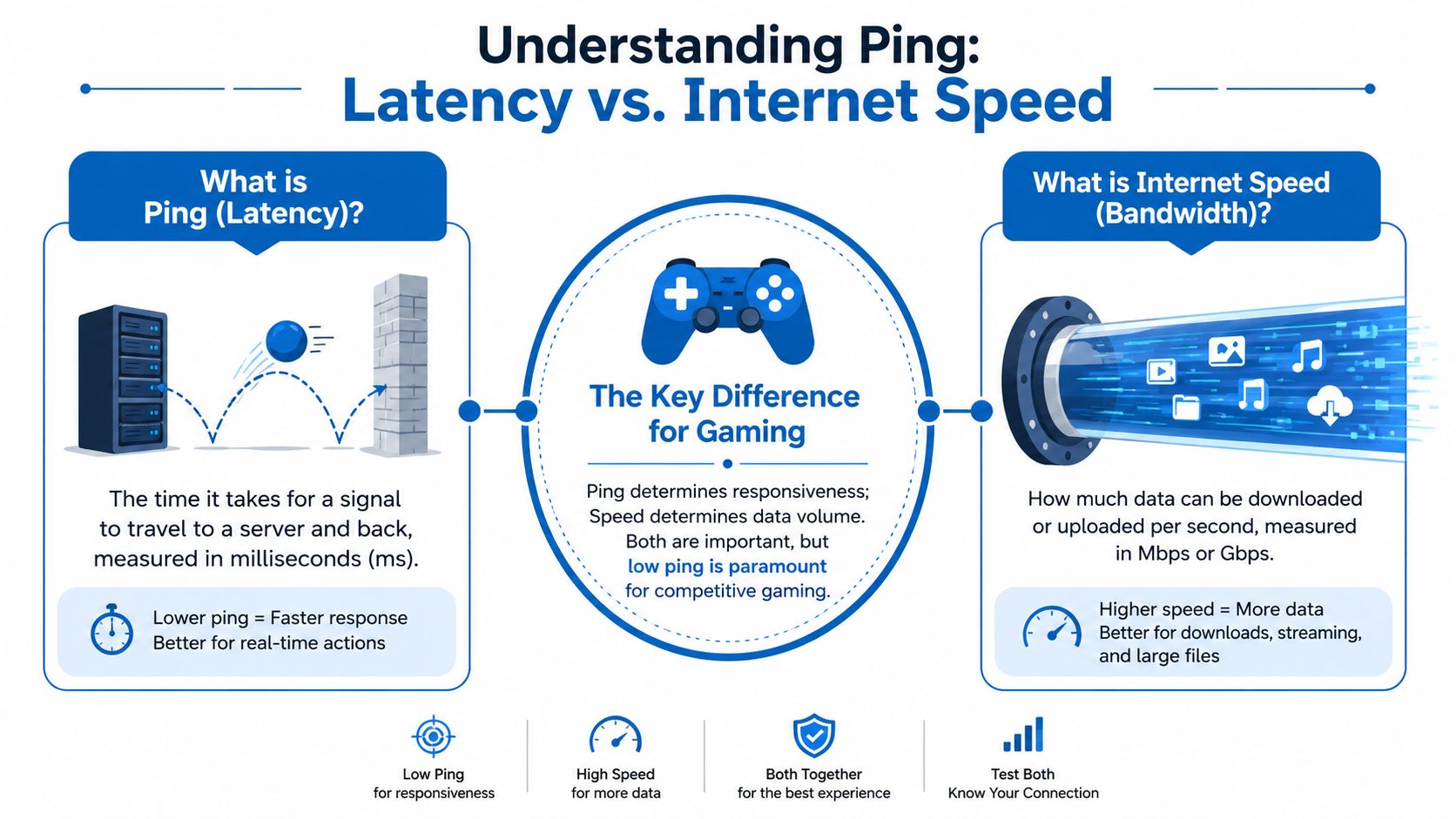
Think of ping like tossing a ball at a wall and timing how long it takes to come back. That round-trip time is your latency, measured in milliseconds (ms). In games, it's the travel time between your device and the server.
Internet speed is different. Speed is the size of the pipe, or how much data can move through it. Ping is the delay before that movement comes back to you.
Ping is responsiveness
If you're asking what is good ping for gaming, the numbers matter most in games where timing decides the outcome. For competitive FPS and MOBA games, 0 to 20ms is considered exceptional, 20 to 50ms is good for smooth play, and anything over 150ms causes significant, noticeable lag according to GameServerPing's gaming ping guide.
That tells you why a premium speed tier doesn't automatically fix lag. You can have a lot of bandwidth and still have a slow round trip to the server. That's like owning a huge highway that still has a long stoplight at the entrance.
Speed is capacity
Bandwidth still matters. Games need room for downloads, updates, voice chat, streaming, and other devices in the house. But bandwidth mostly answers a different question: how much data can move at once?
A simple way to think about it:
- Ping: How quickly the game reacts to your input
- Download speed: How quickly you receive game files, patches, and media
- Upload speed: How quickly your device sends your actions, voice, and stream data out
If you want a clearer look at how download and upload fit together, this guide on fast upload and download speeds breaks down the difference in plain language.
A fast connection that responds slowly will still feel bad in online games.
Why gamers often blame the wrong thing
Plenty of players upgrade to a higher speed package and expect every issue to disappear. Sometimes that helps, especially in busy households. Sometimes nothing changes, because the problem was latency, Wi-Fi interference, unstable routing, or packet loss.
Mail delivery is a useful analogy. Speed is how many packages the truck can carry. Ping is how long it takes the truck to drive to the server house and back. For gaming, the trip time often matters more than truck size.
What Is a Good Ping for Your Favorite Game
You queue for a match, your crosshair is on target, and your shot still feels late. The number on the screen might not even look terrible. That is why a "good" ping is not one universal target. It depends on the game, how competitive you are, and whether your connection stays steady from second to second.
For most players, lower ping feels better. Stable ping feels better too. A connection that sits at a moderate level consistently can play better than one that jumps all over the place. Packet loss can make things even worse, because some of your game data never arrives at all. In real matches, those two problems often hurt more than the average ping number.
Recommended Ping for Gaming by Genre
| Ping (ms) | Quality | Ideal For |
|---|---|---|
| Under 20 | Exceptional | Competitive FPS, MOBAs, ranked play, serious PvP |
| 20 to 50 | Good | Most online multiplayer games, including competitive and casual sessions |
| 50 to 100 | Fair | Casual multiplayer, less reaction-heavy games |
| Over 100 | Tolerable to Poor | Slower-paced games, turn-based titles, or situations where you can accept noticeable delay |
Use that table as a guide, not a promise. A steady 45 ms usually feels better than a connection that bounces between 20 and 80 ms. Mail delivery works as a useful comparison here. If the truck arrives every day at the same time, you can plan around it. If it shows up at random, the whole system feels unreliable.
Why the "right" ping changes by game type
Fast competitive games punish delay first.
In an FPS, every peek, shot, and movement correction depends on quick feedback from the server. In a MOBA, higher latency can throw off skill shots, last hits, and reaction timing during team fights. Racing games suffer in a different way. Steering can feel loose, and opponents may appear to jump slightly on the track.
Slower games give you more breathing room. Turn-based titles, card games, and many strategy games can remain playable with higher ping because split-second timing matters less.
If you mainly play ranked shooters, treat low ping as the target and stable ping as the requirement. If your number looks fine but the game still feels off, jitter or packet loss is often the actual reason. That is also why choosing the best internet for online gaming means looking past advertised speed and paying attention to consistency.
A better way to judge your connection
Ask two simple questions:
- Does my ping stay in a tight range?
- Do I have any packet loss?
Those answers tell you more than the average number alone. Riot Games, for example, explains in its player support that high ping, jitter, and packet loss can each affect responsiveness in different ways, even if the game remains connected.
A good ping is low enough for your game, stable enough to feel predictable, and clean enough to avoid packet loss.
That is the standard that matches what you feel during play.
How to Test Your Ping and Find the Real Problem
If your game feels off, test before you tweak. Otherwise you're guessing.
Start with the game itself
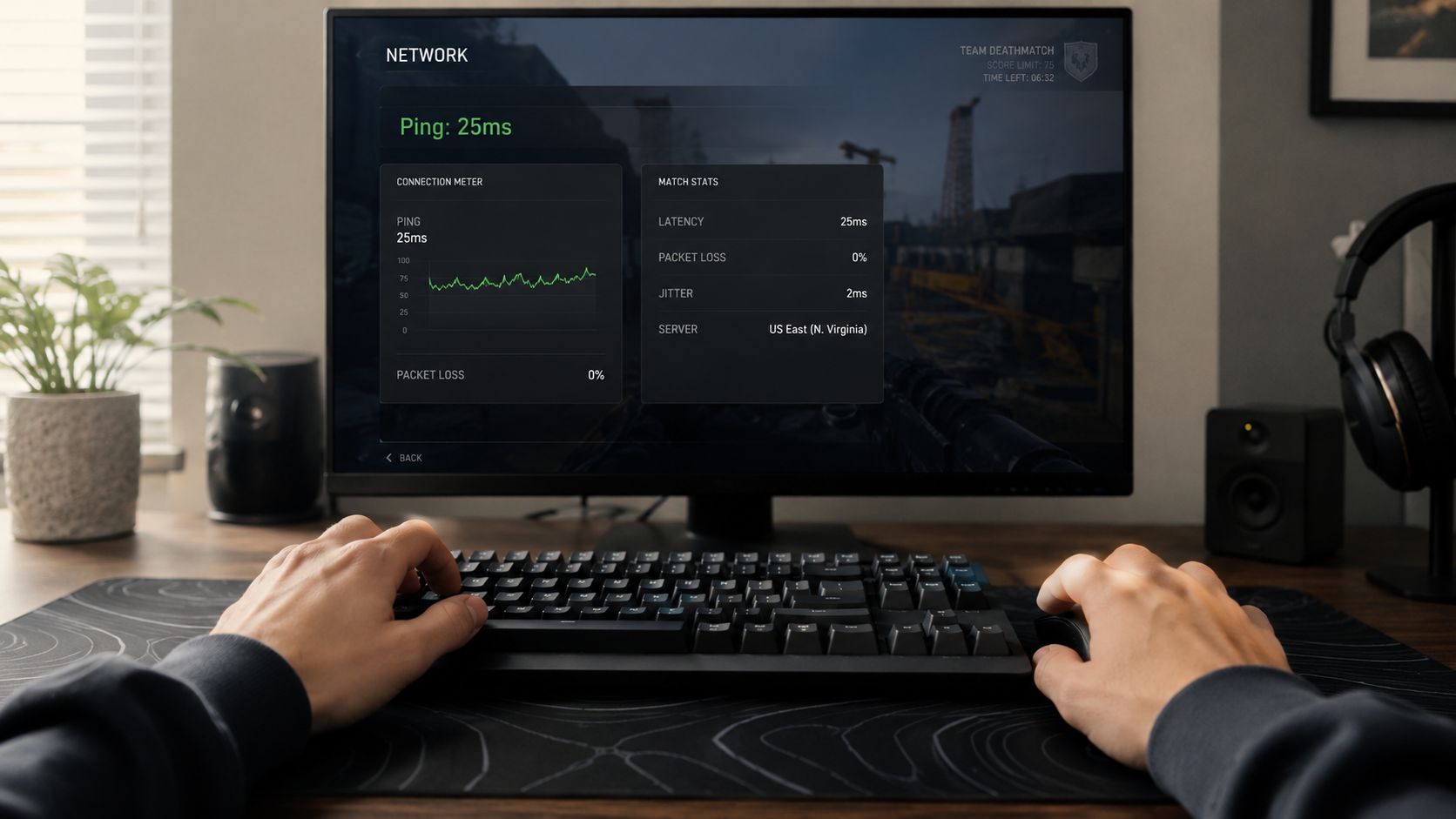
Most online games already show useful network stats. Look for labels like ping, latency, packet loss, or network graph in the settings or HUD options. This is often the most honest test because it shows performance to the actual game server you're using.
Then compare that with a browser test or a system-level test. If you want a walkthrough, this guide on how to test network latency explains the process step by step.
Here are the three checks worth doing:
In-game network stats
Best for real-world gameplay conditions.A browser-based speed test
Good for a quick snapshot, but not always tied to your game's server path.A command-line ping test or tools like WinMTR
Better for spotting repeat issues, route instability, and spikes over time.
Don't stop at the average ping
Many guides often fall short. You can have a decent average and still suffer from a bad connection.
Jitter means your ping keeps changing. A stable line feels predictable. A jumpy line feels like stutter, delayed hit registration, rubber-banding, or weird timing errors.
Packet loss means some of your data never arrives properly. In game terms, that can look like skipped inputs, teleporting players, or sudden desync.
According to Worldstream's gaming latency guide, 40% of high-latency complaints in major gaming markets are due to jitter above 15% rather than high average ping. That's a big reason some players say, "My ping looks fine, but the game still feels terrible."
A steady connection at one moderate latency usually feels better than a lower number that jumps all over the place.
If you want a visual walkthrough of latency issues and practical checks, this video is worth a look.
What your results are telling you
Use this quick reading guide:
- Low ping, stable line, no packet loss: Your network is in good shape.
- Low average ping, constant spikes: Jitter is likely the problem.
- Good speed test, bad in-game feel: Server distance, Wi-Fi interference, or routing may be hurting performance.
- Packet loss showing up anywhere: Fix that first. Even a fast plan can't hide dropped data.
Actionable Steps to Lower Your Ping Today
Once you know the problem, the fixes get a lot more practical. Some are in your room. Some are in your router. Some are outside your control.
Fix what happens on your device
Start close to home. Your console or PC may be competing with background tasks you forgot were running.
- Close background downloads: Game launchers, cloud sync apps, system updates, and streaming tabs can create traffic while you play.
- Restart before ranked sessions: A clean reboot can clear out stuck processes and temporary network weirdness.
- Check local performance too: If the game is stuttering from system overload, it can feel like lag even when the network isn't the only problem. If your machine is cluttered or sluggish, this guide can help you speed up your computer.
Improve your home network first
Wi-Fi is convenient, but convenience isn't the same as consistency.
The highest-impact changes are usually these:
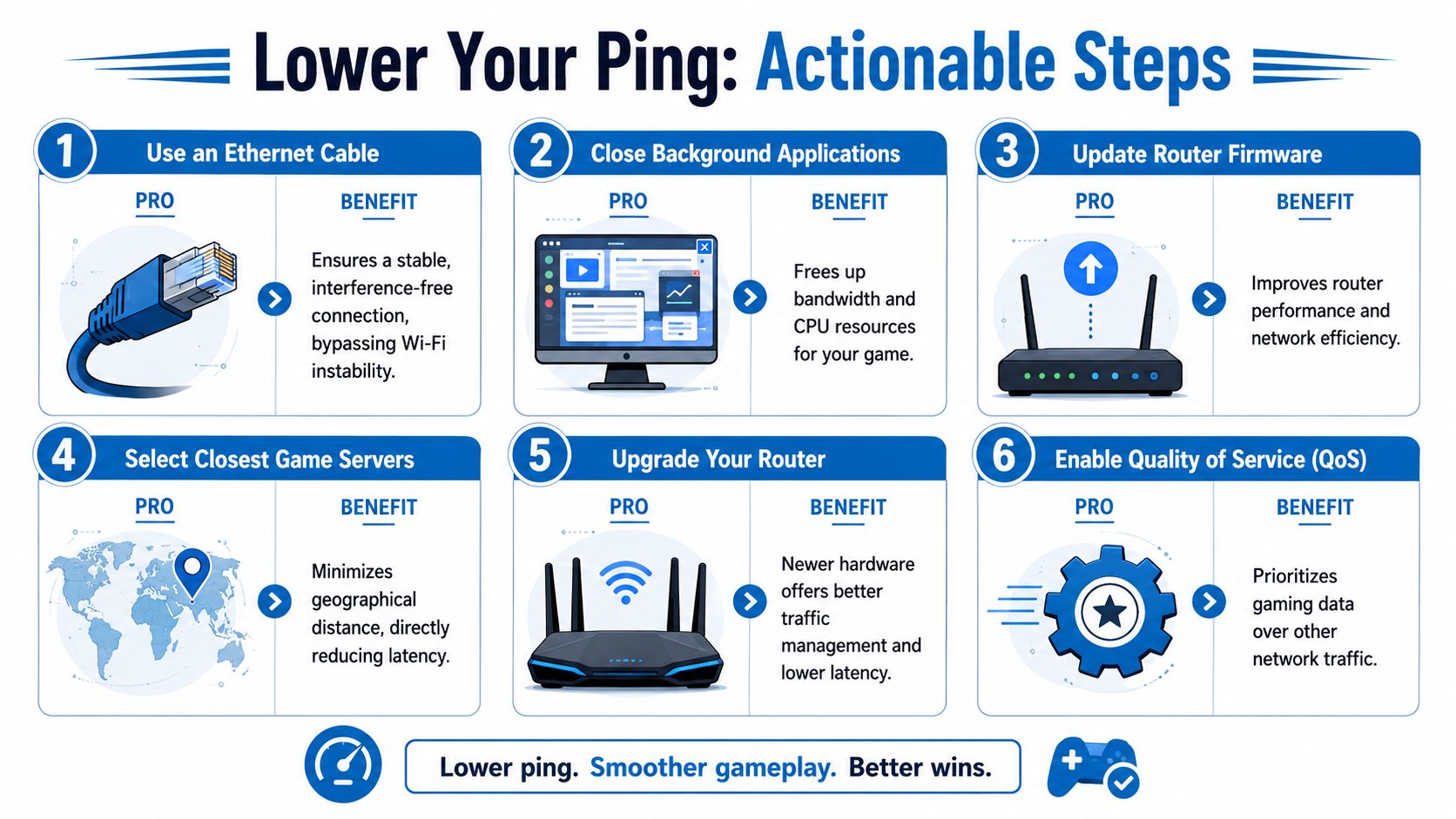
- Use Ethernet when possible: A wired connection avoids a lot of wireless interference and random spikes.
- Move closer to the router if you must use Wi-Fi: Walls, floors, and distance all make wireless less stable.
- Pause household heavy usage during matches: Large downloads, backup jobs, and multiple streams can crowd your connection.
- Update router firmware: Router updates can improve stability and traffic handling.
- Enable QoS if your router supports it: Quality of Service can prioritize game traffic over less urgent activity.
Reality check: If switching from Wi-Fi to Ethernet suddenly makes the game feel normal, your issue probably wasn't raw internet speed.
Choose the right server and timing
Some fixes don't happen in your network menu. They happen in the game menu.
Server region matters because physical distance matters. The farther your data has to travel, the harder it is to keep latency low. If your game auto-selects a distant server for matchmaking reasons, your ping can rise even when your home network is fine.
Try these checks:
- Pick the closest region manually: Don't assume auto is best.
- Avoid overloaded times if you notice a pattern: Evening congestion can make some routes feel worse.
- Watch one full match, not one menu reading: A lobby may look stable, then the live server behaves differently.
Know what you can't fix alone
If you've tried Ethernet, closed background apps, chosen the nearest region, and still see spikes or packet loss, the issue may be upstream. That can include neighborhood congestion, poor routing, peering problems, or aging network infrastructure between you and the server.
At that point, more local tweaking often gives diminishing returns. You can optimize your setup, but you can't repair a weak path outside your home.
The Ultimate Fix A Reliable Fiber Internet Connection
You press fire first, your crosshair is on target, and the replay still makes it look like you reacted late. If that keeps happening even after you fixed your setup at home, the weak point may be the connection itself.
Why fiber changes the experience
Fiber helps because gaming traffic works like fast back-and-forth mail delivery. Your input has to reach the game server quickly, the server has to answer quickly, and those trips need to happen at a steady pace. A connection can show a decent ping number in one test and still feel bad in a match if those deliveries arrive unevenly or go missing.
That is why fiber matters in three practical ways:
- Lower latency potential: Your commands can reach the server with less delay.
- Lower jitter: The timing between packets stays more even, so the game feels steadier from one second to the next.
- Lower packet loss risk and stronger upload performance: Your data is less likely to disappear in transit, which helps with hit registration, voice chat, cloud saves, and streaming while you play.
Many players focus only on the first bullet. The second and third often decide whether a game feels smooth or frustrating.
Consistency changes how the game feels
A low ping reading is helpful, but a stable connection is what makes your aim, movement, and timing feel reliable. If your latency jumps from fine to terrible every few seconds, the average number does not tell the full story. Jitter and packet loss are usually the parts you feel as rubberbanding, delayed shots, stuttery voice chat, or those weird moments where the game seems to ignore your input.
Fiber tends to handle that better than older connection types because it is built for fast, consistent data travel in both directions. That matters more now than it used to. Online games constantly send small updates back and forth, and many players are also in Discord, syncing saves, downloading patches, or streaming to Twitch at the same time.
If you want a fuller breakdown of how that affects both play and streaming, read why fiber internet will change the way you game online and stream everything else.
Good gaming internet should feel boring in the best way. No random spikes. No mystery packet loss. No second-guessing whether the problem was your decision or your connection.
If lag spikes, jitter, or upload bottlenecks keep showing up, Premier Broadband is worth checking out. Its 100% fiber network is built for the kind of stable, low-latency performance gamers, streamers, remote workers, and busy households need every day.