
You're probably using the internet right now the same way many others do. A few phones are on Wi-Fi. A smart TV is streaming. Maybe a doorbell camera is uploading clips, a laptop is syncing files, and someone is joining a work call. In a small business, swap in point-of-sale systems, office PCs, printers, cloud apps, and VoIP phones.
That everyday traffic feels routine, but it creates a bigger target than is commonly understood. Security isn't only about blocking access from the outside. It's also about noticing when something unusual starts happening inside your network.
That's where intrusion detection systems come in. They don't replace firewalls or good passwords. They add visibility. For homes and small businesses, that visibility matters because most security problems don't arrive with a flashing warning sign.
What Are Intrusion Detection Systems
An intrusion detection system, or IDS, is a tool that watches network or device activity and alerts you when it spots something suspicious. The easiest way to think about it is this: a firewall is like a locked gate, while an IDS is like a camera and alarm system watching the gate, the driveway, and the front porch.
An IDS usually doesn't block traffic by itself. It observes, compares, and reports. That's a key distinction because many people hear “intrusion detection” and assume it stops attacks automatically. Often, it doesn't. Its main job is to tell you, “This traffic looks wrong,” or “This device is acting in a way that deserves attention.”
Why homes and SMBs should care
This isn't just an enterprise topic anymore. The global IDS market is valued at approximately USD 6.8 billion in 2025 and is projected to reach USD 22.2 billion by 2035, with a CAGR of 12.5%, according to Future Market Insights' intrusion detection system market outlook. That projection reflects a simple reality: more connected devices create more opportunities for misuse.
For a home, that might mean:
- Smart home exposure: cameras, speakers, TVs, and thermostats all create traffic
- Shared networks: kids gaming, parents working, guests visiting, and devices coming and going
- Limited visibility: it's easy to see if Wi-Fi is working, but not if traffic is suspicious
For a small business, the stakes are broader:
- Customer data handling: even basic operations can involve sensitive information
- Always-on services: phone systems, payment workflows, cloud software, and remote access
- Lean IT staffing: many SMBs don't have a full-time security analyst reviewing alerts all day
An IDS is valuable because it watches for warning signs you'd never notice by looking at your router lights.
What an IDS does and doesn't do
A lot of confusion disappears once you separate monitoring from blocking.
| Function | IDS |
|---|---|
| Watches traffic or device activity | Yes |
| Looks for suspicious behavior | Yes |
| Sends alerts | Yes |
| Automatically blocks traffic | Usually no |
That “usually” matters because some security platforms combine multiple tools. But at its core, IDS is about detection.
For homes and smaller organizations, that makes it useful in a practical way. If your network suddenly starts making unusual outbound connections, or one device behaves very differently from the rest, an IDS can surface that before the problem turns into account theft, service disruption, or a privacy issue.
How an IDS Detects Network Threats
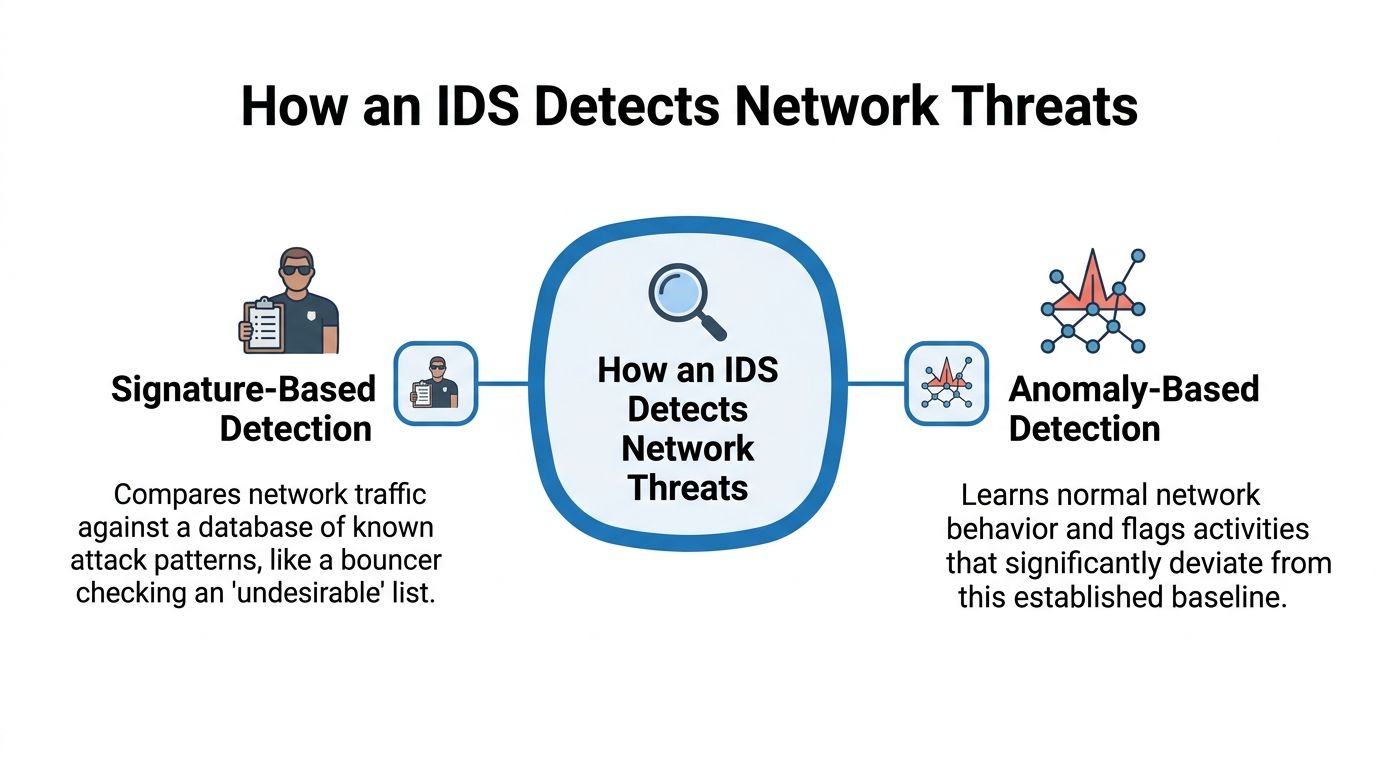
An IDS needs a method for deciding what looks dangerous. At a high level, intrusion detection systems rely on signature-based detection, statistical anomaly-based detection, and stateful protocol analysis, as summarized in Wikipedia's overview of intrusion detection systems.
Signature-based detection
This is the easiest model to understand.
Signature-based detection matches traffic against a database of known attack patterns.
Think of a bouncer with a clipboard. If someone on the troublemaker list walks up to the door, the bouncer recognizes the face and raises the alarm. In networking terms, the IDS compares activity against known malicious patterns.
That's useful because it can be very direct. If the system has already seen a specific exploit or attack pattern before, it can flag it quickly. The downside is just as clear. A brand-new threat may not be on the list yet.
Anomaly-based detection
This method works differently.
Anomaly-based detection looks for behavior that breaks from what the system has learned is normal.
Instead of checking a list of known bad actors, it watches routine behavior. If your home network usually has light traffic overnight but suddenly one device starts acting oddly at 3 a.m., anomaly detection may flag it. In a business, it might notice a workstation communicating in an unusual way compared with its normal pattern.
This approach can spot unfamiliar threats, including activity that doesn't match a known signature. But it can also produce more noise if “normal” is hard to define.
Stateful protocol analysis
There's a third method that gets less attention in basic explainers.
Stateful protocol analysis checks whether traffic follows expected protocol behavior. In plain language, it asks whether the conversation on the network is happening the way it should. If traffic claims to follow a standard but behaves inconsistently, the IDS may treat that as suspicious.
That matters in real networks because not every threat announces itself with an obvious malware pattern. Sometimes the clue is that traffic is speaking the language of the network incorrectly.
Why analysts still matter
Detection methods are only part of the story. Someone still has to interpret alerts, tune rules, and decide what deserves action. If you're curious about the skills involved, these intrusion analyst roles give a useful picture of the human side of network monitoring.
For homes and SMBs, that's also why managed visibility can be appealing. It's one thing to collect alerts. It's another to understand traffic patterns well enough to separate background noise from a real issue. That's also where tools like network traffic analysis fit in, because they help turn raw activity into something you can review and act on.
The Main Types of Intrusion Detection Systems
Not all intrusion detection systems watch the same place. The two main categories are network-based IDS and host-based IDS. The difference comes down to where the system sits and what it can see.

Network-based IDS
A network-based IDS, often shortened to NIDS, monitors traffic moving across the network. Imagine a camera watching a whole street intersection. It doesn't know every detail inside each house, but it sees the flow of cars, unusual stops, and strange patterns.
For a home, a NIDS can help reveal whether a device is behaving oddly on the network. For a small business, it gives a broader view across office devices, cloud connections, guest Wi-Fi, and voice traffic.
A NIDS is useful when you want to answer questions like:
- What's crossing my network: which devices are talking, when, and in what pattern
- Is one device acting strangely: maybe a printer, camera, or workstation starts generating unusual traffic
- Do I need broad visibility: especially when multiple users and devices share one connection
Host-based IDS
A host-based IDS, or HIDS, runs on a specific device rather than watching the whole network. This is more like putting a sensor directly on a door or inside a single room.
Instead of focusing on overall traffic flow, it watches one endpoint. That might include file changes, system activity, application behavior, or login events on a laptop or server. It's narrower in scope, but it can be deeper on that one machine.
That makes HIDS attractive when a particular device matters more than the rest, such as:
| Best fit for HIDS | Why it helps |
|---|---|
| A file server | It can watch local activity closely |
| A staff laptop | It can spot suspicious changes on the endpoint |
| A critical office PC | It provides visibility even if traffic looked normal at the network level |
Which one makes more sense
For most non-enterprise users, this isn't an either-or question so much as a visibility question.
A NIDS is stronger when you want the big picture. A HIDS is stronger when one device holds critical data or runs important services. At home, individuals typically won't install host-level tooling on every smart device, which is one reason network-level monitoring matters so much. In a small business, combining the two can make sense when you have a few especially important systems.
A network-based IDS sees the neighborhood. A host-based IDS checks what's happening inside one house.
Understanding IDS vs IPS
This is one of the most common mix-ups in security conversations. IDS and IPS sound similar because they are related, but they don't play the same role.
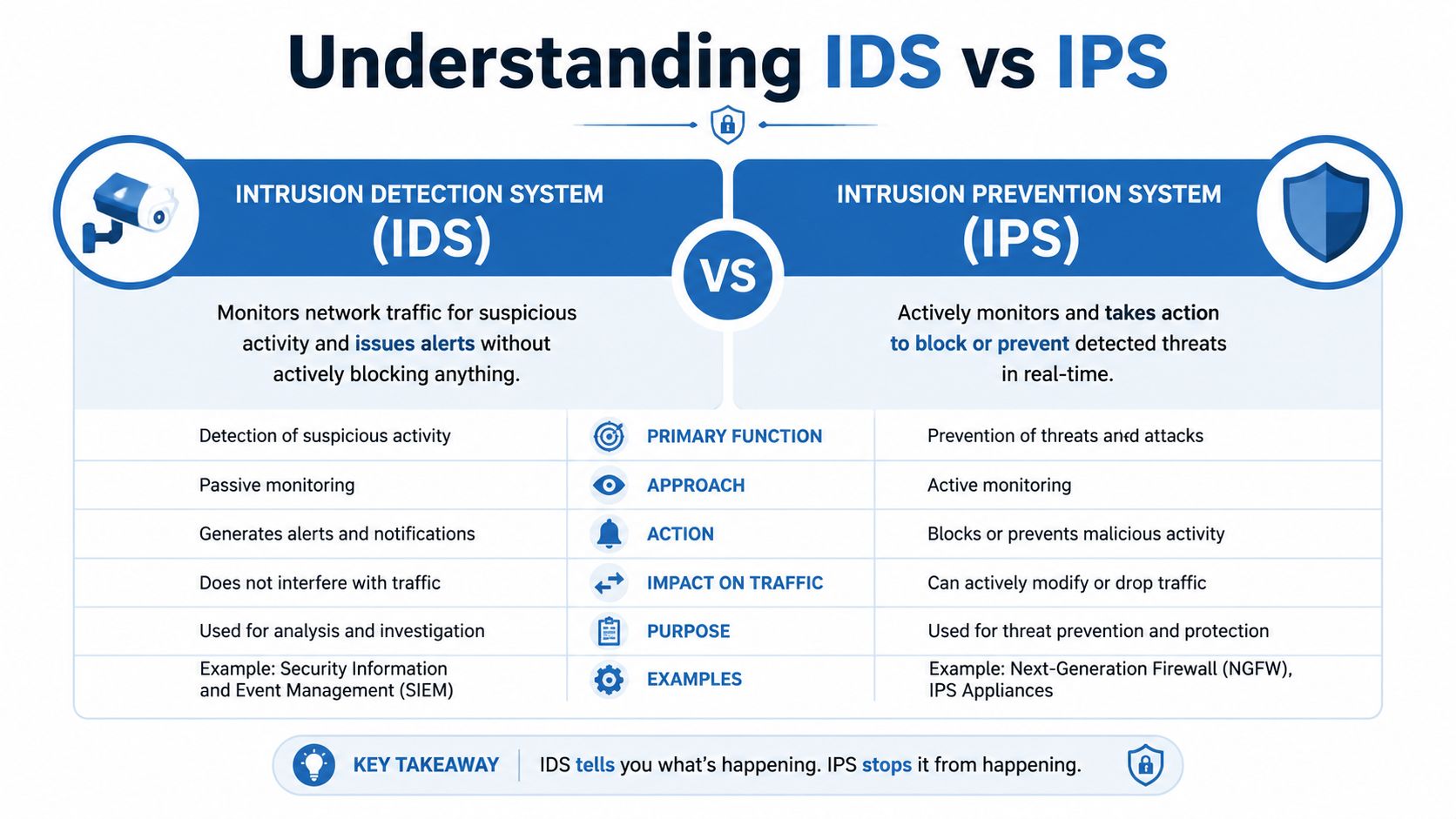
An IDS is about detection. An IPS, or intrusion prevention system, is about prevention. If an IDS is a motion alarm that texts you when someone is on the property, an IPS is the system that also locks a door, drops the connection, or blocks the suspicious traffic.
The practical difference
The easiest comparison is this:
| Tool | Primary job | Typical action |
|---|---|---|
| IDS | Detect suspicious activity | Alert |
| IPS | Stop suspicious activity | Block or prevent |
That sounds simple, but the trade-off is important. Detection-only tools are less likely to disrupt legitimate traffic because they aren't trying to stop anything automatically. Prevention tools can reduce exposure faster, but they require confidence. If they're tuned poorly, they can block activity that users need.
Why this matters to smaller networks
In a home or small office, accidental blocking can be surprisingly disruptive. A prevention system that misreads normal activity could interfere with video calls, cloud apps, gaming, smart devices, or VoIP traffic.
That's why many environments start with observation first. Teams want to understand what normal looks like before enabling aggressive blocking behavior.
This short video gives a helpful visual overview of the difference:
Why both often belong in the same strategy
You don't have to treat IDS and IPS as rivals. Many security setups use both. Detection helps validate what's happening. Prevention applies enforcement after rules are understood and trusted.
For homes and SMBs, the main lesson is practical. If you're choosing a managed security service, ask whether it only alerts, whether it can also block, and who is responsible for tuning those controls. The tool matters, but the operating model matters just as much.
Deploying and Tuning Your IDS
The hard part of intrusion detection systems isn't just installation. It's getting useful alerts without drowning in irrelevant ones.
That problem has a name: false positives. A false positive happens when the IDS flags legitimate activity as suspicious. If that happens too often, people stop paying attention. Once alert fatigue sets in, even a real warning can get missed.
Why tuning matters
Every network has its own normal behavior. A home with smart speakers, gaming consoles, cameras, and remote work traffic doesn't behave like a small retail office. A medical clinic doesn't look like a warehouse. A standard ruleset can only get you so far.
Tuning means adjusting detection so it better fits your environment. That may involve excluding known-safe patterns, refining alert thresholds, and deciding which events deserve escalation. Without that work, the system may produce more confusion than clarity.
A simple rollout often follows this logic:
- Start by observing: let the system watch traffic and generate alerts
- Review the noise: identify what is normal in your environment
- Refine rules: reduce repetitive false alarms
- Escalate carefully: treat high-confidence alerts differently from low-confidence ones
How modern systems improve the signal
Machine learning has improved this area. Advanced anomaly-based IDS using deep neural networks achieved over 99% accuracy on the KDDCup99 benchmark dataset while maintaining false positive rates below 1%, according to Scientific Reports on DNN-based intrusion detection.
That doesn't mean every real-world deployment will instantly perform at that level. Benchmarks are controlled environments. But the result does show something important: strong detection doesn't automatically require a flood of bad alerts.
Practical rule: The best IDS is not the one that alerts most often. It's the one that helps you notice what actually needs attention.
What non-enterprise users should do
Most homes and small businesses don't want to become full-time security operations centers. That's reasonable. You still need visibility, but you probably don't want to babysit detection rules every day.
That's why the surrounding setup matters. Good router and firewall settings still carry a lot of weight, especially before advanced monitoring is added. If you want to tighten the basics first, a review of router and firewall configuration is often the right starting point.
IDS Solutions for Your Home and Small Business
Here's the practical question at hand: what should you do with all of this?
For large enterprises, the answer may involve dedicated analysts, custom policies, and multiple security tools. For homes and SMBs, the better answer is usually simpler. You want coverage that fits the size of your network and the amount of time you can realistically spend managing it.

Why home networks are tricky
Home environments are messy from a security perspective. Devices come from many brands, behave inconsistently, and often don't expose much detail to the user. That makes reliable detection harder than people expect.
Research cited in the verified data shows that anomaly-based IDS in non-medical, network-level contexts achieve only 89% accuracy with high false alarm rates in unstructured home environments, according to this home-environment IDS discussion. That's a useful reminder that consumer networks are difficult to model cleanly.
A typical home problem looks like this:
- IoT sprawl: cameras, plugs, TVs, tablets, voice assistants, and game consoles all behave differently
- Constant change: guests join, kids install apps, and devices update in the background
- Limited feedback: it's not easy to determine whether a spike in traffic is normal or suspicious
That's one reason standard security language can feel misleading. A basic consumer router may have firewall features, but that doesn't mean it offers meaningful intrusion detection that's well tuned for home use.
What makes sense for small businesses
Small businesses usually need stronger security than a household, but they still face the same staffing problem. They need to protect office devices, cloud access, phones, and Wi-Fi without running a full security team.
In that situation, managed services often make more sense than piecing together tools on your own. For example, Premier Broadband offers managed network options that align with this need, and its broader guidance on network security for small business reflects the practical mix most SMBs need: visibility, policy control, and support rather than a pile of disconnected security products.
A simple decision framework
If you're deciding what level of IDS-related protection fits your situation, use this lens:
| Your environment | Most practical approach |
|---|---|
| Basic home with few devices | Focus on secure router settings and managed Wi-Fi basics |
| Busy home with many smart devices | Favor ISP-level or managed visibility over DIY detection tools |
| Small office with shared systems | Look for managed edge security with centralized monitoring |
| Business with critical endpoints | Add endpoint-focused protection where specific devices matter most |
The key trade-off is convenience versus control. DIY tools can offer flexibility, but they also expect time, tuning, and technical judgment. Managed options give up some hands-on control in exchange for simpler operation and more consistent oversight.
The Future of Intrusion Detection
Intrusion detection systems are becoming less dependent on rigid rule sets alone and more capable of adapting to changing behavior. That matters because attacks change, but so does ordinary network use. Cloud apps, hybrid work, smart devices, and always-connected services keep shifting the baseline.
The most promising direction is the use of AI and machine learning to improve detection quality, not just detection volume. In practical deployment evaluations, deep neural network solutions achieved the highest average F1 score of 0.8537, indicating a stronger balance between precision and recall in real-world environments, according to this arXiv evaluation of intrusion detection models. In plain terms, that means better odds of catching meaningful threats without overwhelming people with noise.
What that means for ordinary users
For home users and SMBs, the future isn't about becoming security researchers. It's about getting smarter protection that is easier to live with.
That likely means:
- More adaptive detection: systems that learn normal traffic patterns more effectively
- Fewer meaningless alerts: better filtering before a warning reaches the user
- More explainable decisions: clearer reasons why traffic was flagged
- Tighter service integration: networking, firewalling, and threat monitoring working together
Clear explanations matter almost as much as good detection. If you're interested in the broader mindset behind trustworthy AI security, this visual on AI data protection principles is a useful reference point for thinking about how automated systems should handle sensitive data and decision-making.

The main takeaway
An IDS is your network's watcher. It helps you spot suspicious behavior, whether that comes from a known attack pattern or something that doesn't fit normal activity. It's different from an IPS, which acts to block. And for most homes and small businesses, the main challenge isn't understanding the acronym. It's getting meaningful protection without taking on enterprise-level complexity.
That's why managed approaches will keep gaining ground. They bring together monitoring, policy, and support in a way that better matches how smaller networks operate. If you want to explore that model further, managed network security solutions are a useful place to look for how detection fits into a broader security service.
If you want help protecting your home or business connection without piecing everything together yourself, Premier Broadband offers fiber internet and managed network options that can support a more practical, layered security setup.