
Dad freezes mid-sentence on a work video call. Upstairs, a teenager is uploading a gaming highlight reel to share with teammates. In the kitchen, a younger child's Roblox session starts lagging while a tablet tries to stream a recipe. Everyone blames “slow internet,” but the clue may be the upload direction, not the download number printed on the plan.
That's where fiber internet speed becomes more than a marketing figure. A good connection must move data into your home, send data back out, and respond quickly when several people use it at once. The right choice depends on how your household works during its busiest moments, not on which plan has the largest number.
When Fiber Internet Speed Actually Matters
A single device can make almost any modern connection feel acceptable. One person watches a video, one browser loads a page, and the speed test looks reassuring. Household problems appear when several demanding activities compete at the same time.
Dad's video call needs a steady stream of outgoing camera and microphone data. The teenager's upload consumes the same upstream capacity, while the game and recipe stream need responsive delivery in the opposite direction. If the connection has strong download capacity but limited upload headroom, the call may freeze even though webpages still open quickly.
Practical rule: If downloads seem fine but calls freeze when someone sends files, posts videos, or runs a backup, investigate upload performance first.
Fiber helps because its network design can provide symmetrical download and upload speeds. That balance matters for remote work, cloud storage, livestreaming, security cameras, shared documents, and large media files. OpenVault reported average fiber upload speeds of 556 Mbps, compared with 43 Mbps for DOCSIS cable upload, a difference documented in OpenVault coverage of the fiber and cable upload gap.
The rest of the decision becomes easier once you separate five ideas:
- What speed measures: Download, upload, and latency describe different parts of the connection.
- How access types differ: Fiber, cable, DSL, and fixed wireless behave differently under distance and household load.
- What tiers deliver: A plan's advertised Mbps represents capacity, not a promise that every device needs all of it.
- Which activities demand what: Streaming, gaming, calls, backups, and work files stress the connection in different ways.
- How to verify service: A wired test can reveal whether the provider, router, or Wi-Fi is responsible for disappointing results.
The household doesn't need the biggest plan because it has many devices. It needs enough stable two-way capacity for the activities people perform together, especially during the evening rush.
How Fiber Internet Speed Works
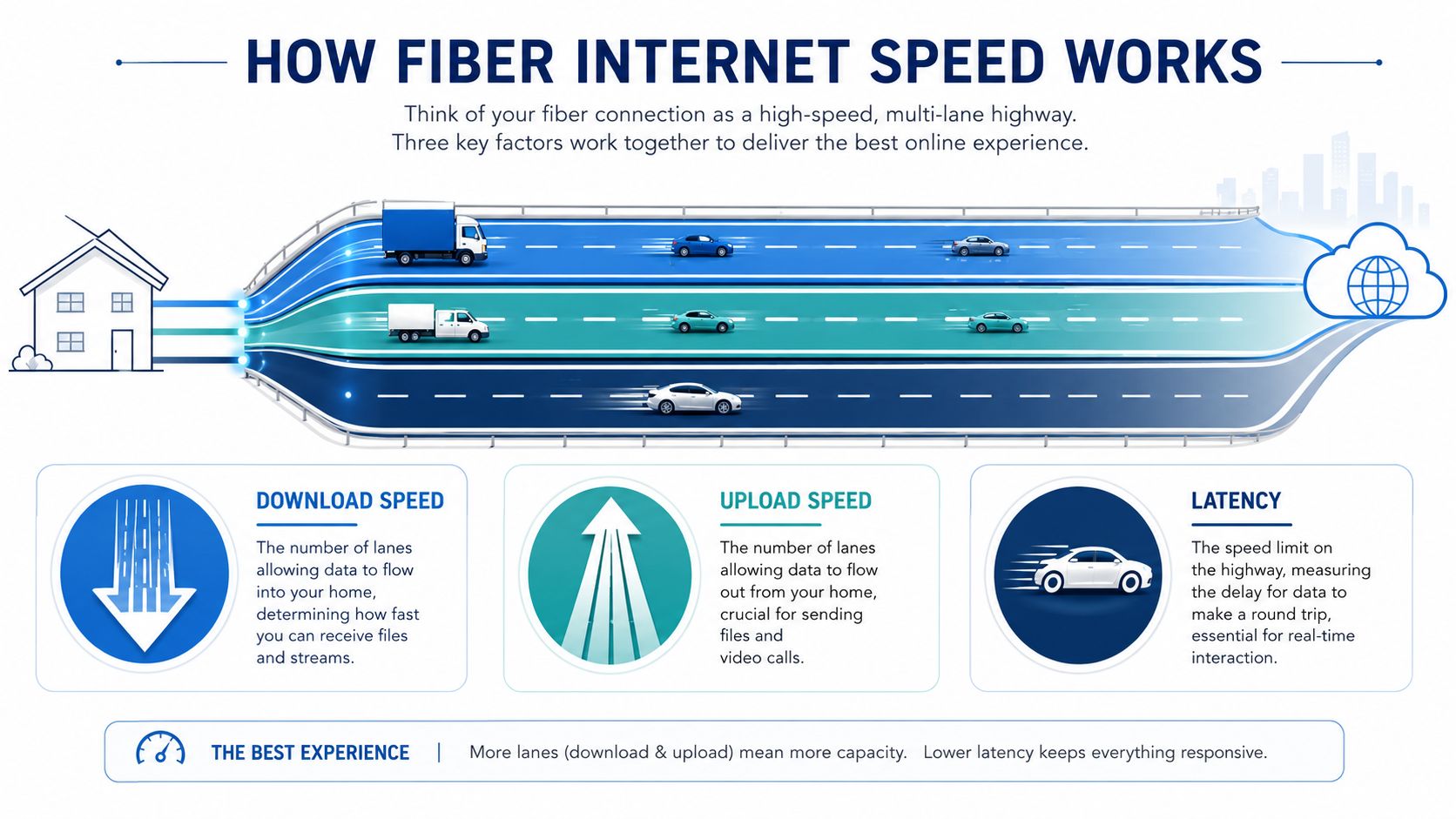
Think of your internet connection as a highway with traffic moving in both directions.
Download speed is the number of lanes carrying data into your home. Movies, webpages, game updates, software, and music all travel along those lanes. Upload speed is the number of lanes carrying data out, including video from a webcam, photos sent to cloud storage, livestream footage, and files shared with coworkers.
Latency is different. It measures how long a packet takes to make a round trip between your device and the destination. Using the highway analogy, latency is closer to how quickly one car can travel from one end to the other and return. A highway with many lanes can carry a lot of traffic, but that doesn't automatically mean each car reaches its destination quickly.
Why the two directions matter
Traditional cable service commonly emphasizes download capacity while providing less upload capacity. DSL can be constrained in both directions, particularly as the home gets farther from network equipment. Fiber can send data through glass strands using light pulses, allowing providers to design service with much more balanced capacity.
That symmetry changes ordinary household behavior. A remote employee can send camera data while another person uploads a video. A photographer can back up a large library without making every other person wait. A small business can move files to cloud systems while staff continue using calls and shared applications.
Fiber's latency advantage also matters. In FCC Measuring Broadband America testing, average peak-period round-trip latency measured 17 ms for FTTH, compared with 28 ms for cable and 44 ms for DSL, as reported in the FCC broadband measurement report. The report noted that the FTTH latency level was adequate for common real-time applications such as VoIP.
For a deeper explanation of the access architecture, see what fiber to the home means. The practical lesson is simple: speed is capacity, upload is outgoing capacity, and latency is responsiveness. A connection feels dependable when all three behave well together.
Fiber Internet Compared to Cable, DSL, and Fixed Wireless
A plan's download headline doesn't tell the whole story. Two connections can advertise similar downstream capacity yet feel very different when a household uploads files, joins calls, or uses the network during busy evening hours.
| Access Type | Typical Download | Typical Upload | Latency | Peak-Hour Consistency |
|---|---|---|---|---|
| Fiber | High to gigabit-class | Often symmetrical with download | Low and stable | Generally strong |
| Cable | High download capacity | Usually much lower than download | Moderate, may rise under load | Can vary by neighborhood demand |
| DSL | Low to moderate | Limited | Higher, affected by line distance | Can remain constrained |
| Fixed Wireless | Varies by signal and network conditions | Varies by signal and network conditions | Can fluctuate | May change with congestion or weather |
These descriptions are qualitative because advertised and delivered performance depends on the provider, access design, local infrastructure, equipment, and service conditions. The important comparison is behavioral, not merely numerical.
What changes in daily use
Cable networks often dedicate more capacity to downloads than uploads. That works well for watching content, but a household can feel the upstream limit when someone sends a large file or runs a cloud backup during a video call. In the OpenVault figures cited earlier, the reported average upload gap between fiber and DOCSIS cable illustrates why a connection with fast downloads can still struggle with outgoing traffic.
DSL has a different weakness. Copper lines lose performance with distance from the provider's equipment, so the home's location within the network can shape both capacity and responsiveness. Fixed wireless depends on the quality of the radio path, signal conditions, tower capacity, and local environment. Weather and congestion can affect the experience, though the degree varies by network.
A 1 Gbps cable plan with 35 Mbps upload is a useful example of why plan labels can mislead, but that figure is illustrative rather than a general market statistic. It won't behave like a 500 Mbps symmetrical fiber plan when several people upload, even though the cable plan has the larger download headline.
For a closer side-by-side explanation of the technologies, read this guide to fiber internet versus cable. If your household depends on calls, backups, and shared files, prioritize upload capacity and consistency before paying extra for a larger download number.
Fiber Speed Tiers and What They Really Deliver
Fiber tiers describe the amount of traffic the connection can carry at once. They don't mean every device will download at the full advertised rate, and they don't eliminate limits caused by Wi-Fi, a website's server, an older device, or a slow storage drive.
The best way to compare tiers is to ask what happens during the household's busiest hour. A home with several people browsing casually may never need a high tier. A home with remote workers, gamers, creators, smart-home equipment, and cloud backups needs more room so one demanding task doesn't crowd out everything else.
| Speed Tier | Best For | Typical Household |
|---|---|---|
| 200 Mbps | Browsing, streaming, calls, and ordinary connected devices | Small household with moderate simultaneous use |
| 500 Mbps | Multiple streams, work calls, gaming, and larger downloads | Active family with several users online together |
| 1 Gbps | Heavy remote work, cloud backups, gaming, and many devices | Larger household with frequent concurrent demand |
| 2 Gbps | Content creation, large transfers, and advanced home networking | Power users or a small office with demanding workflows |
| Multi-gig | Local servers, NAS systems, production files, and intensive business use | Technical households, creators, and multi-unit offices |
Matching capacity to people
200 Mbps can be comfortable for a smaller home that streams, browses, attends occasional calls, and doesn't routinely move large files while everyone else is online. The symmetrical design still gives this tier an advantage for outgoing work.
500 Mbps adds practical headroom. It suits a household where multiple people stream, a smart-home system remains active, and one or more residents join work or school calls at the same time.
1 Gbps becomes useful when heavy activities overlap regularly. A family might have several high-resolution streams, a game download, a work meeting, and a cloud backup running together. The appeal isn't that one person needs the entire connection. It's that the household can share a large pool without constant contention.
2 Gbps and multi-gig plans make more sense for creators moving large video projects, small offices handling production files, or homes with local servers and network-attached storage. They also require compatible wired equipment and devices, so the higher tier alone won't guarantee multi-gig performance throughout the home.
A higher tier creates headroom. It doesn't repair weak Wi-Fi, outdated hardware, or poor router placement.
Real-World Performance for Streaming, Gaming, and Remote Work
Fiber internet speed shows its value when tasks overlap. A speed test measures a controlled transfer to a test server, while a household creates a shifting mix of video, gaming traffic, calls, uploads, updates, and background synchronization.
A 4K stream typically needs about 25 Mbps per stream, according to the usage figures represented in the streaming, gaming, and video conferencing performance infographic. That requirement describes the stream itself, not the total household plan. Browsing, updates, calls, and other devices still share the connection.
Streaming is mostly a download test
Streaming consumes downstream capacity and usually tolerates small delays because the player buffers content. The household problem appears when several streams run alongside downloads and other activity. A properly sized fiber plan should preserve room for ordinary browsing and calls rather than letting one large transfer take over.
Gaming cares about response
Online games usually send and receive relatively small amounts of data compared with video streaming. The critical factors are latency, jitter, and packet stability, not simply the largest Mbps figure. A fiber connection can help responsiveness when replacing a higher-latency access type, but moving from one strong fiber tier to a much faster tier may not materially change ping for most players.
The best internet for streaming and gaming should therefore be judged by stable latency, reliable capacity, and the quality of the home network. A wired console connection or well-placed modern Wi-Fi system can matter as much as the service tier.
Remote work exposes upload weaknesses
A video call needs outgoing camera and microphone data as well as incoming video. The infographic lists 3 to 4 Mbps up and down for a high-quality two-way call, but several calls, screen sharing, cloud synchronization, and household use can raise the total demand.
Cloud backups reveal the difference most clearly. Sending a large photo or video library depends on upload capacity, so symmetrical fiber can finish the task without forcing every other activity to compete for a narrow upstream lane. That also matters to people exploring remote work business ideas for 2026, where dependable file transfers and calls can affect how professionally a home office operates.
How to Test and Troubleshoot Fiber Internet Speed
A reliable test starts by removing variables. Wi-Fi adds distance, interference, radio congestion, and device limitations, so testing wirelessly may measure the path between your router and device rather than the fiber service itself.
Run a clean wired test
- Connect one device: Plug a capable computer directly into the router with Ethernet. Avoid testing while several other devices are downloading, streaming, or syncing.
- Pause background traffic: Close streaming apps, game launchers, cloud backup tools, and browser tabs that may transfer data. A clean test needs the connection to itself.
- Use a consistent test service: Run a trusted tool such as Speedtest.net or Fast.com, and use the same service when comparing results over time.
- Record all three results: Write down download speed, upload speed, and ping or idle latency. Upload is especially important on a fiber plan because it reveals whether the connection is behaving symmetrically.
Find the source of the slowdown
If wired results are strong but Wi-Fi results are weak, focus on the router, placement, wireless band, interference, or the device's network adapter. If both wired and wireless tests are consistently poor, the issue may involve the router, the optical network terminal, the Ethernet cable, or the provider's network.
Try these checks:
- Restart network equipment: Power-cycle the router and optical network terminal, then allow them to reconnect fully.
- Check the test server: A distant or busy server can affect results. Repeat the test with another nearby option.
- Update router software: Install available firmware updates and check whether the router supports the subscribed tier.
- Repeat at different times: A pattern during busy periods points toward congestion or shared network conditions, while an isolated result may reflect temporary traffic.
- Compare wired and Wi-Fi results: This separates service performance from in-home wireless performance.
For a more detailed procedure, follow this guide to test internet speed accurately. Healthy fiber service should produce repeatable wired results reasonably close to the advertised tier, with upload performance that matches the plan's design.
Why 100% Fiber From a Community Provider Is the Safer Bet
Fiber's technical advantages only reach the household when the provider carries fiber all the way to the home and operates the network carefully. A provider may advertise high speed, but the access architecture still determines whether the connection delivers balanced upload capacity, low latency, and dependable performance during shared use.
A community-rooted provider such as Premier Broadband offers 100% fiber-optic internet, symmetrical service, residential plans, business connectivity, and managed Wi-Fi features. Its Premier Protects offering includes family content controls and managed Wi-Fi, while the Premier Protection Plan covers equipment repairs and relocations associated with storms, pets, or home projects.
That combination addresses two different problems. The fiber connection supplies the capacity and two-way performance discussed above. The support and protection features help households manage the equipment and service disruptions that can undermine an otherwise capable connection.
What to evaluate before signing up
Look beyond the advertised download number and ask:
- Is the connection fiber to the home: A full-fiber design supports the symmetrical behavior many households want for calls, backups, and file sharing.
- Does the plan state upload speed: If upload isn't clear, ask directly before choosing a tier.
- What equipment is included: Router capability, managed Wi-Fi, and wired port speeds affect what devices can use.
- How does support work: Local crews and geographically informed service teams may offer a clearer path during outages or installation issues.
- Are prices transparent: Promotional pricing can make a plan look attractive at first, then create uncertainty when the introductory period ends.
The safer provider choice is the one that matches the network design to your workload and explains the service plainly. Peak Mbps matters, but consistent headroom, accountable support, and full-fiber architecture matter more once the household is busy.
Choosing the Right Fiber Speed for Your Household
Choose the lowest tier that stays comfortable during your busiest hour, not the largest number on the flyer. For many homes, 200 to 500 Mbps symmetrical service can support streaming, calls, gaming, and ordinary browsing across a modest number of active devices.
Move toward 1 Gbps when heavy users regularly overlap with cloud backups, remote work, game downloads, or several high-resolution streams. The extra capacity gives the household room to operate without forcing one person's upload or download to interrupt everyone else.
Power users, content creators, and small offices may have a reason to consider 2 Gbps or multi-gig service, especially when they move large production files, operate local storage, or connect many demanding workstations. Before paying for that tier, check that the router, Ethernet ports, switches, Wi-Fi system, and client devices can use the additional capacity.
Decision rule: Buy for simultaneous activity, then add enough headroom that the connection still feels calm when the household is busiest.
Fiber internet speed is best understood as a household capability. It determines how comfortably people can work, create, stream, play, and back up important files together. Test your current service over Ethernet, check the upload result, and choose a provider whose network and support match the way your home uses the internet.
Premier Broadband offers 100% fiber internet with symmetrical upload and download performance, residential and business plans, managed Wi-Fi, and Premier Protects support features. Visit Premier Broadband to compare available service options and choose a connection with the headroom your household needs.