

If you've ever run a speed test, seen fantastic numbers, but still put up with choppy, frustrating calls, you're not alone. It's a classic problem. Standard speed tests are built to measure raw download speed, which is great for streaming Netflix but almost useless for figuring out what’s wrong with your real-time voice calls. To get to the bottom of it, you need a specialized bandwidth test for VoIP that looks at the metrics that actually matter for call quality.
Why a Standard Speed Test Fails Your VoIP System

It’s a scenario we see all the time with new Premier Broadband customers. Your internet plan promises hundreds of megabits per second, but your business calls are a garbled mess. What gives?
The reality is that VoIP doesn't really care about massive download speeds. It craves consistency.
Streaming a movie is a one-way street; your device can easily buffer content to smooth out any bumps in the road. But VoIP is a two-way, live conversation. Even the smallest delays or hiccups in the data stream can make a discussion completely fall apart.
Beyond Download Speed: The True VoIP Metrics
A typical speed test—like the first one you find on Google—is almost entirely focused on download and upload bandwidth. While those numbers are part of the story, they completely ignore the three factors that make or break a clear voice call.
The table below breaks down the metrics that are far more critical for VoIP performance than just raw speed.
Key VoIP Quality Metrics at a Glance
| Metric | What It Measures | Why It Matters for VoIP |
|---|---|---|
| Latency (Ping) | The round-trip time for a data packet to travel from your network to a server and back. | High latency causes that awkward delay where you end up talking over the other person because you can't hear them in real-time. |
| Jitter | The variation in the arrival time of data packets. It's a measure of consistency. | If some voice packets arrive fast and others are slow, the audio sounds choppy and robotic. Consistent delivery is key. |
| Packet Loss | The percentage of data packets that get lost in transit and never arrive at their destination. | Even a tiny amount of packet loss can make entire words or phrases disappear from the conversation, leaving gaps of silence. |
These three metrics are the true indicators of how well your connection will handle real-time communication.
Think of it like this: Bandwidth is how many lanes are on the highway. A standard speed test just tells you it’s a 10-lane highway. A VoIP test actually checks for potholes (packet loss), random speed limit changes (jitter), and traffic jams (latency) that mess up your journey.
The Overlooked Importance of Upload Bandwidth
Back in the day, slow upload speeds were a huge bottleneck for early VoIP adopters. While most modern connections are much better, it's still a critical factor.
A single high-quality VoIP call needs about 60–100 Kbps of dedicated bandwidth in both directions. For a small business with just five people on calls at the same time, you're looking at a minimum of 0.5 Mbps of stable, dedicated upload capacity.
This is exactly why Premier Broadband's symmetrical fiber plans—which give you the same super-fast speeds for uploads and downloads—are such a game-changer for VoIP reliability. Before you run a specialized VoIP test, it’s always a good idea to test your internet speed accurately to get a solid baseline. For a deeper dive, the team at 8×8.com has a great breakdown of VoIP bandwidth requirements.
How to Prepare Your Network for an Accurate Test
Running a bandwidth test for VoIP while your network is busy is a recipe for bad data. It’s like trying to check your car's oil while driving down the highway—the results just won’t be right. To get a real sense of what your Premier Broadband connection can do, you need to create a quiet, clean testing environment first.
This all comes down to isolating the test from everything else happening on your network. Before you even think about starting a test, you’ll need to hit pause on anything eating up your bandwidth.
Isolate Your Connection for Precision
The whole point here is to measure your network's raw potential, not just how it’s performing with your family streaming Netflix in the next room. A quiet network gives you a true baseline.
Here’s a quick list of things to shut down for a few minutes:
- Streaming Services: Make sure Netflix, YouTube, Spotify, and similar apps are closed on all your devices.
- Large Downloads: Pause any big file downloads, system updates, or online games.
- Cloud Syncing: Temporarily turn off services like Google Drive, Dropbox, or OneDrive that are always syncing in the background.
Taking these simple steps ensures that stray network traffic won't create artificial latency or jitter, which would completely throw off your results.
Pro Tip: Don't forget about the quiet bandwidth hogs! Smart TVs, security cameras, and even smart speakers can be updating or uploading in the background. If you're not sure what's running, sometimes the easiest fix is just to reboot your router to clear out all the old connections.
Plug In for a Direct Measurement
Wi-Fi is great, but it’s also notoriously fickle. For the most accurate bandwidth test for VoIP, you absolutely have to use a wired connection. It's non-negotiable.
Grab an Ethernet cable and plug your computer directly into your Premier Broadband router. This takes Wi-Fi interference completely out of the equation. You'll be testing your internet service itself, not just the strength of your wireless signal.
If you do find that Wi-Fi is a major bottleneck, we've got some practical tips in our guide on how to improve home Wi-Fi.
It's also a smart move to test a few different times during the day. Try one in the morning and another during peak evening hours to see how neighborhood network traffic affects your speeds. Before you get into the nitty-gritty of VoIP diagnostics, you need to be confident in your baseline speed numbers. For a deeper dive, learning how to test internet speed accurately will help you establish a solid foundation for evaluating your VoIP readiness.
Running a Comprehensive VoIP Network Test
Now that you've prepped your network, it's time to go beyond a basic speed check and run a proper bandwidth test for VoIP. This is where the rubber meets the road—you'll get a real-world look at how your connection handles the sensitive data that makes up a phone call. The good news? You don't need a degree in network engineering to get this done.
Specialized online tools are built just for this. Unlike the speed tests you might be used to, these utilities don't just measure how fast you can download a big file. Instead, they mimic an actual phone call by sending a steady stream of small data packets back and forth, which is the only way to accurately measure latency, jitter, and packet loss.
Choosing and Using a VoIP Test Tool
First thing's first: you need a reliable tool. Many VoIP providers have their own, but plenty of great third-party options exist. A good one will give you clear, easy-to-understand results, often with a simple pass/fail grade or a Mean Opinion Score (MOS), which rates call quality on a simple 1 to 5 scale.
So, what's happening when you click "start"?
- The tool does a quick bandwidth check to make sure you have enough upload and download capacity for voice.
- Then, it starts the important part: a packet simulation, sending a continuous stream of voice-like data for about 15-30 seconds.
- While this is running, it's meticulously tracking every single packet to calculate those critical call quality metrics.
This whole process gives you a snapshot of how your Premier Broadband connection handles the kind of constant, delicate data flow needed for crystal-clear calls. We’ve put together a list of tools we trust in our guide to network diagnostic utilities.
What to Look For in Your Test
When the results pop up, don't let the numbers intimidate you. What you're really looking for is stability. I've seen it a hundred times: a connection with slightly lower bandwidth but rock-solid jitter and zero packet loss will always sound better than a super-fast connection that's all over the place.
One of the biggest mistakes people make is running the test just once. To get the full picture, run the bandwidth test for VoIP at least three times—once in the morning, again midday, and finally during peak evening hours. This is the best way to see if neighborhood network congestion is sabotaging your calls.
Think of it like taking your blood pressure; one reading doesn't tell the whole story. Consistency is everything. For instance, if your morning test shows 15ms of jitter but your evening test spikes to 60ms, that’s a huge red flag pointing to peak-hour congestion. Keeping a log of these results gives you powerful data to help us pinpoint the problem, which is exactly what we'll dig into next.
How To Interpret Your VoIP Test Results
So you've run the tests, and now you have a screen full of numbers and charts. What does it all mean for your actual day-to-day calls? Let's cut through the noise and figure out what these results are telling you.
Each number directly impacts the experience of making a call. High latency? That’s the annoying delay where you and the other person keep talking over each other. Jitter? That’s what makes voices sound choppy and robotic, like a bad sci-fi movie.
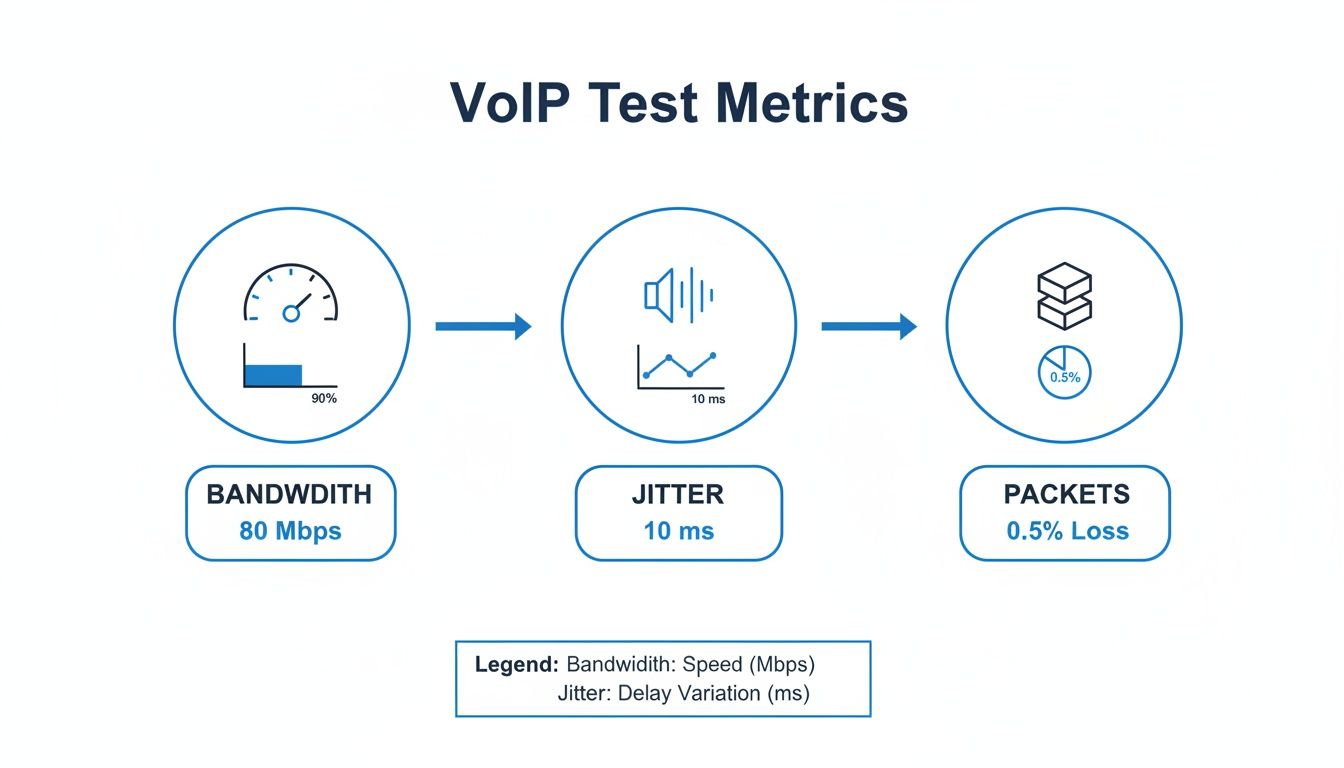
This graphic gets right to the heart of it. Bandwidth, jitter, and packet loss are the three legs of the stool for a solid VoIP connection. If any one of them is wobbly, your call quality suffers.
Understanding the Key Quality Metrics
Every test tool looks a bit different, but they all measure the same core things. Here’s what you need to focus on to get a clear picture of your VoIP performance.
- Latency (Ping): This is simply the round-trip time for a small piece of data to get from your computer to the test server and back. Think of it as your conversation's reaction time. For clear calls, you need latency to be under 150 milliseconds (ms). Ideally, you want to see it below 75ms.
- Jitter: This measures the consistency of your latency. If your latency is jumping all over the place, voice packets arrive jumbled and out of order. That's what causes garbled audio. A good, stable connection will have jitter under 30ms.
- Packet Loss: This is the percentage of voice data that gets lost on the way and never arrives. Even 1% packet loss is enough to cause noticeable gaps and dropouts in speech. The goal here is simple: 0%.
Your VoIP quality is only as strong as your weakest metric. A connection with fantastic bandwidth can still deliver terrible call quality if jitter is too high or packets are being dropped. Consistency is everything.
Your VoIP Quality Scorecard and Target Metrics
Use this quick scorecard to see how your numbers stack up. This is what we look for to ensure crystal-clear conversations.
| Metric | Acceptable Range | Ideal Target | What Poor Results Cause |
|---|---|---|---|
| Latency (Ping) | Under 150 ms | Below 75 ms | Noticeable delays, talking over each other |
| Jitter | Under 30 ms | Below 15 ms | Choppy, robotic, or garbled audio |
| Packet Loss | Under 1% | 0% | Gaps in speech, dropped words or sentences |
| Bandwidth | 100+ Kbps/call | 100+ Kbps/call | Dropped calls, inability to handle multiple calls |
If your results are consistently hitting the "Ideal Target" column, you're in great shape. If you're seeing numbers in the "Acceptable Range" or worse, it's time to start troubleshooting.
Calculating Your Call Capacity
Beyond just the quality of one call, a VoIP test helps you understand how many calls your network can handle at once. This isn't just about raw speed; it's about having enough stable bandwidth for everyone.
A single high-quality voice call typically needs about 100 Kbps of dedicated upload and download speed. As a practical rule of thumb, supporting 6–10 simultaneous calls requires around 1 Mbps of clean, uncontested bandwidth. Premier Broadband’s symmetrical fiber plans are built for this, giving you plenty of headroom for voice, video, and all your cloud apps. The team at Ultatel.com has a great breakdown of how the experts calculate these needs.
To figure out your own capacity, just multiply the number of simultaneous calls you expect by 100 Kbps. For a small office with 10 people on the phone, that means you need to reserve 1 Mbps of both upload and download speed just for voice. This ensures call quality stays high, even when the rest of the network is busy.
Troubleshooting Common VoIP Quality Issues
So, your bandwidth test for VoIP came back with some numbers that weren't quite what you hoped for. Don't sweat it. This is actually a good thing! Now you have real data to guide you toward a fix.
Most of the time, call quality problems aren't about your Premier Broadband service itself, but about common bottlenecks happening right inside your own network. Let's walk through the most frequent culprits, starting with the quick and easy fixes.
Your Router Is the Traffic Cop
Think of your router as the traffic cop for every bit of data moving through your home or office. If it's old, overwhelmed by too many devices, or just not set up correctly, it can easily become the main source of that annoying latency and jitter.
Sometimes, the simplest fix works wonders. Try a full power cycle: unplug your router and modem, wait a solid 60 seconds, and then plug them back in. This simple reboot can clear out temporary glitches that are slowing things down.
Pro Tip: If your router is more than five years old, you should seriously consider an upgrade. Older hardware just doesn't have the muscle to handle the constant demands of today's voice and video traffic.
Another troublemaker I see all the time is a feature called SIP ALG (Application Layer Gateway). It's usually turned on by default and is supposed to help VoIP traffic, but more often than not, it causes one-way audio and dropped calls. Disabling it is a key step, and you can learn exactly why in our guide that explains everything about what SIP ALG is.
Prioritizing Voice with Quality of Service
Picture this: someone's streaming a 4K movie, another person is in an intense online gaming session, and you're trying to close a deal on an important business call. All that data is fighting for the same slice of bandwidth.
This is where Quality of Service (QoS) saves the day.
Most modern routers have a QoS setting that lets you tell it which traffic is most important. By creating a QoS rule for your VoIP service, you're essentially putting your voice calls in the express lane. No matter what else is happening on the network, your calls get priority.
Turning on QoS is probably the single most effective thing you can do to keep your calls crystal clear, even when your network is working overtime.
When the Problem Is Outside Your Walls
If you’ve rebooted the router, checked for SIP ALG, and set up QoS but your test results still show high latency or packet loss, the issue might be happening further upstream. For those who are more tech-savvy, troubleshooting common SIP errors like 408 can provide deeper insight into persistent call drops.
But for most folks, this is the time to give Premier Broadband support a call.
When you reach out, be ready to share the numbers from your tests. Saying, "My latency is spiking to 160ms in the evenings" is so much more helpful than "My calls sound choppy." Giving our technicians that specific data helps them pinpoint the problem and get you back to flawless calls much faster.
Got Questions About VoIP Bandwidth? We’ve Got Answers.
Once you've run a few VoIP tests, you probably have some questions floating around. Getting the details right is what separates a decent connection from a genuinely great one. We've put together the most common questions we hear from Premier Broadband customers to help clear things up.
How Many Calls Can My Connection Actually Handle?
This is easily the number one question, especially for small businesses. For a safe, practical estimate, you'll want to set aside 100 Kbps of both upload and download bandwidth for every single call you expect to happen at the same time.
Sure, some newer codecs are more efficient, but planning for 100 Kbps per call gives you a reliable safety net for consistently high-quality audio. If you have five employees who might be on the phone simultaneously, you need at least 500 Kbps (or 0.5 Mbps) of clean, dedicated bandwidth just for your voice traffic.
Is My Router Good Enough for This?
Here’s a hard truth: not all routers are created equal. An older model might be perfectly fine for checking email and browsing the web, but it can easily choke on the constant, real-time data streams that VoIP demands.
If your router is more than five years old, it probably doesn't have the processing muscle or modern features—like a good Quality of Service (QoS) engine—to prioritize your calls effectively.
An outdated router is one of the most common—and overlooked—reasons for bad call quality. Swapping it out for a newer model can make an immediate, noticeable difference in call clarity, especially when your network gets busy.
Why Do My Calls Sound Terrible at Certain Times of Day?
If you notice your call quality takes a nosedive in the late afternoon or evening, you're almost certainly dealing with network congestion. It’s the digital version of rush hour traffic—everyone in your area is online, and it’s slowing everything down. Running your network tests during these peak times will tell you for sure.
The best way to fight back is to set up QoS on your router. This tells your network to give your phone calls first priority for bandwidth, letting them cut to the front of the line no matter how many people are streaming or gaming nearby.
Can I Really Trust Wi-Fi for Important Calls?
While today's Wi-Fi is leaps and bounds better than it used to be, a wired Ethernet connection will always be the best choice for VoIP. It’s just a matter of physics.
Wi-Fi signals are vulnerable to interference from other electronics, get blocked by walls, and weaken the farther you are from the router. All of these things introduce latency and jitter—the two biggest enemies of a clear phone call. For a business-critical phone line or a home office where every call counts, do yourself a favor and plug directly into your router. You’ll get the most stable and reliable performance, every time.
Ready to see what a 100% fiber network can do for your calls? Premier Broadband delivers the symmetrical speeds and rock-solid stability your home or business needs for flawless VoIP communication. Explore our fiber internet and voice plans today!