

You're ten minutes into a client call when your face freezes, your voice turns robotic, and someone says you're breaking up. You run a speed test afterward and it looks fine. That gap is where most home office frustration lives, and it's why buying a larger download number often doesn't fix anything. The problem is usually upload room, Wi-Fi in the room where you work, backup when service drops, or a home network nobody's managing.
What Business Internet for Home Actually Means
Business internet for home is fiber installed at a residence but specified for work. It gives you matching upload and download speeds, a path to a static IP (a fixed internet address that doesn't change), a written repair expectation, and often phone service on the same connection. It isn't a storefront circuit, and it isn't ordinary home broadband bought mainly to stream shows.

Say it's 9 a.m. on a Tuesday. Your speed test shows a healthy download, you're sharing your screen on a client video call, and then a cloud backup starts in the background. Your picture freezes because the backup is using the same narrow upload path your voice and video need to leave the house.
Entertainment speed is the wrong scorecard for that morning. Streaming pulls data down. Work pushes data up, through meetings, file sends, screen sharing, and a business phone number, often all at once.
The shift isn't temporary for many households. The OECD analysis of telework during COVID-19 found that in February 2020, approximately two-thirds of businesses had no teleworking or only very limited teleworking, and by August 2020 that share had fallen to less than one in four businesses. Roughly 25% to 30% of businesses and nonprofit organizations reported that all personnel were teleworking on the measurement date.
The Three Features Worth Testing
Judge any offer on three things before you compare headline speeds.
- Upload symmetry: Does upload match download, or is upload a small fraction of it?
- Static IP availability: Can you get a fixed address if a VPN, camera recorder, or small server needs one?
- The service promise: What's written down about repair time and remedies when service is down?
A plan can be fast for movies and still be weak for work. You're buying a return path and a repair promise, not just a download score.
Residential Fiber Versus Business Fiber at Home
| Feature | Typical residential fiber | Business internet for home |
|---|---|---|
| Main job | Streaming, gaming, and shared household use | Video calls, uploads, VoIP, and household use together |
| Speed shape | Download may be much faster than upload | Upload and download may be symmetric |
| Service address | A residence | The same residence, with business-class features |
| IP address | Usually dynamic | Static IP may be available for a VPN, cameras, or a small server |
| Reliability language | Check the stated reliability terms and any remedies for downtime | Check the stated reliability terms and any written repair or remedy commitments |
| Data and term | Check the plan's data allowance and contract terms | Check the plan's data allowance and contract terms |
| Phone service | Optional add-on | May be bundled, such as Premier Voice with a line and handset |
The distinction is not just the address or the advertised download speed. A business plan may offer features suited to work, while a residential plan may suit a household that mainly streams and browses. Compare the actual terms and capabilities of the plans available at your address.
Speed shape can matter more than a larger download number. Symmetric means upload and download speeds match. If upload is much slower, sending a large file can take longer even when streaming and downloads feel fast.
What a Static IP Actually Does
An IP address works like a house number for internet traffic. A dynamic IP can change, which is usually fine for browsing and streaming. A static IP stays fixed, which helps when another system needs to reach your home network at the same address each time.
- VPN gateway: Your office network can allow connections from one known address.
- Camera recorder: You can reach recordings without the address shifting.
- Small server: A hosted file share or application stays reachable at a stable location.
Many home offices do not need a static IP. If you do, check whether the plan offers one. Residential tiers often do not.
What 99.9 Percent Reliability Does Not Promise
An SLA, or service level agreement, is a written promise about uptime or repair time, sometimes with a stated remedy if the provider misses it. A reliability percentage in an advertisement is not the same as a written repair commitment. By itself, a 99.9 percent claim does not say how quickly a technician will arrive or whether you will receive a credit.
Check the contract, not the banner: Ask what happens when service is down, in writing, before treating a reliability percentage as a guarantee.
Compare each plan's stated data limits, contract term, and reliability terms side by side. With Premier, the useful comparison is between the features and terms listed for each plan, including speed symmetry, voice options, static IP availability, and support commitments.
How Much Upload a Home Office Needs
A download score hides the direction that breaks work. Every video call sends your camera and voice out of the house continuously, so your upload path has to sustain that traffic for the full meeting, not just spike once during a test.
The image below summarizes the upload floors for common call types before we work through the math.

Zoom's system requirements for video calls specify approximately 1.2 Mbps in both directions for a one-to-one 720p call, about 2.6 Mbps downstream and 1.8 Mbps upstream for a group 720p call, and roughly 3.8 Mbps upstream and 3.0 Mbps downstream for 1080p calls. Those are floors for one call, with nothing else happening in the house.
| Activity | Downstream | Upstream |
|---|---|---|
| One-to-one 720p Zoom call | 1.2 Mbps | 1.2 Mbps |
| Group 720p Zoom call | 2.6 Mbps | 1.8 Mbps |
| 1080p Zoom call | 3.0 Mbps | 3.8 Mbps |
| Two simultaneous 1080p calls | about 6 Mbps | about 7.6 Mbps |
| Calls plus a cloud backup | add other downloads | backup can fill a 10 to 20 Mbps upstream |
Two people on 1080p calls already need about 7.6 Mbps up before anyone streams, games, shares a screen, or runs a backup. Screen sharing, cloud sync, and a partner's meeting add directly to that total. The minimum is a starting point for arithmetic, not a design target.
The Two-Lane Road Problem
Picture your connection as a two-lane road, one lane into the house and one lane out. A cable plan with 400 Mbps down and 20 Mbps up has a wide inbound lane and a narrow outbound lane. One large backup can fill that outbound lane, and every call behind it slows down, freezes, or drops audio.
Fiber tiers such as 300/300 or 500/500 work differently because the return lane matches the arrival lane. You're not buying the bigger number for its own sake. You're buying headroom, several times the application minimum, so ordinary household traffic doesn't push a call over the edge.
The short video below walks through how these requirements show up in a typical home office setup.
Two other terms explain why a fast test can still feel bad. Latency is delay, and high latency makes conversation feel sluggish, with people talking over each other. Packet loss means pieces of the call never arrive, which causes audio gaps and unstable VPN sessions.
Managed Wi-Fi can sort traffic inside your house. It can't invent upload capacity your access line doesn't have.
Fix the return path first. Then it's worth talking about price, because you'll know which tier fits the work.
What the Monthly Bill and Contract Cover
A plan's advertised monthly rate is only one part of the home-office bill. Plan pricing, speed tiers, voice bundles, static IP charges, and Wi-Fi service vary by address. Confirm Premier Broadband's current offers for your location before ordering rather than budgeting around unverified prices.
| Plan | Speed | Monthly price | Voice included | Contract note |
|---|---|---|---|---|
| Residential or business internet | Varies by address | Confirm current rate | Depends on plan | Confirm contract terms |
| Internet with phone service | Varies by address | Confirm current rate and bundle charge | Depends on plan | Confirm contract terms |
The Three Lines That Move Your Total
- Voice bundle: A phone line and its equipment may add to the internet-only rate. Compare the full bundle price with the cost of internet alone.
- Managed Wi-Fi: Ask whether coverage or setup support carries a monthly charge, and what help the service includes inside the house.
- Static IP: If your work requires a fixed internet address, ask whether it is available and what it costs each month.
Check the contract length and any early-termination fee before signing. A longer term can make a move or a change in work needs more expensive. If flexibility matters, confirm whether you can change plans or cancel without a term commitment.
Confirm These at Your Address
Ask for the full monthly total, including taxes, equipment, installation, and any add-ons. Get the answer in writing and compare it with the headline rate. Availability and final pricing depend on the service address, so a neighbor's offer may not apply to your home.
Securing a Home Office Without Company IT
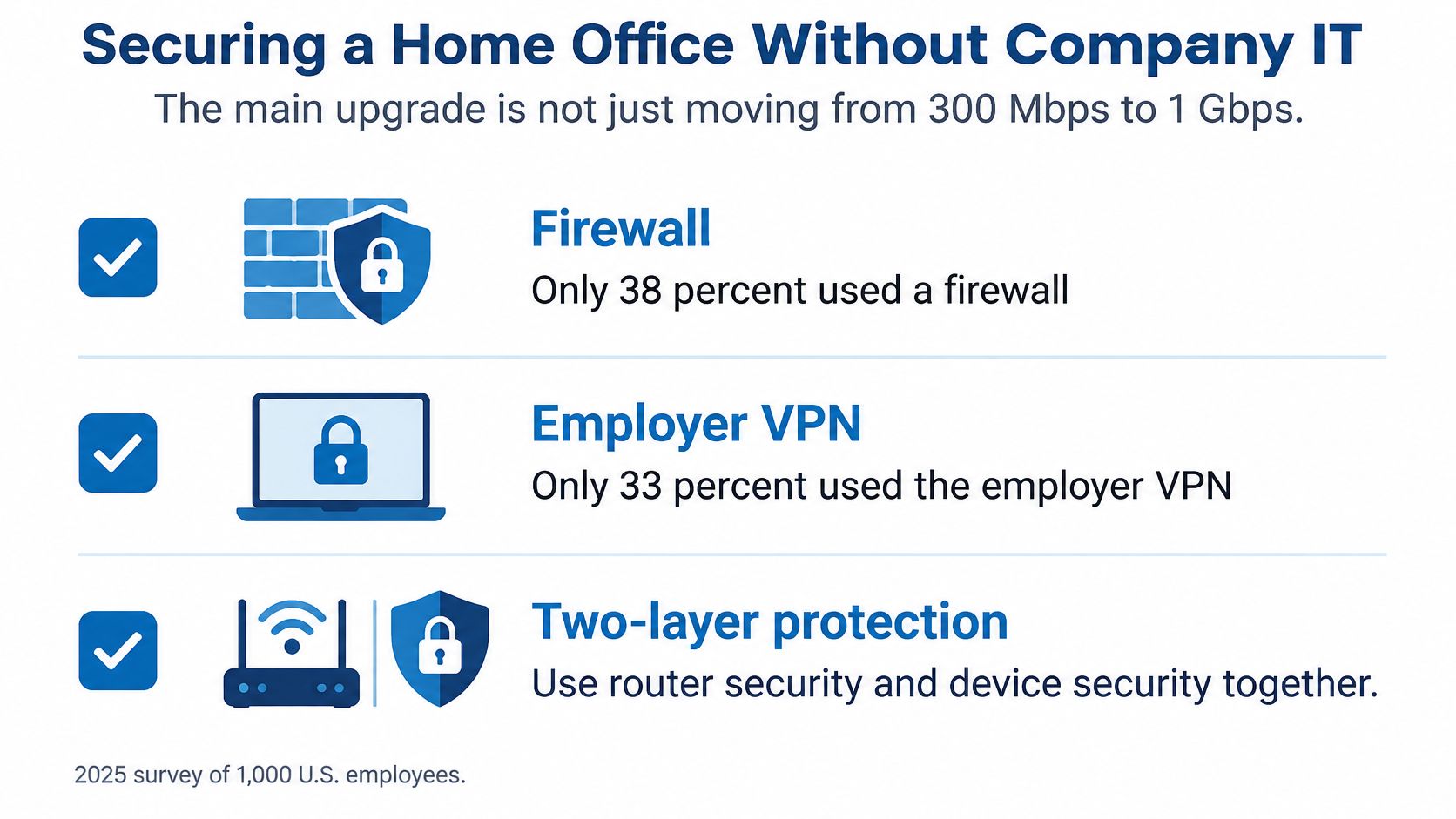
Moving from 300 Mbps to 1 Gbps isn't the main business upgrade for most home offices. The bigger risk usually sits in the unmanaged equipment already in the house. The 2025 RS cybersecurity survey of U.S. employees found that in a survey of 1,000 U.S. employees, only 38% used a firewall and 33% connected to their employer's VPN while working from home, just 30% regularly updated their router, and 72% had used personal devices for work.
The chart below puts those gaps in one place, because they describe the typical home office better than any speed tier does.
A Baseline You Can Finish in an Evening
Work through these in order. Each step is a setting, not a purchase.
- Replace the router admin password: The default printed on the label or set at the factory is the first thing an attacker tries, so change it and store the new one in a password manager.
- Turn on automatic firmware updates: Firmware is the router's own software, and updates patch holes you'd otherwise never hear about.
- Use current Wi-Fi encryption: Choose the strongest option your router offers, with a long, unique Wi-Fi password you don't reuse elsewhere.
- Split work from household gadgets: Put work laptops on your main network and guests, TVs, and smart-home devices on a guest or second network.
- Keep the work computer patched: Turn on automatic operating system and browser updates so they don't depend on you remembering.
A concrete split makes this easier to picture. Your work laptop and VoIP phone sit on the main network. A video doorbell, the living room TV, and a visitor's phone go on the second network, where they can reach the internet but can't see your work machine.
What a VPN Does and Does Not Cover
An employer VPN protects traffic between your computer and company systems. It doesn't secure every phone, printer, and camera on your home network. If a poorly secured gadget shares your work network, the VPN on your laptop doesn't fix that exposure.
Managed Wi-Fi, including Premier's managed Wi-Fi and Premier Protects content controls, can watch coverage and simplify setup. You still own device passwords and the decision about which gadgets share a network with your work computer. That division of labor is the part most buyers never get explained.
There's also a privacy boundary worth naming. Ask your provider what managed Wi-Fi can see about devices and traffic, and keep employer monitoring tools on employer systems rather than spreading them across household devices. You want help managing the network without blurring who's watching what.
A well-run 300 Mbps connection with a patched router and a separated work network protects a business better than a neglected gigabit line.
Why Calls Fail When the Speed Test Passes
A speed test measures one burst of traffic from one spot in the house. Your workday happens in a specific room, at busy hours, alongside everyone else's traffic. The 2025 U.S. home-connectivity survey summarized by the Benton Institute found that 68% of households experienced Wi-Fi problems during the prior year, 18% experienced problems daily and 20% weekly, and among households reporting issues, 76% had location-specific coverage gaps and nearly 39% required a technician visit.
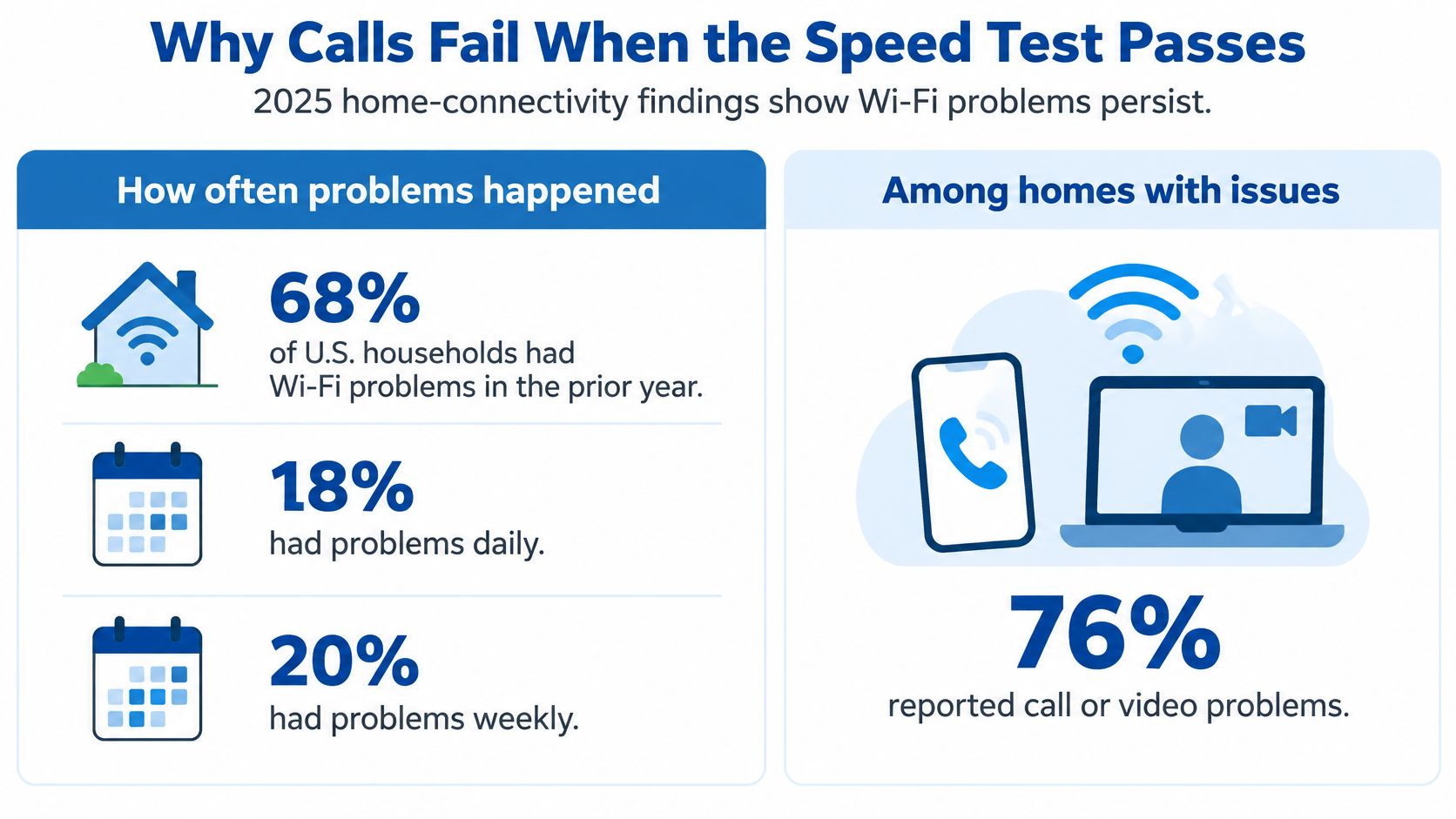
Match the symptom to the cause before you spend money. Four common scenes cover most home office failures.
| Symptom | Likely cause | Fix |
|---|---|---|
| Call drops only in the back bedroom | Wi-Fi coverage gap | Central gateway placement, managed or whole-home Wi-Fi, or Ethernet to the desk |
| Call fails while a backup or large send runs | Upload congestion | Pause the backup or move to symmetric fiber, not a higher download tier |
| Calls fail across the neighborhood during an outage | Access line is dark | LTE backup the phone can use |
| Router stops working | Equipment failure | Replacement policy, a spare, and a written truck-roll time |
Four Scenes, Four Different Fixes
A call that drops only in the back bedroom is a coverage problem. Walls and distance weaken Wi-Fi, so the fix is a centrally placed gateway, managed or whole-home Wi-Fi that extends coverage, or an Ethernet cable run to the desk. A faster plan sends more speed to a signal your laptop can barely hear.
A call that fails only while a backup or large send is running is upload congestion. Pause the backup during meetings, schedule it overnight, or move to symmetric fiber. Raising the download tier on the same thin upstream changes nothing, because the crowded direction is the one leaving your house.
A neighborhood outage is different again. No fiber tier works when the line is dark, so you need a second path, such as LTE backup your phone can use to stay reachable. Decide in advance which calls move to mobile and which can wait.
A dead router is an equipment problem, and the fix is logistical. Ask about the replacement policy, whether a spare makes sense, and how fast a technician comes out. Don't treat a marketed reliability percentage as that promise.
Phone service deserves the same planning. Premier business fiber can include Premier Voice, so your desk phone and data share the fiber connection, and a softphone on a laptop or mobile keeps your number reachable if the desk set loses the local network. If you're setting that up yourself, it's worth taking time to plan your office phone system rollout so numbers, handsets, and apps are assigned before the first workday.
Resilience isn't a bigger number. It's placement, a wire to the desk, a backup path, and a written repair expectation.
Pick the Home Plan That Matches the Work
Stay on residential fiber, such as Premier Essentials or Streamer, when the house mostly streams and games and work calls are occasional and light. You're not missing anything if nobody depends on the connection to earn a living.
Choose Business Fiber 300, at $74.99 without phone or $89.99 with Premier Voice, for one or two people who need symmetric uploads and a business line. That's the entry point where the return path stops being the constraint for most home offices.
Choose 500 Mbps symmetric when several people are on calls and cloud applications at the same time, with backups and screen sharing layered on top. Choose the 1 Gbps business tier when sending large files is a daily part of the job, not because a bigger number feels safer.
Order business internet for home only after you've planned the security baseline and a wired or managed Wi-Fi setup at the desk. Those steps fix more failed calls and more risk than an unused speed jump ever will.
Ask These Before You Order
- Upload symmetry: Is upload equal to download on this exact tier?
- Static IP: Is one available, and what does it cost each month?
- Downtime remedy: Is there a written remedy or repair window, or only a reliability claim?
- Term: Is there an annual contract or an early-termination fee?
- Voice details: Does the bundle include a handset plus a mobile or softphone app?
Check your street address for Premier fiber, compare the residential and business rows that fit your household, and order the lowest symmetric tier that still leaves headroom for everyone under your roof.
Premier Broadband offers symmetrical fiber plans for homes that work as offices, with unlimited data, no annual contract, managed Wi-Fi options, and Premier Voice phone service on the same connection. Enter your address at Premier Broadband to check fiber availability, compare residential and business tiers side by side, and choose the plan that leaves your calls, uploads, and business number room to run.