
A copper landline can still feel like the most dependable phone in the house, especially when the lights go out. That feeling isn't wrong, but it isn't the whole story anymore. Copper wire phone lines now sit on a network that's shrinking while repair crews, spare cable, and replacement parts shrink with it. If you understand how the line works, how to test a fault, and what to prove before a replacement takes over, you can judge the change on evidence instead of habit.
Copper Phone Lines at a Glance
U.S. telephone lines peaked at approximately 186 million in 2000, and more than 100 million copper lines have been disconnected since, according to Ooma's overview of the copper sunset. The decline reflects a network getting smaller, not one failing everywhere at once. With fewer customers sharing the cost of maintenance, keeping older copper equipment in service becomes a harder task.
Copper wire phone lines use a pair of twisted copper wires to connect a home or office to the telephone network and carry voice calls. Providers may call this service POTS, short for plain old telephone service. Check your bill or ask your provider whether your address has a copper line. That answer helps determine which retirement process may apply.
Copper Phone Line Figures in the United States
| Measure | Figure | Year | What It Signals |
|---|---|---|---|
| Peak US telephone lines | About 186 million | 2000 | Peak of the mass-market copper era |
| Copper lines disconnected since 2000 | More than 100 million | 2000 onward | Households shifted to mobile, cable and fiber |
These figures describe a change in how households get phone service, rather than a sudden technical collapse. Mobile phones, cable voice, broadband voice and fiber have replaced copper for many customers. For households still using a copper line, the practical questions are whether it can be maintained, how it performs during an outage, and what to test before switching.
How a Copper Line Carries Your Voice
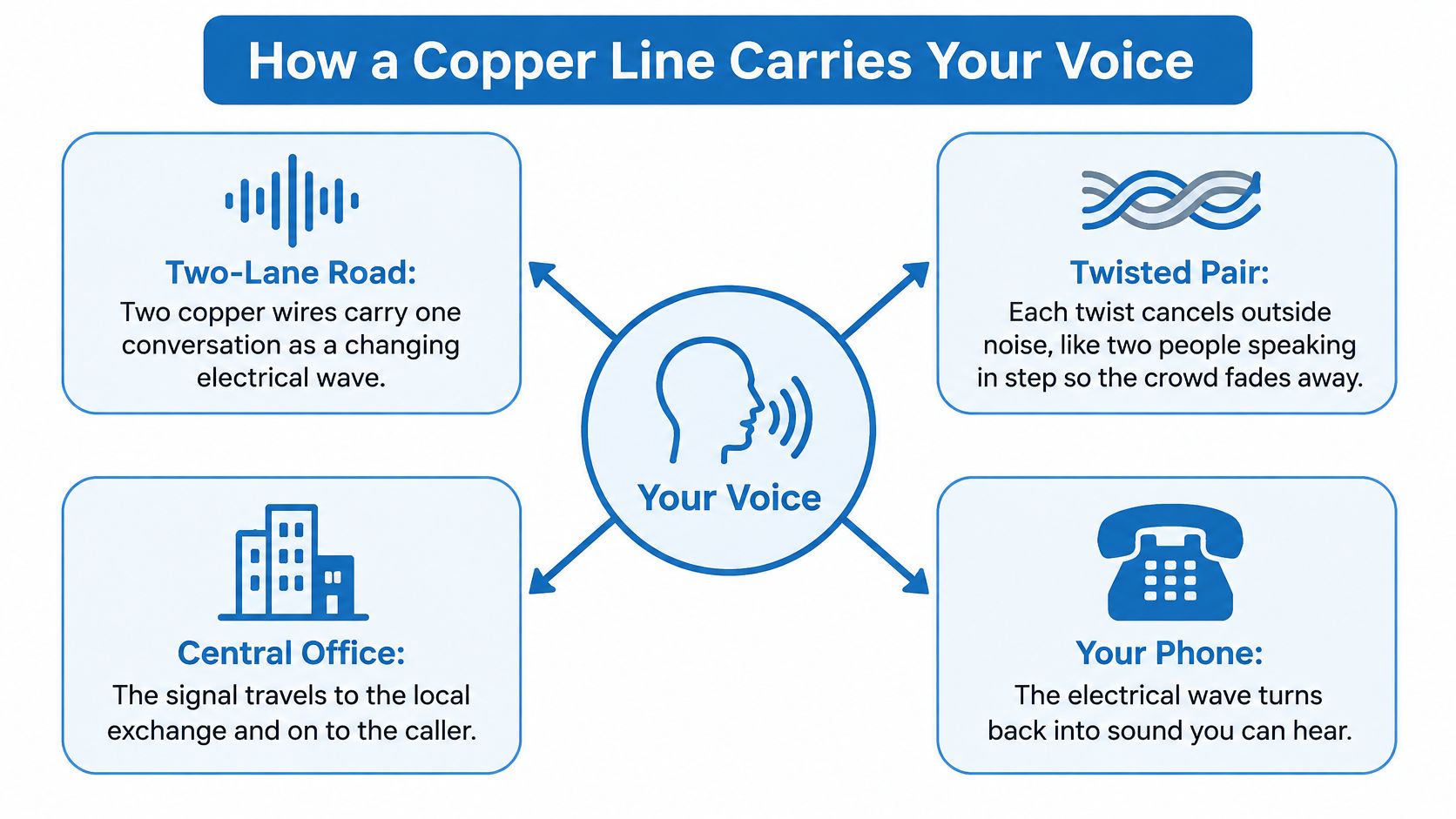
Think of a copper line as a two-lane road for one conversation. Your voice doesn't travel as sound. The handset turns it into a changing electrical wave, that wave rides the two copper wires, and the phone at the other end turns it back into sound.
The map below follows that path from your mouth to the exchange and back again.
The Path From Handset to Exchange
Your call starts in the handset, travels through the cord to a wall jack, then through inside wiring inside your walls. It reaches the network interface box, the small box where your wiring ends and the provider's outside wiring begins. That box is the property line for faults, which is why technicians ask about it first.
From there, the signal travels on the outside pair, bundled with neighbors' pairs in a larger cable on poles or underground. It ends at the telephone exchange, also called a central office. Equipment there reads the number you dialed and switches your call toward the other person.
The two wires are twisted around each other for a reason. Outside electrical noise, from power lines or motors, hits both wires almost equally, so the equipment can cancel much of it out. It's like two people walking in step through a crowd. Their shared rhythm stays clear even when the crowd is loud.
Why the Exchange Powers Your Phone
A basic corded phone needs no wall outlet because the exchange sends a small electrical current down the same pair. The exchange has battery backup, so your phone can keep working when your house loses power. A cordless phone is different, since its base still needs household electricity.
This design proved itself early. Copper-wire telephone service became the foundation of the modern public switched telephone network after commercial telephone service began in 1877, and loading coils later enabled voice signals to travel hundreds of miles, helping make long-distance service between major U.S. cities possible by 1907, according to the FCC historical document on telephone network development. Copper beat earlier iron and steel conductors because it carried the signal more strongly and reliably.
The Broadband Twist and the Farmhouse Test
DSL, or digital subscriber line broadband, squeezes internet data into higher frequencies the voice call doesn't use on the same pair. Voice is forgiving over distance. Those higher DSL frequencies are not, and they weaken as the loop gets longer.
Say a farmhouse sits several miles from the exchange while another house sits beside it. Both get a clear voice call. The farmhouse gets much slower DSL because its signal has farther to travel and arrives weaker.
Remember three things: a twisted pair carries the call, the exchange supplies the power, and distance hurts DSL speed far more than it hurts voice.
How the Copper Network Is Maintained and Why Repairs Slow
A copper line isn't dependable just because it's a physical wire. It stays dependable only while someone keeps repairing the cable, boxes, and connections between your home and the exchange. That upkeep is where the modern problem sits.
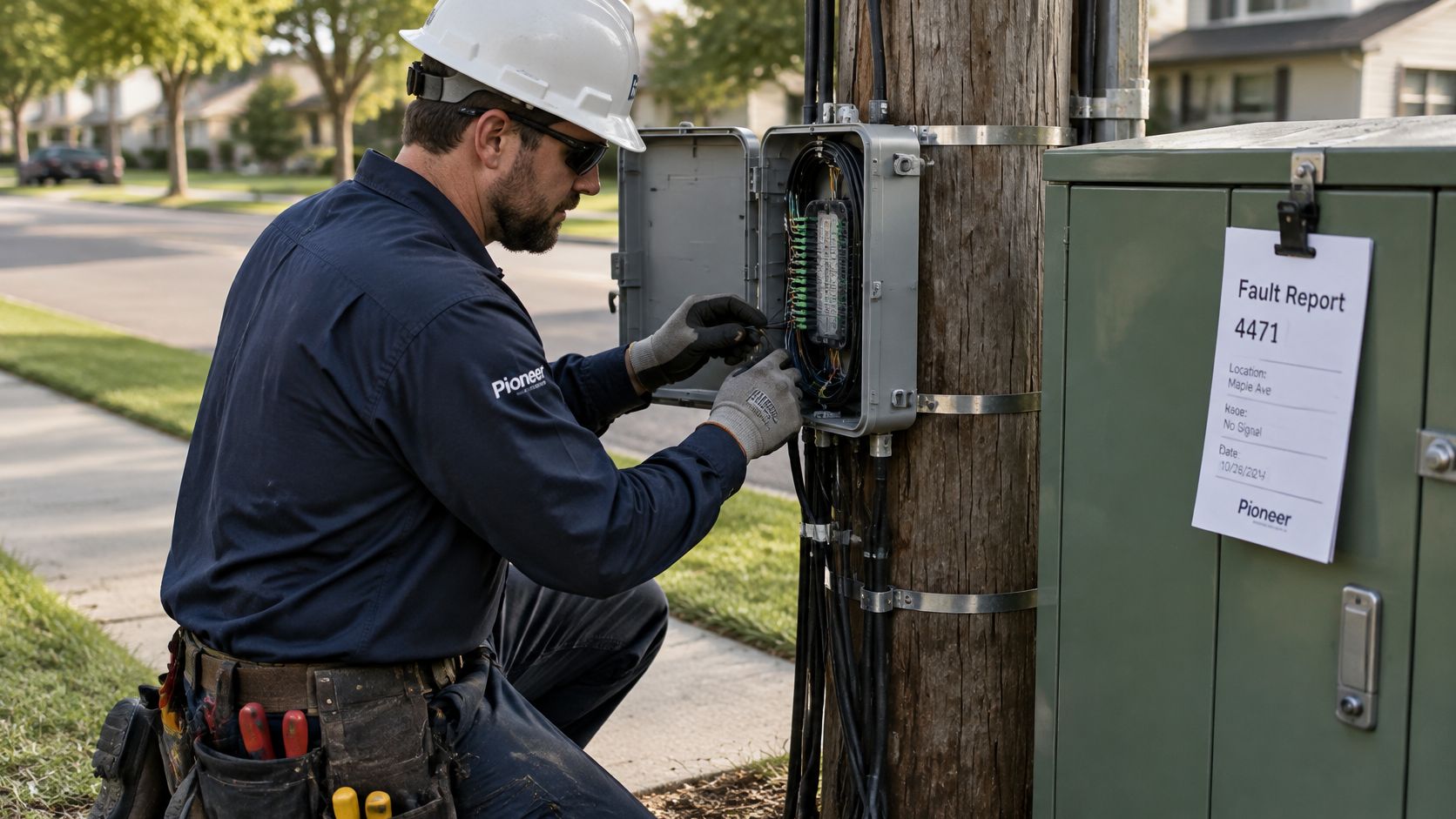
The photo below shows the kind of pole work an outside repair can require.
Who Maintains What
Provider crews who handle outside plant maintain everything beyond your network interface box. That includes aerial cable on poles, buried cable, splice cases that seal cable joins, cross-connect boxes, and street cabinets. You maintain the phones, cords, and wiring inside your home or office.
A normal repair follows a chain. You report the fault, the provider tests the line remotely from the exchange, and the test estimates whether the break is inside or outside. If it's outside, a technician is dispatched to repair a splice or move you to a spare working pair, then closes the job with a test call. Each link needs staff, parts, and a spare pair that still works.
This short video shows the hands-on side of tracing and repairing legacy copper plant.
Why the Chain Breaks Down
As customers leave, providers train fewer copper technicians and stock fewer legacy parts. Water-damaged cable may have no clean spare pair left to swap to. In a 2026 FCC filing, AT&T reportedly documented more than 500 copper-network outages in May alone and said it would not restore affected facilities where comparable substitute service was available, while also experiencing more than 4,000 copper-theft-related outages in California during 2025 and approximately 2,000 more during 2026 at the time of reporting, according to Broadband Breakfast's report on AT&T's FCC filing. Treat the 2026 figures as reported at that filing date, not as a promise about your street.
That's the nuance to hold onto. Copper can survive a home power cut and still be slow to repair after theft, storm damage, or a failed splice. One strength doesn't cancel the other weakness.
Your Evidence File
Start a simple log today, before you need it in a dispute or migration.
- Dated outage log: Write the start and end time of every loss of dial tone or severe noise.
- Ticket numbers: Save every repair ticket number and the name of anyone who promised a date.
- Written responses: Keep emails, letters, and chat transcripts, not just notes from phone calls.
- Repeat count: Total the failures in the past year so a pattern is visible at a glance.
Common Copper Line Problems and How to Fix Them
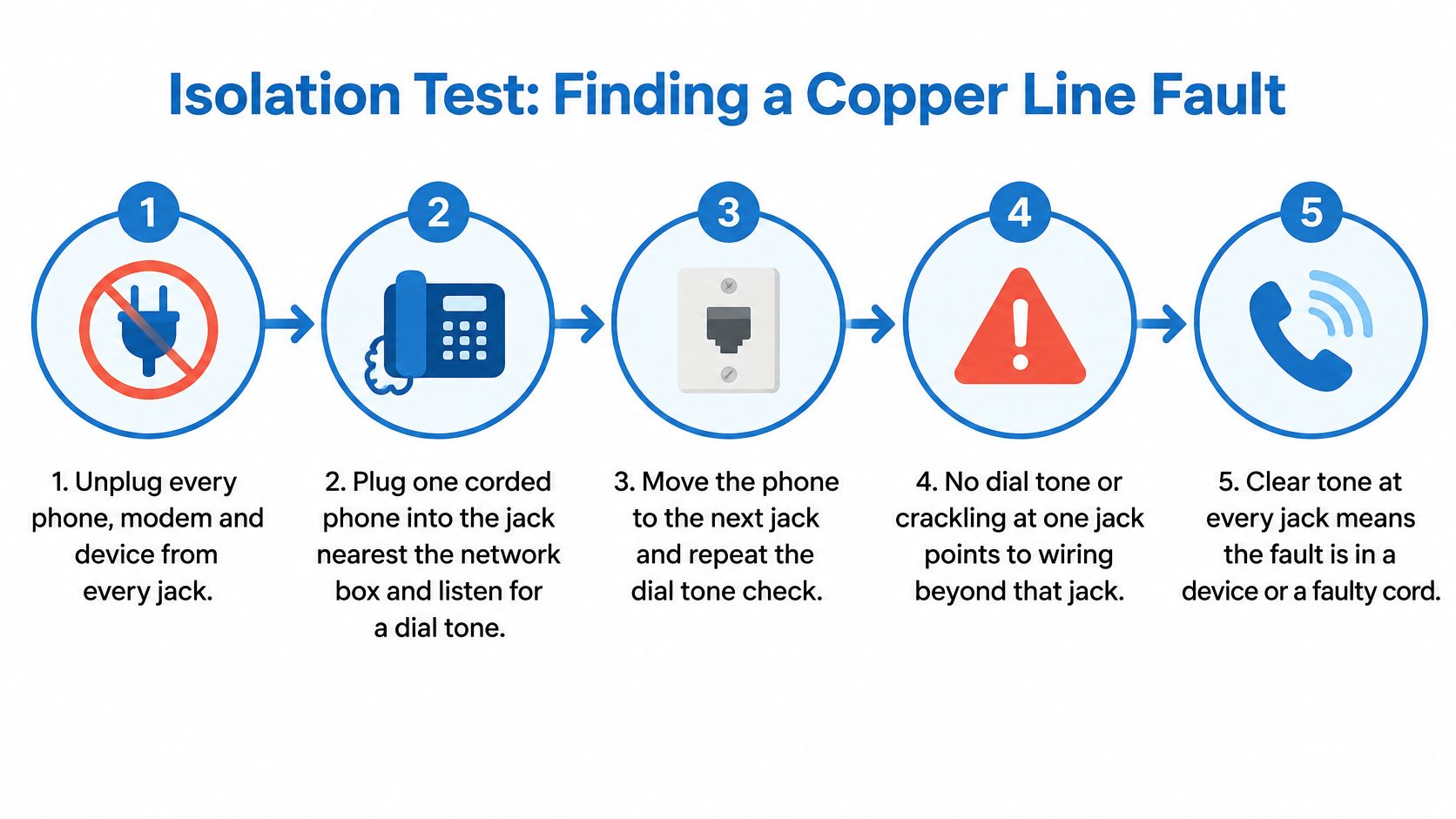
Don't guess at a noisy or dead line. Isolate it. The isolation test separates a bad phone or jack inside your home from a fault on the provider's outside pair, and it takes one corded phone you know works.
The five steps below move from unplugging everything to a clear verdict on where the fault lives.
The Isolation Test Step by Step
- Unplug everything: Remove every phone, modem, fax, and alarm connection from every jack so no device can drag the line down.
- Test at the first jack: Plug one corded phone into the jack nearest the network interface box and listen for a clean dial tone.
- Move jack by jack: If that tone is clean, repeat at each other jack to find a failing jack or a damaged run of inside wiring.
- Call the provider if the first jack fails: No tone or loud crackling there points outside your home, so report it as an outside fault.
- Write down the pattern: Note which jack failed, the date and time, and whether faults show up in rain, heat, or at certain hours.
Rain-linked crackling usually means water is reaching a connection. A fault that appears only in the evening may involve a device that's switched on then, such as a faulty cordless base. Your notes give the technician a starting point instead of a blank search.
Symptoms, Likely Causes and Who Fixes Them
| Symptom | Likely Cause | Fix and Owner |
|---|---|---|
| No dial tone on any phone | Break in outside pair or failed connection at the box | Report to provider after isolation test |
| Crackling or static | Corroded contact, damaged splice, water in a connection | Swap cord first, then provider checks outside joins |
| Humming or buzzing | Phone wiring running too close to electrical cable, faulty device | Homeowner reroutes inside wiring or replaces device |
| Calls drop mid-conversation | Intermittent loose contact that opens with vibration or heat | Tighten jack contacts at home, provider remakes outside splice |
| DSL slow only at peak times | Network congestion beyond your pair | Provider checks capacity, homeowner can't fix this |
| One dead jack, others work | Broken inside wire or corroded jack terminals | Homeowner replaces jack or hires a low-voltage electrician |
| All lines dead after a storm | Lightning damage or downed outside cable | Provider only, stay away from fallen cable |
A failed DSL filter, the small plug that keeps broadband noise off your phones, causes hiss on calls while the internet still works. Swap in a spare filter before you suspect the wiring. It's the cheapest test on the list.
Never open the provider's side of a live network box or splice an outside line yourself. Test from your jacks, document what you find, and hand outside faults to the crew with the right tools.
Copper Line Safety, Lifespan and Power Cut Readiness
The question readers ask most isn't about speed. It's whether the phone will work when the power fails, and for how long. Copper answers that question well. Most replacements answer it only if you plan ahead.
How Long Copper Lasts
Copper pairs can run for decades when they stay dry and sealed. Moisture creeping into a splice, corrosion on terminals, and rodents chewing insulation in attics and crawl spaces shorten that life. In many homes, old inside wiring and cheap jacks fail years before the provider's outside cable does, which is why the isolation test matters.
Safety Rules Worth Following
- Thunderstorms: Don't work on phone wiring or use a corded phone during a storm, since a strike can travel down the line.
- Surge protection: Fit a surge protector where phone and modem equipment connects at your network interface area.
- Separation: Keep phone wiring away from household electrical cable to prevent hum and reduce risk.
- Outside wiring: Never splice, move, or alter the provider's outside pair or pole hardware.
- Downed lines: Stay clear of any fallen cable and report it, since you can't tell a phone line from a power line on the ground.
The Power Cut Gap and Your Checklist
Traditional POTS is powered from the telephone network, whereas replacement wireless and fiber-based services may depend on electricity at the premises, backup equipment, network availability, and local signal conditions, a gap raised in Senator Schumer's press release on Verizon's proposed copper transition. Faster fiber doesn't automatically preserve that outage behavior. Battery runtime is finite, and once the battery runs out, a fiber or wireless phone at home stops working until power returns or you swap in a charged battery.
Use this checklist for any service you rely on in an emergency.
- Confirm battery runtime: Ask how long the cordless base, router, and network box run on their backup batteries under real use.
- Test alarms: Trigger your medical alarm and monitored security system and confirm the monitoring center receives the signal.
- Check 911 location: Confirm the address tied to your service matches where the phone sits.
- Keep a tested mobile backup: Keep a charged mobile phone, check its indoor signal, and make a test call from the room where you'd shelter.
Copper Retirement Rules and Who Is Affected
A carrier can't switch off copper on a whim. Federal processes through the FCC and rules from your state utility commission shape how retirement happens, and notice and approval steps differ by place. Check your own state's current requirements rather than relying on a neighbor's experience in another state.
The stakes are still large. In 2024, approximately 88 million U.S. voice connections were landlines, representing an estimated 20% of individual voice connections, figures reported by USA TODAY's article citing Gartner research. Millions of households, clinics, shops, and alarm systems still sit behind those connections.
Who Feels Retirement First
Urban and suburban customers usually see fiber or cable replacements offered first because building there costs less per home. Rural customers may wait longer for a wired substitute and face weaker indoor mobile coverage in the meantime. A replacement that works in a city apartment may fail in a farmhouse with one faint bar of signal.
What to Check in Any Retirement Notice
- Replacement price: Get the full monthly cost in writing, including equipment and battery charges.
- Number portability: Confirm your existing number moves to the new service and on what date.
- Cutover date: Pin down the exact day copper stops and what happens if the replacement isn't ready.
- Complaints contact: Note the named office or phone number for disputes, not just a general sales line.
Check backup power, 911 calling, and alarm behavior against the readiness checklist you've already built. Ask for written answers, keep copies with your evidence file, and file a complaint with your state commission if answers stay vague. Judge the responses you receive, not the brochure.
Copper, Fiber and VoIP Side by Side
A copper phone can keep working through a home power cut because it draws power from the exchange. Fiber with VoIP, or voice over internet protocol, and broadband-only VoIP need local power for the network equipment. If the router or required backup battery is out, calls may stop.
The comparison below shows the practical trade-offs. For monthly cost, prices vary by provider and region. Compare written quotes that list service, equipment, and battery fees.
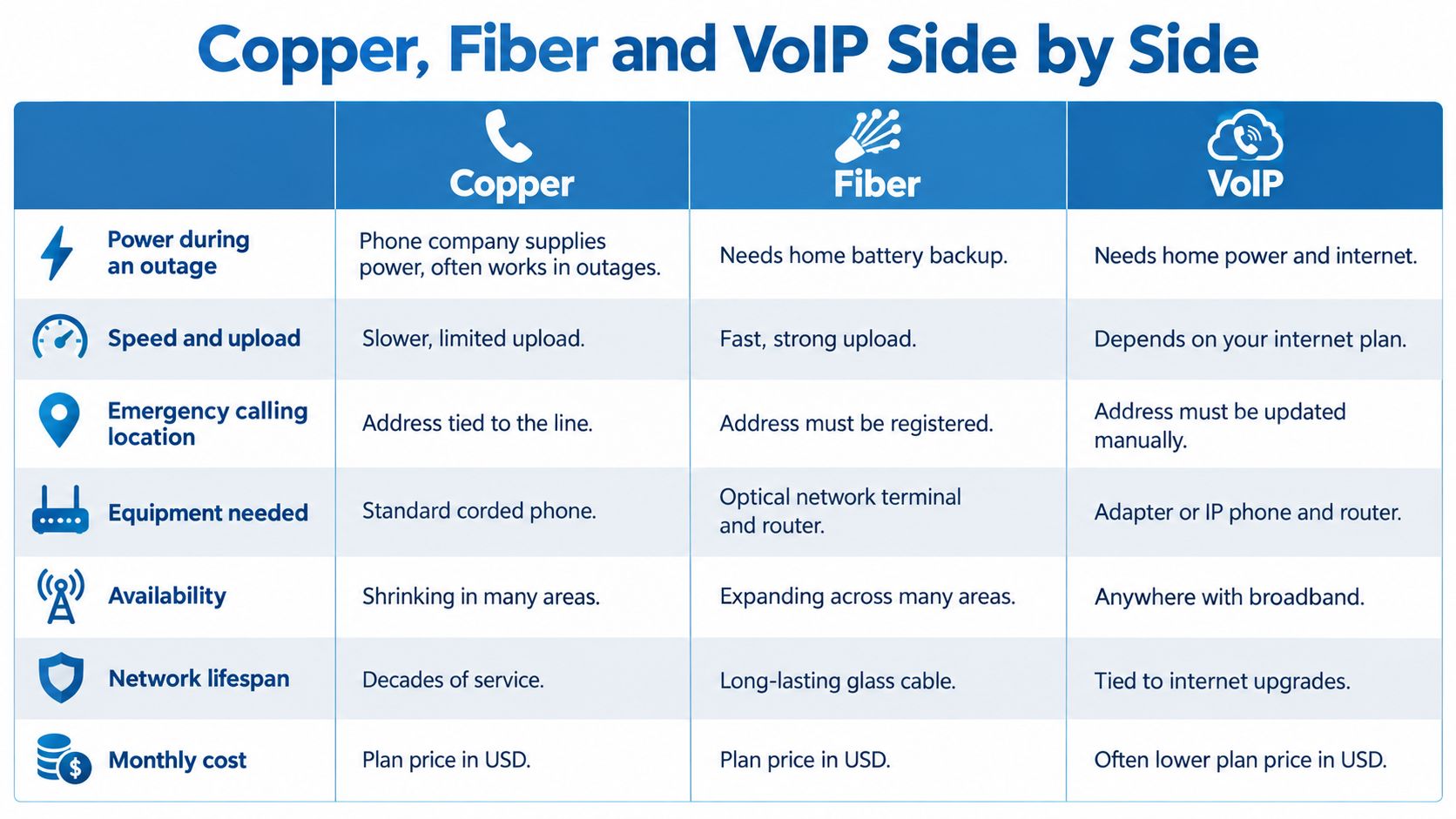
| Criterion | Copper Phone Line | Fiber With VoIP | Broadband-Only VoIP |
|---|---|---|---|
| Works during home power cut | Usually, while the exchange and line remain powered | Requires local power or battery backup | Requires local power or battery backup and a working router |
| Speed and upload | Voice on a plain line; DSL speed falls with loop length | Symmetrical fiber speeds | Set by your broadband plan |
| Emergency calling location | Associated with the line address | Registered address must stay current | Registered address must stay current |
| Equipment needed | Standard analog phone | Network box, router, VoIP-capable phone | Router, adapter or IP phone |
| Availability | Shrinking, with service being retired | Expanding in fiber areas | Available wherever compatible broadband is available |
| Network lifespan | Existing lines may last decades, but they are aging | Fiber provides a long-term upgrade path | Tied to the internet connection |
| Monthly cost | Varies by provider and region | Varies by provider and region | Varies by provider and region |
A plain copper line carries voice, while fiber can also support symmetrical upload and download speeds for video calls and large file transfers. Providers such as Premier Broadband offer fiber internet with VoIP phone service for homes and businesses. Ask whether a plan includes battery backup and supports alarm equipment; for a small office, check every device that uses the old line. Test the fax machine and alarm panel on the replacement service before cutover.
Clinics considering how to answer calls over an internet connection can review an AI receptionist for clinics. The service depends on a working internet phone connection underneath it.
Choose Your Migration Path Before the Cutover
The right replacement depends on what your line protects, not just what it costs. Find your case first, then run the steps.
| Case | Recommended Path | Backup to Plan | Test Before Cutover |
|---|---|---|---|
| Rural home with medical alarm | Keep copper until a replacement is proven, then fiber or VoIP | Battery backup sized for the alarm | Alarm signal test on the new service |
| Urban home, few calls, good mobile signal | Fiber with VoIP | Charged mobile phone as backup | Test calls and 911 address check |
| Home office with video calls | Fiber with VoIP | Battery backup for router and phone | Upload speed and call quality test |
| Small business with fax and alarm lines | Fiber with VoIP and alarm-line support | Battery backup for fax and alarm equipment | Fax transmission and alarm signal test |
| Multi-line business with phone system | Hosted or SIP VoIP | Power and internet continuity plan | Call routing and caller ID test |
| Household treating landline as emergency service | Keep copper until replacement passes outage test | Tested mobile phone and battery | Simulated power-cut call test |
SIP, or session initiation protocol, is the standard that sets up VoIP calls for multi-line phone systems. If you're helping a parent or relative choose, the plain-language guidance on choosing phone support for older adults covers handset simplicity and support needs that younger buyers often overlook.
Your Test Before Cutover Plan
- Gather your papers: Put the retirement notice together with your outage evidence file so dates and promises sit in one place.
- Check your address: Confirm which replacements actually serve your home or premises, not just your town.
- Run both services together: Use the replacement for one to two weeks while copper still works, and make real calls at your busiest times.
- Protect your number: Confirm the porting date in writing and keep the copper number active until it has fully moved.
- Simulate a power cut: Unplug the new equipment from mains power, run it on battery, and test calls, alarm signals, and your 911 address before the battery fades.
Dial tone on day one proves almost nothing. A replacement earns your trust when it passes your alarm, your fax, and your power-cut test with your number already moved.
Your next step this week is small and concrete. Check replacement availability at your exact address, ask what battery backup the plan includes, and get the answer in writing before you agree to any cutover date.
If fiber internet with VoIP phone service is available at your address, Premier Broadband can check availability, explain symmetrical fiber speeds for video calls and uploads, and walk through VoIP features such as voicemail-to-email and caller ID before your copper line is retired. Visit the site, enter your address, and ask specifically about battery backup and alarm-line support so your test-before-cutover plan starts with real answers.