
Your phones are cutting out, a customer can't finish a payment, and staff are asking whether restarting the router will help. The connection hasn't necessarily failed. Malicious traffic may be crowding out the traffic your business needs.
DDoS protection services aim to keep those services reachable during an attack. Choosing one means looking beyond advertised capacity to a more practical question: how many minutes will customers lose, and what will the provider do while they're waiting?
What a DDoS Protection Service Actually Does
Thousands of fake ticket holders arrive at a stadium gate together. Real fans can't get in, and a guard checking tickets at the entrance can't clear a crowd that has already blocked the access road.
A distributed denial-of-service attack, or DDoS attack, creates a similar problem online. Traffic from many sources overwhelms a connection, network device, or application. A protection service identifies that traffic and filters it where there's enough capacity to keep legitimate users moving.
Different targets need different defenses
Volumetric floods consume bandwidth or overwhelm equipment with packets. Engineers describe their size using measures such as gigabits per second and packets per second.
Application-layer attacks target the work a service performs. Repeated requests to a customer portal, API, or phone-system component can exhaust processing resources even when the internet connection isn't full. Bigger bandwidth alone doesn't solve that problem.
Say a retailer's website still loads its home page, but customers can't search the catalog. The bottleneck may be the application handling searches, not the broadband circuit. Protection must match that failure point.
What the service should include
A typical service combines:
- Monitoring and detection: Watch normal traffic and identify suspicious changes.
- Traffic handling: Divert traffic to a scrubbing location when the design requires it.
- Filtering and forwarding: Remove attack packets and deliver legitimate traffic.
- Incident reporting: Explain what happened, what changed, and when service recovered.
Not every service includes every capability, especially application-specific protection.
Practical rule: DDoS protection protects availability. It doesn't replace strong passwords, patching, backups, or controls that protect stored data.
Start by listing what must stay reachable: internet access, phones, your website, remote access, and cameras. Treat each as a separate coverage question rather than assuming one security subscription protects everything.
Why Businesses, VoIP Users and ISPs Need Protection
In its global telemetry, the Corero threat-intelligence report found that customers experienced an average of 11 attacks per day in 2024, up 5% year over year, and described multi-vector campaigns switching protocols every 30–60 seconds. Defenders may have to reassess traffic repeatedly during the same incident.
The operational problem isn't limited to a website going offline. Consider these situations:
- A gamer: An interrupted connection ends a match before the player can reconnect.
- A remote worker: A video meeting drops during a customer presentation.
- A small business: During a sales promotion, saturated access bandwidth disrupts hosted-phone signaling and audio, even though the local firewall's processor looks healthy.
- An ISP: An attack against shared infrastructure affects subscribers across a neighborhood, creating simultaneous support calls.
Short attacks can finish before an operator completes a manual investigation. Repeated interruptions also consume time through troubleshooting, customer callbacks, and escalation between providers.
Estimate your exposure, not someone else's average
Among organizations surveyed in the Radware and Osterman application-DDoS report, 20% reported application-DDoS downtime losses below $500 per minute, while 13.4% reported at least $20,000 per minute. Those different outcomes make a universal downtime estimate unhelpful.
For your estimate, add the hourly sales, payment activity, and staff productivity at risk. Divide that total by the minutes in an hour, then multiply by the duration of a plausible short interruption. Avoid double-counting phone orders already included in sales.
For costs that don't appear immediately in a sales report, Nutmeg Technologies' explanation of the hidden business costs of unplanned outages provides useful context, including disrupted work and recovery effort.
A brief outage isn't harmless just because the connection recovers before someone answers the support call.
Attach the estimate to each service in your deployment inventory. That makes it easier to prioritize phone access, payments, or remote working based on actual business consequences.
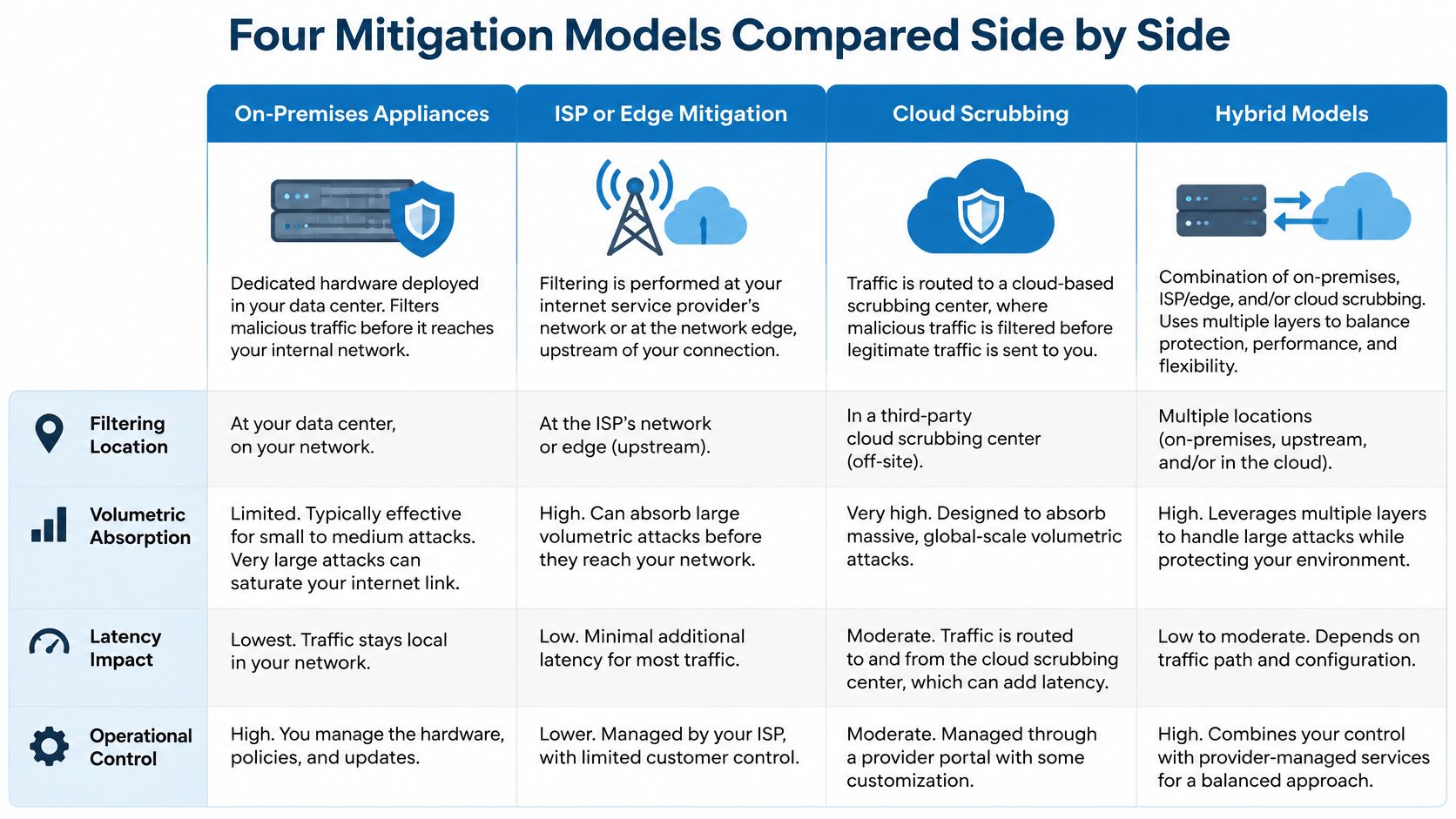
Four Mitigation Models Compared Side by Side
DDoS mitigation models compared
| Model | Where filtering happens | Handles volumetric floods | Typical cost pattern | Best fit |
|---|---|---|---|---|
| On-premises appliance | Customer's own edge hardware | Limited, because floods can saturate the circuit first | Upfront hardware plus maintenance | Large sites with spare upstream capacity and in-house security staff |
| ISP or edge mitigation | Carrier network before the last mile | Good for floods the carrier can absorb | Bundled into a plan or monthly add-on | Fiber households and small businesses on a single ISP |
| Cloud scrubbing | Provider scrubbing centers, with traffic diverted on detection | Strong when upstream and clean-traffic capacity are sufficient | Monthly base fee plus overage or per-attack charges | Hosted VoIP, applications, and uptime-critical sites |
| Hybrid | Local detection with cloud scrubbing on demand | Strong when diversion is automated and adequately provisioned | Combined hardware and subscription costs | Businesses with latency-sensitive voice and critical applications |
The filtering location determines which bottlenecks the service can address.
The upstream capacity principle
The ENISA internet-infrastructure guide explains that volumetric attacks can consume available access bandwidth. Filtering after a saturated connection cannot recover the capacity already consumed on that connection.
Consider a hypothetical fiber circuit receiving more traffic than it can carry. A powerful local firewall may discard malicious packets correctly, but legitimate packets still struggle to reach it. Buying a faster firewall doesn't remove the upstream bottleneck.
ISP mitigation addresses that problem before traffic reaches the customer's access link. It's a practical starting point for households and smaller businesses, provided the carrier has sufficient capacity and supports the services being protected.
Cloud scrubbing moves inspection to a provider's filtering infrastructure. Check both its ability to receive attack traffic and its ability to return legitimate traffic to you. Diversion can change the route, so measure the effect on voice quality and application response rather than assuming the extra path is harmless.
Choose for the operating environment
A business using hosted VoIP should evaluate ISP filtering with automated scrubbing escalation where required. Confirm that the design supports voice protocols, not just browser traffic.
A large site with spare upstream capacity and skilled operators may gain more value from local appliances. A hybrid arrangement retains local visibility while providing an upstream option, but its routing and activation procedures need careful testing.
This video offers additional context for understanding DDoS attacks and defenses.
Treat the table's cost patterns as contract categories, not price promises. Request a quote that identifies which components, traffic allowances, and activation charges apply to the proposed design.
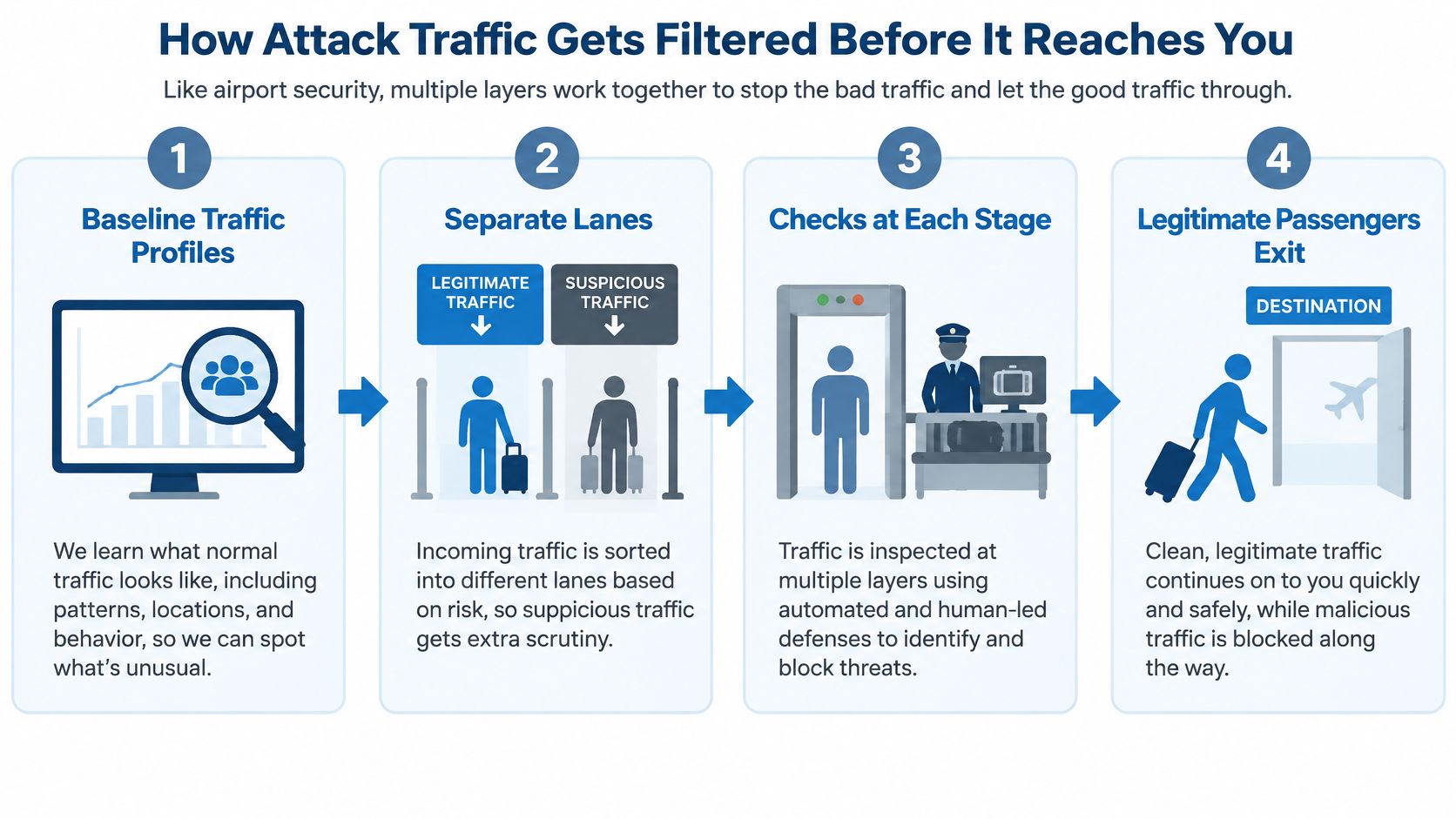
How Attack Traffic Gets Filtered Before It Reaches You
Airport security works by organizing passengers, applying different checks, and maintaining a usable exit for those who pass. Network filtering needs the same discipline. Rejecting everyone would stop the threat, but it would also defeat the purpose of operating the service.
A successful mitigation process preserves legitimate sessions while progressively narrowing the attack traffic.
Establish the baseline and validate sources
Operators first build baseline traffic profiles using bandwidth, packet rates, protocol mix, connection behavior, and application health. A spike alone isn't proof of an attack. A promotion can increase legitimate demand, while an application attack may cause failures without a dramatic bandwidth increase.
Automated detection should combine those signals. Operators then need enough detail to distinguish abusive requests from genuine customers, rather than treating all increased activity as hostile.
NIST's interdomain-routing guidance recommends complementary controls including access-control lists, unicast Reverse Path Forwarding, BGP Flow Specification, remotely triggered black-hole filtering, and response-rate limiting.
Source-address validation checks whether traffic's claimed origin is plausible. Deployed at appropriate network boundaries, it reduces attackers' ability to send requests with forged victim addresses and cause other systems to reflect replies toward the victim. It doesn't authenticate every sender or eliminate attacks from compromised devices.
Filter selectively and limit residual abuse
Once operators identify an attack pattern, they can apply access-control lists or BGP Flow Specification, usually called FlowSpec, to match traffic by protocol, prefix, port, or packet characteristics. Upstream enforcement removes matching traffic before it consumes the protected access connection.
Black-holing is different: it discards traffic to a destination, potentially including every legitimate request. It can protect surrounding infrastructure, but it isn't equivalent to keeping the targeted service available.
Rate limiting offers another option when exact classification is difficult. Operators restrict a traffic class rather than blocking it entirely, accepting that legitimate traffic may also encounter limits.
For example, broadly blocking UDP could interrupt DNS lookups, gaming sessions, VPN connections, or voice audio. A narrowly scoped rule may remove the attack while allowing those sessions to continue.
Operational check: Ask what legitimate traffic a proposed rule might block, who can reverse it, and how recovery will be verified.
After mitigation, verify routing state, application reachability, call quality, and latency. Confirm temporary rules expire or are removed as intended. An attack ending doesn't guarantee that every emergency control has been cleared.
Judging Providers and Confirming Coverage Before You Sign
A provider's headline capacity doesn't tell you whether a customer can complete a payment during mitigation. Judge DDoS protection services by usable availability, short-burst handling, and response quality, with written commitments behind each claim.
Use this comparison when reviewing proposals.
Provider evaluation criteria
| Criterion | What good looks like | Red flag |
|---|---|---|
| SLA detection and mitigation time | Stated minutes, with reports showing actual response times | Best-effort wording without a time commitment |
| Mitigation capacity | Written clean-traffic capacity sufficient for your circuit and workload | Peak figures without clean-traffic numbers |
| Latency impact | Measured added delay during diversion and return | Mitigation delay is never disclosed |
| False-positive handling | Staged rules, rollback, and a customer approval path | Blanket blocking without notice |
| Always-on or activated | Defined activation time or an always-on option | Manual activation begins only after you call |
| Cost model | Flat fee with explicit overage rules | Unpriced per-attack surcharges |
| Service coverage | Explicit coverage for VoIP, DNS, VPN, and camera systems | Web-only protection offered for a wider requirement |
| Support and escalation | Round-the-clock contacts with a named escalation path | Business-hours support only |
Read the timeline, not just the guarantee
Separate time to detect, time to start mitigation, and time to restore usable service. A provider can meet an activation target while customers still experience failed calls or transactions.
Define when each clock starts. Check whether restoration means a route is available, an application responds, or a real customer workflow succeeds. Read exclusions, customer responsibilities, service-credit rules, and liability limitations.
Use a consistent evaluation sheet so sales claims and contract terms can be compared directly.
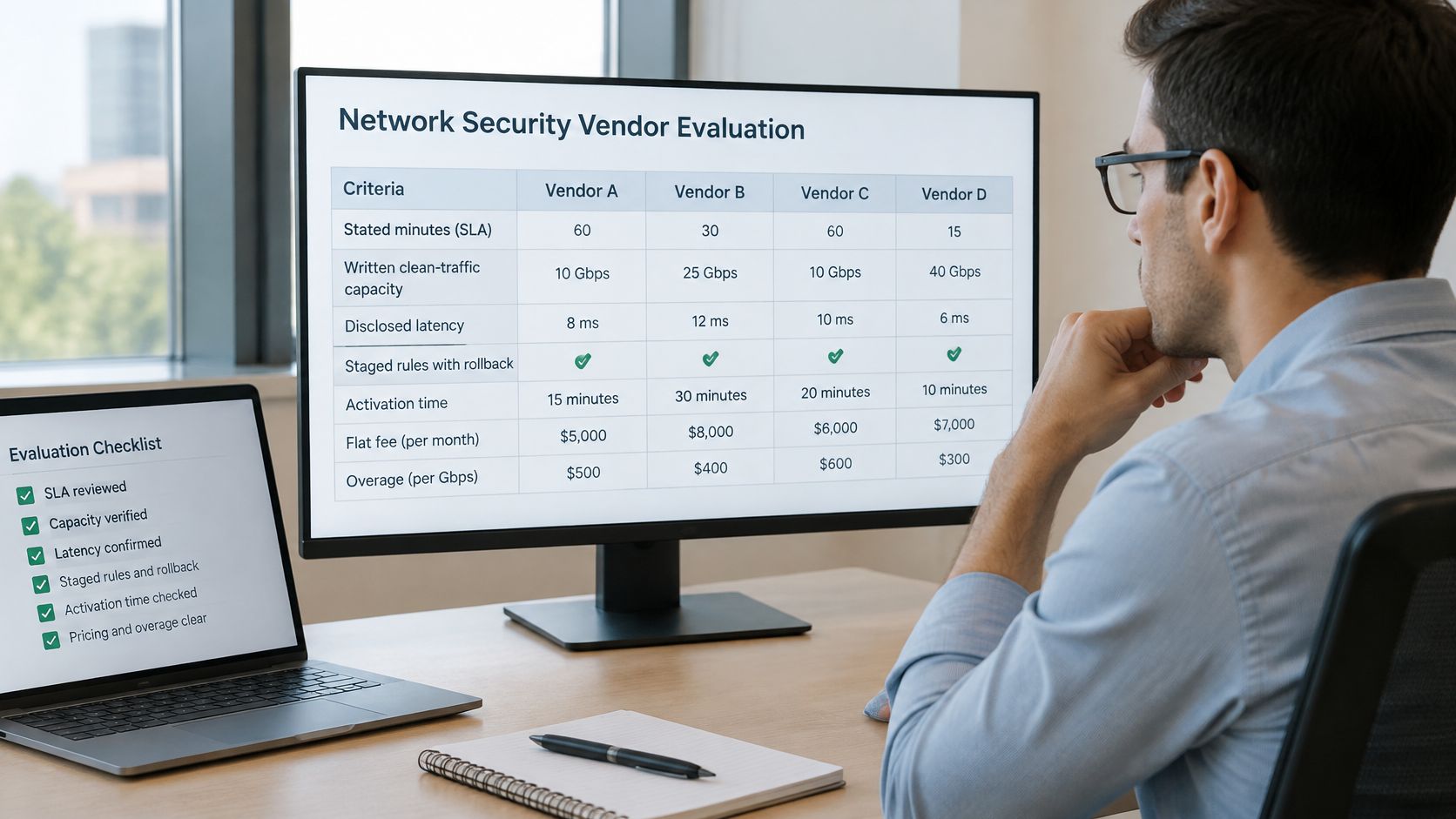
Compare commercial models with equal care. A flat monthly fee needs an explicit scope; a base-plus-overage plan needs a defined billing meter; per-attack pricing needs a definition of when an incident ends and another begins. Repeated bursts shouldn't create an unexplained invoice.
Require an observable, authorized test
Request a test designed to avoid customer disruption, using a staging endpoint or isolated test service where possible. Obtain written authorization from the network and service owners before generating test traffic.
Agree on stop conditions, rollback ownership, and evidence to capture. Record timestamps for detection, notification, filtering, and successful transactions, alongside call quality, packet loss, and false positives. Include repeated short bursts and legitimate traffic, not just one sustained flood.
A staging test can validate procedures and rule behavior, but it doesn't prove the entire production path can withstand every attack. Request separate evidence for capacity and routing assumptions.
Send shortlisted providers these questions:
- Coverage: Which exact services and prefixes are covered, including VoIP and remote access?
- Activation: Is mitigation always on or triggered after detection, and how long does activation take?
- Commitment: What mitigation-start time is written into the SLA?
- Capacity: What clean-traffic capacity is committed, and how are attacks larger than my circuit handled?
- Performance: What added latency applies during diversion?
- Billing: What triggers overage or per-attack charges?
- Escalation: Who answers outside business hours, and who owns escalation?
- Testing: Can you demonstrate the response without interrupting customers?
Our technical support at Premier Broadband is available 24/7, and we prepare custom business quotes around the connectivity and voice services a business is interested in. Call (877) 828-9280 to discuss those requirements, while requesting written confirmation of any DDoS-specific coverage rather than treating general technical support as a mitigation guarantee.
This week, document your downtime exposure and send the same evaluation questions to every shortlisted provider. Sign against confirmed coverage and measurable obligations, not capacity marketing.
How to Deploy Protection on Your Network
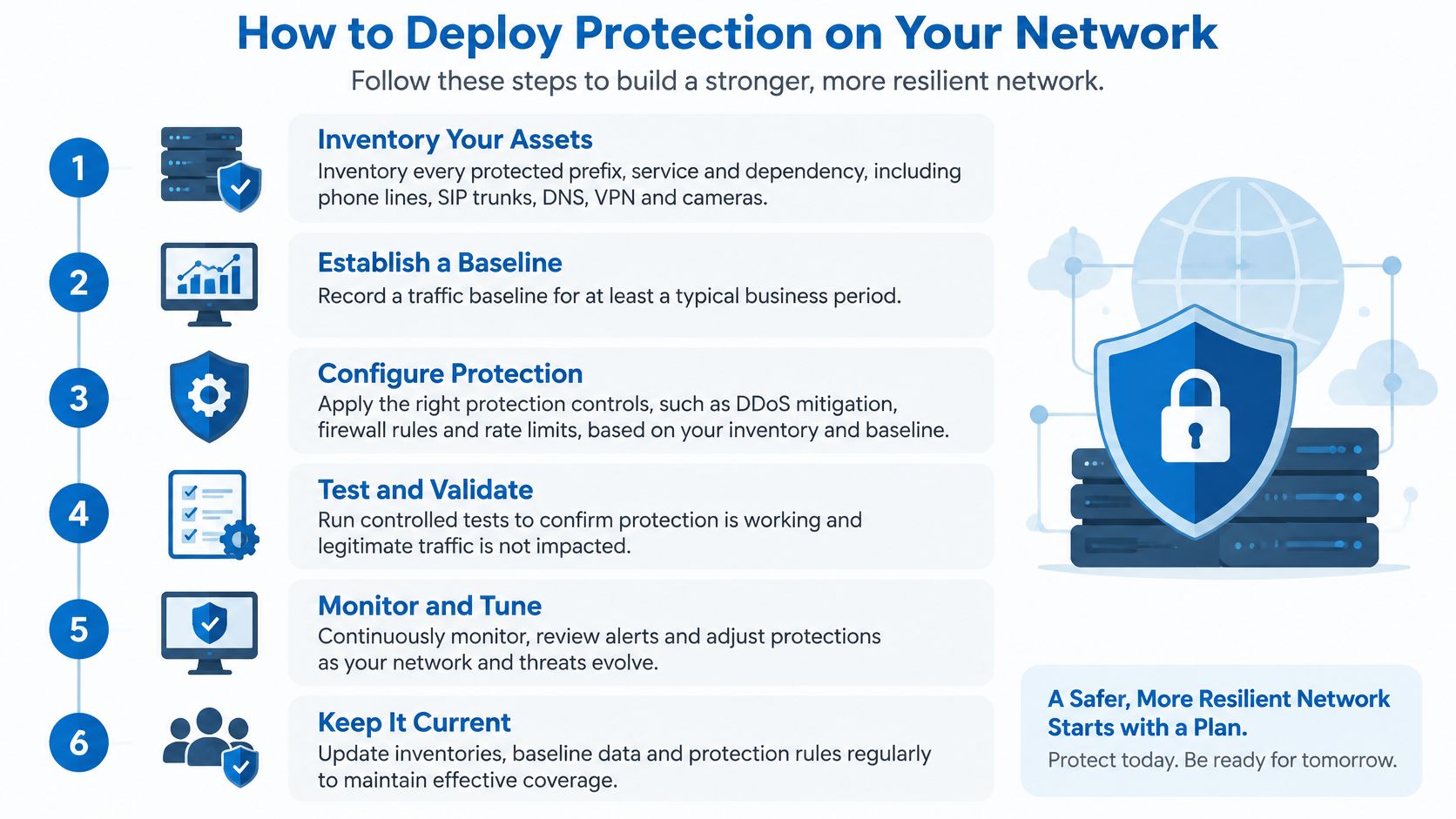
Deployment starts with ownership, dependencies, and a reversible configuration. Don't activate filtering across the network before someone has confirmed what normal service looks like and who can stop a faulty change.
Build and validate the deployment
Inventory the protected services. Record prefixes, phone lines, SIP trunks, DNS, VPNs, cameras, hosting platforms, and their dependencies. A common omission is protecting an application while leaving the DNS or remote-access service it needs outside scope.
Record a representative traffic baseline, including busy periods, quiet periods, backups, and promotions. Without that context, operators can mistake ordinary demand for an attack or overlook abnormal behavior during a normally busy period.
Select the mitigation model against circuit capacity, application location, and voice requirements. Confirm where legitimate traffic returns, since a sound filtering design can still fail through an undersized return path.
Put detection, mitigation-start, and restoration terms in writing, alongside the diversion method and operational responsibilities. Don't leave routing ownership or activation approval unresolved until an incident.
Route monitoring and alerts to named people. Verify delivery and backup ownership, not merely that notifications are enabled. ProtectIQ lets our users monitor blocked threats, intrusions, viruses, and connected devices, and sends real-time alerts when a threat is blocked; these features shouldn't be treated as proof of upstream DDoS scrubbing.
Stage rules in observation or test mode before enforcement where the platform supports it. Keep a known-good configuration and a documented rollback path so an overly broad rule doesn't become a prolonged outage.
Test failover in a planned window, with authorization and notice to affected staff or customers. Avoid peak periods, and stop the test if agreed service-health limits are crossed.
After every event, reconcile logs, verify temporary-rule removal, and record actual disruption minutes. Include the time spent recovering calls, sessions, and transactions rather than stopping the clock when attack traffic falls.
Use a checklist to keep the rollout consistent across services and locations.
Confirm readiness before going live
For an ISP, group subscribers by circuit capacity and service requirements, then pilot on a neighborhood node before wider rollout. For a small business, validate each hosted service, beginning with phone lines and SIP trunks.
- Baseline recorded: Expected traffic and service-health measures are documented.
- Rules staged: Proposed controls have been checked against legitimate sessions.
- Alerts assigned: A named person and backup receive notifications.
- Rollback tested: Operators can restore the approved configuration.
- Terms filed: Coverage, responsibilities, and escalation details are accessible.
To enable ProtectIQ, contact our team so we can activate the feature on your account. Keep that device-facing security step distinct from validating the network's DDoS mitigation arrangements.
Premier Broadband offers business internet, voice services, and consultative Managed Network Edge solutions for your organization's connectivity needs. Visit Premier Broadband with your service inventory and downtime priorities to discuss a custom quote and confirm which protection responsibilities your network design needs to address.