
At its core, a VoIP phone simply turns your voice into digital data and sends it over the internet instead of old-school copper phone lines. The best way to think about it is like sending an email versus a physical letter. Your voice travels instantly across a high-speed connection, like Premier Broadband's fiber network, and gets put back together on the other end for crystal-clear audio. It’s a smarter, more flexible way to communicate.
Your Quick Answer: From Analog Voice To Digital Packets
To really get how a VoIP phone works, it helps to follow the journey your voice takes. An old analog phone sends a continuous electrical wave down a dedicated wire. A VoIP system is totally different—it digitizes your voice. It chops your speech up into thousands of tiny pieces of information called packets.
Each packet is like a tiny digital envelope with a piece of your voice inside, stamped with the address of the person you're calling. These packets then zoom across the internet, each one finding the fastest path to get where it's going. Believe it or not, this idea has been around for a while; the first voice data packet was sent over ARPANET, the internet's predecessor, way back in 1973.
When the packets arrive, they might be jumbled and out of order. That's okay. The system on the other end is smart enough to quickly reassemble them in the right sequence to perfectly reconstruct your voice. This whole process—conversion, transmission, and reassembly—happens in milliseconds. The result is a conversation that feels just as natural and instant as a traditional phone call.
The Five Stages of a VoIP Call
To simplify this, we can break down any VoIP call into five distinct stages. The table below gives you a step-by-step look at what happens from the moment you pick up the phone until you're connected and talking.
Getting a handle on these steps is key to understanding how modern communication tools, including a cloud phone system for your business, really work.
| Stage | What Happens |
|---|---|
| 1. Dialing & Connection | You pick up a VoIP phone or open a softphone app and dial a number. Your device sends a signal to your VoIP provider to start the call. |
| 2. Analog to Digital Conversion | As you speak, your VoIP device instantly converts the analog sound waves of your voice into digital data packets. |
| 3. Data Transmission | These digital packets are sent through your router and over your high-speed internet connection, traveling to the recipient. |
| 4. Digital to Analog Conversion | The packets arrive at the recipient's end, where their device reassembles them and converts them back into analog sound waves. |
| 5. Audio Output | The recipient hears your voice through their phone's speaker, completing the seamless communication loop. |
It's a simple, elegant process that powers all modern voice communications. Now that we have the big picture, we can start digging into the specific technologies that make each of these stages possible.
The Core Technology Powering Every VoIP Call
To really get how a VoIP phone works, we need to pop the hood and look at the engine. Every single call made over the internet depends on a team of specialized protocols working together perfectly. Think of it like mailing a package—you need both an address label and a delivery truck to get it there.
In the world of VoIP, these protocols are the digital rules of the road that make sure your call connects and your voice gets from point A to point B without a hitch. The two most important players on this team are SIP and RTP. They have very different jobs, but both are absolutely essential.
SIP: The Digital Handshake of Every Call
Before you even get to say "hello," the call has to be set up. That’s the job of the Session Initiation Protocol (SIP). SIP is the traffic controller, the digital switchboard operator for every call. Its main role is to manage all the behind-the-scenes logistics.
When you dial a number, your VoIP phone sends a SIP "invite." This message is like knocking on the other person’s digital door to see if they’re available to talk.
SIP is responsible for:
- Starting the Call: It finds the person you're trying to reach and makes their phone ring.
- Managing the Call: It handles all the extra features like putting a call on hold, transferring to a colleague, or adding more people for a conference call.
- Ending the Call: When you hang up, SIP sends the signal to officially close the line for everyone.
Simply put, SIP builds the road, but it doesn't carry the traffic. For businesses handling lots of calls, knowing how this works is key. For a deeper look at how this foundational tech supports high call volumes, check out our guide on how SIP trunks work.
RTP: The Vehicle for Your Voice
Once SIP has connected the call and the handshake is complete, another protocol takes over for the main event: the conversation itself. The Real-time Transport Protocol (RTP) is the delivery truck that actually carries your voice across the internet.
As you talk, your voice gets chopped up into tiny digital packets. RTP takes these packets and sends them on their way, adding timestamps and sequence numbers to each one. This is a critical step.
That sequencing is what lets the phone on the other end reassemble your voice in the correct order, even if some packets get delayed or arrive out of sequence. It’s what keeps your conversation from sounding like a garbled, choppy mess.
The whole thing is a brilliant partnership. SIP sets everything up, and RTP handles the back-and-forth delivery of your voice.
To make the roles of these two protocols crystal clear, here’s a quick breakdown:
Signaling vs Media Protocols SIP vs RTP
| Protocol | Primary Role | Analogy |
|---|---|---|
| SIP | Signaling Protocol. It sets up, manages, and tears down the call. | The Air Traffic Controller that guides the planes (calls) for takeoff and landing but doesn't carry passengers. |
| RTP | Media Protocol. It transports the actual audio (and video) packets. | The Airplane that actually carries the passengers (your voice) from one airport to another. |
This teamwork—SIP handling the logistics and RTP handling the delivery—makes the whole system incredibly reliable and efficient.
Codecs: The Language Translators
There's one more piece to this puzzle: codecs. A codec (short for coder-decoder) is a small but powerful piece of software that compresses your voice data on one end and decompresses it on the other.
Think of a codec as a translator who's also an expert at packing a suitcase. It takes the large digital audio file of your voice and shrinks it way down. This compression is vital because it means your call uses far less internet bandwidth.
When those compressed packets arrive, the codec on the other end instantly unpacks them back into crystal-clear audio. There are a few common ones you'll see:
- G.711: An older, super reliable codec that offers excellent quality but uses more bandwidth.
- G.729: A very popular choice that balances good quality with low bandwidth use, making it perfect for most connections.
- Opus: A modern, flexible codec that automatically adjusts quality based on your network conditions, used by many of today’s top apps.
This technology really took off in 1999 when SIP became the industry standard, paving the way for the internet phone services we use today. The process is amazing—your voice is sampled 8,000 times per second before a codec compresses it and RTP sends it on its way. This combination is what makes modern, high-quality internet calls possible.
Choosing Your VoIP Phone: Hardware, Software, and Adapters
Knowing how VoIP works is great, but the real fun begins when you choose the right tools for the job. Unlike old-school phone systems that locked you into one kind of clunky desk phone, VoIP lets you make calls from all sorts of hardware and software. This freedom means you can build a setup that fits exactly what you need, whether you’re in a busy office, working from your kitchen table, or always on the go.
The choice you make boils down to balancing convenience, features, and what you’ve already got. Let’s walk through the three main ways you can connect to a VoIP service: dedicated IP phones, versatile softphones, and clever analog adapters.
Dedicated IP Phones: The Modern Desk Phone
The most familiar option is the IP Phone. It looks and feels just like the office phone you're used to, but there's a key difference. Instead of plugging into an old-fashioned wall jack, it connects directly to your internet router or network switch with an Ethernet cable.
These phones are built from the ground up for VoIP, so you get fantastic audio quality and rock-solid reliability. They’re the perfect choice for a traditional office where people like having a physical handset on their desk.
Many IP phones also come with Power over Ethernet (PoE). This nifty feature lets the phone get its power from the same Ethernet cable that gives it an internet connection. No more extra power cords cluttering up your desk! For businesses setting up dozens of phones, this makes installation a breeze.
An IP Phone is the workhorse of the VoIP world. It mixes the familiar comfort of a traditional phone with the powerful features of an internet-based system, making it a reliable tool for everyday business calls.
These devices are packed with features that go way beyond just making calls, often including big touchscreens, support for multiple lines, and buttons you can program for things like speed dial or transferring calls.
Softphones: Your Phone on Your Computer or Smartphone
For ultimate portability, nothing beats a softphone. A softphone is just a software app you install on your computer, smartphone, or tablet that turns it into a full-featured phone.
This is the perfect solution for remote workers, road warriors, or anyone who doesn't want to be chained to a desk. All you need is the softphone app and a headset, and your laptop or mobile phone becomes your business line. You can make and receive calls on your business number from anywhere you have a solid internet connection.
This approach has some huge advantages:
- Mobility: Your office phone number goes wherever you go.
- Cost-Effectiveness: You don't have to buy a physical phone for every single person.
- Integration: Softphones can often link up with other business tools, like your customer database, so you can see a caller's info pop up on your screen.
More and more companies are realizing how powerful this flexibility can be. To see how these tools fit into a bigger picture, check out the different VoIP solutions for small business that mix and match these options.
Analog Telephone Adapters: Bridging the Old and New
But what if you have an old analog phone that you just can't part with? VoIP has you covered there, too. An Analog Telephone Adapter (ATA) is a small, simple box that acts as a translator between your old phone and your new VoIP service.
You just plug your traditional phone into the ATA, and then plug the ATA into your internet router. The adapter does the heavy lifting, converting the analog signals from your old phone into the digital packets that VoIP needs. This lets you keep using the hardware you already know and love while getting all the savings and features of an internet phone system.
ATAs are a fantastic, budget-friendly choice for homes or small offices that want to switch to VoIP without buying all-new hardware right away.
How Your VoIP Call Travels Across the Internet
When you dial a number, your voice packets don’t just wander aimlessly across the web. They follow a specific, intelligent path guided by a digital traffic controller. This central “brain” ensures your call finds the right person out of billions of connected devices, whether they’re next door or across the ocean.
This crucial role is played by a SIP Server or a Private Branch Exchange (PBX). Think of this server as a super-smart switchboard operator for the internet age. It gets the initial call request from your phone and handles all the complex routing needed to connect you.
The server manages your account, confirms your device is legit, and then hunts down the IP address of the person you’re trying to reach. It’s the digital matchmaker that sets up the connection so the conversation can actually begin.
The Brain of the Operation: Your PBX
Historically, this "brain" was a physical piece of hardware called an on-premise PBX—a bulky, expensive box of equipment that a business had to buy and maintain in its own server closet. While it worked, this approach was far from perfect. It was costly to purchase, required special technicians for maintenance, and was a real headache to scale as a company grew.
Today, thankfully, most businesses are switching to a much more flexible and powerful solution: the cloud-hosted PBX.
A cloud PBX, or hosted VoIP solution, moves that entire switchboard into your provider's secure data center. Instead of a physical box on-site, all the call routing and feature management happens over your internet connection. This shift has completely changed the game for business communications for a few key reasons:
- Lower Upfront Costs: You no longer need to buy pricey hardware. Instead, you pay a predictable monthly fee per user.
- Infinite Scalability: Adding a new employee is as simple as adding a user in a web portal. No more physical limits on how much your system can grow.
- Greater Flexibility: Employees can connect from anywhere—the office, home, or a coffee shop—using their IP phone, a softphone app, or their mobile device.
- Automatic Updates: Your provider handles all the maintenance and software updates, so you always have the latest features and security patches without lifting a finger.
This move to the cloud is exactly why a small local business can now access the kind of advanced phone features that were once only available to massive corporations.
This breakdown shows the most common ways to connect to a VoIP system, from physical desk phones to software on your laptop.
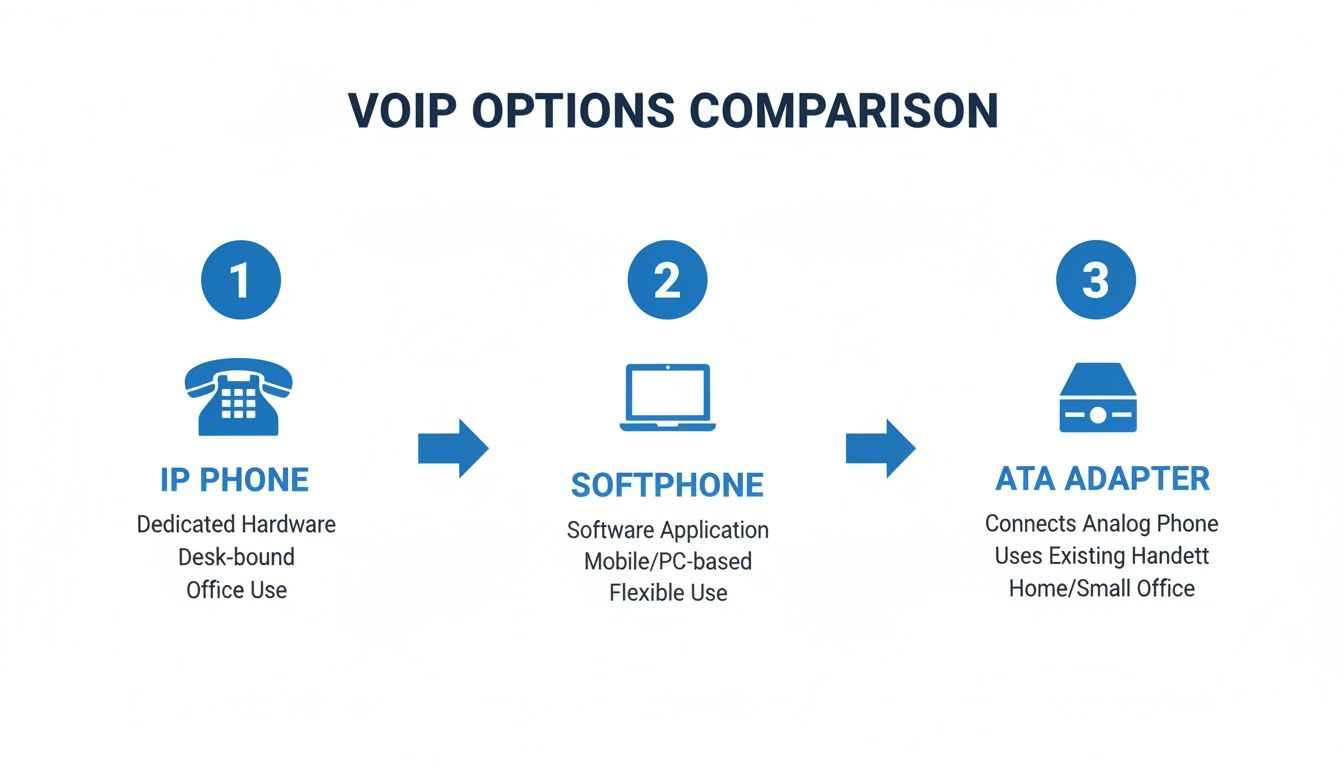
As you can see, whether you prefer a traditional IP phone, a flexible softphone, or an ATA adapter to use your old equipment, there's a VoIP option that fits your needs.
Connecting to the Old Phone Network
So, what happens when your VoIP call isn't going to another VoIP phone? How can you call your grandmother’s traditional landline or a friend's mobile number? This is where another critical piece of technology comes into play: the PSTN Gateway.
The Public Switched Telephone Network (PSTN) is the official name for the classic, circuit-switched phone network that’s been around for over a century. A PSTN Gateway acts as a bridge, or translator, between the modern VoIP world and the traditional phone world.
When you dial a landline number from your VoIP phone, your voice packets travel over the internet to this gateway. The gateway then converts your digital packets back into the analog signals the old phone network understands, completing the final leg of the call.
This process happens in reverse, too. When someone calls your VoIP number from their landline, the call hits the gateway first. It gets converted into digital packets before being sent to you over the internet.
This entire translation happens instantly. You’d never even know it was going on behind the scenes. It's this seamless connection that gives VoIP its power, letting you call any phone number on the planet, regardless of the tech on the other end. It’s the perfect blend of old and new, ensuring no one gets left out of the conversation.
Keeping Calls Crystal-Clear and Solving Common Issues
Now that we've covered how VoIP works by sending your voice over the internet in little data packets, it’s easy to see why call quality is directly tied to the health of your internet connection. A VoIP call is a live data stream, and any bump or slowdown on that digital road can affect how you sound to the person on the other end.
Think of it like this: your internet connection is a highway. All your online activity—streaming movies, downloading files, browsing social media, and your VoIP call—are cars trying to get where they need to go. If that highway gets too crowded, cars get delayed or even lost. For your phone call, that traffic jam translates directly into frustrating audio problems.
The good news is that most of these issues are well-known and fixable. It's all about managing your network's traffic. Let's break down the usual suspects behind poor call quality and how you can get things back on track.
Finding the Cause of Bad Calls
When a VoIP call sounds garbled, choppy, or delayed, it's almost always due to one of three culprits: latency, jitter, or packet loss. Understanding what these are is the first step to a clear conversation.
-
Latency (The Awkward Delay): This is simply the time it takes for a voice packet to get from your phone to the other person's. High latency is what causes that annoying lag where you end up talking over each other because the audio isn't arriving in real time.
-
Jitter (Choppy, Robotic Sound): Jitter happens when your voice packets show up out of order. If your sentence is a train, jitter is when the train cars arrive all jumbled up. The phone on the receiving end tries its best to put them back in the right sequence, but when there's too much jitter, it can't keep up, resulting in robotic-sounding audio.
-
Packet Loss (Dropped Words): This is the most damaging problem. Packet loss means some of your voice packets just disappear and never make it to their destination. Back to our highway analogy, these are the cars that took a wrong turn and vanished completely. This creates gaps and missing words in the conversation, making it nearly impossible to follow.
Sometimes, even your router can cause these problems. A specific setting called SIP ALG can interfere with call data, and you can learn more about it in our guide on what is SIP ALG.
Creating a VIP Lane for Your Voice Traffic
So, how do you make sure your important voice "cars" don't get stuck in traffic? The best way is with Quality of Service (QoS).
QoS is a feature on your router that basically creates a VIP express lane for your voice traffic. It lets you tell your network which data is most important. By setting your VoIP packets as the top priority, you ensure they always get to the front of the line, no matter what else is happening on your network.
Think of QoS as a traffic cop who sees an ambulance—your VoIP call—and immediately waves it through the intersection. The delivery trucks (file downloads) and other cars (web browsing) have to wait a few extra seconds. This simple act of prioritization keeps your conversation flowing smoothly, even when your internet is busy.
For any business, maintaining excellent call quality is non-negotiable, especially for things like customer support calls, where clarity is key.
Quick Tips for Flawless Calls
Besides setting up QoS, a few simple best practices can make a world of difference for your call quality, especially on a fast connection like Premier Broadband’s fiber network.
-
Plug In with an Ethernet Cable: Wi-Fi is great for convenience, but a wired Ethernet connection is king for stability and speed. If your desk phone or computer stays in one spot, plugging it directly into your router is the single best thing you can do for top-tier call quality.
-
Keep an Eye on Bandwidth: A single VoIP call only uses about 100 kbps of your upload and download speed. That’s not much, but it adds up. If you have dozens of calls going at once or someone is downloading huge files during an important conversation, it can still create a bottleneck.
-
Use a Quality Router: Not all routers are built the same. A modern router with strong QoS capabilities and a powerful processor is much better at managing traffic and preventing problems before they start. It's the foundation of a reliable network and a reliable phone system.
Frequently Asked Questions About How VoIP Works
Even after diving into the technology, you probably have a few practical questions. This section cuts through the jargon to give you straightforward answers about how a VoIP phone works day-to-day. We'll cover everything from internet speed to keeping your number, giving you the final pieces of the puzzle.
What Internet Speed Do I Need for a VoIP Phone?
It’s a common myth that you need a blazing-fast internet plan for VoIP to work well. The truth is, the requirements are surprisingly small. A single VoIP call typically only uses about 100 kbps (or 0.1 Mbps) of your upload and download speed.
What's far more important than raw speed is the quality of your connection. A stable, low-latency connection—exactly what a fiber network provides—is the real key to crystal-clear calls.
For a home, any standard broadband plan will be more than enough. For a business with multiple calls happening at once, you just multiply that number. An office with 10 simultaneous calls would need about 1 Mbps of dedicated bandwidth, which is a tiny fraction of a modern business fiber plan.
Can I Keep My Old Phone Number with VoIP?
Yes, absolutely. In nearly all cases, you can bring your existing phone number with you when you switch to VoIP. This process is called "number porting," and your new VoIP provider handles all the tricky parts for you.
Your new provider coordinates directly with your old phone company to transfer the number over. This can take anywhere from a few days to a couple of weeks, so it's critical to keep your old phone service active until the switch is 100% complete.
Once the number moves successfully to your new VoIP service, you can safely cancel your old plan. This is a must-have feature for any business that relies on its phone number and can’t afford to miss a single customer call.
Are VoIP Calls Secure and Private?
That's a great question, especially since VoIP calls travel over the internet. While the most basic VoIP setups might not be encrypted, modern systems offer powerful security features to keep your conversations private.
The best providers use two key encryption technologies together:
- Transport Layer Security (TLS): This scrambles the setup information for the call—things like who is calling whom and when the call ends.
- Secure Real-time Transport Protocol (SRTP): This encrypts the actual audio of your conversation, making your voice unreadable to anyone trying to listen in.
When a provider like Premier Broadband uses both TLS and SRTP, your VoIP calls are just as secure, if not more so, than an old-fashioned landline. It's always smart to confirm your provider offers these security standards.
Can I Use a VoIP Phone During a Power Outage?
This is one of the biggest differences from old copper landlines, which could draw power directly from the phone line. VoIP phones rely on a few different devices that all need electricity.
Your internet modem, your router, and your VoIP phone all need power to work. That means if the power goes out, your VoIP service will go down too—unless you have a backup plan.
This is why we highly recommend connecting your modem, router, and phone to an Uninterruptible Power Supply (UPS). A UPS is essentially a battery backup that keeps your gear running for a while after the power cuts out, giving you time to make important calls when you need them most. It’s a small investment for some serious peace of mind.
Ready for crystal-clear calls and advanced features? Upgrade your home or business communications with VoIP phone service from Premier Broadband, built to run flawlessly on our 100% fiber network. https://premierbroadband.com