
A phone internet adapter is a small but powerful device that connects your trusty analog home phone to a modern internet-based phone service. You'll often hear it called an Analog Telephone Adapter (ATA). Its job is to convert your voice into a digital signal that can travel smoothly over your high-speed internet connection.
What a Phone Internet Adapter Does for You
Ever wish you could get all the new features of internet calling without ditching the home phone you’re already comfortable with? A phone internet adapter is exactly what you need. It lets you keep the same handset you’ve used for years while completely upgrading the technology that powers your calls.
Think of it this way: your voice is like a letter you've written by hand. To send it across the country in a split second, you'd need to scan it and turn it into an email. A phone internet adapter does the same thing for your voice—it takes the analog sound from your phone and "digitizes" it. That digital information then zips across Premier Broadband’s super-fast fiber or LTE network.
Bridging Old and New Technology
The main goal of a phone internet adapter is to give you the best of both worlds. You get to enjoy the comfort and simplicity of your classic phone while tapping into powerful features only an internet connection can deliver. This one simple device modernizes your home phone system without any complicated changes.
Here’s what you get:
- Keep Your Existing Phone: No need to buy or learn how to use new hardware. Your current home phone plugs right into the adapter.
- Unlock VoIP Features: Get modern calling features like voicemail-to-email, custom caller ID, and call forwarding straight to your cell phone.
- Superior Call Quality: Our fiber-optic network sends voice data faster and more reliably, leading to conversations that are often much clearer than an old copper phone line.
- Cost-Effective Calling: Internet-based phone service is usually more affordable, especially for long-distance and international calls, saving you money every month.
At its core, a phone internet adapter is a translator. It helps your analog phone speak the digital language of the internet, making sure nothing gets lost in translation and every call comes through crystal clear.
This technology is the foundation of Voice over IP (VoIP), which has totally changed how we think about phone calls. By turning your voice into data, VoIP makes your home phone as flexible and powerful as any other internet device in your house. For a closer look, you can learn more about how VoIP phone systems work and see the technology in action. A phone internet adapter makes this advanced system easy for everyone to use.
How Adapters Bridge Your Phone to the Internet
So, how does a phone internet adapter actually work? Think of it as a translator. It’s a clever little device that takes the analog sound of your voice from a traditional phone and converts it into a digital language the internet can understand.
When you speak, the adapter captures those sound waves and instantly digitizes them. This process chops your voice into tiny bundles of information called data packets. You can imagine these packets like a stream of digital postcards, each one carrying a small piece of your conversation. The adapter then sends these "postcards" over your Premier Broadband fiber or LTE network to the person you're calling.
The whole thing happens in a flash—just milliseconds—so your conversation flows without any weird delays. On the other end, the process just reverses, and the packets are reassembled into crystal-clear audio.
This diagram shows the simple but powerful journey your voice takes to go from an old-school phone to the digital world.
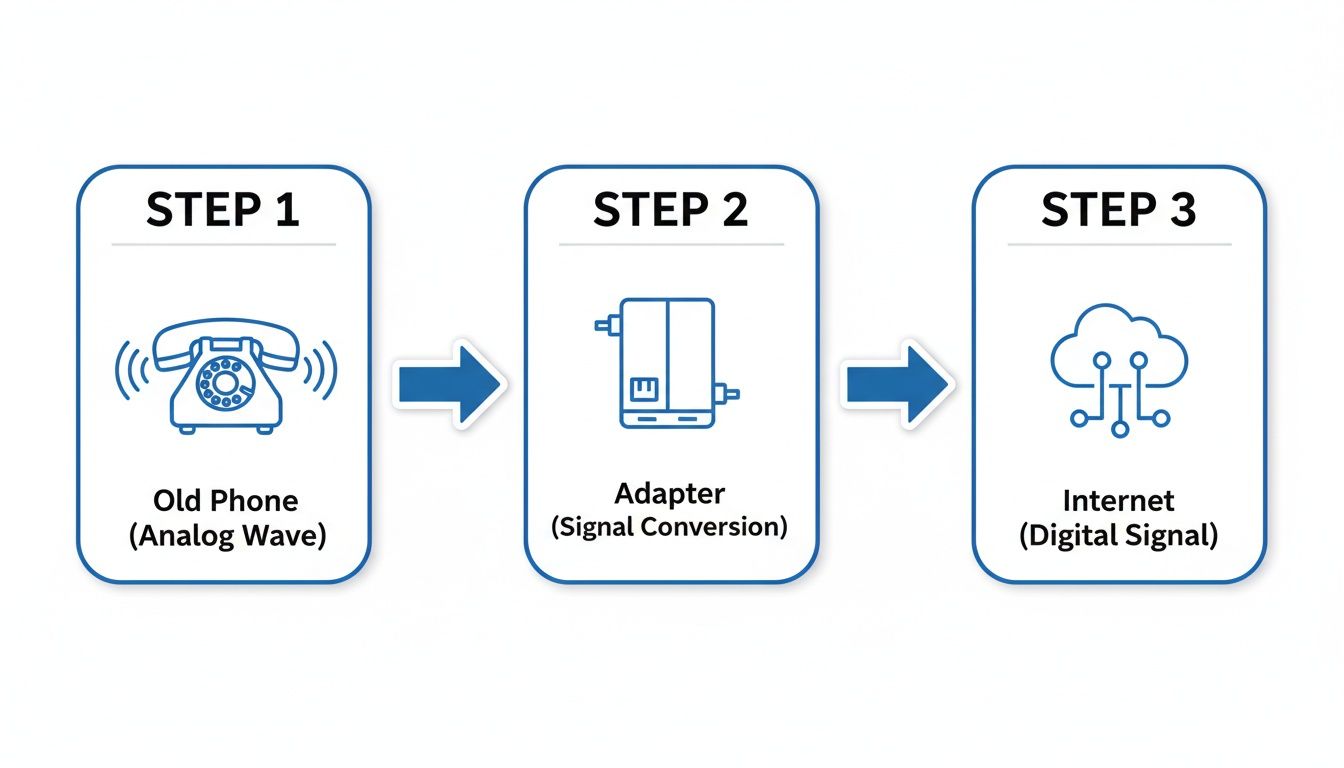
As you can see, the adapter is the essential bridge that allows old and new technology to work together perfectly.
The Language of Internet Calling
Now, for this digital conversation to actually happen, every device involved needs to speak the same language. That's where Session Initiation Protocol (SIP) comes in. SIP is the technology that sets up, manages, and ends your internet phone calls.
It’s the digital "handshake" that kicks off the connection between you and the person you’re calling. SIP handles all the behind-the-scenes work, from making the other phone ring to ending the call when you hang up. To really get into the nuts and bolts, take a look at our guide on what SIP calling is and how it powers modern phone systems.
Keeping Your Calls Crystal Clear
But what if your internet connection gets busy? Let's say someone in your house starts streaming a movie while you're on an important call. You need to make sure your call quality doesn't drop. This is where a feature called Quality of Service (QoS) saves the day.
Think of QoS as a VIP express lane on your internet highway, reserved just for your phone calls. It gives your voice data packets priority, making sure they zip past any other traffic without getting stuck.
This is why VoIP calls often sound even clearer and more reliable than old landlines. Thanks to modern tech like SIP and QoS built into your phone internet adapter, you can count on a high-quality calling experience, even when your home network is humming with activity.
Choosing the Right Phone Internet Adapter
Picking out a phone internet adapter isn't like grabbing any old gadget off the shelf. It's about getting the right piece of equipment for your specific needs. Think of it as a translator for your phone—the better it is, the clearer every conversation will be. For this to work, the adapter must be a perfect match for both your analog phone and your internet phone service.
When everything is compatible from the start, you get seamless communication the moment you plug it in. At Premier Broadband, we take the guesswork out of the equation. We make sure the adapter you use works flawlessly with our network, giving you a smooth and reliable connection for every single call.
Key Specifications to Consider
When you start comparing adapters, you'll run into a few technical terms. Don't worry, they're simpler than they sound. The two most important things to check are the number of ports and the voice codecs it supports.
- FXS Ports: This is just the techy name for a standard phone jack. An adapter with one FXS port lets you connect one phone line. If your home or business needs two separate lines with unique numbers, you'll need an adapter with two FXS ports.
- Voice Codecs: A codec is simply the technology that packages (compresses) and un-packages (decompresses) your voice for travel over the internet. Some codecs, like G.711, give you crystal-clear, high-definition audio. Others, like G.729, use less of your internet bandwidth but the quality is a bit lower. A good adapter can handle multiple codecs, which gives us more flexibility to optimize your service.
The demand for these little devices is booming. The wireless adapter market is projected to more than double from USD 7.2 billion in 2024 to USD 15.3 billion by 2033. This growth highlights just how crucial these adapters are for connecting our trusted technology to modern networks. You can learn more about this expanding market and its forecast on verifiedmarketreports.com.
The Advantage of a Provider-Managed Device
Sure, you could buy a phone internet adapter on your own, but letting Premier Broadband provide and manage it for you comes with some major perks. It completely removes the technical headaches and ensures you get the absolute best performance from your phone service.
Think of a provider-managed adapter as a VIP pass for your phone service. It grants you exclusive access to expert setup, automatic updates, and dedicated support, ensuring your connection is always optimized and secure without you lifting a finger.
When we manage your equipment, we handle it all—from the initial setup to ongoing updates. This means your adapter always has the latest software, security fixes, and the perfect settings for our network. If a problem ever pops up, our team can diagnose and fix it fast, often without even needing to send a technician out. It’s all about providing you with total peace of mind and is a huge part of our commitment to delivering the best internet telephone service possible.
Your Simple Guide to Adapter Setup
Getting your phone internet adapter connected is much easier than you might think. You don't need to be a tech whiz to get it done. These devices are designed to be plug-and-play, usually just needing three quick steps to get your trusty home phone working over your internet connection.
First, you'll need to give the adapter power. Just take the power cord that came in the box, plug one end into the adapter, and the other into a wall outlet. You should see a light pop on, letting you know it's powered up.
Next up is the internet connection. Grab an Ethernet cable and plug it into the port on your adapter, usually marked "Internet" or "WAN". The other end goes into a free LAN port on your internet router—the same kind of port you'd use for a computer or a video game console.
Final Connections and Professional Help
With the adapter powered on and hooked up to the internet, you're on the home stretch.
- Plug in Your Phone: Take your telephone's cord and plug it right into the port labeled "Phone 1" or "FXS" on the back of your adapter.
- Wait for it to Boot Up: Give the adapter a few minutes to start up and connect with the network. You'll know it's ready when the lights for Power, Internet, and Phone all turn solid green.
- Listen for a Dial Tone: Pick up your phone. If you hear that familiar, clear dial tone, you're all set! Your phone is ready to make calls.
While you can definitely set this up yourself, having a professional do it ensures everything is dialed in perfectly. A technician can fine-tune all the settings to match your network, giving you the best call quality from day one.
For Premier Broadband customers, we take all the guesswork out of it. We offer professional installation where our own technicians handle everything for you. They'll make sure your adapter is connected right, configured for our network, and fully tested. It’s the easiest way to get your new phone service running flawlessly without lifting a finger.
Unlocking Advanced Calling Features
A phone internet adapter does a whole lot more than just make your old landline work on our network. It’s your gateway to a ton of modern calling features. Think of it as a smart upgrade that turns your trusty old handset into a powerful, flexible communication tool. From the moment it's connected, you get access to features that completely change how you manage your calls.
Imagine never missing an important message because your voicemails are sent straight to your email as an audio file. You can listen on the go, save them for later, or forward them to someone with a simple click. That's just one of the conveniences you get when you switch to VoIP through an adapter.
Modern Conveniences for a Connected Life
Beyond voicemail, these adapters give you a new level of control over your communications. For busy families and professionals, these features are total game-changers.
- Detailed Call Logs: See a full history of all your incoming, outgoing, and missed calls online. It's perfect for tracking business calls or just seeing who tried to reach you while you were out.
- Custom Caller ID: You can choose the name and number that shows up when you call someone else—a nice, professional touch for any home business.
- Call Forwarding: Automatically send calls to your cell when you're not home, making sure you're always reachable.
This shift from simple connectors to smart devices is happening everywhere. Digital media adapters have already transformed home entertainment since 2015, and that market is projected to grow from USD 8.44 billion in 2024 to USD 21.26 billion by 2035. People want smarter, more connected tech, and that's exactly what a phone internet adapter brings to your home phone.
Maintaining Superior Call Quality
Getting all these new features is great, but crystal-clear call quality is what really matters. Your phone internet adapter works with your Premier Broadband connection to make sure your voice traffic is always the top priority.
Our network is designed to give voice data an "express lane," which keeps other things like streaming or gaming from messing with your call quality.
By intelligently managing data, a quality VoIP service ensures your conversations remain clear and jitter-free, even when your household is streaming, gaming, and browsing all at once.
To really see what’s possible with today’s communication tools, it’s worth exploring the benefits of upgrading your phone system to VoIP. This is the technology, powered by your adapter, that brings your home phone into the modern, connected world.
Troubleshooting Common Adapter Issues
Even the best tech needs a quick reset sometimes. If your phone internet adapter is giving you trouble, don't sweat it. Most of the common hiccups can be fixed with a few simple steps, getting you back to crystal-clear calls in no time.
Before you start digging into the settings, always check the basics first. Are all the cables plugged in tight? Give the power cord, the Ethernet cable from your router, and the phone line a little push to make sure they're secure. You'd be surprised how often a loose connection is the real problem.
If everything is plugged in correctly, it's time for the oldest trick in the IT book: a simple reboot. But the order you do it in is key. First, unplug your modem, router, and the phone adapter from their power outlets. Wait a full 60 seconds. Then, plug them back in one at a time, starting with the modem. Wait for its lights to go solid before plugging in the router, and then, finally, the adapter.
Diagnosing Specific Problems
Still no luck after a reboot? Let's figure out exactly what's going on. Different symptoms usually point to different causes.
-
No Dial Tone: This almost always means there's a connection problem. After checking the cables and rebooting, try to visit a website on your computer. If your internet is out, your phone service will be out, too.
-
Choppy or Robotic Audio: This is typically a sign of an unstable internet connection, not a faulty adapter. It can also be caused by a router setting that's messing with your voice data. A common offender is a feature called SIP ALG, which can sometimes interrupt VoIP calls. You can learn more by checking out our guide on what SIP ALG is and see if it needs to be turned off.
Think of it this way: your phone service needs a smooth, stable internet connection to work properly. Choppy audio is like a pixelated video stream—it’s a signal that the data is having a hard time getting through.
If you’ve walked through these steps and are still running into issues, the Premier Broadband support team is here to help. Just give us a call, and we can check your connection on our end to sort out any deeper problems and get your service back to normal.
Frequently Asked Questions About Phone Adapters
Switching to a new phone service naturally comes with a few questions. We want to make sure you have all the answers, so we've put together this quick guide to address the most common things people ask about using a phone adapter.
The number one question we get is, "Can I keep my current phone number?" Absolutely. The process is called number porting, and it's a straightforward, federally regulated procedure. We handle all the background work to move your number from your old provider to your new Premier Broadband service, so you don't have to worry about a thing.
Data Usage and Security
Another thing people are curious about is how much internet data these calls use. You'll be happy to know it's incredibly small. A VoIP call uses only about 0.5 to 1 megabyte of data per minute. For comparison, streaming an HD movie can use 50 times that amount. Your phone calls will barely make a ripple in your monthly data.
Security is always a top priority, and rightly so. So, just how secure is a phone internet adapter?
- Built-in Encryption: Modern adapters use powerful encryption to scramble your call data, making it unreadable to anyone trying to listen in.
- Secure Network: With Premier Broadband, your calls travel over our managed, secure network—adding a layer of protection you simply don't get with free-for-all calling apps.
Your conversations are kept just as private and secure as they would be on an old-school landline.
Handling Power and Internet Outages
What happens if the power or internet goes out? Since your phone adapter needs an internet connection, a service outage will affect your ability to make calls. The good news is, there are simple and effective backup solutions.
An Uninterruptible Power Supply (UPS) is a great tool. It's essentially a backup battery that can keep your modem, router, and phone adapter running for hours during a power outage. Plus, features like call forwarding can automatically send incoming calls straight to your cell phone, so you never miss an important call.
It's also important to know how 911 works with VoIP. When you sign up, your service is tied to the physical address you provide. This is the location that emergency services will see. If you move, always update your address with us to ensure help can find you quickly.
Ready to get crystal-clear calls with modern features while keeping the phone you already have? Premier Broadband makes it easy with professional support and managed equipment. Explore our VoIP phone services today and bring your home phone up to speed.