

If you're looking for the short answer, a solid gaming experience needs at least 25 Mbps download, 5-10 Mbps upload, and a ping below 50ms. But if you're serious about competitive play or streaming your gameplay, you’ll want to aim much higher: think 100+ Mbps download, 25+ Mbps upload, and a ping under 20ms. The real secret is the balance between these three, not just a flashy download number.
Your Quick Guide to Gaming Internet Speeds
Let's cut right to the chase. A great gaming connection isn’t just about the big download number your internet provider advertises. It’s a careful balance of download speed, upload speed, and latency all working together to deliver a smooth, responsive experience.
Think of this as your cheat sheet. We'll give you clear targets for different types of gamers—from kicking back with a casual co-op game to climbing the ranks in a competitive shooter. This will help you see how your current connection stacks up before we dive deeper into why these numbers are so critical.
Recommended Internet Specs for Gaming
Understanding what kind of gamer you are is the first step toward crushing lag for good. A casual Minecraft player has totally different needs than someone grinding in Valorant or streaming their gameplay on Twitch.
To make it simple, we've broken down the numbers you should be aiming for. This table gives you a clear snapshot of the performance you need, whether you're just starting out or going pro.
| Gaming Style | Minimum Download Speed | Recommended Download Speed | Recommended Upload Speed | Target Latency (Ping) |
|---|---|---|---|---|
| Casual Gaming | 25 Mbps | 50-100 Mbps | 10 Mbps | Under 50ms |
| Competitive Gaming | 100 Mbps | 300+ Mbps | 25 Mbps | Under 20ms |
| Streaming & Gaming | 100 Mbps | 300-500+ Mbps | 50+ Mbps | Under 20ms |
As you can see, the demands jump up fast when you move from casual play to competitive or streaming environments. While download speed handles game updates and loading assets, it’s your upload speed and latency that become the real MVPs for lag-free, real-time performance.
Why Download Speed Is Only Half the Story
For years, gamers have been conditioned to chase the biggest download number they can find, thinking that a massive pipeline is the silver bullet for lag-free gaming. While a fast download is definitely part of the equation, fixating on it is like building a race car with a huge engine but tiny brakes—you're missing a critical piece of the puzzle.
Think of it this way: your download speed is how you receive all the data from the game's server. It pulls in the game world, shows you where your opponents are, and renders all the explosive action happening around you. But your upload speed? That’s how you send your own actions back. Every single mouse click, every button press, every time you move your character—that's an upload.
The Two-Way Street of Gaming Data
Imagine you’re in a tense firefight in a first-person shooter. Your download speed is what lets you see the enemy peek around a corner. But it's your upload speed that sends the signal from your controller telling your character to fire. If that upload is weak or choppy, your command gets delayed. On your screen, it looks like you fired first, but the server didn't get the message in time. You lose the fight, and it’s beyond frustrating.
This is the root cause of some of the most infuriating gaming moments:
- Input Lag: That maddening delay between when you do something and when you see it happen in the game.
- Rubber Banding: When you sprint forward, only to be yanked back to where you were a second ago because the server lost track of your position.
A sluggish upload connection is almost always the culprit when you feel like you're constantly a step behind in online games. It creates a disconnect between your real-time actions and what the game server registers, putting you at a huge competitive disadvantage.
Why Upload Speed Is Now a Priority
In the past, most internet providers sold their plans based almost entirely on download speeds, with upload treated as an afterthought. That mindset is quickly becoming obsolete. Games are more interactive than ever, and our homes are packed with smart devices all competing for bandwidth. A powerful upload connection isn't just a nice-to-have anymore; it's essential.
Modern gaming demands a solid upload pipeline. For casual players, we recommend a minimum of 10 Mbps upload. If you're a competitive gamer or you stream your gameplay on platforms like Twitch or YouTube, you really need 25 Mbps or more to ensure everything runs without a hitch.
This is why providers like Premier Broadband are focusing on symmetrical speeds—where your upload speed matches your download speed. It's a game-changer. You can dive deeper into what makes a good upload speed in our dedicated guide.
The industry is catching on, and as gaming performance metrics have evolved on liveoakfiber.com, the importance of upload bandwidth is finally getting the attention it deserves. In a busy household where someone might be on a video call while you’re trying to clutch a win, a robust upload speed makes sure your commands aren't drowned out by the other digital traffic.
Understanding Latency: The Real MVP of Gaming
While download and upload speeds get all the attention, every competitive gamer knows the real secret weapon is latency. You’ve probably heard it called "ping." It's the one metric that matters most for that snappy, responsive feel in any real-time game.
Essentially, latency measures how long it takes for your command—like firing a weapon or casting a spell—to travel to the game server and for the server's response to get back to your screen.
Think of it like this: your download speed is the size of a delivery truck, but latency is how fast that truck makes the round trip. A 1 Gbps download speed is a massive truck, but if it gets stuck in traffic (high latency), the package still shows up late. For gaming, you’d much rather have a small, nimble motorcycle (low latency) that gets there instantly.
What Is a Good Ping for Gaming?
Ping is measured in milliseconds (ms), and when it comes to gaming, the lower the number, the better. It’s what separates an action that feels instant from one that feels sluggish and delayed. A low ping means your inputs register on the server almost immediately, which can give you a massive edge over the competition.
Here’s a quick guide to what those ping numbers actually feel like in-game:
- Under 20ms (Excellent): This is the sweet spot, the gold standard for competitive gaming. Your connection is so responsive it feels instantaneous, giving you the best possible reaction time in fast-paced shooters and fighting games.
- 20ms – 50ms (Good): You're still in great shape here. Gameplay will feel smooth and crisp with virtually no noticeable lag. This range is perfect for most online games, from MOBAs to battle royales.
- 50ms – 100ms (Average): Okay, now you might start to feel a slight delay, especially in those clutch moments. It’s still playable, but you’ll be at a disadvantage against opponents with a better connection.
- 100ms+ (Poor): At this point, lag becomes a real problem. You'll see significant delays between your actions and what happens on screen, making it tough to compete at all.
In a first-person shooter, high latency is the difference between winning a firefight and getting taken out before you even see the other player on your screen. It’s the reason your shots sometimes seem to pass right through an enemy without registering a hit.
Why Low Latency Is More Important Than Speed
It’s not an exaggeration: a connection with 50 Mbps and a 15ms ping will crush a 1 Gbps connection with a 150ms ping every single time in a real-time gaming match. Big download speeds are great for downloading games and updates quickly, but it’s your latency that determines how well you can actually play the game.
High latency creates that frustrating delay between your actions and the game's response. What you're seeing on your screen is a fraction of a second behind what's really happening on the server. In competitive games where every millisecond counts, that’s a game-losing handicap.
If you're dealing with these kinds of issues, it's worth learning how to fix high latency to get your competitive edge back.
Finding the Right Internet Speed for Your Gaming Style
Let's get one thing straight: what counts as "good" internet for gaming is totally different for everyone. A weekend warrior teaming up with friends in a relaxed co-op game has completely different needs than a wannabe esports pro grinding the competitive ladder. It all comes down to your personal gaming style.
Think of it like buying a car. You wouldn't buy a Formula 1 race car for a casual Sunday drive, and you don't need a gigabit connection if you're just playing a few rounds of your favorite mobile game. The goal is to find a plan that fits your habits perfectly, so you aren't overpaying for speed you’ll never touch.
This guide will walk you through the ideal setup for every kind of gamer out there.
For the Casual Gamer
If you spend your gaming time building worlds in Minecraft, enjoying casual mobile games, or diving into single-player RPGs that just happen to have online features, your biggest enemy isn't speed—it's instability. Your main goal is to have a solid, consistent connection that prevents those frustrating disconnects.
A plan with 50-100 Mbps download and at least 10 Mbps upload is plenty for this kind of play. This gives you more than enough power for game downloads and updates while making sure your game runs smoothly. Of course, your device matters, too, especially for mobile titles. For example, it’s worth looking into how Refurbished iPhones For Gaming can handle modern titles without breaking the bank.
For the Competitive Player
Alright, this is where things get serious. If your nights are filled with fast-paced, high-stakes games like Valorant, Counter-Strike 2, or Overwatch, you know that every single millisecond is the difference between winning and losing. For you, low latency (ping) and a strong upload speed are absolutely critical.
A competitive gamer’s internet connection is just as important as their mouse or monitor. High ping or a weak upload is like playing with a broken controller—it puts you at a huge, immediate disadvantage before the match even starts.
Competitive players need to aim higher, shooting for a minimum of 100-300 Mbps download and 25+ Mbps upload. Just as important, your ping should be consistently under 20ms. The internet demands for gaming have exploded; while older games ran fine on basic connections, today's competitive scene requires a much more powerful setup to stay in the game, a trend you can learn more about evolving speed requirements on highspeedoptions.com.
For the Streamer and Cloud Gamer
Welcome to the most demanding category of gamers. If you're broadcasting your gameplay on Twitch or using a cloud gaming service like NVIDIA GeForce NOW, your internet connection is pulling double-duty, and it needs the muscle to handle both jobs at once.
-
Game Streamers: You need a beefy upload speed to send a high-quality (1080p or 4K) video stream to your audience without causing your own gameplay to lag. A weak upload will force you to choose between a stuttering stream or a poor in-game experience. You should be looking for 50+ Mbps upload speed, minimum.
-
Cloud Gamers: These services are basically streaming a movie of your game to you in real-time. This requires a rock-solid and powerful download connection to prevent fuzzy graphics and killer input lag. You'll want at least 50 Mbps download dedicated just to the cloud gaming service itself.
How to Test and Optimize Your Gaming Connection
Knowing the ideal specs is one thing, but actually putting that knowledge to work is how you banish lag for good. Before you can improve anything, you need a clear, honest baseline of your current performance. A simple speed test is the best way to see what you’re really working with.
Running a test gives you three key numbers: download speed, upload speed, and latency (also called ping). While the first two are important, your ping is the number you really want to watch. For gaming, a low and stable ping is way more valuable than a massive download speed. You can learn more in our guide on how to test your internet speed accurately.
This flow chart shows how your internet needs grow as your gaming style gets more serious—from casual play all the way to competitive streaming.
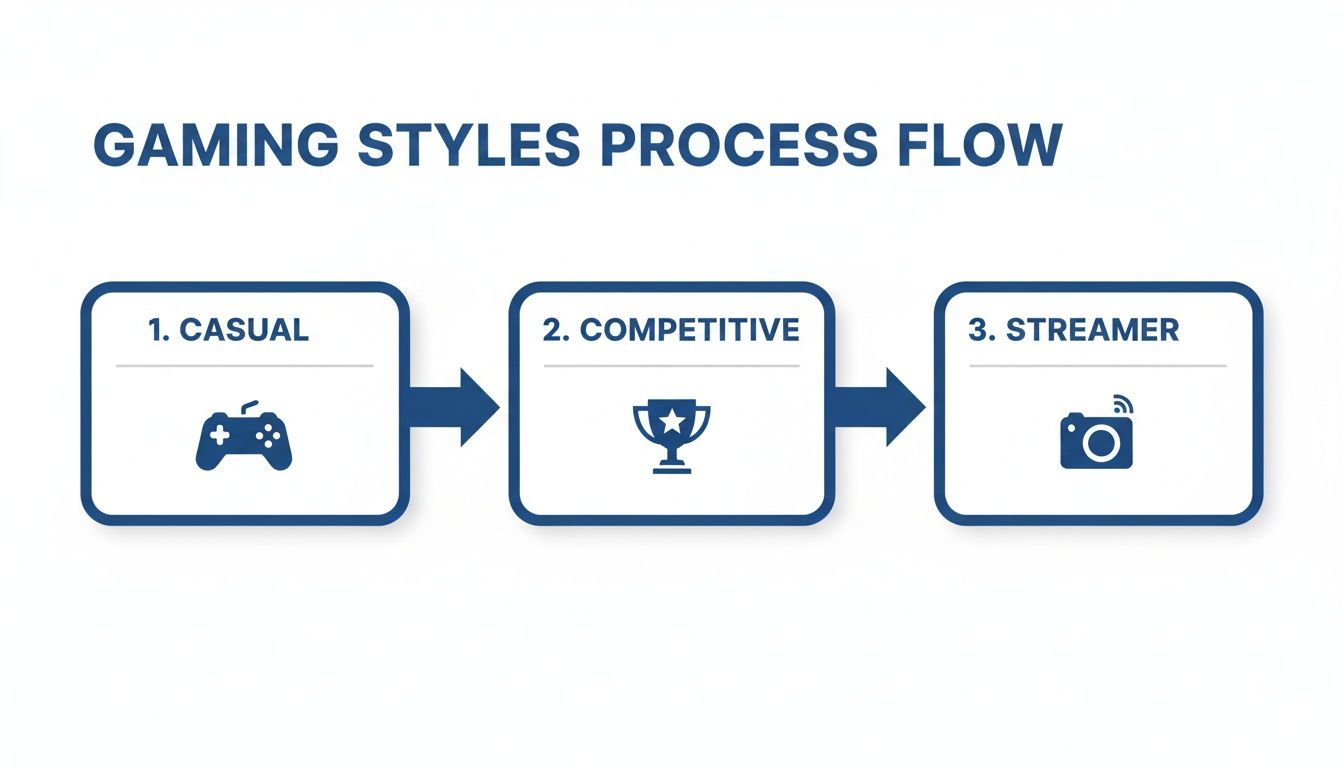
It’s pretty clear: as you move from casual to competitive gaming and then to streaming, the demands on your connection—especially for upload speed and low latency—increase dramatically.
Quick Fixes for a Better Gaming Connection
If your test results are looking a little disappointing, don't sweat it. There are several practical steps you can take right now to strengthen your connection and get an edge on the competition. Some of these are surprisingly simple but make a huge difference.
Start with this checklist to get the most out of your current setup:
-
Use a Wired Ethernet Connection: This is the single most effective change you can make, period. Plugging an Ethernet cable directly from your router into your PC or console gives you a faster, more stable signal than Wi-Fi. It dramatically lowers latency and cuts out wireless interference.
-
Optimize Your Router's Position: If you absolutely have to use Wi-Fi, treat your router like the critical piece of equipment it is. Place it in a central, elevated spot away from thick walls, large metal objects, and other electronics like microwaves that can mess with the signal.
-
Reduce Network Congestion: Is someone else in your house streaming 4K movies or jumping on a video call while you’re trying to clutch a win? Those activities hog a ton of bandwidth. Try to schedule your gaming sessions during off-peak hours or just ask others to pause any heavy downloads or streams.
Advanced Optimization with Quality of Service
For gamers who want total control, it’s time to dig into your router’s Quality of Service (QoS) settings. Think of QoS as a traffic controller for your home network. It lets you tell your router which devices and apps get to go first.
By enabling QoS and prioritizing your gaming console or PC, you're essentially creating a VIP lane for your gaming data. This ensures your commands get to the server first, even when your network is busy, leading to a more consistent and lower-ping experience.
This one setting can be a true game-changer, especially in a busy household with tons of connected devices. It makes sure that a big file download in another room won't suddenly cause your in-game ping to skyrocket, keeping your connection silky smooth when it matters most.
The Unbeatable Advantage of Fiber Internet for Gamers
So we’ve covered download speeds, upload speeds, and latency. It's pretty clear that not all internet connections are built the same. For gamers, the how is just as important as the how fast. This is where fiber internet sprints past the competition to take the gold medal.
Picture your internet connection as a highway. Old-school connections like cable are like a single, crowded city street that everyone in your neighborhood has to share. When traffic gets heavy—say, around 7 p.m. when everyone is streaming, working, or gaming—that street gets totally jammed. Your data gets stuck in gridlock, and that's why your connection can feel snappy one minute and painfully laggy the next.
The Fiber Superhighway
Fiber optic internet is a whole different ballgame. It's like having your own private, multi-lane superhighway built right to your front door. Instead of sharing a copper line, you get a dedicated line made of tiny glass strands that transmit data literally at the speed of light. This gives you an incredibly stable and consistent connection that won’t slow down just because your neighbors are all binge-watching the latest hit show.
This dedicated connection is what makes fiber the undisputed champion. A recent gamer survey found that 74% reported a much better gaming experience after switching to fiber. They dealt with less lag, felt way less frustration, and even said their in-game graphics looked better.
For gamers, a fiber connection delivers the holy trinity of performance: ultra-high speeds, incredibly low latency, and rock-solid reliability. It eliminates the variables that cause lag, providing the clean, stable foundation needed for competitive play.
Symmetrical Speeds: The True Game Changer
But here’s the real secret weapon for fiber: symmetrical speeds. This just means your upload speed is just as fast as your download speed, and for any modern gamer, this is an absolute must-have.
With a symmetrical connection, you can stream your gameplay in crystal-clear HD on Twitch, jump into a voice chat with your squad, and download a massive game patch all at the same time—without your ping even flinching. That powerful two-way data flow makes sure every button press and mouse click hits the game server instantly.
Want to learn more? You can check out all the benefits of fiber internet in our complete guide.
Your Top Gaming Internet Questions, Answered
Let's cut through the noise. When it comes to gaming, internet specs can get confusing fast. We've tackled the questions we hear most often from gamers to give you straight answers for a better connection.
Is 100 Mbps Fast Enough for Gaming?
Absolutely. For almost every gamer out there, a 100 Mbps download speed is plenty for a lag-free match. What really makes or breaks your game are two other factors: upload speed and latency.
You should be looking for at least 10+ Mbps on the upload side and a ping that stays below 40ms. A rock-solid 100 Mbps connection with low latency will always feel better than a gigabit plan that's constantly dropping packets.
Does Wi-Fi Make Gaming Laggier?
It almost always adds some latency, yes. Wi-Fi has to send data through the air, and that signal can get tripped up by walls, your microwave, or other wireless gadgets in your home. This interference leads to lost data (packet loss) and a higher ping.
If you're serious about your gaming performance, nothing beats a wired Ethernet cable. It’s the undisputed champion for a stable, low-latency connection.
Plugging in with an Ethernet cable is the single best thing you can do to lower your latency. It bypasses all the wireless interference for a clean, direct path from your console or PC to your router.
My Internet Is Fast, So Why Does My Game Still Lag?
This is the classic gamer's headache, and it almost always comes down to high latency or a weak upload speed. Your speed test might show an impressive download number, but that's only half the story.
Lag happens when there's a delay in the round-trip journey of your data to the game server and back. If your ping is high or your upload speed can't keep up, you'll feel that frustrating stutter, no matter how fast your downloads are.
Ready to leave lag in the dust with an internet connection actually built for gamers? Premier Broadband delivers symmetrical fiber with the ultra-low latency and powerful upload speeds you need to clinch the win. Check your availability today!