
You're away from home, your laptop is open, and the Wi-Fi in front of you is either weak, crowded, or missing entirely. Maybe you're in a hotel lobby trying to join a video call. Maybe your home internet just went down an hour before a deadline. Maybe you're in a rural area where “free Wi-Fi” means a browser page that never fully loads.
That's usually when people start searching for a dongle for internet.
It sounds simple because it is simple, at least on the surface. It's a small device that can get you online through the mobile network instead of depending on the building's Wi-Fi. For the right job, that's highly useful. For the wrong job, it can be frustrating fast.
The main question isn't whether an internet dongle is good or bad. The better question is when it makes sense and why you'd choose it over a home connection, hotspot, or fixed service.
Your Guide to Internet Anywhere
A dongle often enters the story when something else fails. Your home connection drops during a storm. The coffee shop network won't stay stable. You're traveling and don't want to trust public Wi-Fi with work files, passwords, or banking.
In those moments, a small cellular device can feel like a lifesaver. It gives you a private path online using the same kind of mobile network your phone relies on. If there's usable cell coverage, you have a good chance of getting connected without waiting for a technician, hunting for a password, or asking the front desk why the internet keeps disconnecting.
That's why people keep them for very specific situations:
- Travel days: Work from a car, train station, rental, or temporary apartment.
- Internet outages: Keep a backup connection ready when home service goes offline.
- Short-term setups: Get online in a dorm, job site, event booth, or temporary office.
- Remote areas: Use cellular internet where wired options are limited.
If you spend time in weak-signal places, it also helps to understand how cell coverage behaves before you buy anything. Magic Eagle's remote cell service tips give a useful plain-English overview of what affects reception in less connected areas.
For people who live beyond dense city coverage, it's also worth comparing portable options with longer-term service choices like internet for remote areas. A dongle can solve today's problem. A dedicated home connection may solve the everyday one.
What Is an Internet Dongle and How Does It Work
An internet dongle is easiest to understand if you think of it as a portable modem for one person or a small group. Instead of pulling internet from a cable in the wall, it pulls internet from the cellular network.
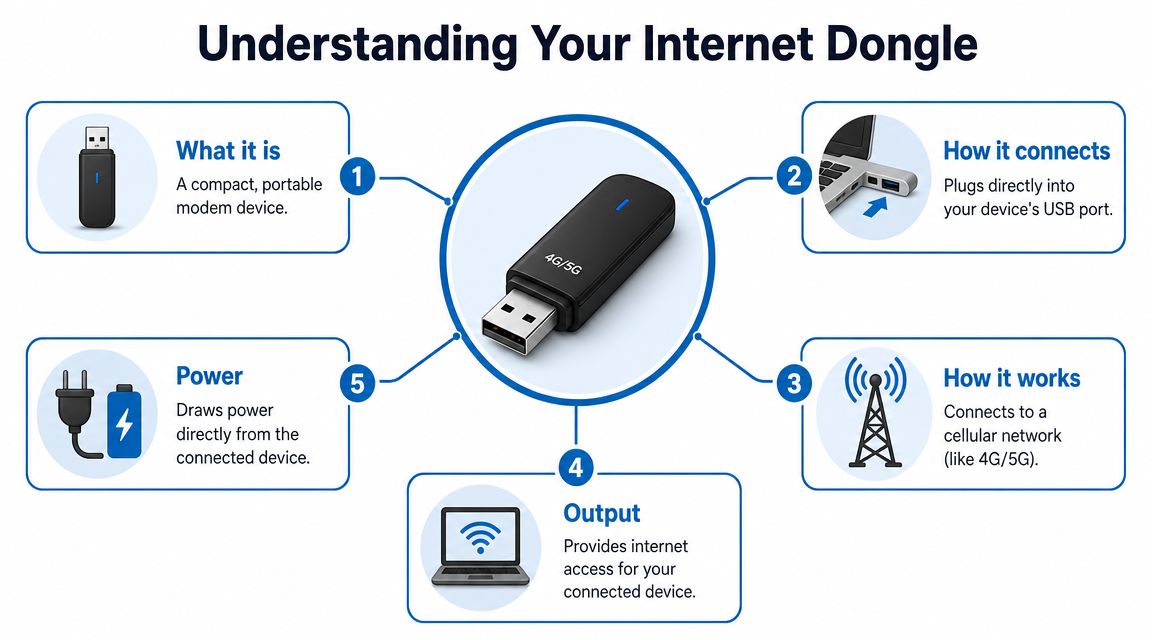
A consumer guide from Uswitch describes it this way: a dongle for internet is typically a small USB modem or adapter that connects a laptop or tablet to mobile broadband, often through 4G or 5G networks rather than fixed Wi-Fi. In practical terms, it functions like a portable modem: you plug it into a device, add a data plan, and it uses the mobile network to get online (Uswitch mobile dongle guide).
The basic parts
Often, a USB stick is pictured, and that's still a common form. You plug it into a laptop or tablet, the device powers on, and it connects through a cellular plan.
Under the hood, there are just a few moving parts:
- The dongle hardware: The small modem itself.
- A mobile data plan: Usually tied to a carrier.
- A compatible device: Often a laptop, tablet, or other USB-powered host.
- Cell signal: No signal means no internet, no matter how good the dongle is.
Practical rule: A dongle doesn't create internet from nowhere. It turns cellular coverage into a usable internet connection.
Two common styles you'll run into
Some dongles are straightforward USB modems. They're mainly designed to serve the device they're plugged into. That makes them appealing for solo travelers, field staff, and anyone who wants the simplest possible setup.
Others act more like compact hotspots. They may still be USB-powered, but they can also broadcast a local Wi-Fi connection for nearby devices. That matters if you want to connect a laptop and a tablet, or share one data plan across a few gadgets.
A glossary from Lenovo notes that many modern dongles can create a local Wi-Fi hotspot, can be powered by USB, may support plug-and-play setup, and in some implementations can serve around connected devices in the low double digits. It also stresses that compatibility with your USB port, operating system, and driver support matters for stable use. If you're comparing portable gear with fixed home service, residential LTE internet options sit in that middle space between a pocket device and a traditional install.
A short visual walkthrough can help if you're more of a see-it-than-read-it person.
Internet Dongles vs Fiber and Fixed Wireless
A common point of confusion for many is asking whether a dongle is “better” than fiber or fixed wireless. That, however, is the wrong test. These tools solve different problems.
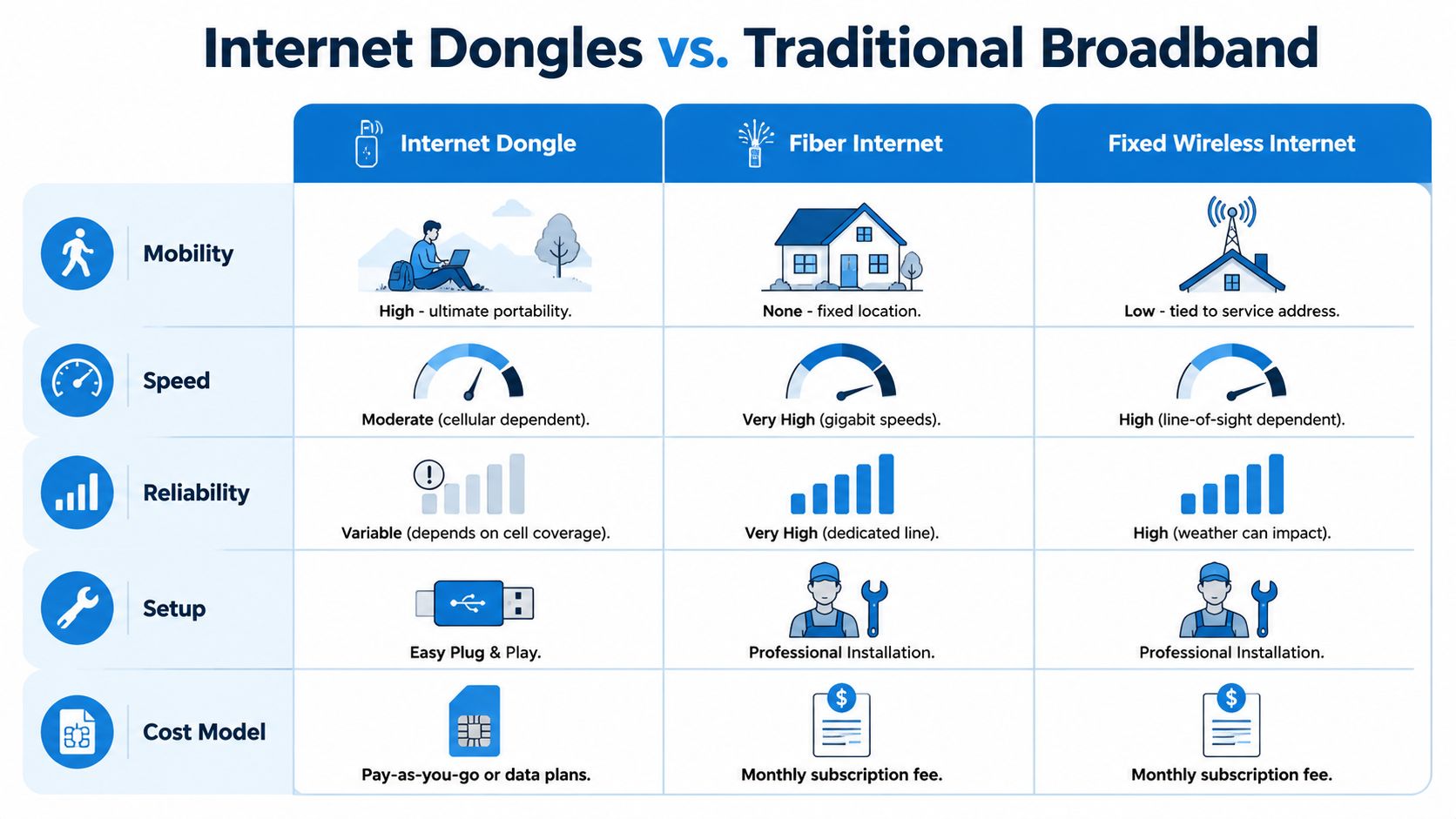
A dongle is built for mobility and fast access. Fiber is built for steady, high-demand use at one location. Fixed wireless sits in between, giving many homes a permanent internet option without needing a wired line into the house.
The trade-offs that matter most
Here's the simplest side-by-side view.
| Connection type | Where it shines | Main trade-off |
|---|---|---|
| Internet dongle | Travel, backup, temporary setups | Performance can vary with cell conditions |
| Fiber internet | Homes with heavy daily use | Stays at one address |
| Fixed wireless | Homes where wired service is limited | Depends on local wireless conditions and installation |
The biggest win for a dongle is obvious. You can take it with you. That matters more than any speed chart if your real problem is needing internet in a moving, temporary, or unpredictable setting.
The biggest weakness is just as obvious. Cellular conditions change. A strong connection in one room can become a weak one in another. Tower load, signal quality, and plan limits all shape the experience.
Speed and consistency
Vendor specs cited by EIOTCLUB show that USB internet dongle throughput is constrained by both the mobile radio and the USB interface, with examples advertised at up to 150 Mbps, while lower-end mobile broadband dongles are commonly sold in the 7.2 to 60 Mbps range depending on carrier and plan (EIOTCLUB product details).
That sounds decent until you remember how internet gets used in a real home. One person is on a video call. Another is streaming. A console is downloading an update. A cloud backup starts in the background. A portable cellular device can handle some of that, but it isn't designed to be the invisible utility a busy household forgets about.
A dongle can be fast enough. It just isn't always predictably fast in the same way a fixed home connection is expected to be.
Fiber's advantage isn't portability. It's consistency. Fixed wireless also aims at stable home use, even though the delivery method is wireless rather than wired. If your goal is replacing a home line, a dedicated fixed wireless internet service usually fits that job more naturally than a USB dongle.
Setup and everyday use
A dongle is often easier to start using. Plug it in, activate the plan, connect, and you're off. That's excellent for short stays, emergency backups, and people who don't want an installation appointment.
But convenience cuts both ways. If you'll use internet all day, every day, at the same address, the portability benefit fades. Then the questions become more practical:
- How many people are sharing the connection?
- Do you need stable video meetings?
- Do you game online or upload large files?
- Will you burn through mobile data quickly?
If the answer to several of those is yes, a dongle is usually the sidekick, not the main character.
Ideal Use Cases for an Internet Dongle
The best way to judge a dongle is by the moment it solves.
For some people, it's a travel tool. For others, it's insurance. For a few, it's the only practical bridge between “no internet right now” and “good enough to get through the day.”
The traveler who needs internet now
A consultant lands in a new city, checks into a rental, and discovers the property Wi-Fi reaches the kitchen but not the desk. They don't need a full home installation. They just need a reliable connection for meetings, email, and shared docs for a few days.
That's a strong dongle scenario. It's compact, fast to deploy, and private compared with public networks. The device turns cell service into internet without depending on a landlord, hotel router, or cafe login page.
Students in temporary housing fit this pattern too. If you're between apartments, in a dorm for a short term, or waiting on permanent service, portable cellular internet can fill the gap without a long commitment.
The backup planner at home
This is one of the smartest reasons to own a dongle. Not as your main internet. As your fallback.
Your home service goes down during a storm or neighborhood outage. You still need to send files, answer messages, or keep a work session alive. Instead of scrambling for your phone hotspot and draining its battery, you plug in the dongle and move on.
Keep a dongle where you keep flashlights and spare chargers. It belongs in the same category of “things you hope not to need, but are glad to have.”
This use case also works well for home offices. If your income depends on staying online, backup connectivity is less about convenience and more about continuity.
Small-group sharing on the go
Some modern dongles can do more than connect one laptop. Lenovo notes that many can create a local Wi-Fi hotspot and can often support around 10 connected devices (Lenovo dongle glossary).
That opens up a few practical situations:
- Family road trips: Keep tablets and a parent's laptop connected from one portable device.
- Pop-up workspaces: Give a few teammates temporary internet at an event booth or job site.
- Shared travel setups: Let a couple of personal devices use one connection instead of each needing its own.
That doesn't mean “more devices” always equals “better experience.” A small shared cellular connection can get crowded quickly if everyone starts streaming or syncing large files at once. Still, for light use, it can be very handy.
Niche but useful situations
Some people keep a dongle for one narrow reason. A gamer may want a backup path online if the main home connection fails mid-session. A photographer may need to upload selects from the field. A salesperson may spend more time between cities than at a desk.
Those aren't universal needs. That's exactly the point. A dongle works best when you treat it as a specialized tool for mobile work, temporary access, or emergency coverage.
How to Choose and Set Up Your Dongle
Buying the wrong dongle usually comes down to two mistakes. People choose hardware that doesn't fit their devices, or they choose a data plan that doesn't match how they use the internet.
That's fixable if you keep the decision simple.
Choose the hardware first
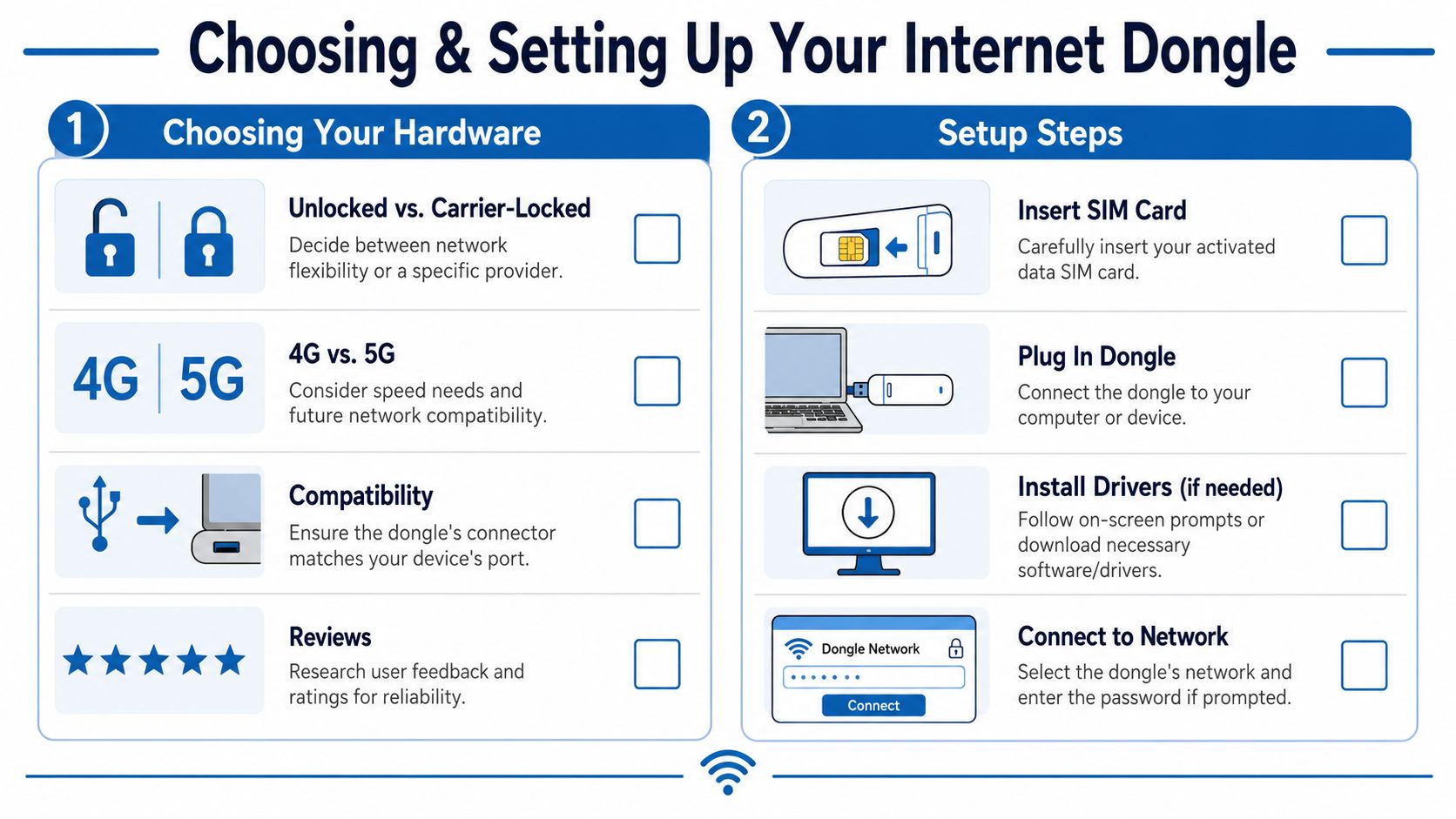
Start with compatibility. Check the port on your laptop or tablet and make sure the dongle matches it. Also check whether your operating system supports the device cleanly. A plug-and-play promise is helpful, but it only helps if your machine recognizes the hardware without drama.
Then think about flexibility. Some devices are tied to one carrier. Others are carrier-agnostic and give you more freedom to choose or switch providers. If you travel often or want options, carrier-agnostic hardware can be easier to live with.
A few practical buying checks:
- Port fit: Make sure the connector works with your laptop or tablet.
- Carrier fit: Decide whether you want one-provider simplicity or broader SIM flexibility.
- Network fit: If you expect to use newer cellular coverage where available, look at models built for that network support.
- Sharing fit: If you need more than one device online, look for hotspot capability rather than a single-device-only model.
Match the plan to your real habits
Many people often overspend. They buy a plan for the fantasy version of their life instead of their normal one.
Consumer coverage highlighted examples such as $15 for 15 GB over 30 days, $75 for 50 GB full-speed unlimited-style access, and short-duration options like 1 GB for 1 day and 1 GB for 7 days (consumer plan examples in this video coverage). The point isn't that one of those is universally right. The point is that the market now treats dongles as part device, part recurring data service.
Use this quick guide:
| If your usage looks like this | A plan style that may fit better |
|---|---|
| A few trips each month | Prepaid or short-term access |
| Emergency-only backup | Low-commitment plan |
| Frequent travel for work | Larger recurring monthly plan |
| Mixed work and family sharing | Plan with enough headroom for multiple devices |
If you're trying to understand the home side of the equipment question too, a basic modem and router setup guide helps clarify how portable gear differs from permanent home networking hardware.
Set it up without overthinking it
Most setups follow the same pattern:
- Insert the SIM card if your device uses one.
- Plug the dongle into your device or power it on if it has its own hotspot mode.
- Follow the prompts to connect, install software, or join the Wi-Fi network it creates.
After that, do the security steps people often skip.
Change the default admin password and any default Wi-Fi password before you rely on the device in public or while traveling.
If the dongle supports hotspot mode, rename the network to something you recognize. Keep the password private. Install firmware updates when the manufacturer provides them. And test the whole setup before the day you need it. Backup internet that hasn't been tested isn't really backup internet.
Is a Dongle Enough or Do You Need Premier Broadband
For some people, yes, a dongle is enough. If you travel often, work from changing locations, or want a backup connection for outages, it's a practical tool that solves a real problem.
For a full-time home connection, the answer usually changes. A household with multiple people streaming, gaming, uploading files, and taking calls needs consistency more than portability. A remote worker who can't risk frozen meetings needs a connection built for daily use at a fixed address. That's where home internet options stop being interchangeable.
If your internet is mostly a road tool, a dongle makes sense. If your internet is the utility your home or office runs on all day, a dedicated service is the better fit. That can mean fiber where available, fixed wireless in some locations, or a managed business setup with backup planning built in. Premier Broadband is one example of a provider focused on fixed home and business connectivity through fiber-based service rather than portable mobile access.
The simplest way to choose is this. Use a dongle for mobility, short-term needs, and emergencies. Use a fixed home service when your connection has to carry the weight of everyday life.
If you're deciding between portable backup internet and a permanent home connection, Premier Broadband is worth reviewing for fixed residential and business service options, especially when your priority is stable day-to-day connectivity rather than internet on the go.