
Most cord cutting advice starts with one instruction: cancel cable and subscribe to a few streaming services. That advice is incomplete. The first subscriptions are cheap enough to feel harmless, but sports, local news, children's programming, premium movies, cloud DVR, and live TV can rebuild the same expensive bundle you were trying to escape.
A useful cord cutting guide starts with your viewing habits, not a service list. A light viewer, a sports fan, and a family with several simultaneous viewers need completely different setups. Your internet connection matters just as much as your apps, because a low monthly TV bill is worthless if the household spends every evening waiting for video to recover from buffering.
Why Cord Cutting Is Not Always Cheaper Than Cable
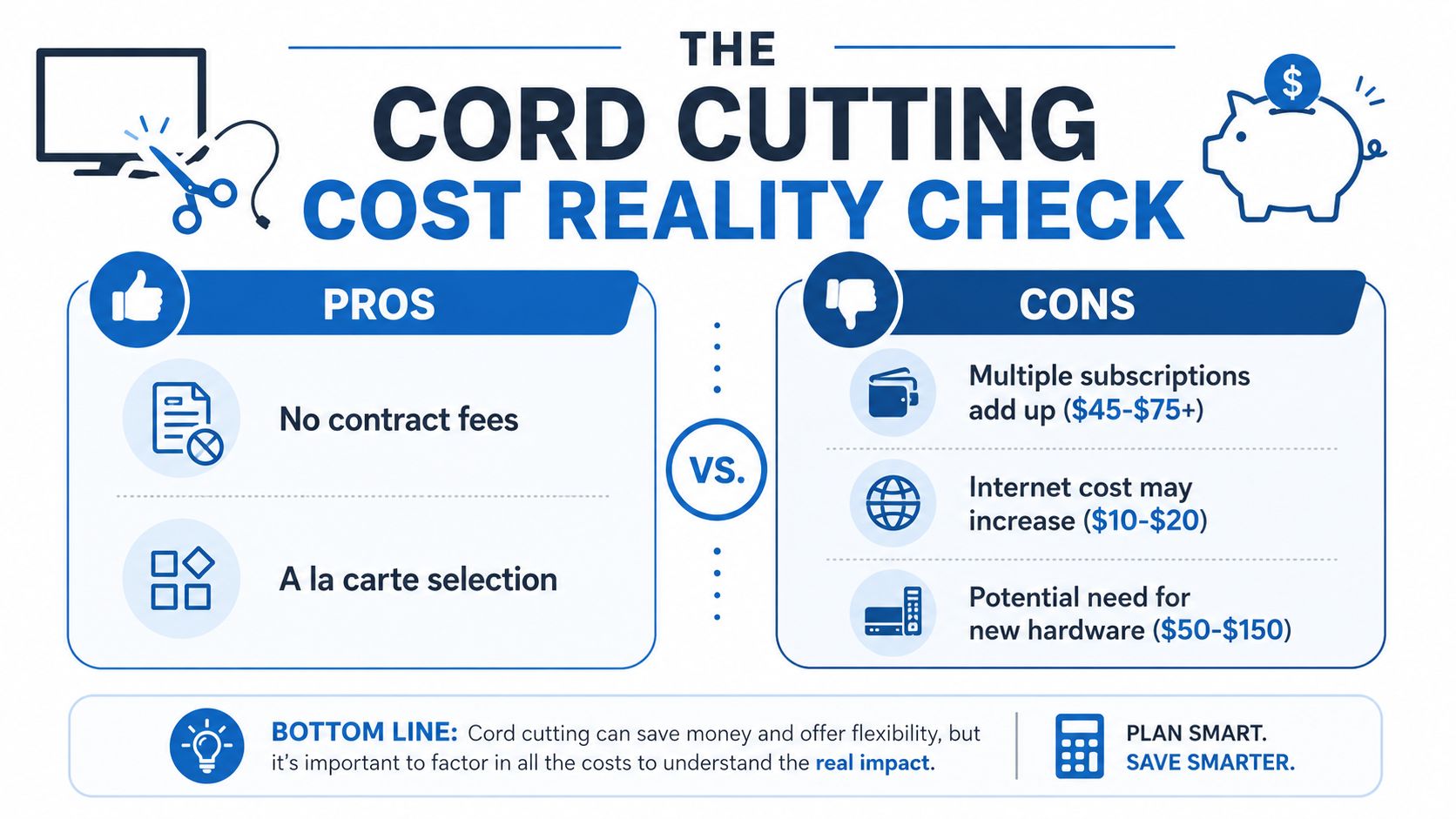
Cord cutting can reduce waste, but it isn't automatically a money-saving move. The key question is what you'll add after canceling cable. A household that watches occasional shows may need only an antenna and one on-demand service. A sports-heavy household may add a live-TV platform, league subscriptions, premium channels, and a DVR. Those two households aren't making the same financial decision.
The problem is streaming stack creep. You begin with Netflix, add Disney+ for the children, keep Max for a new series, and then add a live-TV service for sports or local news. Each choice seems reasonable on its own. Together, they can recreate a cable-like bill while leaving you to manage multiple apps, logins, billing dates, and content restrictions.
The broader shift is real. Cord cutting moved from an early-2000s niche into a mass-market change during the late 2000s and 2010s. One historical account identifies 2007 as a cornerstone year, when Netflix introduced internet streaming, and reports that U.S. zero-TV households reached 8.6 million by 2015, compared with 2 million in 2007 and 5 million in 2013 (history of cord cutting).
The viewer profile determines the result
Light viewers usually have the clearest path to savings. If you mainly watch a small number of series, rotate services instead of keeping every subscription active. Free broadcast channels through an antenna can also cover local programming where reception is suitable.
Sports fans face a harder calculation. Live sports often determines which platform you need, and a live-TV service can become the largest part of the stack. If you want several sports leagues, regional coverage, local stations, and reliable recording, cord cutting may improve flexibility more than it reduces cost.
Families should count users and screens, not just subscriptions. Children may need Disney+, parents may prefer Netflix or Max, and the household may still want live news or sports. Parental controls, simultaneous streams, and simple navigation can justify a service that costs more than the cheapest available option.
Practical rule: List the programs, channels, and features you actually use before canceling anything. Build the replacement around that list, then remove anything that doesn't earn its place.
Use a subscription management approach rather than guessing. This guide to saving money on streaming services can help you identify services to rotate, cancel, or keep. The right outcome isn't “streaming at any cost.” It's paying for the viewing experience your household uses.
Real Streaming Costs in 2026
Streaming becomes expensive through stack creep. Internet service forms the base, then on-demand platforms, live-TV access, sports packages, premium channels, DVR features, and compatible hardware add layers. App prices alone hide the bill you will pay.
A 2026 cost analysis places a typical four-service combination of Netflix, Disney+, Max, and Prime Video at about $60 per month on ad-supported tiers, or roughly $720 per year (2026 streaming cost analysis). The analysis also puts a comparable ad-supported setup at about $37 per month in some cases. Ad-free plans cost more, with major services listed at $19.99 for Netflix, $18.99 for Disney+, $18.99 for Hulu, and $18.49 for HBO Max in 2026.
Ads reduce the subscription total but change the viewing experience. Paying for ad-free access across several platforms restores convenience while removing much of the flexibility cord cutting should provide. Set a monthly ceiling before adding another service.
A practical cost comparison
| Household Type | Services | Monthly Cost | Annual Cost |
|---|---|---|---|
| Light viewer | Antenna plus one ad-supported on-demand service | Qualitatively low | Qualitatively low |
| Family viewer | Several on-demand services plus live-TV access | About $60 to $100 or higher | Calculate from the selected monthly stack |
| Sports-heavy household | Live-TV streaming, sports access, on-demand services, and DVR features | About $80 or higher before additional services | Calculate from the selected monthly stack |
These ranges reflect recent cord-cutting guidance. Live-TV streaming alone can cost about $45 to $83 per month, while internet plus on-demand services can push a replacement setup into the $60 to $100 monthly range or higher (complete cord-cutting guide).
Sports fans should calculate first. A live-TV package, sports access, several entertainment apps, and DVR features can recreate a cable-style bill, even if each charge appears manageable on its own. Light viewers have a clearer savings path because an antenna and one rotating service may cover their needs.
By early 2025, one independent industry summary estimated about 56 million U.S. internet households were cord cutters, representing 46% of internet households, while 12% were cord-nevers. Another forecast projected 80.7 million cord-cutting households by 2026, more than 25 million above remaining pay-TV households (U.S. cord-cutting statistics and forecast). Adoption does not guarantee savings. Your viewing habits, live-channel requirements, and total streaming stack determine the result.
Choosing the Right Streaming Services for Your Needs
Stop choosing services by popularity. Choose them by the job they perform in your home.
Light viewers need fewer commitments
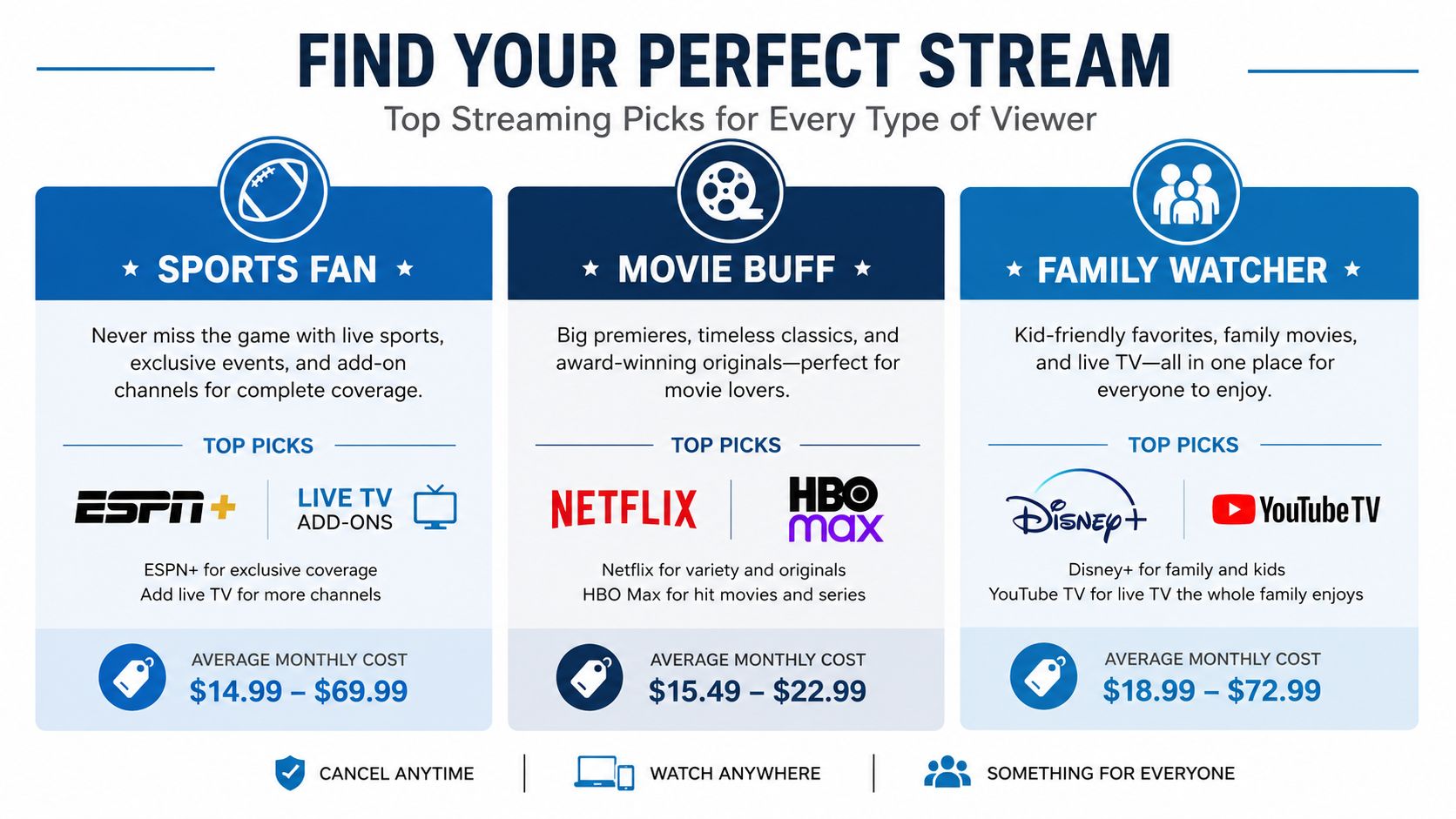
If you watch a few series and occasional films, start with one core on-demand service. Netflix, Disney+, and Max each make sense for different libraries, but keeping all of them year-round is usually unnecessary for a selective viewer. Subscribe when the content you want is available, watch it, and pause the service when it no longer earns a place in the budget.
An antenna can handle suitable local broadcast programming without turning every viewing decision into a subscription decision. It's especially useful for households that want local news and network programming but don't need a full live-TV interface.
Families should prioritize simplicity
Families usually need a broader mix. Disney+ can serve children's programming, while Netflix or Max may cover general entertainment. A live-TV service becomes relevant when parents want local news, scheduled events, or a familiar channel guide.
YouTube TV, Hulu + Live TV, and Fubo are live-TV options to compare when live channels matter. Don't assume the cheapest option is the right one. Check local availability, sports access, recording features, simultaneous viewing rules, and whether the household can find what it wants without jumping between apps.
Sports fans should start with the schedule
Sports viewers shouldn't begin with a favorite platform. Begin with the teams, leagues, and events you follow, then identify where those broadcasts appear in your market. Regional restrictions and blackouts can matter more than the app's headline content library.
If you're trying to find a specific event, a resource such as Episode 6 streaming options shows how program-specific availability can vary by platform and viewing method. Use that type of guide to verify access before subscribing.
For a household that watches movies but rarely watches live channels, Max and Netflix may be more sensible than a live-TV platform. For a family that wants children's programming plus scheduled channels, Disney+ paired with a live-TV service may be more practical. For sports fans, a live-TV service and targeted sports add-ons may be unavoidable, so the budget should reflect that from the beginning.
The best streaming stack is the smallest combination that reliably delivers your must-watch content. Anything beyond that should be temporary, rotated, or removed.
Internet Speed and Hardware Requirements for Streaming
A streaming plan can meet its stated minimum and still buffer once the household gets busy. Your connection must handle simultaneous video, background updates, browsing, video calls, smart-home traffic, and every other device sharing the same last-mile connection. That is where streaming stack creep becomes a network problem: adding services often means adding devices, viewers, and competing traffic.
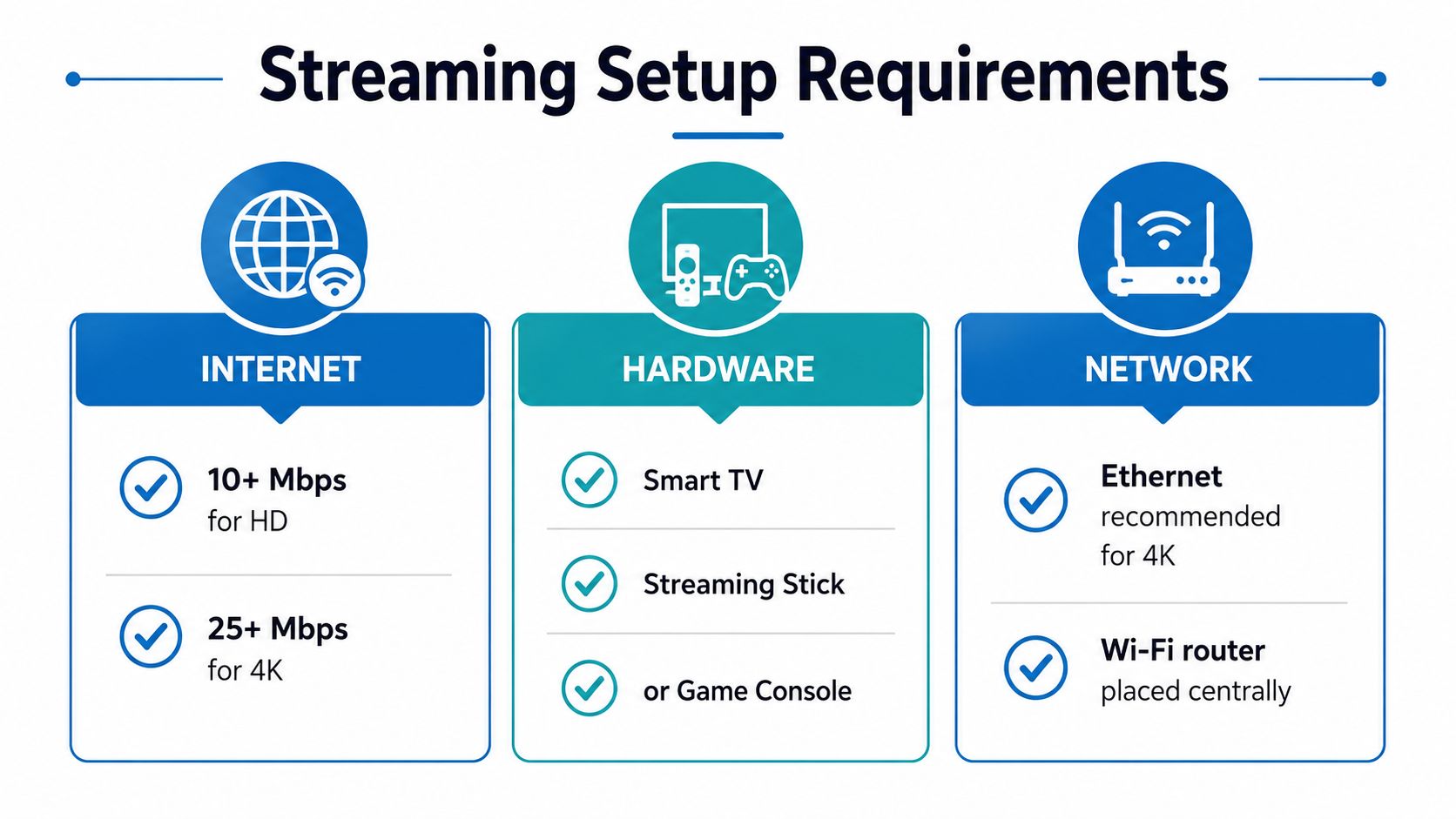
A single 4K stream typically needs about 15 to 25 Mbps. Broadband guidance recommends planning for 50 to 100 Mbps minimum in a multi-device household, with about 25% to 30% overhead for non-video activity and peak congestion (streaming bandwidth guidance).
Calculate demand by concurrency
Count simultaneous streams, not televisions. Two people watching 4K content while another joins a video call creates a different requirement from one person watching HD video alone. Households with several simultaneous viewers should generally consider 100 to 200 Mbps, according to multi-device streaming requirements.
Use 100 Mbps minimum as a practical benchmark for two simultaneous 4K streams, a video call, and general browsing. 200 Mbps provides more headroom, as noted in the broadband guidance above. Upload-heavy households need separate attention. Live streaming, cloud backups, and video calls use upload capacity as well as download capacity, so symmetrical fiber can be a better fit.
Fix the home network, not only the plan
Use wired Ethernet for a television or streaming box when practical. Place the router centrally, keep its firmware current, and add a mesh system if the home has dead zones. A smart TV, streaming stick, or game console can all work well, but none can compensate for an inconsistent connection.
Network planning also affects furniture placement in a dedicated viewing room. A guide to crafting a custom entertainment center can help organize router access, console storage, sound equipment, and streaming hardware.
For households comparing service options, high-speed internet for streaming offers a starting point for evaluating internet separately from television apps. Choose capacity for the people and devices using the network at the same time. A light viewer may need only a modest plan, while a sports household or family streaming across several rooms needs more headroom. Avoid rebuilding a cable-sized bill with services and an oversized internet plan you do not use.
Replacing Cable Features You Actually Use
Cable customers rarely miss every channel. They miss specific features: a simple guide, local stations, live sports, recordings, and the ability to turn on the television without deciding which app to open. Replace those features one at a time.
Local channels
Start with an over-the-air antenna if local broadcast reception works at your address. Check signal conditions before canceling cable, place the antenna where reception is strongest, and scan for channels through the television menu. An antenna doesn't require internet service for its broadcast signal, which makes it a useful backup when the connection fails.
Live-TV streaming can provide local channels where the service carries them, but availability varies by market. Verify your ZIP code and the exact local affiliates before subscribing. Don't assume a national service includes every station in your area.
DVR and scheduled viewing
Cloud DVR is the closest replacement for cable recording. Compare storage limits, retention rules, fast-forward restrictions, and whether recordings are available across devices. Some services make recording simple but limit how long content remains available, while others charge extra for expanded DVR features.
An antenna can also work with compatible DVR hardware, but that creates another device to configure and maintain. If your household records heavily, pay for the feature deliberately instead of assuming it's included.
Sports and live events
Sports requires the most careful planning. Identify the event, its broadcaster, local availability, and any regional blackout before buying a package. A service can carry a league broadly while still restricting particular games in your market.
Before canceling cable: Write down the exact teams, news stations, programs, and recording features your household used during the last month.
A live-TV platform may be the most convenient replacement for a cable-like experience, but convenience has a cost. If you only watch occasional games, a targeted subscription or event-specific purchase may be more efficient than keeping a full live-TV service all year. If sports runs through most of your calendar, accept that the goal may be flexibility and control rather than dramatic savings.
Adding Home Phone Service Without a Landline
Cord cutting doesn't require eliminating every traditional household service. Many homes still need a dependable phone for a medical alert, security system, family communication, or business calls. The practical replacement for a copper landline is usually VoIP, which carries voice calls over your internet connection.
A fiber connection can support voice and streaming together when the home network has enough capacity and the provider manages the voice service properly. VoIP can also add features that older phone systems handled poorly, including caller ID, voicemail-to-email, and mobile app access.
Keep the transition controlled
Ask the provider whether you can port your existing number before canceling the old service. Keep the old line active until the transfer completes, then test incoming calls, outgoing calls, emergency calling, voicemail, and any device that depends on the number.
A phone adapter can connect traditional handsets to the VoIP service, while some providers supply an integrated gateway. The right choice depends on your equipment and whether you need the phone near the network termination point or throughout the home.
For small businesses comparing systems, the IT Cloud Global VoIP guide offers useful criteria for evaluating features, administration, and calling workflows. Home users should apply the same discipline, but focus on reliability, number portability, emergency service, and support.
Premier Broadband offers affordable home phone service alongside internet connectivity, giving households an option to evaluate voice and broadband as one setup. Its published service information describes features such as voicemail-to-email, caller ID, and mobile app integration.
The key is integration. Streaming uses download capacity, video calls and backups use upload capacity, and VoIP needs a stable connection with sensible network management. A well-planned home network can support all three without forcing you to maintain separate legacy systems.
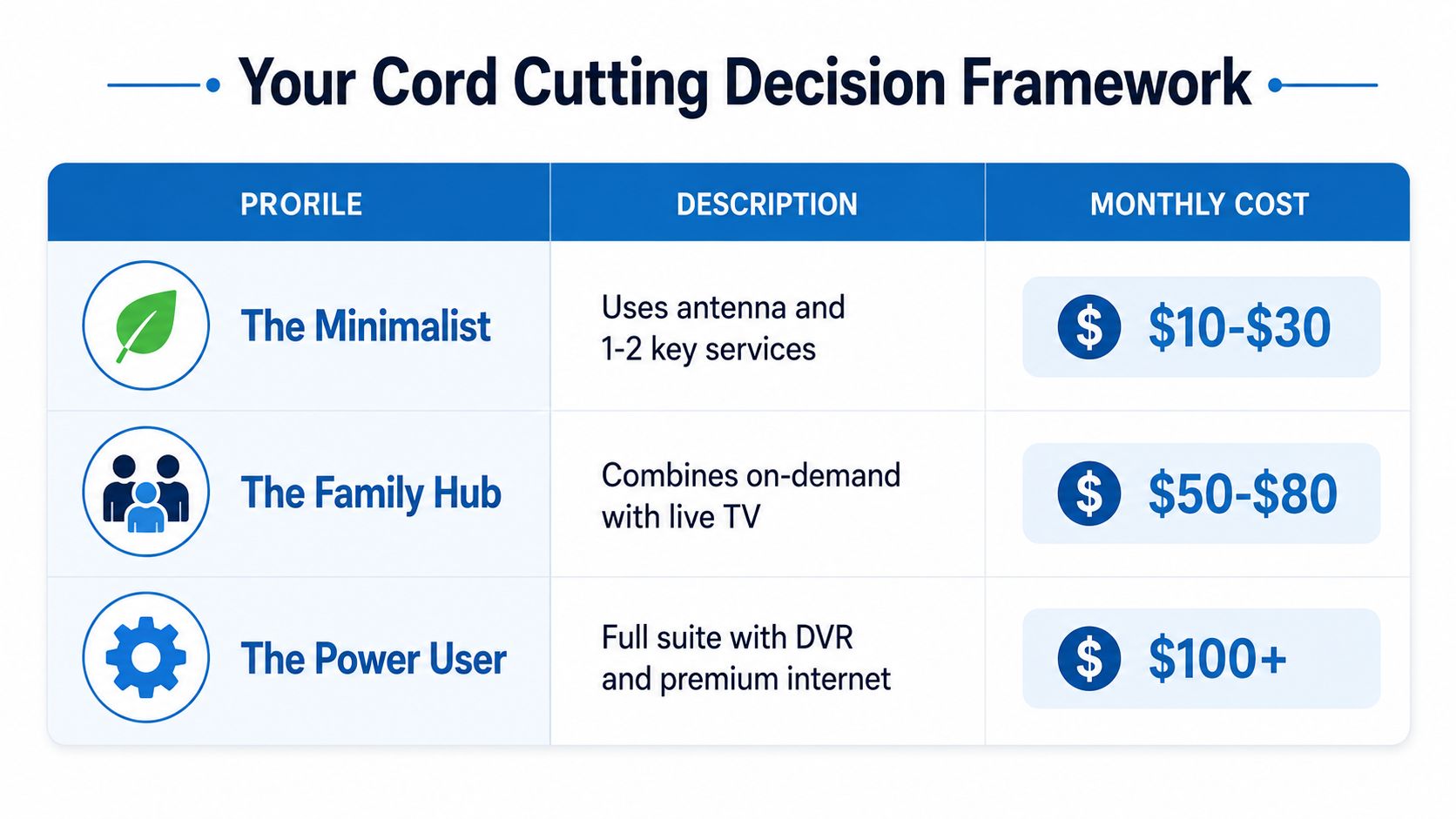
Your Cord Cutting Decision Framework
Choose one of three paths, then test it against your actual viewing habits.
The minimalist path
Use an antenna where practical and keep one or two on-demand services. This suits a light viewer who doesn't need live sports, extensive recording, or a large household library. The attached decision visual places this setup in the $10 to $30 monthly range, while the exact total depends on the services and equipment selected.
The family hub path
Combine on-demand programming with live-TV access when the household needs local news, scheduled channels, children's content, and easier navigation. The visual framework places this profile at $50 to $80 per month. Review the total with internet before deciding whether the convenience still produces meaningful savings.
The power-user path
Sports fans and live-TV enthusiasts may need live channels, sports access, DVR, several on-demand services, and stronger internet capacity. The framework identifies this profile as $100 or more per month, which is why cable replacement can become a service redesign rather than a low-cost alternative.
Use this final checklist
- Name the must-watch content: Include teams, local stations, programs, and children's shows.
- Separate live from on-demand: Don't buy live-TV access for a household that rarely watches scheduled programming.
- Count simultaneous users: Choose internet capacity for the busiest evening, not the quietest afternoon.
- Price the complete stack: Include internet, apps, sports, DVR, premium tiers, and hardware.
- Set a review date: Cancel or rotate services that no longer deliver something your household watches.
For the internet portion of the decision, compare available options through home internet plans, then evaluate the television stack separately. That separation prevents a cheap app bundle from hiding an unsuitable connection or an expensive live-TV replacement from masquerading as savings.
Cord cutting makes the most sense when you control the stack. Light viewers should keep it minimal, families should pay for simplicity only where it helps, and sports-heavy households should calculate the full cost before canceling cable. Choose based on what you watch, how many people watch at once, and which cable features you're unwilling to lose.
Premier Broadband offers fiber internet and VoIP phone service for households that want reliable streaming, video calls, uploads, and home calling in one connected setup. Visit Premier Broadband to review internet, whole-home connectivity, and phone options before you build your replacement for cable.