

Your phone system usually gets attention only when it starts causing trouble. Customers hear a busy signal during your lunch rush. A new employee waits far too long for a working extension. Your team works from home part of the week, but the office phone setup still acts like everyone sits at the same desk, in the same building, every day.
That's when many owners realize the phone system isn't just an admin tool. It affects sales, customer service, hiring, and day-to-day momentum.
SIP trunks for business solve that problem by replacing old fixed phone connections with a digital connection that runs over your internet service. The result is a phone system that's easier to scale, easier to manage, and better aligned with how modern companies operate. You can add capacity without waiting on physical line installs, support office and remote staff from the same system, and move toward voice, video, and messaging on a unified platform.
This isn't fringe technology anymore. Nearly 70% of decision-makers have adopted SIP trunking for enterprise communications, and 96% of those adopters report high satisfaction with call quality, according to Bandwidth's SIP trunking overview.
Introduction Is Your Phone System Holding Your Business Back
A lot of businesses reach the same breaking point in different ways. A front desk misses calls during busy hours. A second location opens and suddenly the phone setup feels stitched together. Remote employees can access email and files just fine, but business calls still depend on a desk phone sitting in one office.
Those issues look small on their own. Together, they slow growth.
An older phone system often creates hidden business costs. You may pay for lines you don't fully use, wait on carrier changes that should be simple, or struggle to route calls cleanly when your team is spread across offices, homes, and mobile devices. None of that helps you serve customers faster.
What business owners usually notice first
- Peak-hour bottlenecks: Customers call when your team is busiest. If your setup can't handle enough simultaneous calls, opportunities slip away.
- Expansion friction: Adding lines, moving desks, or opening another office turns into a project instead of a simple settings change.
- Remote work gaps: Staff can work from anywhere, but the phone system still behaves like it's tied to copper and closets full of hardware.
- Billing confusion: Telecom invoices tend to grow complicated right when you need clarity.
A modern phone system should remove friction from growth, not add another layer of it.
SIP trunking changes the role of your phone service. Instead of treating calling as a separate, rigid utility, it turns it into part of your business network. That gives you more flexibility, more control over capacity, and a cleaner path toward cloud communications.
For a business owner, the practical question isn't “What does SIP stand for?” It's simpler. Will this lower waste, support growth, and reduce communication risk? In the right environment, the answer is often yes.
What Are SIP Trunks Explained Simply
A SIP trunk is the internet-based connection between your business phone system and the public phone network. It lets your company place and receive calls over your existing data connection instead of relying on separate legacy phone circuits.
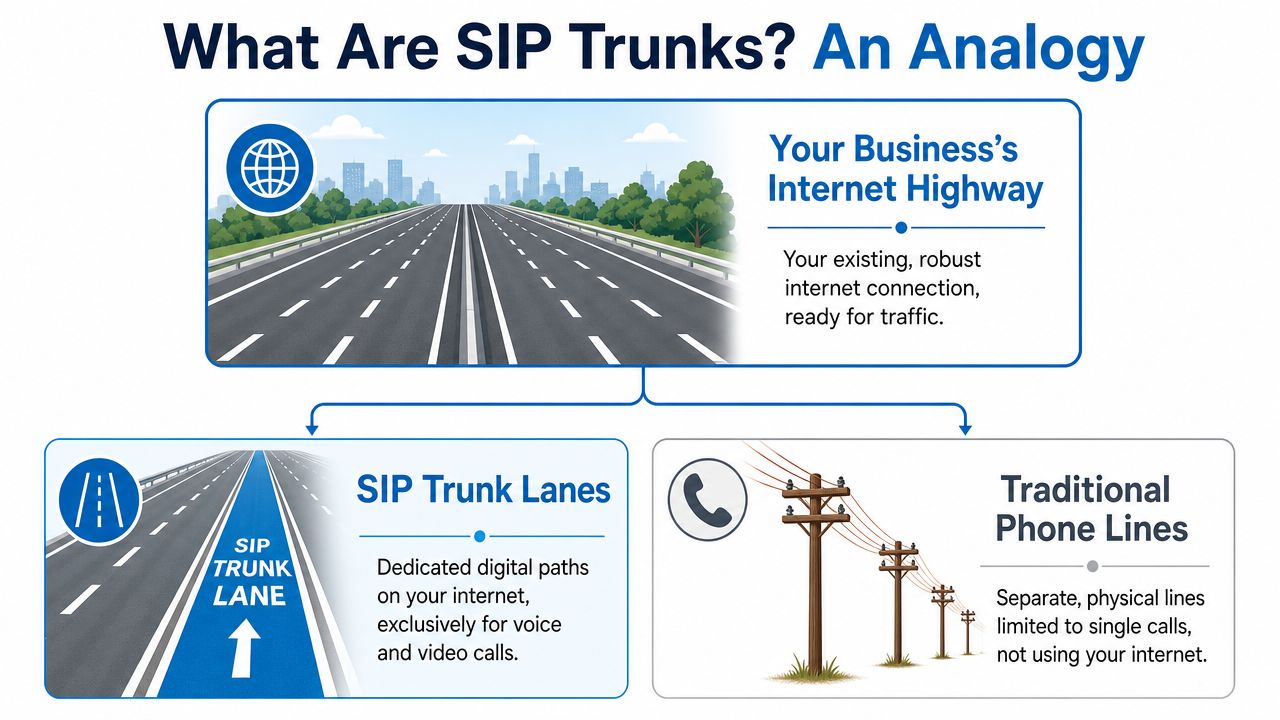
For a business owner, the practical value is straightforward. You are using one network for more of your communications, which can reduce line waste, make capacity easier to adjust, and give your phone system room to grow with the business.
What SIP and trunk actually mean
SIP stands for Session Initiation Protocol. The name sounds technical, but its job is easy to grasp. It is the set of rules that starts, manages, and ends a voice or video session.
Trunk refers to the shared connection carrying those calls. Instead of ordering a separate physical line for each path, your business uses one logical connection that can handle multiple simultaneous calls through channels.
If you want the mechanics in plain English, this guide on how SIP trunks work walks through it step by step.
What that looks like in real life
Say your office has a PBX phone system. In a legacy setup, that PBX reaches the outside world through fixed telephone circuits. With SIP trunking, it connects through your IP network and your SIP provider instead.
That change matters because it affects day-to-day operations, not just wiring in a telecom closet.
- Calls travel as data: Voice is converted into digital packets and sent over IP.
- Capacity is easier to adjust: You can add or remove call channels based on actual demand.
- Location matters less: Office phones, softphones, and remote staff can work within the same phone environment.
A good way to picture it is this. Traditional phone service gives you a set number of physical checkout lanes, whether they are busy or empty. SIP trunking is closer to opening lanes as traffic increases and scaling back when it drops. That flexibility is where cost control and growth planning start to connect.
Here's a short visual if you'd rather see it than read about it.
Where people get confused
Business owners often hear VoIP and SIP trunking used in the same conversation and assume they mean the same thing. They are related, but they solve different parts of the problem.
VoIP is the broad category. It means voice calls sent over an IP network. SIP trunking is one specific method for connecting a business phone system to outside calling services using SIP.
That distinction matters when you are making a buying decision. If your company already has a PBX, needs better control over concurrent calls, or wants a cleaner path to support multiple offices and remote users, SIP trunking is often the connection strategy that turns those goals into a workable system.
Plain-English version: SIP is the call-control language. The trunk is the shared route to the phone network. Together, they let your business run calls over the internet with more flexibility than old fixed-line setups.
SIP Trunks vs Traditional Phone Systems
A lot of business owners reach this point with a practical question, not a technical one. “If our phones still work, why change anything?”
Fair question.
The answer usually comes down to how each system handles growth, change, and day-to-day costs. A traditional PRI setup gives you phone service through a dedicated physical circuit. It is dependable, but capacity is tied closely to that circuit and to the location where it is installed. SIP trunking carries calls over your IP network, so service can expand, contract, and reach users in more flexible ways.
That difference shows up quickly in real business decisions. If you add staff, open a second office, support remote employees, or need more call capacity during busy periods, a traditional circuit often takes more planning, more carrier involvement, and sometimes more infrastructure work. SIP trunking usually lets you adjust service with less disruption.
The business tradeoff
Traditional phone systems fit companies with stable calling needs and a mostly fixed office setup. You know where the phones sit, how many lines you need, and how rarely that changes.
SIP trunks fit companies that expect change.
A helpful way to frame it is this. PRI is closer to owning a fixed-size parking lot. It works well if demand stays predictable. SIP trunking is closer to using a lot that can add or release spaces as traffic changes. For a business owner, that affects spending, hiring speed, and how easily the phone system keeps up with the rest of the company.
Here is the side-by-side view.
SIP Trunks vs. Traditional Phone Lines PRI
| Feature | SIP Trunking | Traditional PRI |
|---|---|---|
| Connection type | Virtual connection over IP networks | Physical telecom circuit |
| Scalability | Add or remove channels as needed | More rigid expansion model |
| Infrastructure changes | Usually no rewiring for capacity changes | Often tied to physical service changes |
| Media support | Voice, video, and messaging support | Primarily voice-focused |
| Remote work fit | Works well with distributed users and internet-connected devices | More location-bound |
| Cost structure | Better aligned to actual channel needs | Can be less flexible when needs change |
If you want a broader baseline on how internet-based calling compares with legacy phone service, our guide to VoIP vs landline phone systems for business adds useful context.
Where the business case gets stronger
SIP trunking often makes the most financial sense when communications need to follow the business instead of the building.
A growing team is a good example. Adding calling capacity to a traditional setup can be slower and less predictable because the service is tied to physical infrastructure. With SIP, capacity planning is usually closer to a service adjustment than a construction project.
The same logic applies to multi-site companies. Instead of treating each office like its own phone island, SIP trunks can support a more unified calling strategy across locations. That reduces administrative headaches and gives leadership better control over costs and call routing.
Hybrid work changes the picture too. If calls need to ring a desk phone one day, a laptop softphone the next day, and a remote office after that, SIP handles that model more naturally because the service is built around IP connectivity rather than one fixed circuit in one fixed place.
What to evaluate before you switch
SIP trunking is only as good as the network and provider behind it. Clear call quality depends on stable internet service, sensible network configuration, and a provider that can deliver consistent uptime and support.
That is why the smartest comparison is not “Which technology sounds newer?” It is “Which system gives us better control over cost, scaling, and business continuity?”
For many companies, SIP trunking answers that question well because it lines up communications spending more closely with actual use, supports expansion without as much friction, and gives the business a cleaner path toward cloud communications later. That is the future-proofing piece. You are not just replacing phone lines. You are choosing a platform that can keep up with how your company works next year, not just how it worked five years ago.
Essential Technical and Billing Considerations
A common mistake is sizing SIP trunks by headcount instead of real calling patterns. That is how a company with 20 employees ends up paying for capacity it rarely uses, or worse, buying too little and hearing busy signals at the wrong time.
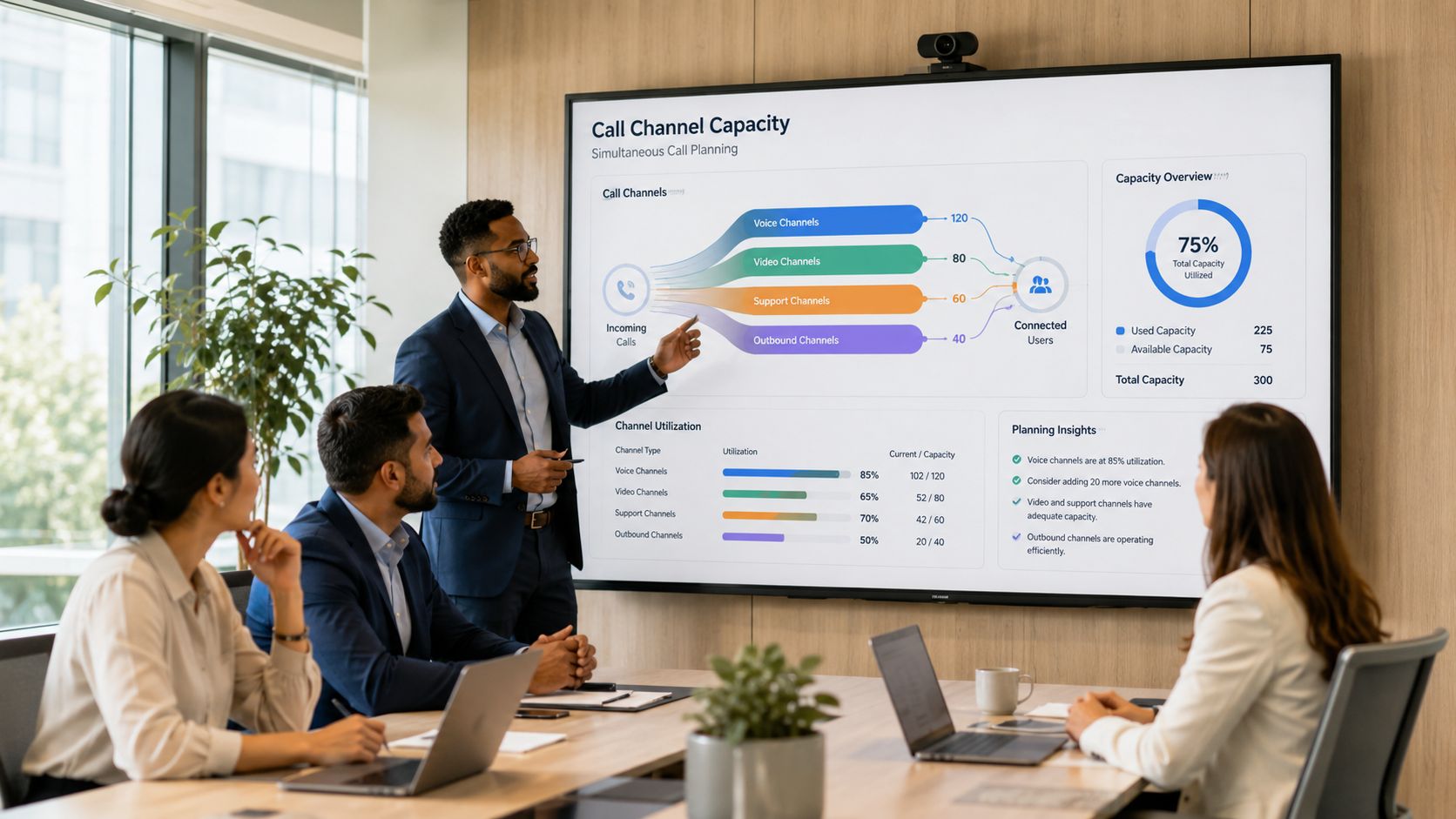
The better starting point is two business questions. How many calls might happen at the same time, and what will those calls cost month to month? If you can answer those, you can usually avoid the two biggest SIP buying mistakes: overpaying for idle capacity and underestimating what your network needs to deliver clear calls.
Start with channels, not employees
A channel is one simultaneous call. If five people are talking to customers at the same moment, you need five channels. If 20 employees have phones but only six are usually on outside calls at once, your first estimate is closer to six than 20.
That matters because many SIP providers bill around concurrency. In plain terms, you are buying lanes on a highway, not assigning one private road to every employee. The goal is to match capacity to real traffic.
For an owner or finance lead, the return on investment begins to materialize. Traditional phone setups often force you to buy in bigger chunks than you need. SIP trunking lets you align spend more closely with actual usage, which usually leads to less waste and easier forecasting.
Then check bandwidth
Channels answer “How many calls?” Bandwidth answers “Will those calls sound good?”
Did Logic gives a practical formula for estimating voice capacity:
Concurrent Calls × Codec Bandwidth × 1.25
That extra 1.25 covers overhead and normal network variation. In its SIP trunking hardware requirements, Did Logic also explains that 50 concurrent calls using G.711 require about 4.5 Mbps of symmetrical upload and download bandwidth, and that good voice quality typically depends on latency under 150 ms, jitter under 30 ms, and packet loss under 1%.
If those terms feel abstract, here is the simple version. Latency is delay. Jitter is inconsistency in delivery. Packet loss is missing pieces of the conversation. Too much of any one of them turns a normal call into the kind of call where people talk over each other or ask, “Can you repeat that?”
If you are reviewing your connection before a rollout, this guide to bandwidth requirements for VoIP phone systems can help you estimate whether your circuit has enough room for voice traffic.
Practical rule: Reserve bandwidth for voice before users complain. Clear calls usually come from planning, not luck.
Billing models that deserve a closer look
Providers usually bill in one of two ways.
- Per-channel pricing: You pay for a set number of simultaneous calls. This fits businesses that want predictable monthly costs and a known capacity limit.
- Usage-based calling: Charges track call activity more closely. This can work well if your call volume rises and falls sharply by season, campaign, or location.
Neither option is universally better. A law office with steady inbound traffic may prefer predictable per-channel billing. A seasonal business with uneven volume may save money with usage-based pricing. The right choice depends on how your phones are used on a normal Tuesday, not your busiest day of the year and not your slowest.
Ask one more billing question while you are comparing quotes. What happens when you exceed your planned capacity? Some providers allow temporary overflow. Others charge overages or block additional calls. That detail affects customer experience and risk, not just the invoice.
Questions that lead to a better decision
A good provider conversation should cover both technical fit and business impact.
- How many concurrent calls are we sizing for today?
- Which codec are we planning around, and how does that affect bandwidth?
- Is our internet connection symmetrical enough for voice in both directions?
- What happens during call spikes or seasonal peaks?
- Which charges are fixed monthly costs, and which vary with usage?
You may also hear terms like codec, NAT traversal, SIP over UDP, TCP, or TLS, and RTP. Those matter to the engineers configuring the service. For a business owner, the takeaway is simpler. If the service is sized correctly, billed in a way that matches your call patterns, and supported by a prepared network, SIP trunking improves cost control and gives you room to grow without rebuilding your phone system later.
Security and Compliance in VoIP Communications
A missed customer call hurts. A fraudulent international calling spree hurts more. If your phone system carries sales calls, support requests, or after-hours emergencies, security is not an IT side topic. It is part of revenue protection and risk control.
SIP trunking can be secure, but only if the service is set up with the right safeguards. The easiest way to understand it is to picture your voice system as traffic on an internet highway. You want the conversations encrypted, the entrances monitored, and suspicious traffic stopped before it reaches your phones.
What secure SIP looks like
A well-designed SIP service usually includes several layers working together.
- TLS encrypts signaling data. That protects the call setup information, similar to how HTTPS protects data between a browser and a website.
- SRTP encrypts the voice stream. That helps keep the conversation itself private while it travels across the network.
- Fraud monitoring watches for unusual patterns. If a system suddenly starts making odd after-hours calls or unusual international calls, the provider can investigate and limit damage faster.
- Session Border Controllers inspect and control traffic. They help block unauthorized access, filter bad traffic, and enforce security rules at the edge of the voice network.
One control on its own is not enough. Good VoIP security works in layers, the same way a well-protected office uses locked doors, cameras, and alarm codes instead of relying on a single key.
Why the SBC matters to a business owner
A Session Border Controller, or SBC, works like a guarded front desk for your phone system. Every request comes through it first. If something looks wrong, the SBC can reject it before it turns into dropped calls, toll fraud, or unwanted access.
That matters for business outcomes, not just technical neatness.
An SBC can help keep call quality stable, limit exposure to attacks, and make provider-to-provider connections easier to control. For an owner or operations leader, that translates into fewer surprises, less downtime risk, and a lower chance of paying for traffic your team never intended to send.
Compliance is more than encryption
Security protects the call. Compliance protects the business.
If your company handles sensitive information, your checklist may include call retention rules, access permissions, audit trails, and emergency calling records. SIP trunking can support those needs, but the phone service alone does not make you compliant. Your policies and day-to-day processes matter just as much.
Emergency calling is a good example. If employees work from multiple offices, from home, or move desks often, location records need regular attention. Accurate emergency records are part of business continuity and employee safety. Our guide to 911 address verification for business phone systems explains what to review.
Questions to ask before you sign
A provider should answer security questions in plain language, not hide behind acronyms.
- Is signaling encrypted with TLS?
- Is voice media encrypted with SRTP?
- What fraud detection and alerting do you provide?
- Is there SBC protection at the network edge?
- How do you manage emergency location records for remote or hybrid staff?
- Who can access the admin portal, and how is that access protected?
Clear answers reduce risk. Vague answers usually mean more work, more exposure, and more cost for your business later.
A Checklist for Choosing Your SIP Provider
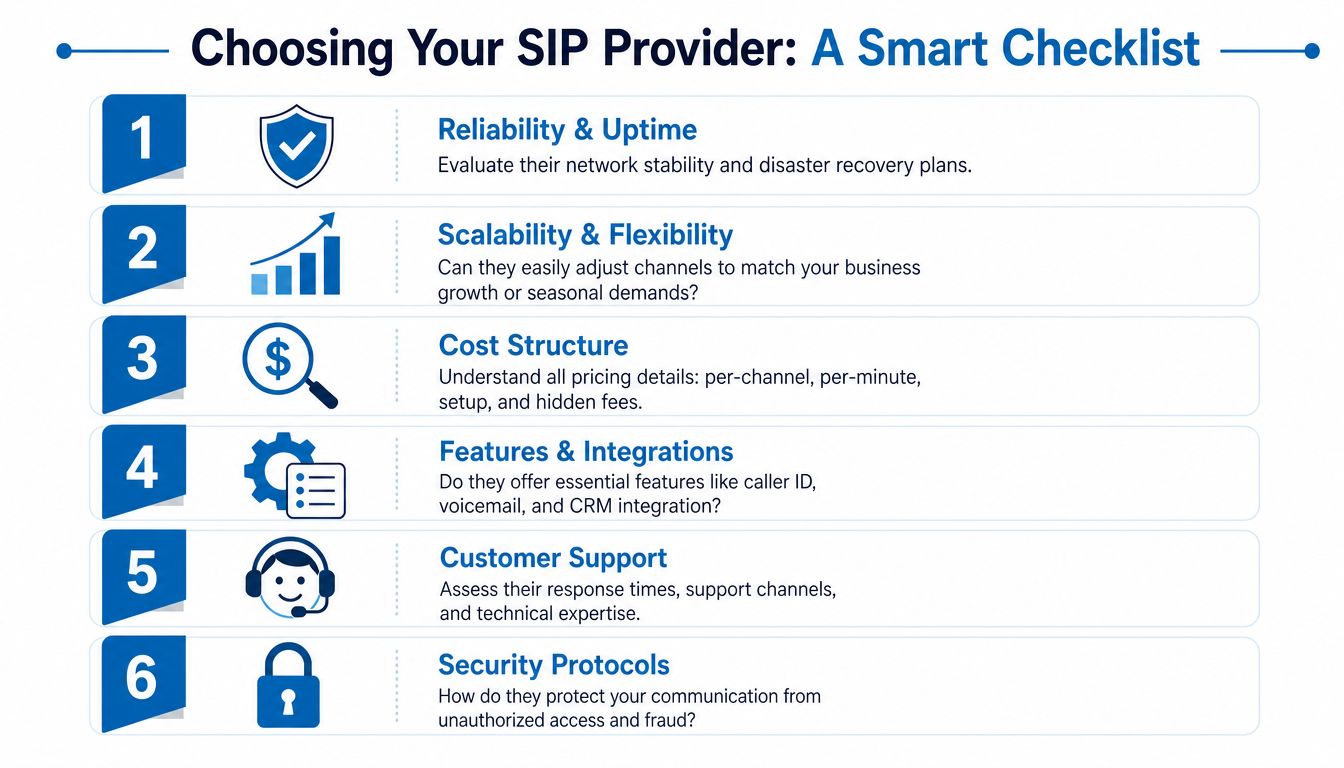
A SIP provider is not just a vendor on a bill. It is the carrier for every customer call, sales conversation, and support request that moves through your phone system. If the provider is hard to reach, slow to fix problems, or vague about pricing, those issues show up fast in your business. Missed calls, confusing invoices, and long outages all have a cost.
That is why the buying decision should start with business outcomes. Lower monthly spend matters. So do faster changes when you hire, fewer service disruptions during busy periods, and a setup that still fits two years from now if you add locations or move more staff remote.
Questions worth asking before you sign
Start with reliability. A SIP trunk works like a set of digital phone lines running over your internet connection, but the provider still controls how calls are routed, protected, and recovered if something fails. Ask what happens during an outage, whether calls can reroute automatically, and how they handle maintenance without disrupting business hours.
Then look at scaling. If you open a new office, add a seasonal team, or shift more staff to hybrid work, you should be able to add capacity without replacing hardware or waiting through a long carrier process. Good SIP service should bend with the business instead of forcing the business to bend around the phone system.
Billing deserves the same scrutiny. Ask for a plain-language explanation of recurring charges, call rates, setup fees, porting costs, contract terms, and any support charges that appear only after service starts. A cheaper quote can become an expensive one if the bill is full of small extras.
Features matter too, but only if they solve a real operating problem. Caller ID control, direct inward dialing, failover routing, number porting, admin tools, and emergency calling support all affect day-to-day use. The right question is not "What features are included?" It is "Which features reduce work, lower risk, or improve customer response?"
Support often decides how painful a problem becomes.
If phones are down, your team does not need a ticket number and a long wait. They need someone who understands voice networking, can read a call path, and can explain the issue in plain English. Ask who answers support requests, what hours they cover, and how escalation works when an outage affects live calls.
A simple way to compare providers
A scorecard helps because it turns technical claims into buying criteria a business owner can judge. Use the same questions for each provider so you can compare real differences, not just sales language.
| Buying factor | What to look for |
|---|---|
| Reliability | Clear explanation of failover, outage response, and service continuity |
| Scalability | Fast capacity changes, support for new sites, and flexibility for remote teams |
| Transparency | Pricing, contract terms, and fees explained in plain language |
| Features | Tools that improve operations, not a long list of extras your team will ignore |
| Support | Access to knowledgeable voice support when calls are affected |
| Security | Specific protections and clear answers about how the service is protected |
A provider that cannot explain these points clearly will usually be harder to work with later.
Signs you're talking to the right partner
A good provider usually asks detailed questions before they quote anything. They want to know what PBX you use, how many concurrent calls you need, whether you have remote staff, what numbers must be ported, and how important uptime is during your busiest hours. That is a healthy sign. It shows they are sizing the service around your operation, not dropping your business into a generic package.
It also signals better long-term ROI. A correctly sized service helps you avoid paying for capacity you never use, while reducing the risk of busy signals, poor call handling, or rushed changes later.
The wrong provider focuses on price first and details later. That can feel convenient in the moment. It often leads to extra costs, delayed fixes, and a phone system that becomes another thing your team has to work around instead of rely on.
Migration and Real-World Use Cases
Most SIP migrations are less dramatic than owners expect. They're planning projects, not moon landings. The smoother ones start with a simple audit of current call paths, peak usage, phone numbers, and network readiness.
After that, the usual sequence is straightforward.
What migration usually involves
- Review your current setup: Identify your PBX, numbers, call flows, and any lines tied to alarms, faxing, or special devices.
- Estimate live call demand: Size channels around real concurrent usage, not guesswork.
- Prepare the network: Make sure voice traffic has the bandwidth and priority it needs.
- Port numbers and configure routing: Keep the numbers customers already know while setting up new call paths.
- Test before cutover: Validate inbound calls, outbound calls, failover behavior, and remote user experience.
That process can support either an on-premise PBX that stays in place or a broader move toward cloud communications. In regions where SIP stability is inconsistent, some businesses and partners also use VoIP gateways as a practical adaptation rather than waiting for ideal infrastructure. That challenge is discussed in this article on SIP trunks for small businesses.

How businesses use SIP trunks in practice
A retail business with several locations often wants one cleaner communications setup instead of separate phone arrangements by site. SIP trunks can help centralize that structure so call handling feels more consistent across stores.
A growing professional firm may need to bring new users online quickly. In a SIP-based environment, adding calling capacity and routing for new team members is generally much easier than waiting on traditional line changes.
A company with hybrid staff may care less about desk phones and more about continuity. If an office loses power or becomes unavailable, modern SIP designs can reroute calls so the business still answers customers.
The real payoff
The biggest gains usually show up in three areas:
- Operational agility: Changes that once required physical telecom work become software and provider changes.
- Cost control: You align service more closely with active business needs instead of old fixed-line assumptions.
- Risk reduction: Redundancy and rerouting options improve continuity during disruptions.
For many owners, that's the whole story. They don't buy SIP trunks because the protocol is interesting. They buy because the business needs a phone system that scales, supports modern work, and stops creating unnecessary drag.
If your business is weighing SIP trunks, cloud voice, or a full communications refresh, Premier Broadband can help you sort through the practical questions around internet readiness, call quality, scalability, and migration planning. The goal isn't to sell you buzzwords. It's to help you choose a setup that fits how your business works.