

A true VoIP bandwidth test does more than just check your download speed. It dives deep into quality metrics like jitter, latency, and packet loss to see if your internet connection can actually handle clear, reliable calls. It's designed to simulate live call traffic, giving you a real-world snapshot of your network's voice performance.
Why Your Standard Speed Test Fails for VoIP

Seeing a huge 500 Mbps download speed on a generic speed test feels great, but it’s a trap when you're evaluating VoIP readiness. Those standard tests are built to measure how fast you can download big files—perfect for streaming movies, not so much for a real-time, two-way conversation.
VoIP isn't about bulk data transfer; it's a constant, sensitive stream of small data packets going both ways. A standard speed test completely misses the little things that can wreck a phone call. It’s like having a wide-open highway that tells you nothing about the potholes (packet loss) or random, unpredictable stoplights (jitter) along the way.
The Metrics That Truly Matter
A dedicated VoIP bandwidth test zeroes in on the subtle details that directly impact call quality. These are the real culprits behind those robotic voices, awkward silences, and dropped calls that drive everyone crazy.
Here are the key metrics a proper VoIP test measures:
- Jitter: This is the inconsistency in when data packets arrive. You want jitter to be under 30ms; any higher and you'll get jumbled, out-of-order audio.
- Latency (Ping): This measures the round-trip time for a data packet. To avoid noticeable conversational delays, your latency should ideally stay under 150ms.
- Packet Loss: This tells you what percentage of data packets get lost in transit. Even a tiny amount is bad news. You need this to be 0%, as any loss creates gaps in the audio.
To give you a quick reference, here are the key VoIP metrics and what you should be aiming for.
Key VoIP Quality Metrics at a Glance
This table breaks down the most important metrics for VoIP call quality and the acceptable thresholds you should see in your test results.
| Metric | What It Measures | Ideal Threshold |
|---|---|---|
| Jitter | Variation in packet arrival time | < 30ms |
| Latency | Round-trip time for a data packet (ping) | < 150ms |
| Packet Loss | Percentage of data packets that never arrive | 0% |
Keeping these numbers within their ideal ranges is the secret to flawless, professional-sounding calls.
A standard speed test is like checking a car's top speed—impressive, but irrelevant for navigating city traffic. A VoIP test is like a full diagnostic, checking the suspension, brakes, and steering to ensure a smooth, reliable ride.
The Upload Speed Bottleneck
Another major flaw with generic tests is their obsession with download speed. VoIP is a two-way street; you're sending just as much voice data as you're receiving. Many older internet technologies like cable or DSL have asymmetrical speeds, meaning your upload speed is just a fraction of your download speed.
That upload bottleneck is one of the most common causes of poor call quality. Your 200 Mbps download speed might look great on paper, but if you're stuck with a tiny 10 Mbps upload, your own voice will constantly cut out for the person on the other end of the line. For a deeper dive, our guide explains how to test internet speed accurately and what to look for beyond that big download number.
This is exactly why modern fiber connections are such a game-changer for businesses. By providing symmetrical speeds—where upload and download are equally fast—they completely eliminate the upload bottleneck and create the perfect foundation for crystal-clear communication.
Figuring Out Your Real VoIP Bandwidth Needs
Before you even think about running a VoIP bandwidth test, you need a baseline. It's like planning a road trip; you wouldn't just start driving without knowing your destination. You need to figure out what your network should be able to handle, so you're testing against a realistic goal instead of just guessing.
The first piece of this puzzle is the VoIP codec, which is the tech that compresses and decompresses your voice data as it travels across the internet. Different codecs have different appetites for bandwidth. For example, the G.711 codec delivers crystal-clear, uncompressed audio but uses up more bandwidth to do it. On the flip side, codecs like G.729 are more efficient, using less bandwidth but with a slight trade-off in audio quality.
A solid rule of thumb I always recommend is to set aside about 100 Kbps (or 0.1 Mbps) of bandwidth for every single phone call happening at the same time. This simple estimate covers both the codec's needs and all the necessary network overhead, giving you a practical number to start with.
How Many Calls Are Happening at Once?
One of the most common mistakes I see is businesses planning for every single employee to be on the phone at the same time. If you have a 20-person office, it's highly unlikely you'll ever have 20 simultaneous calls. What you really need to plan for is your concurrent calls—the maximum number of calls happening at your absolute busiest moment.
For most small to mid-sized businesses, you'll find that only 30-50% of your team is actually on the phone during peak hours. Knowing this can seriously lower your bandwidth requirements. Let's go back to that 20-person office. Instead of planning for 20 calls, you're realistically looking at 6 to 10 concurrent calls. That brings your voice bandwidth needs down to a much more manageable 600-1,000 Kbps (0.6-1 Mbps). When you factor in other office tasks like email and cloud syncing, you should aim for about 15-20 Mbps total to keep everything running smoothly. The experts over at Amvia.co.uk have some great insights on this as well.
Think of it like a grocery store. A store with 20 employees doesn't need 20 cash registers open all day. They only need enough to handle the peak rush hour, and the same principle applies to your VoIP traffic.
Don't Forget About Everything Else on Your Network
Your VoIP calls don't exist in a bubble. Your internet connection is always juggling other tasks—sending emails, syncing files to the cloud, running video meetings, and even processing payments. If you ignore all this other traffic, you're setting yourself up for dropped calls the minute someone tries to upload a big file.
To get the full picture, you have to account for all the activity on your network.
Here are a few common bandwidth hogs to keep in mind:
- Email and Web Browsing: This creates a constant, low-level stream of traffic.
- Cloud Backups and File Syncing: Services like Dropbox or OneDrive can cause huge spikes in upload usage.
- Video Conferencing: A single HD video call can eat up more bandwidth than a dozen voice calls combined.
- Streaming Services: Both music and video streaming will compete for resources.
When you add everything up, I always suggest adding a buffer of at least 25% on top. This safety net accounts for any unexpected usage spikes and ensures your call quality stays solid even when your network is busy.
Why Your Upload Speed Is So Important
Finally, always remember that VoIP is a two-way street. That makes your upload speed just as critical as your download speed. If your upload connection is weak, you'll run into classic problems like one-way audio or people complaining that you sound like a robot. While many internet plans brag about high download speeds, it's the upload capacity that truly makes or breaks a VoIP system.
We have a detailed guide that explains what is a good upload speed and why it's so vital for real-time communication. Ultimately, having symmetrical speeds—where your upload and download are equal—is the best foundation for any reliable business phone system.
How to Run a VoIP Bandwidth Test Like a Pro
Alright, time to roll up our sleeves and run a VoIP bandwidth test that actually gives you useful results. Just hitting the "Go" button on some random speed test site won't tell you the whole story. To really see what your network can handle for voice calls, you have to create a controlled environment that mimics your busiest days.
Think of it like trying to hear a whisper during a rock concert. If your teenager is streaming 4K video while you're running the test, the results are going to be skewed. The whole point is to isolate your connection and test its raw performance for voice traffic, and that means silencing all the other noise.
Setting the Stage for an Accurate Test
Before you start clicking, a little prep work is essential. Skipping these steps is the quickest way to get misleading numbers that send you chasing problems that don't even exist.
First things first: ditch the Wi-Fi. Wireless is great for convenience, but it's easily disrupted by everything from microwaves to a neighbor's network. For the most reliable reading, plug your computer directly into your router with an Ethernet cable. This one simple move gets rid of a massive source of potential jitter and packet loss.
Next, you need to be the only one using the internet connection. That means:
- Shut down background apps: Close out anything that quietly sips bandwidth, like Dropbox, OneDrive, email clients, or software updaters.
- Pause all streaming: Make sure no one on the network is on Netflix, Spotify, or a video call. These are huge bandwidth hogs.
- Turn off your VPN: A Virtual Private Network adds extra routing and encryption, which will definitely slow things down and mess with your latency results.
Choosing Your Tool and Simulating Calls
With your network quiet and ready, it's time to find an online test specifically built for VoIP. Standard speed tests just don't measure the right things. You need a tool that can measure jitter, latency, and packet loss while simulating the stress of actual phone calls.
When you start the test, it'll likely ask how many concurrent calls you want to simulate. This is where your earlier math comes in handy. If you figured out your peak usage is 10 simultaneous calls, that's the number you should enter. This makes sure the VoIP bandwidth test puts your connection under the right amount of pressure to reflect a busy workday.
Here’s a quick look at the simple process for figuring out your needs before you run the test.
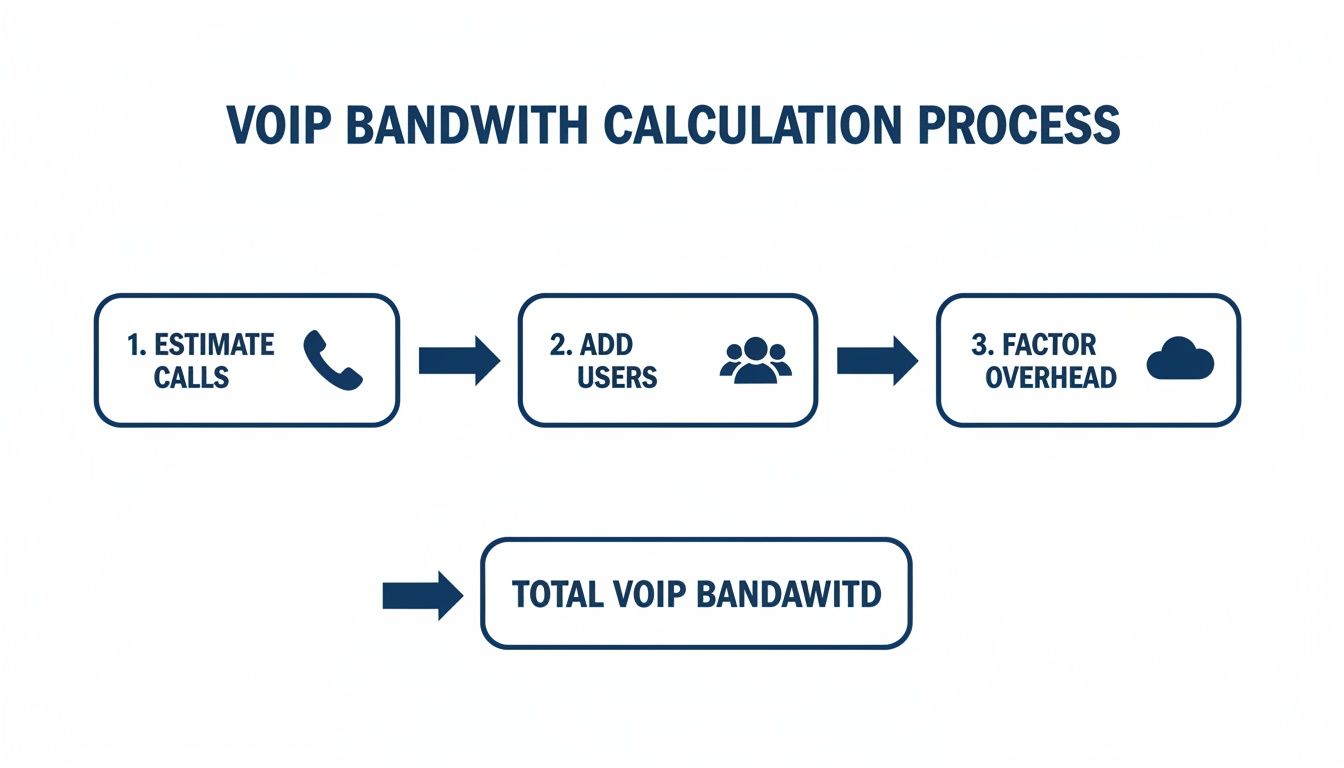
As you can see, estimating your concurrent calls, adding users, and accounting for network overhead are the key steps to setting up a realistic test.
Interpreting the Initial Output
Once the test is done, you'll get a report with your results. You’ll see the usual download and upload speeds, but the real gold is in the VoIP-specific metrics. Don't just look at the big speed numbers and call it a day—the true story is told by the jitter, latency, and packet loss figures.
A good test will often give you a Mean Opinion Score (MOS), which boils everything down to a single number on a scale of 1 to 5 that predicts your overall call quality. This is your ultimate benchmark. We’ll get into what these numbers mean in the next section, but for now, the goal is just to gather this data accurately.
If you need to dig even deeper, exploring a range of network diagnostic utilities can offer even more detailed insights. By taking this professional approach, you're doing more than a simple speed check—you're running a real diagnostic to see if your network is ready to deliver the crystal-clear calls you depend on.
Decoding Your VoIP Test Results
So you've run a VoIP test and now you're staring at a screen full of numbers. It might look a little technical, but this data holds the key to understanding exactly how your calls will sound. Let's cut through the jargon and translate these metrics into what they mean for your day-to-day conversations.
Think of these numbers as the vital signs for your network's health. We're checking the stability and speed of your connection to see if it's ready for high-quality voice traffic. The three most important metrics to watch are latency, jitter, and packet loss.
The Big Three VoIP Metrics
First up is latency, which you might also see called "ping." It's simply the time it takes for a data packet to travel from your network to a server and back again. For a phone call, high latency is what causes that awkward delay where you end up talking over the other person.
For a conversation to feel natural and flow smoothly, your latency needs to stay under 150 milliseconds (ms). Anything higher than that and you'll notice a frustrating lag.
Next, we have jitter. Jitter measures the variation in the arrival time of those data packets. If latency is the travel time, think of jitter as the unpredictable traffic that messes up the schedule. Your VoIP system can smooth over minor inconsistencies, but too much jitter means packets arrive out of order.
The result? Choppy, robotic-sounding audio that makes conversations hard to follow. To keep calls crystal clear, your jitter should always be below 30ms.
Finally, there’s packet loss. This metric shows the percentage of data packets that simply vanished on their journey and never made it. Even a tiny amount of packet loss is a big deal for VoIP because it creates audible gaps and dropouts in the conversation.
Ideally, your packet loss should be 0%. Any value higher than zero points to a problem that will directly hurt your call quality. If you're seeing any packet loss at all, our guide on understanding what packet loss is can help you dig deeper into the causes.
Understanding Your Mean Opinion Score (MOS)
All of these individual metrics—latency, jitter, and packet loss—are combined into a single, easy-to-understand number: the Mean Opinion Score (MOS). This is the industry-standard way to rate call quality on a simple scale from 1 (terrible) to 5 (excellent). It's designed to predict how a real person would actually perceive the quality of a call on your connection.
Your MOS score isn't just a technical spec; it's a direct reflection of the user experience. It answers the simple question: "How good will my calls actually sound?"
A higher score is always better. The top score for the most common VoIP codec (G.711) is around 4.4, so don't sweat it if you don't see a perfect 5.0.
The table below breaks down what each score means in the real world.
Mean Opinion Score (MOS) Explained
| MOS Score | Call Quality Description | User Experience |
|---|---|---|
| 4.3–5.0 | Excellent | Crystal-clear audio, feels like an in-person conversation. |
| 4.0–4.2 | Good | Very clear with minimal, barely noticeable imperfections. |
| 3.5–3.9 | Fair | Mostly understandable, but with some noticeable distortion. |
| 3.0–3.4 | Poor | Frustrating to use, with significant audio issues. |
| 1.0–2.9 | Unacceptable | The conversation is nearly impossible to follow. |
Your MOS gives you an instant snapshot of your network's VoIP readiness. If your score dips below 4.0, you can then look back at the individual metrics like jitter and packet loss to pinpoint the exact problem and start fixing it.
Practical Fixes for Common VoIP Issues
After running a comprehensive voip bandwidth test, you finally have the data you need to stop guessing and start fixing. Instead of just randomly tweaking settings, you can now use those results—high jitter, packet loss, or a poor MOS score—as a clear roadmap.
This targeted approach saves a ton of time and frustration. Let’s walk through the most effective fixes for the problems your tests likely uncovered. The good news is, many of these issues can be solved with a few smart adjustments to your network hardware.
Taming High Jitter with Quality of Service
If your test results showed jitter consistently spiking above 30ms, the culprit is almost always network congestion. This is what happens when your VoIP calls are fighting for bandwidth with everything else—file downloads, video streaming, you name it. Your router is treating every bit of data the same, which is a recipe for disaster for real-time voice conversations.
The fix? Quality of Service (QoS).
QoS is a feature built into most modern routers that lets you tell it which traffic gets to go first. By setting up a QoS rule for your VoIP devices, you’re basically creating a dedicated express lane for all your voice data.
You can typically configure QoS to prioritize traffic based on:
- The IP address of your VoIP phone or adapter.
- Specific ports used for VoIP (like SIP and RTP).
- The unique MAC address of the device making the calls.
This ensures that even if someone on your network kicks off a massive cloud backup, your calls will remain crystal-clear and free from that choppy, jumbled audio that high jitter causes. It's one of the most powerful tools you have for improving call quality.
Eliminating Packet Loss for Clearer Audio
Packet loss, even as low as 1%, can create those awkward gaps and dropouts in your calls. If your voip bandwidth test flagged any packet loss, your very first move should be checking the physical connections. It sounds simple, but a loose Ethernet cable or a bad port on a router is a surprisingly common cause.
If all the cables are snug, the next stop is your router's firmware. Manufacturers are constantly pushing out updates that patch bugs and improve performance, including how the device manages data packets. An outdated firmware version can absolutely contribute to packet loss.
A router with outdated firmware is like a traffic cop using an old, inaccurate map. It might still direct cars, but it’s going to cause unnecessary jams and send some down the wrong path. Keeping it updated ensures it has the most efficient routes available.
For a deeper dive into solving connection problems, which are often the root cause of VoIP trouble, this general internet troubleshooting guide is a great resource.
Still seeing packet loss? It might be time to think about a router upgrade. Older or budget routers can get overwhelmed by today's network demands, and their processors just can't keep up, leading them to drop packets under pressure.
Automating Optimization with Managed Services
Let's be honest, manually configuring QoS and troubleshooting firmware can be a real time-sink, especially for a busy company. This is where a service like Managed Network Edge from Premier Broadband really shines. Instead of making you the network expert, these services handle the entire optimization process for you.
A managed solution can:
- Automatically apply and update QoS policies to keep voice traffic prioritized.
- Monitor your network performance in real time and make proactive adjustments.
- Ensure all your network gear is running the latest, most secure firmware.
This hands-off approach guarantees your network is always perfectly configured for flawless VoIP performance. It turns reactive troubleshooting into a proactive, automated system, letting you focus on your business, not your router settings.
Why a Fiber Connection Is Your Best VoIP Solution
After running a detailed voip bandwidth test and tweaking settings, you might get some improvement. But let’s be honest, that often feels like putting a band-aid on a bigger problem. For truly flawless voice calls, you need to fix the foundation, and nothing beats a 100% fiber-optic internet connection.
Think of older cable and DSL connections like roads built for a different time. They were designed for one-way traffic—mostly downloads. When you try to have a two-way VoIP call, you hit gridlock. This is especially true on the upload path, which is where things really slow down and cause most call quality issues.
The Symmetrical Speed Advantage
Fiber internet completely changes the game with symmetrical speeds. This simply means your upload speed is just as fast as your download speed. For a VoIP call, which is a constant back-and-forth exchange of data, this is critical. Your voice gets sent out with the same power and priority as the voice you’re hearing.
This gets rid of the upload bottleneck that plagues older technologies. No more one-way audio where you can hear the other person perfectly, but they complain you sound robotic or are cutting out. With fiber, the data flows freely in both directions, creating a stable, reliable base for every single conversation.
Unpacking Fiber's Inherent Stability
Beyond just speed, fiber brings unmatched reliability. Unlike the old copper cables used for DSL and cable, fiber-optic lines are made of glass. This makes them immune to the electromagnetic interference that can mess with data signals on older networks.
This immunity directly translates to better VoIP performance:
- Extremely Low Jitter: Fiber delivers data so consistently that packet arrival times are incredibly predictable. This keeps jitter measurements near zero, which is the secret to natural-sounding audio.
- Minimal Latency: Light travels fast. Fiber connections drastically cut down the round-trip time for data, keeping your latency well below the 150ms threshold needed for smooth, delay-free conversations.
- Near-Zero Packet Loss: Because fiber is so robust and free from interference, data packets rarely get lost. Hitting 0% packet loss is the norm, not a rare achievement.
A fiber connection is the pristine, multi-lane superhighway your VoIP traffic needs. Cable and DSL are more like winding, single-lane roads with unpredictable construction—they might get you there, but the journey will be slow and bumpy.
Handling More Than Just Calls
In any modern business or home office, your internet is juggling a lot more than just phone calls. It's handling video conferences, cloud backups, file uploads, and dozens of other apps all at once. This is where fiber really leaves the competition behind.
Did you know a single high-quality VoIP call only needs about 85-100 Kbps of bandwidth? That doesn't sound like much, but on older DSL connections with upload speeds as low as 1-5 Mbps, we used to see 30-50% of calls drop the second another app started competing for that tiny slice of bandwidth. The symmetrical speeds of fiber completely solve this historical headache.
With a strong fiber connection, your business can run ten simultaneous VoIP calls, host a 4K video conference, and sync a terabyte of data to the cloud—all at the same time, without a single dropped call. That's the power of a superior foundation.
Ready to put an end to poor call quality for good? Premier Broadband delivers 100% fiber internet with the symmetrical speeds and rock-solid reliability your home or business needs for crystal-clear VoIP. Explore our fiber plans and experience the difference.